Upcoming Updates - August 2022
Hi all,
Greetings from the Zoho Creator team! Today we've got news for you on some exciting updates. And rest assured— there’s more to come!
In this post, we'll be going over the upcoming features and improvements for this month as mentioned below. A few of these will be available immediately and the rest are planned for release in the coming weeks.
- Enabling dark mode for Android apps
- Introducing presets
- Customizing display titles for forms
- Launching a revamped UI for customer portals
- Announcing strict validation for the max length field property
In addition to the above, Creator 4 will be deprecated, and all the accounts still using it will be automatically upgraded to Creator 5 by August 31, 2022. Scroll down to know more!
Dark mode for Android
One of our most requested features is finally here: Dark mode!
Dark mode, which is currently supported in our iOS apps, has now been extended to Android apps as well. We have carefully designed every component and screen to have an overall balanced color scheme for your mobile apps. Dark mode will be automatically enabled based on your default system settings and has the following benefits:
- Reduces power usage by a significant amount (depending on your device's screen technology)
- Improves visibility for users with low vision and those who are sensitive to bright light
- Makes it easier for anyone to use their devices in low-light environments

Presets - panel configuration reusability
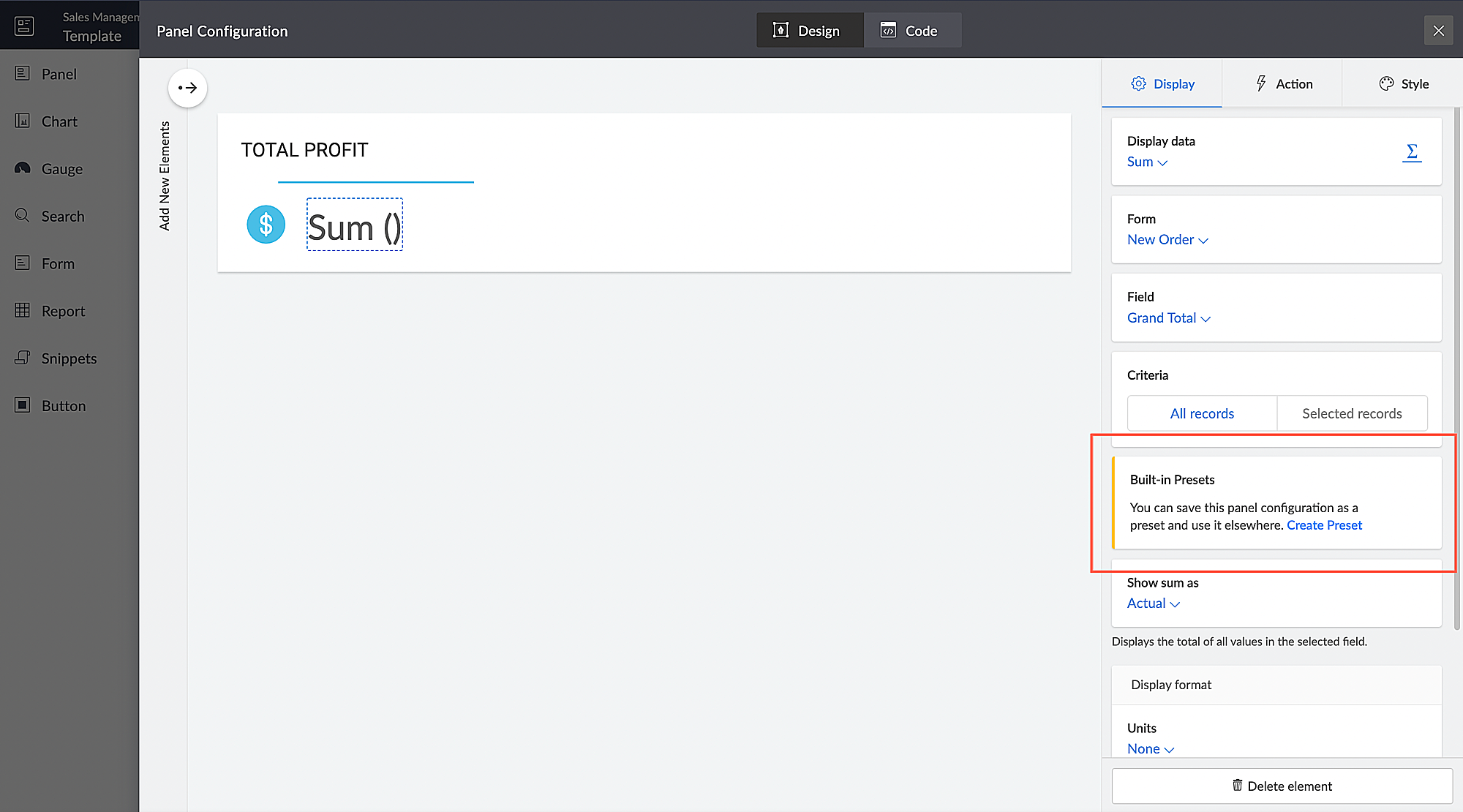
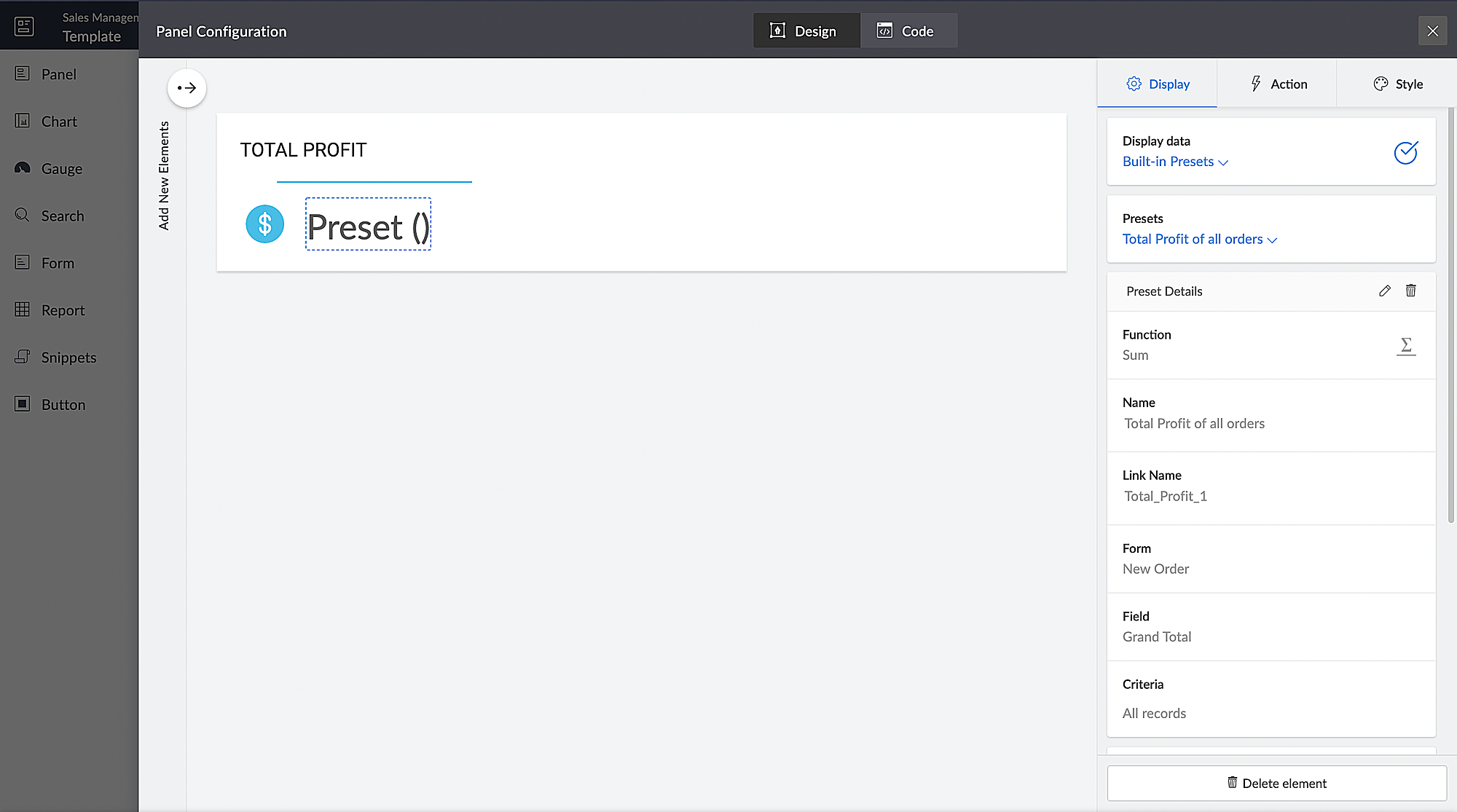
You can configure aggregates to be displayed on page panels. Currently, if such a configuration needs to be reused on a different panel on the same page or on a different page, it has to be manually reconfigured. With presets, the aggregate configuration can now be saved and used across apps in your Creator account, thereby preventing repeated manual configurations. The created presets will be available as a dropdown inside the panel element.
Presets are required in cases, where a configured aggregate value needs to be displayed in more than one panel, like if a user needs to display the Total Profit value in their dashboard, both as an actual value and as a percentage value. In this particular case, the user will have to manually configure the Total Profit value in two panels and choose a different Show As value (Actual in one panel and Percentage of a number in the other panel) in each panel. Using the preset capability, users can save the configuration and reuse it in different panels with only the Show As value being different.
Introducing different display titles for forms
Interacting with forms can become more meaningful when we have contextual information about the actions performed by users. We've introduced form titles that'll enable you to assign different customized titles to the forms displayed when a user is performing the following tasks:
- While adding record - The title that will be displayed when a user accesses the form to add a record.
- While editing record - The title that will be displayed when a user is editing an existing record.
By default, the form title for while adding to the form and while editing the form actions will be the same as the form name. Learn more

Revamped UI for customer portals
We're happy to announce the rolling out of a major refinement to the customer portal UI (sign in, signup, and reset password pages).
Portal users will now be able to use a one-time password (OTP) for signing in to your customer portal. Along with Google and Facebook, federated login can now be set up to allow users to sign in to the portal using their Apple IDs.
These refinements have been designed to ensure compatibility with upcoming features that we are working on. Although the feel and appearance of the new UI will be different from the existing one, we have ensured that it doesn't affect any of your existing portal functionalities. We'll have a separate detailed post on the changes for existing users once the feature is ready to go live.
Announcing strict validation for the max character length field property
In reference to this post, starting from August 31, 2022, maximum character length validation will be implemented strictly across Creator. If a record is added via Deluge, API, or email input, the maximum length property will be validated for all your form fields. This validation ensures that all the records added via various inputs undergo a thorough check for their field characters to ensure they're on par with the predefined character limits that you set, thereby minimizing error handling. After this update, errors might be shown in the following cases:
(i) Existing forms:
While editing/updating a record in an existing form, the maximum length property will be validated for all fields in that form.
(ii) Workflows
- On validate: Following this update, during the execution of the on validate script for a particular record, the maximum length validation will be strictly performed for all the fields that are associated with the script, and an appropriate error will be thrown.
- On success: Following this update, during the execution of the on success script, an exception will be thrown for varchar fields (email, single line) when a new record is successfully submitted to the database or when an existing record is updated or deleted from the database. In the case of number fields, the values will be truncated upon successful submission.
(iii) APIs
While adding/updating record values via API requests, the maximum length property will be validated for all fields.
Additionally, if a record is added via email input, the maximum length property for all the fields will be validated. As an admin, you can minimize errors by suitably adjusting your character limits. We also assure you that we've taken all necessary measures to ensure that the transition is seamless, with minimal impact on your end.
Upgradation to Creator 5
The majority of our users have already migrated to Creator 5 from the previous version (Creator 4). As the final step of this process, we'll be automatically migrating the remaining accounts using the older version to Creator 5 by August 31, 2022.
As you all know, Creator 5 empowers developers to customize traditional web-based apps for smartphones and tablets, opening up new possibilities and ensuring an all-around smoother experience. You will be notified via email prior to the migration and this will not affect the data in your existing Creator apps.
We hope this announcement serves to be helpful in planning your upcoming projects and apps. We'd also like to thank you once again for your loyalty and continued support. Please don't hesitate to reach out to us at support@zohocreator.com if you have any questions or concerns, or need assistance.
That's all for now!
Thanks,
The Zoho Creator Team.
Topic Participants
Meghaa
Meghaa Pradyumnan
George Thiess
Club De Baloncesto Soldados Elite
AP
Sticky Posts
Introducing Zoho Creator's 2025 Release Projection 2
Hello Creators! I'm Prakash, from the Creator product management team, and today I'm delighted to unveil our next set of features as part of Release Projection 2 for 2025. With thoughtful analysis and planning, we've curated powerful new capabilitiesZoho Creator - 2023 Release Projection 1
Hello everyone! A very Happy New Year to you and your family. Hope you're all good and having a great time using Zoho Creator to make your lives easier and your businesses prosper. 2022 was an action-packed year for us at Creator, and we hope to continueZoho Creator User Group meetups in a city near you! - Oct - Nov, 2023
Greetings from the Zoho Creator team! We're hosting a series of Zoho Creator meetups in various cities across the globe, and we'd love to meet you there! Our meetups are a great opportunity to network with industry peers, exchange ideas and best practices,Zoho Creator - 2023 Release Projection 2
Hello everyone! Time truly flies when you're having an incredible journey, and today we mark the completion of an eventful and action-packed six months. It feels like just yesterday when we embarked on this adventure together with the launch of our newUpcoming Updates - August 2022
Hi all, Greetings from the Zoho Creator team! Today we've got news for you on some exciting updates. And rest assured— there’s more to come! In this post, we'll be going over the upcoming features and improvements for this month as mentioned below. A
Recent Topics
[Integration Edition] Deluge Learning Series – Custom API with Deluge | November 2025
We’re excited to conclude this four-month Integration Edition of the Deluge Learning Series: Session 1 – Integrating Zoho Apps with Deluge Using Built-In Integration Tasks Session 2 – Integrating Zoho Apps with Deluge Using invokeURL and invokeAPI SessionTips for Organizing Workflows and Improving Team Coordination in Zoho
Hi everyone, I’m looking for some general advice on how different teams are organizing their daily work within Zoho’s apps. Our team recently expanded, and we’re trying to streamline how tasks, discussions, and documents are shared so everything staysPrevent user from viewing all records?
I have a report that is meant to be used by vendors to view only the records that are assigned to them. All the vendor information is stored in a separate application, so I need to call a function to get the current user's ID (not the zoho user ID). The report settings criteria doesn't support using function calls, so instead I'm embedding the report in an html page like this: if (thisapp.Global.CurrentUserIs("Vendor")) { personID = common.getLoggedInPersonID(); query = "Assigned_Vendor.ID="Zoho Site pages not displaying in iframes
I simply want to show a Zoho Site page inside an iframe on another non Zoho website. When testing this across many browsers, the iframe content simply does not appear. IE reports that the host does not allow their content to be displayed in iframes. Very disappointing. Is there a way around this please? Here is the URL of the page I would like to appear in an iframe. http://ips-properties-to-rent.zohosites.comZUG Meet-ups are back - Across India (December 2025)
The Zoho User Group (ZUG) meet-ups are back, and this time, we’re travelling across India to reconnect with our amazing community! From Chennai to Delhi, Bengaluru to Mumbai, we can’t wait to meet you all in person and talk everything Zoho SalesIQ, automation,Zoho Inventory as connector in Zoho Creator
Hello, It doesn't appear that Zoho Inventory is one of the many built in connectors in Zoho Creator? I see that there are non-Zoho inventory applications that have built in connectors such as Cin7, which leads me to believe that I'm missing somethingSend Zoho Forms Link using Zoho CRM Email Templates
I have set up Zoho Forms and CRM integration to pre-populate data from Zoho CRM to Zoho Forms. The setup is working fine. I have also created an email template in the Zoho CRM deals module to send Zoho forms links. So when I send an email using that templateMy go to On Load Client Script - Fast, efficient, and works for ALL profiles; Hides everything except initial fields
This is my on Load client script that I use for Create pages. I use a modified version for Edit and Display pages which you can create yourself using the same basic structure that I will give you below. First up, the script. Below that will be an explanationCustom Search using HTM+CSS Snippet
Suppose I wanted to create my own list view using HTML and CSS snippets inside a Page with a custom search input at the top of the list (not the Search snippet). Without Javascript, is there a way to retrieve a user's entry from that search input andZoho CRM Kiosk Upload Files
Hello all, We are trying out Kiosks at the moment to see where it can fit best in our business. We are still a bit off in the application but lets say we will sort this out. My question is the following - when I create a Kiosk I can add "File Upload"Double opt-in notifications and customizable confirmation messages for your webforms
Dear CRM Community, We are excited to announce a major upgrade to our Webforms feature. You can now customize the confirmation message shown to your users who double opt-in from your webform and also customize your confirmation emails when they submitHas Anyone successfully integrated Zoho and Sage Intact?
Hey all, We’re evaluating Zoho One + Sage Intacct and I’m trying to connect with anyone who has actually implemented the two together.Specifically, I’d love to know: -- Which functions you kept in Zoho vs. Intacct (e.g., Product Catalog, AR/AP, invoicing,Introducing Image Upload Field
Hello everyone, In this post we will discuss about the benefits and usage of the Image upload field. The field is available for standard and custom modules. Usage: This field can be used to upload a gallery of images to a record and share the record with peers or customers. The record can be made accessible to users outside of Zoho CRM via Portals, where they can upload the necessary images. Preview, editing, and deleting images: The uploaded images can be directly edited and saved from the recordFree webinar alert on November 19 - Email driven strategies - Master personality based styles
Hello Zoho Community! Want to make email management easier, smarter, and more you? We’ve got just the session for you! Join our interactive, game-based webinar to discover how Zoho Mail adapts to your personality and work style. Learn practical hacks,AI generated meeting notes associated to Account or Deal
As our organization works to improve efficiency we are looking for a solution to leverage AI to generate meeting notes and then add those notes to a CRM record such as an Account or Deal. I see Zoho has a Notebook AI offering that talks about the abilitydue date on cheue
how to handle cheque in zoho books for customers and vendors including due dateConta META desativada. Problema no uso do CRM Zoho e SalesIQ.
Olá, Habilitei um número Whatsapp no SalesIQ em Agosto/2025 com sucesso. Agora concluí a configuração do Zoho CRM e ao habilitar o Whatsapp, descobri que a conta META foi desativada: Configurar CRM -> Canais -> Mensagem de negócio -> WhatsApp Você não'Statement of Accounts does not exist' error received, when creating PO using api in Zoho Inventory
Here is request json -- JSONString = { "date": "2019-09-24", "purchaseorder_number": "PO-6-1", "delivery_date": null, "delivery_org_address_id": 36221200000056XXX, "vendor_id": 362212000000564XXX, "attention": "Testing", "line_items": [{ "unit": "Pieces", "account_id": 36221200000003XXX, "quantity": 1, "item_id": 362212000000049XXX, "tax_type": "", "tax_name": "", "name": "One HD", "purchase_rate": 85, "tax_percentage": 0, "item_total": 85.00, "tax_id": "", "warehouse_id": 362212000000564XXX }] }Zoho Projects API 100 requests/2 min. Limit
Hi Requesting clarification on the API documentation. "You can invoke or call an API for 100 times in a span of two minutes. If you invoke more than 100 times, the particular API request will be locked for the next 30 minutes. " Does this limit applyIntegrate your Outlook/ Office 365 inbox with Zoho CRM via Graph API
Hello folks, In addition to the existing IMAP and POP options, you can now integrate your Outlook/Office 365 inbox with Zoho CRM via Graph API. Why did we add this option? Microsoft Graph API offers a single endpoint to access data from across Microsoft’sZoho Projects - Attachments added to Task and Bug emails are not saved
Hi Projects team, I have been experimenting with emails into projects to create tasks and bugs. I have noticed that attachments added to the emails are not saved to the task or bug. Is this normal behaviour? Thanks, AshleyZoho Inventory's latest shipping integration updates at a glance.
Hello Users, We would like to share some important news about our latest improvements in the Shipping integration capabilities of Zoho Inventory that we achieved in 2024 with some of our major integration partners in key editions across APAC, North America,Sorting a list of record acquired from the zoho.crm.searchRecords function.
This is something for which I'm trying to figure out a straightforward way to do. The searchRecords does a great job fetching me the records that I want. However, in some cases, where it returns multiple records, I want it to sort the returned list by date of creation of that record, so that when I do records.get(0), I get the most recent record. As an example, here's my sample pseudo code: records = zoho.crm.searchRecords("Clients", "Office_Number:equals:123456"); Now the "records" list above containsZoho Inventory Custom Field Update
Hello All, In this post I am describing how can we Update the Custom Field Value in Zoho Inventory. // Get Org ID orgid = organization.get("organization_id"); // Field Value resvp = ifnull(item.get("purchase_rate"),null); // Record ID iid = item.get("item_id");Alphabetically
How can i arrange alphabetically - (Manage Manufacturer) Field in Item MasterCan i set a default value for country and state in address field in zoho creator?
Can i set a default value for country and state in address field in zoho creator?Convert HTML to PDF & Send as Email Attachments in Zoho Creator (Deluge)
This approach is useful for sending welcome letters, instructions, or promotional offers after order creation. // 1. Define the variables using the submitted input customerName = input.Customer_Name1; orderID = input.ID; customerEmail = input.Email_Address; //Redirect after submission is not working after a few submission
I have setup redirect url correctly and everything works as expected. However, it seems that there's a limit to the number of submissions before the redirect stops working. After the "limit" is reached, the page redirects to a seemingly zoho hosted page,Enhancement Request for Multi-Asset Work Order Feature
Hello Latha, Thank you for your continued support. The multi-asset Work Order feature is extremely helpful. I did some testing based on our requirements, and during the process, I noticed a few areas where we need your team’s support to improve the featureMarketing Tip #8: Run limited-time offers
Exclusive offers that don't last long make shoppers purchase right away instead of waiting. Run a flash sale or limited-time discount to convert interest into sales. Try this today: Set up a "Buy X Get Y" coupon in Zoho Commerce valid for a limited timeAdd Option to Mass Dispatch by User
Hello! We are using the dispatch console to dispatch service appointments to our service ressources. Right now, the process is our dispatcher verifies each ressource's route for the day and dispatches it after validation. Sadly, there doesn't seem toZoho Projects - Email notification relabelling of modules not present on default templates
Hi Projects Team, I noticed that in the default email template notification, the word "bug" was not renamed to the lable I am using in my system. As many users may used the Bugs modules for various purposes including Changes, Revisions, Issues, etc...Include the "Added Email ID" to the Filters of a Report
Hi, With a Report and lots of entries, a normal thing is to filter entries by the submitter, but that is not included in the Auto Filter of Reports and you can't add a custom filter to a Report without specifying the actual value. I would like to be ableLoops in Deluge
Hi, Can someone tell me how I do a simple loop in deluge? For example, if i have a variable "X" containing a number of loops to perform, i would like to perform an action X amount of times. X = 10; do while (Y < X){ // ... do something } to further explain, the equivalent in PHP of what i am trying to acheive would be: $X = 20; for($Y = 1; $Y < $X; $Y++ ){ // ... do something } ThanksI am facing a problem with an if-else condition
If I use if, else if, and else conditions in Deluge with the same variable name, sometimes the variable causes an error because the same variable name is present in every blockZoho Projects - Reply by email to @ mentions posted on the Feed.
When mentioning someone on the Feed (Status), it would be great if that mentioned person could reply to the email notification to update the Feed thread.Product Updates in Zoho Workplace applications | October 2025
Hello Workplace Community, Let’s take a look at the new features and enhancements that went live across all Workplace applications this October. Zoho Mail Create Signature from Compose window You can now effortlessly create a Signature using the CreateSubform data to Sheets
I have been trying to setup a Zoho Flow automation to bring any Subform input to a Zoho Sheets but it seems impossible to post the subform entries to a Zoho Sheet. Is there any way to do it via Zoho Sheet API? https://www.zoho.com/sheet/help/api/v2/#CONTENT-Insert-row-with-JSON-dataEdit Contact Roles in the Potentials Mod
New to ZOHO so I need some help. I work the same people on different projects concurrency. Their contact info remains the same but their role changes from project to project. In the Potential Mod you can pick contacts and assign a Role to them. I knowIs there a way to disable the Activity Reminders Pop-Up Window every time I log in?
Just wondering if there is a setting to disable the window from opening every time I open my CRM? Thanks ChrisNext Page