Visualize your data with a new set of charts: Treemap, Butterfly, Sankey, and Cluster charts in Zoho CRM
Dear customers,
When it comes to analytics, it's not just about the numbers; it's about understanding the story behind them.
With that philosophy in mind, we’re excited to introduce a line of representations to the existing array of chart types in Zoho CRM: Treemap, butterfly, sankey and cluster charts. Let's go!
Treemaps
Treemap charts are used to visually represent hierarchical datasets in a rectangular layout. It aligns its parent categories as larger tiles with their sub-categories nested within them. The size of each tile is proportional to its corresponding value, making it easy to compare different segments within the hierarchy.
This is how a treemap chart looks:

These structured data representations help you understand overall performance and contributions, as well as compare participating entities at a glance.
Unlike traditional bar charts or pie charts, treemaps can be used if your datasets are large and exhibit parent-child relationships.
Here are some examples to better understand their usage:
Comparing revenue distribution between functions
A company's revenue is distributed among its functions before it gets further disbursed to its employees. Treemap charts can be used to depict this distribution and compare it between functions. As you can see below, the hierarchy can be represented as a treemap to compare it directly with other functions:

The hierarchy at the top shows just the numbers and levels, but the treemap chart represents the numbers proportionally, allowing leaders to visualize the difference in distribution.
Interpretation: As you can easily see in the treemap, sales and marketing receive the same amount of revenue, while engineering is given significantly more than the other two.
Likewise, with treemap charts, you can:
- Compare popular lead sources with lead counts is the measure and lead source being the participating entity—a classic single-grouping configuration.
- View cost savings achieved across departments. With the departments as the grouping parameters and the cost saved as the measured amount, the chart lays out all the departments as tiles in proportion, based on money saved.
- Compare ad spends across channels, where channels are the parent grouping and ad spend is the measured unit.
Butterfly
Butterfly charts are used to compare two related datasets side-by-side, resulting in a representation that looks like a butterfly or tornado.
Now, how does it differ from bar charts?
The standard bar chart can compare two entities for a given measure. Say, you are comparing the performance of Mary and Charles. The two users' data is represented using bars, and the length will denote their performances. But, when it comes to comparing their performances over a period or their contribution across different stages, a bar chart is not sufficient.


With butterfly charts, you can:
- Compare revenue between two of your branches each month. With branches being compared for sum of sales revenue, grouped by closing date.
- Compare the performance of two reps in a given quarter. Compared between two users for average of amount of deals, grouped by closing date until today.
In addition to the user-based comparison above, butterfly charts are well-suited to visualizing other types of data comparisons, like:
- Picklist-based comparisons
- Duration-based comparisons
- Aggregate-based comparisons
Business scenario
Comparing the number of deals closed for each lead sources: Duration-based comparison
You can identify the productive lead source by comparing the number of deal closures for every lead source in your organization based on their closing week.

Analyzing effective sales methodology, inbound vs. outbound: Picklist-based comparison
Businesses use both inbound and outbound lead generation strategies, and each of these methods can reap different results based on the season and occasion. By comparing inbound versus outbound each month, you can identify which works best at what time.

Analyze the amount versus the expected revenue between accounts: Aggregate-based comparison
Expected revenue is a result of a deal's progression in the sales pipeline. Comparing the amount versus their expected revenue will not only help visualize the expected revenue of participating accounts but also indicate the accounts' stage in the sales pipeline.

Sankey
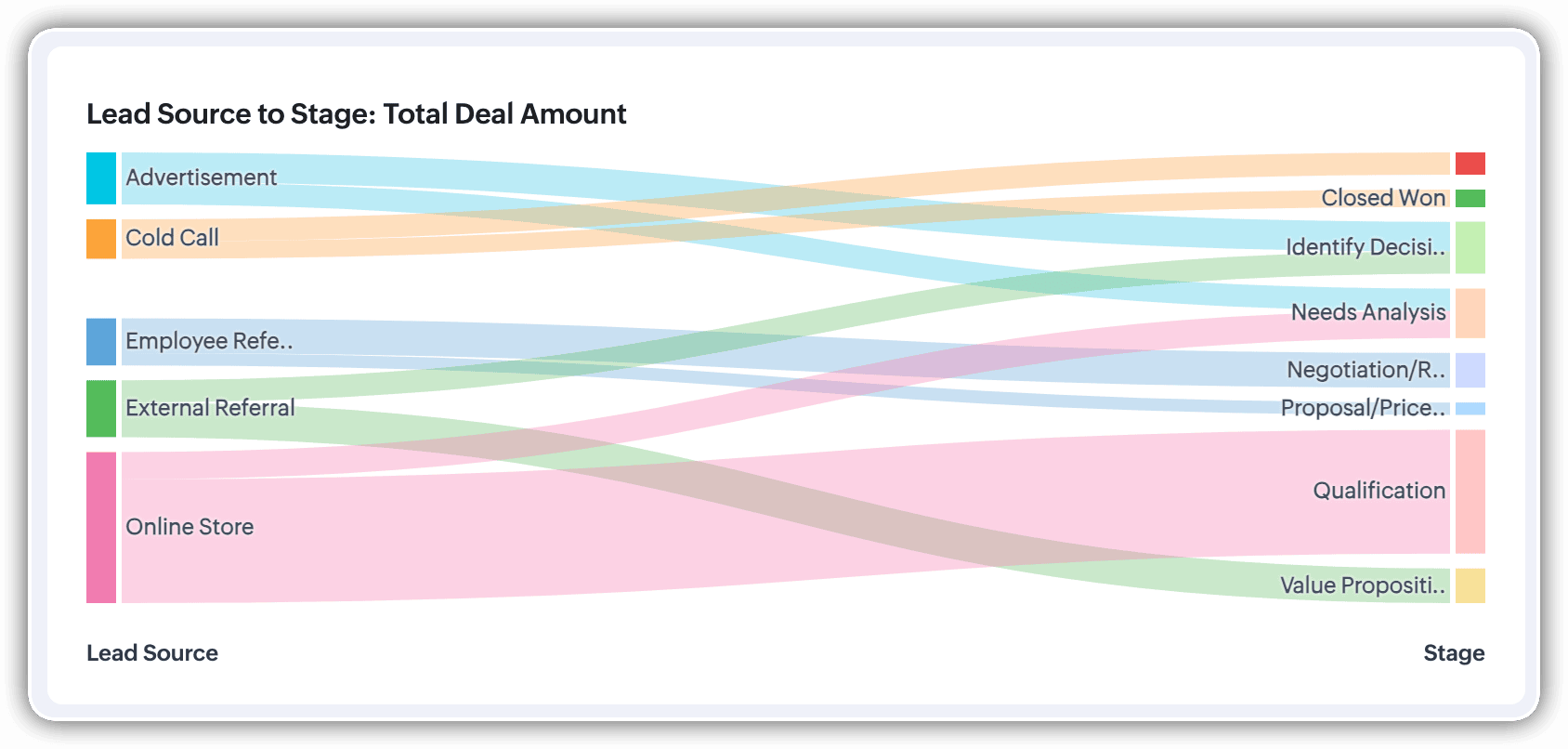
A Sankey Chart is designed to visualize the movement of data across different data groups. Unlike traditional charts—such as bar, column, pie, or donut—that mainly provide a static distribution of values, the Sankey Chart focuses on illustrating the flow between multiple segments or grouping fields. This makes it an ideal choice when you want to track how values (like lead counts, revenue, or deal statuses) move from one category to the next.

Key features
- Flow visualization: With the Sankey Chart, you can observe the movement of data between different groups.
- Multiple grouping fields: This chart works best when you have at least two grouping fields. You can go even further and add a third grouping to see an even more detailed mapping of your data flow.
- Simple configuration: The configuration for the Sankey Chart is as simple as any other chart type in Analytics.
Business scenarios:
Imagine you’re a sales manager trying to get a better handle on your team’s performance and your company’s pipeline. You want to understand not just how many deals are coming in, but also which sources are contributing the most value—and how those deals are progressing through different sales stages.
Let’s say you want to understand which lead sources are driving the most deal activity and how those deals progress through the pipeline. You can create a Sankey chart that maps the count of deals from Lead Source to Stage.

After analyzing the chart, you might notice that Online Store brings in a high volume of early-stage deals, while sources like External Referral contribute fewer deals that are more likely to reach advanced stages like Proposal or Negotiation.
This insight helps you prioritize nurturing the most profitable channels.
Sankey charts can also be helpful in other operational scenarios where understanding transitions across stages or teams is essential:
- Regional revenue distribution: Visualize how revenue flows across different regions, product categories, and their corresponding annual revenue. This helps you compare which regions contribute the most to each product line and where your high-value segments lie.
- Ticket handling flow: Visualize the flow of support tickets from their origin channel to internal departments and finally to resolution statuses. This can reveal workload imbalances or common points of delay in your support process.
Cluster
A cluster chart is similar to stacked column charts, but instead of stacking horizontally, the data is represented as vertical bars. As you create a column chart with multiple groupings, you can change the type of column chart to a cluster chart to achieve this representation.

In the above image, you can see the stacked column chart compares the number of lead conversions based on popular sources between countries. The stacks appearing on top of existing stacks ask you to calibrate the record count (y-axis) based on the previous stacks, which can lead to inaccurate interpretations. In this case, a cluster representation will paint a clearer picture of the analyses.
Other minor enhancements:
In addition to the three charts we mentioned above, we've also made the following minor changes:
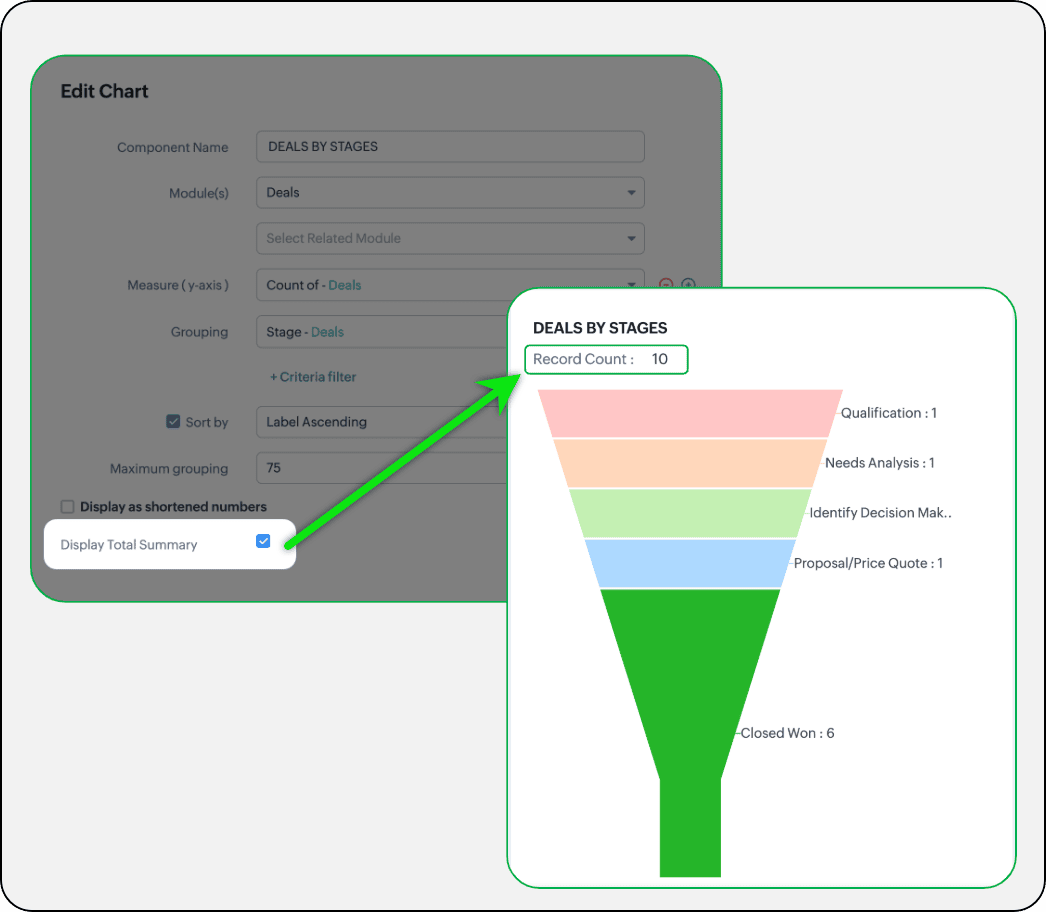
- Display total summary: Thus far, for all charts, each participating measure included labels. Now, to better understand overall contributions, a check box to display the total summary is provided under More options on the Chart Configuration page. Based on the configuration, the total revenue or the rolled-up quantities will be prominently displayed.
- Merge Y-axis: For charts that use two y-axis measurements, the intention is to view the progression of one entity against these two measures. Despite the scale, if the y-axis on the left is disproportionate to the values of the y-axis on the right, the plotted graph will result in a graphically and logically incorrect representation.
As you can see in the image below, the plot area of the sum of amount bar and the sum of expected revenue aligns close together, while, the difference between $700,000 and $40,500 is drastic, creating inaccurate interpretations.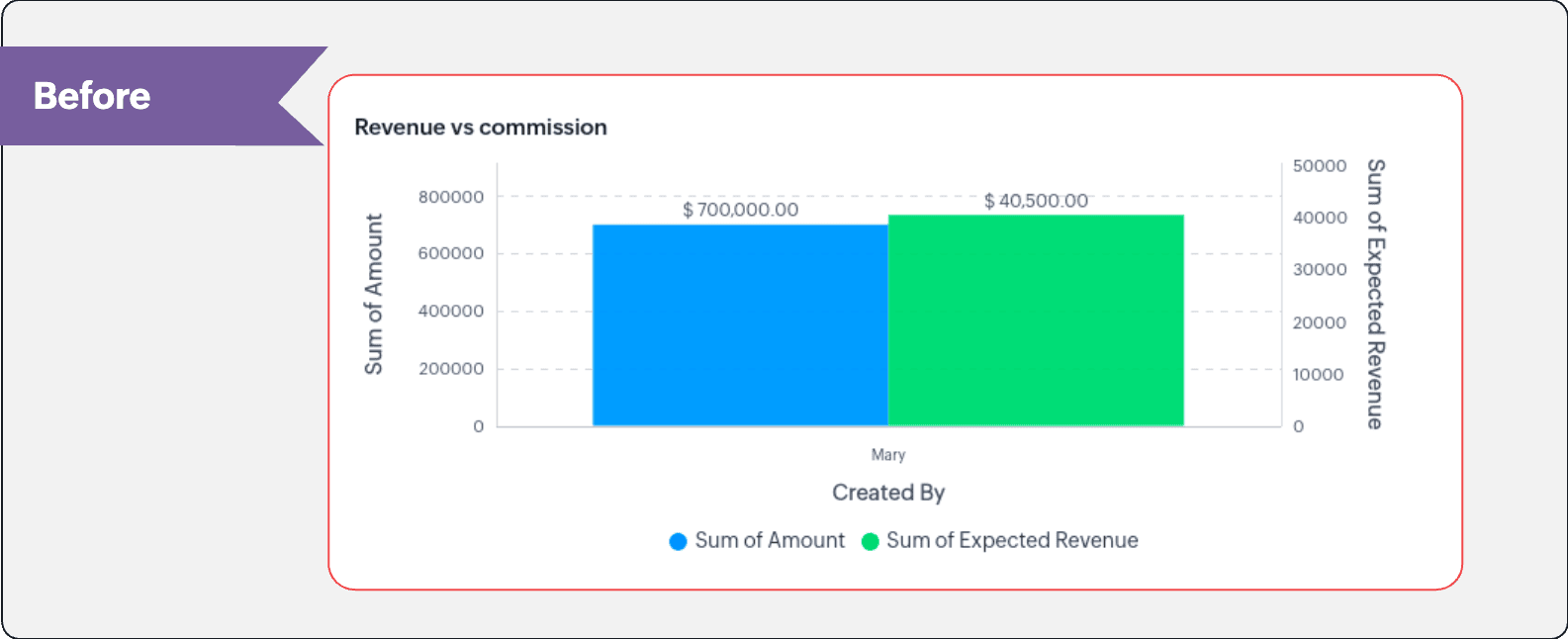
In this enhancement, we're allowing neighboring values of measures to merge so that the interpretation can be more visually accurate.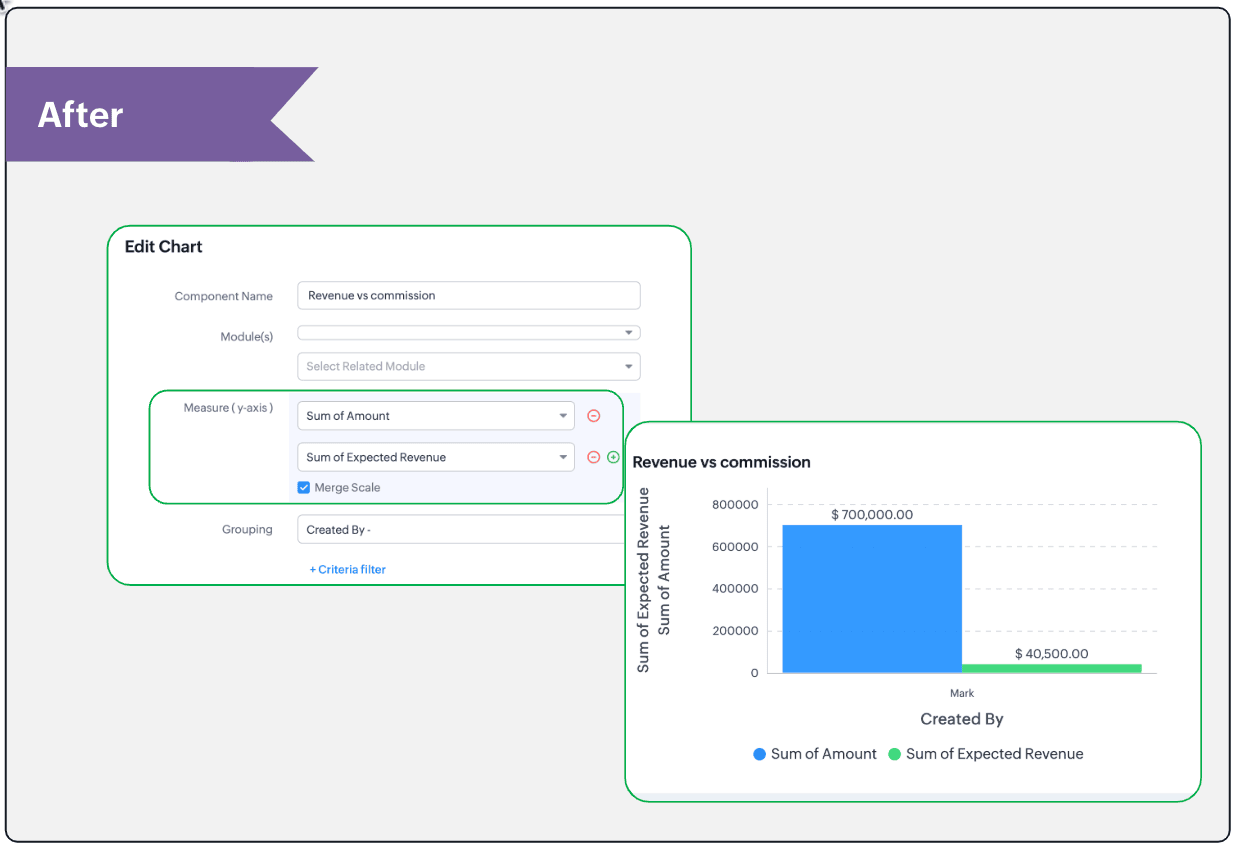
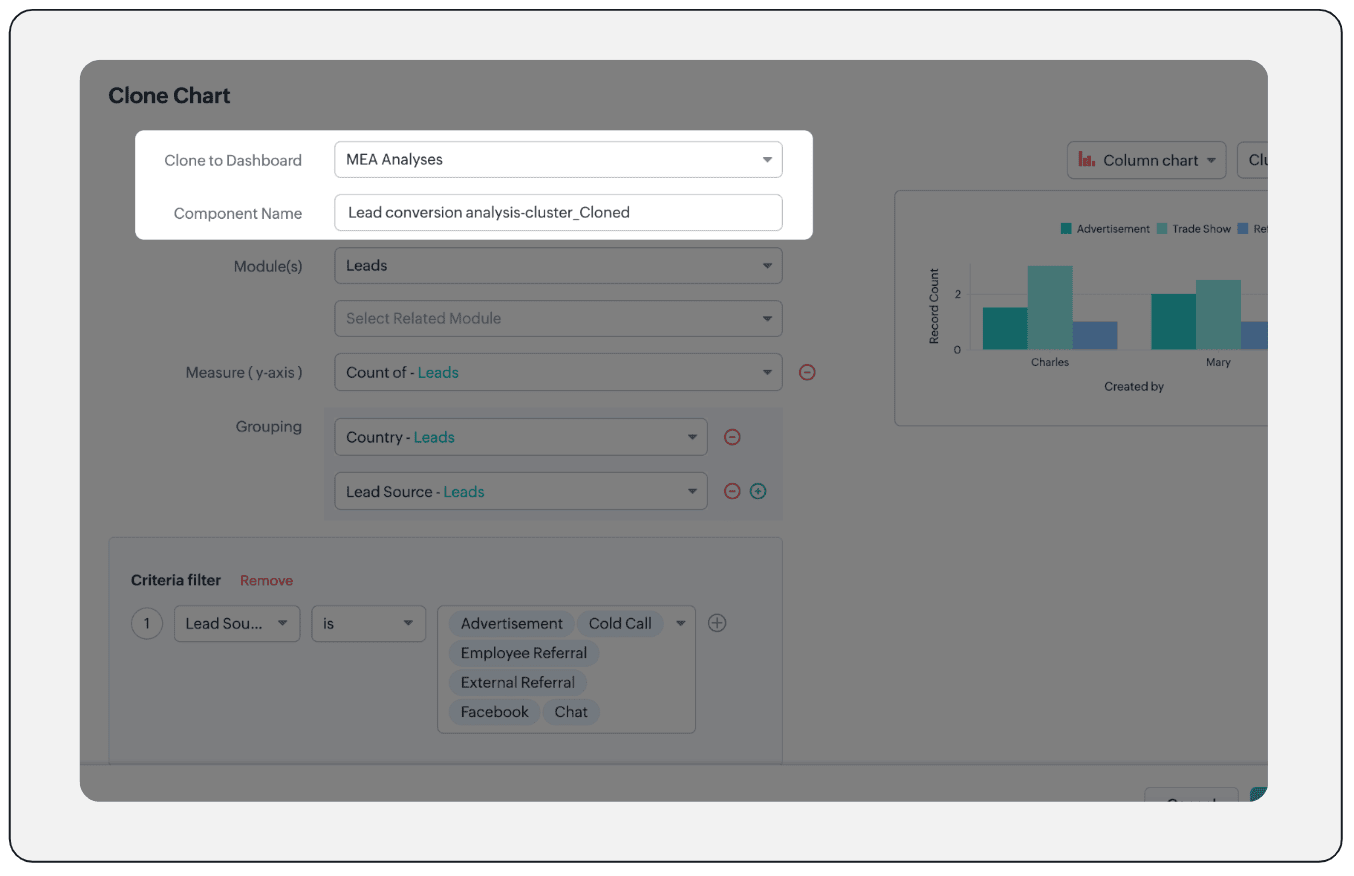
- Clone components to a different dashboard: Dashboards in Analytics serve in unique ways for various audiences—there can be separate dashboards for the sales team, marketing team, engineering team, and so on, and the chances of using the same measure for reference is common. Thus, when you clone a chart, you can now determine the target dashboard in which the cloned chart can be placed.
Resource: Help document
Thanks and have a good one!
Kind regards,
Saranya Balasubramanian
Saranya Balasubramanian
Topic Participants
Saranya Balasubramanian
Sticky Posts
Zoho CRM's sales trend and sales follow-up trend dashboards are now customizable
Dear Customers, We're here with good news! Sales trend and sales follow-up trend are two system-defined dashboards that help you understand trends and anomalies in your sales outreach and conversion efforts. They use Zia's intelligence to identify patternsIntroducing Multiple Sandbox Types and Support for Module's Data Population
Register here for the upcoming Focus Group webinar on Multiple Sandbox | Help documentation to learn more about the new enhancements Hello everyone, Sandbox in CRM is a testing environment for users to create and test new configurations like workflowGood news! Calendar in Zoho CRM gets a face lift
Dear Customers, We are delighted to unveil the revamped calendar UI in Zoho CRM. With a complete visual overhaul aligned with CRM for Everyone, the calendar now offers a more intuitive and flexible scheduling experience. What’s new? Distinguish activitiesVoC in Zoho CRM is now data savvy: Explore response drilldown, summary components and participation in CRM criteria
VoC has all the goods when it comes to customer intelligence—which is why we're constantly enhancing it. We recently added the following: A customer drilldown component that shows you the list of prospects and customers behind a chart's attribute ExpandedWrapping up 2025 on a high note: CRM Release Highlights of the year
Dear Customers, 2025 was an eventful year for us at Zoho CRM. We’ve had releases of all sizes and impact, and we are excited to look back, break it down, and rediscover them with you! Before we rewind—we’d like to take a minute and sincerely thank you
Recent Topics
Remove Powered by Zoho at the footer
Hi, I've read two past tickets regarding this but it seems that the instructions given are outdated. I assume the layout keeps on changing, which makes it frustrating for me to search high and low. Please let me know how exactly do I do this now? ThNo Need To Fix Something That Is Working
Zoho Books is a great financial tool which helps businesses to become more efficient and productive with day-to-day operations. As such, every change, upgrade, improvement needs to be carefully thought before implemented in the software and I'm sure ZohoUsing email "importance" as workflow-criteria
I'd like to set up a workflow that triggers if an incoming email has been flagged as "high importance" but I'm not seeing any way to do that. Hopefully I'm just missing something obvious...?This domain is not allowed to add. Please contact support-as@zohocorp.com for further details
I am trying to setup the free version of Zoho Mail. When I tried to add my domain, theselfreunion.com I got the error message that is the subject of this Topic. I've read your other community forum topics, and this is NOT a free domain. So what is theWhat is Resolution Time in Business Hours
HI, What is the formula used to find the total time spent by an agent on a particular ticket? How is Resolution Time in Business Hours calculated in Zohodesk? As we need to find out the time spent on the ticket's solution by an agent we seek your assistanceCheck & Unchecked Task Segregation in Export
It must have a feature to represent checked and unchecked tasks as [ ] and [✅] respectively when exporting it to Arratai or WhatsApp ; as Keep Notes by Google contains…WorkDrive Download Issue
My client has been sending me files via WorkDrive, which generally has worked fine. Recently files won't download at all. If you try and individually select and download a file, a popup will appear in the bottom right saying it's preparing and then itResolution Time Report
From data to decisions: A deep dive into ticketing system reports What are time-based reports? Time-based reports are valuable tools that help us understand how well things are going by breaking down key metrics over specific periods. By tracking, measuring,Support Custom Background in Zoho Cliq Video Calls and Meetings
Hello Zoho Cliq Team, We hope you are doing well. We would like to request an enhancement to the video background capabilities in Zoho Cliq, specifically the ability to upload and use custom backgrounds. Current Limitation At present, Zoho Cliq allowsAdd RTL (Right-to-Left) Text Direction Button in Zoho Cliq
Greetings Zoho Team, We would like to request the addition of an RTL (Right-to-Left) text direction button in Zoho Cliq, similar to what is already available in other Zoho apps like Zoho Desk. Currently, while using Zoho Cliq with the English interface,Enable Backgrounds and Video Filters for 1:1 Cliq Calls Across All Zoho Entry
Hello Zoho Cliq Team, We hope you are doing well. We would like to request an enhancement related specifically to 1:1 video calls in Zoho Cliq. Current Behavior Zoho Cliq currently provides background and video filter options in the following scenarios:Zoho Flow: Stripe a Zoho Marketing Automation
Hola! Quiero hacer un flujo con Zoho Flow, para que cuando se haga un pago en Stripe, añada el lead en Zoho Marketing Automation. Lo he configurado, configurando el disparador como "Payment created" y mapeando el campo de Stripe "Receipt email address".Need Customer Item Inward Module along with QC
Need Customer Item Inward Module along with QC 1. Using Transfer Orders hit the item balance sheet 2. Items without inventory it becomes difficult for tracking purpose. 3. Custom Modules become tedious to capture multiple items, item subforms are notLESS_THAN_MIN_OCCURANCE - code 2945
Hi I'm trying to post a customer record to creator API and getting this error message. So cryptic. Can someone please help? Thanks VarunInvalid tax authority ID.
How do I correct this ?Zoho email
I need a list of email addresses of all contacts on my zohoShift-Centric View for Assigning and Managing Shifts in Zoho People
Hello Zoho People Product Team, Greetings and hope you are doing well. This feature request is related to Zoho People - please don't move it to zoho one! We would like to submit a feature request regarding the shift assignment and management view in Zohocant upload images in signature- urgent help needed. ta!
HI, I have been trying to insert the company logo in the signature. i have tried it several times since yesterday, the longest I waited was 1 hour and 12 minutes for the pop up window to upload a 180 KB .jpg file. what am i doing wrong.. an urgent replyAdd Ticket button in Home view
When I go to the My Tickets or the Knowledge Base view in our Help Centre, the Add Ticket button is available, but not in the Home view. I would really like for it to be displayed in the Home view as well. Is this possible? Thanks.Problem using Zoho Desk API
Goodmorning, I am trying to use the Zoho Desk API to create a dashboard in Grafana, but I am having a problem. Following the instructions in the API documentation, I created the API Console application (server-based application). Then I created the stringAdd zoho calendar to google calendar
Hi I keep seeing instructions on how to sync Zoho CRM calendar with google calendar but no instructions on how to view Zoho calendar in my google calendar.How to print a label from zoho creator app?
Hello, I would like to print a label from zoho creator app record similar to attached one. Size 74mm x 102mm. I tried record template. It leaves plenty of space around the content and also I couldn't set the height of the page. So it is not printing properly. Could someone please direct me to right direction for this requirement?City field suggestion in Zoho Books
Hi team, We are using Customers module in Zoho Books. In the Address section, we want to understand whether the City field can show suggestions while typing using any API or built-in feature. For example, if a user types “Mum”, can the system suggestNon-responsive views in Mobile Browser (iPad)
Has anyone noticed that the creator applications when viewed in a mobile browser (iPad) lost its responsiveness? It now appears very small font size and need to zoom into to read contents. Obviously this make use by field staff quite difficult. This is not at all a good move, as lots of my users are depending on accessing the app in mobile devices (iPads), and very challenging and frustrating.How can I check all announce?
Hiii, May I ask how can I check all the announce based on broadcast date instead of reply date based So that I will not will miss out any new functionWhat are the create bill API line item requiered fields
While the following documentation says that the line items array is requiered it doesn't say what if any files are requiered in the array. Does anyone know? API documentation: https://www.zoho.com/inventory/api/v1/bills/#create-a-bill I'm trying to addCannot connect to imap.zoho.eu on iOS26
Hey, I recently migrated to another iPhone and since then use iOS26. Every since then, I was not able to connect to "imap.zoho.eu" from Apple Mail. I tried deleting the account and adding it again, did not work. I tried creating an app password, didn'tPersonalize your booking pages with Custom CSS
Greetings from the Zoho Bookings team! We’re introducing Custom CSS for Zoho Bookings, designed to give you complete control over the look and feel of your booking pages. With this new feature, you can upload your own CSS file to customize colors, fonts,Marketer's Space: Plan smarter with Zoho Campaigns' Calendar
Hello Marketers, Welcome to another post! Today, we'll talk about a discreet yet significant feature that's neatly tucked inside Zoho Campaigns: the calendar. It might look like an optional but somewhat unnecessary feature that you can use occasionally,Accounting for Territories
We have different territories i.e. Europe and US and although we can manage the sales process for each and allocate different currencies in the CRM - we want to keep the accounting separate for each territory as there are different reporting and accounting requirements - is there any way to do this? We want to avoid having two separate instances of zoho.User
If user is already part of manage engine endpoint central , what hapens when i try to add them to another Zoho org / directory? Are these users added as external users?Create static subforms in Zoho CRM: streamline data entry with pre-defined values
Last modified on (9 July, 2025): This feature was available in early access and is currently being rolled out to customers in phases. Currently available for users in the the AU, CA, and SA DCs. It will be enabled for the remaining DCs in the next coupleOutlook - Zoho CRM Calendar Integration
I'm facing an issue integrating Outlook with Zoho CRM. Has anyone successfully connected their Outlook to Zoho, and are all your meetings and emails being captured correctly in the CRM? Any insights or troubleshooting tips would be appreciated【Zoho CRM】ポータル機能のアップデート
ユーザーの皆さま、こんにちは。コミュニティチームの藤澤です。 今回は「Zoho CRM アップデート情報」の中から、ポータル機能のアップデートをご紹介します。 ポータル管理の新機能「自動招待」により、Zoho CRMからポータルへの招待を自動化できるようになりました。これまで必要だった、ユーザーごとの手動設定は不要になります。設定した条件に基づいて、対象ユーザーに自動で招待が送信されます。 ポータルの新機能 条件に基づく自動招待:指定した条件を満たすユーザーに、自動で招待を送信 招待設定:招待メールの言語を選択し、言語ごとに条件を設定可能Contact data removes Account data when creating a quote
Hi, Our customer has address fields in their quote layout which should be the address of the Account. They prefill the information, adding the account name - the address data is populated as per what is in the account - great. However when they then addExport all of our manuals from Zoho Learn in one go
Hi, I know there's a way to export manuals in Zoho Learn, but I want to export everything in one go so it won't take so long. I can't see a way to do this, can I get some assistance or is this a feature in the pipeline? Thanks, HannahAutomation#31: Automate Splitting Names for New Contact Records
Hello Everyone, This week, we present to you a custom function, which allows you to split the first and last names from the user's email ID based on the separator used in the ID. Having grown into a large firm, Zylker Techfix aims to optimize its processes,Automatically remove commas
Team, Please be consistent in Zoho Books. In Payments, you have commas here: But when we copy and paste the amount in the Payments Made field, it does not accept it because the default setting is no commas. Please have Zoho Books remove commas automProject Change Orders and Additions
We are in the process of migrating from QuickBooks Online to Zoho Books. We have Zoho One and like the ability to sync all of our data across everything. And I like that projects work in a way that's less dumb than QuickBooks. I'm trying to figure outZOHO Desk - Description of slave ticket disappeared after Merge
Dear Support, On Zoho Desk the description of a ticket disappeared after merging two ticket. The one which was the slave one completely disappeared. The problem that in this description there was an image which i had only on Desk in that ticket. CouldNext Page