Wat is er nieuw in Zoho Desk 2023
Beste Community leden,
Hoeveel je ook van je klanten en je werk houdt, als klantenservice medewerker zul je zeker een aantal zware dagen tegenkomen. We hebben het dan over de dagen dat je een paar keer op de snooze-knop drukt, koffie morst op je favoriete shirt en op je werk inlogt om een stapel ongeopende support tickets in je wachtrij te vinden. Het is logisch dat je naast goede ook slechte dagen hebt. Soms, tijdens die sombere klantenservice diensten, is "Dank u voor uw hulp" wat je op de been houdt.
Klantenservice medewerkers spelen zo'n belangrijke rol in de tevredenheid van de klant dat sommige bedrijven de rol hebben geherdefinieerd tot "customer happiness agent". Als agent speel je een directe rol om ervoor te zorgen dat klanten een geweldige ervaring hebben met je bedrijf. En bij Zoho Desk hebben we het onze missie gemaakt om jou - als "geluksbrenger" - de klant tevreden te houden!
Sinds het begin staat tevredenheid (zowel van jou als van je klanten) centraal bij alles wat we bij Zoho Desk doen. Immers, een tevreden werknemer zorgt voor meer tevreden klanten en uiteindelijk voor een gezonder bedrijf.
De nieuwe Zoho Desk release versterkt de omnichannel communicatie, customer self-service en agent experience. Lees verder voor meer informatie over alles waar we mee bezig zijn geweest.
Instant messaging
We zijn verheugd om een nieuwe manier van interactie met je klanten in Zoho Desk te onthullen. Met het Instant Messaging (IM) platform voor Zoho Desk kunnen klanten je bedrijf bereiken via WhatsApp, Telegram, LINE en WeChat. Aangezien de meeste van je klanten deze platforms al gebruiken voor communicatie, is het alleen maar logisch om ze daar te helpen. We hebben alle tools die je al kent gecombineerd met onze uitgebreide IM-module, samen met enkele nieuwe functies die zijn ontworpen om de productiviteit te maximaliseren.
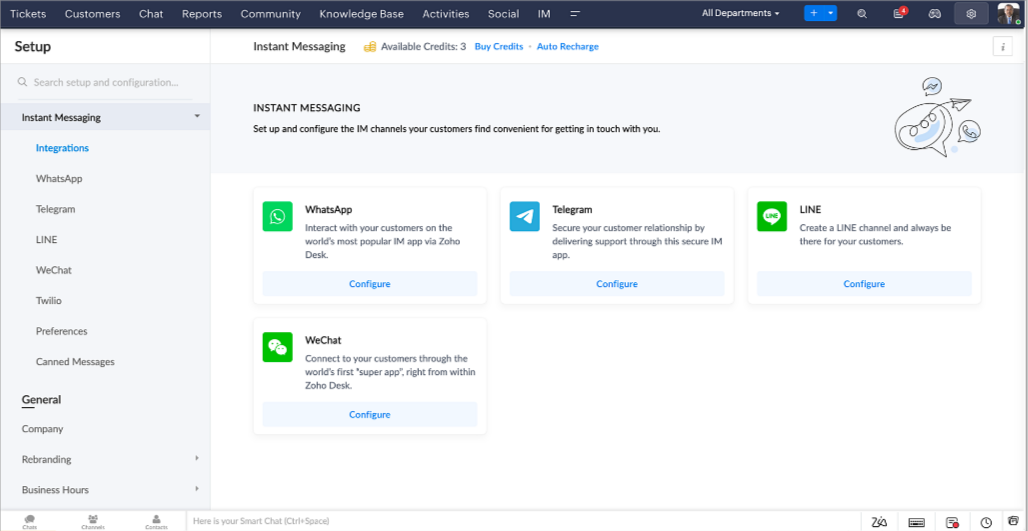
Zoho Desk geeft je een melding in realtime voor inkomende chats, zodat je gemakkelijk contact kunt leggen met klanten vanuit de interface die je al gebruikt. Daarbij kun je nu:
- Klantcontact, ticket informatie, cross-channel gespreksgeschiedenis en bijlage gegevens binnen het chatvenster van de klant volgen voor directe context.
- Kennisbank artikelen openen en toevoegen vanuit het invoergedeelte, vooraf opgestelde antwoorden gebruiken voor snelle oplossingen en emoji's toevoegen voor extra personalisering.
- Neem deel aan meerdere chats tegelijk in verschillende kanalen zonder van tabblad te hoeven wisselen.
- Wijs gesprekken toe aan je teamgenoten.
- Converteer gesprekken in tickets om ze gemakkelijk te kunnen volgen tot ze zijn opgelost.
Hoe zit het met automatisering? Je hebt het! Automatisering, zoals workflows, Blueprints, toewijzingsregels en SLA's, en meer die mogelijk zijn voor tickets aangemaakt vanuit andere kanalen zijn mogelijk voor tickets aangemaakt vanuit je instant messaging kanalen. Je kunt ook automatische reacties instellen voor de tijden dat je afwezig bent of je klanten op oneven uren berichten sturen.
Je kunt het voor klanten gemakkelijk maken om contact met je op te nemen door QR-codes te installeren bij fysieke verkooppunten of door onze eenvoudig te implementeren knop Bericht ons op je website te embedden. Ze kunnen je zelfs bereiken via direct zakelijk zoeken op het IM-platform zoals Telegram.
Guided Conversations (GC)
We zijn erg enthousiast over de introductie van Guided Conversations (GC), het resultaat van de inzet van ons productteam om je de beste zelfbedieningsopties te bieden.
Als klantenservice professional weet je dat de meeste vragen geen eenvoudige antwoorden hebben. Ze vereisen vaak vervolgvragen en veel context voordat er een oplossing komt. Daar komt GC om de hoek kijken. Het is een proactief, low-code, self-service platform dat het pad naar antwoorden voor complexe vragen van je klanten vereenvoudigt. Kies uit een reeks vooraf gedefinieerde vervolgvragen of antwoorden om een GC-flow te creëren die klanten systematisch naar de best mogelijke oplossingen leidt. Je kunt GC bouwen met functionaliteiten die specifiek zijn voor je publiek. Bovendien kun je op elk moment tijdens het gesprek je klanten doorverwijzen naar menselijke interactie, en dan zo nodig terugschakelen.
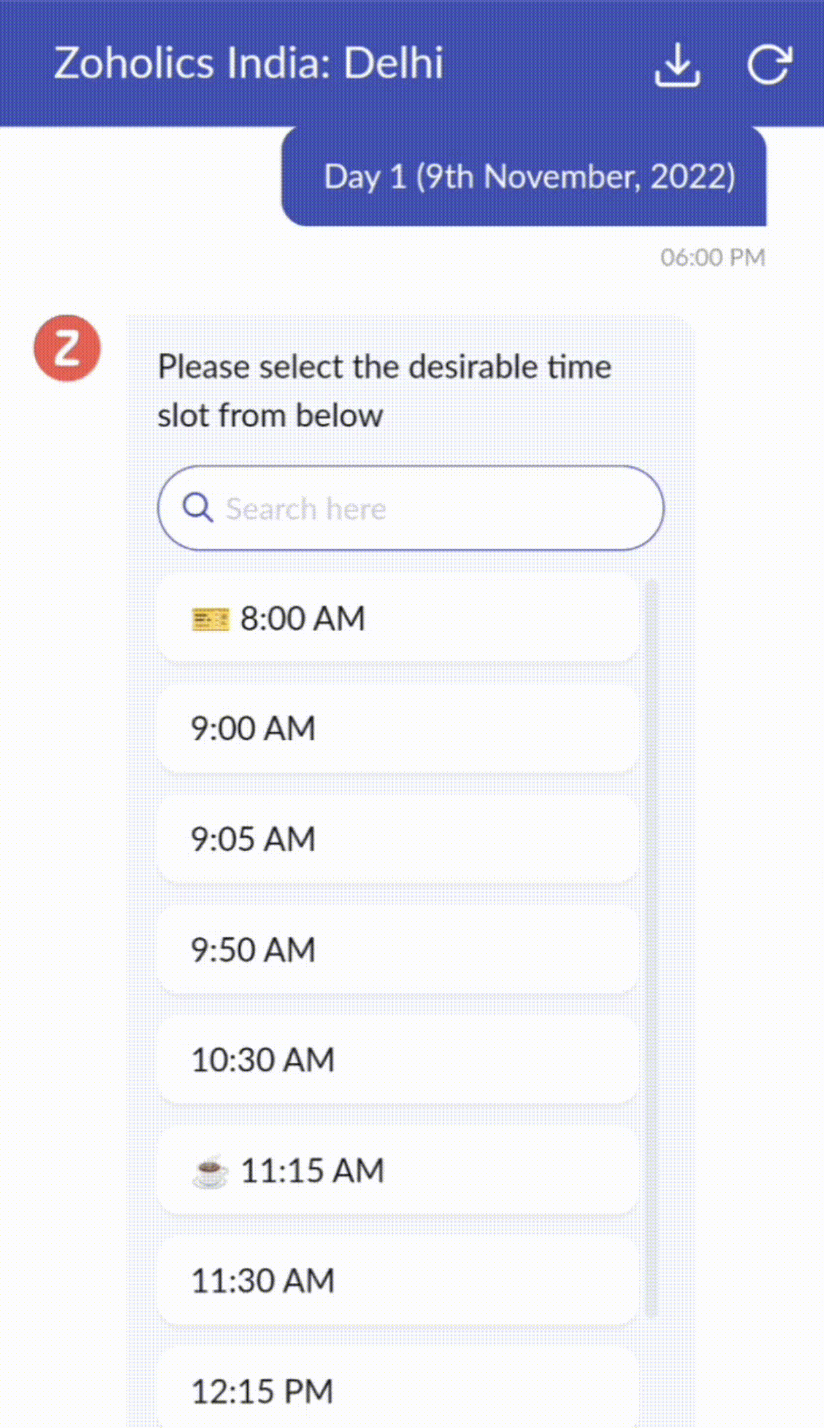
Guided Conversations kunnen worden gebruikt in verschillende situaties, zoals bij het boeken, bestellen, terugvragen of het verzamelen van informatie voor creditcard verwerking of verzekeringen. De mogelijkheden zijn eindeloos. Hier zie je hoe we Guided Conversations hebben gebruikt voor Zoholics, ons jaarlijkse gebruikersconferentie.
Drag-and-drop bouwer
Bouw je GC-flow met behulp van een reeks reactieformaten of -blokken, zoals tekst, afbeeldingen, valuta, datum en tijd, schuifregelaar, keuze, overslaan en opnieuw beginnen. Om een GC-flow te bouwen, sleep je gewoon blokken, voeg je variabelen of dynamische plaatshouders toe en verbind je paden om de volgorde van gebeurtenissen te bepalen, afhankelijk van de keuze van een gebruiker in elke engagement fase.
Webhooks voor naadloze integratie
Door Webhook-blokken te configureren, kun je je conversatiestroom zo samenstellen dat er interactie is met Zoho Desk-processen, andere Zoho-services of applicaties van derden. Als de gebruiker bijvoorbeeld al je contactpersoon is, haalt het Webhook-blok zijn informatie rechtstreeks op uit uw CRM, in plaats van hem te vragen deze elke keer te verstrekken.
Integreer GC overal waar klanten toegang hebben.
Bekijk en implementeer je uiteindelijke flow door deze te koppelen aan uw ASAP helpcentrum op je website, landingspagina's en mobiele apps.
We kunnen niet wachten om de unieke flows te zien die je maakt met Zoho Desk's Guided Conversations!
Verbeterde ervaring
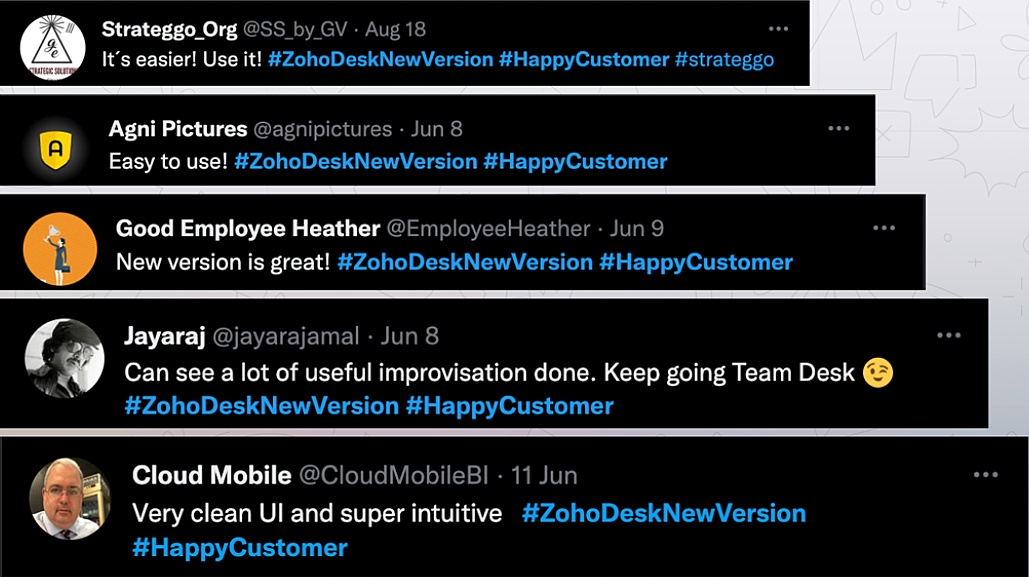
Misschien heb je de Try New Version-optie in Zoho Desk al opgemerkt en zelfs onze vernieuwde gebruikersinterface (UI) geprobeerd, die we eerder dit jaar hebben geïntroduceerd. Dit is onderdeel van onze inspanningen om Zoho Desk logischer en visueel aantrekkelijker te maken om je de beste werkervaring te geven - omdat we weten dat een ingewikkelde helpdesk ervoor kan zorgen dat acht uur aanvoelt als 20 uur.
Wat is er veranderd?
Betere UI, meer context en eenvoudigere navigatie
Wij geloven dat goed ontworpen software weinig tot geen instructies nodig heeft. Daarom hebben we de gebruikersinterface aantrekkelijker, samenhangender en begrijpelijker gemaakt. Die presenteert gegevens beter, geeft meer context en is gemakkelijker te navigeren.
Het belang van snelle toegang tot relevante informatie voor klantenservice teams kan niet genoeg worden benadrukt. We hebben onze UI geoptimaliseerd en het navigeren door verschillende schermen om de juiste informatie te vinden eenvoudiger gemaakt. We hebben ook enkele schermen een make-over gegeven om je een holistisch beeld te geven van je klanten en tickets op één enkele interface. Weet je nog hoe graag we je context geven? Bekijk onze nieuwe look in:
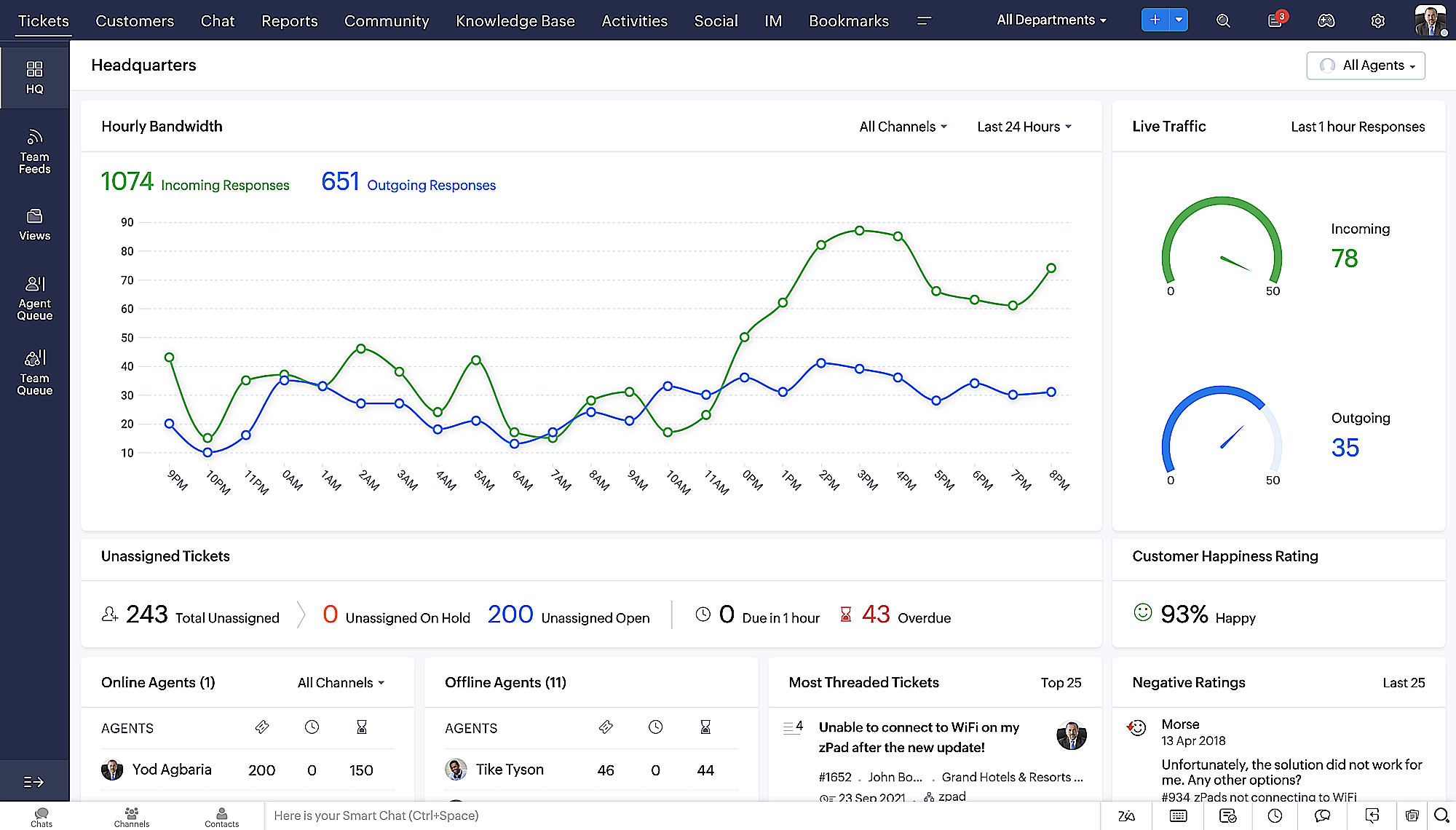
- Laatste Hoofdkwartier weergave met een verfijnde gegevensindeling en vernieuwde algemene look.
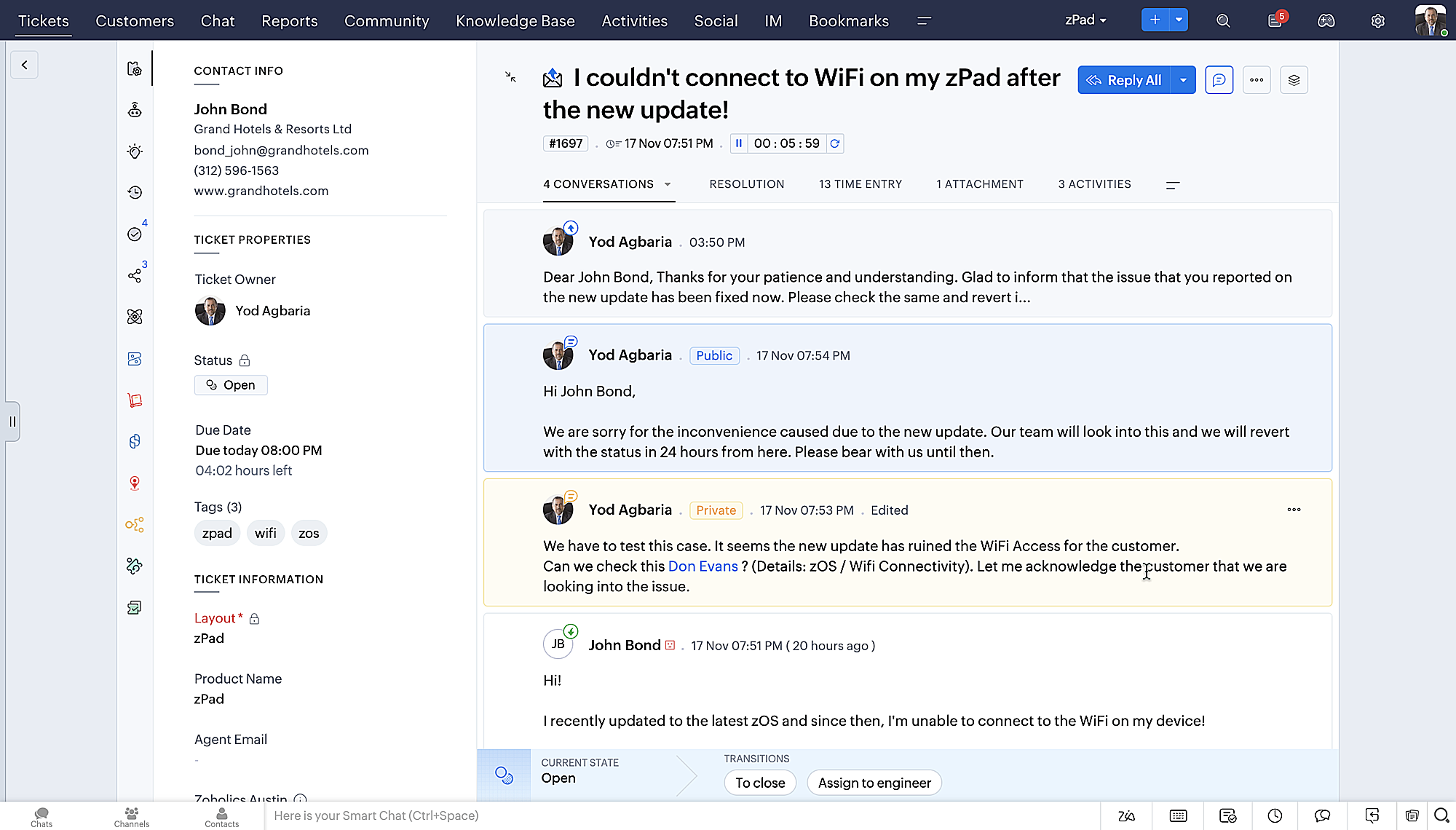
- Gedetailleerde ticketweergave met kleurgecodeerde threads voor eenvoudigere navigatie tussen gesprekken en opmerkingen.
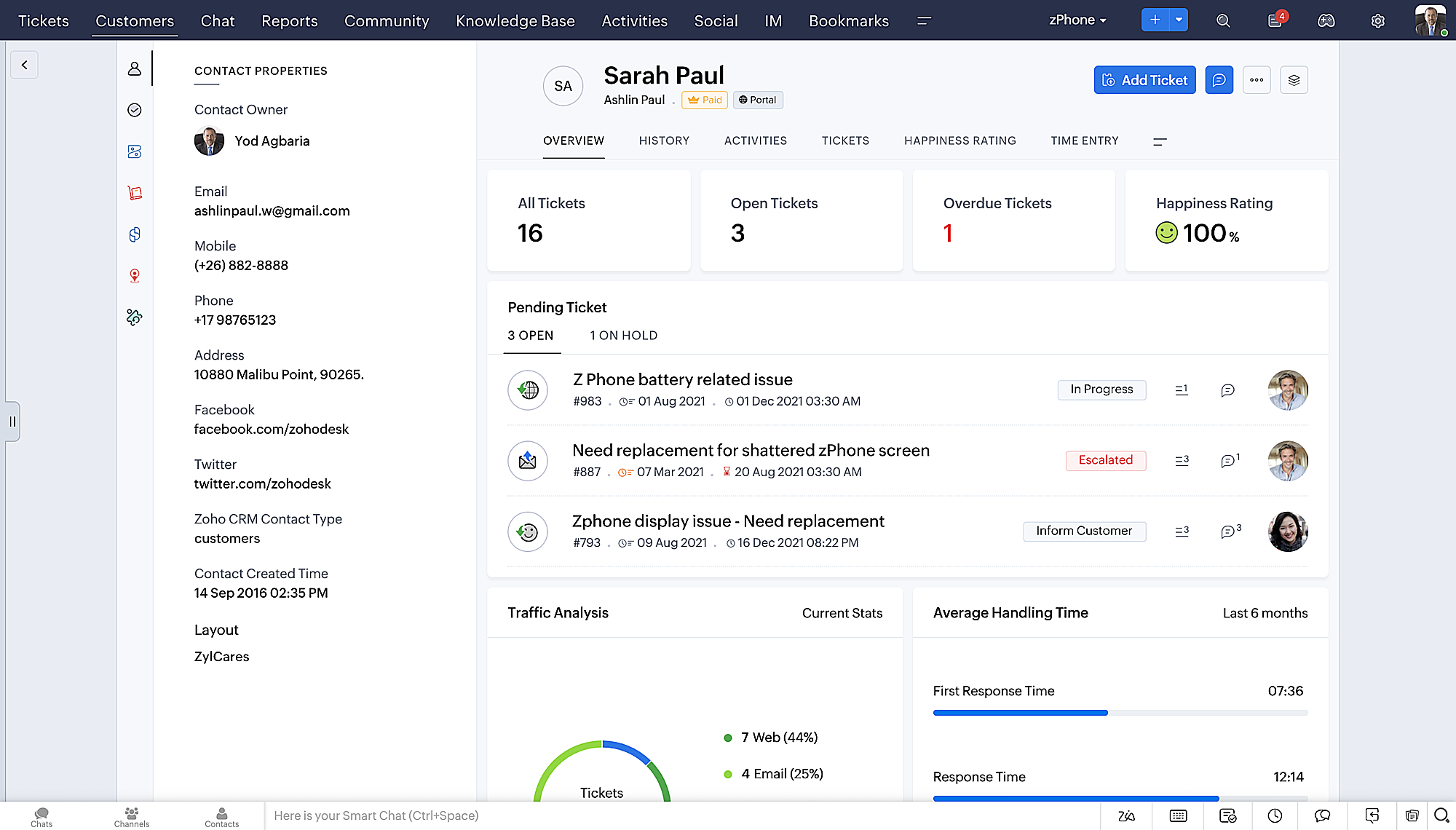
- Gedetailleerde Contactweergave met knoppen voor snel toevoegen, een sectie Wachtende tickets en een overzicht van Ticketinzichten.
- Ticket Queue View met drop-down statusopties, zodat je snel updates kunt geven zonder Ticket Detail View te openen.
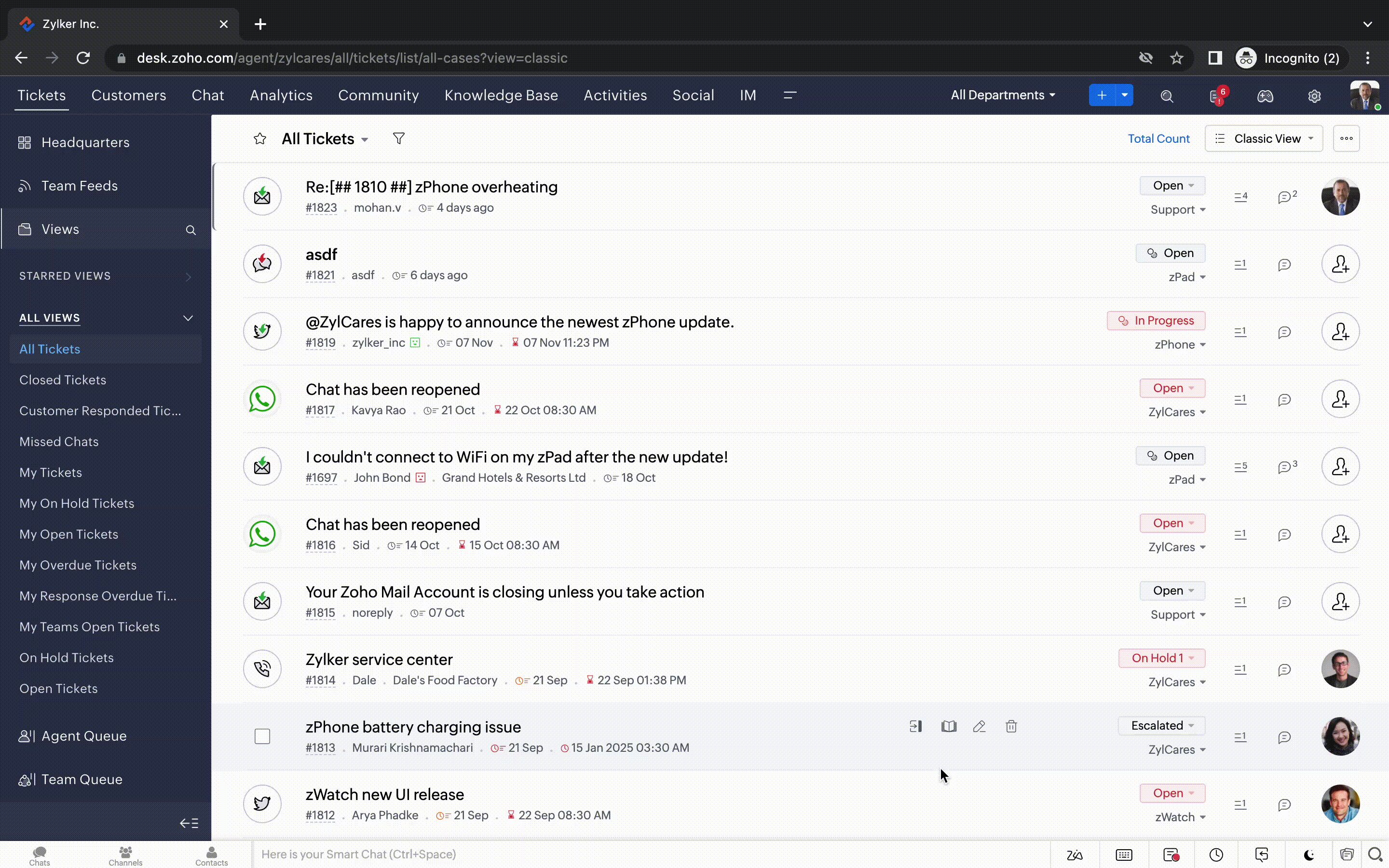
- Een nieuwe optie markeren als gelezen/ongelezen in de ticket lijstweergave, en een geconsolideerde vervolgkeuzelijst Werkmodi in de hele module Tickets.
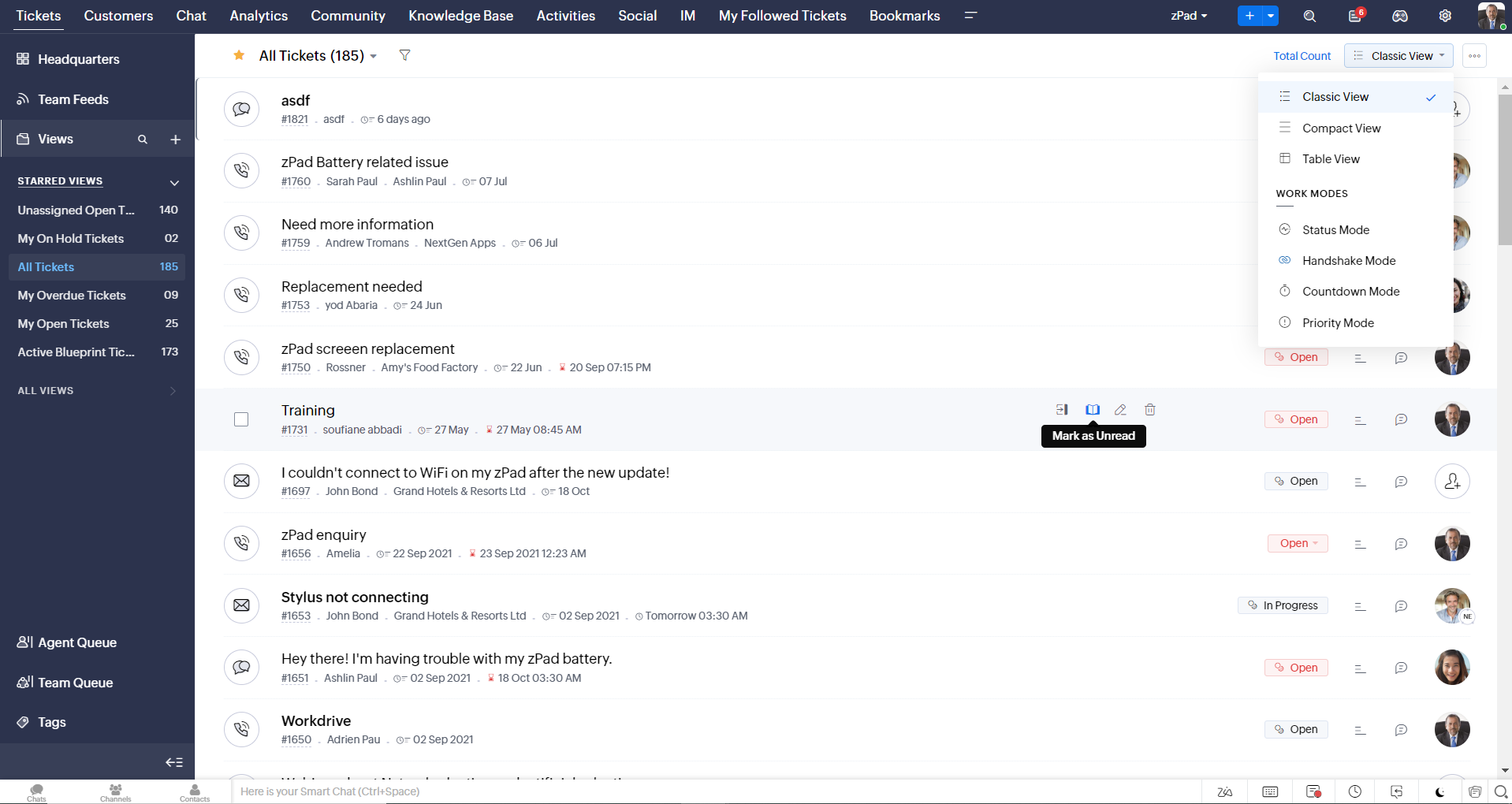
- Oneindig scrollen voor snellere ticket verkenning en navigatieknoppen om snel naar de bovenkant of onderkant van de pagina te gaan.
Nieuwe personaliseringsopties voor gebruikers
Personalisatie is zo'n gewoon onderdeel van ons dagelijks leven geworden dat we het in de meeste van onze productinteracties verwachten.
In Zoho Desk kun je al lay-outs, velden, rollen, sjablonen en je helpcentrum aanpassen. Nu kun je ook het uiterlijk van je portaal aanpassen, zodat je je meer verbonden voelt met je helpdesk. Dit is wat er nieuw is:
- Dark mode/nachtmodus voor een comfortabele kijk- en leeservaring bij weinig licht.
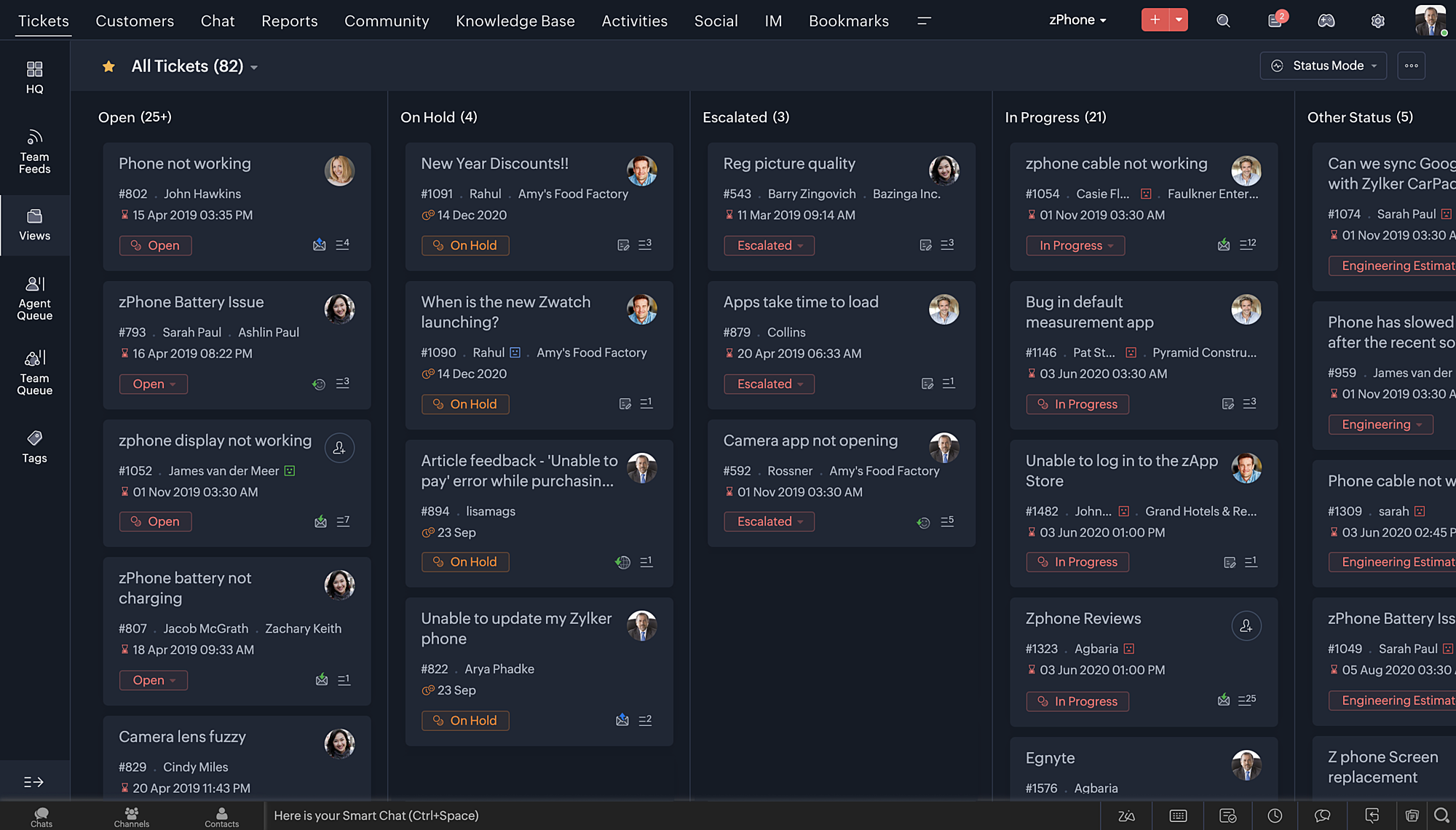
- Nieuwe thema's voor het bekijken van Desk in je favoriete kleur, of in kleuren die jouw merk vertegenwoordigen.
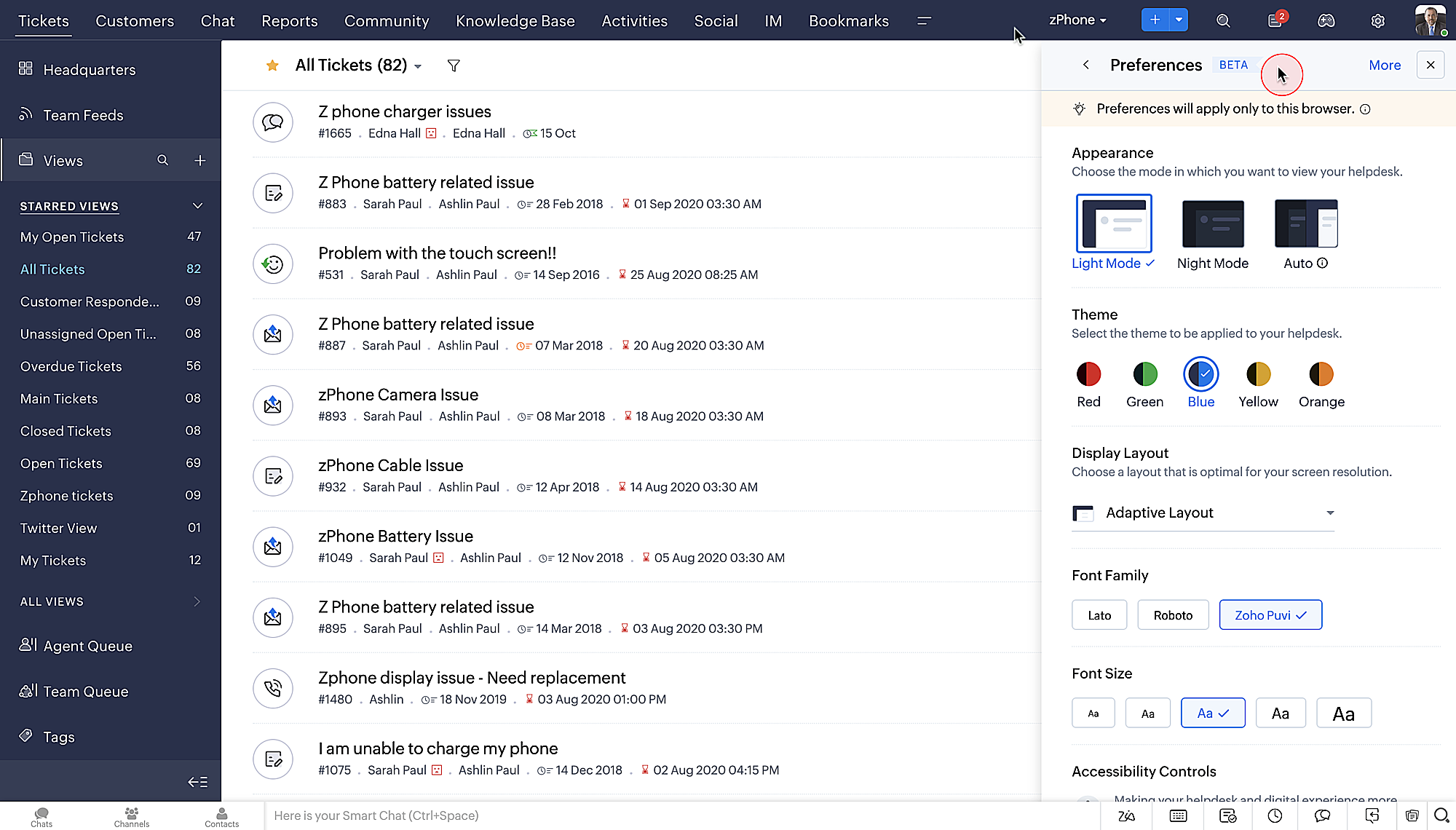
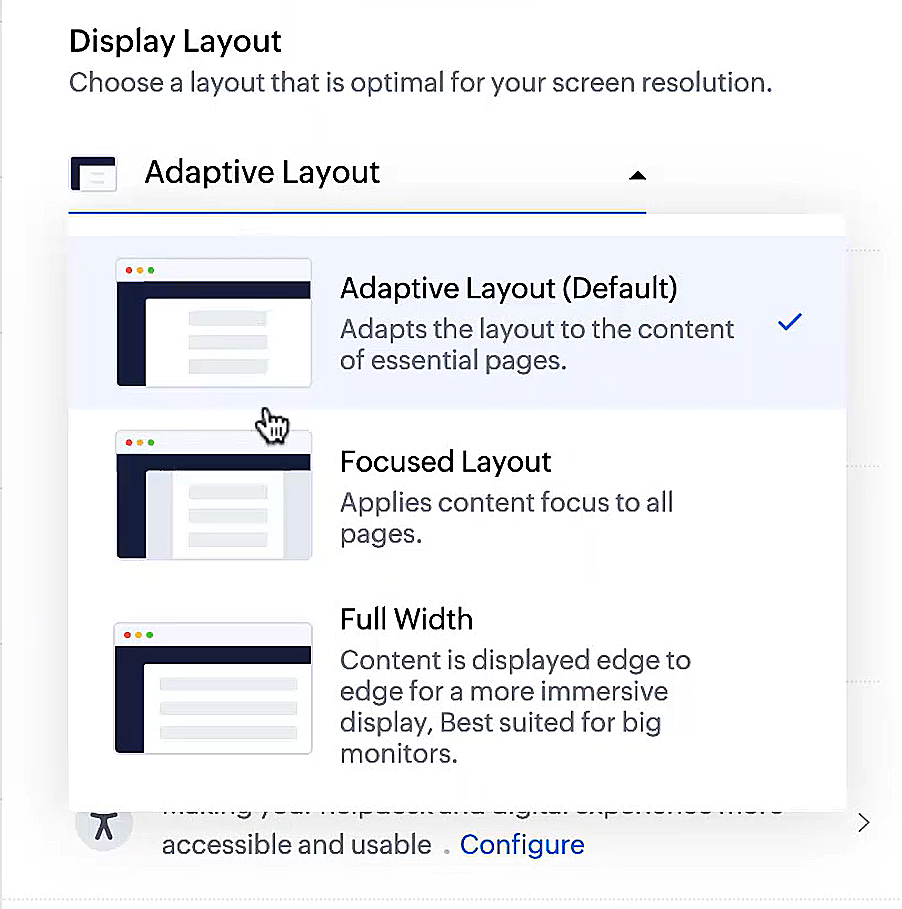
- Display lay-outs waarmee je kunt kiezen hoe je inhoud aan je wordt gepresenteerd.
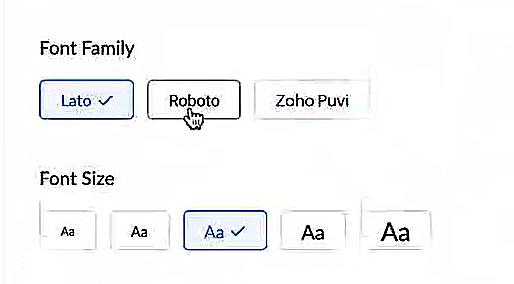
- Nieuwe lettertypes en -groottes zodat je tekst precies overeenkomt met je voorkeuren.
Toegankelijkheidscontroles
Het is altijd onze missie geweest om alle gebruikers toegang te geven tot onze producten, en met onze nieuwe toegankelijkheidscontroles komen we een stapje dichterbij. We hebben meerdere knoppen toegevoegd ter ondersteuning van je gezichtsvermogen, fysieke en motorische behoeften en leerbehoeften.
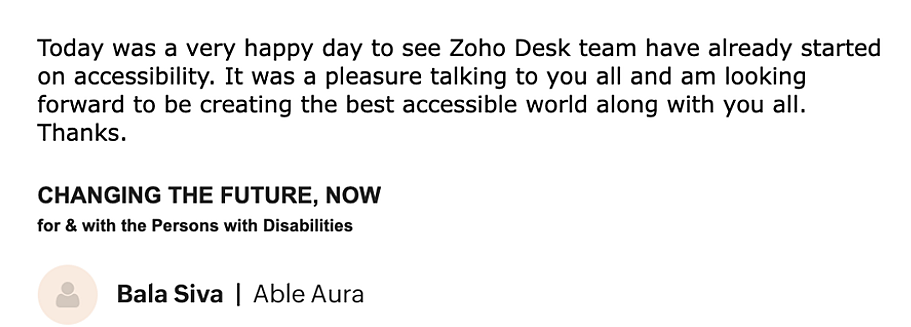
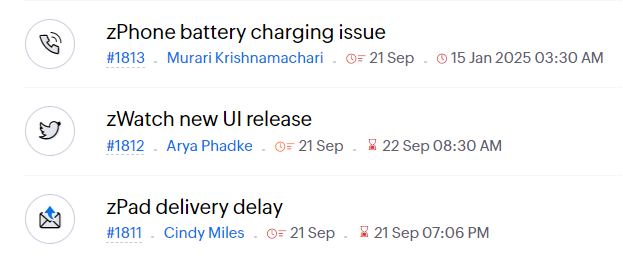
- Highlight Critical Information toont belangrijke informatie, zoals ticket ID, ticket eigenaar en contactgegevens in een opvallende kleur.
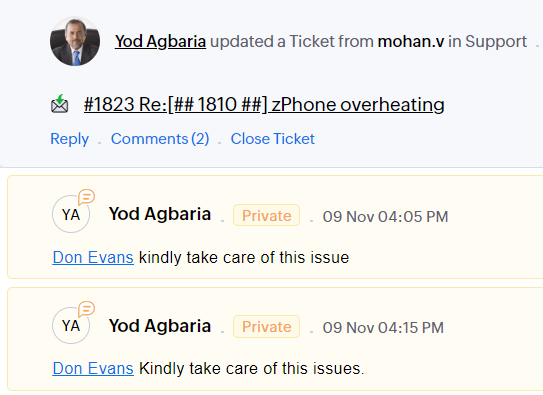
- Onderstreep Links verhoogt de zichtbaarheid van klikbare links.
- Benadruk Focusgebied voegt een rand toe rond je focusgebied om de omvang en klikbaarheid aan te geven.
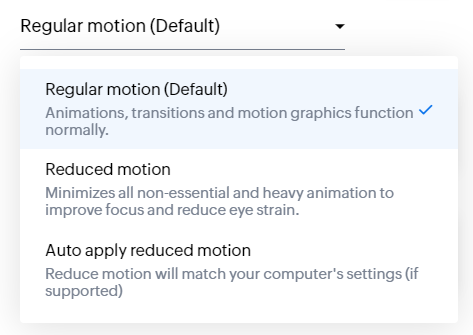
- Animatie regeling optimaliseert animaties en overgangen in je helpdesk.
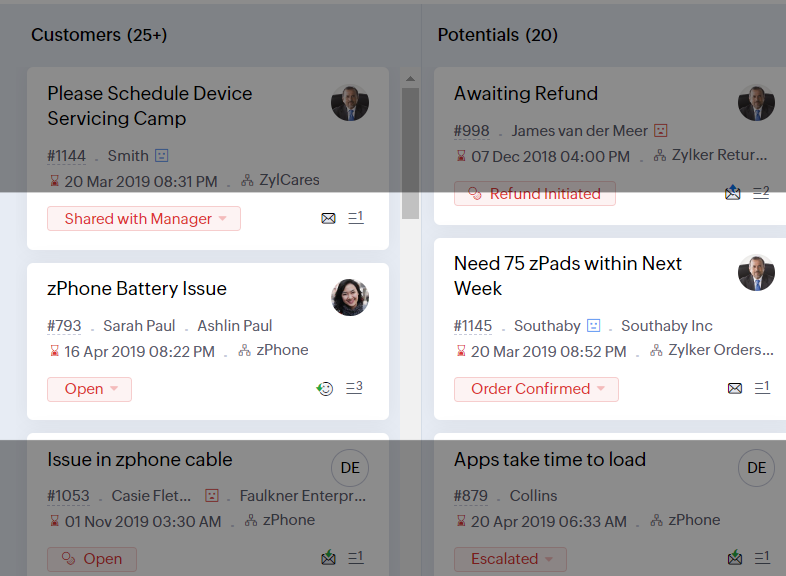
- Leesmasker elimineert afleiding door tekst te maskeren die je momenteel niet leest.
- Met Zoomniveau kun je in- en uitzoomen tot de pagina gemakkelijk te bekijken is.
- Toon lettergrootte past de lettergrootte aan tot de pagina goed leesbaar is.
Met alle nieuwe functies in de Zoho Desk 2022 editie hebben bedrijven nu meer mogelijkheden om te zorgen voor tevreden medewerkers en tevreden klanten.
We horen graag wat je van de nieuw toegevoegde functies vindt! Deel je feedback in onze comments of op social media.
Topic Participants
Sukhpreet Singh
Sticky Posts
Doe mee aan de Zoho Desk Meetup op 7 maart in Antwerpen
Beste Community leden, Wij nodigen jullie graag uit voor de Community Meetup van Zoho Desk! Op 7 maart komen we bij elkaar in Antwerpen, samen met een klant en de Zoho Experts van Brainsolutions. Onze experts zullen een live demo presenteren en jouw vragenDoe mee aan de Zoho Desk Meetup op 16 Februari in Utrecht
Beste Community leden, Wij nodigen jullie graag uit voor de Community Meetup voor Zoho Desk! Op 16 februari komen we bij elkaar in Utrecht, samen met Fleetkennis en de Zoho Expert van Mobile XL. Onze experts zullen een live demo presenteren en jouw vragenWat is er nieuw in Zoho Desk 2023
Beste Community leden, Hoeveel je ook van je klanten en je werk houdt, als klantenservice medewerker zul je zeker een aantal zware dagen tegenkomen. We hebben het dan over de dagen dat je een paar keer op de snooze-knop drukt, koffie morst op je favorieteTips & Tricks #10 Automatiseren met Zoho Desk Deel 2
In deel 1 van het automatiseren met Zoho Desk las je een use case over een probleem in een appartementencomplex en hoe dit door gebruik te maken van Zoho Forms en Zoho Desk kan worden opgelost. In deel 2 lees je meer over het integreren van Zoho FormsTips & Tricks #09 Automatiseren met Zoho Desk Deel 1
Beste Community leden, Zoals jullie weten hebben we in Nederland een woningtekort. Een oplossing hiervoor is de hoogbouw. Echter, om de de hoogte in te gaan moet er ook voor de juiste faciliteiten in flats worden gezorgd. Problemen kunnen we allemaal
Recent Topics
Assign Income to Project Without Invoice
Hello, Fairly new user here so apologies if there is a really obvious solution here that I am just missing... I have hundreds of small deposits into a bank account that I want to assign to a project but do not want to have to create an invoice every timeTracking Non-Inventory Items
We have several business locations and currently use zoho inventory to track retail items (sales and purchase orders). We were hoping to use zoho inventory to track our non-inventory items as well (toilet paper, paper towels, etc). I understand that weProfile Page View Customization
I need to change the fields, sections from the profile view of an emplyoyee.Zoho Desk Android app update: Filter, Sort and Saved filters Enhancements
Hello everyone! We are excited to introduce the below features on the Android version Zoho Desk mobile app: 1. Filter & Sort support has been introduced for the Contacts and Accounts modules. 2. Sort options is now available in Custom Modules as well.Accessing shared mailboxes through Trident (Windows)
Hi, I have a created a couple of shared mailboxes. The mailboxes are showing up on the browser based Zoho workplace, but I cannot seem to figure out how to access my shared inboxes through Trident (Windows). Am I missing something or is this feature notFeature Request: Ability to set Default Custom Filters and apply them via URL/Deluge
I've discovered a significant gap in how Zoho Creator handles Custom Filters for reports, and I'm hoping the Zoho team can address this in a future update. This limitation has been raised before and continues to be requested, but remains unresolved. TheClosing the Loop: Why Lookup Asymmetry is Harming Data Integrity in Creator
TL;DR: Lookup fields allow users to add new related records inline via the "+" icon, but there's no equivalent ability to edit an existing related record without navigating away and losing form context. Adding a native "Edit" icon—with automatic Userfiltering lookup field options based on information in another module.
In our CRM system. We have the standard Accounts and Deals modules. We would like to introduce the ability to classify Accounts by Sector. Our desired functionality is to have a global list of all sectors that an Account can select, with the ability toService op locatie organiseren met Zoho FSM: waar lopen organisaties tegenaan?
Bij organisaties met service teams op locatie merken we vaak dat de complexiteit niet zozeer in de planning zelf zit, maar in wat er rond die planning gebeurt. Denk aan opvolging na interventies, consistente servicerapporten, en het bijhouden van installatiesIntroducing Assemblies and Kits in Zoho Inventory
Hello customers, We’re excited to share a major revamp to Zoho Inventory that brings both clarity and flexibility to your inventory management experience! Presenting Assemblies and Kits We’re thrilled to introduce Assemblies and Kits, which replaces theDoes the ability exist to make tax on the customer profile mandatory?
I am reaching out to inquire about the possibility of making the "Customer Tax" field mandatory when creating a new customer in Zoho. We want to ensure that all customers have their tax information recorded to maintain compliance with our internal processes.email association with CRM
Why is it 2024 (almost 2025) and Zoho has not figured out how to integrate email with CRM? It is so inconsistent at associating emails within CRM. I am an attorney. I have clients and work with other attorneys. Attorney John Doe is associated with multipleFix the speed
It takes ages to load on every step even though my dataset is quite small.Credit Note for Shipped and Fatoora pushed invoices
We have shipped a Sales Order and created an Invoice. The Invoice is also pushed to Fatoora Now we need to create a credit note for the invoice When we try it, it says we need to create a Sales Return in the Zoho Books, we have already created a SalesFSM - Timesheet entires for Internal Work
Hi FSM Team, Several of my clients have asked how they can manage internal timesheets within Zoho FSM. Since their technicians already spend most of their day working in FSM, it would be ideal if they could log all working hours directly in the FSM app.Add a way of clearing fields values in Flow actions
It would be great if there was an option to set a field as Null when creating flows. I had an instance today where I just wanted to clear a long integer field in the CRM based on an action in Projects but I had to write a custom function. It would beRole Management
I am creating an analytics dashboard for a company that will be utilized by its various departments such as Finance, Marketing, and HR. My goal is to design the dashboard with separate tabs for each department. Additionally, I plan to implement role-basedHighlight a candidate who is "off limits"
Hello: Is there a way to highlight a candidate who is "off limits"? I would like to have the ability to make certain candidate and / or Client records highlighted in RED or something like that. This would be used for example when we may have placed a candidate somewhere and we want everyone in our company to quickly and easily see that they are off limits. The same would apply when we want to put a client or former client off limits so no one recruits out of there. How can this be done? Cheers,Announcing new features in Trident for Windows (v.1.37.5.0)
Hello Community! Trident for Windows just received a major update, with a range of capabilities that strengthen email security and enhance communication. This update focuses on making your mailbox safer and your overall email experience more reliable.Early Payment Discount customize Text
Hi, I’m currently using Zoho Books and am trying to customize the standard “Early Payment Discount” message that appears in the PDF invoice template. I’ve reviewed the documentation here: https://www.zoho.com/books/help/invoice/early-payment-discount.htmlDeprecation of SMS-based multi-factor authentication (MFA) mode
Overview of SMS-based OTP MFA mode The SMS-based OTP MFA method involves the delivery of a one-time password to a user's mobile phone via SMS. The user receives the OTP on their mobile phone and enters it to sign into their account. SMS-based OTPs offerZoho Sheet - Desktop App or Offline
Since Zoho Docs is now available as a desktop app and offline, when is a realistic ETA for Sheet to have the same functionality?I am surprised this was not laucned at the same time as Docs.DKIM Now Mandatory - Changes to Zoho Forms Email Policies
Hello Zoho Forms Users, This post is to inform you about an important update regarding the authentication of all email domains in your Zoho Forms account. This year, we are doubling down on our commitment to deliver a secure, seamless, and empoweringCall description in notes
When completing a call, we type in the result of the call in the description. However, that does not show up under the notes history on the contact. We want to be able to see all the calls that have taken place for a contact wihtout having to go intoEmail Address for Contact not Populating
When I click "Send Mail" from a Contact's page, their email address does not auto populate the "To" field. How do I make this happen?New in CRM: Dynamic filters for lookup fields
Last modified on Oct 28, 2024: This feature was initially available only through Early Access upon request. It is now available to all users across all data centers, except for the IN DC. Users in the IN DC can temporarily request access using this formWhy hybrid project management might be the best fit for you?
Project management techniques are designed to equip teams with proven methods for easy and efficient project execution. While management teams may have apprehensions about adopting the hybrid method of project management, we’ve compiled the top reasonsAllow all Company Users to view all projects, but only owner/admins can change projects
I was wondering if there was a permission setting I could adjust to allow all our company users to see all projects created. Then, only the project owners and admins with the change permission. ThanksFail to send Email by deluge
Hi, today I gonna update some email include details in deluge, while this msg pops up and restrict me to save but my rules has run for one year. can you tell me how to use one of our admin account or super admin account to send the email? I tried to updateSeeking help to be able to search on all custom functions that are defined
Hello I have a lot of custom functions defined (around 200) and i would like to search some specific strings in the content of those. Is there a way to accomplish that? If not, is there a way to download all existing custom functions in some files locallyTotals for Sales Tax Report
On the sales tax report, the column totals aren't shown for any column other than Total Tax. I can't think of a good reason that they shouldn't be included for the other columns, as well. It would help me with my returns, for sure. It seems ludicrousAdd Bulk Section / Grid Layout Duplicate Feature in Zoho Forms Builder
Currently in Zoho Forms, users can only duplicate individual fields. There is no option to duplicate an entire section or two-column/grid layout with all internal fields. This becomes inefficient when building structured forms such as Family Details,Leistungsdatum in Rechnungen (Zoho Books)
Hallo, ist es irgendwie möglich den Leistungszeitraum in der Rechnung aufzuführen? Beste Grüße AleksZoho Trident Windows - Streams Not Visible
Namaste We’re having an issue with Streams not being visible in Trident (Windows), which is important for us as we share many emails internally. It appears that the feature to show Streams above the Inbox folder, as seen in the default mailbox view, isSales IQ Chat Widget is Only Displaying Last Name
Can anyone suggest why the widget is only displaying "last name"?! We have the latest version of the wordpress plugin installed. Thanks Thanks!Shopify - Item sync from Zoho Inventory
Hi team, We’ve connected Shopify with Zoho Inventory. We want that when an item is created in Zoho Inventory, it must create a product in Shopify. But currently, new items created in Zoho Inventory are not getting created in Shopify even after clickingBulk upload image option in Zoho Commerce
I dont know if I am not looking into it properly but is there no option to bulk upload images along with the products? Like after you upload the products, I will have to upload images one by one again? Can someone help me out here? And what should I enterIs it possible to setup bin locations WITHOUT mandating batch tracking?
Hi fellow zoho users, I'm wondering if anyone else has a similar issue to me? I only have some products batch tracked (items with shelf life expiry dates) but I am trying to setup bin locations for my entire inventory so we can do stock counting easier.Kill zoho meeting
Saying the quiet part out loud. Can zoho please just give up on the idea that they can make a meeting platform and just make our workplace licenses cheaper when you remove it so people can switch to zoom or teams. Tired of the excuses, you guys cant makeUtilisation de Zoho en conformité avec l’article 286 du Code général des impôts (CGI)
Cher(e) client(e), Conformément à l’article 286 du Code général des impôts (CGI) impose aux entreprises assujetties à la TVA d’utiliser des systèmes de caisse ou de gestion commerciale certifiés lorsqu’elles enregistrent des ventes à des particuliers.Next Page