Weekly Tips : Make your email content error free with Spell check in Zoho Mail
As someone who writes multiple emails a day, we are bound to make both grammatical and spelling errors. Most of them we may not even notice, and even if we do, we may not have the time to correct each one individually when we are in a hurry. So how do you make sure your content is error-free without breaking your writing flow?
With Zoho Mail’s Spell checker, your work becomes much easier. It detects all your errors as you write and provides quick suggestions to correct them.
Spell check
Zoho Mail has an inbuilt enhanced Spell checker to correct your spelling and grammar errors on the go. After composing your email, click the Spell check icon. The misspelt words or grammar errors in your email content will be highlighted. Simply click the highlighted words to see a list of possible words with the nearest correct spelling or alternative words. You can also add a word to your custom Dictionary by clicking the Add to dictionary icon so that it doesn't get flagged the next time you spell-check an email.

Enable Spell check
- Log into your Zoho Mail account.
- Navigate to Settings > Compose > Spellcheck option.
- Click on the Checkbox Spell check as you type.
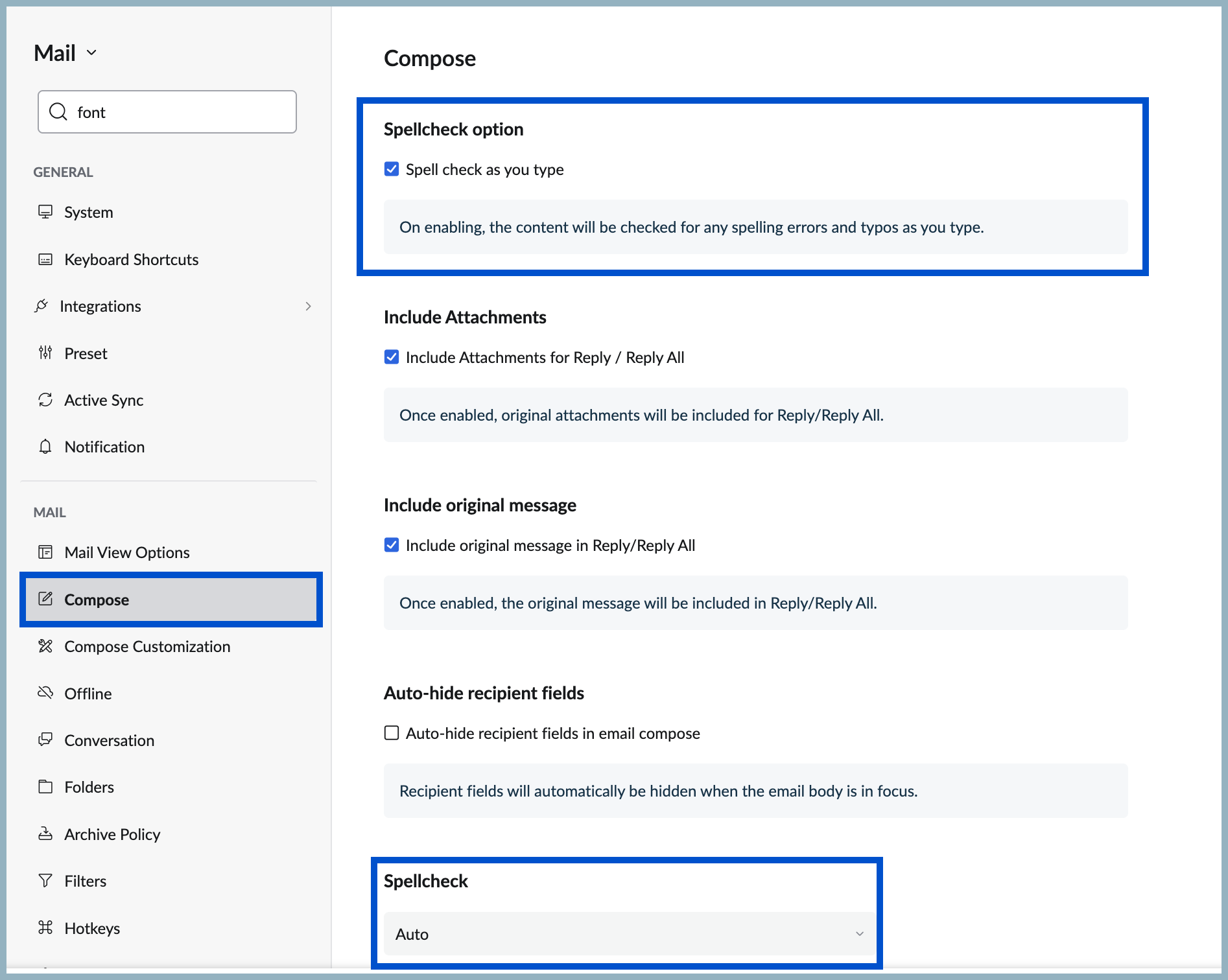
- Scroll down to Spellcheck to apply spell check for other languages in Compose.
- Then select your preferred language from the options in the Spellcheck drop-down.
No more typos or overlooked mistakes, ensure your content is error free without breaking the writing flow with Spellcheck in Zoho Mail.
Topic Participants
Sania Sultana H
Sticky Posts
Weekly Tips: Secure your attachment downloads with Zoho Mail
Safety is one of our main concerns, whether it’s about device security or online protection. We use tools like fingerprint scanners, facial recognition, and two-factor authentication to keep our devices and email accounts secure. We use methods like OTPWeekly Tips : Make collaboration effortless with Whiteboard in Zoho Mail
Working with your team often means switching between emails, notes, and other applications just to explain an idea. Maybe you are trying to sketch a layout, plan a workflow, or quickly brainstorm ideas—with text alone, things can get confusing. So howWeekly Tips : Make your email content error free with Spell check in Zoho Mail
As someone who writes multiple emails a day, we are bound to make both grammatical and spelling errors. Most of them we may not even notice, and even if we do, we may not have the time to correct each one individually when we are in a hurry. So how doWeekly Tips : Master Keyboard Shortcuts in Zoho Mail
If you spend a lot of time managing emails, switching between your mouse and keyboard can slow you down. Whether you are replying to clients, organizing your inbox, or searching for messages, every second counts. So, how can you streamline your emailWeekly Tips: Manage External Images in Zoho Mail
When you receive emails every day, whether from clients, newsletters, or services, many of them contain external images that automatically load when you open the message. While this can make emails look more engaging, it can also impact your privacy and
Recent Topics
Outlook Add-in security times out needs to login 10 times a day
hi we've just switched the Zoho. We use Azure SSO. All users have stopped using it. Sometimes it asks every 5 minutes. What should I lot at to solve this?Simplify Zoho API integration with Deluge’s invokeAPI task
Hello all! Happy New Year! As we kick off 2025, we’re excited to share some of the latest updates to enhance your Deluge experience. While Deluge already offered robust API integration capabilities, we’ve taken it to the next level with the introductionSimplify Zoho API integration with Deluge’s invokeAPI task
Hello all! Happy New Year! As we kick off 2025, we’re excited to share some of the latest updates to enhance your Deluge experience. While Deluge already offered robust API integration capabilities, we’ve taken it to the next level with the introductionAttention: Display Issues on Chromium Browsers with Intel® Core™ Ultra Processors
Dear Customers, We've recently identified a display-related issue that may affect some of our Zoho Assist users, particularly technicians using devices powered by Intel® Core™ Ultra Processors. What’s Happening? If you're running a Chromium-based browserIs the "schedule 10 mass emails/module" limit a per user or per organization limit?
For scheduling emails out of Zoho CRM, there is a 10 scheduled mass emails per module limit according to Zoho documentation (https://help.zoho.com/portal/en/kb/crm/faqs/emails/articles/how-to-schedule-mass-emails-in-zoho-crm). Is this limit per user orHow do I show file uploads in my Zoho Creator approval workflow?
As far as I can tell I'm not able to add the file upload field to the approval workflow show fields list. As a work around I'm making a plain text field that links to the files URL. But I'm not sure how to get a link to that url that will me to previewZoho Bookings - variable appointments
Hello, I am looking to see if its possible for zoho bookings to recognise booking slots in the calendar or a way to do this. I would like appointments only booked in at certain times of the day and this could vary per host. I have provided a calendarBest Practices - Extensions for Zoho Finance Suite
With Sigma, the extension developer platform, you can create custom extensions that enhance the functionality of Zoho Finance apps like Zoho Books, Zoho Billing, Zoho Inventory, Zoho Expense, and Zoho Invoice. Here’s how to get started: Sign up: CreateQR code image is not exported in PDFs
The new QR code field works fine when I include it in a report template and I choose the print option: https://creatorapp.zoho.com/<username>/<app_link_name>/record-print/<report_link_name>/<record_ID>/ But when I try to save the document to a .pdf fileZoho Form to Zoho Form Integration
I've created an application form that asks for references. I would like the submission of the application form to trigger a form to the reference using the email id and name entered in the first form. In the reference form that is triggered I need toCRM: related table using module queries, are links possible?
Hello. I was exploring the possibility of using a module query to get a filtered related list. For example, I'm using a Canvas custom details page and if an account has an open deal I'd like it to appear at the very beginning of the account page, with【開催報告】名古屋 ユーザー交流会 Vol.1 2025/6/6 Zohoで社内システム管理を実現するユーザー事例の共有
ユーザーの皆さま、こんにちは。コミュニティチームの藤澤です。 6/6(金)に名古屋 ユーザー交流会 Vol.1を開催しました。当日は11名の皆さまにご参加いただきました。 本投稿では、当日実施したセッションの様子と投影資料をご紹介します。会場にお越しいただけなかった方も、ぜひご覧ください。 ユーザー活用事例セッション:Zoho CRM Plusによる引合~見積~受注までのプロセス統合 日本アイリッヒ株式会社の清水裕さんに登壇いただきました。以下に一部抜粋して掲載しています。ぜひご覧ください。 セッションの後半は、清水さんの環境を投影いただき、実際の画面上で操作しながらご説明いただいたため、本記事では掲載しておりません。予めご了承ください。Better reorder point functionality?
1. How about having item reorder point warehouse level instead branch? 2. Considering committed stock and to be received quantity also as reorder point calculation? 3. Considering associated items as committed when sales order created on composite iBatch tracking updates
I applaud the Zoho team for their recent updates to batch tracking information and even though I have 'chatted' to the Zoho team, I'm still batteling to understand the reasoning on the below. We buy stock in bulk and it is received into the Bulk Warehouse.Custom Button in Shipments
Custom buttons feature is very much needed in shipments. Please work on this feature request!Zoho Support is Dysfunctional & Don't Know Their Own Support Hours
Seeking clarification on Zoho support hours and contact numbers please. We have been trying to phone Zoho support on +61 2 8066 2898 at 9:20am AEDT for the second day in a row, and gotten a message on Zoho's support line: "support is open monday throughWhat are the knowledge database limit for AnswerBot and which app its integrate?
1) Can AnswerBot be integrated in Trainer Central? 2) Can AnswerBot learn from external websites and excel spreadsheets? 3) Is there a limit size or number of documents for the knowledge based content to train AnswerBot? ThanksReports showing 24hr days instead of business hours
I am not sure what I am missing, I created a report to look at resolution times in business hours but it is displaying hours based on 24hr days. I have business hours set (7am-5pm) and all that functionality is working, the reports are displaying 2 daysSkip Pages - Zoho form
Hi Team, I need help with skipping pages based on the below logic in Zoho form: If field number of borrowers is 1 and field number of dependants is 0 then do not show page borrower 2 and 3 If field number of borrowers is 2 and field number of dependantsHow to print blank form and also how to use form offline
I have created a form in PC and want to use the form in the field to gather information. Can I use the form offline in PC - in case I have no internet access? As a fail safe, I'd like to print the blank form ut just in case the PC form doesnt work forUsing Marketing Automation Journey to associate lead record with a campaign?
Hello, I am trying to push people from a Marketing Automation Journey to a CRM campaign so I can track lead journeys and lead conversions however I am hitting a roadblock. When a lead hits particular scores or does specific actions in marketing automationExpose FIFO COGS in Invoice API
Currently, in the Invoice API, the line_items array contains the purchase_rate field. Unfortunately, this purchase_rate field is the Cost Price of the Item, not the FIFO cost journaled into COGS for that sale. There seems to be no current way to get theDrag-and-Drop Customization Interface for Help Center in Zoho Desk
Hi Zoho Desk Team, We hope you're doing well. We’d like to submit a feature request regarding the customization of the Help Center in Zoho Desk. 🔧 Current Limitation: At present, Help Center customization options are quite limited through the Zoho Deskhide resolution from help centre
to my surprise, i just found out that the resolution text is public in the helpcenter, even if 'notify customer' is off. is there a workaround to that? how do others deal with this? How zoho support does this and I don't think its used by Zoho in the first place. the resolution is meant to be private, not publicStop selling out of stock Items.
Hi I have been using Zohobooks for a around 8 month now. I am not involved in selling process but my staff cant stop selling product which they do not hold in stock, this is a big headache for me as physical count never matches what is shown on the books.Importing New Items to be Added to Existing Item Group
How to use the import sheet to import new items to be added to an existing item group. The import gives me an error that the item group name already exists and won't proceed. If it's possible, how should my import spreadsheet should look like?ShipStation and Zoho Inventory
Hello, I am looking to sync zoho inventory with shipstation ZOHO INVENTORY SHIP STATION Sales Order ==> create ORDERS INVOICE <== Shipments What exactly does BETA mean on the Shipstation connector? This is required for me to sign-on in the next month. Thanks in advance for your effortsCondolences and Prayers Following the Ahmedabad Plane Crash
Dear Zoho Team, We were heartbroken to learn about the tragic plane crash that occurred today in Ahmedabad, as reported in the news. On behalf of our entire team, we want to extend our deepest condolences to everyone at Zoho and across India who may haveZoho Developer Community Monthly Digest – May 2025
Hello everyone, Welcome to this month’s Zoho Developer Community Digest! From fresh product insights to hands-on tech sessions and standout community threads, there's plenty here to keep your ideas flowing and your skills sharp. Be sure to explore ourTimesheet in project not visible to invited users.
We are using Zoho Projects and have enabled the client portal so our clients can access both Projects and Timesheets. However, while the client can see the project, no timesheet entries are visible. How can we resolve this issue?Scheduled outbound calls
How do you mark a scheduled outbound call as complete? I see no way to change the status.How to see exact clicked links in CRM from Zoho Campaigns ?
Hi, I'm wondering how I can see the clicked links from an email sent from Campaigns when I'm in a campaign in the CRM module. I can see the number of clicks but I need the sales team to be able to see which link has been clicked by a prospect or contact.Email parser rule will only parse emails with an exact match? What madness is this?
I finally got myhead around deluge and scripting, but wondered why my parser wasn't working. (https://help.zoho.com/portal/en/community/topic/extract-11-digit-number-in-any-position-from-enail-subject) Problem: There are *zero* characters or phrases thatHow to add a fee based on payment method
I currently accept both ACH payments and credit card. I want to add a 3% fee to a number of my subscription plans if the customer chooses to use a credit card (and not ACH/checking). How do I do this? Is there an in-built feature, or would i have to createCondolences and Prayers Following the Ahmedabad Plane Crash
Dear Zoho Team, We were heartbroken to learn about the tragic plane crash that occurred today in Ahmedabad, as reported in the news. On behalf of our entire team, we want to extend our deepest condolences to everyone at Zoho and across India who may haveCRM Analytics - Elegant Comparator
Anyone noticed a wierd thing on the Elegant Comparator on CRM... Compare Among - Time Period - Last 6 Weeks... only 5 weeks show Compare Among - Time Period - Last 5 Weeks... only 4 weeks show Compare Among - Time Period - Last 4 Weeks... only 3 weeksCopy Templetes from one module to another in Zoho Books.
Hello, I have created a Custom Module in Books for GST Invoice. I can see only 1 Invoice Templete over there. Can we clone or copy Invoices Templetes from Sales Module of Books into Customer Module.Enhancements in Bookings browser extension
Greetings from Zoho Bookings! We're here with another update to make your scheduling even quicker. We have enhanced our browser extension with three significant features: Copy slots to email Gmail integration LinkedIn integration Copy slots to email ThisSome notes are shown as Not Synced
I'm not sure why this happens but it's a weird little bug I noticed. I have two notes I believe that has that weird icon shown in the screenshot that shows that it's not synced even though the notes do sync properly. Manual syncing doesn't remove thePower of Automation :: Auto-Color Tasks in Gantt chart based on values in Picklist field.
Hello Everyone, A Custom function is a user-written set of code to achieve a specific requirement. Set the required conditions needed as when to trigger using the Workflow rules (be it Tasks / Project) and associate the custom function to it. Requirement:-Next Page