We're thrilled to announce a significant update focused on expanding your data connectivity, enhancing visualization capabilities, and delivering a more powerful, intuitive, and performant analytics experience. Here’s a look at what’s new.
Explore What's New!
Accessibility
Introducing a new Accessibility section in Zoho Analytics. It gives you full control over how you view and interact with your Zoho Analytics interface. This update brings enhanced usability and helps ensure a more comfortable, efficient, and accessible reporting experience.
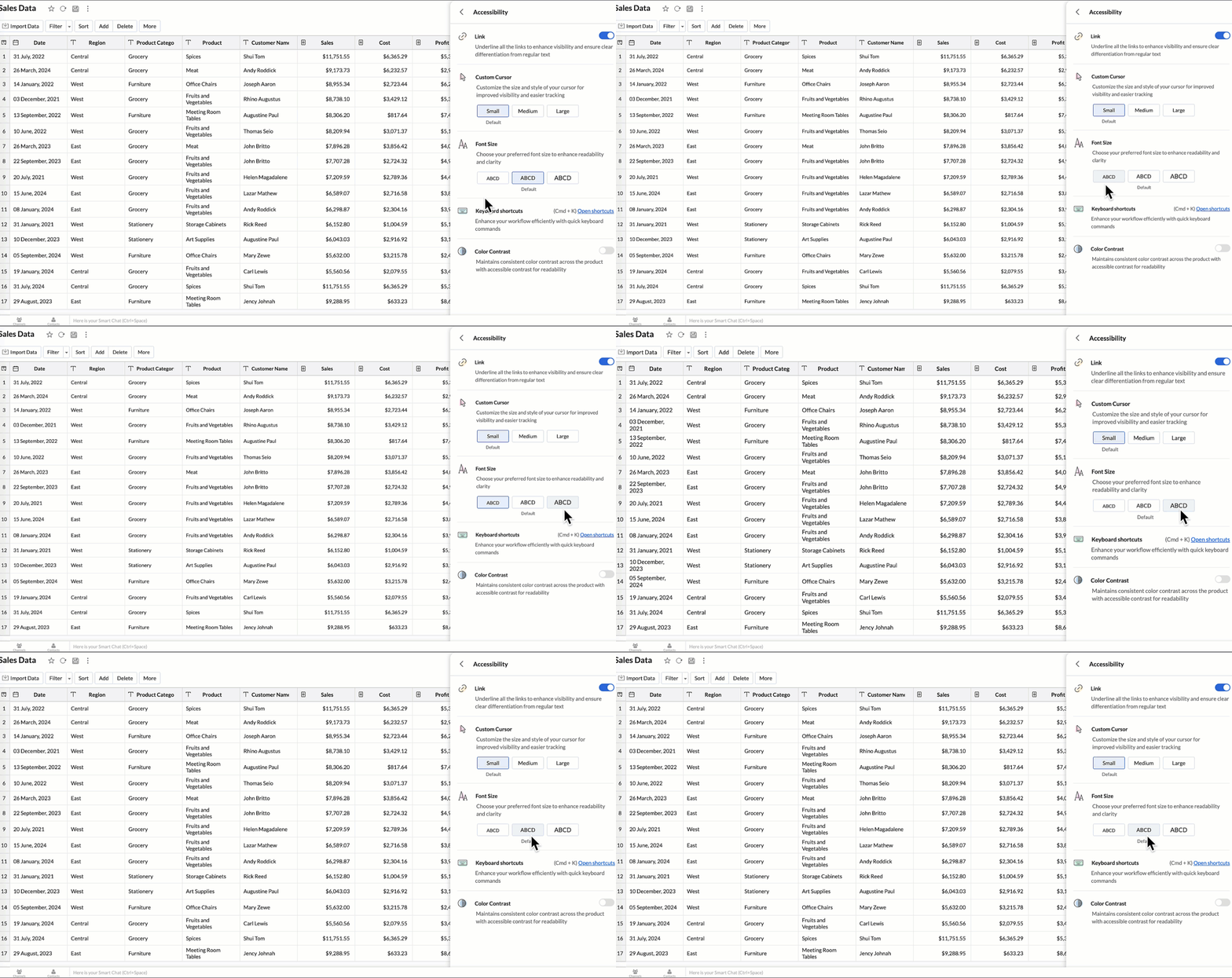
You can now personalize your interface with these new settings:
- Highlight Links - Underline all links to distinguish them clearly from regular text.
- Custom cursor - Choose the size of your mouse cursor (Small / Medium / Large) for better visibility and easier navigation.
- Font size - Adjust the font size of the interface to suit your reading comfort.
- Color contrast - Enable high-contrast mode to improve readability and support users with visual impairments.
- Keyboard shortcuts - Access a full list of built-in shortcuts, to speed up your workflow and navigate quickly using the keyboard.
Learn more.
New Data Connectors
Bring data from more sources into your analytics ecosystem with these new native connectors.
Qntrl Connector
Effortlessly bring workflow and process data from Qntrl into Zoho Analytics. Build reports to analyze task progress, approvals, and operational efficiency.
Learn more.
Asana Connector
Sync your Asana tasks, projects, and workflows seamlessly. Create visual dashboards to track productivity, timelines, and team performance.
Learn more.
Zoho Community Spaces Connector
Import engagement and activity data from Zoho Community Spaces. Analyze member participation, content performance, and community growth trends.
Learn more.
Zoho Finance Connector - New Modules
Gain deeper financial insights with newly added modules, enabling more granular reporting and analysis across your Zoho Finance suite.
Learn more.
Data Sync & Live Connect Enhancements
Incremental Fetch Enhancements
- From Other Workspaces: Users can now configure incremental fetch for data imported from another workspace, bringing in only new or updated records. This improves sync efficiency and reduces load times.
- For Custom Queries: Incremental fetch is now supported for data imported via custom queries, retrieving only new or updated records to enhance performance and reduce processing time.
Learn more.
Developer Hub Enhancements
API – Ruby Language Support
Zoho Analytics SDK now supports Ruby, enabling developers to build Ruby-based integrations and automation with native methods.
Learn more.
JS API - Tab Switch
Enhance embedded dashboard navigation. The JavaScript API now allows you to switch between tabs programmatically, enabling a better navigation control and interactive dashboard experiences.
Learn more.
Map & Geo Analytics Enhancements
Map-Layering Enhancements
Map Layering now includes drill-through for individual layers, options to fix unresolved locations, and the ability to use layered maps as filters in dashboards. These updates deliver deeper and more interactive geo-analysis.
Learn more.
Map Chart – Tooltip Enhancements
Map chart tooltips have been refined by removing Latitude/Longitude values. Users now see cleaner, more meaningful data highlights.
Reporting & Visualization Enhancements
Drill Through Enhancements
Drill-through is now supported for both Public Views and Embedded Views, enabling viewers to seamlessly access related reports for deeper data exploration and enhanced analytical context.
Previously, drill-through functionality was limited to shared reports. With this enhancement, viewers can now open linked drill-through reports, provided those reports have also been made Public.
Learn more.
Tooltip / Info Icon in Widgets
Widgets now support tooltips and Info icons to display additional descriptions or context. This helps dashboard viewers understand metrics instantly.
Learn more.
Anomaly Detection for Dimensional Fields
Zoho Analytics now supports enhanced anomaly detection when a dimension field (category) is added to the Color shelf. Users can choose from multiple detection modes to better analyze deviations across different perspectives
- Overall data
- Each X-Series
- Each Color-Series Individually
- Each Combined Series of X and Color Columns
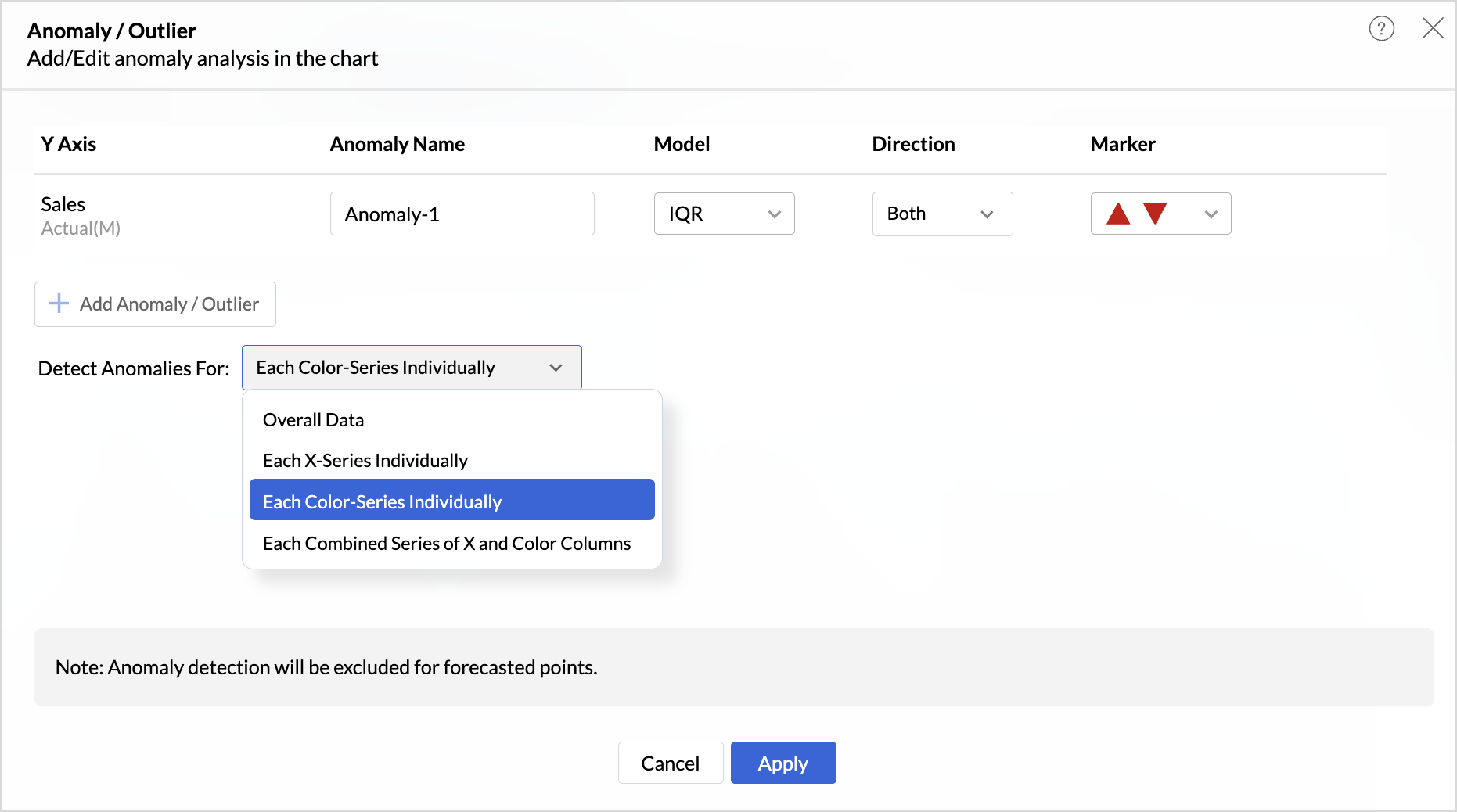
These enhancements offer greater flexibility and precision in uncovering unusual trends and outliers across segmented data visualizations.
Learn more.
Sorting of Values Across Group in Pivot Views
We have added a new option called Sort across Group which helps you apply clearer and more consistent sorting in Pivot Tables.
Earlier, sorting worked only inside each group. With Sort across Group, you can now sort the entire pivot table based on the selected column, regardless of how the groups are arranged.
Freeze Column Support in Pivot & Summary Views
We have added Freeze Column support in Pivot and Summary Views to help you work more comfortably with wide reports. This feature keeps selected columns fixed on the left side of the table while you scroll horizontally, allowing you to compare key columns with other metrics without losing context.
Report-Level Fiscal Year Option
Align individual reports with your organization's financial calendar by defining the Fiscal Year start month at the report level. This setting applies only to the selected report and appears when a date column is used, enabling accurate time-period analysis.
Learn more.
Dynamic Thresholds with Variables in User Filters
Aggregate formulas can now be used with variables inside thresholds. When paired with User Filters, threshold values are calculated dynamically based on each user’s filter selections ensuring every user sees context-relevant threshold boundaries instead of a fixed value.
Datatype-based Variable Suggestions for Default User Filters
When configuring default values in User Filters, only variables matching the filter’s datatype are now listed. This prevents configuration issues such as assigning a text variable to a numeric filter, and ensures accurate default value mapping.
Learn more.
AI & ML Enhancements
AutoML – 128GB Server Support
AutoML now runs on high-power 128GB servers in the US Data Center. This enables faster model training and support for significantly larger datasets.
Learn more.
Zia Insights - Enhancements
Customize Zia Insights
Users can now tailor Zia Insights by selecting specific metrics and dimension columns for insight generation and choose the types of insights to focus on:
- Contribution Analysis: Understand key factors impacting outcomes.
- Time Series Insights: Detect trends, seasonality, anomalies, and forecast future values.
- Comparison Between Dimensions: Analyze performance and variance across different dimensions.
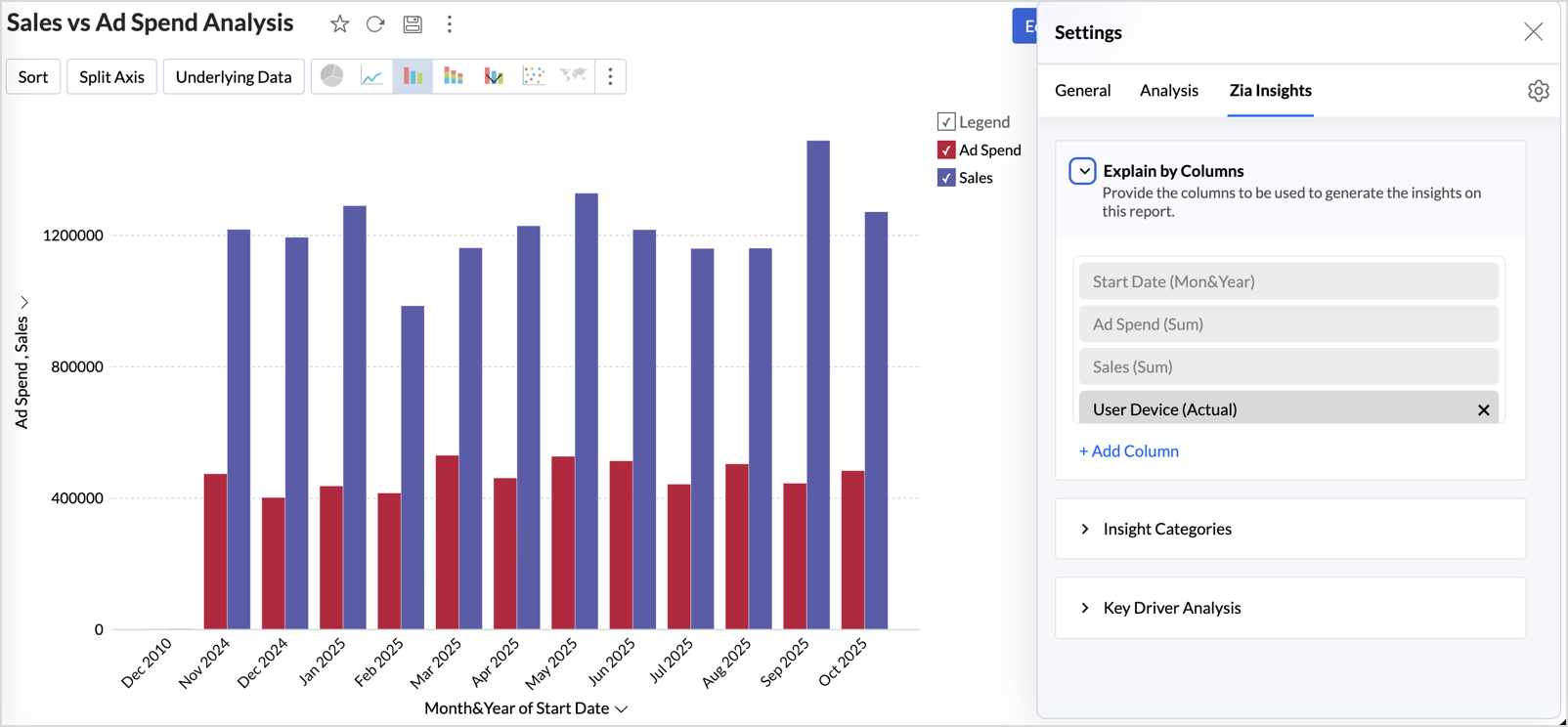
This customization ensures insights are focused, relevant, and tailored to the report’s context.
Learn more.
Diagnostic Insights Now Available for Multiple Time Series Analyses
Previously, diagnostic insights were available only for Recent Time Period Analysis. With this update, users can now access diagnostic insights across multiple time series analyses like, Anomalies/Outliers, Largest Incline/Decline, Period-over-Period Changes, and Start vs End Period Analysis revealing the “why” behind the data for more informed decisions.
Other Updates
Audit Logs for White label Users
Track administrative actions with greater precision. All activities performed in the White Label admin console are now comprehensively logged in the Audit Logs for improved security and compliance.
New Language Support
Zoho Analytics is now more accessible globally, with support for 29 international and 11 Indian languages.
Learn more.
Recent Topics
Best practices for managing Project Charters, Business Case and RAID logs within Zoho?
Hello everyone, I’m currently refining our PMO setup within Zoho Projects and I’m curious how others are handling high-level governance documentation. We’ve been using the standardized Project Charter, Business Case and RAID frameworks from projectmanagertemplate.com
Zoho Books Payroll
How am I supposed to do payroll and pay my employees with Zoho Books? I think it's pretty strange that an accounting software doesn't have the ability to perform one of the most common functions in business; paying your employees. Am I missing something,
Sort Legend & stacked bar chart by value
I'd love to see an option added to sort the legend of graphs by the value that is being represented. This way the items with the largest value in the graph are displayed top down in the legend. For example, let's say I have a large sales team and I create
Is It Possible to Convert a Custom Module to a Quote?
I recently created a custom module in our CRM environment for RFQs so that our sales team can submit quote requests directly in Zoho rather than by email/phone. This allows for a cleaner overall process, minimizing potential errors and potentially encouraging
Proposal: Actionable API Error Messages to Reduce Support Ticket Volume
I've encountered a long-standing frustration with how Zoho Creator's API communicates errors to developers, and I'm hoping the Zoho team can address this in a future update. This issue has persisted for over 9 years based on community discussions, and
Dynamic Field Folders in OneDrive
Hi, With the 2 options today we have either a Dynamic Parent Folder and lots of attachments all in that one folder with only the ability to set the file name (Which is also not incremented so if I upload 5 photos to one field they are all named the same
File Conversion from PDF to JPG/PNG
Hi, I have a question did anyone every tried using custom function to convert a PDF file to JPG/PNG format? Any possibility by using the custom function to achieve this within zoho apps. I do know there are many third parties API provide this with
Allocating inventory to specific SO's
Is there a way that allocate inventory to a specific sales order? For example, let's say we have 90 items in stock. Customer 1 orders 100 items. This allocates all 90 items to their order, and they have a back order for the remaining 10 items which could
Cliq iOS can't see shared screen
Hello, I had this morning a video call with a colleague. She is using Cliq Desktop MacOS and wanted to share her screen with me. I'm on iPad. I noticed, while she shared her screen, I could only see her video, but not the shared screen... Does Cliq iOS is able to display shared screen, or is it somewhere else to be found ? Regards
Pull cells from one sheet onto another
Hello all! I have created an ingredients database where i have pricing and information and i want to pull from that database into a recipe calculator. I want it to pull based on what ingredient I choose. The ingredients database has an idea and i want
Closing the Loop: Why Lookup Asymmetry is Harming Data Integrity in Creator
TL;DR: Lookup fields allow users to add new related records inline via the "+" icon, but there's no equivalent ability to edit an existing related record without navigating away and losing form context. Adding a native "Edit" icon—with automatic User
Add the ability to Hide Pages in Page Rules
Hi, We have Field Rules to show and hide fields and we have page Rules, but we can't hide a page in Page Rules so it isn't completed before the previous page (And then have the Deny Rules to prevent submitting without both pages completed), we can only
Enable Free External Collaboration on Notecards in Zoho Notebook
Hi Zoho Notebook Team, I would like to suggest a feature enhancement regarding external collaboration in Zoho Notebook. Currently, we can share notes with external users, and they are able to view the content without any issue. However, when these external
using the Client script on the load of the form if service no is empty means then i want to make issue relate to is Service
using the Client script on the load of the form if service no is empty means then i want to make issue relate to field is Service if Purchae no is empty means then i want to make issue relate to is Purchase
Changes to the send mail Deluge task in Zoho CRM
Hello everyone, At Zoho, we continuously enhance our security measures to ensure a safer experience for all users. As part of our ongoing security enhancements, we're making an important update on using the send mail Deluge task in Zoho CRM. What's changing?
Work Order wont mark as Completed
I have a couple of work orders that won't mark as completed even when I've marked the Service Appointments as completed fully.
Item name special charaters <>
Im trying to input speical characters such as < and > into item name and item description but comes up with following error: Invalid value passed for Item Name and Invalid value passed for Item Description How do i allow speical characters?
Zoho Analytics Dashboard - How to hide the user filter
I am using the same dashboard template across different external clients and applying a user filter to the data by site URL. How can I hide the user filter in View Mode so the external client won't see the list of other clients in the drop-down menu?
Customer Parent Account or Sub-Customer Account
Some of clients as they have 50 to 300 branches, they required separate account statement with outlet name and number; which means we have to open new account for each branch individually. However, the main issue is that, when they make a payment, they
Kaizen #229: Email-Deal Associations in Zoho CRM
Hi All, Welcome back to another week of Kaizen! Emails are a core channel for customer communication in any CRM system. In Zoho CRM, emails can be associated with records across multiple modules. In this post, we will focus on email associations with
Action Required: Update Microsoft SQL Server Security Settings Before February 2026
Dear Users, We recently deployed security updates in Zoho Analytics that inadvertently caused connection failures for a few customers using Microsoft (MS) SQL Server hosted on older Windows versions (Windows Server 2012, 2012 R2, and 2014). To restore
Contacts limit in basic vs standard - what counts? Are customers contacts?
I’ve been using books for a number years for my small business. I only ever work with 20 clients at any given time. I do purchase services from a number of vendors to run my business, so there are some comtacts there too. I used to use the basic package,
Saving issue
First problem I opened a MS word file in writer. after the work is done, it does not save instantly, I waited for like 10min and it still did not save. second problem When I save a file, then file gets saved as another copy. I just did save, not save
Automating Employee Birthday Notifications in Zoho Cliq
Have you ever missed a birthday and felt like the office Grinch? Fear not, the Cliq Developer Platform has got your back! With Zoho Cliq's Schedulers, you can be the office party-cipant who never forgets a single cake, balloon, or awkward rendition of
Create Tasklist with Tasklist Template using API v3
In the old API, we could mention the parameter 'task_template_id' when creating a tasklist via API to apply a tasklist template: https://www.zoho.com/projects/help/rest-api/tasklists-api.html#create-tasklist In API v3 there does not seem to be a way to
Ability to Set a Unified Tab Order/View for All Users in Zoho Projects
Hello Zoho Projects Team, We hope you are doing well. We would like to submit a feature request regarding tab/menu organization in Zoho Projects. Current Behavior: The tab (module) order in Zoho Projects is user-specific. Each user (internal or external)
Task Order
Hello! I've recently switched to Zoho Projects and a long time user of MS Project, Asana and LiquidPlanner (which has recently been purchased) and I'm running into a frustration I'm hoping someone can assist with. It has to do with how tasks are ordered
Automating CRM backup storage?
Hi there, We've recently set up automatic backups for our Zoho CRM account. We were hoping that the backup functionality would not require any manual work on our end, but it seems that we are always required to download the backups ourselves, store them,
Zoho Books | Product updates | January 2026
Hello users, We’ve rolled out new features and enhancements in Zoho Books. From e-filing Form 1099 directly with the IRS to corporation tax support, explore the updates designed to enhance your bookkeeping experience. E-File Form 1099 Directly With the
2026 Product Roadmap and Upcoming Features
This is your guide to what is coming in Zoho Vertical Studio throughout 2026. We’ll update this post throughout the year as items move from development to release, and as and when new initiatives are added. Once a feature is released, it will be reflected
Vendor legal and DBA names for USA users
I would like to hear how Zoho Books users are handling DBA names in the vendor profile. If the Company name in the vendor profile has to be the legal name (line 1 of the W-9), whare are you entering the DBA name (the name that checks are made out to)
Zoho Books API invoice email bouncing with 'relaying-issues' error
I have waited over 30 days for zoho books uk to assist with the following and i have had no replies or tickets erronously closed. The service has been terrible - very unlike zoho! So i am raising this here hoping that a community member can assist: Hello,
Stop the Workarounds: We Need Native Multi-Step Forms
After over 17 years of community requests, I'm hoping the Zoho team can finally address the lack of native multi-page form support in Zoho Creator. This has been one of the longest-standing feature requests in the community, with threads spanning nearly
Product Updates in Zoho Workplace applications | January 2026
Hello Workplace Community, Let’s take a look at the new features and enhancements that went live across all Workplace applications for the month of January. Zoho Mail Zoho People Notifications preview in Zoho Mail Notification emails from Zoho People
How do i setup default values for few fields
We have few fields in CRM like rate of return, type etc - they can be picklist and standard inut fields. picklist we have choice to set default value. but how do we default some value in input type of fields?
We know the company but not the contact
We are fairly new to Zoho, part of our marketing stack is we use products like lead feeder to identify which companies are visiting our site. We are able to match this data to salesiq but cannot find a way to add a company name to the salesiq visitor
Customize Calendar view in Teamspaces Settings
Right now every customization that happens inside of the calendar view inside of CRM is only visible for the specific user. We want to be able to set up calendar views as an admin for specific roles. I would suggest to do that inside of the settings of
How to filter subform report based upon main form report in dashboard
Hi Team, I am creating a dashboard in Zoho Analytics. I want to have a main form report and below I want to show subform report of main form. If I filter the main form with date then I want to show subform records based upon main form. how can I achieve
using the Client script I want to Hide Show the Fields
if Related to service means some of the field like service no want to shoe and hide Amc no , purchase no how i achive this let issu = ZDK.Page.getField('Issue_Related_To').getValue(); if (issu == 'Service') { var field_obj = ZDK.Page.getField('Warranty_Cases');
Ask the Expert – Zoho One Admin Track : une session dédiée aux administrateurs Zoho One
Vous administrez Zoho One et vous vous posez des questions sur la configuration, la gestion des utilisateurs, la sécurité ou encore l’optimisation de votre back-office ? Bonne nouvelle : une session Ask the Expert – Zoho One Admin Track arrive bientôt,
Next Page