Hello Users!
We are starting the year with a strong lineup of updates, marking the beginning of many improvements planned to enhance your analytics experience. Explore the latest improvements built to boost performance, simplify analysis, and help you extract more value from your data.
Archive Data
No more querying all records while generating reports! Analyze data faster and optimize workspace performance with Archive Data. Move older or less-frequently used records out of active tables, and store them securely.
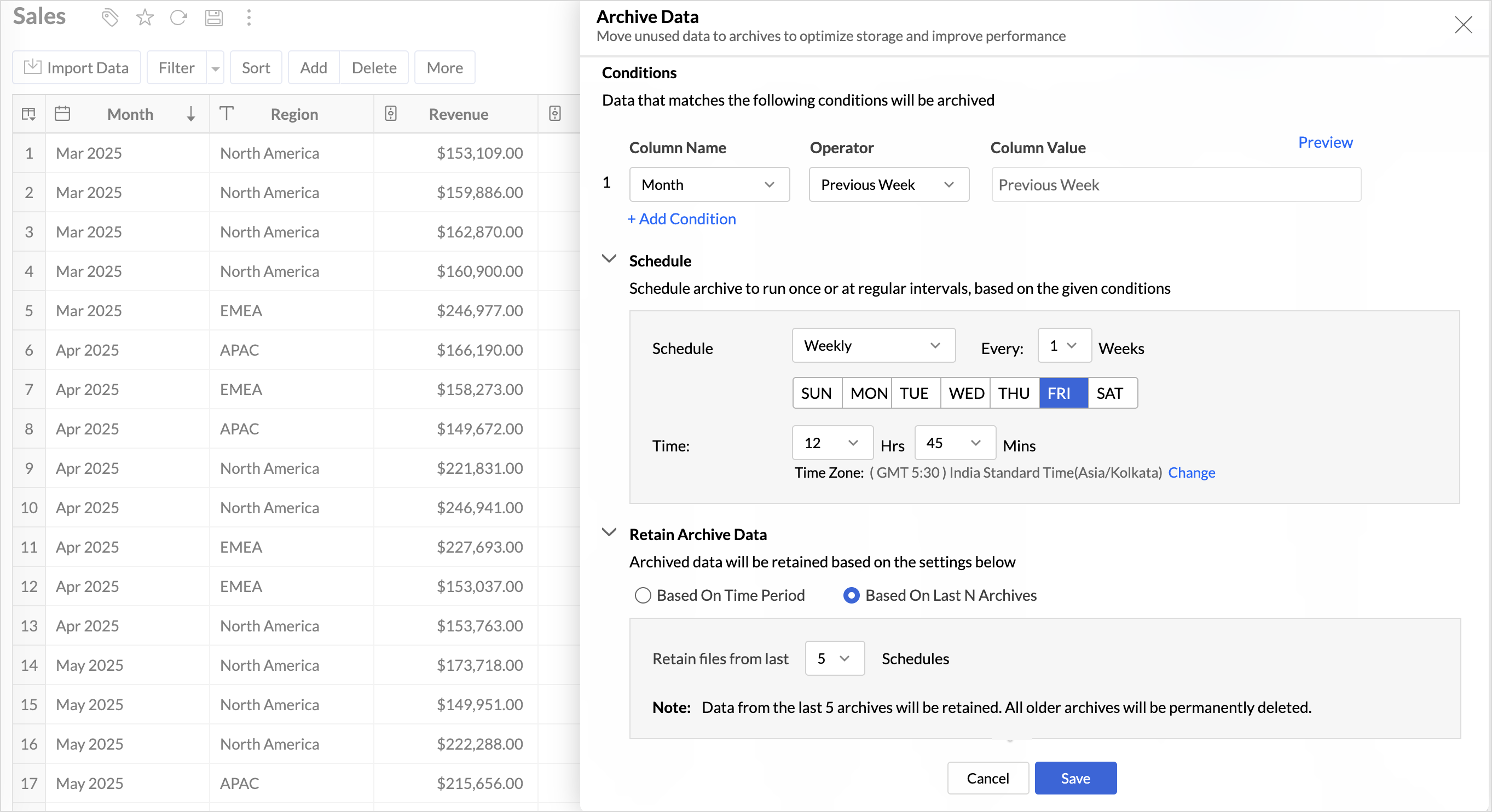
Key Benefits
- Pay only for what you analyze: Active data is reserved for analysis, while historical data is retained without impacting usage limits.
- Improved Querying and Faster Analysis: By limiting queries to relevant data, report generation and dashboard loading times are significantly reduced, resulting in faster insights and a more responsive analytics experience.
- Optimized Storage Usage: Archiving older data helps control table size, preventing unnecessary growth, and better management of row limits.
Learn more.
Organize Views with Tags
Group related views, and manage reports and dashboards effortlessly. Use tags to organize views by teams, departments, projects, or specific use cases, making it easy for users to navigate large workspaces.
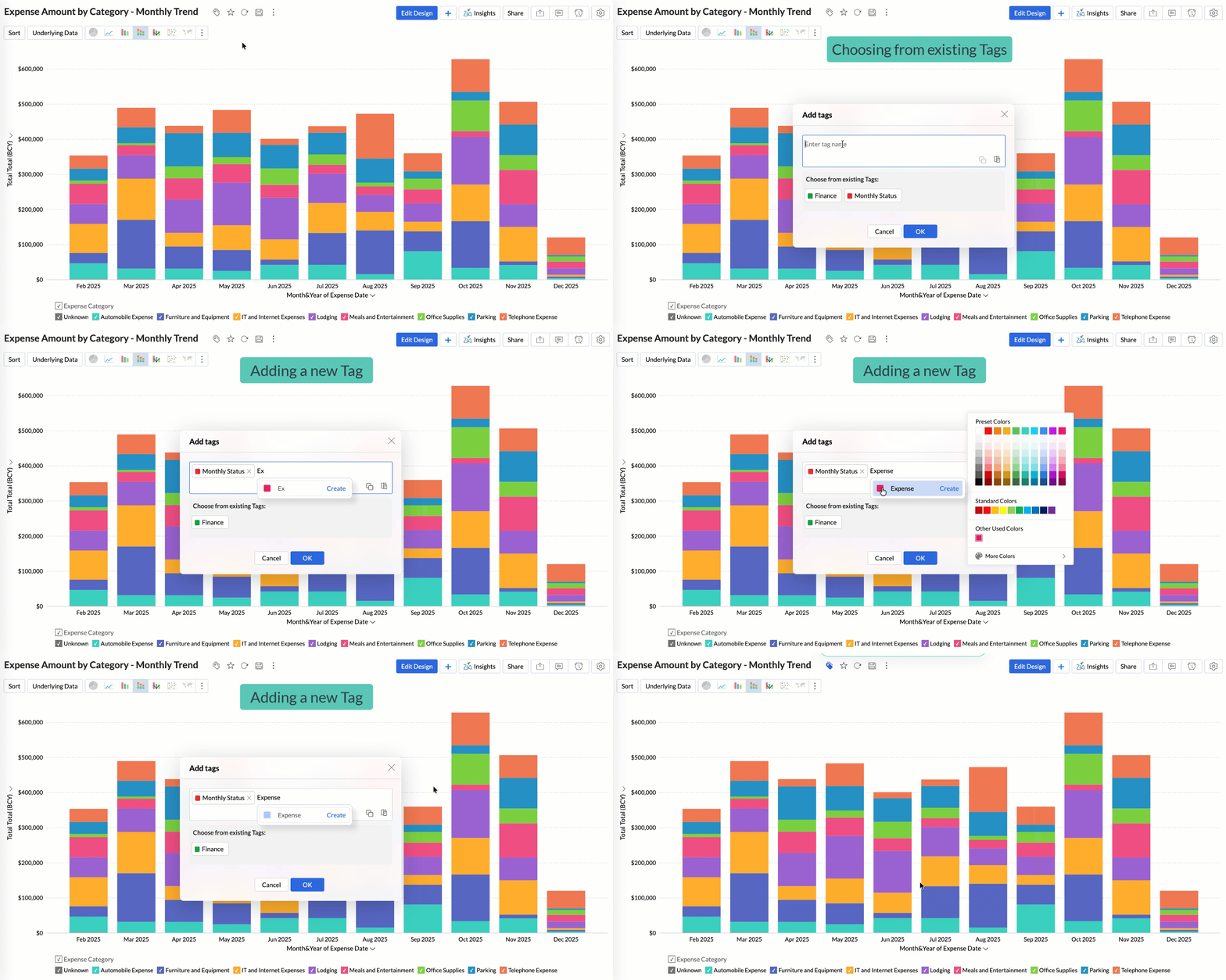
Quickly filter and find the right reports and dashboards, reduce clutter, and ensure teams always have access to the views that matter most to them.
Learn more.
Global Custom Sort
Custom sort was limited to individual reports previously. With recent enhancements, you can now define the sort order for text data types at the workspace level.
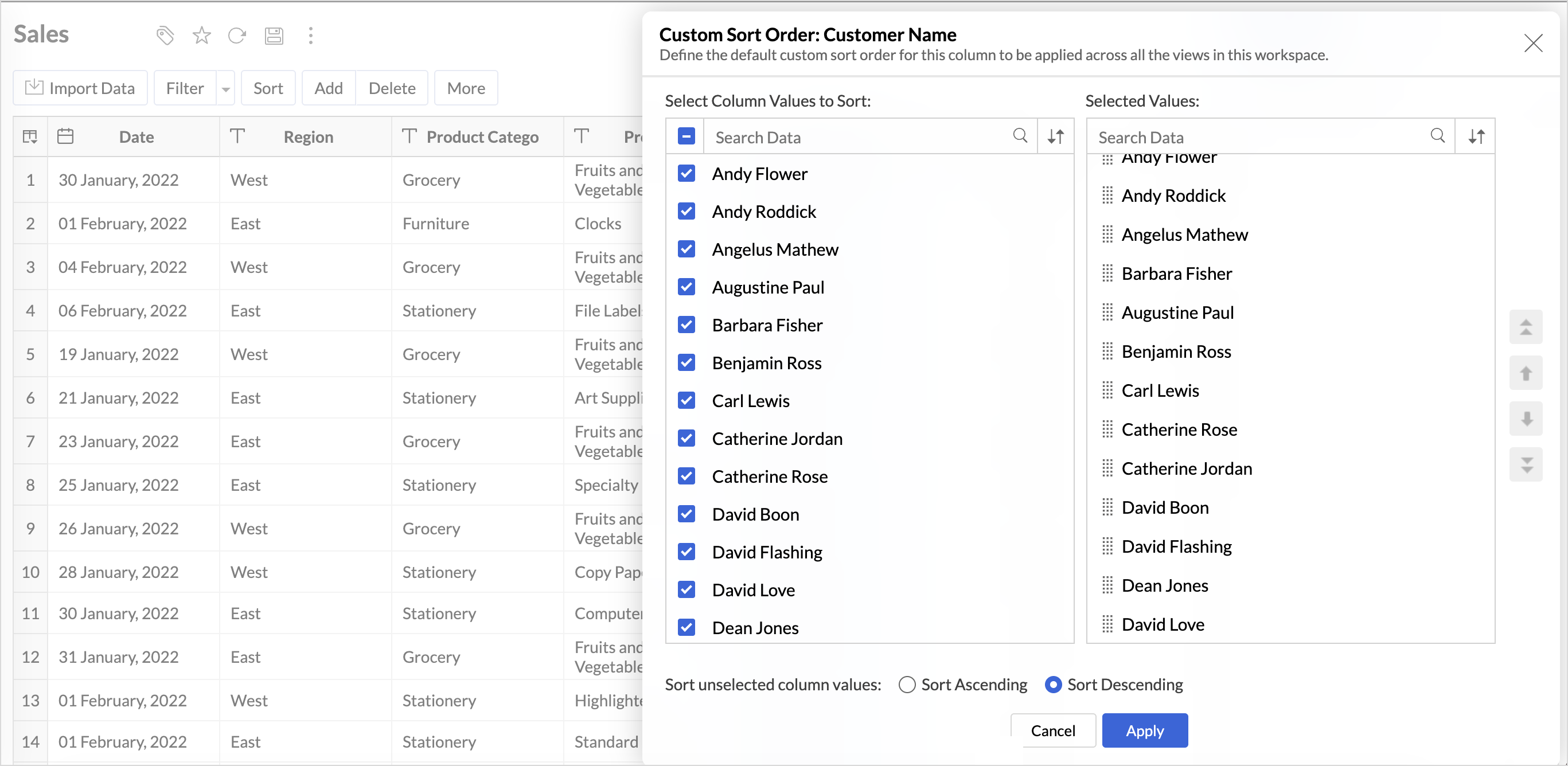
This improvement helps you maintain a consistent sorting across all reports, reduces repetitive setup, and saves time. It also ensures a standardized view of your data throughout the workspace.
Learn more.
Timeframe Selection for Overview Charts
Overview charts now offer flexible timeframe selection, allowing you to focus on relevant periods for deeper trend analysis.
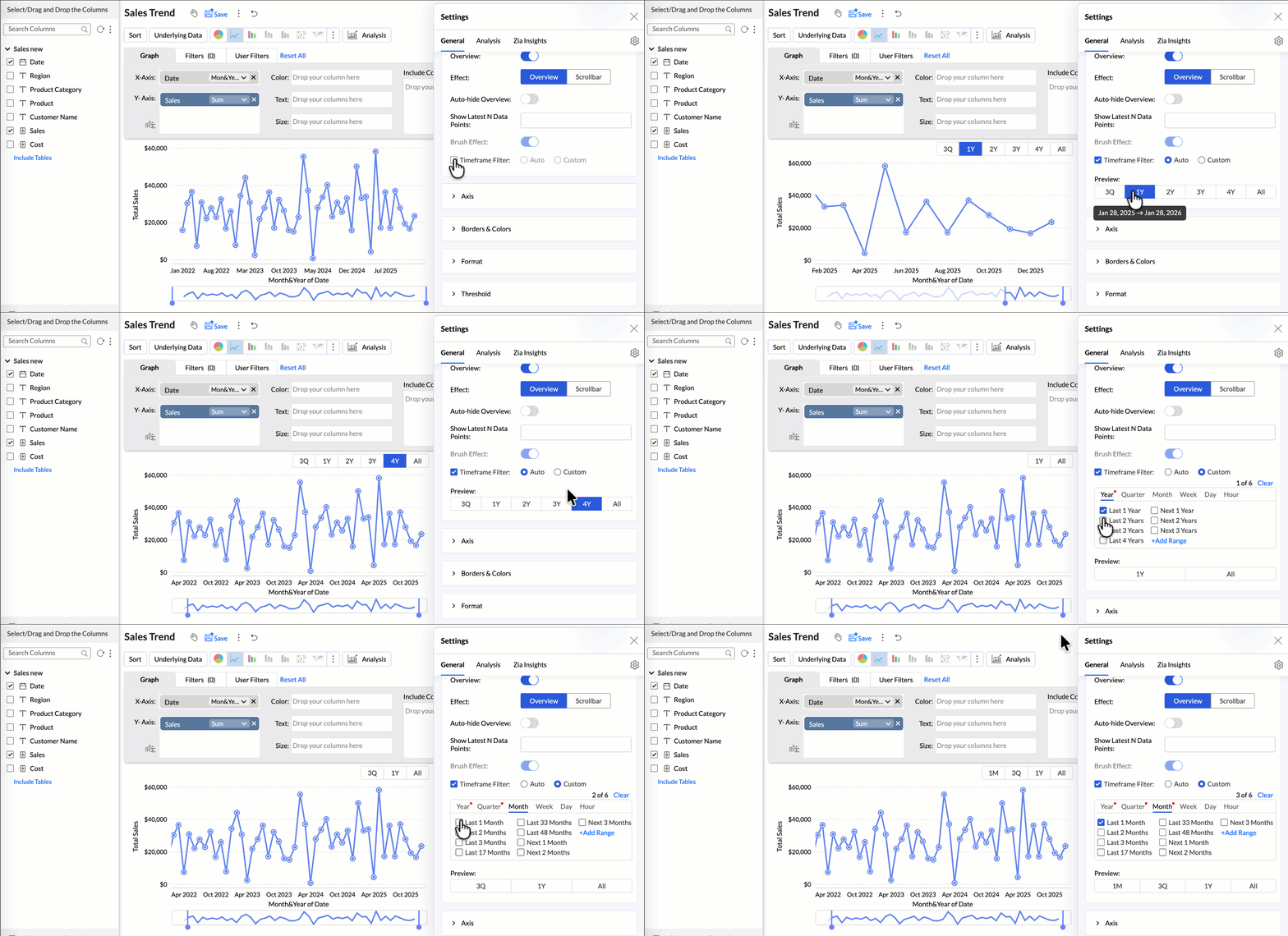
By narrowing the time range, you can better compare performance, identify patterns, and gain clearer insights without distraction from older data.
Learn more.
Customize Zia Insights placement in Dashboards
Choose where and how the insights are displayed, so that they complement your analysis without disrupting your dashboard layout. This gives you greater flexibility to present insights in the way that best suits your audience and reporting style.
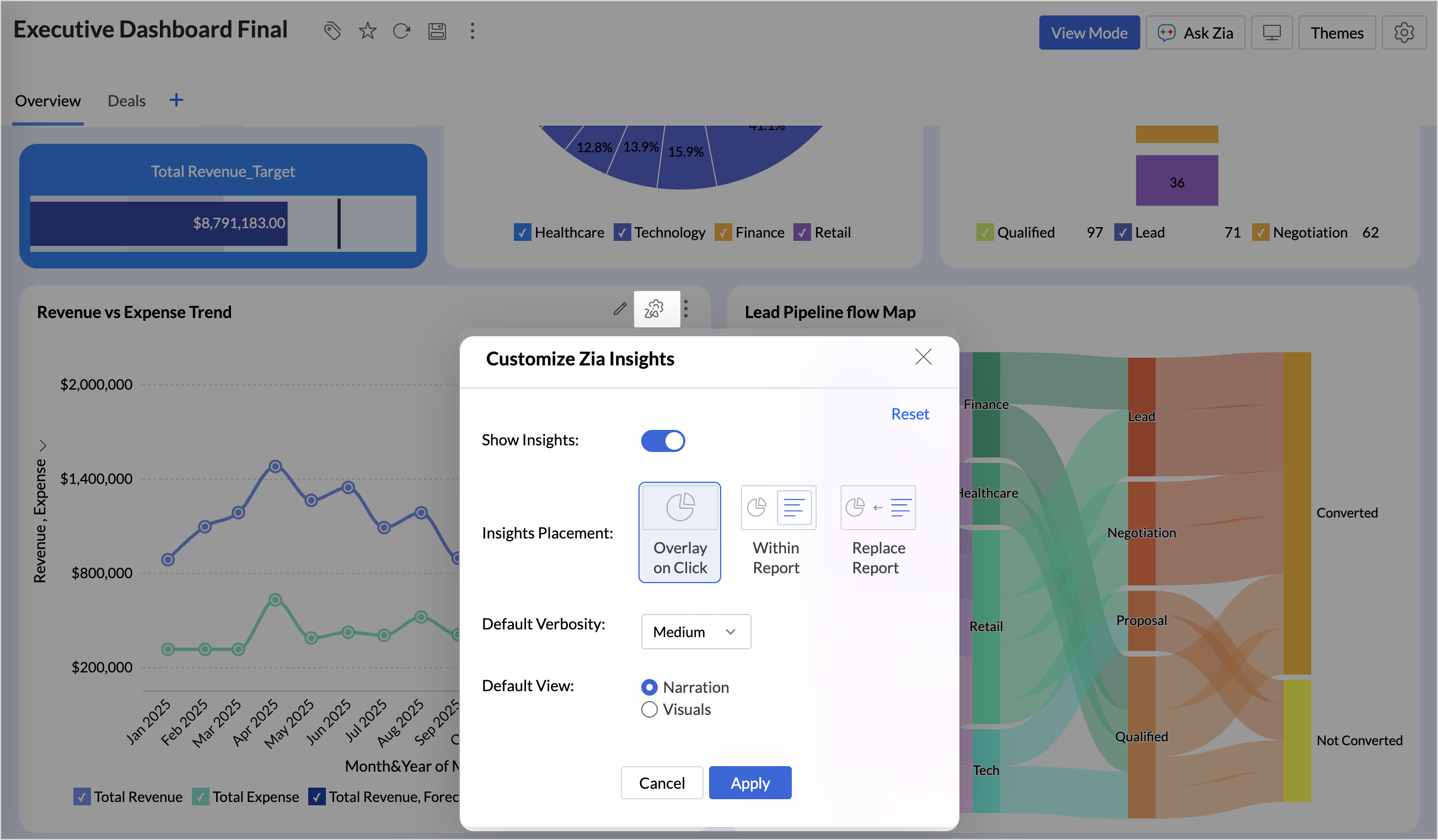
- Overlay: Displays insights in a floating panel that opens on demand, allowing users to review insights without leaving or altering the report view.
- Within Report: Embeds insights directly within the report, enabling users to view data and insights together in a single, continuous view.
- Replace Report: Displays insights as the primary view by replacing the report entirely, offering an insight-first experience focused on conclusions, rather than raw data.
Learn more.
Customize Image Size in Dashboards
Dashboards now support image size settings that let you control how images are displayed.
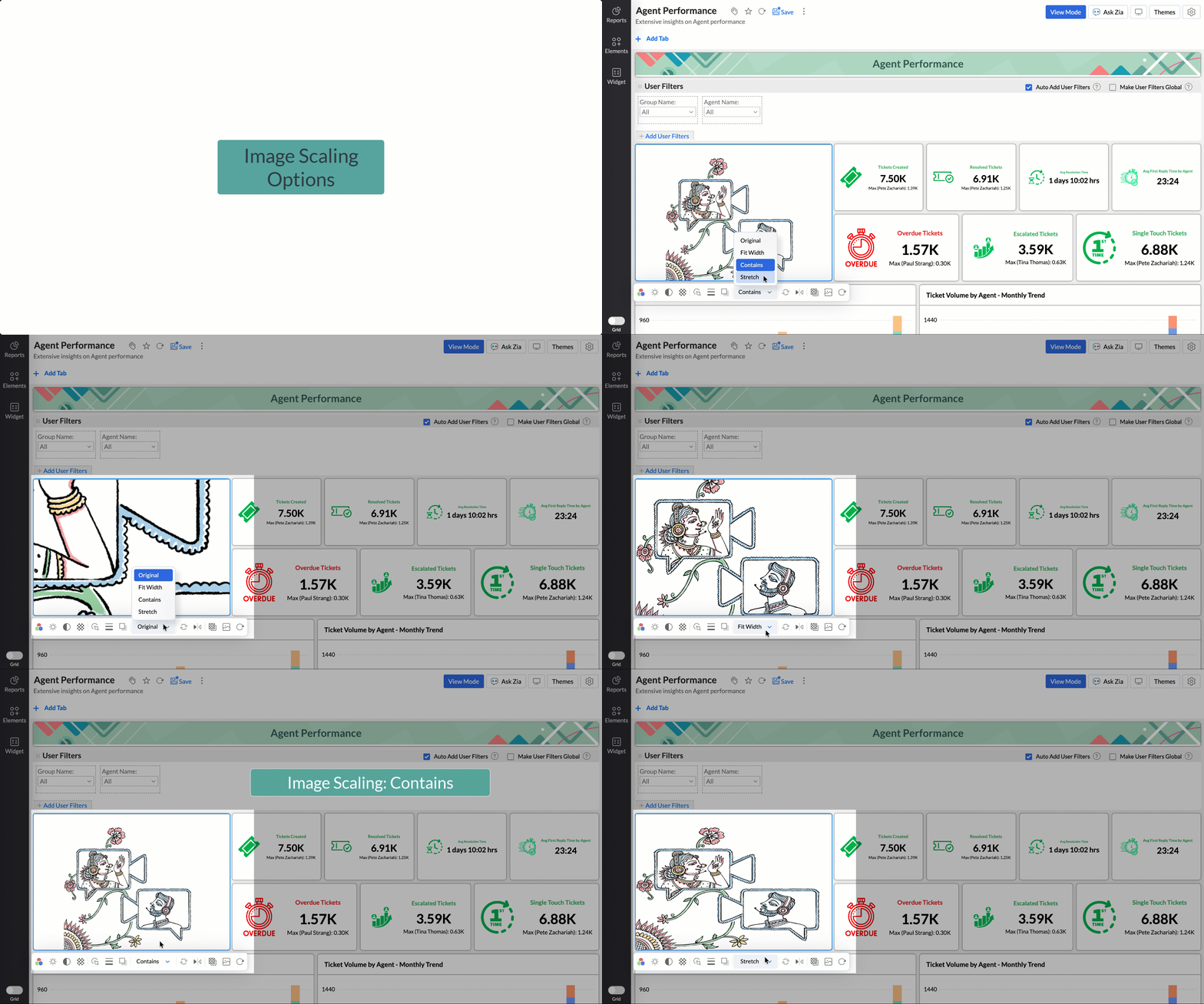
Choose from options like Original, Fit to width, Contain, or Stretch to ensure images align well with your dashboard layout, and thus improve visual clarity.
Learn more.
Tabular View Enhancements
- With this enhancement, all tables linked via lookup columns are now available in the Filter Criteria tab. This makes it easier to share views with users using associated filters, ensuring the specified criteria are automatically applied to the shared report.
- You can now customize lookup columns and the join paths used within Tabular View. This enhancement gives you control over how related tables are connected, helps avoid incorrect or ambiguous joins, and ensures more accurate and reliable data representation in your tabular reports.
New Business App Connectors
We have now introduced integration with two new business connectors Zoho FSM and Magento.
Zoho FSM
Connect your Zoho FSM Data with Zoho Analytics to analyze your field service operations in depth. Identify bottlenecks, optimize resource allocation with interactive reports and dashboards. Analyze revenue, service costs, and customer trends to improve profitability and service quality.
Learn more.
Adobe Commerce (Magento)
Analyze sales, orders, customers, and product performance with ready-made reports and dashboards. Track key metrics like revenue trends, average order value, and top-selling products. Gain insights into customer behavior and regional sales patterns. Make faster, data-driven decisions to optimize store performance and growth.
Learn more.
These updates bring enhanced functionality and improved workflows. Explore them in your Zoho Analytics workspace now!
Recent Topics
A few suggestions for Zoho Books
Hello. I've been evaluating Zoho Books for a small law firm practice. The interface is solid and I like the integration of accounting and time tracking, which is hard to find among cloud based services. I have a few suggestions that would be very helpful in determining whether we can adopt Zoho Books: 1. Be able to assign bills to clients/projects. Quickbooks desktop allows this and is very helpful in keeping track of bills that haven't been paid, but will be invoiced to clients as an expense. Creating
Book project costs to tasks
Hi all, New to zoho but far from new to this sort of platform. I've been scouring the web for a suitable platform for my growing business. I'm currently using Xero and WorkFlow Max but it lacks a key need. I signed up to zoho projects and books to test
Project expenses in Zoho Books
Just the way timesheet is used to calculate labour cost for a particular project, how do i record other expenses against a project such as materials and consumables used for the project? So that under report, I can view the total amount expended on each
Supplier Purchase Orders applied to a Project
We are finding it difficult to decide the best way track project expenses in Zoho books and would like to know how other users are handling this task. We provide Professional Services and engage 3rd party Suppliers on most projects and provide them with
Anyone using Books to track Project Profitability? If so, I could use some guidance
Hello Zoho Community. I am a recent subscriber to Zoho, and its part of an ongoing evaluation. My company (and my clients) have extensive project-tracking needs. The Projects module seems to be good from a project management standpoint, but I am perplexed
Deluge Error: "Data type of argument of function 'get' did not match required type [BIGINT]" when working with Lookup fields
Hi everyone, I’m facing an issue in Zoho CRM Deluge while working with lookup fields. Setup: Module: Monthly Bills Field: Customer (Lookup → Accounts) Module: Laundry Orders Field: Laundry_Account_Name (Lookup → Accounts) Field: Expected_Revenue (Currency)
Opt-out from mailing list means can't email at all??
It seems that if a contact unsubscribes from a mailing list the only way to email them is to uncheck the email opt-out box first, then re-check after the email has been sent. I've been through a chat with support and they confirmed this. This seems bizarre. Many of my clients don't want to receive a monthly newsletter but they definitely want to be in email communication with me, often on a daily basis. Any thoughts out there?
Email Opt Out Question
Has the problem where if a customer is emailed opt out prevents you sending standard emails? For me this feature is simply to stop any email marketing and should not block people from receiving emails via Zoho mobile, which makes no sense.
Zoho TeamInbox stuck / unusable – possible orphaned organization?
Hi all, I’m running into an issue with Zoho TeamInbox under Zoho One Trial and wondering if anyone has seen this before. We’re trying to set up a shared inbox for orders (orders@), but TeamInbox appears to be in a broken state: • The app does not load
Audio transcript not working in Zoho notebook
Greetings all! I'm enjoying the Zoho notebook as I tested out over other notebook applications. I would really love the audio transcripts to work as that would save us a lot of time so that we can utilize the notes from an audio recording. Currently when
Re: Application Architecture in Zoho Creator — A Platform-Specific Deep Dive
A recent community post on application architecture made some excellent points about planning architecture early in Zoho Creator projects. The core message is right — Creator applications have a habit of growing organically into maintenance nightmares,
Schedule Timeout 5 minutes vs. stated 15 minutes
I am running into a function run timeout error after 5 minutes for my schedules. The Functions - Limits documents states it should be 15 minutes: Functions - Limits | Online Help - Zoho CRM. What should it actually be? Due to the 5 minute timeout, I'm
Cliq iOS can't see shared screen
Hello, I had this morning a video call with a colleague. She is using Cliq Desktop MacOS and wanted to share her screen with me. I'm on iPad. I noticed, while she shared her screen, I could only see her video, but not the shared screen... Does Cliq iOS is able to display shared screen, or is it somewhere else to be found ? Regards
Placeholders in Ticket Templates
We should be able to use placeholders in ticket templates. When we create a new ticket, our description field is shown to the client in the email they receive. It would be very handy to be able to personalize that description field in our ticket templates to pull in the name of the client that the ticket is for. Using them in the subject field as well, so we can auto populate Account Names, etc.
Favorite Views list sort order?
Is there a way to rearrange the Favorite Views list?
Will I see emails sent via campaigns in CRM?
It would be useful for people to be able to see emails sent via campagins in Zoho CRM is that possible?
Introducing Product Catalog in Bigin
Greetings, I hope all of you are doing well. For many small businesses, sharing products and collecting customer interest often involves multiple tools, manual follow-ups, or even building a full ecommerce website. To address this challenge, we're excited
Products in Email Template
I’m a little confused as to how to add the listed products, from within a specific deal, to an email template. I want to generate said email template when a deal reaches a specific stage and include the products that have been selected for the deal in
Option for - CSV Export from Pipeline Deals by Stage (Including Products, Companies, and Contacts)
I would like to know when we will be able to export a simple CSV file from pipeline deals, with the option to select a specific stage within the pipeline. This export should include data for products, companies, and contacts, all in a single view. For
Zoho Billing Partial Proration...
Hi, In Zoho billing, we offer upgrades, downgrades, suspends, and resumes. We use online payment for most subscriptions, but have only a few that are offline, but we treat them the same either way.. We prorate only parts of these changes.. Right now zoho
Announcing Zoho Sheet desktop app for macOS and Windows (Beta)
Hello Sheet users, We know you’ve been waiting for this one. It has always been the top priority on our roadmap to provide a single native desktop app for macOS and Windows that works both online and offline. Today, we are excited to announce that the
What is the maximum length/size of a presentation on Apple TV?
Hello, I have a presentation here that I regularly show on Apple TV. It’s always the same presentation, which keeps getting longer and more extensive over time. Almost every slide contains a graphic or photo that takes up the entire slide. That means:
CRM Notes
Hello, We want to add a Note to the Contact record when a Note is added to a Case or Deal. I wasn't able to do this using a workflow, so I tried using Zoho Flow, but that didn't work either. Does anyone have a suggestion on how we can accomplish thi
Zoho Books | Product updates | April 2026
Hello users, Welcome to our April 2026 product updates roundup! Highlights include profit margin for sales transactions, insights in reports, recording deposits from undeposited funds in banking, and faster production workflows with improved assembly
Sorter View No Longer Works Properly
Today I realized that sorter view no longer works properly. I believe just yesterday, I was able to drag a slide or a group of slides and move it/them to the place I want to move it/them to. While I was dragging, I got a visual feedback of where I could
Ignroe_filtrers and drill through
I have two charts, where one is connected to the other using drill-through. The issue is with the second chart (the drill-through target). It contains an aggregation formula that uses the ignore_filters function. Under normal conditions, the formula works
Installation error: Zoho Books Extension in Zoho Bookings
Dear Zoho Support Team, I am reaching out for assistance with an integration issue that I believe is related to a recent change in my subscription model. Background: I initially started with individual subscriptions for Zoho Sites and Zoho Bookings. To
zoho creator panel add formula
Hello. I'm using zoho panels which works good for me but i need to add an extra calculation the predefined sum function provided by zoho. not sure if this is possible? The code zoho is generating for the sum is as follows; <text margin='0px' padding='0px'
Kaizen #238: Fetching Employee Data from Microsoft SQL Server into Zoho CRM Using Queries
Hello everyone! Welcome back to the Kaizen series! Many organizations manage workforce data such as employee designations, contact details, salary bands, and joining dates in an HRMS backed by Microsoft SQL Server, while their sales teams work in Zoho
Du prompt à la production : comprendre le fonctionnement du MCP
Le Model Context Protocol (MCP) est un protocole ouvert qui standardise la manière dont les applications se connectent aux modèles de langage (LLM). En termes simples, le MCP est le « USB-C des agents IA » : une interface universelle qui relie l’intelligence
Add Flexible Recurrence Options for Meeting Scheduling in Zoho Cliq (e.g., Every 2 Weeks)
Hello Zoho Cliq Team, We hope you are doing well. Currently, when scheduling a meeting inside Zoho Cliq, the recurrence options are limited to Daily, Weekly, Monthly, and Yearly. There is no ability to set a meeting to occur every X weeks — for example,
filter on sheets mobile (iOS, iPadOS) does not work
re-posting this as a question because reporting as a problem netted zero responses... I have this issue on every spreadsheet, whether imported or created natively in Zoho Sheets. I can use on desktop without issue: but on iOS the filter dropdowns are
Inactive License for free account.
I recently upgraded my Cliq subscription not my team (on the free version), are unable to login to their accounts. The error message received is Inactive License Looks like you have not been covered under the current free plan of users. Please contact
Zoho Books recurring invoicing link to a Zoho CRM Deal?
With the Zoho CRM Finance Integration setup, normally when creating an invoice via Zoho CRM Finance Integration on a Deal, it creates the invoice in Zoho Books with the CRM Deal *Potential link for that invoice. Alternatively, if you create the invoice
No background for video recordings, no playback speed, can't even playback longer recordings - have to download…
Hi. We utilize heavily video messages on Slack, but wanted to migrate to Cliq with Zoho One, however very basic yet very frequently used feature is missing: backgrounds for video recordings and playback speed. We were not happy with Slack's 5 minute limits
Introducing PDF conversion in Deluge
Hello everyone, We're pleased to introduce built-in PDF conversion capabilities in Deluge with the launch of the convertToPDF task. As PDF is one of the most widely used formats in professional environments, this task helps streamline document generation
Changing naming convention for Estimates
Hi there, How do I customise the naming of the filenames for estimates when sending them? Currently they are named literally just ES11.PDF or whatever the number of the estimate is. There is no Company name, description of the work, customer name, date
Email templates for estimates
Hi there, When I send an estimate the option to choose a template appears. However it is common to need to make some minor personalizations and modifications to the email before sending ie. adding a second person to the greeting, or adding a small note
How to transfer uploaded files from Zoho Survey to external systems?
Hi everyone, I'm currently integrating Zoho Survey with an external system and have run into a limitation I haven't been able to solve yet. I'm using webhooks to send submitted survey data (JSON) to my external API, which works perfectly for all standard
Editing Estimates
Hi team, How do I delete line items in an estimate when editing it? I can't see any option to do this - no X, no trashcan, no drop down... And how do I revert to the original estimate after cloning? I cloned to see if the option to edit were disabled
Next Page