Zoho Payroll: Product Updates - June 2025

Zoho Payroll: Product Updates - June 2025

This June, we’re taking a giant step forward. One that reflects what we’ve heard from you, the businesses that power economies.

For our customers using the latest version of Zoho Payroll (organizations created after Dec 12, 2024) in the United States, we’re excited to introduce the Professional Plan, shaped by some of your most requested features. With multi-state support and multiple pay rates for an employee, you now have more control, more flexibility, and more confidence with every pay run. And we didn’t stop there.

From additional forms in India to smart enhancements in the UAE, every update this month has been thoughtfully built to simplify the way you manage your payroll.

Multi-State Payrolls (US)

If your employees work across multiple states in the US, payroll shouldn't get any complex. Now, with the release of the new professional plan, Zoho Payroll supports work locations of employees in all the U.S. states, all while staying compliant with each state’s local laws and tax requirements.

We calculate and withhold federal, state, and local taxes from employee wages and account for employer contributions such as Social Security, Medicare, and State Unemployment Insurance. These obligations are tracked and reported accurately, so your filings reach the right agencies on time.

We have also incorporated reciprocity agreements into our system. Should the employee reside in one state but work in another, you can configure to apply the reciprocity agreement, when applicable, to ensure that they will be taxed only in the state of residence.

Multi-state payroll is available in the Professional plan of Zoho Payroll. 


Multiple Pay Rates for Employees (US)

Some employees might do more than one job in your organization. Their pay should reflect the different roles they take on. For example, consider an employee who works part-time as a customer support associate and also handles weekend IT maintenance. You pay them $20/hour for support duties and $35/hour for IT tasks. 

With this feature in Zoho Payroll, you can now associate multiple pay rates to an employee. Each rate is based on the specific role they perform. When it's time to run payroll, you can include the hours worked under each role of an employee. Learn how to add multiple pay rates

With multiple pay rates in Zoho Payroll:
  • Both roles and corresponding rates can be added to the employee’s profile.
  • During payroll processing, their pay is calculated based on the hours worked in each role.
This feature is available in the Professional plan of Zoho Payroll.


Introducing Custom Roles (US)

Few users of Zoho Payroll  might require access to all the data in your Zoho Payroll organization. Others might need tighter control and specific access based on job responsibilities. That’s where custom roles come in.

Using custom roles in Zoho Payroll, you can now create roles beyond the default ones. Choose exactly what each role can view, create, edit, or delete—from employee pay details to tax information. You decide who needs access to what, and we make sure it stays that way.

 For example, you can create a role like Senior Financial Reporter with view-only access. That person sees only what’s relevant to their job, nothing more.

Custom roles are available in the Professional plan of Zoho Payroll.


Reporting Tags for Smarter Payroll Insights (US)

When your payroll grows, so does the need to track how money flow across your business. With reporting tags in Zoho Payroll, you can now organize payroll data using custom labels (e.g., work shifts).

You can assign these tags to employees and filter payroll reports based on them. This gives you a clear view of where your payroll costs are going. Learn how to create reporting tags

Reporting tags are available in the Professional plan of Zoho Payroll.

Manage Documents (US)

From employee contracts to company-wide tax filings, payroll involves a lot of paperwork. Now, with the Documents feature in Zoho Payroll, you can securely store and organize both employee-specific and organization-level documents—all in one place.

You can upload employee specific documents, such as ID proofs, offer letters, or salary revision letters. For broader needs, you can add and manage organizational documents like company-level compliance records. Learn how to manage documents 

This feature is available in the Professional plan of Zoho Payroll.


Bonus Payroll (US)

Whether it’s a year-end bonus or a performance-based reward, bonus payroll gives you the flexibility to issue one-time bonuses independently of your regular schedule. There’s no need to specify a pay period, so you can reward employees when the moment calls for it. 
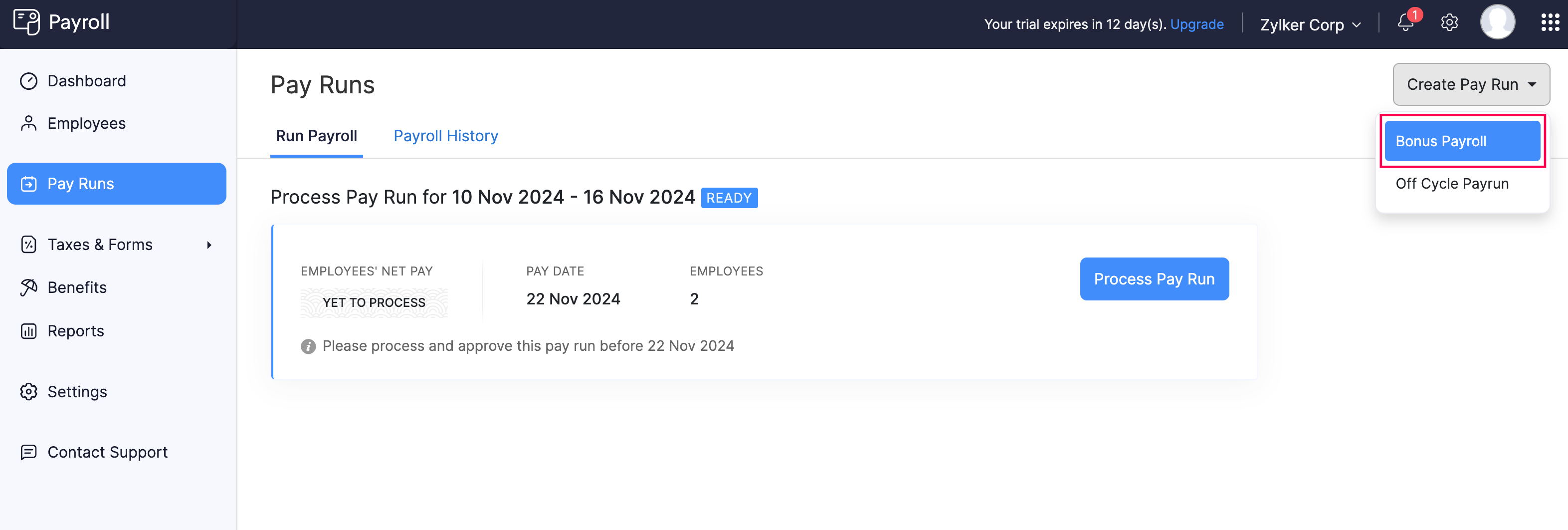


Off-Cycle Payroll (US)

There may be situations where certain payments need to be processed outside the regular payroll schedule. Off-cycle payroll allows you to disburse such payments, whether for corrections or time-sensitive disbursements that require immediate attention based on the pay period you specify.


Both Bonus and Off-Cycle Payrolls are available in the Professional Plan of Zoho Payroll.

Introducing Approvals for Pay Runs (US)

In Zoho Payroll, approvals are built into the way your team works. Based on the roles and permissions you assign, some users will see the option to submit a pay run, while others with the right access can approve it. This helps make sure that pay runs are double-checked and only processed after the right person approves them.

This feature is available in the Professional plan of Zoho Payroll.

Instant Bank Account Verification for Direct Deposits with Plaid (US)

While configuring Direct Deposit — used to transfer funds directly to your employee bank account and make tax payments to relevant tax authorities — you can now almost instantly verify your bank account by securely logging in via Plaid. It’s quick, secure, and designed to help you get started with direct deposits more efficiently.

Download Form 16 with Form 12BA (India)

Form 12BA is a statement that lists perquisites and other fringe benefits provided to an employee in addition to their regular salary. If your organization has early access to upload Part B of Form 16 in Zoho Payroll, you can generate and download Form 16, which includes Form 12BA as page 3 of the document.

Other Enhancements

Origin Country Sync (All GCC Editions): While syncing employee details from Zoho People, you can now sync the origin country of employees as well. 

Alrajhi Bank Advice Format (KSA): You can download bank advice to manually transfer the salaries to your employees’ bank accounts in the Alrajhi Bank format.


That's a wrap for now! We are always eager to hear your suggestions so we can help you do payroll better. Feel free to share them in the comments below.

If you need any assistance, please write to us at support@zohopayroll.com, and we'll help you. Stay tuned for more updates from Zoho Payroll.

With a shared purpose,
The Zoho Payroll Team


    • Sticky Posts

    • Zoho Payroll | Quarterly Product Updates For 2024

      As we navigate through the ever-changing payroll landscape, we bring you the latest updates that span the first quarter of 2024, tailored to meet the diverse needs of employers and employees in India, the UAE, and the US. From useful integrations to refined
    • Introducing Academy 🎉: your go-to hub for all things payroll

      Hello! We're thrilled to launch our newest payroll resource hub - Academy by Zoho Payroll [for India] - the information repository where you can go to learn everything about payroll. Introducing Academy by Zoho Payroll Why did we build Academy? Payroll
    • Recent Topics

    • Upload ticket attachments via Drag-&-Drop

      Hello, if you want to upload a file to the ticket attachment you need to click the button and use the file browser to select and upload the desired file. In many cases, it would be much more efficient if you could simply drag the file to the browser window...
    • Can we disable add to cart in Zoho Commerce?

      Hello, Our sales happen on the phone. During the call the customer is directed to our website to inspect the products together with the sales rep. So we need a way to present our inventory. I figured Zoho Commerce is a good fit for this use case. However
    • Introducing WhatsApp integration in Bigin

      Greetings! In today's business landscape, messaging apps play a significant role in customer operations. Customers can engage with businesses, seek support, ask questions, receive personalized recommendations, read reviews, and even make purchases—all
    • Issues with Zoho Sheet in Mac

      I have downloaded the Zoho App from App Store but It is failing to Save As, Open & Download Operations. App Store
    • Zoho One account closure vs deactivation

      I wonder what are the best practices and guidelines around deactivating vs deleting Zoho accounts in organisations? Any practical considerations?
    • Global Search placement in the new UI

      Having a hard time with the global search placement in the UI redesign. Surely I can't be the only one. Previously global search placement was perfect. A bar at the top/center of the page. Exactly where you would expect it to be. Since the new UI has
    • Role Management

      I am creating an analytics dashboard for a company that will be utilized by its various departments such as Finance, Marketing, and HR. My goal is to design the dashboard with separate tabs for each department. Additionally, I plan to implement role-based
    • Schedule Zoho CRM reports only on Business Days

      Hello, Is it possible to schedule reports only on business days ? We currently get daily sales reports on weekend which has no value since the sales team doesn't work on weekends. Thanks
    • How to install Widget in inventory module

      Hi, I am trying to install a app into Sales Order Module related list, however there is no button allow me to do that. May I ask how to install widget to inventory module related list?
    • Cannot see Application from Lookup field

      Hi all, I am trying to access data for an application on our account via a lookup field; however, the application doesn't appear in the dropdown at all. Can anyone shed any light on this, please? I have asked Zoho support; however, they're just as confused,
    • How to track a contact or customer's past product purchases in Bigin Premiere?

      Hello there. I am the sole user of Bigin for a small company (chess club), and would like to track current and past purchases made by a contact (player) or company (family which includes the player). Players may register for multiple tournaments, take
    • LENTITUD EN RECIBIR MAIL

      Buenas tardes, Estamos experimentando lentitud en la recepción de correos electrónicos.
    • Items should display under specific warehouse

      I have configured the multi warehouse but it show all the items under all warehouse which is not correct according to our business logic, so i want that items should only display under that specific warehouse not under all the warehouses not even with zero quantity. Some items should be common but not all so is there any option for that purpose so i can specific the items to its warehouse. Regards
    • Tracking Non-Inventory Items

      We have several business locations and currently use zoho inventory to track retail items (sales and purchase orders). We were hoping to use zoho inventory to track our non-inventory items as well (toilet paper, paper towels, etc). I understand that we
    • Partial refunds

      I am trying to process refund for a one item invoice, however the refund is partial: i am getting this error while creating credit note, can anyone share some wisdom about this
    • Best practice importing items and matching assemblies

      Hi, I was wondering what would be the best practice to import items and composite items (assemblies) From my backup, what should I import first? The items or the composite items? I am on Zoho one, using inventory and books. Kind regards, Sabine
    • Bulk Fill In & Edit PO/Bill/SO/Invoice

      Hello, I am adding stock in bulk on a PO, the system is automatically populating the Rate (price) and Tax from the item data. Problem is that the bill rate is different from the rate on the item data, so I have to manually erase each and enter the price.
    • Separate Items & Services

      Hi, please separate items and services into different categories. Thank you
    • Items Below Reorder Point Report?

      Is there a way to run a report of Items that are below the Reorder Point? I don't see this as a specific report, nor can I figure out how to customize any of the other stock reports to give me this information. Please tell me I'm missing something s
    • Allocating inventory to specific SO's

      Is there a way that allocate inventory to a specific sales order? For example, let's say we have 90 items in stock. Customer 1 orders 100 items. This allocates all 90 items to their order, and they have a back order for the remaining 10 items which could
    • Cancelled Transfer order problem

      Hello, We've canceled a transfer order, and we can't add the related items to a new Transfer Order. The system tells us that the bin doesn't have the required quantity, but when we check the item, it indicates that there are 2 units in the bin. It also
    • Creating a Chart from a Report

      In Zoho Analytics, is it possible to create a chart from a Pivot View report? We are looking to use Zoho Analytics to replace Excel for Sales reports and would like to be able to show both the table and the chart together.
    • Client Portal ZOHO ONE

      Dear Zoho one is fantastic option for companies but it seems to me that it is still an aggregation of aps let me explain I have zoho books with client portal so client access their invoice then I have zoho project with client portal so they can access their project but not their invoice without another URL another LOGIN Are you planning in creating a beautiful UI portal for client so we can control access to client in one location to multiple aps at least unify project and invoice aps that would
    • Email Insights included in Bigin emals are marked as SPAM everywhere

      Today I noticed that email recipients who use Office 365 never receive emails sent from Bigin. Further examination showed that all Email Insights links in email headers are marked as spam/phishing by Office 365. Example screen included. The problem is
    • Data Import | Zoho Analytics Custom Query Window Size

      Please increase the window size for the Custom Query Data Import. It's impossible to work with such a small query window.
    • Name changed in settings for mailbox but still not changed when typed in To field

      In the email account secretary@ i have updaetd the new staff members details but the old members name still appears when I type secretary@ in the To field. I cant work out where Zoho is finding the old name from. I have deleted the browser cache. If I
    • Cannot add my name to my domain name

      I want to have My name@mydomain.com and it says my name is linked to another account already. Please fix it since I do not have another account.
    • Invoice status on write-off is "Paid" - how do I change this to "Written off"

      HI guys, I want to write off a couple of outstanding invoices, but when I do this, the status of the invoices shows as "Paid". Clearly this is not the case and I need to be able to see that they are written off in the customer's history. Is there a way
    • Establishing new Zoho email account on laptop

      Good Morning: I am very long time Outlook business user and decided to try your email service last night and had established an account. I am trying to verify my account; how do I establish my Zoho email account on my laptop? I opened the account with
    • unable to send message reason 550 5.4.6 unusual sending activity

      My email account can't send message. It shows unable to send message reason 550 5.4.6 unusual sending activity detected
    • how to add email to existing organization i w

      I am already registered my organization and i have an email id. I need one more email id but i can't find anywhere .i want the cheapest email id . how to add ?
    • e-mail bloqueado

      Estou com meu e-mail lucas@peplus.me bloqueado, preciso desbloquear para retorno de usos em minhas atividades.
    • zoho labels api not working

      We're using n8n to automte email reply using zoho api. I'm facing issue with label api. I added the required scopes but its not working. i followed zoho api documentation but didn't work. also, where do i find/how do i create zoho oauth token mentioneeed
    • Desk DMARC forwarding failure for some senders

      I am not receiving important emails into Desk, because of DMARC errors. Here's what's happening: 1. email is sent from customer e.g. john@doe.com, to my email address, e.g info@acme.com 2. email is delivered successfully to info@acme.com (a shared inbox
    • Streams/Shared email doesn't show up in windows trident app. It works fine on MAC. Is there any difference between 2 install ?

      I can see streams/share email boxs on my MAC version of trident app but i can't see them in windows version of trident app. Is there any difference between 2 install? I try to find setting but not able to see any setting to add stream/share email boxes.
    • add zoho account

      How to add a zoho mail to previous zoho account? I have two
    • Zoho Desk Mobile App Year-End Roundup - 2025

      Dear Zoho Desk users, Greetings! As you gear up for the festive season, we are excited to share a quick journey into all that is released in 2025! Zia's generative AI capabilities Zia insights can be highly beneficial in helping agents manage daily support
    • Narrative 17: The role of Zia AI in customer support

      Behind the scenes of a successful ticketing system: BTS Series Narrative 17: The role of Zia AI in customer support Overview Zia in Zoho Desk is a layered AI assistant that combines generative AI, prediction, and automation to support agents, automate
    • Domain Transaction

      I have purchased a domain name called trainedworkforce.co.in I made the payment got the receipt but the domain is still not purchased after successful transaction .
    • Ability to Set a Unified Tab Order/View for All Users in Zoho Projects

      Hello Zoho Projects Team, We hope you are doing well. We would like to submit a feature request regarding tab/menu organization in Zoho Projects. Current Behavior: The tab (module) order in Zoho Projects is user-specific. Each user (internal or external)
    • Next Page