Hey Zoho Writer users!
Say goodbye to all your WordPress content publishing woes with Zoho Writer's WordPress extensions. Publish content with all your formatting and images, republish content when you update a document, and more—from a single window in Zoho Writer.
Before we dive into how to post your content to WordPress easily, here's a quick overview of the two types of WordPress blogs and their purposes.
WordPress.com 

| WordPress.org 

|
Simple option for individuals to set up a blog for personal use
| More complex option suited for organizations and professionals
|
Managed hosting is built-in
| You must find and pay for a hosting provider yourself
|
Individuals can easily create blogs and post content
| Admins need to add users to the self-hosted blog
|
Not dependent on any external plugin for posting content
| Dependent on external plugins to set up and post content
|
Zoho Writer offers extensions for both types of WordPress blogs. You can install the extensions for WordPress and WordPress.org from Zoho Marketplace.
How to integrate and post documents to WordPress.org with Zoho Writer
To integrate Zoho Writer with your self-hosted WordPress blog, you need a plugin. You can use our Zoho Flow plugin for a simple, seamless process.
Steps to integrate WordPress.org with Zoho Writer:
1. Install the Zoho Flow plugin in your WordPress.org account.
2. Install the WordPress.org extension in Zoho Writer and complete the authentication process.
Installing the Zoho Flow plugin in WordPress.org account
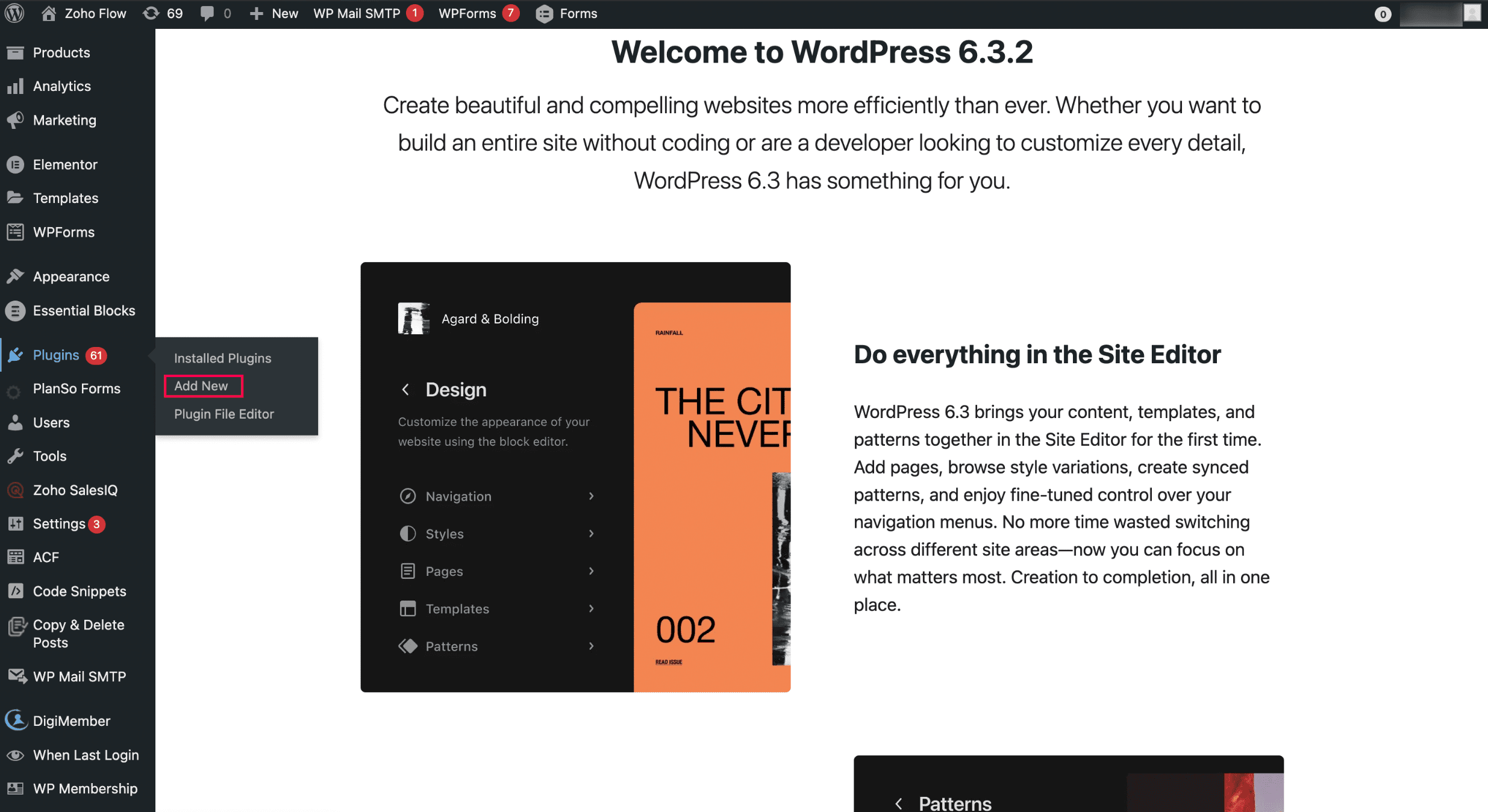
- To install it from the Plugins menu:
i. Open WordPress and click Add New in the Plugins menu.
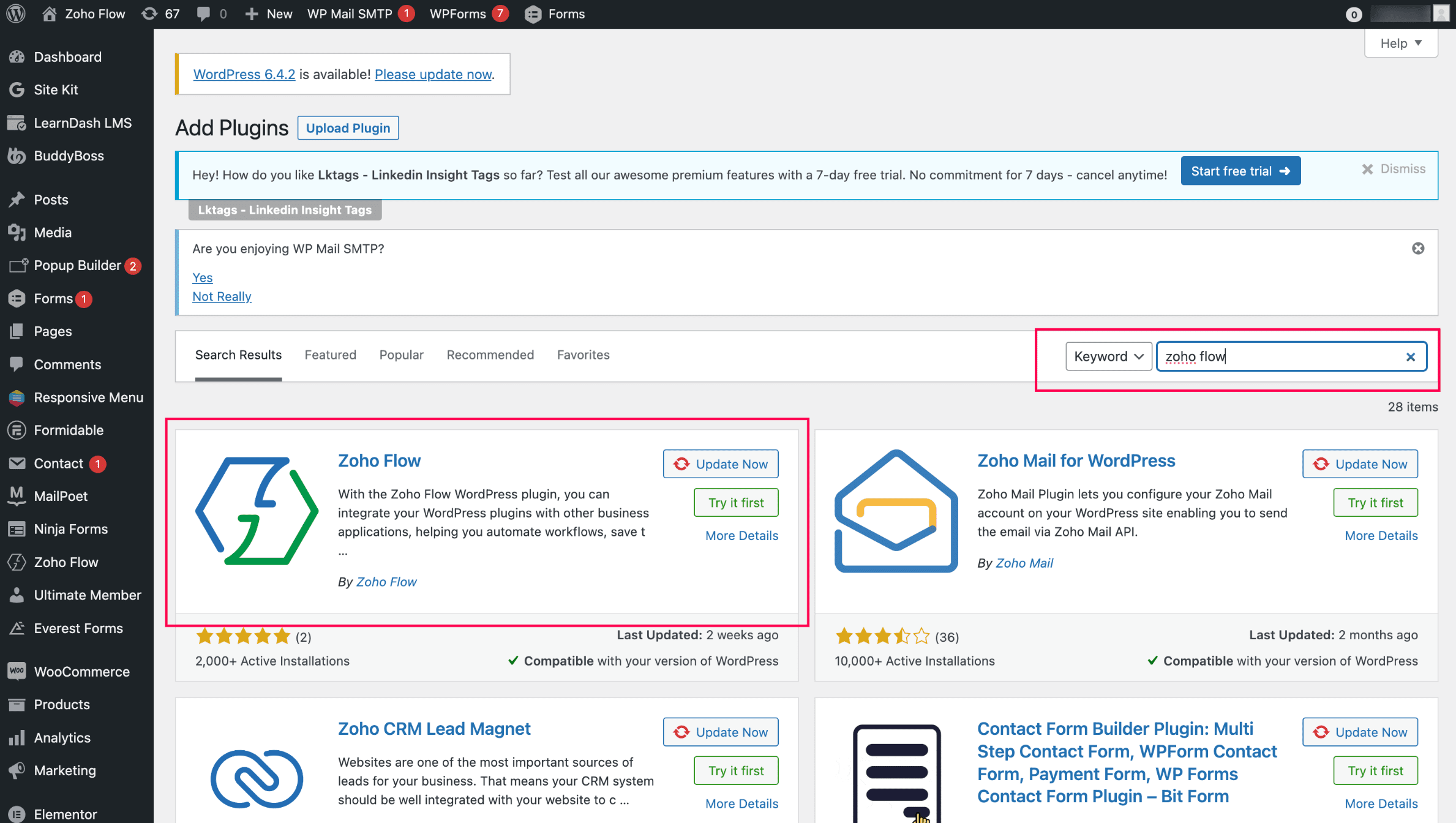
ii. Search for Zoho Flow and click Zoho Flow plugin to initiate the installation.
Installing the WordPress.org extension in Zoho Writer and completing the authentication:
- Install the WordPress.org extension from Zoho Marketplace in Zoho Writer. (By default, it'll be pre-installed for all Zoho Writer users)
- Authenticate the extension with your base URL and API key. (Note: You can authenticate only one WordPress site at a time)
- To generate the base URL and API key, click Zoho Flow in your WordPress site and choose WordPress.org.
Posting content from Zoho Writer:
- Open the WordPress.org extension from the right pane of your document in Zoho Writer.
- Add important metadata to your blog posts, such as title, description, and tags, and choose from a list of categories.
- Click Publish to publish the content.

When posting content from Zoho Writer, SEO-friendly image names will help increase visibility in search engines.

You can customize and change the theme of your WordPress blog from Appearance > Themes in the right side of your WordPress blog. Choose a new design or customize the existing design by clicking the Customize button.
Updating blog content from Zoho Writer:
- Click View Published History in the WordPress.org extension in your Writer document.
- Choose the document version you want to update the content to from the list of options displayed and click Republish Current Version.
Switch to the Zoho Flow plugin from Jetpack and continue posting to your WordPress.org from Zoho Writer.
Try Zoho Writer's WordPress and WordPress.org extension and let us know your suggestions and feedback in the comments or email us at support@zohowriter.com or support@eu.zohowriter.com. You can also add your feedback about the Zoho Flow plugin here. It will help us improve the plugin and smoothen your experience.
Regards,
Team Writer
Recent Topics
Recurring Addons
Hi, I know you can set the pricing interval for addons to weekly, monthly and yearly & set it for one off or recurring, which these are fine as a base addon item. It really would be helpful if when creating a subscription when you add on the addon item
CRM x WorkDrive: We're rolling out the WorkDrive-powered file storage experience for existing users
Release plan: Gradual rollout to customers without file storage add-ons, in this order: 1. Standalone CRM 2. CRM Plus and Zoho One DCs: All | Editions: All Available now for: - Standalone CRM accounts in Free and Standard editions without file storage
Cancellation Fees
Hi, It really would be good if Billing could take subscription management further with cancellations & being able to apply or set a cancellation fee for a plan that is either fixed or prorated. It is not uncommon in subscriptions for cancellation fees
All new Address Field in Zoho CRM: maintain structured and accurate address inputs
Availability Update: 29 September 2025: It's currently available for all new sign-ups and for existing Zoho CRM orgs which are in the Professional edition exclusively for IN DC users. 2 March 2026: Available to users in all DCs except US and EU DC. 24
Zoho Writer Frequently not loading
I've reported this as a problem already but I can't log into my email right now or get onto the main site so you're going to hear about it again here: at least once a week, Zoho Writer will just refuse to load entirely. The main page will load and load
Bulk Associate Tasks/Task Lists to Milestones (Similar to Issues)
Hello Zoho Projects Team, We hope you are doing well. We would like to request an enhancement regarding Milestone management for Tasks in Zoho Projects. Current Behavior: In the Issues module, it is possible to select multiple issues and easily associate
Allow agents to enable or disable notifications from certain departments
Agents who are part of multiple departments receive notifications frequently from across the departments. They may not be actively involved in performing every action in all departments. For example, an agent could be a part of both the sales and support
Unable to produce monthly P&L reports for previous years
My company just migrated to Books this year. We have 5+ years financial data and need to generate a monthly P&L for 2019 and a monthly P&L YTD for 2020. The latter is easy, but I'm VERY surprised to learn that default reports in Zoho Books cannot create
WorkDrive API returning empty response even after placing file in Team Folder
Hi everyone, I am trying to fetch a file from Zoho WorkDrive using a Deluge standalone function in Zoho People. The API call executes successfully using a configured connection, but the response is coming back empty. I have verified the following: The
Address Typeahead Extension for Zoho Books
I installed the Address Typeahead extension for zoho books but when I went to configure it, it said that that version was deprecated. Is there a newer version somewhere?
Transaction Rules & Customer Payments
So I have a situation as follows. We have many clients who are all invoiced on the 1st of each month on a recurring invoice for 1 of 10 plans. This means that almost all payment dates are the same (some people pay late) and that a lot of the amounts are
Can I Integrate ADP Payroll with Zoho Books?
Hi, I am hoping that I can integrate ADP Payroll with Zoho Books so that I do not need to manually input the payroll journal entries. Is this possible? If so, how do I do that?
Zoho Books | Product updates | February 2026
Hello users, We’ve rolled out new features and enhancements in Zoho Books. From Advanced Reporting Tags to the ability to mark projects as completed, explore the latest updates designed to improve your bookkeeping experience. Introducing Advanced Reporting
Darshan Hiranandani : How many participants can join a Zoho Meeting at once?
Hi everyone, I'm Darshan Hiranandani, trying to find out the maximum number of participants that can join a Zoho Meeting at once. Has anyone here used Zoho Meeting for larger groups and can share their experience or knowledge about the participant limit?
Ask The Expert: Deep Dive into Zoho CRM, Desk, SalesIQ, and Campaigns!
Are you using Zoho to power your sales, support, and marketing, and have questions about configuration, automation, or best practices? We have great news: the “Ask The Expert” session is coming to the Zoho Benelux Community! This session is specifically
How to create a new Batch and update Stock via Inventory?
Hi everyone, We are building an automation where a user enters batch details (Batch Number, Mfg Date, Expiry, and Quantity) into a Custom Module. I need this to trigger an API call to Zoho Inventory to: Create the new batch for the item. Increase the
Zoho books Inventory valuation report VS Stock GL value
At one client, we track inventory using composite (bundled) items, and in the system settings we have enabled the option to prevent stock from going below zero. After the year-end physical count and quantity adjustments, we identified a mismatch: Inventory
Zoho Zoom extension for CRM
When meetings are booked through Zoho using the Zoom extension, the Zoom link in the invite is a host start link that contains an expiring ZAK token. The invite should instead use a standard attendee join link or a non-expiring host link - why is this
Setting GC session variable programatically in a website
Hi! Is there a way now to programatically set session variables from a website for a Guided Conversations? The current available methods are dependent on react-native.
Stereo audio
L.S. Is stereo audio supported in Zoho Meetings? I would like to conduct music lessons with Meetings, but the audio needs to be good (if not great!) and stereo, and not too much compressed and such.
Usar o Inventory ou módulo customizado no CRM para Gestão de Estoque ?
Minha maior dor hoje em usar o zoho é a gestão do meu estoque. Sou uma empresa de varejo e essa gestão é fundamental pra mim. Obviamente preciso que esse estoque seja visível no CRM, Inicialmente fiz através de módulos personalizados no próprio Zoho CRM,
Is Zoho Sites still actively being developed?
Hello, Is Zoho Sites still actively being developed as part of the Zoho ecosystem? I noticed that the What's New page (https://www.zoho.com/sites/whats-new.html) does not show any updates since Q1 2025. We were considering migrating our website from Squarespace
Zia should track how customer relationships evolve over time
Here's a feature idea that I've been thinking about The Problem Zia is great at analyzing individual interactions email sentiment, call transcription, best time to contact. But here's what it can't do: tell you how a relationship has evolved over time.
Zoho Surveys
Dear Zoho Support Team, I hope this message finds you well. I am writing to inquire about the availability and documentation for the Zoho Survey API. Background: I am currently working on a project that requires programmatic access to survey data and
Zoho FSM API Delete Record
Hi FSM Team, It would be great if you could delete a record via API. Thank you,
Duplicate Leads Concerns with Round Robin and Lead Approval Process
It is great to have the Duplicate Lead Approval Process, there are a few issues with the process that I would greatly appreciate taken consideration in enhancing. It appears that A Lead comes in Lead owner assigned by the Round Robin Check for Duplicate,
Cliq iOS can't see shared screen
Hello, I had this morning a video call with a colleague. She is using Cliq Desktop MacOS and wanted to share her screen with me. I'm on iPad. I noticed, while she shared her screen, I could only see her video, but not the shared screen... Does Cliq iOS is able to display shared screen, or is it somewhere else to be found ? Regards
Incoming email replies not automatically associating with Deals/Opportunities - Is this possible in Zoho CRM?
Hello Zoho Community, I'm running a travel agency (B2B and B2C) and we've been struggling with what seems like a basic functionality that we cannot get to work properly. Our use case: We send emails to suppliers (hotels, transportation companies) and
Writing SQL Queries - After Comma Auto Suggesting Column
When writing SQL Queries, does anyone else get super annoyed that after you type a comma and try to return to a new line it is automatically suggest a new column, so hitting return just inputs this suggested column instead of going to a new line? Anyone
New Enhancements to Zoho CRM and Zoho Creator Integration
Hello Everyone, We’ve rolled out enhancements to the Zoho Creator and Zoho CRM integration to align with recent updates made to the Zoho Creator platform. With enhancements to both the UI and functionality, This update also tightens access control by
Desk API that can search Merged Tickets
Is there any method that can still search a ticket that was already merged? zoho.desk.searchRecords - doesn't explicitly mention
Issue with "Send Email" from Quotes not loading Email Template data
Hi everyone, I'm currently experiencing an issue when using the "Send Email" option from a Quote record in Zoho CRM. What’s happening: When I go to the Quotes module and select a record, then click Send Email, the attached file (Quote) correctly pulls
Suggestions for Improved Table Management and Dashboard Filter Controls in Zoho Analytics
Dear Zoho Analytics Community, I hope you are doing well. I would like to share a few suggestions based on issues I am currently experiencing while working with visualizations and dashboards. Firstly, when I create a new visualization using the Sales-Order
Introducing Rollup summary in Zoho CRM
------------------------------------------Moderated on 5th July'23---------------------------------------------- Rollup summary is now available for all organizations in all the DCs. Hello All, We hope you're well! We're here with an exciting update that
Zoho Projects and CRM Integration in Analytics
Hi Team, In Zoho CRM, I’ve integrated CRM with Zoho Projects and associated a project within the CRM. The integration is visible under the Deals module. However, I’m unable to find this data in Zoho Analytics. Does anyone know where this information is
Cursor lands on disabled fields when tabbing through forms
As of yesterday, form behavior has changed w/ regard to disabled fields. Previously when tabbing through a form the cursor would skip over disable fields (as would typically be desired). But now the cursor is landing on all disabled fields, in all of
Permission query
we have two permission settings i.e 'user permission ' & 'portal user permission' and both have the same setting that we enable for our users, Now those who have access to user permission can see a button on the pivot table, "regenerate" but those who
Zoho Forms sheet prefil
I've been using zoho sheet prefill for a week and it was working perfectly, as soon as i deleted the particular sheet and replaced it with another one no matter what I do it cant find the record and i get this message. Could you please assist me to resolve
"Create Deal" button should default to the currently selected layout/pipeline
When viewing Deals in Kanban or List view with a specific layout and pipeline selected, clicking "Create Deal" should default to that same layout — not the profile's default layout. Currently it always opens the default layout regardless of context, requiring
Zoho mail admin panel not opening
Next Page