Yes/No field

Yes/No field

Greetings, form architects!


What would you do when you need a simple yes/no answer on your form?

Normally, you add a Radio field.
Type Yes. Type No.

Until now.


The new Yes/No field is purpose-built for binary decisions. It is preconfigured, visually consistent, and designed to get you a clear answer, fast.

Three visual languages, one purpose

What makes this field genuinely innovative is not that it offers yes/no options. 

Not all yes/no questions are the same.

We have recognized binary decisions exist in different emotional and contextual registers and the UI should reflect that.

Some yes/no questions are formal and serious. Others are quick, instinctive, even emotional. So, instead of building one generic yes/no solution, we built three visual styles for meaningful flexibility within purposeful constraints.
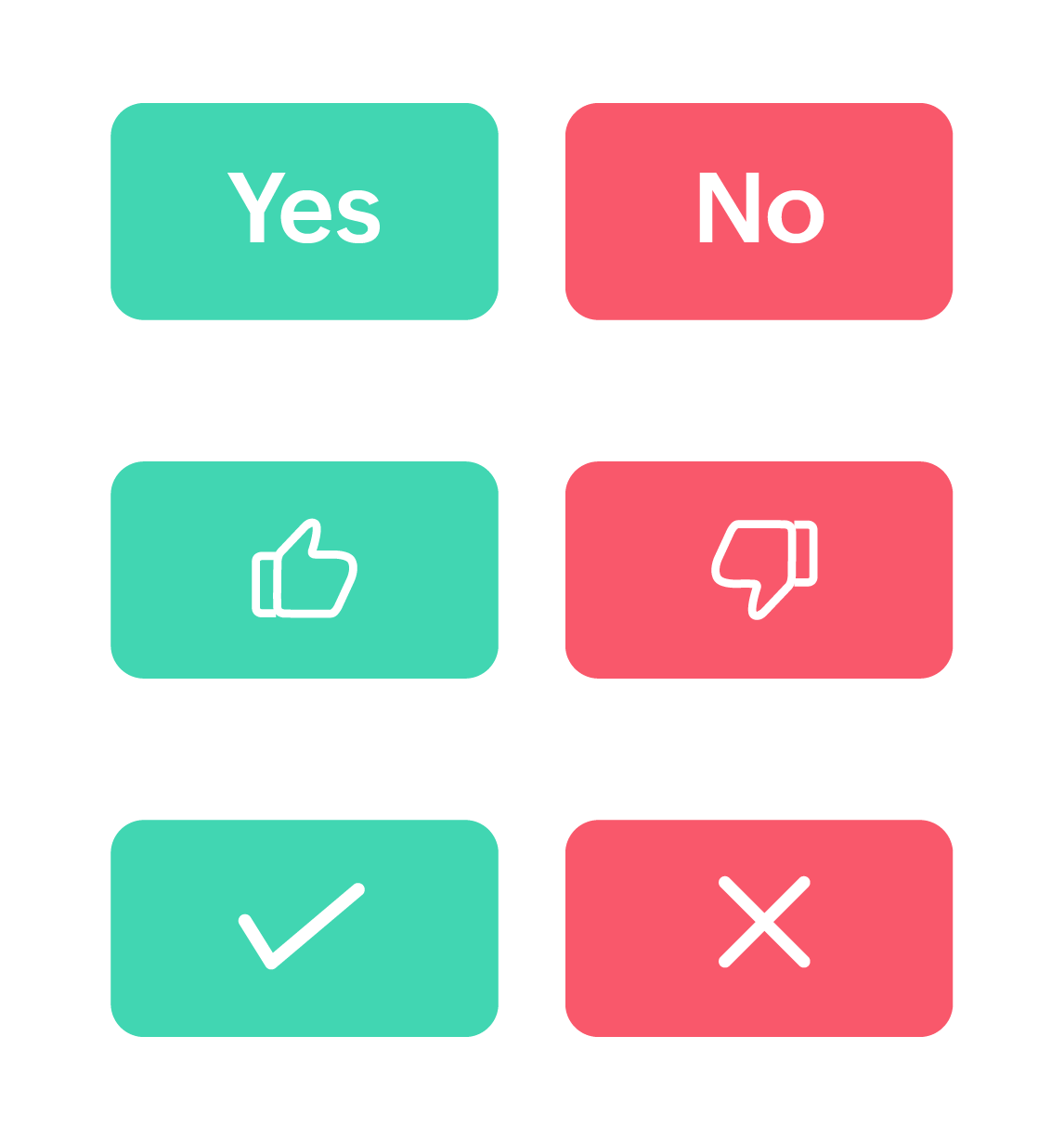

Classic toggle

Text-based, unambiguous, universally understood. When you need respondents to carefully read and consciously commit to a decision, this style delivers.
It's perfect for terms of service agreements or formal approvals.

Like/Dislike icons

Here's where we leaned into something pretty much every social platform has already proven. People respond to visual feedback. The thumbs-up/thumbs-down iconography transcends language barriers and taps into emotional response patterns. When you ask "Was this article helpful?" and show someone a thumbs-up or thumbs-down, you are inviting a feeling-based response, not a manufactured one. It works because it mirrors human gesture.

For forms where you are measuring gut reactions rather than deliberated choices, this visual language outperforms text every time.

Check mark/Cross icons

Check marks and crosses carry decades of conditioning. From grade school papers to quality control checklists, they communicate approval/rejection with zero ambiguity.

These symbols trigger decision-making mode rather than reflection mode. They are action-oriented, which is why they excel in operational and process-driven contexts.

No matter the style you choose, you can rename the labels to anything you want; the meaning remains unchanged. For example, change "Yes/No" to "Approve/Reject," and that meaning carries through whether you are showing text toggles or check mark icons.

Want minimalist, icon-only buttons? You can turn text labels on or off independently.

Beyond surface-level styling

Let's talk about the theme customization capabilities; this is where a field truly shows its sophistication.

You will find granular control over:

  • Separate background colors for labels
  • Independent text/icon colors for each option
  • Border color across all styles

Why does this matter? Because color carries meaning.
For example, the question "How are you feeling today?" can have:

  • Soft green for positive responses (calming, associated with growth)
  • Muted orange for negative responses (attention-drawing without being alarming)

Pro tip: Maintain WCAG-compliant color contrast ratios (at least 4.5:1 for normal text) to ensure accessibility; beautiful and accessible are not mutually exclusive.

Why obsess over something this small?

Let’s zoom out for a moment and talk about why a "simple" yes/no field deserves this much attention.

In product development, there is a constant tension between building flashy new features and perfecting foundational ones.

Here's what we have learned after years of building form tools.

Great experiences are built from tiny, excellent interactions stacked together.

Nobody fills out a form thinking, "Wow, I love how well-designed this binary question is." But they do notice when forms feel unnecessarily complicated.

The Yes/No field is our attempt to handle one small interaction, binary choice, with the care and thoughtfulness it deserves.

Now we want to hear from you.
What additional features would make this field indispensable for your workflows?
Drop your thoughts, use cases, and creative implementations in the comments. The best ideas often come from the community pushing features in directions we never imagined.


Cheers,
Samhita


    • Sticky Posts

    • Step up your lead generation game with online forms

      Hello fellow form builders,   Generating leads for your sales team gets easier when you integrate your CRM with online forms. To help show you how to use forms as part of your lead generation strategy, we have exclusive tips and tricks on how to collect, update and prioritize lead information in Zoho CRM based on form responses.  1. Create new leads If CRM software is designed to help you handle your business easily, that means getting data into it should also be easy. Check out the article on how
    • New field in Zoho Forms: Validate structured data with the Regex field

      Have you ever received form submissions where the information looked almost correct but wasn't quite in the format you expected? Maybe an employee ID was missing a character. A PAN number was entered in lowercase. A license number had an extra space.
    • Password-Protected PDFs in Zoho Forms

      Hello form builders, PDFs generated from your form submissions travel through email, across devices, and between hands you didn't intend. For a restaurant's event inquiry, that's fine. But for a signed legal agreement, a loan application, or personal
    • Introducing Spotlight Forms

      Hey form builders! If someone opens your form, sees the wall of fields ahead, and quietly closes the tab. It may not be because the questions were hard. It could be because the experience felt like too much. Which is why we have now introduced a new form
    • Access millions of Unsplash photos directly from the Theme Builder

      Hello form builders, We're excited to introduce a new enhancement to the Zoho Forms Theme Builder. You can now browse and apply millions of high-quality images from Unsplash without leaving the Theme Builder. There's no need to download images, switch
    • Recent Topics

    • How can I add a Custom Field (or Customer_name) to a picklist?

      Our workflow is Shopify-->SO -->Picklist-->Package-->Shipment. We would like to have the Picklist template to include a custom field "Customer_Notes" (we have created this field already). This way we get alerted when a customer has notes on their account.
    • Can't copy and paste from email in Zoho email client

      I don't know what happened, but I have lost the ability to cut and paste information from an email.
    • Which Zoho CRM tasks would you want an AI assistant to handle?

      I’ve started delegating my Zoho CRM work to AI – and many tasks now take me half the time. It has been so useful that we’re now working to make it available to everyone. Instead of clicking through records and tabs, I simply describe what needs to be
    • What's New in Zoho Inventory | July & August 2026

      Hello users, The July and August 2026 releases bring a range of new features and improvements across the product. From the Nigeria Edition and Super Admin enhancements to Sri Lanka IRD-compliant invoicing, Loyalty Program Management, and improvements
    • Hide Inactive Social Sign-In Providers from Login Screen

      Hello Zoho Team, We hope you are doing well. Currently, Zoho One allows admins to configure security policies and enable or disable Social Sign-In options for third-party providers such as Apple, Google, Microsoft, LinkedIn, Yahoo, Twitter, Facebook,
    • Forms data export bug

      The export csv with a password has changed for the worst. It is less secure by not allowing complex passwords. Just last week and the last year (at least) I was able to use a complex, secure password. Export CSV moreover doesn't even work if I use a simple
    • How does Zoho handle the daylight savings time change in Alberta?

      Alberta has just made the decision to get rid of daylight savings. This means that as of November 1, 2026 we remain on UTC-6 year-round. We have timing errors in meetings scheduled after that For example, we scheduled meetings in late November at 9:00
    • Zoho Projects - Linking CRM Deals to Projects via API without sending customer contact email invitation to project portal

      We are using the Zoho CRM and Zoho Projects APIs to automatically create a project in Zoho Projects and then associate that project with the relevant Deal in Zoho CRM. The API process is working in that the project is created successfully and appears
    • Shared Mailbox in iOS app

      Hi, On the desktop I am using a Shared mailbox for our company's general mailbox that somebody else should be able to view. In the iOS app however I can't find it? Old sources on the internet says this isn't possible but that can't be right? Somebody
    • Issues with Zoho Insights and email template web links

      Is anyone else out there having the same issue we're experiencing? When we send out an email template, Zoho insights is converting the URLs from the URL we insert in to the template in to one of the form https://mailer1.zohoinsights.com/ocgeturl/2d6f.327230a?l=0ed7f050-5b31-11eb-a1a...
    • UCP: Why We Killed the Multi-Portal Mess and Simplified Customer Self-Service

      Let's talk about the multi-portal mess nobody wants to admit that it exists. Your customer needs an invoice from one app, wants a ticket update from another, and has a project waiting in a third, each behind its own login, its own UI, its own "was it
    • Object-level edit permissions

      Hi, we are currently running into a limitation with permissions inside larger workspaces. Our use case is a central Analytics workspace that contains many tables, Query Tables, reports and dashboards used by different teams. We would like to allow certain
    • inventory removal at packing list or shipment.

      currently our system is set to remove inventory at invoice. This is creating an inventory nightmare? Is it possible to change the settings to remove the item from inventory at either the packing slip stage or shipping the item.
    • Item description is not displayed

      I added the item description while importing the new item through the bulk item Excel sheet, and the import was completed successfully. However, I cannot see the description in the item details under Inventory. Could anyone please advise how to make the
    • Shared inbox unable to see replies

      Hi we are a small company me and someone else, we have a shared inbox for our sale@ and contact@ however we have this issue where by if i reply to an email or the other person reply to the email, it does not show it to them and therefore we end up replying
    • Record Payment - Auto Populate Amount as payments are selected

      When recording payments you have the option of clicking on "Pay in Full" next to the bill which automatically adds the total at the bottom of the page next to "Amount used for payments" but this should also auto populate / update the total at the top
    • Can't set conditional layout rule on lookup field in Zoho CRM

      Namaskaram Zoho CRM team, Usually any fields of module except mandatory fields can be hide using conditional layout rules. But that can't be set on lookup fields event that is not a mandatory fields. Many users are in need of that. Crafted with ❤️ Zoho
    • [Request] Pivot filter date option : from set date to relative value ie from 01Jan to LastMonth

      I don't think I can currently do this... but it's worth asking if it's possible. My use case is concerning annual leave which is calculated from the beginning of the calendar year (01Jan) then each month I want to have details of leave taken etc... In
    • Need to be able to apply layout rules to 'Multi Pick List'

      Currently, we are unable to apply layout rules to fields that are 'Multi Pick List'. This means we have to instead use checkbox fields, but they are inefficient. For example, we use the Multi Pick List to list our products. However, we're unable to apply
    • Announcing the new SKILL.md for Zoho CRM and the updated OAS repository!

      We are introducing a new zoho-crm skill to make working with Zoho CRM Developer tools (like APIs, functions, widgets, client scripts, queries etc) easier and faster, with the help of AI in your preferred AI harness like Claude Code, Codex, Cursor, VSCode
    • My "trigger" panel disappear from my workflow ...

      Hello, I want to add a trigger to an email sequence, but the "trigger" panel has disappeared when I want to modify ...I used a predefined template to create this sequence, is that because of that? Thank you. I have attached a screenshot to you
    • Workflow Automation Not Triggering

      My Zoho CRM workflow sometimes doesn’t trigger when a record is updated, even though the workflow criteria appear to be met. What should I check to find out why the workflow is being skipped?
    • AI Calling

      Hi, does anyone have experience or any thoughts on AI Calling. Getting AI to make calls on behalf of your company. We are looking into it, but are finding it difficult to get info and providers that can assist.
    • Zoho Sheet as KB Document

      It would be nice if Zia Agents could take Zoho Sheets as part of the knowledge base. The use case here is that it's infinitely easier for humans to maintain a spreadsheet table than any .md / TAML / JSON document. For situations where humans are responsible
    • Ask the Experts: Five-hour live Q&A session with Zoho WorkDrive product experts

      Have questions about WorkDrive 5.0? Let’s talk! We recently launched Zoho WorkDrive 5.0, packed with powerful updates to help your team work smarter, stay secure, and get more value from your business content. From content-centric workflows and AI-powered
    • Automating CRM backup storage?

      Hi there, We've recently set up automatic backups for our Zoho CRM account. We were hoping that the backup functionality would not require any manual work on our end, but it seems that we are always required to download the backups ourselves, store them,
    • Zoho Community Digest - September 2026 | Part 3

      Hi everyone, and welcome back! Zoho CRM launches PRM for partner management, Bigin builds this year's Apple AI updates into the app, and Snapchat is now a connected channel in Zoho Social. There are also three notices worth reading, including WhatsApp
    • Change from OST to PST on Windows 10/11 Using Free Method

      There is an advantage in converting OST files to PST format if you need to access your Outlook data on a different computer, want to keep a local copy, or are trying to recover items from an old Outlook profile. The good point is that users of Windows
    • ERROR: This user is not allowed to add in Zoho. Please contact support-as@zohocorp.com for further details

      I can add new user for mail, i received message error about; This user is not allowed to add in Zoho. Please contact support-as@zohocorp.com for further details Try creating user name; instagram@eficaztecnologia.com.br
    • Support for Custom Fonts in Zoho Recruit Career Site and Candidate Portal

      Dear Zoho Recruit Team, I hope you're doing well. We would like to request the ability to use custom fonts in the Zoho Recruit Career Site and Candidate Portal. Currently only the default fonts (Roboto, Lato, and Montserrat) are available. While these
    • Ability to filter services and parts based on a field in the Work Order

      Hell FSM team, We have a customer with 2 value streams using Zoho FSM. Each value stream uses different products, at different price point. Currently, all of the products are accessible when creating a work order and modifying a service appointment, which
    • SubTotaks for Item Headers in Estimates

      Hi, Apparently, one can add Item Headers in Estimates in Zoho Books. Is this feature like an Estimate section with a SubTotals for each Item Header/Section? Or is the Item Header just a Title and cannot be SubTotalized? Thank You
    • Sync of products and orders between Zoho Inventory, Zoho Books and Shopify

      Good Day I migrated from QuickBooks to Zoho Books and Zoho Inventory at the beginning of this year. The migration team assisted with importing my data, but I am currently experiencing multiple issues affecting syncing between Shopify and Zoho. 1. SKU
    • Best practices for importing phone numbers

      I've recently found a problem with my phone provider, integrated with Zoho CRM, where a phone number that starts with 00 instead of + won't work. The problem has no solution: they tell me to replace all 00 with + I've always preferred using 00 instead
    • Copy + Paste in Notes: Text color and text background are not retained

      I've recently started using Zoho Notebook as an Evernote replacement. When copying and pasting text within Zoho Notes, I notice that the formatting of the text (text color and background color) is not retained when pasting. Only the attributes "Bold"
    • Add Comprehensive Accessibility Features to Zoho Writer

      Hello Zoho Writer Team, We hope you are doing well. We would like to submit a feature request to enhance Zoho Writer with a full set of accessibility tools, similar to the accessibility options already available in the Zoho Desk agent interface. 🚧 Current
    • MAKING ENTRY TIME MORE USER FRIENDLY AND FASTER O PREVENT TAB TIME

      I AM CURIOUS TO KNOW IF WE CAN MAKE IT MORE USER FRIENDLY WHILE MAKING BILLS , I MAJORLY USE OVER DESKTOP SO I AM SUGGESTING TO REMOVE TAB TIME WHILE ENTERING BILL OR MAKING INVOICE DIRECT JUMP TO ONLY REGULAR PARTS OF THE BILL . YOURS RAKESH 782866
    • Email Forwarding to Zoho Desk Failing After Migration from Gmail to Outlook (Microsoft)

      We recently migrated from Gmail to Microsoft Outlook. Since the migration date, emails sent by our customers are no longer being received by Zoho Desk. I tried setting up the email forwarding rules in Outlook similar to what we had in Gmail, but it still
    • Shopify B2B Integration: Option to Match Customers by Company Name

      It would be great if the Shopify integration could include Company Name as a customer matching option. At the moment customers can only be matched by: Email Name Email and Name Phone For businesses using Shopify B2B, the company is often the customer
    • Free Methods to Convert PST to MBOX on Mac & Windows

      Converting PST files to MBOX is often needed when moving Outlook mailbox data to email clients such as Thunderbird, Apple Mail, or other MBOX-supported applications. The process can be different on Windows and macOS, and free methods may involve several
    • Next Page