Introducing Zoho POS for Restaurants
Hello Community,
We’re thrilled to announce the launch of Zoho POS for Restaurants, unveiled at the 30th milestone edition of Zoholics India 2026.
Running a restaurant involves multiple teams and workflows. A single table journey, from seating a guest to closing the bill, involves the host, server, kitchen staff, and cashier. When these hand offs are disconnected, they can lead to delays, errors, and a poor customer experience.
Zoho POS for Restaurants is built around these workflows. It connects your front-of-house and back-of-house operations in a single system. Orders entered by servers at the table can be sent directly to the kitchen, eliminating the need for paper tickets or verbal communication. Kitchen staff can also update order statuses, allowing floor staff to stay informed about the progress of each order without having to leave the dining area.
Menu management
A well-structured menu is an essential part of running a restaurant. Before creating a menu, you can add the food items and ingredients required for your business operations.
Food items can be managed in different ways depending on how your restaurant operates. For example, if you directly sell a packaged or ready-to-sell food product, you can add it as an item and include it in your menu. You can then track its stock based on its availability.
If your business involves preparing food, you can add the ingredients used in the preparation process, such as oil, vegetables, and other raw materials. These ingredients don't need to be displayed on the menu. Instead, you can associate them with a composite item, which represents the final food product that is added to your menu. The stock of the composite item is determined based on the availability of its associated ingredients.
You can also create modifiers to provide customers with additional options when ordering food. For example, you can create modifiers for pizza toppings, beverages, seasonings, and more. Modifiers can have their own prices, associated items, and stock levels, and can be added to your menu as required.
Once you've created your food items and modifiers, you can create a customized menu for your restaurant. Menus can be assigned based on locations, sales channels, and specific dates or times.
You can organize food items into groups and subgroups based on your business requirements. You can also configure different prices for the same menu, which can be useful when you want to maintain separate pricing for offline and online sales.
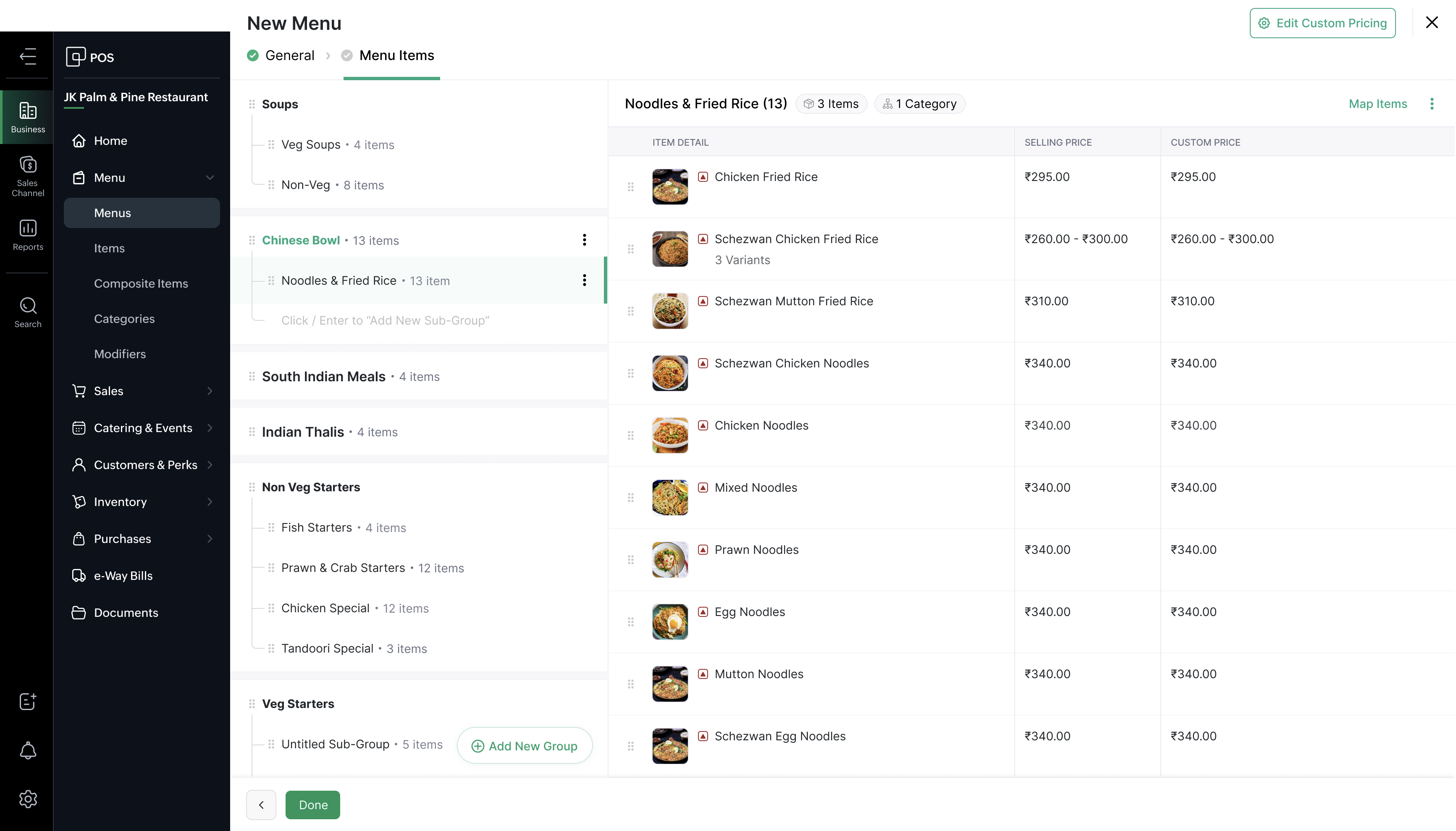
You can even host your menu online and share it with customers using a QR menu, making it easy for them to browse your offerings from their own devices.
Order and billing management
Your order and billing workflow can vary depending on your restaurant's business model. Zoho POS provides dedicated sales channel devices—including the POS Register, Waiter App, and Self-Ordering Kiosk to support different ordering and billing scenarios.
You can configure these sales channels based on your restaurant's requirements and use them individually or together.
POS Register
The POS Register is suitable for a wide range of restaurant business models and supports both ordering and billing workflows.
For example, if you operate a QSR without dining facilities, you can use the POS Register to add items and bill customers. Once the order is placed, the Kitchen Order Ticket (KOT) can be sent directly to the kitchen for preparation.

If your restaurant offers dine-in service, you can create dining areas and tables, along with their seating capacities. When taking an order, you can select the relevant table, specify the number of guests, and add the customer's order. KOTs can then be sent to the kitchen for preparation.

Waiter App
The Waiter App is designed specifically for waiters to take orders directly from tables.
You can create waiter profiles and assign devices to them. You can also restrict waiters to specific tables based on your restaurant's requirements.
Waiters can select a table, enter the number of guests, add items to the order, and send KOTs directly to the kitchen. Multiple KOTs can be sent for the same table as customers place additional orders.
Once the customers finish dining, the sale can be completed and sent for billing through the appropriate billing workflow.

Kiosk
The Self-Ordering Kiosk is designed primarily for self-service restaurant models, where customers can place their own orders, make payments, and collect their food.
If you operate with limited staff or want to manage customer queues more efficiently, you can install self-ordering kiosks and allow customers to complete the ordering process themselves.
The workflow is simple: Customers browse the menu, add items to their cart, complete the payment, and place the order. The KOT is then sent to the kitchen, where the order is prepared. Once the food is ready, the customer can collect it.
All these sales channels can work together in the same restaurant, supporting both online and offline operations. You can create registers based on your business requirements and assign unique billing sequences to help identify transactions.
You can also control access to each sales channel using user roles and permissions. Session management helps you track users' activities across these sales channels on a daily basis.

Food aggregator
If you want to take your restaurant online and reach customers beyond your physical location, you can integrate Zoho POS with hyper local food aggregators such as Swiggy and Zomato.
If you're already using these platforms, you can connect them to Zoho POS using your dedicated aggregator ID and partner portal URL. If you're new to these platforms, you can complete their onboarding process first and integrate them with Zoho POS afterward.
During the integration process, you can configure the store location, menu, order-receiving device, and deposit account. Once the integration is complete, orders from the food aggregator can be received and managed directly from your configured order-receiving device.
You can also configure preferences such as preparation time, order actions, and automatic order acceptance.
If a particular food item is temporarily unavailable, you can disable it from the POS Register. You can also configure a time after which the item is automatically made available again.

Payments
Billing in a restaurant context is rarely straightforward. Zoho POS for Restaurants handles scenarios that come up every service: splitting a bill between guests, merging two tables that have been seated together, applying item-level or order-level discounts, and processing payments across multiple methods in a single transaction. A table of four can settle their bill with two cards, one cash payment, and a gift voucher applied to the remainder, and the system will record each payment method against the same order.
Zoho POS Indian edition supports multiple payment providers, including Paytm, PhonePe, Pine Labs, Razorpay, and more. Depending on the payment provider, you can accept different payment methods such as cash, cards, wallets, UPI, and more.

Catering & events management
If your restaurant handles large food orders for events or catering, you can manage these orders using the Catering & Events module.
You can manage bulk orders through Sales Orders. If an order requires shipping, you can use the Packaging and Shipment sub-modules to manage the fulfillment process.
You can also manage returns through the Returns module.

Multi-outlet management
If you operate more than one restaurant location, Zoho POS for Restaurants lets you manage all of them from a central configuration. Menus, pricing, staff roles, and permissions can be set at the organization level and applied to individual outlets, or each outlet can be configured independently depending on how your business is structured.

Users, roles, and permissions
Zoho POS for Restaurants lets you define what each staff role can see and do within the system. A billing staff member may have access to the payment screen but not to the configuration settings. A supervisor may be able to apply discounts above a set threshold that a server cannot. A store manager may be able to view reports that are not visible to front-of-house staff. These permissions can be configured per role and applied consistently across your team, reducing the risk of unauthorized changes and keeping each person focused on their part of the workflow.

Dashboard and reports
Zoho POS stores the information generated through your day-to-day operations, including users, items, transactions, payments, inventory, and more.
You can use the Reports module to analyze this data and gain insights into your business performance. The reporting tools in Zoho POS for Restaurants give you a view of your operation beyond the current service.
Some of the key reports include:
- Sales by Customer
- Sales by Item
- Profit by Item
- Inventory Valuation Summary
- FIFO Summary
- Table Performance Summary
- Inventory Aging Summary
- Stock Summary
- Payments Summary
- Activity Logs
- Audit Trail

You can also get a quick overview of your business through Dashboards. Dashboards are displayed when you log in to Zoho POS, giving you access to important business insights at the start of your day.

Key dashboard insights include sales summaries, sales by sales channel, inventory aging, item trends, and other statistics that can help you monitor your daily operations and make informed decisions.
Availability and Specifications
Zoho POS for Restaurants is available in four plans: Free, Essential, Signature, and Premium, each offering a different set of features and capabilities.
To support budding restaurateurs in India, the Free plan supports invoices of up to ₹12 lakhs in annual value.
Zoho POS for Restaurants supports both online and offline operations. Zoho POS Web is the cloud-based administrative application that requires an internet connection and is used as the back-of-house system.
The following sales channel front-of-house applications support both online and offline operations:
Sales Channel | Platform |
POS Register | |
Waiter App |
From managing menus and table orders to streamlining kitchen operations, payments, online orders, and business insights, Zoho POS for Restaurants brings your restaurant's essential operations together in one place.
Whether you're running a café, QSR, bakery, dine-in restaurant, or catering business, you can configure Zoho POS to suit your business model and scale as your business grows.
Ready to simplify your restaurant operations? Explore Zoho POS for Restaurants and discover how it can help you serve your customers better and run your business more efficiently.
Topic Participants
Raghav Krishna E
harsh yadav
Kiran Kumar B
Sticky Posts
Introducing Zoho POS for Restaurants
Hello Community, We’re thrilled to announce the launch of Zoho POS for Restaurants, unveiled at the 30th milestone edition of Zoholics India 2026. Running a restaurant involves multiple teams and workflows. A single table journey, from seating a guest
Recent Topics
Backorder For Composite Items
Hello If i released SO for composite item and use backorder feature of zoho inventory then it should backorder child item items of composite and not composite item.This is basic of backordering.I conveyed this to zoho call center but no solution yet.Global Constants / Variables
It would be great if there were a Global Constant feature. The idea here is for managing constants that are used in multiple Flows and Subflows, but might change over time. The idea is that the change could be made in one place and cascade to all futureemails?
Why can't I send emails from my account anymoreDeal Activity Tracking - By Time
Hello, I am trying to figure out a way to implement a time tracking ability within the CRP that will provide a line item on the final invoice in books. Would the Cases module be of good to use in this scenario? Want to integrate into Books as well. Itime tracking on zoho crm cases
Is there a time tracking feature in zoho crm cases? I need calculate time spent in calls, tasks and events Thanks in AdvanceTime Card Tracking For Employees
Does ZOHO have an add-on or app that my employees can use to clock in & out on a daily basis. In the past we had used a third party solution, but it was hard to use and pricey. We would really like to use your time tracking feature if you have one......ifLogging time within Time Tracking
At the moment I use the call logging feature of CRM to log time spent on clients work. Its nice to be able to start, stop and pause the timer and record how many hours I need to bill the client. Any chance of implementing this in Zoho Invoice's time tracking feature The same interface as CRM would be great or a simple start/stop/pause/restart timer.3rd Party/Easy Time Tracking Integration with Zoho
We are new customers using Zoho One with Zoho Project/CRM/Desk being the 3 big applications we will use. The majority of our work is done in the field and we need accurate and easy time tracking for our workers on mobile phones. aka TSheets type functionality. but tied to Zoho. Zoho is outstanding overall so I am surprised at how laborious, inefficient and disconnected time tracking is mobile devices. Adding time to a project task on a mobile phone can be a 10+ click task and that's not an exaggeration!TrueSync for Windows 5.16+ breaks Excel save in "Shared with Me" (temp file writes fail) – workaround: pin 5.15.1
Hi all, After TrueSync for Windows auto-updated past 5.15.1, some of our users can no longer save Excel files that live under "Shared with Me". We isolated it to a client-side regression and found a workaround. Sharing in case it saves someone a few hoursIntroducing PRM: Build, manage, and scale your partner ecosystem
Growing a partner ecosystem is a good problem to have. What starts as a handful of partners can quickly turn into a maze of spreadsheets, emails, and disconnected processes. More partners mean more opportunities, greater reach, and new ways to growPurchase Requisition in Zoho Books
I want to understand if Zoho Books is having the following workflow: PR ( Purchase Requisition ) >> PO ( Purchase order) >> GRN/SRN ( Goods/Services receipt note) >> BillEnhancement Request: Preserve Canceled Zoho Bookings Meetings in CRM
I recently worked with Zoho Support on ticket 170383788 regarding what happens in Zoho CRM when an appointment is canceled in Zoho Bookings. Support confirmed that the current behavior is intentional: when a Bookings appointment is canceled, the correspondingIntroducing the Markdown editor in Zoho Learn
Hello everyone, We're excited to announce the release of the Markdown editor in Zoho Learn. With Markdown editor, you can create and import articles as Markdown. You can write content using simple Markdown syntax and see how it looks with the built-inWhen will Bigin's latest AI features be available in Europe?
Hi, As I previously raised this question in the post “Introducing Bigin's latest AI features, built for the way you work!”, but received no response, I am bringing it up again here. It has now been five months since the announcement, and these AI featuresFunction #50: Send Mass emails to your customers
Hello everyone, and welcome back to our series! We have reached a milestone of 50 Functions, which means that we have automated 50 different tasks in Zoho Books. Every Friday, we have shared a nifty function aimed at either automating a task or streamliningTime tracking
Hi there We are looking for a simple, intuitive but powerful time track application. We bill our clients by the time we spend, and so need to link Clients<>Projects<>Tasks or Activities<> Time spent. Is there an app in Zoho we could use? Many thanks.. MorriStaff Tracking in
Hi , I would like to see what activity my staff does over Zoho CRM and over Zoho Mail . I need to know which deals in CRM haven't been touched or had an activity on by a particular staff member . Basically need to establish what work.gets done by WFHZoho Projects connector with Zoho CRM (Related List module) features
Hi community, I use Zoho Projects connected to Zoho CRM, where we associate Projects with Deals, clients, etc.. I am looking to change/edit the fields that are available in the integration. Currently it shows Project Status, Project Completion, Milestones,Report: avg time to visit each lead
We are on zoho one. our sales team visits leads using the ZohoCRM app. They track their hours using the zoho books timer. So the results in zoho books look like this: -total hours worked: 8 In ZohoCRM we have a custom date/time field in each lead recordCreating a Stop Start Timer for Custom Moduel
Hello, I am trying to track Maintenance of internal Assets through Zoho CRM (I have tried the FSM, Projects, Inventory apps nothing is working the way I need it to). I have it all built in the CRM where I have internal work orders where i can keep trackLogging time to a Sales Lead in CRM
Hi, Is there a way to log time against a Sales Lead / Deal in CRM before it is won and becomes a project? Our employees often do work for sales opportunities and need to log time against them at any point of the sales cycle, before it is won. Thanks, AtifHourly Billing in Zoho CRM Deals, Books, and Projects?
We bill on an hourly basis and need that time added into a client's invoice in Books. A client might have multiple deals open with us that we are working on, and billing separately, and thus need separate invoices for each. The functionality of ProjectsTime taken on a task
I notice that you can record the length of a call, but not an event or a task. When a potential progresses from beginning to end it is just a series of tasks/calls/events in a process. I have most of it automated depending on the type of sale and triggered by updating the sales cycle field. It follows that you should be able monitor the time of each of them so that you actually know how much time you spend on each potential. This gives an idea of profitability of each potential. I would think thisTimesheets from Deals
Hi Guys, new Zoho One customer here with only a few employees. I run a small software company and currently our small number of employees are creating manual timesheets in excel. There is a column for a job number (that relates to a Zoho Deal) and they just put in the time taken to perform the work. As an example, they might spend 1 hour running some barcodes for a particular client (and deal). Then they may do a support all for another client and that takes 2 hours (This client would have a yearlyTimesheet option in zoho crm
Recording a timesheet against a job is very crucial for every business because it will help them in billing the client accordingly and also it keeps a track on how much time a user is exactly taking in marking the job as cloed. Currently in crm therePortal access is now available in the Zoho CRM mobile app
Hello everyone, Zoho CRM Portals provide a secure space for sharing selected records with people outside your organization. These portal users can include customers, vendors, partners, or anyone who needs access to specific CRM data. Previously, portalField of Lookup - 5 Field Association Limit.
This query relates to the post at: https://help.zoho.com/portal/en/community/topic/introducing-the-field-of-lookup-in-crm-public-early-access-2023 My simple (and common) scenario: I select an account / customer lookup and want their address pulled intoZoho Forms API
Is there any way to get all form entry list using API? Looking forward to hear from youMultiple locations
I have many customers (accounts) that have multiple locations, like bank branches. How can I manage them under one account?Calendar won't load
I run into this problem about once a week, where I try to open my Zoho calendar in a web browser, and it just gets stuck, waiting forever to load (see attached screenshot). I'm usually using Edge or Duck-Duck-Go browser. Sometimes it loads just fine,Feature Request: Enhance Zoho Books Customer Approvals with WhatsApp, Multiple Approvers, Automated Reminders, and Workflow Automation
Product: Zoho Books Module: Time Tracking → Customer Approvals Category: Feature Enhancement / Workflow Automation / Omnichannel Communication Description I would like to suggest several improvements to the Customer Approvals module in Zoho Books, particularlyFeature Request: Extend Zoho Books Customer Approvals API and MCP Support
Product: Zoho Books Category: API Enhancement / OAuth Scopes / MCP Integration Feature: Customer Approvals (Timesheet Approvals) Description I would like to suggest an enhancement to the integration and automation capabilities of Zoho Books, specificallyTip: #14 Save words and phrases in Writer for faster writing!
As you start working with more documents everyday, you'd find yourself using certain words and phrases across documents quite often. In this week's tip, let's discuss two easy ways to train Writer to remember your commonly used words—equipping you toZoho ERP | Product updates | October 2026
Hello users, A new month, a fresh set of updates in Zoho ERP. This month brings Netting, enhancements across our verticals, and more updates to help streamline your everyday work. Explore this month’s updates and see what’s new. Compliance with RevisedZoho Forms - Feature Request - Embed iFrame or Dynaic URLs in Description fields
Hi Zoho Forms team, I'm working with a client who uses Zoho Forms internally to collect information over the phone from potential work placement candidates. At the end of the form, the candidate needs to be booked in for an induction, which we've configuredBANK FEED - MAYBANK , provider from YODLEE IS NOT WORKING
As per topic, the provider YODLEE is not working for the BANK FEED. It have been reported since 2023 Q3, and second report on 2023 Q4. now almost end of 2024 Q1, and coming to 2024 Q2. Malaysia Bank Maybank is NOT working. can anyone check on this issue?Digest Octobre - Un résumé de ce qui s'est passé le mois dernier sur Community
Bonjour chers utilisateurs, Bienvenue dans ce nouveau digest de la communauté Zoho France ! Vous y trouverez les discussions marquantes, les nouveautés produits, les conseils pratiques partagés et bien sûr les événements à venir. Le mois dernier, nousBank feeds - still a problem
I'm really frustrated that the bank feeds only "sometimes" work. I raised this problem once before and was advised that Zoho used Yodlee and feeds were only updated once a day. That's fine but it only "sometimes" seems to work. Eventually transactions appear but they sometimes seem to take days. I know of other programs (Xero) that another business I am involved with uses Yodlee and they do not have this issue. My bank feeds are active, I tried to manually refresh however Zoho tells me thatthis is getting ridiculous
My checking account bank feeds haven't worked since 6/4/21. Multiple emails to Zoho since 6/10, and all they tell me is they have re-escalated my problem to their banking service provider team. 14 days and nothing is fixed. I'm just about ready to bailNo feedback from Zoho Books regarding Yodlee feeds for Investec
I reported on 6 Feb 2025 that the Bank Feeds for Investec bank via Yodlee are not working. To date there has been no resolution. You are charging us for a suite of products where the functionality does not work. Please advise how you will refund me forNext Page