Spam Quarantine: Manage suspicious emails in Zoho Mail
When an email is quarantined by spam processing, it need not always be blocked right away. Some emails may be marked incorrectly, or may need to be reviewed before a final decision is made.
The Spam Quarantine feature in the Zoho Mail Admin Console gives administrators a dedicated space to review, approve, or reject such emails before they reach your users.
What is spam quarantine in Zoho Mail?
Spam Quarantine in the Zoho Mail Admin Console holds emails flagged by your organization's spam processing rules. Both incoming and outgoing emails can be quarantined. Instead of being delivered or blocked automatically, these emails are placed in a quarantine queue where administrators can review and take action.
Incoming emails may be quarantined due to SPF, DKIM, or DMARC failures, DNSBL flags, block-listed addresses or domains, cousin domain detection, display name spoofing, or organization-level rules. Outgoing emails can be quarantined based on content patterns, attachment type or size, blocked users or recipients, and more.
How can administrators use spam quarantine effectively?
The quarantine section gives administrators full control over what gets delivered and what gets blocked, without missing legitimate emails that were incorrectly flagged.
Review and act on flagged emails: Open any quarantined email, review its content and headers, and choose to deliver or deny it based on your assessment.
Use deliver and deny actions strategically: The Deliver & Add option adds the sender to the allowed list after delivery, while Deny & Add blocks the sender going forward. Use Deny & Notify to inform the sender that their email has been rejected.
Monitor outgoing emails: Outgoing Quarantine helps prevent data loss and policy violations by holding suspicious outbound emails for review before they leave the organization.
Set up quarantine notifications: Configure alerts so that the relevant administrators are notified whenever an email is quarantined, along with the sender, subject, and reason for quarantine.
Assign self moderators: Allow specific users to approve quarantined emails addressed to them, reducing the load on administrators for individual-level quarantine decisions.
Steps to access and manage quarantined emails
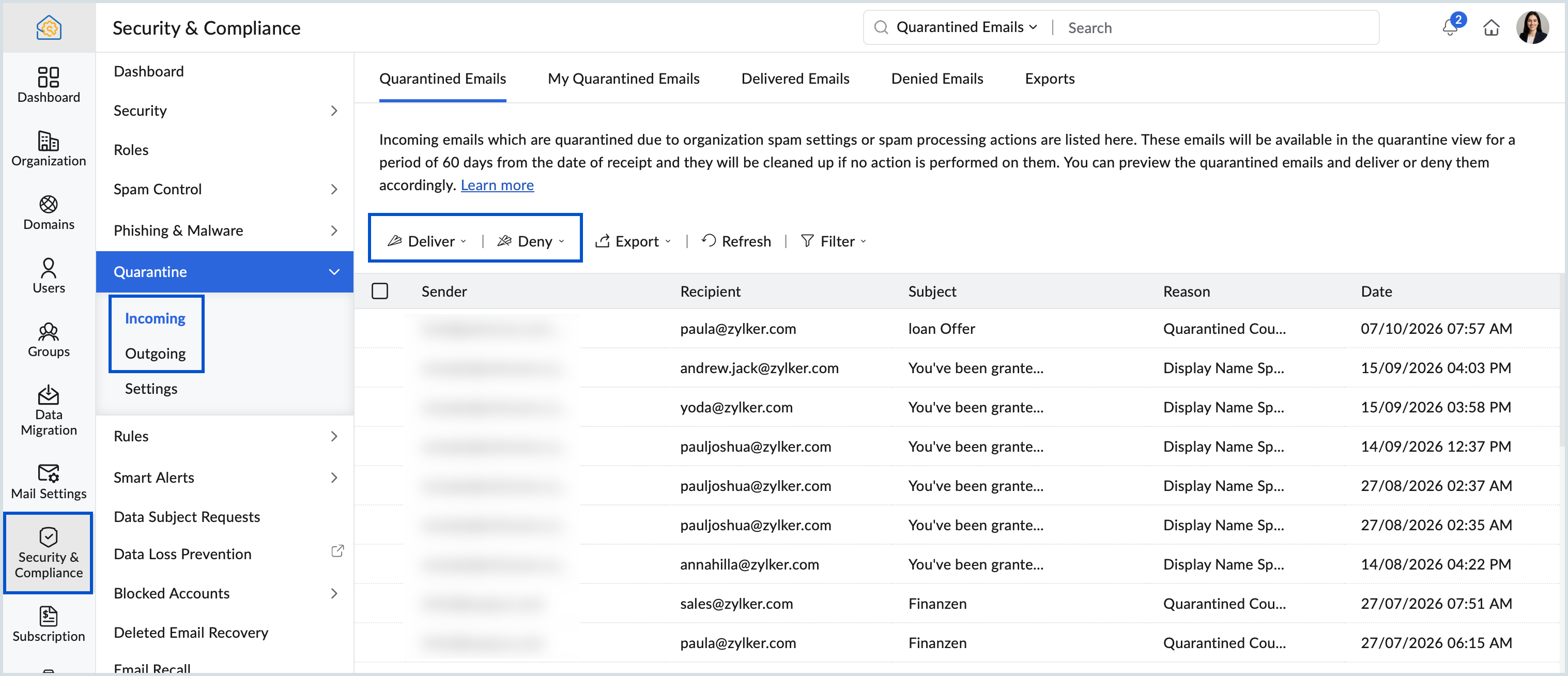
Log in to the Zoho Mail Admin Console.
Navigate to Security & Compliance in the left pane.
Select Incoming or Outgoing under Quarantine based on the emails you want to review.
Choose from Quarantined Emails, Delivered Emails, Denied Emails, or Exports. For incoming emails, you will also see a My Quarantined Emails tab listing emails addressed specifically to you.
Click on an email to view its content and headers.
Select Deliver or Deny and choose the appropriate action from the dropdown.
Steps to set up quarantine notifications
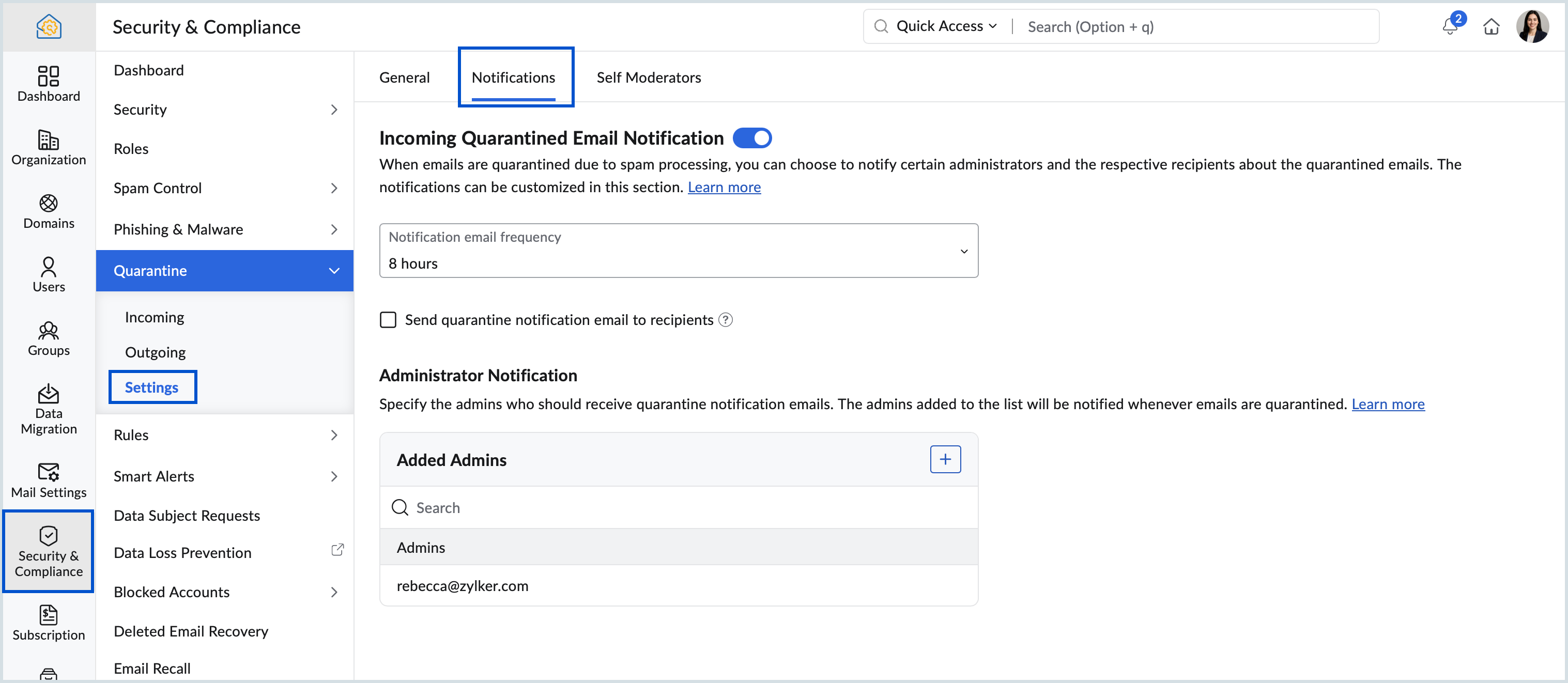
Log in to the Zoho Mail Admin Console.
Navigate to Security & Compliance and select Quarantine.
Go to Settings and select the Notifications tab.
Turn on Incoming Email Notification.
Set the notification frequency from the dropdown.
Check the box to send quarantine notifications to the email recipients, if needed.
Under Administrator Notification, add the administrators who should be notified.
Quarantined emails in the My Quarantined Emails section are available for 60 days. If no action is taken, they are automatically removed.
The Deliver partially option is available only for emails with multiple recipients and does not appear when multiple emails are selected at once.
The Deny & Notify option applies to one email at a time and does not appear when multiple emails are selected.
If an administrator denies an email before a self moderator takes action, the self moderator cannot approve it later.
Outgoing Quarantine is available only for paid plans. To enable it for your organization, contact support@zohomail.com
Topic Participants
Saranya A
Sticky Posts
Zia for Mail: AI-powered assistance for Email, Calendar, and ToDo in Zoho Mail
Zia for Mail brings AI assistance into Zoho Mail for everyday email, calendar, and task activities. Administrators can integrate third-party AI providers, such as ChatGPT or Gemini, and decide which features are available to users. What is Zia for MailEmail Journaling in Zoho Mail: Maintain a complete record of your organization’s email communication
Organizations often need a complete record of their email communication for audits, legal reviews, or internal investigations. Email Journaling in Zoho Mail captures a copy of emails sent and received in your organization and forwards it to a destinationEmail Recall in Zoho Mail: Retract sent emails within your organization
Emails can go out with the wrong recipient, an incorrect attachment, or information that was not meant to be shared. Email Recall in Zoho Mail lets you take such emails back from the inboxes of recipients within your organization. What is Email RecallData Subject Requests in Zoho Mail: Retrieve and export email data for legal and compliance needs
Organizations are often required to retrieve specific email communication data in response to legal investigations or compliance audits. The Data Subject Requests (DSR) feature in the Zoho Mail Admin Console allows administrators to search for all emailSAML authentication in Zoho Mail: Simplify and secure your organization's login management
Managing login credentials across multiple web applications can be challenging for organizations with a large number of users. Without a centralized authentication system, users are required to maintain separate passwords for each application, increasing
Recent Topics
Portal access is now available in the Zoho CRM mobile app
Hello everyone, Zoho CRM Portals provide a secure space for sharing selected records with people outside your organization. These portal users can include customers, vendors, partners, or anyone who needs access to specific CRM data. Previously, portalField of Lookup - 5 Field Association Limit.
This query relates to the post at: https://help.zoho.com/portal/en/community/topic/introducing-the-field-of-lookup-in-crm-public-early-access-2023 My simple (and common) scenario: I select an account / customer lookup and want their address pulled intoZoho Forms API
Is there any way to get all form entry list using API? Looking forward to hear from youMultiple locations
I have many customers (accounts) that have multiple locations, like bank branches. How can I manage them under one account?Calendar won't load
I run into this problem about once a week, where I try to open my Zoho calendar in a web browser, and it just gets stuck, waiting forever to load (see attached screenshot). I'm usually using Edge or Duck-Duck-Go browser. Sometimes it loads just fine,Feature Request: Enhance Zoho Books Customer Approvals with WhatsApp, Multiple Approvers, Automated Reminders, and Workflow Automation
Product: Zoho Books Module: Time Tracking → Customer Approvals Category: Feature Enhancement / Workflow Automation / Omnichannel Communication Description I would like to suggest several improvements to the Customer Approvals module in Zoho Books, particularlyFeature Request: Extend Zoho Books Customer Approvals API and MCP Support
Product: Zoho Books Category: API Enhancement / OAuth Scopes / MCP Integration Feature: Customer Approvals (Timesheet Approvals) Description I would like to suggest an enhancement to the integration and automation capabilities of Zoho Books, specificallyIntroducing PRM: Build, manage, and scale your partner ecosystem
Growing a partner ecosystem is a good problem to have. What starts as a handful of partners can quickly turn into a maze of spreadsheets, emails, and disconnected processes. More partners mean more opportunities, greater reach, and new ways to growTip: #14 Save words and phrases in Writer for faster writing!
As you start working with more documents everyday, you'd find yourself using certain words and phrases across documents quite often. In this week's tip, let's discuss two easy ways to train Writer to remember your commonly used words—equipping you toIntroducing the Markdown editor in Zoho Learn
Hello everyone, We're excited to announce the release of the Markdown editor in Zoho Learn. With Markdown editor, you can create and import articles as Markdown. You can write content using simple Markdown syntax and see how it looks with the built-inZoho ERP | Product updates | October 2026
Hello users, A new month, a fresh set of updates in Zoho ERP. This month brings Netting, enhancements across our verticals, and more updates to help streamline your everyday work. Explore this month’s updates and see what’s new. Compliance with RevisedZoho Forms - Feature Request - Embed iFrame or Dynaic URLs in Description fields
Hi Zoho Forms team, I'm working with a client who uses Zoho Forms internally to collect information over the phone from potential work placement candidates. At the end of the form, the candidate needs to be booked in for an induction, which we've configuredBANK FEED - MAYBANK , provider from YODLEE IS NOT WORKING
As per topic, the provider YODLEE is not working for the BANK FEED. It have been reported since 2023 Q3, and second report on 2023 Q4. now almost end of 2024 Q1, and coming to 2024 Q2. Malaysia Bank Maybank is NOT working. can anyone check on this issue?Digest Octobre - Un résumé de ce qui s'est passé le mois dernier sur Community
Bonjour chers utilisateurs, Bienvenue dans ce nouveau digest de la communauté Zoho France ! Vous y trouverez les discussions marquantes, les nouveautés produits, les conseils pratiques partagés et bien sûr les événements à venir. Le mois dernier, nousBank feeds - still a problem
I'm really frustrated that the bank feeds only "sometimes" work. I raised this problem once before and was advised that Zoho used Yodlee and feeds were only updated once a day. That's fine but it only "sometimes" seems to work. Eventually transactions appear but they sometimes seem to take days. I know of other programs (Xero) that another business I am involved with uses Yodlee and they do not have this issue. My bank feeds are active, I tried to manually refresh however Zoho tells me thatthis is getting ridiculous
My checking account bank feeds haven't worked since 6/4/21. Multiple emails to Zoho since 6/10, and all they tell me is they have re-escalated my problem to their banking service provider team. 14 days and nothing is fixed. I'm just about ready to bailNo feedback from Zoho Books regarding Yodlee feeds for Investec
I reported on 6 Feb 2025 that the Bank Feeds for Investec bank via Yodlee are not working. To date there has been no resolution. You are charging us for a suite of products where the functionality does not work. Please advise how you will refund me forongoing bank sync problems
My bank feed broke May 14th 2021 Since then I just get an endless stream of we are working on it, "Kindly bear with us for sometime" from support Multiple times I have asked to speak to managers and half the time they don't call at all. If they do callWe must admit - Yodlee is an unreliable partner!
Hello Zoho, Our Yes Bank account intergration is messed up since the beginning and the problem has not been addressed yet. With bad synchronization, poor categorization of transactions, duplicate/unknown copies of accounts, no support, geared at income/expenses,Make your PDFs clearer with shapes
Sometimes the best way to mark up a PDF is to point at it directly. Zoho PDF Editor includes shape tools that let you add circle, check and cross marks anywhere in your PDF, so you can flag content for review without extra comments. Here's what you canAdmin Logging in as another User
How can a Super Admin login as another user. For example, I have a sales rep that is having issues with their Accounts and I want to view their Zoho Account with out having to do a GTM and sharing screens. Latest Update (27th April 2026): With the earlyProject Migration
We currently have two separate Zoho organizations: A Spark Robotic organization under Zoho CRM Plus A separate Contract Manufacturing organization under Zoho One We are working with Zoho Support to consolidate the CRM Plus organization into our existingCNIL - Suivi de Pixel
Bonjour à tous, À la suite de la nouvelle recommandation de la CNIL sur les pixels de suivi dans les e-mails, savez-vous si Zoho Campaigns permet : de conditionner le suivi des ouvertures au consentement de chaque contact ; de proposer un lien permettantLive connection to DS files in Zoho Creator / ChatGPT
As an idea, we are using ChatGPT to build with Zoho Creator (outside of Zia), which is works brilliantly to assist write deluge, provide test suggesitons etc. Currently we are uploading the DS files which are very point in time, it would be great to haveImproved Filtering and Tagging options for Notes
We rely on the notes section across several modules and would love to have some more options in filtering, grouping, and tagging notes. We would like to be able to filter notes differently on a contact or deal and have that choice stay on that recordAction required: Update the Zoho Desk Client SDK URL in your extensions
Hi Developers, To improve reliability and performance, the Zoho Desk Client SDK is now served from a new CDN domain. We request that you update your existing extensions with the new Client SDK URL given below. Note: Going forward, all newly created extensionsDecoupling Email Sending from Storage in CRM & Email Storage Add-on Purchases
Hello everyone, We are excited to announce the rollout of the second phase of our email storage management, designed around a simple principle: your business communication should never be disrupted by storage limits. We've decoupled email sending fromEnhancement Request: Preserve Canceled Zoho Bookings Meetings in CRM
I recently worked with Zoho Support on ticket 170383788 regarding what happens in Zoho CRM when an appointment is canceled in Zoho Bookings. Support confirmed that the current behavior is intentional: when a Bookings appointment is canceled, the correspondingEdit PDFs using Zoho PDF Editor
Hello users, In a previous article, we covered the organizing capabilities of Zoho PDF Editor. Here, we'll provide a quick recap of its editing features, including a few new additions. A few highlights of Zoho PDF Editor's editing capabilities: Add andFeature Request - Ability to Customise Contact Info Card on Ticket Details View
Hi Desk Team, I've added a "Contact Priority" and "Account Prioirty" field and it would be very useful to agents if they could see that information in the Contact Info card on the Ticket Details view. It would be great if we could choose some fields toWhat is a realistic turnaround time for account review for ZeptoMail?
On signing up it said 2-3 business days. I am on business-day 6 and have had zero contact of any kind. No follow-up questions, no approval or decline. Attempts to "leave a message" or use the "Contact Us" form have just vanished without a trace. It stillCustomer portal: recommended way to scope lookup fields to the logged-in client?
Hi all, I'm building a customer portal on Creator for our clients (we're a esting lab, so each client has their own sites, contacts and jobs). Planning stage, so I'd rather get the approach right before I build it. The portal forms need several lookupZia for Mail: AI-powered assistance for Email, Calendar, and ToDo in Zoho Mail
Zia for Mail brings AI assistance into Zoho Mail for everyday email, calendar, and task activities. Administrators can integrate third-party AI providers, such as ChatGPT or Gemini, and decide which features are available to users. What is Zia for Mail"Else / If" Statement in Zoho CRM Inventory Template
Hello, I would like to use the below "Else If" in my Inventory Templates, but it's not working correctly. Essentially, if the field "Quote Payment Terms" is filled in, display that. If "Quote Payment Terms" is blank, display "Account Payment Terms" instead.Office Integrator
Our users are complaining the slowness and speed when working in Zoho Office. Explicitly when working in a sheet. Here are observed issues *Copy and pasting values from one cell into another takes 10-20 seconds to show it has done it. *Modifying a value[ZohoDesk] Improve Status View with a new editeble kanban view
A kanban view with more information about the ticket and the contact who created the ticket would be valueble. I would like to edit the fields with the ones i like to see at one glance. Like in CRM where you can edit the canvas view, i would like to editSubform UI Unresponsive
Has subform with a couple of hundreds of rows but suddenly the you can't add any row nor edit any fields. The subform has 10 columns Any thoughts on this Zoho team?Kaizen #267: Four Developer Tools, One Prompt: Cracking Custom Cases with the Zoho CRM Skill
Hello everyone! Welcome back to another Kaizen post. In this Kaizen, we’ll see how the Zoho CRM Skill solves a custom use case that requires multiple Zoho CRM developer tools. You describe the requirement in plain language, and the skill identifies the【開催報告】 福岡 ユーザー交流会 NEXUS 2026/10/30 | CRM×AIの実践事例とZia Agents活用を紹介
Zoho ユーザーの皆さん、こんにちは。 コミュニティグループの中野です。 10月30日(金)、福岡にてZoho ユーザー交流会 NEXUSを開催しました。 今回は、Zoho CRM × AIをテーマに、ユーザーさんによる実践事例、 Zia Agentsのデモ、参加者同士のグループワークなどを実施しました。 ご参加いただいた皆さん、ありがとうございました! 本投稿では、当日の様子を一部ご紹介します。 ユーザー活用事例 :Zoho CRM × AIを、実際の営業業務でどう使う? 登壇者:株式会社etikaKB Articles from Zoho Learn - Import as .md
I love the concept of being able to use articles from Zoho Learn as knowledge base articles for Zia Agents. This will absolutely help with proper documentation and organization of company processes and SOPs. This was a great concept. However, even whenNext Page