Wat is er nieuw in Zoho Desk 2023
Wat is er nieuw in Zoho Desk 2023


Beste Community leden,

Hoeveel je ook van je klanten en je werk houdt, als klantenservice medewerker zul je zeker een aantal zware dagen tegenkomen. We hebben het dan over de dagen dat je een paar keer op de snooze-knop drukt, koffie morst op je favoriete shirt en op je werk inlogt om een stapel ongeopende support tickets in je wachtrij te vinden. Het is logisch dat je naast goede ook slechte dagen hebt. Soms, tijdens die sombere klantenservice diensten, is "Dank u voor uw hulp" wat je op de been houdt. 

Klantenservice medewerkers spelen zo'n belangrijke rol in de tevredenheid van de klant dat sommige bedrijven de rol hebben geherdefinieerd tot "customer happiness agent". Als agent speel je een directe rol om ervoor te zorgen dat klanten een geweldige ervaring hebben met je bedrijf. En bij Zoho Desk hebben we het onze missie gemaakt om jou - als "geluksbrenger" - de klant tevreden te houden!

Sinds het begin staat tevredenheid (zowel van jou als van je klanten) centraal bij alles wat we bij Zoho Desk doen. Immers, een tevreden werknemer zorgt voor meer tevreden klanten en uiteindelijk voor een gezonder bedrijf.

De nieuwe Zoho Desk release versterkt de omnichannel communicatie, customer self-service en agent experience. Lees verder voor meer informatie over alles waar we mee bezig zijn geweest.

Instant messaging 
We zijn verheugd om een nieuwe manier van interactie met je klanten in Zoho Desk te onthullen. Met het Instant Messaging (IM) platform voor Zoho Desk kunnen klanten je bedrijf bereiken via WhatsApp, Telegram, LINE en WeChat. Aangezien de meeste van je klanten deze platforms al gebruiken voor communicatie, is het alleen maar logisch om ze daar te helpen. We hebben alle tools die je al kent gecombineerd met onze uitgebreide IM-module, samen met enkele nieuwe functies die zijn ontworpen om de productiviteit te maximaliseren.
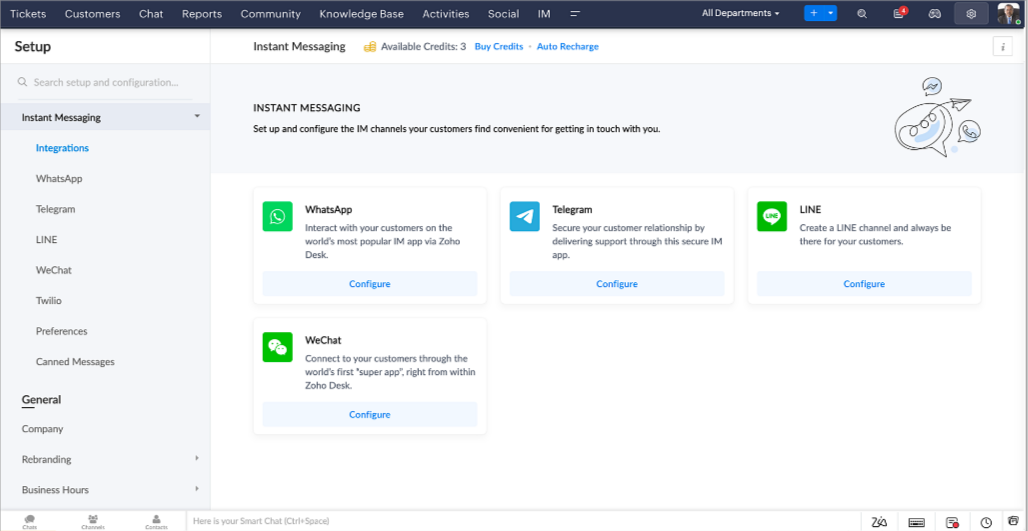


Zoho Desk geeft je een melding in realtime voor inkomende chats, zodat je gemakkelijk contact kunt leggen met klanten vanuit de interface die je al gebruikt. Daarbij kun je nu:

  • Klantcontact, ticket informatie, cross-channel gespreksgeschiedenis en bijlage gegevens binnen het chatvenster van de klant volgen voor directe context.
  • Kennisbank artikelen openen en toevoegen vanuit het invoergedeelte, vooraf opgestelde antwoorden gebruiken voor snelle oplossingen en emoji's toevoegen voor extra personalisering. 
  • Neem deel aan meerdere chats tegelijk in verschillende kanalen zonder van tabblad te hoeven wisselen.
  • Wijs gesprekken toe aan je teamgenoten.
  • Converteer gesprekken in tickets om ze gemakkelijk te kunnen volgen tot ze zijn opgelost.
Hoe zit het met automatisering? Je hebt het! Automatisering, zoals workflows, Blueprints, toewijzingsregels en SLA's, en meer die mogelijk zijn voor tickets aangemaakt vanuit andere kanalen zijn mogelijk voor tickets aangemaakt vanuit je instant messaging kanalen. Je kunt ook automatische reacties instellen voor de tijden dat je afwezig bent of je klanten op oneven uren berichten sturen. 

Je kunt het voor klanten gemakkelijk maken om contact met je op te nemen door QR-codes te installeren bij fysieke verkooppunten of door onze eenvoudig te implementeren knop Bericht ons op je website te embedden. Ze kunnen je zelfs bereiken via direct zakelijk zoeken op het IM-platform zoals Telegram.

Guided Conversations (GC)
We zijn erg enthousiast over de introductie van Guided Conversations (GC), het resultaat van de inzet van ons productteam om je de beste zelfbedieningsopties te bieden.
Als klantenservice professional weet je dat de meeste vragen geen eenvoudige antwoorden hebben. Ze vereisen vaak vervolgvragen en veel context voordat er een oplossing komt. Daar komt GC om de hoek kijken. Het is een proactief, low-code, self-service platform dat het pad naar antwoorden voor complexe vragen van je klanten vereenvoudigt. Kies uit een reeks vooraf gedefinieerde vervolgvragen of antwoorden om een GC-flow te creëren die klanten systematisch naar de best mogelijke oplossingen leidt. Je kunt GC bouwen met functionaliteiten die specifiek zijn voor je publiek. Bovendien kun je op elk moment tijdens het gesprek je klanten doorverwijzen naar menselijke interactie, en dan zo nodig terugschakelen.

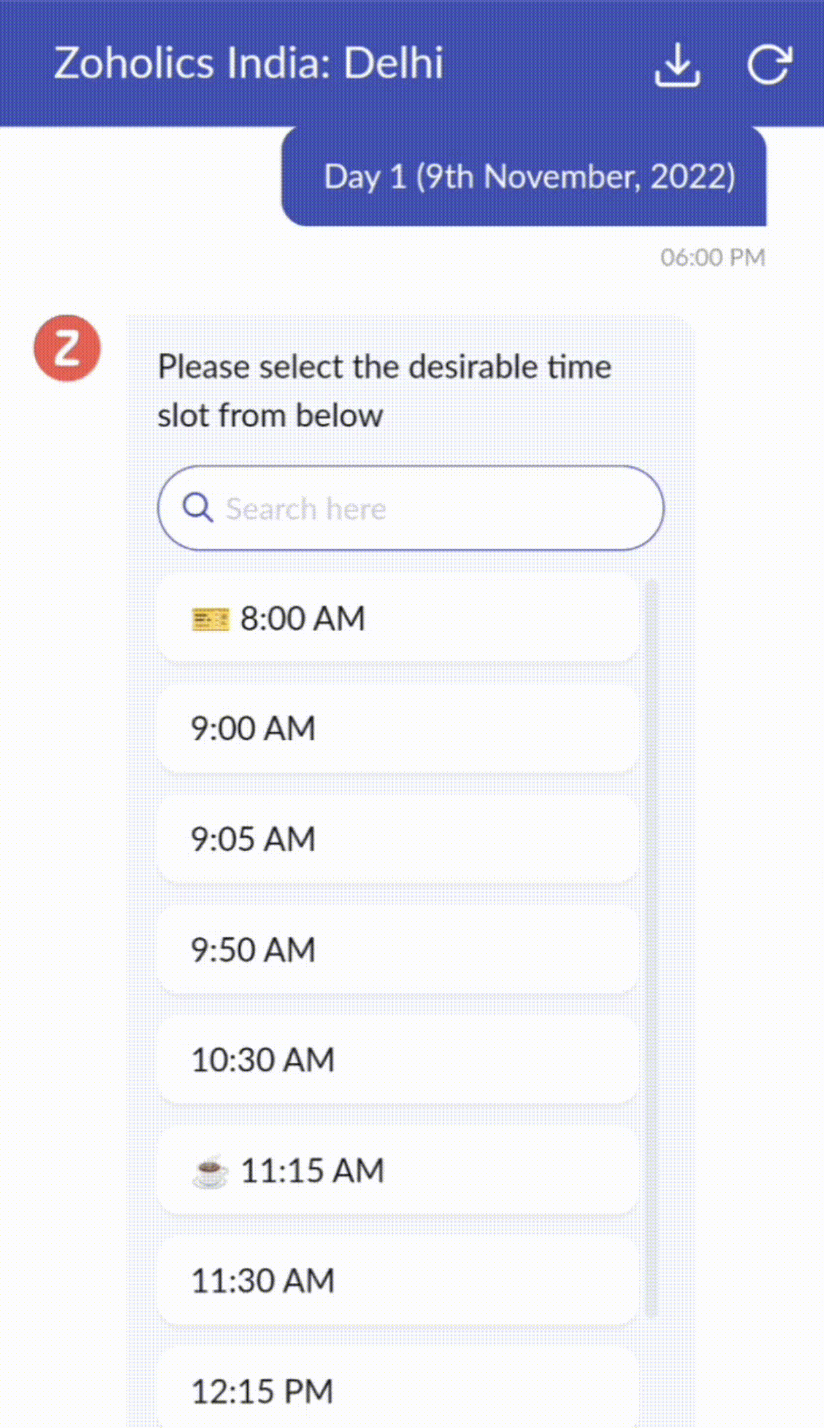
Guided Conversations kunnen worden gebruikt in verschillende situaties, zoals bij het boeken, bestellen, terugvragen of het verzamelen van informatie voor creditcard verwerking of verzekeringen. De mogelijkheden zijn eindeloos. Hier zie je hoe we Guided Conversations hebben gebruikt voor Zoholics, ons jaarlijkse gebruikersconferentie.


Drag-and-drop bouwer
Bouw je GC-flow met behulp van een reeks reactieformaten of -blokken, zoals tekst, afbeeldingen, valuta, datum en tijd, schuifregelaar, keuze, overslaan en opnieuw beginnen. Om een GC-flow te bouwen, sleep je gewoon blokken, voeg je variabelen of dynamische plaatshouders toe en verbind je paden om de volgorde van gebeurtenissen te bepalen, afhankelijk van de keuze van een gebruiker in elke engagement fase.

Webhooks voor naadloze integratie
Door Webhook-blokken te configureren, kun je je conversatiestroom zo samenstellen dat er interactie is met Zoho Desk-processen, andere Zoho-services of applicaties van derden. Als de gebruiker bijvoorbeeld al je contactpersoon is, haalt het Webhook-blok zijn informatie rechtstreeks op uit uw CRM, in plaats van hem te vragen deze elke keer te verstrekken. 
Integreer GC overal waar klanten toegang hebben.

Bekijk en implementeer je uiteindelijke flow door deze te koppelen aan uw ASAP helpcentrum op je website, landingspagina's en mobiele apps.

We kunnen niet wachten om de unieke flows te zien die je maakt met Zoho Desk's Guided Conversations!

Verbeterde ervaring
Misschien heb je de Try New Version-optie in Zoho Desk al opgemerkt en zelfs onze vernieuwde gebruikersinterface (UI) geprobeerd, die we eerder dit jaar hebben geïntroduceerd. Dit is onderdeel van onze inspanningen om Zoho Desk logischer en visueel aantrekkelijker te maken om je de beste werkervaring te geven - omdat we weten dat een ingewikkelde helpdesk ervoor kan zorgen dat acht uur aanvoelt als 20 uur.
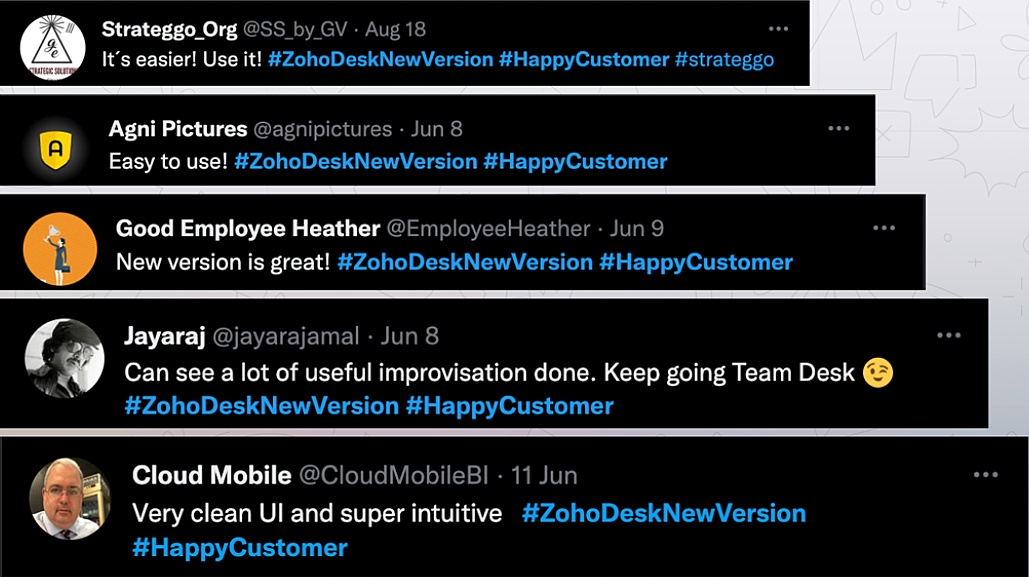


Wat is er veranderd?

Betere UI, meer context en eenvoudigere navigatie 
Wij geloven dat goed ontworpen software weinig tot geen instructies nodig heeft. Daarom hebben we de gebruikersinterface aantrekkelijker, samenhangender en begrijpelijker gemaakt. Die presenteert gegevens beter, geeft meer context en is gemakkelijker te navigeren. 
Het belang van snelle toegang tot relevante informatie voor klantenservice teams kan niet genoeg worden benadrukt. We hebben onze UI geoptimaliseerd en het navigeren door verschillende schermen om de juiste informatie te vinden eenvoudiger gemaakt. We hebben ook enkele schermen een make-over gegeven om je een holistisch beeld te geven van je klanten en tickets op één enkele interface. Weet je nog hoe graag we je context geven? Bekijk onze nieuwe look in:
  • Laatste Hoofdkwartier weergave met een verfijnde gegevensindeling en vernieuwde algemene look.
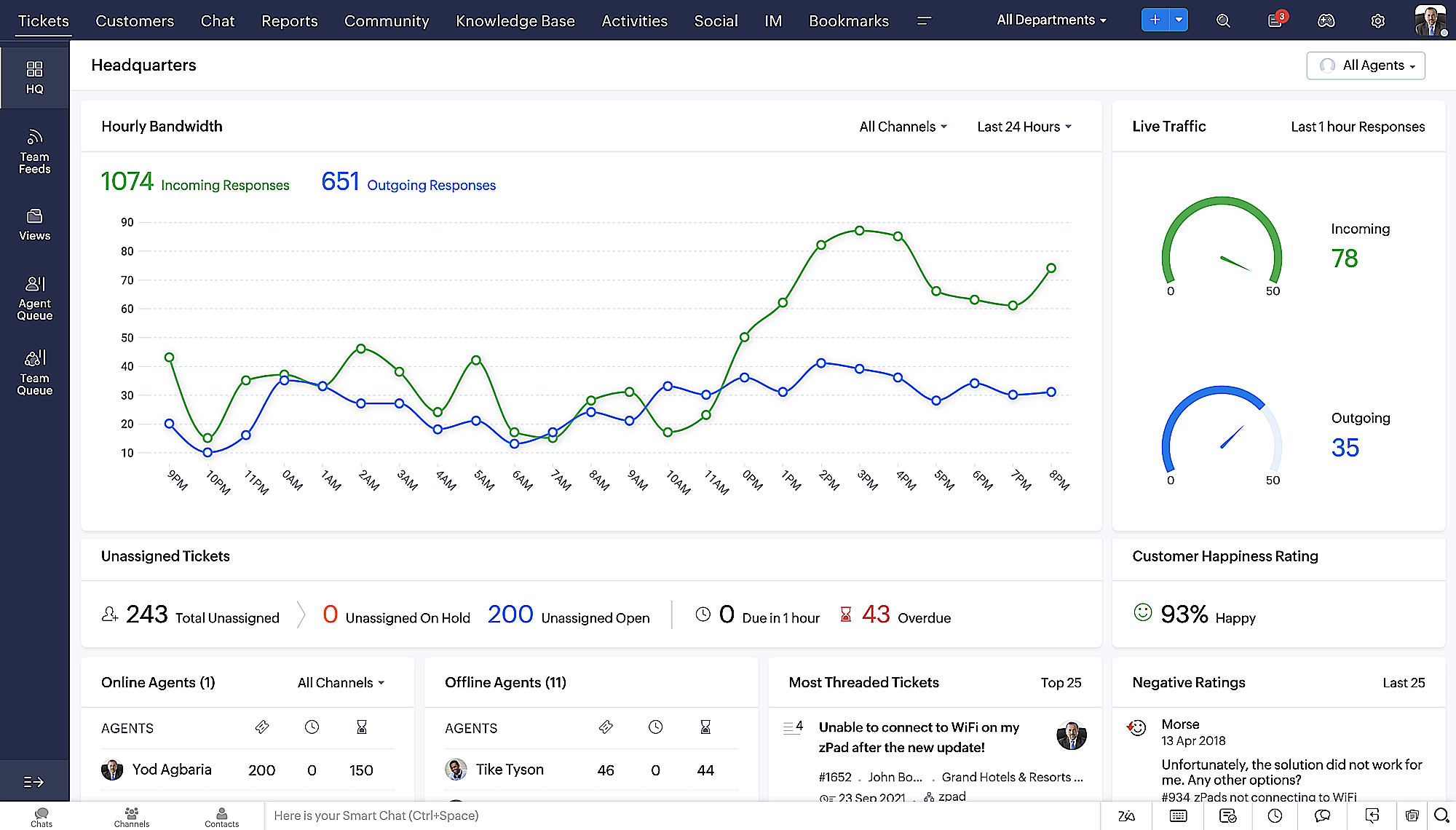
  • Gedetailleerde ticketweergave met kleurgecodeerde threads voor eenvoudigere navigatie tussen gesprekken en opmerkingen. 
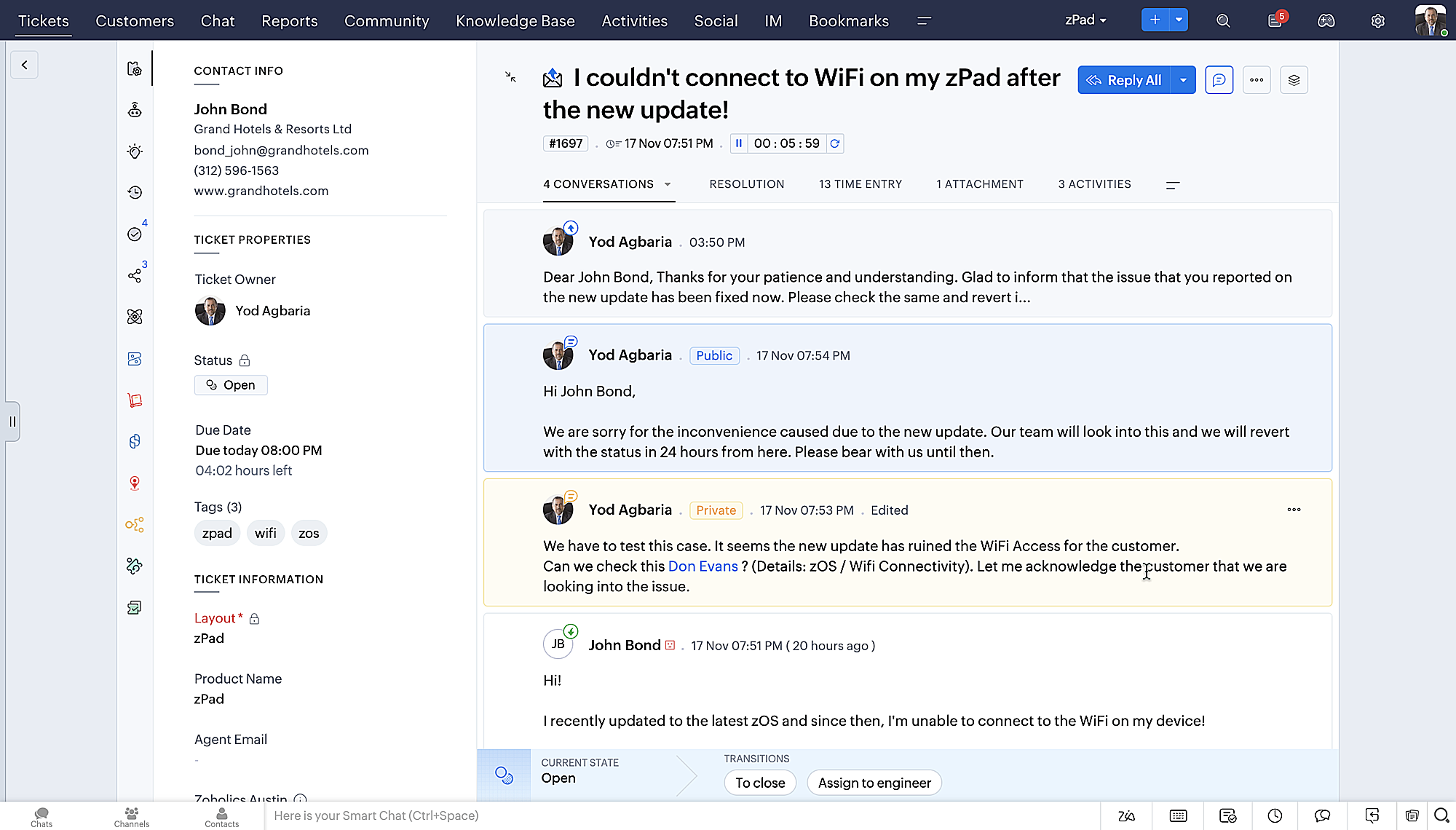
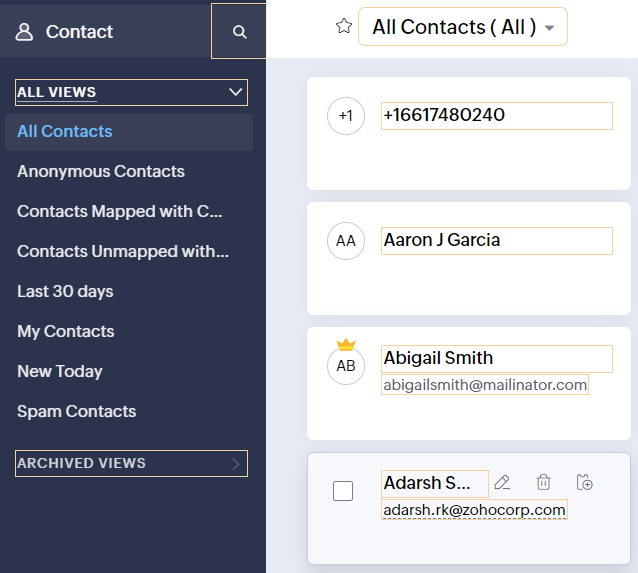
  • Gedetailleerde Contactweergave met knoppen voor snel toevoegen, een sectie Wachtende tickets en een overzicht van Ticketinzichten.
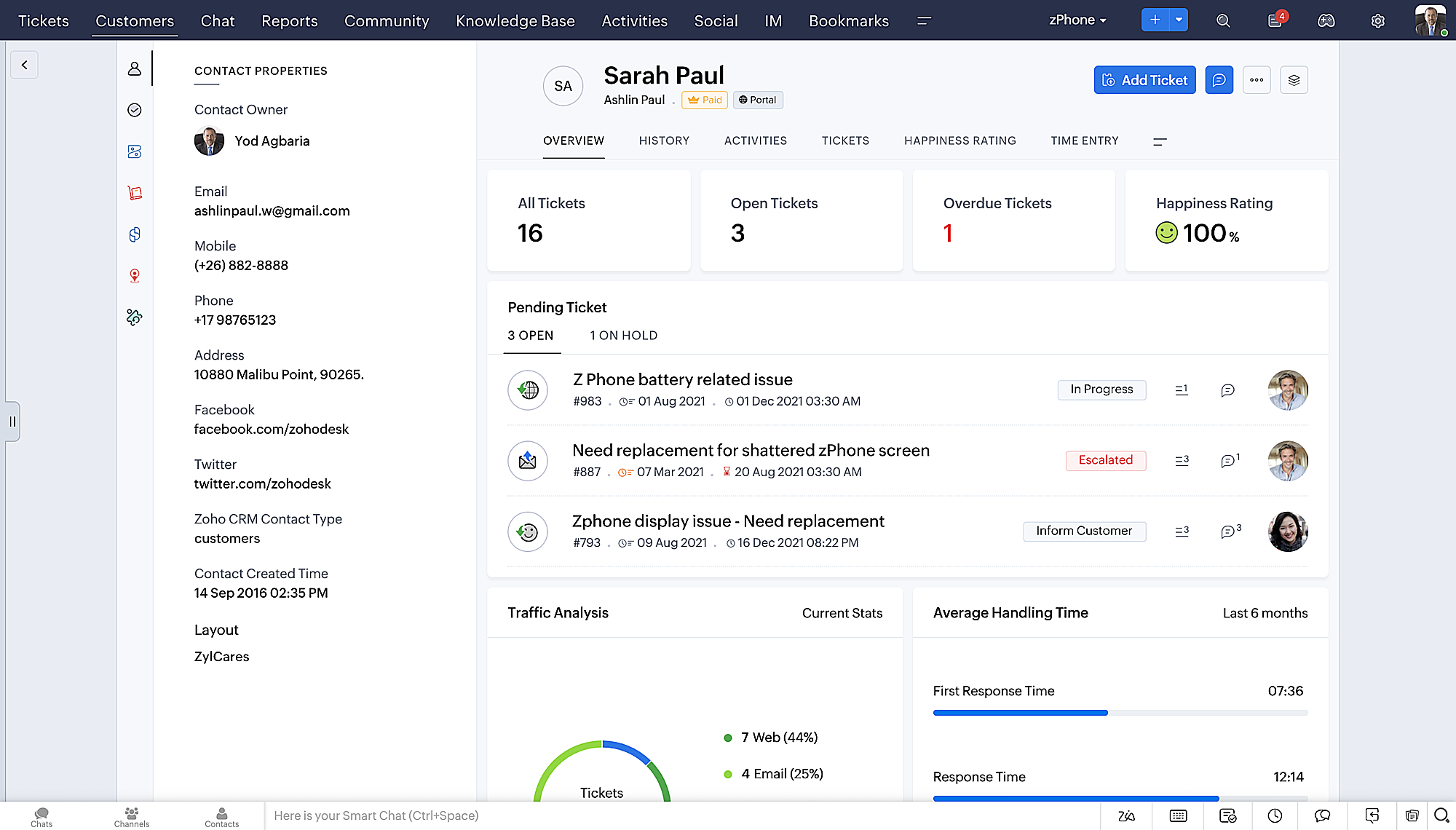
  • Ticket Queue View met drop-down statusopties, zodat je snel updates kunt geven zonder Ticket Detail View te openen.
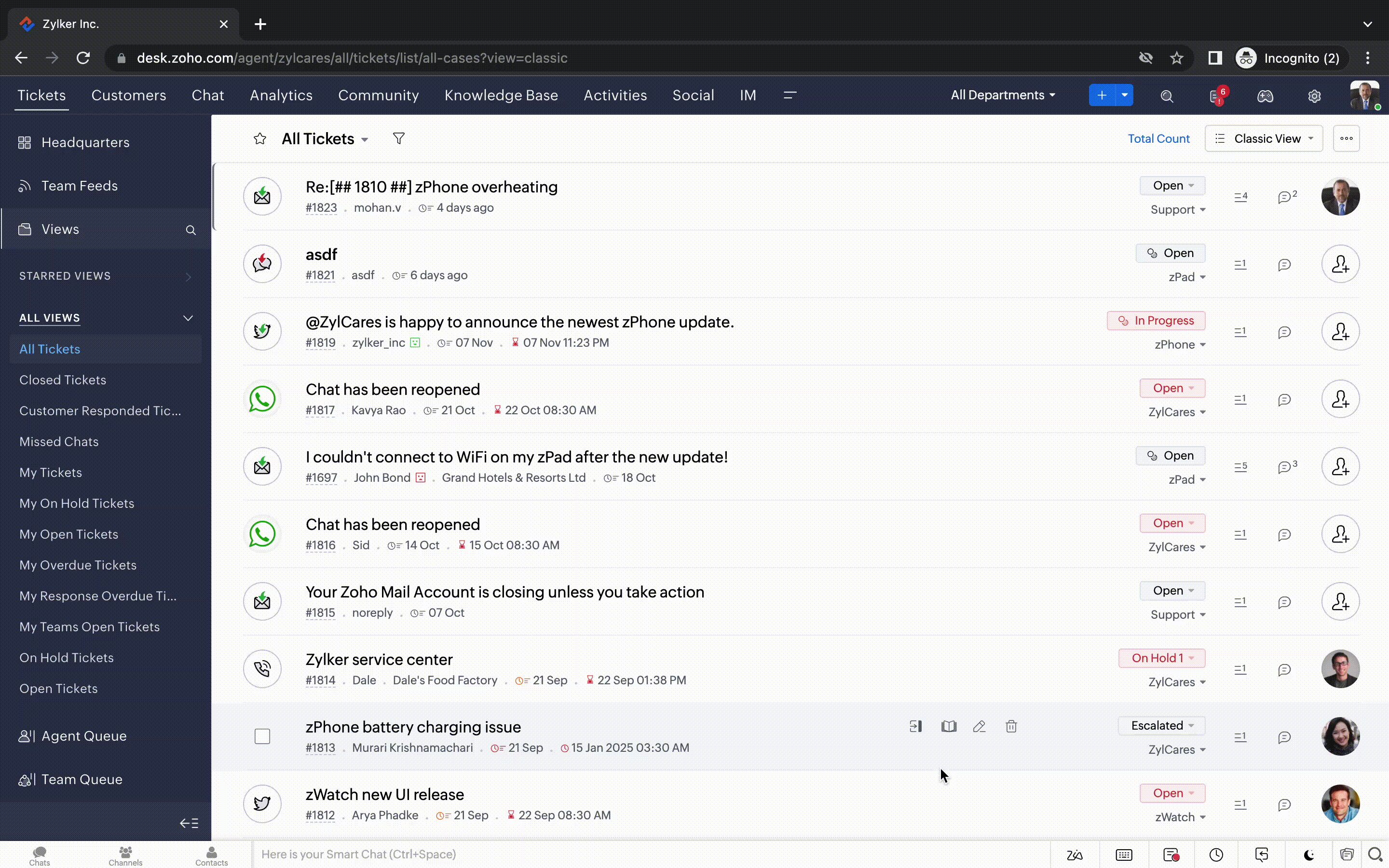
  • Een nieuwe optie markeren als gelezen/ongelezen in de ticket lijstweergave, en een geconsolideerde vervolgkeuzelijst Werkmodi in de hele module Tickets.
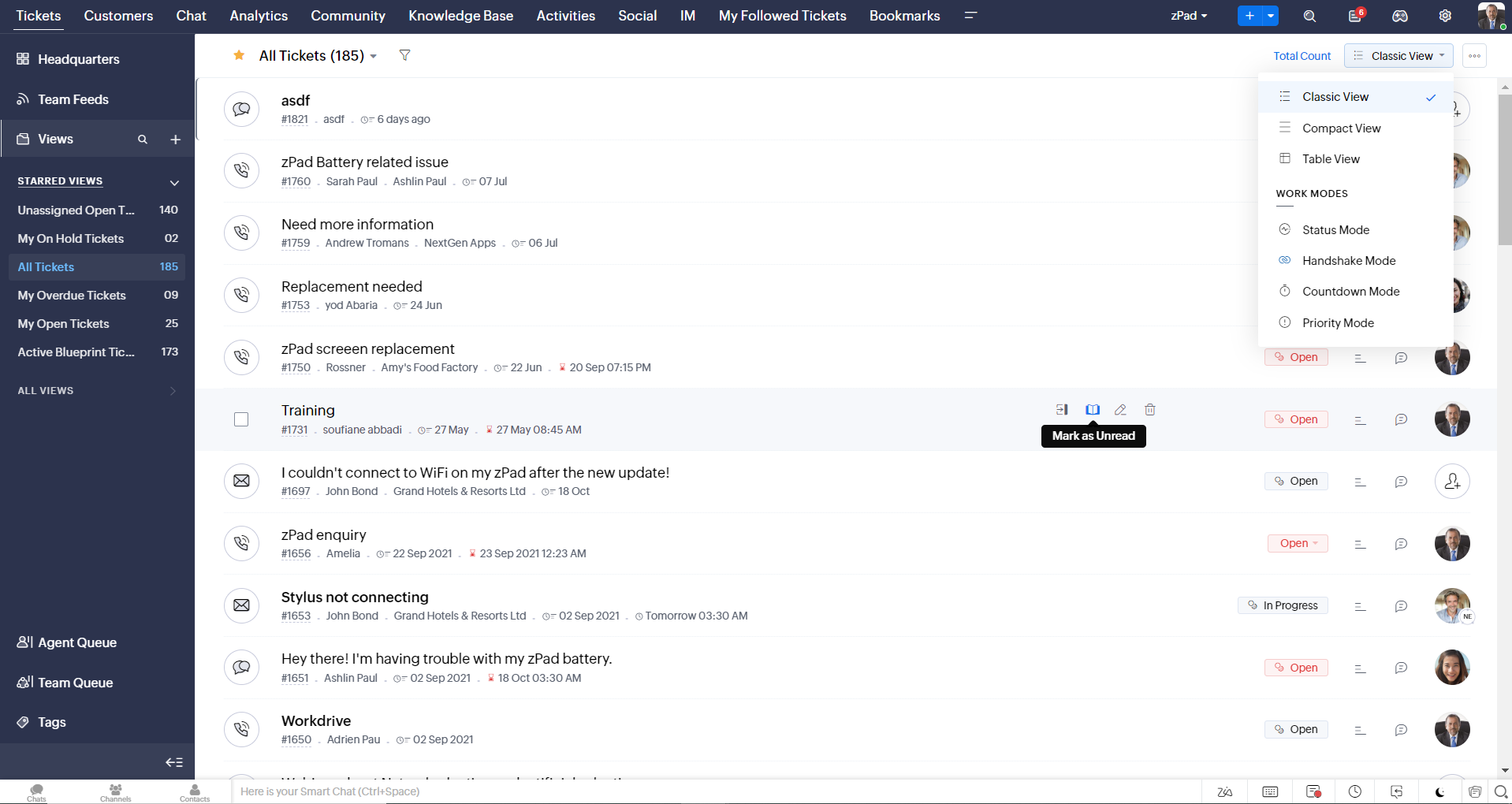
  • Oneindig scrollen voor snellere ticket verkenning en navigatieknoppen om snel naar de bovenkant of onderkant van de pagina te gaan. 
Nieuwe personaliseringsopties voor gebruikers
Personalisatie is zo'n gewoon onderdeel van ons dagelijks leven geworden dat we het in de meeste van onze productinteracties verwachten. 
In Zoho Desk kun je al lay-outs, velden, rollen, sjablonen en je helpcentrum aanpassen. Nu kun je ook het uiterlijk van je portaal aanpassen, zodat je je meer verbonden voelt met je helpdesk. Dit is wat er nieuw is:
  • Dark mode/nachtmodus voor een comfortabele kijk- en leeservaring bij weinig licht.
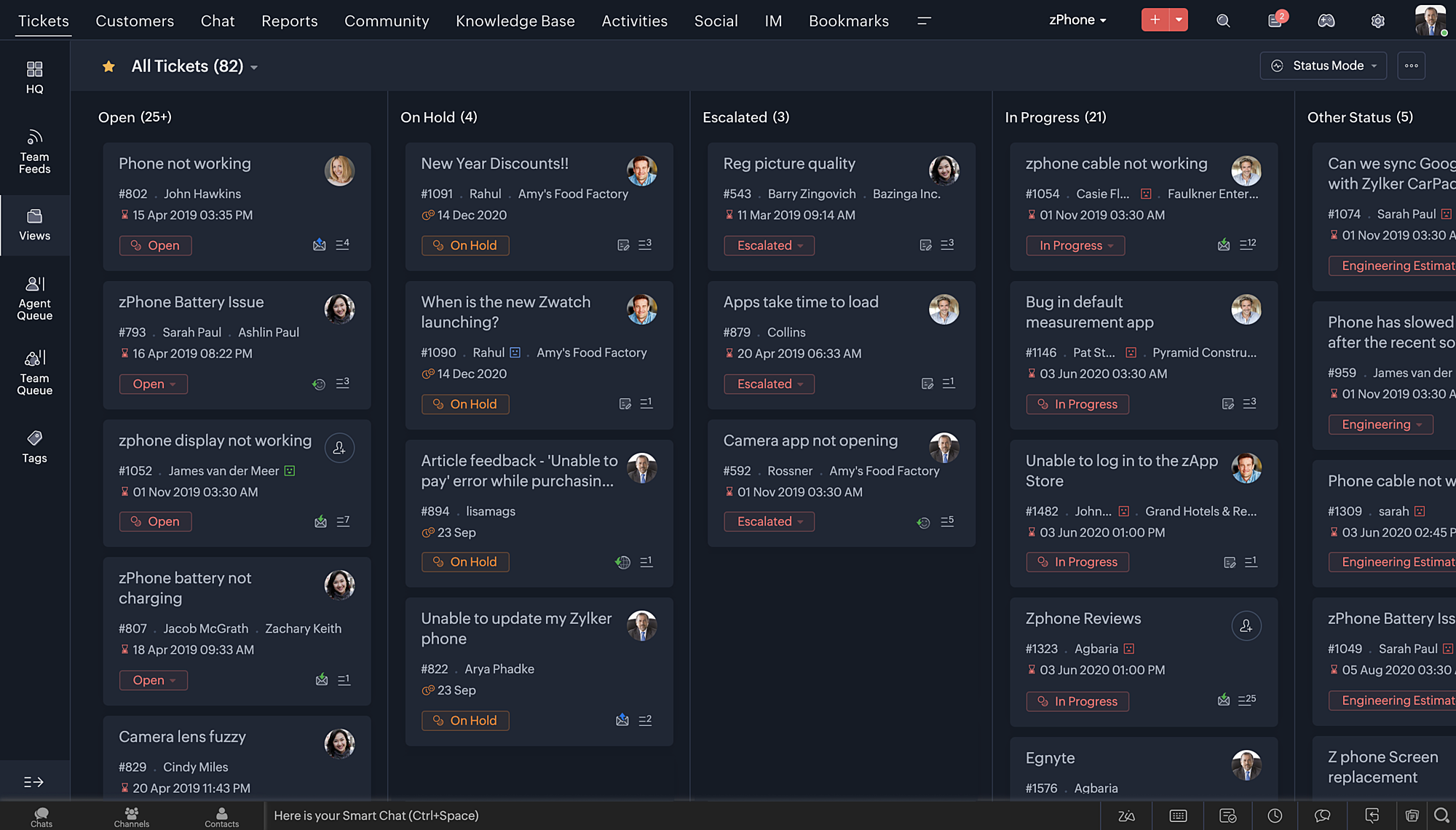
  • Nieuwe thema's voor het bekijken van Desk in je favoriete kleur, of in kleuren die jouw merk vertegenwoordigen.
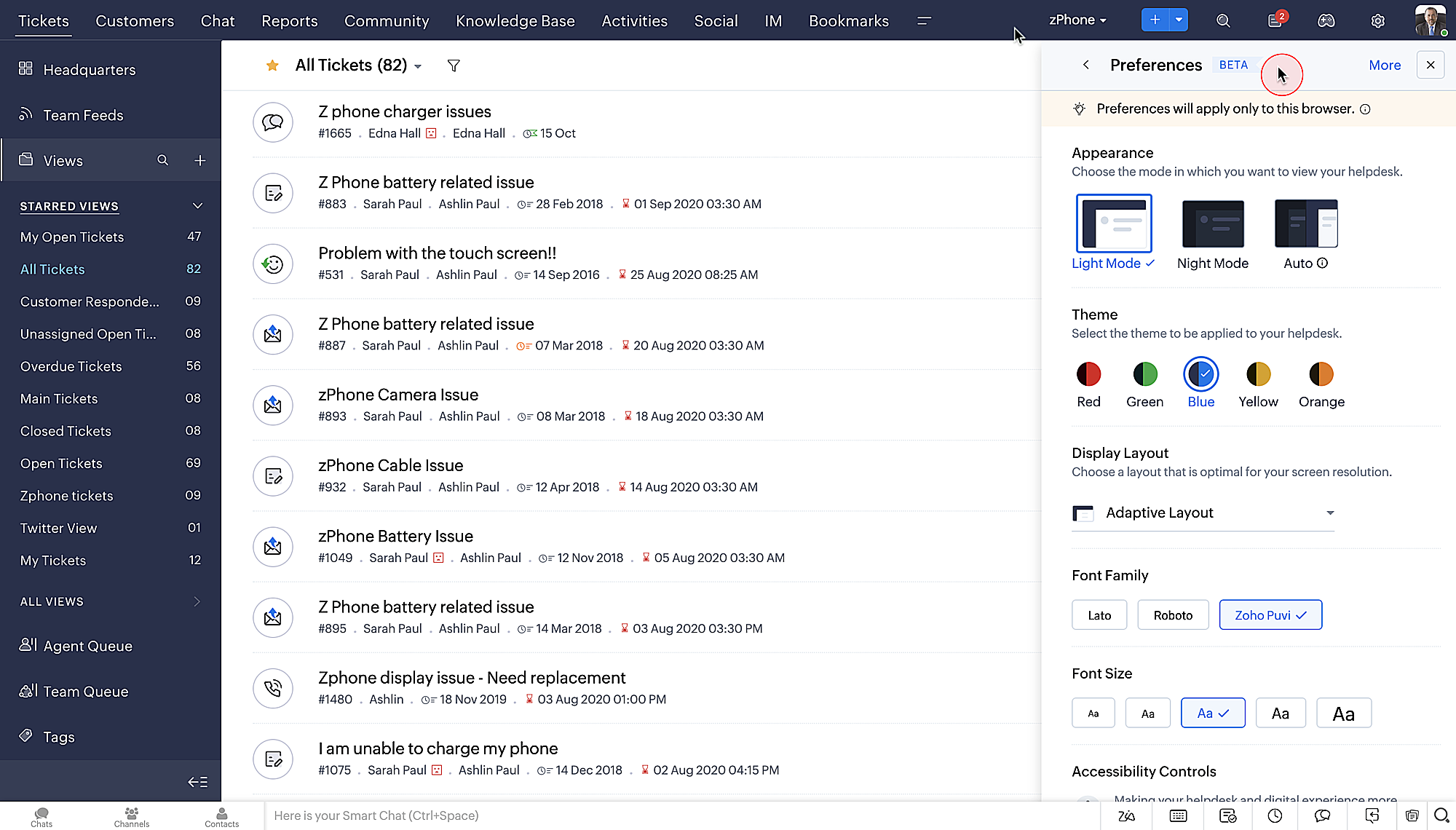
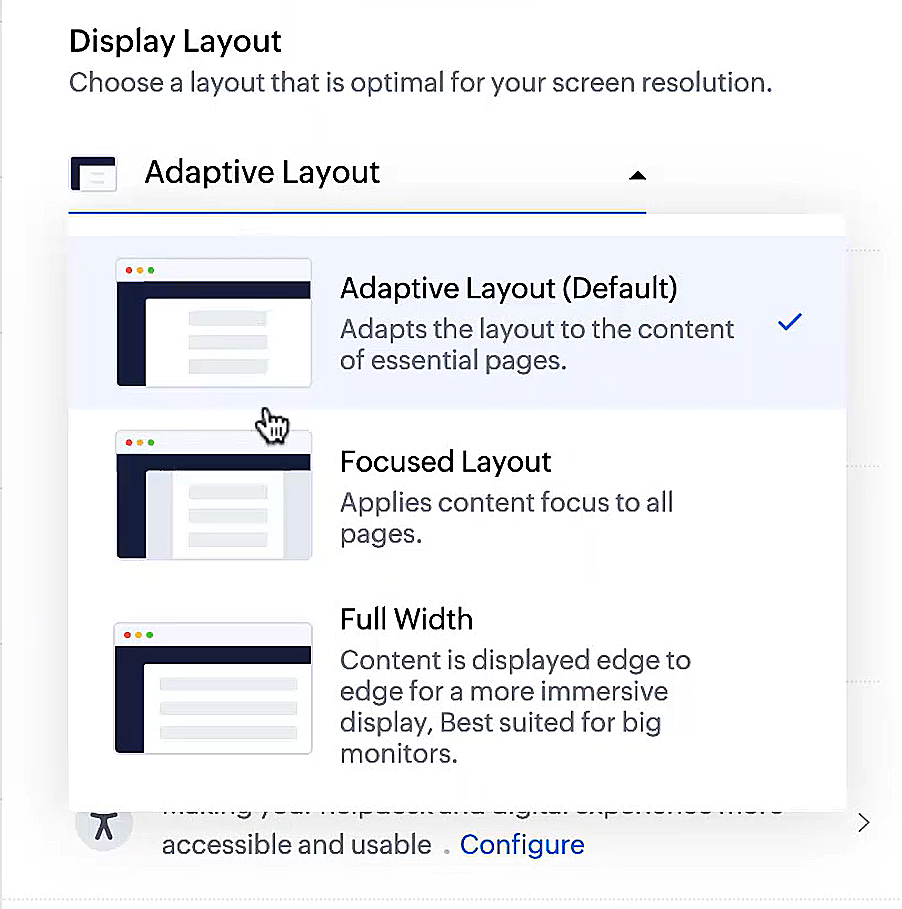
  • Display lay-outs waarmee je kunt kiezen hoe je inhoud aan je wordt gepresenteerd.
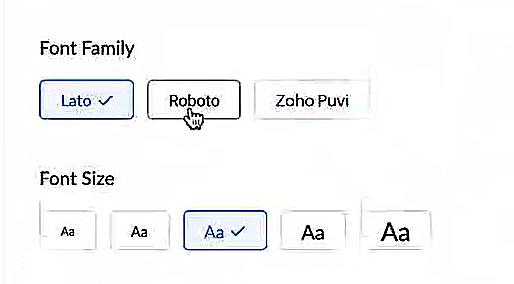
  • Nieuwe lettertypes en -groottes zodat je tekst precies overeenkomt met je voorkeuren. 
Toegankelijkheidscontroles
Het is altijd onze missie geweest om alle gebruikers toegang te geven tot onze producten, en met onze nieuwe toegankelijkheidscontroles komen we een stapje dichterbij. We hebben meerdere knoppen toegevoegd ter ondersteuning van je gezichtsvermogen, fysieke en motorische behoeften en leerbehoeften. 

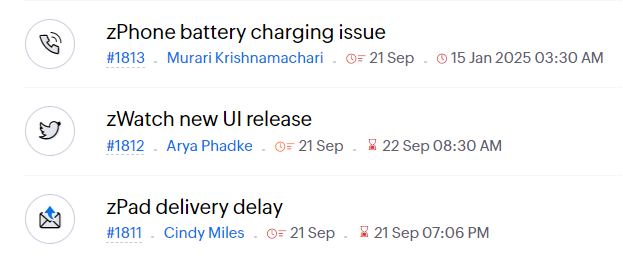
  • Highlight Critical Information toont belangrijke informatie, zoals ticket ID, ticket eigenaar en contactgegevens in een opvallende kleur.
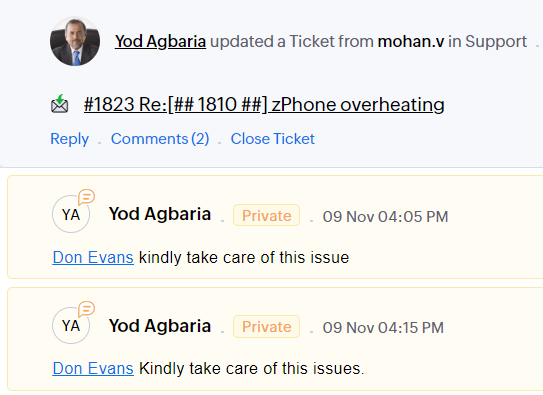
  • Onderstreep Links verhoogt de zichtbaarheid van klikbare links.
  • Benadruk Focusgebied voegt een rand toe rond je focusgebied om de omvang en klikbaarheid aan te geven.
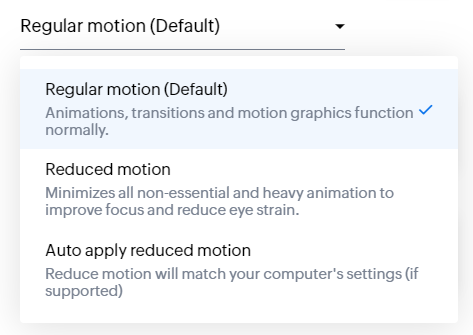
  • Animatie regeling optimaliseert animaties en overgangen in je helpdesk.
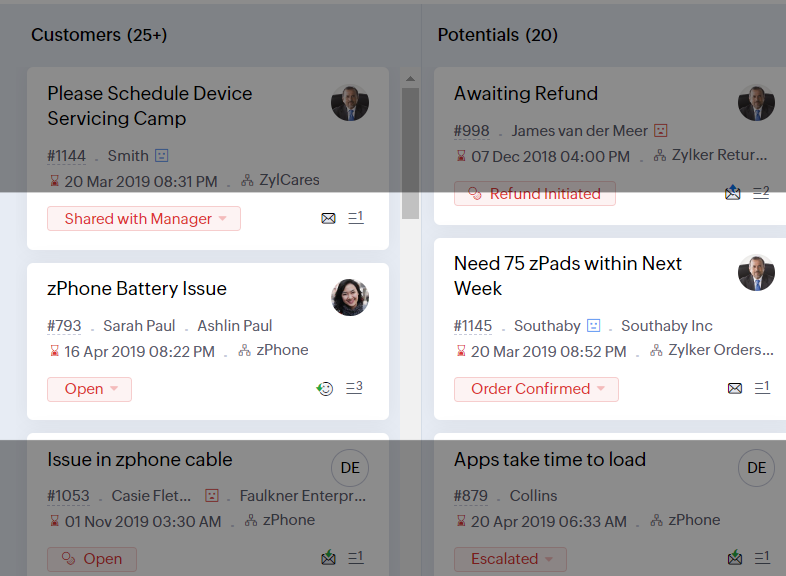
  • Leesmasker elimineert afleiding door tekst te maskeren die je momenteel niet leest.
  • Met Zoomniveau kun je in- en uitzoomen tot de pagina gemakkelijk te bekijken is.
  • Toon lettergrootte past de lettergrootte aan tot de pagina goed leesbaar is.
Met alle nieuwe functies in de Zoho Desk 2022 editie hebben bedrijven nu meer mogelijkheden om te zorgen voor tevreden medewerkers en tevreden klanten.

We horen graag wat je van de nieuw toegevoegde functies vindt! Deel je feedback in onze comments of op social media. 

    • Sticky Posts

    • Doe mee aan de Zoho Desk Meetup op 7 maart in Antwerpen

      Beste Community leden, Wij nodigen jullie graag uit voor de Community Meetup van Zoho Desk! Op 7 maart komen we bij elkaar in Antwerpen, samen met een klant en de Zoho Experts van Brainsolutions. Onze experts zullen een live demo presenteren en jouw vragen
    • Doe mee aan de Zoho Desk Meetup op 16 Februari in Utrecht

      Beste Community leden, Wij nodigen jullie graag uit voor de Community Meetup voor Zoho Desk! Op 16 februari komen we bij elkaar in Utrecht, samen met Fleetkennis en de Zoho Expert van Mobile XL. Onze experts zullen een live demo presenteren en jouw vragen
    • Wat is er nieuw in Zoho Desk 2023

      Beste Community leden, Hoeveel je ook van je klanten en je werk houdt, als klantenservice medewerker zul je zeker een aantal zware dagen tegenkomen. We hebben het dan over de dagen dat je een paar keer op de snooze-knop drukt, koffie morst op je favoriete
    • Tips & Tricks #10 Automatiseren met Zoho Desk Deel 2

      In deel 1 van het automatiseren met Zoho Desk las je een use case over een probleem in een appartementencomplex en hoe dit door gebruik te maken van Zoho Forms en Zoho Desk kan worden opgelost. In deel 2 lees je meer over het integreren van Zoho Forms
    • Tips & Tricks #09 Automatiseren met Zoho Desk Deel 1

      Beste Community leden, Zoals jullie weten hebben we in Nederland een woningtekort. Een oplossing hiervoor is de hoogbouw. Echter, om de de hoogte in te gaan moet er ook voor de juiste faciliteiten in flats worden gezorgd. Problemen kunnen we allemaal
    • Recent Topics

    • How to add a fee based on payment method

      I currently accept both ACH payments and credit card. I want to add a 3% fee to a number of my subscription plans if the customer chooses to use a credit card (and not ACH/checking). How do I do this? Is there an in-built feature, or would i have to create
    • How to charge Convenience fee OR payment gateway charges to the end client who is paying the invoice?

      Hello, I am creating this topic after having discussions with various sets of users and have understood that with people moving more and more to digital payments, it is important for the client to enable the "Convenience fee" kind of scenario. I have
    • In ZOHO Books, it appears that there is a maximum of 200 Shipping addresses.

      I am using ZOHO Books and what you call a shipping address, we use as a Service address. I have a couple of customers that have Many Many service addresses, I am starting to get an error saying too many shipping addresses. Additionally, is there a way
    • How can I add a Custom Field (or Customer_name) to a picklist?

      Our workflow is Shopify-->SO -->Picklist-->Package-->Shipment. We would like to have the Picklist template to include a custom field "Customer_Notes" (we have created this field already). This way we get alerted when a customer has notes on their account.
    • Can't copy and paste from email in Zoho email client

      I don't know what happened, but I have lost the ability to cut and paste information from an email.
    • Which Zoho CRM tasks would you want an AI assistant to handle?

      I’ve started delegating my Zoho CRM work to AI – and many tasks now take me half the time. It has been so useful that we’re now working to make it available to everyone. Instead of clicking through records and tabs, I simply describe what needs to be
    • What's New in Zoho Inventory | July & August 2026

      Hello users, The July and August 2026 releases bring a range of new features and improvements across the product. From the Nigeria Edition and Super Admin enhancements to Sri Lanka IRD-compliant invoicing, Loyalty Program Management, and improvements
    • Hide Inactive Social Sign-In Providers from Login Screen

      Hello Zoho Team, We hope you are doing well. Currently, Zoho One allows admins to configure security policies and enable or disable Social Sign-In options for third-party providers such as Apple, Google, Microsoft, LinkedIn, Yahoo, Twitter, Facebook,
    • Forms data export bug

      The export csv with a password has changed for the worst. It is less secure by not allowing complex passwords. Just last week and the last year (at least) I was able to use a complex, secure password. Export CSV moreover doesn't even work if I use a simple
    • How does Zoho handle the daylight savings time change in Alberta?

      Alberta has just made the decision to get rid of daylight savings. This means that as of November 1, 2026 we remain on UTC-6 year-round. We have timing errors in meetings scheduled after that For example, we scheduled meetings in late November at 9:00
    • Zoho Projects - Linking CRM Deals to Projects via API without sending customer contact email invitation to project portal

      We are using the Zoho CRM and Zoho Projects APIs to automatically create a project in Zoho Projects and then associate that project with the relevant Deal in Zoho CRM. The API process is working in that the project is created successfully and appears
    • Need to set workflow or journey wait time (time delay) in minutes, not hours

      Minimum wait time for both Campaigns workflows and Marketing Automation journeys is one hour. I need one or the other to be set to several minutes (fraction of the hour). I tried to solve this by entering a fraction but the wait time data type is an integer
    • Shared Mailbox in iOS app

      Hi, On the desktop I am using a Shared mailbox for our company's general mailbox that somebody else should be able to view. In the iOS app however I can't find it? Old sources on the internet says this isn't possible but that can't be right? Somebody
    • Issues with Zoho Insights and email template web links

      Is anyone else out there having the same issue we're experiencing? When we send out an email template, Zoho insights is converting the URLs from the URL we insert in to the template in to one of the form https://mailer1.zohoinsights.com/ocgeturl/2d6f.327230a?l=0ed7f050-5b31-11eb-a1a...
    • UCP: Why We Killed the Multi-Portal Mess and Simplified Customer Self-Service

      Let's talk about the multi-portal mess nobody wants to admit that it exists. Your customer needs an invoice from one app, wants a ticket update from another, and has a project waiting in a third, each behind its own login, its own UI, its own "was it
    • Object-level edit permissions

      Hi, we are currently running into a limitation with permissions inside larger workspaces. Our use case is a central Analytics workspace that contains many tables, Query Tables, reports and dashboards used by different teams. We would like to allow certain
    • inventory removal at packing list or shipment.

      currently our system is set to remove inventory at invoice. This is creating an inventory nightmare? Is it possible to change the settings to remove the item from inventory at either the packing slip stage or shipping the item.
    • Item description is not displayed

      I added the item description while importing the new item through the bulk item Excel sheet, and the import was completed successfully. However, I cannot see the description in the item details under Inventory. Could anyone please advise how to make the
    • Shared inbox unable to see replies

      Hi we are a small company me and someone else, we have a shared inbox for our sale@ and contact@ however we have this issue where by if i reply to an email or the other person reply to the email, it does not show it to them and therefore we end up replying
    • Record Payment - Auto Populate Amount as payments are selected

      When recording payments you have the option of clicking on "Pay in Full" next to the bill which automatically adds the total at the bottom of the page next to "Amount used for payments" but this should also auto populate / update the total at the top
    • Can't set conditional layout rule on lookup field in Zoho CRM

      Namaskaram Zoho CRM team, Usually any fields of module except mandatory fields can be hide using conditional layout rules. But that can't be set on lookup fields event that is not a mandatory fields. Many users are in need of that. Crafted with ❤️ Zoho
    • [Request] Pivot filter date option : from set date to relative value ie from 01Jan to LastMonth

      I don't think I can currently do this... but it's worth asking if it's possible. My use case is concerning annual leave which is calculated from the beginning of the calendar year (01Jan) then each month I want to have details of leave taken etc... In
    • Need to be able to apply layout rules to 'Multi Pick List'

      Currently, we are unable to apply layout rules to fields that are 'Multi Pick List'. This means we have to instead use checkbox fields, but they are inefficient. For example, we use the Multi Pick List to list our products. However, we're unable to apply
    • Announcing the new SKILL.md for Zoho CRM and the updated OAS repository!

      We are introducing a new zoho-crm skill to make working with Zoho CRM Developer tools (like APIs, functions, widgets, client scripts, queries etc) easier and faster, with the help of AI in your preferred AI harness like Claude Code, Codex, Cursor, VSCode
    • My "trigger" panel disappear from my workflow ...

      Hello, I want to add a trigger to an email sequence, but the "trigger" panel has disappeared when I want to modify ...I used a predefined template to create this sequence, is that because of that? Thank you. I have attached a screenshot to you
    • Workflow Automation Not Triggering

      My Zoho CRM workflow sometimes doesn’t trigger when a record is updated, even though the workflow criteria appear to be met. What should I check to find out why the workflow is being skipped?
    • AI Calling

      Hi, does anyone have experience or any thoughts on AI Calling. Getting AI to make calls on behalf of your company. We are looking into it, but are finding it difficult to get info and providers that can assist.
    • Zoho Sheet as KB Document

      It would be nice if Zia Agents could take Zoho Sheets as part of the knowledge base. The use case here is that it's infinitely easier for humans to maintain a spreadsheet table than any .md / TAML / JSON document. For situations where humans are responsible
    • Ask the Experts: Five-hour live Q&A session with Zoho WorkDrive product experts

      Have questions about WorkDrive 5.0? Let’s talk! We recently launched Zoho WorkDrive 5.0, packed with powerful updates to help your team work smarter, stay secure, and get more value from your business content. From content-centric workflows and AI-powered
    • Automating CRM backup storage?

      Hi there, We've recently set up automatic backups for our Zoho CRM account. We were hoping that the backup functionality would not require any manual work on our end, but it seems that we are always required to download the backups ourselves, store them,
    • Zoho Community Digest - September 2026 | Part 3

      Hi everyone, and welcome back! Zoho CRM launches PRM for partner management, Bigin builds this year's Apple AI updates into the app, and Snapchat is now a connected channel in Zoho Social. There are also three notices worth reading, including WhatsApp
    • Change from OST to PST on Windows 10/11 Using Free Method

      There is an advantage in converting OST files to PST format if you need to access your Outlook data on a different computer, want to keep a local copy, or are trying to recover items from an old Outlook profile. The good point is that users of Windows
    • ERROR: This user is not allowed to add in Zoho. Please contact support-as@zohocorp.com for further details

      I can add new user for mail, i received message error about; This user is not allowed to add in Zoho. Please contact support-as@zohocorp.com for further details Try creating user name; instagram@eficaztecnologia.com.br
    • Support for Custom Fonts in Zoho Recruit Career Site and Candidate Portal

      Dear Zoho Recruit Team, I hope you're doing well. We would like to request the ability to use custom fonts in the Zoho Recruit Career Site and Candidate Portal. Currently only the default fonts (Roboto, Lato, and Montserrat) are available. While these
    • Ability to filter services and parts based on a field in the Work Order

      Hell FSM team, We have a customer with 2 value streams using Zoho FSM. Each value stream uses different products, at different price point. Currently, all of the products are accessible when creating a work order and modifying a service appointment, which
    • SubTotaks for Item Headers in Estimates

      Hi, Apparently, one can add Item Headers in Estimates in Zoho Books. Is this feature like an Estimate section with a SubTotals for each Item Header/Section? Or is the Item Header just a Title and cannot be SubTotalized? Thank You
    • Sync of products and orders between Zoho Inventory, Zoho Books and Shopify

      Good Day I migrated from QuickBooks to Zoho Books and Zoho Inventory at the beginning of this year. The migration team assisted with importing my data, but I am currently experiencing multiple issues affecting syncing between Shopify and Zoho. 1. SKU
    • Best practices for importing phone numbers

      I've recently found a problem with my phone provider, integrated with Zoho CRM, where a phone number that starts with 00 instead of + won't work. The problem has no solution: they tell me to replace all 00 with + I've always preferred using 00 instead
    • Copy + Paste in Notes: Text color and text background are not retained

      I've recently started using Zoho Notebook as an Evernote replacement. When copying and pasting text within Zoho Notes, I notice that the formatting of the text (text color and background color) is not retained when pasting. Only the attributes "Bold"
    • Add Comprehensive Accessibility Features to Zoho Writer

      Hello Zoho Writer Team, We hope you are doing well. We would like to submit a feature request to enhance Zoho Writer with a full set of accessibility tools, similar to the accessibility options already available in the Zoho Desk agent interface. 🚧 Current
    • Next Page