All new Address Field in Zoho CRM: maintain structured and accurate address inputs

All new Address Field in Zoho CRM: maintain structured and accurate address inputs

AlertThe address field will be available exclusively for IN DC users. We'll keep you updated on the DC-specific rollout soon.
  • It's currently available for all new sign-ups and for existing Zoho CRM orgs which are in the Professional edition.


Info
Latest update on 11th November 2025:
Our developers are working on a few aspects/use cases for release of the new address fields in the other DCs. We will update the post when we have a rollout plan for this.


Managing addresses in Zoho CRM just became simpler and more effective. With the new custom address field type, you no longer need multiple separate fields or ambiguous text entries. You can now easily capture and manage address data comprehensively in a single, structured, and user-friendly field.


Why the new address field?

Until now, there was no single, collective way to capture a complete address in Zoho CRM. If you were the admin of a sales team and got the task of collecting client addresses, you had two options:
  1. You could create separate fields—one for street, one for city, one for state, one for country, and so on. But if you wanted states to change based on the country selected, you'd have to enter all the country and state values yourself manually and then set up dependency rules.
  2. Or you could create a single multiline text field for the whole address. That avoided the setup work, but it came at the cost of functionality; you couldn't filter by country or state, and you couldn't use the data for quick reporting or territory-based analysis.
Either way, it was a lot of manual work, and neither method gave you a quick, consolidated way to both read and act on the address information.

The new address field eliminates all of this headache by enabling you to capture all the necessary components in one structured field while still being able to view, filter, and report on them individually.
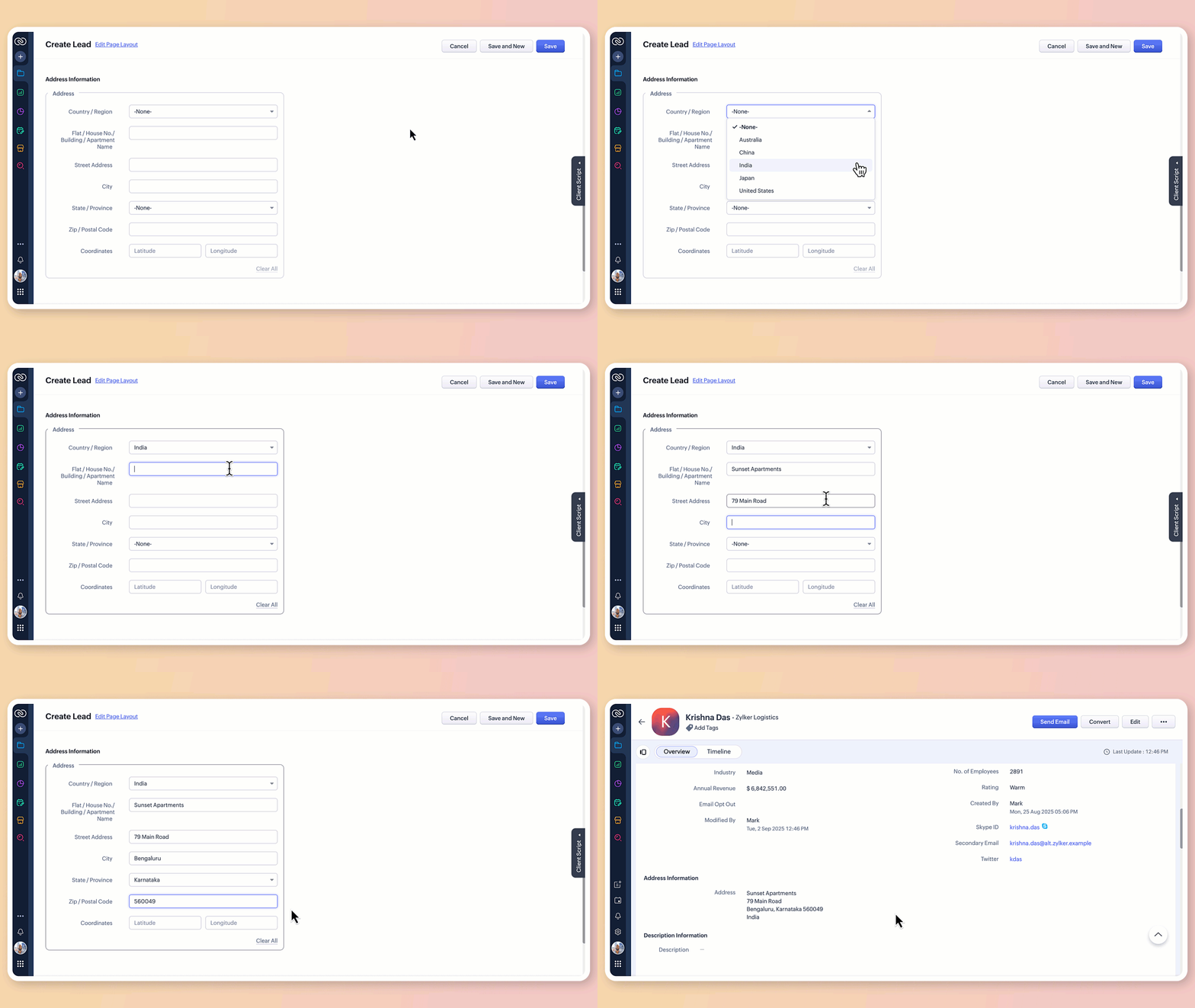

What does the new address field offer?

1. Structured address input

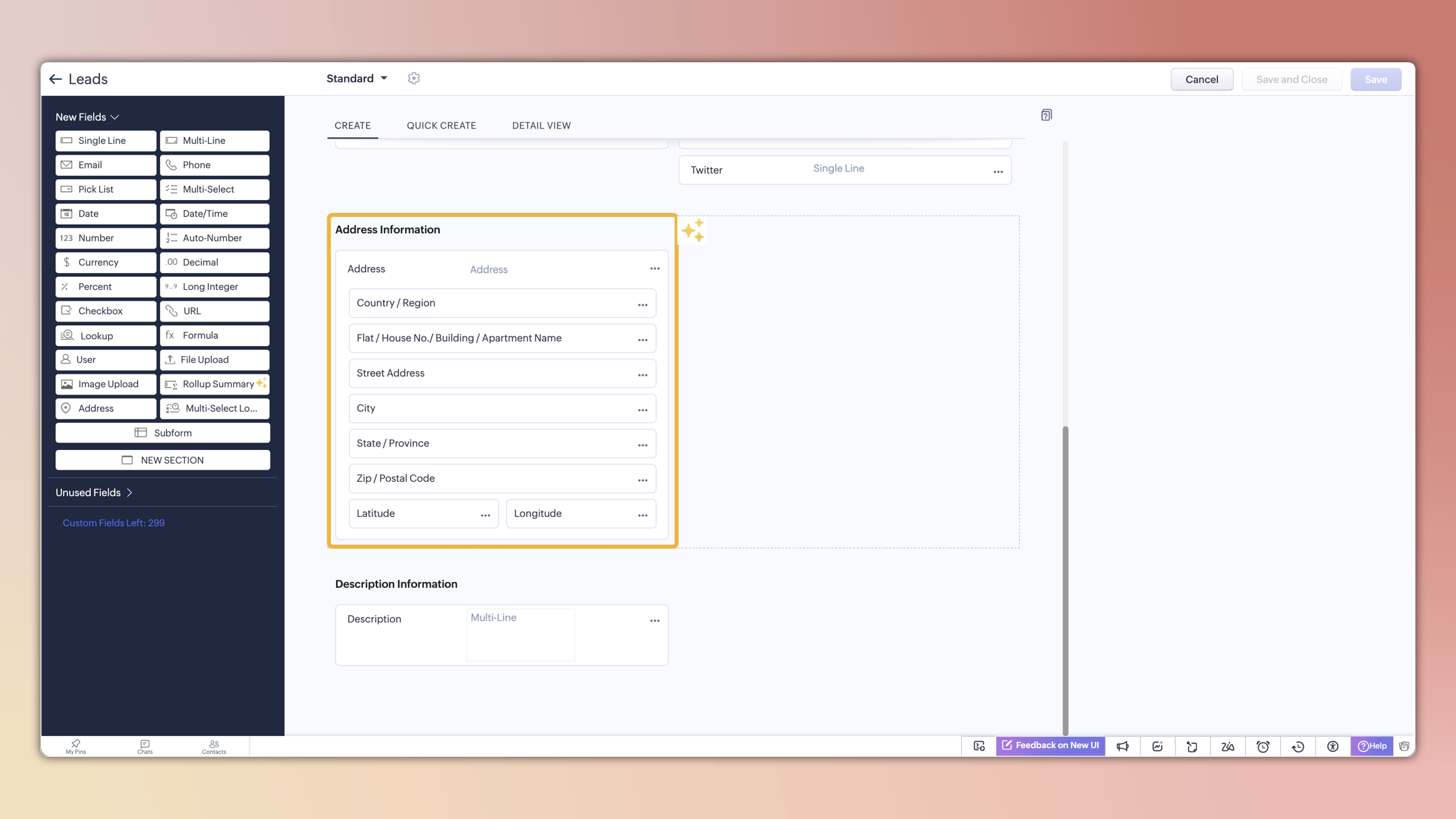
The all-new address field breaks down location details into clearly defined components:

  • Country/region

  • Flat/house number/building/apartment name

  • Street address

  • City

  • State/province

  • Zip/postal code

  • Precise geographic coordinates in latitude and longitude

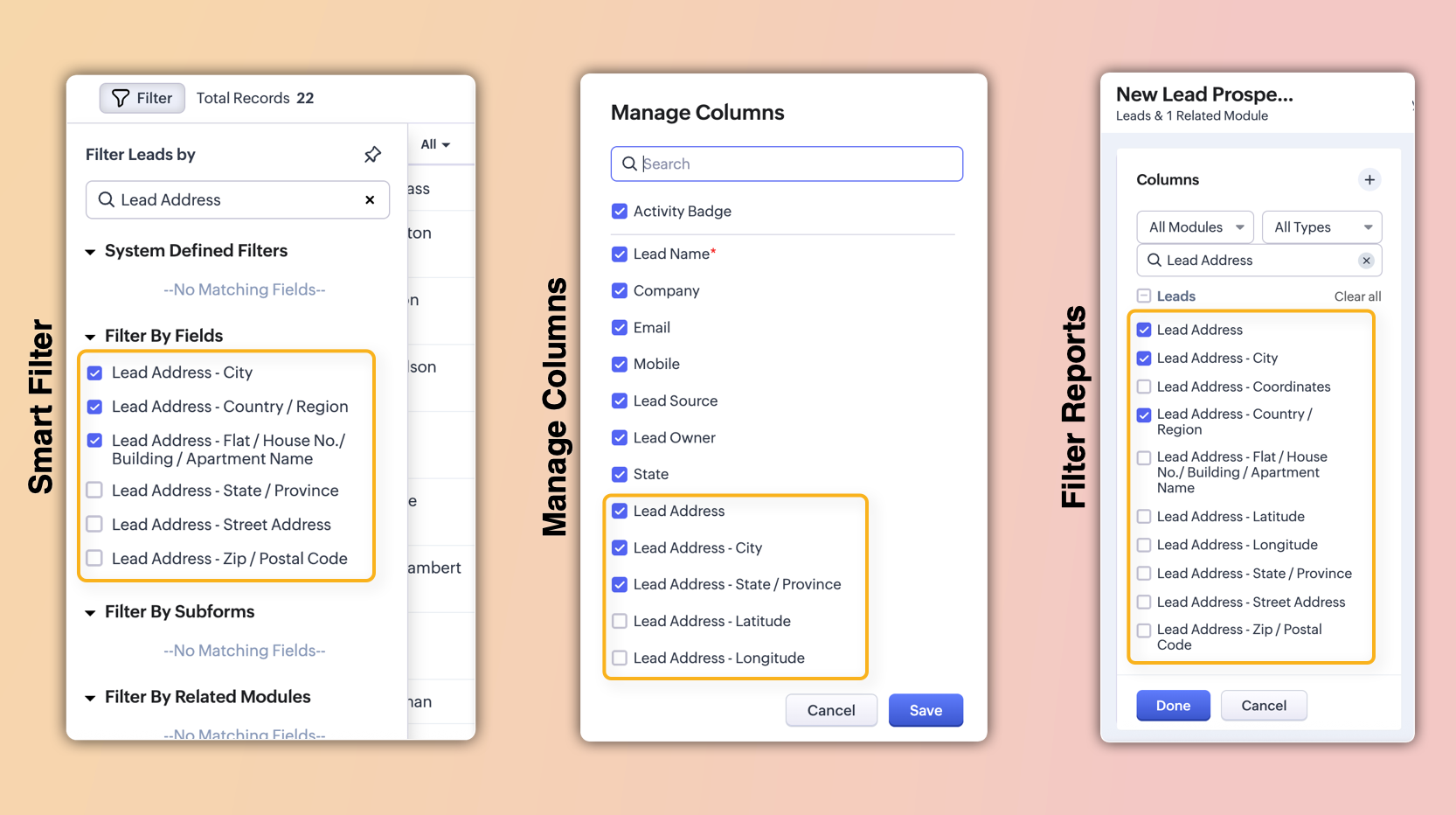
These sub-fields will also be individually available for viewing, filtering, and applying criteria. This enables users to configure, search, and report on address data with greater precision and flexibility.

2. Global sets for countries and states

The new address field comes pre-loaded with standardized lists of countries and their respective states/provinces.

  • Selecting a country instantly filters the available states, so you don't have to set up dependencies manually or type them in.
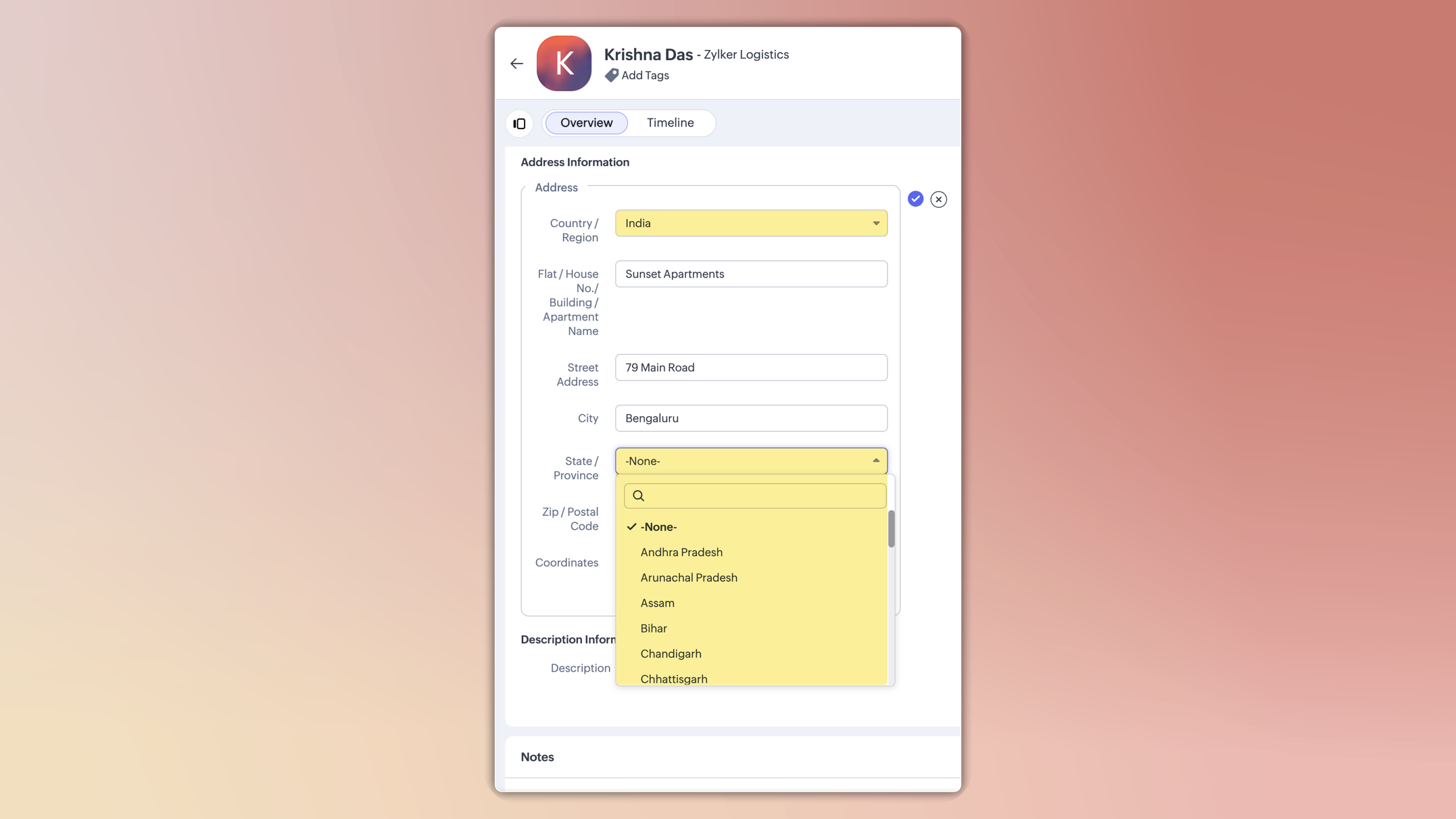

  • This ensures consistent spelling, eliminates typos, and keeps reporting clean.

  • You can also customize these lists in the Global Sets page by adding or removing values based on your business needs.
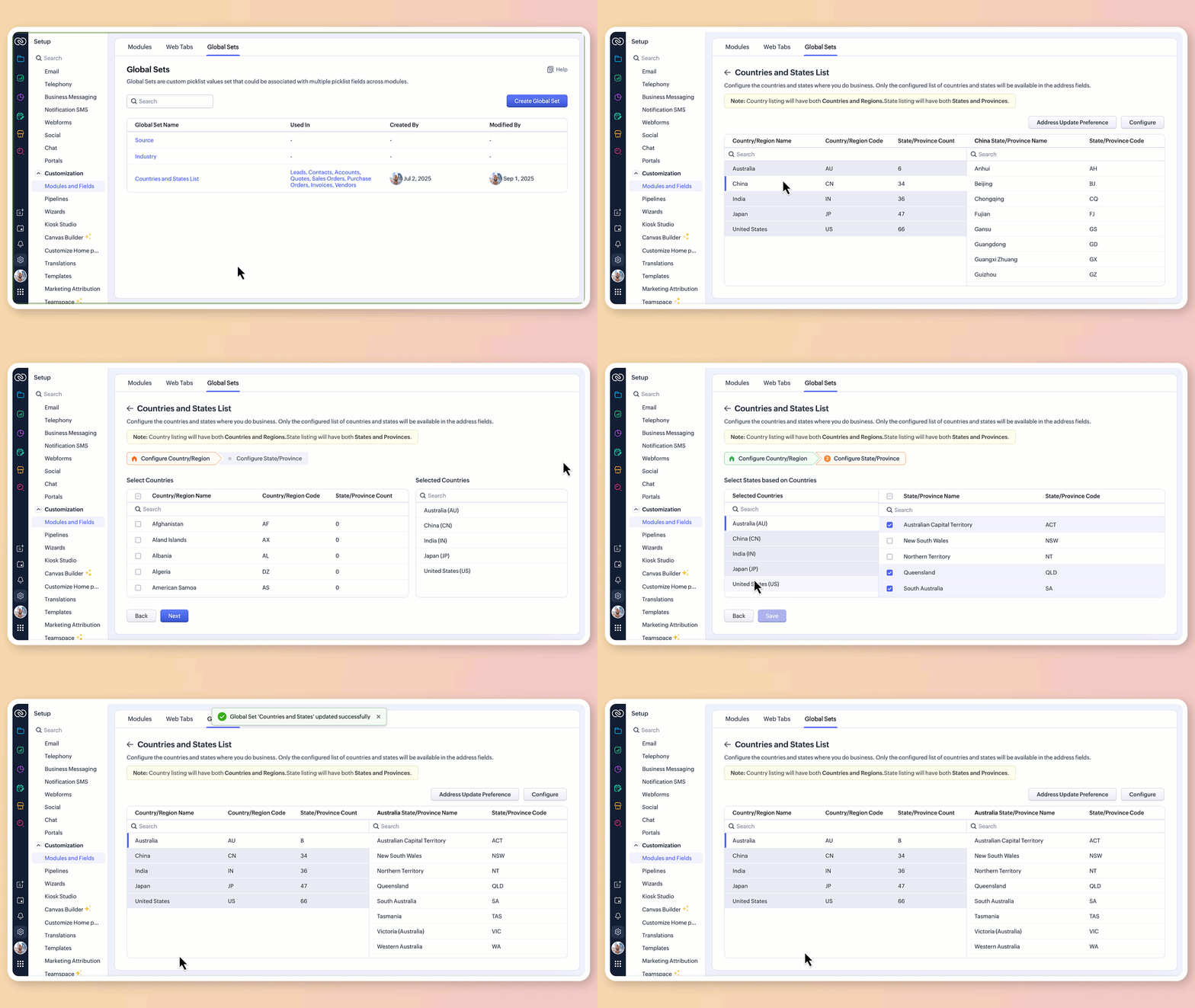

3.Maintain accuracy with address update preferences

To avoid mismatched or invalid country and state data, you can now set address update preferences in your org.

  • Choose to allow only configured country and state values in records, irrespective of the update source.

  • Choose how invalid entries are handled:
    You can either skip the country/state update alone and proceed with the record creation or update, or stop the entire record creation or update altogether if an invalid value is detected.


Info

Feature availability and limits

  • Editions supported: Professional, Enterprise, and Ultimate

  • Modules supported: All modules except user modules, linking modules, and Tasks, Calls, and Meetings modules

  • Limits: Up to two custom address fields per module

Alert

Points to be noted:

  • For new signups: The system-defined address fields will be available in the new address format for: Leads, Contacts, Accounts, Vendors, Quotes, Invoices, Sales Orders, and Purchase Orders modules.Additionally, admins can configure custom address fields for these modules if required.

  • Existing orgs: Admins can incorporate the new address field into their modules manually by adding it via the layout editor. The address field will be available as a custom field in the field tray.

  • Address field is not supported in Webforms, Field updates in Automation and Process management, Zia Enrichment. (The support for the same is in progress and will be updated shortly.)

Please share your feedback in the comments below.

Thanks,

Nizamuddin


    • Recent Topics

    • Custom SMTP is now available in Zoho Sign

      Hi there! Want to send Zoho Sign emails from your organization's or personal email server? Look no further! Zoho Sign has introduced custom Simple Mail Transfer Protocol (SMTP) for Enterprise users across all data centers. By enabling custom SMTP, you
    • Email was sent out without our permission

      Hi there, One customer just reached out to us about this email that we were not aware was being sent to our customers. Can you please check on your end?
    • Flexible Partial-Use Coupons (Stored Value Credits)

      Subject: Feature Request: Ability for users to apply partial coupon balances per transaction Problem Statement Currently, our coupons are "one-and-done." If a user has a $50 coupon but only spends $30, they either lose the remaining $20 or are forced
    • Prevent accidental duplicate entry of Customer Ordersome

      Zoho Support has confirmed that Zoho currently does not have any method (using Deluge, flow or any other method) to alert a user when a sales order has been entered twice using the same customer reference number (i.e. a duplicate). Most ERP platforms
    • Migrating Brevo Automation Logic to Zoho Campaigns

      Hello Zoho Campaigns Support Team, I am in the process of migrating my email marketing from Brevo to Zoho Campaigns. I have around 10,000 contacts, which I have already successfully exported from Brevo and imported into Zoho Campaigns. I now need guidance
    • Is there a way to delete workspaces?

      I want to remove one of the workspaces in my Campaigns account. I don't see any obvious way to do this. Am I missing something?
    • Boost your Zoho Desk's performance by archiving tickets!

      The longer your help desk operations are, the more likely it is to accumulate tickets that are no longer relevant. For example, ticket records from a year ago are typically less relevant than currently open tickets. Such old tickets may eventually lead
    • Collapsing and expanding of lists and paragraphs

      hello Would you ever implement Collapsing and expanding of lists and paragraphs in zoho writer ? Best regards
    • New Custom View -Sorting the Custom fields

      While creating a New Custom View in invoice , Customers, Bills ,expense etc , the sorting of custom fields are not available , a query function "order by / sort by  " may also be included in  Define new criteria module  which will be more beneficial to
    • Make CAMPAIGNS email look as simple as possible

      Hi there I'm trying to make my Campaigns email look as much like a normal email as possible. I'm a bit stuck with the "justification" of the email email block. Can I LEFT JUSTIFY the "whole email" to make it look "normal"? (Please see screenshot attached)
    • [Webinar] Top 10 Most Used Zoho Analytics Features in 2025

      Zoho Analytics has evolved significantly over the past year. Discover the most widely adopted features in Zoho Analytics in 2025, based on real customer usage patterns, best practices, and high-impact use cases. Learn how leading teams are turning data
    • Sorry! we encountered some problems while sending your campaign. It will be sent automatically once we are ready. We apologize for the delay caused.

      Hello. Lately we are having problems with some campaigns, which show us this error message. Sorry! we encountered some problems while sending your campaign. It will be sent automatically once we are ready. We apologize for the delay caused. We can't find
    • Can I remove or divert certain contacts from an active Campaigns workflow?

      I have created a workflow in Zoho Campaigns, which sends different emails, once contacts have been added to a mailing list. To choose which email to send to the contacts, there are conditions, which divert contacts based on their company type and their company size. There was a subsection of this workflow, where company size wasn't selected correctly, and some contacts have been sent down the wrong path and received the wrong email. The workflow contains a reminder loop and a further series of emails.
    • How to map fields from Zoho Recruit to Zoho People

      I've got these fields from my Job Offer that I'm trying to map to the Work information fields in Zoho People, but they arent showing up. For example, how do I get the department name field (in the job post) to map to the work information field in Zoho
    • UTM in zoho campaigns

      Helloo everybody!!! Someone know how IF ZOHO CAMPAIGNS has UTM for tracking the url of any campaigns. thank u
    • Full Context of Zoho CRM Records for Zia in Zoho Desk for efficient AI Usage

      Hello everyone, I have a question regarding the use of Zia in Zoho Desk in combination with CRM data. Is it possible to automatically feed the complete context of a CRM record into Zia, so that it can generate automated and highly accurate responses for
    • Knowledge base printing

      I saw a posting about printing the knowledge base as I was looking for the answer, but we would like the ability to print out the entire knowledge base with a click, keeping the same organization format.   Bonus would include an index of keywords and
    • Search not working!

      I have items in my notebook tagged but when I search for a tag nothing comes up! Any fix for this?
    • Zoho Books | Product updates | January 2026

      Hello users, We’ve rolled out new features and enhancements in Zoho Books. From e-filing Form 1099 directly with the IRS to corporation tax support, explore the updates designed to enhance your bookkeeping experience. E-File Form 1099 Directly With the
    • Updates for Zoho Campaigns: Merge tag, footer, and autoresponder migration

      Hello everyone, We'd like to inform you of some upcoming changes with regard to Zoho Campaigns. We understand that change can be difficult, but we're dedicated to ensuring a smooth transition while keeping you all informed and engaged throughout the process.
    • File Upload field not showing in workflow

      Hi, I have added a field on Zoho CRM. I want to use it in a workflow where that particular field is updated based on another field, however it is not showing up in the field list to select it in the workflow. Why is this please?
    • Drag 'n' Drop Fields to a Sub-Form and "Move Field To" Option

      Hi, I would like to be able to move fields from the Main Page to a Sub-Form or from a Sub-Form to either the Main Page or another Sub-Form. Today if you change the design you have to delete and recreate every field, not just move them. Would be nice to
    • Sharing my portal URL with clients outside the project

      Hi I need help making my project public for anyone to check on my task. I'm a freelance artist and I use trello to keep track on my client's projects however I wanted to do an upgrade. Went on here and so far I'm loving it. However, I'm having an issue sharing my url to those to see progress. They said they needed an account to access my project. How do I fix this? Without them needing an account.
    • How do i integrate google analytics to Zoho Campaigns?

      Looking to track Zoho Traffic from email Current topic is outdated
    • How do teams manage meeting follow-ups across Zoho tools?

      We’re using Zoho tools for collaboration and tracking, but managing meeting notes, action items, and follow-ups across teams is still challenging. Curious how others are handling this within Zoho workflows. Are there best practices or integrations that
    • Customize Colors used on graphs and charts according to users desire.

      It would be great if we could customize the graph's colors as we see fit. I hate that yellow is always the default color!
    • Let us view and export the full price books data from CRM

      I quote out of CRM, some of my clients have specialised pricing for specific products - therefore we use Price Books to manage these special prices. I can only see the breakdown of the products listed in the price book and the specialised pricing for
    • Mejoras urgentes para ZOHO MEETING

      Tengo unos meses usando Zoho Meeting. En general, es buena, pero hay cosas vitales que no logra cumplir con mínima calidad. 1) Calidad de audio y video: urge mejoras. Audio con retraso, imagen borrosa, mal recorte de silueta con fondos virtuales. Además,
    • Multiple header in the quote table???

      Hello, Is it possible in Zoho CRM to add multiple headers or sections within the Quote product table, so that when the quote is printed it shows separate sections (for example “Products” and “Services”)? To clarify, I’m asking because: This does not appear
    • Saving sent email campaign as PDF

      I'm looking to add all campaigns sent to an archive folder in sharepoint. Is there anyway to accomplish this in Zoho Flow ? I'm falling at the first hurdle ... can I automatically save a sent campaign as a PDF to a folder location ?
    • Exporting All Custom Functions in ZohoCRM

      Hello, All I've been looking for a way to keep about 30 functions that I have written in Zoho CRM updated in my own repository to use elsewhere in other instances. A github integration would be great, but a way to export all custom functions or any way
    • How can Data Enrichment be automatically triggered when a new Lead is created in Zoho CRM?

      Hi, I have a pipeline where a Lead is created automatically through the Zoho API and I've been trying to look for a way to automatically apply Data Enrichment on this created lead. 1) I did not find any way to do this through the Zoho API; it seems like
    • Conditional Layouts On Multi Select Field

      How we can use Conditional Layouts On Multi Select Field field? Please help.
    • Appreciation to Qntrl Support Team

      We are writing this topic to appreciate the outstanding level of support from Qntrl Team. We have been using Qntrl since 2022 after shifting from another similar platform. Since we joined Qntrl, the team has shown a high level of professionalism, support,
    • How can I hide "My Requests" and "Marketplace" icon from the side menu

      Hello everybody, We recently started using the new Zoho CRM for Everyone. How can I hide "My Requests" and "Marketplace" from the side menu? We don't use these features at the moment, and I couldn't find a way to disable or remove them. Best regards,
    • Whatsapp Integration on Zoho Campaign

      Team: Can the messages from Zoho Campaign delivered through Whatsapp... now customers no longer are active on email, but the entire campaign module is email based.... when will it be available on whatsapp.... are there any thirdparty providers who can
    • Mandatory Field - but only at conversion

      Hello! We use Zoho CRM and there are times where the "Lead Created Date & Time" field isn't populated into a "Contractor" (Account is the default phrase i believe). Most of my lead tracking is based on reading the Lead Created field above, so it's important
    • Different Task Layouts for Subtasks

      I was wondering how it would be possible for a subtask to have a different task layout to the parent task.
    • Enable Free External Collaboration on Notecards in Zoho Notebook

      Hi Zoho Notebook Team, I would like to suggest a feature enhancement regarding external collaboration in Zoho Notebook. Currently, we can share notes with external users, and they are able to view the content without any issue. However, when these external
    • Using data fields in Zoho Show presentations to extract key numbers from Zia insights based on a report created

      Is it possible to use data fields in Zoho Show presentations along with Zoho Analytics to extract key numbers from Zia insights based on a report created? For example, using this text below: (note that the numbers in bold would be from Zia Insights) Revenue
    • Next Page