Aperçu des modules de Zoho Projects

Aperçu des modules de Zoho Projects


Dans cet article nous découvrirons les différents modules dans Zoho Projects qui vont vous permettre de gérer vos projets en stimulant la productivité, en améliorant la transparence du projet et en fournissant une vision claire à l'équipe.

ACCUEIL

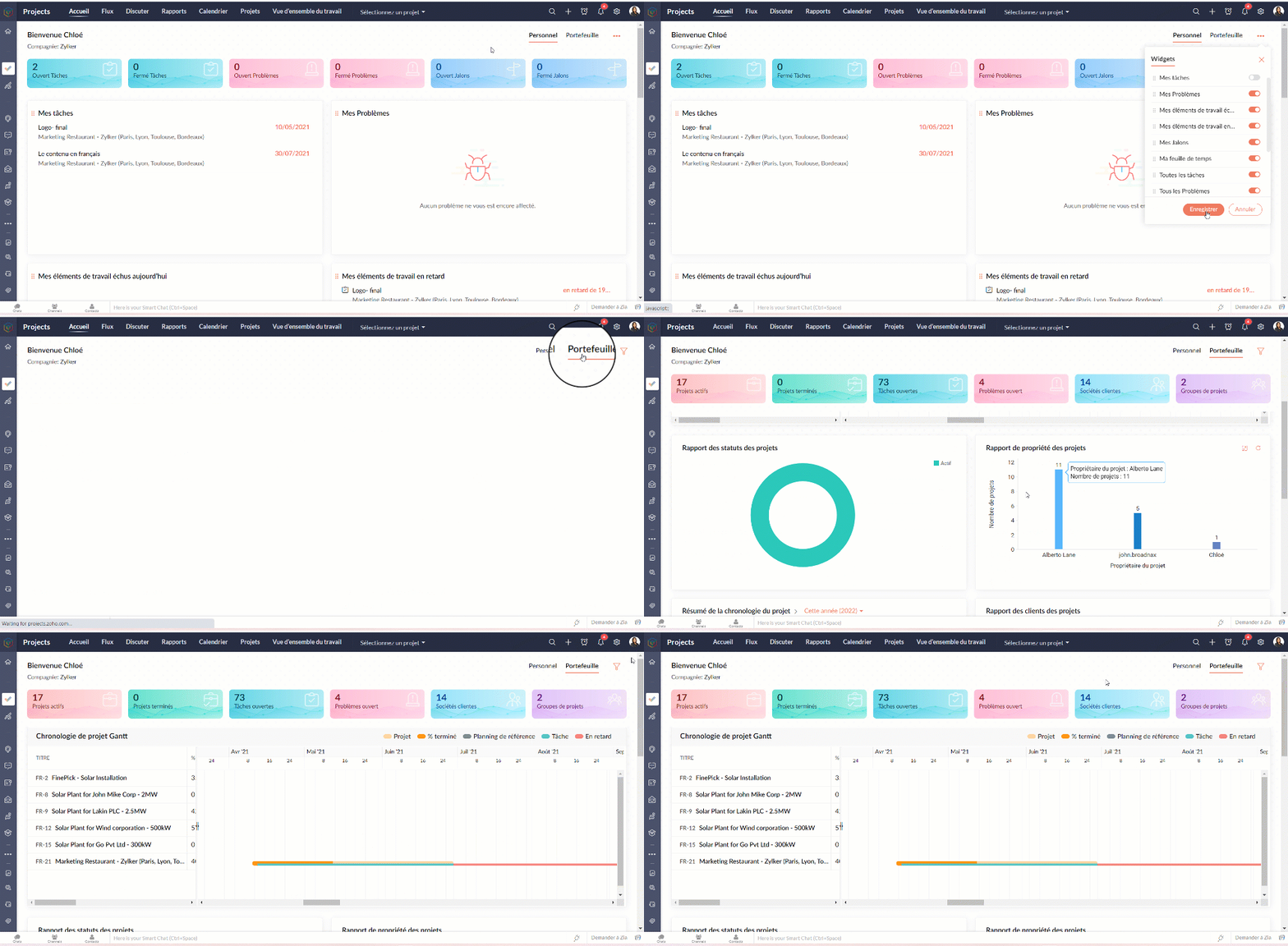
L'accueil ou le tableau de bord de Zoho Projects vous donne deux vues;
  • La vue personnelle où vous allez trouver les détails sur l'ensemble des projets dont vous faites partie. Cette vue peut être personnalisée.
  • La vue portefeuille où vous avez un aperçu des détails de l'ensemble des projets du portail de votre organisation. Un compteur affiche les statistiques relatives à vos projets, tâches, problèmes, clients et groupes de projets. Le time line du projet Gantt donne un indicateur visuel du calendrier du projet et de son état d'avancement.
FLUX

Par défaut, les flux sont affichés pour tous les projets. Sous le module "Flux", il y a trois onglets :
  • Flux - Flux est un système automatisé qui enregistre les activités dans vos projets. Chaque fois que des utilisateurs effectuent des activités dans les projets auxquels vous êtes associé, vous recevrez des mises à jour. Vous pouvez également partager vos avis sur ces flux en les commenter et même ajouter des pièces si nécessaire.
  • Statut - Sous l'onglet "Statut", vous trouverez les mises à jour du statut d'activité de tous les utilisateurs de tous les projets desquels vous faites partie. Il vous permet de connaître les statuts récemment publiés par vos collaborateurs.
  • Flux d'activités - Les activités de tous les utilisateurs dans les projets sont affichées dans une vue chronologique, ce qui vous permet d'être informé sur les activités des membres de votre projet au quotidien et de savoir qui fait quoi. Vous pouvez également accéder à une chronologie spécifique pour vérifier l'activité particulière exécutée par votre membre du projet.

Vérifier les flux pour un projet spécifique

  • Depuis la liste déroulante de "Sélectionner un projet", choisissez un projet. Le flux s'affiche pour ce projet spécifique.

DISCUTER

Il s'agit d'une fonction de collaboration interne qui vous permet de mener des discussions par chat ou par les réunions audio-vidéo avec les personnes associées à vos projets.

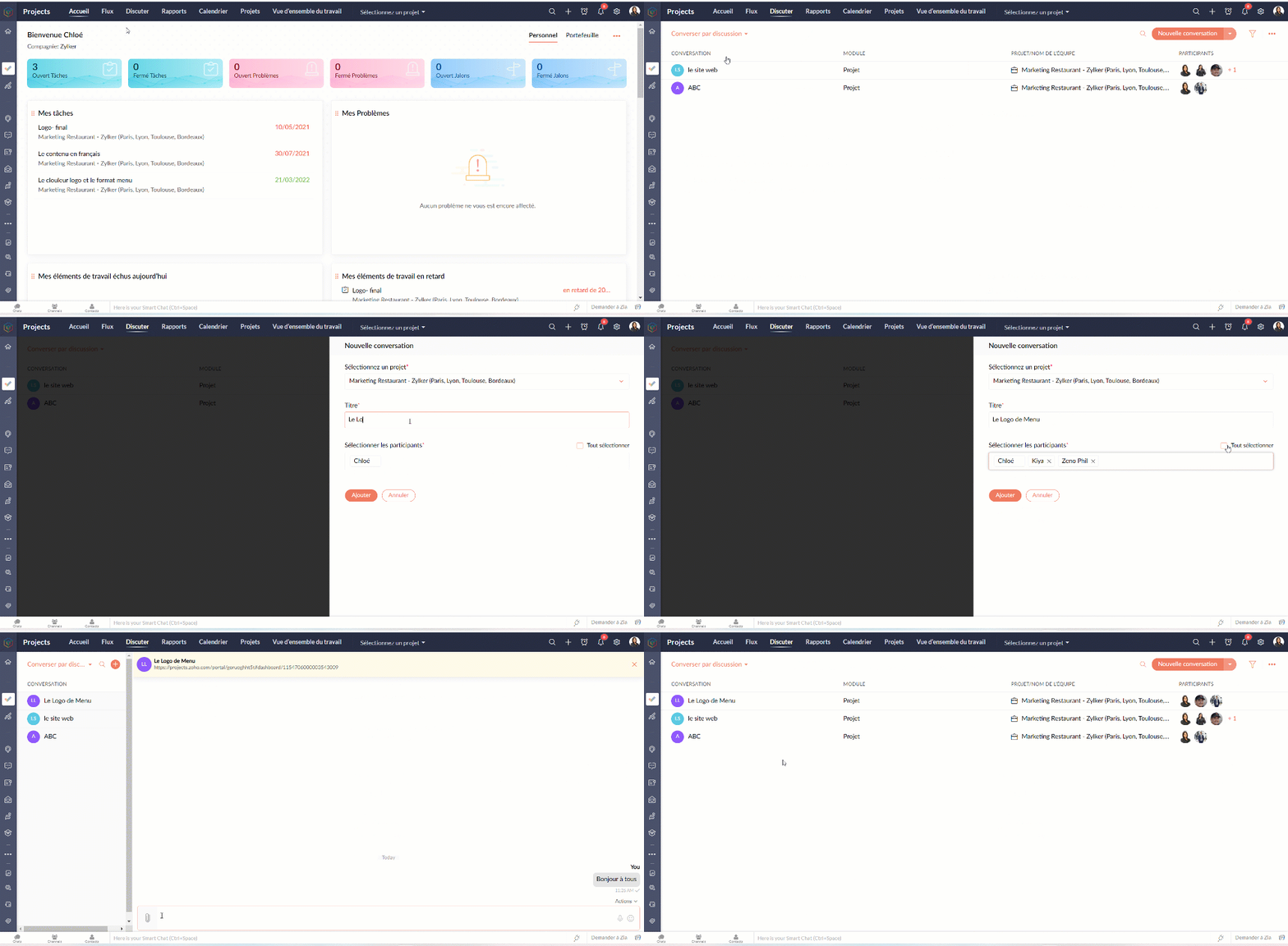
Entamer une conversation

  • Sélectionnez "Converser par discussion" depuis la liste déroulante.
  • Cliquez sur "La nouvelle conversation".
  • Sélectionnez le nom du projet, ajoutez le titre de la discussion.
  • Ajoutez les participants parmi les collaborateurs du projet sélectionné.
  • Cliquez sur "Ajouter".
  • Une nouvelle fenêtre de chat s'affiche et est prête à entamer la discussion.
  • Les participants peuvent toujours revenir à "Discuter" et cliquer sur le chat pour communiquer.
  • Les participants peuvent accéder aux anciens chats à partir de l'onglet " Anciens salons de discussion"
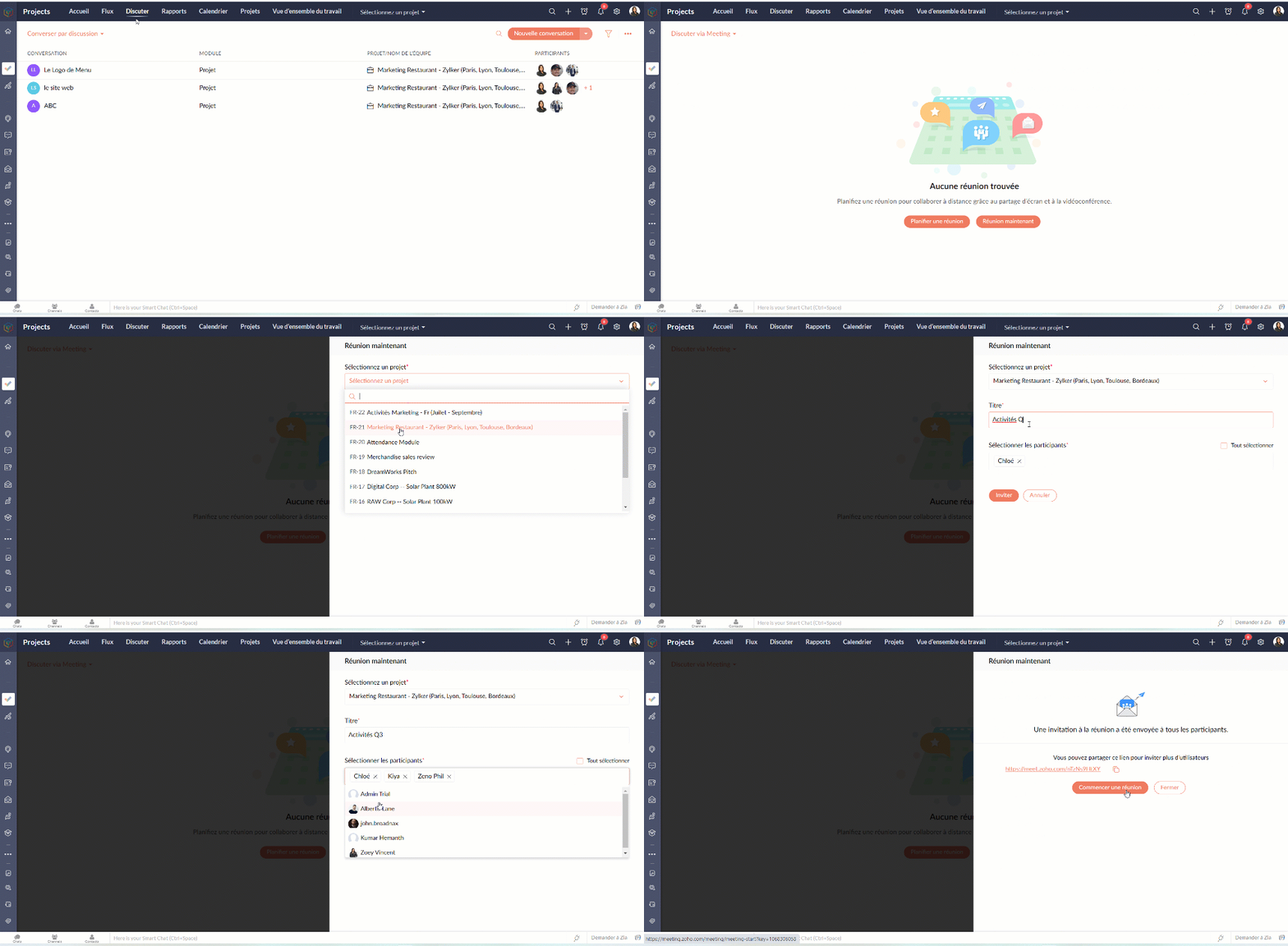
Entamer une réunion

  • Sélectionnez "Discuter via Meeting" depuis la liste déroulante.
  • Vous pouvez suivre les indications à l'écran pour programmer la réunion.
CALENDRIER

Suivez toutes les activités de votre projet à l'aide du module Calendrier. Le calendrier vous permet d'organiser rapidement des réunions, des événements, de planifier des rendez-vous et de gérer des tâches et des problèmes. Il aide l'équipe à rester au top du planning. Il aide également l'équipe à identifier facilement les dates auxquelles elle est engagée afin qu'elle puisse planifier à l'avance et terminer son travail à temps.

Ajouter les activités dans le calendrier

Gérez les échéances de vos projets et les principaux éléments livrables avec vos modules de calendrier. Vous pouvez créer des jalons, des tâches, des événements, des étapes et des problèmes dans le calendrier. Vous pouvez également afficher toutes les activités de projet prévues pour des dates particulières dans votre calendrier.

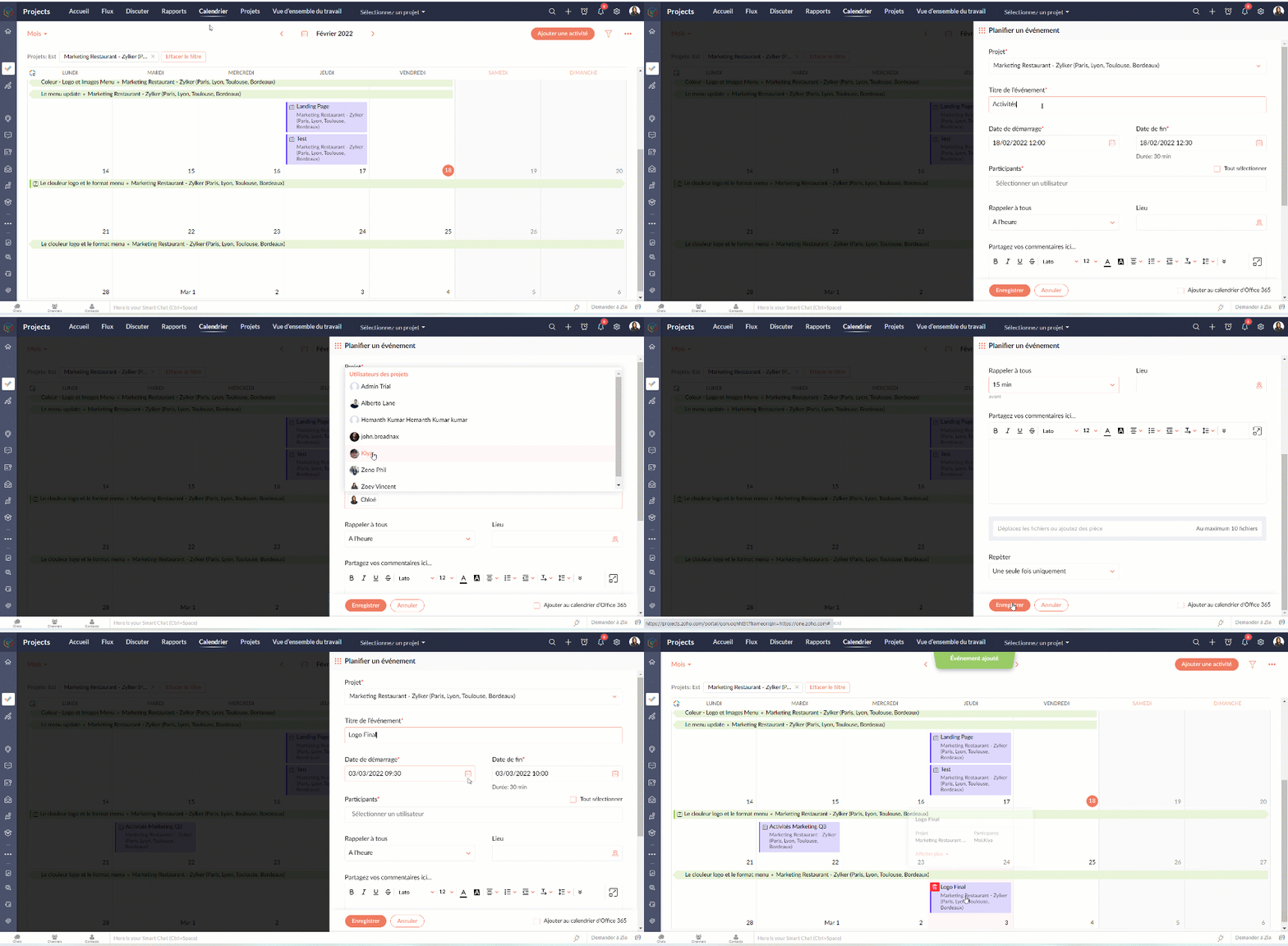
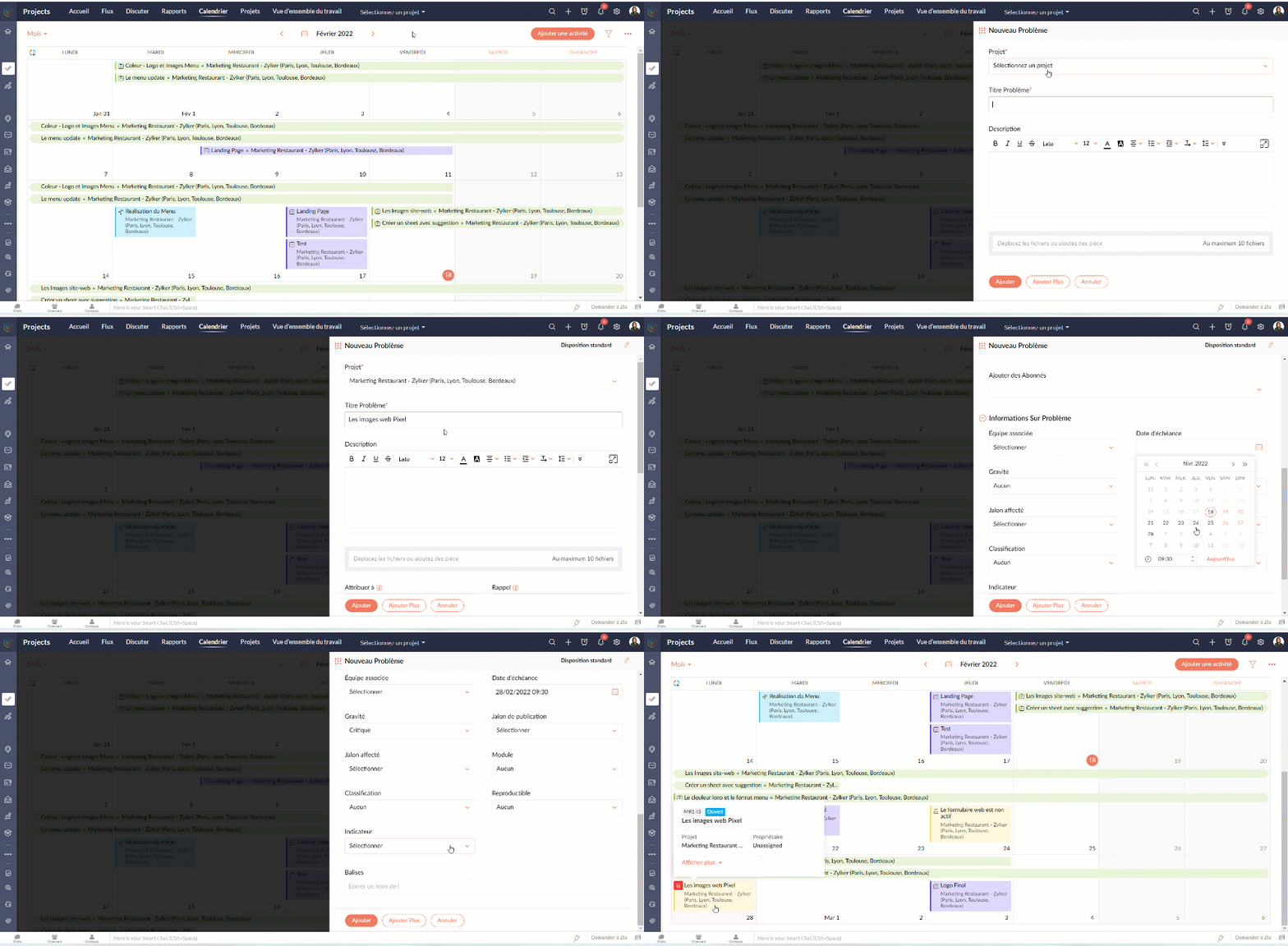
   Programmer un événement dans votre calendrier

  • Cliquez sur "Ajouter une activité"
  • Sélectionnez le projet, ajoutez le nom de l'événement
  • Remplissez les autres détails demandés et enregistrez
   Programmer une tâche/ un problème / un jalon

  • Cliquez sur "Ajouter une activité"
  • Survolez sur l'icône des options complémentaires 
  • Choisissez parmi les options disponibles
  • Suivez les indications s'affichant sur l'écran.
  • Voilà : la tâche, le problème ou le jalon sont créés dans votre calendrier.
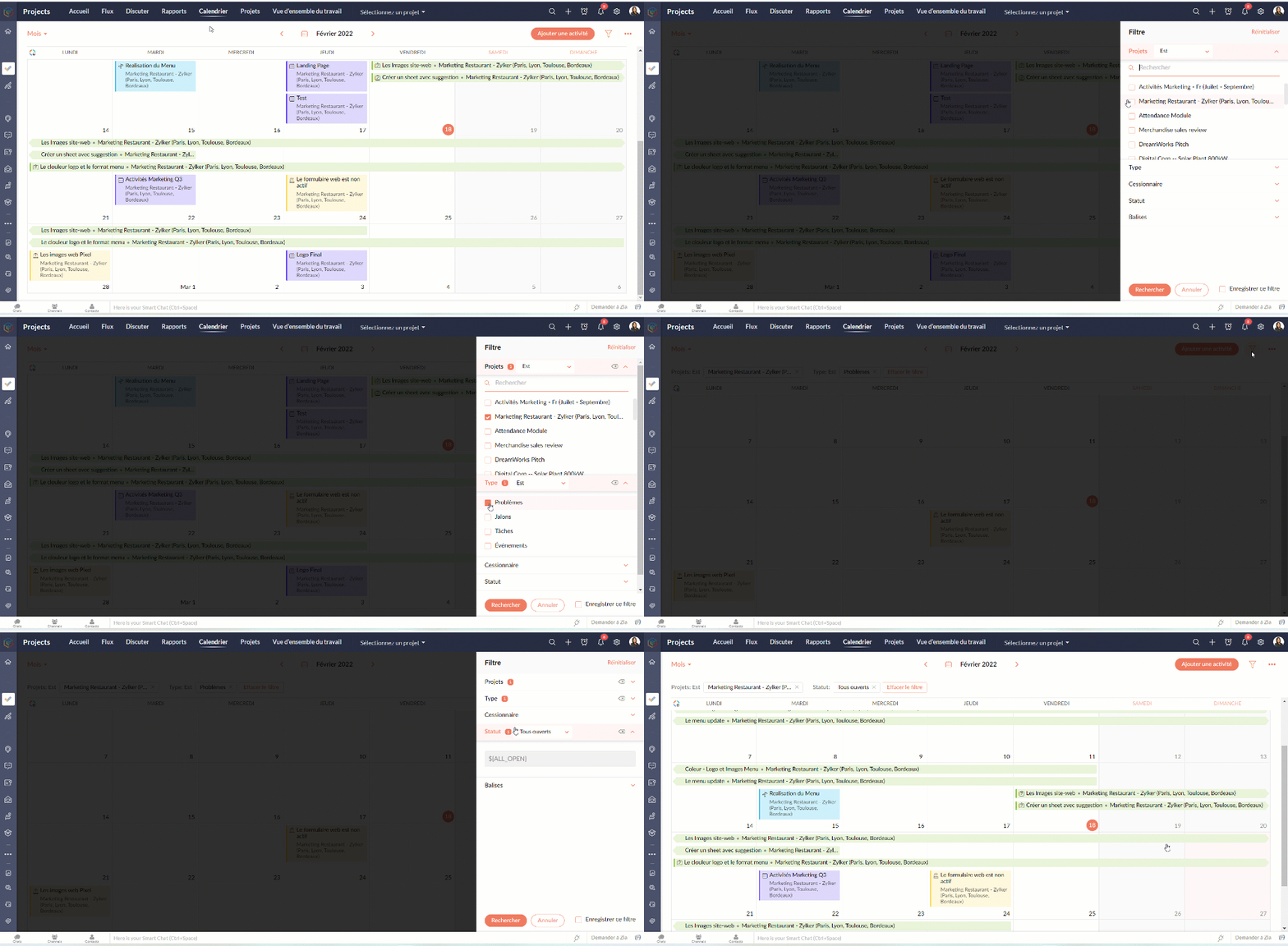
Avec l'option filtre, vous pouvez paramétrer les vues selon les projets, le statut, le type, les balises, etc.

PROJETS

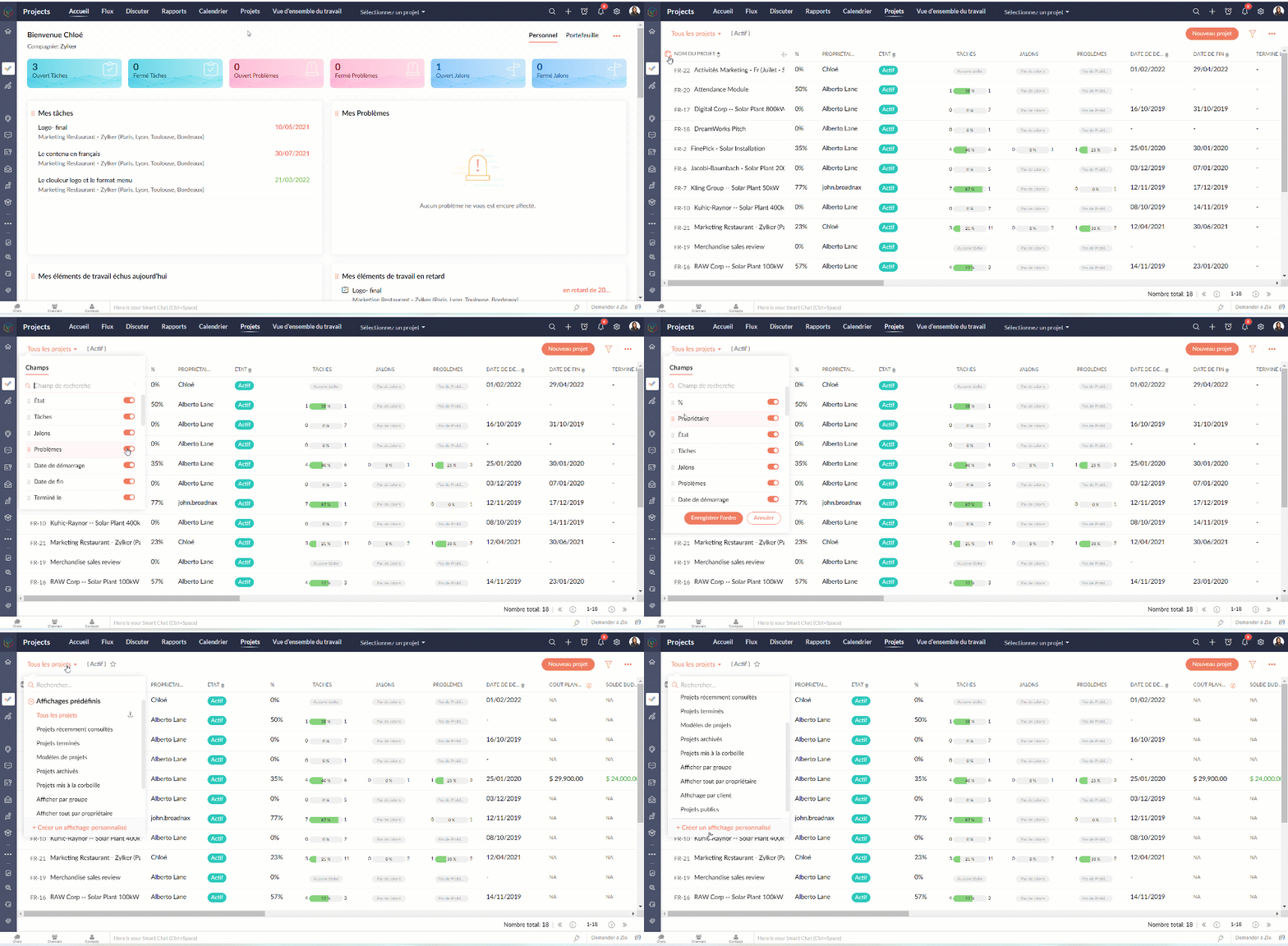
L'onglet projets donne un aperçu rapide de tous les projets auxquels vous participez. Les utilisateurs peuvent voir le statut du projet, le nombre de tâches accomplies, la date de début et de fin, les coûts prévus et réels, les détails du budget et bien plus encore. Les champs affichés peuvent être personnalisés pour afficher vos propres champs ou même désactiver des champs.

Personnaliser l'aperçu

  • Allez sur l'onglet "Projets"
  • Sélectionnez l'onglet " Personnaliser colonne".
  • Choisissez les colonnes que vous voulez activer ou désactiver.
  • Réorganisez les colonnes en glisser-déposer.
  • Depuis les affichages prédéfinis vous pouvez choisir les projets que voulez afficher ou même créer une vue personnalisée.
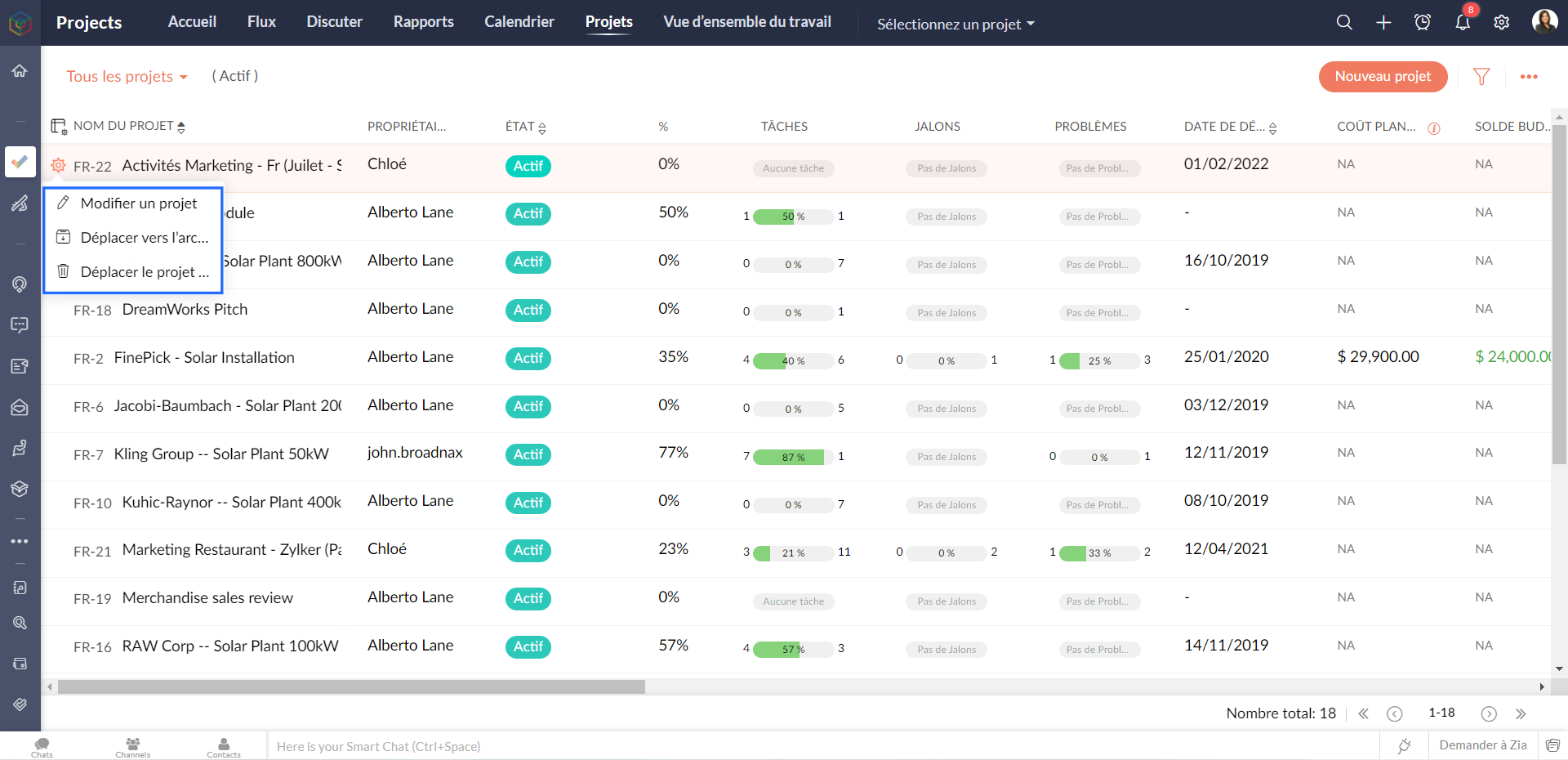
Modifier / supprimer un projet

  • Survolez sur le projet que vous voulez modifier/ supprimer
  • Depuis l'onglet paramètres à coté, vous pouvez soit modifier, supprimer ou archiver un projet
Les modèles de projet

Les modèles de projet peuvent vous aider à gérer votre travail plus efficacement. Vous n'avez pas à saisir les mêmes tâches à plusieurs reprises, ce qui vous permet de gagner du temps et d'être plus productif. Les modèles de projet sont accessibles à partir de la vue de la liste des projets.

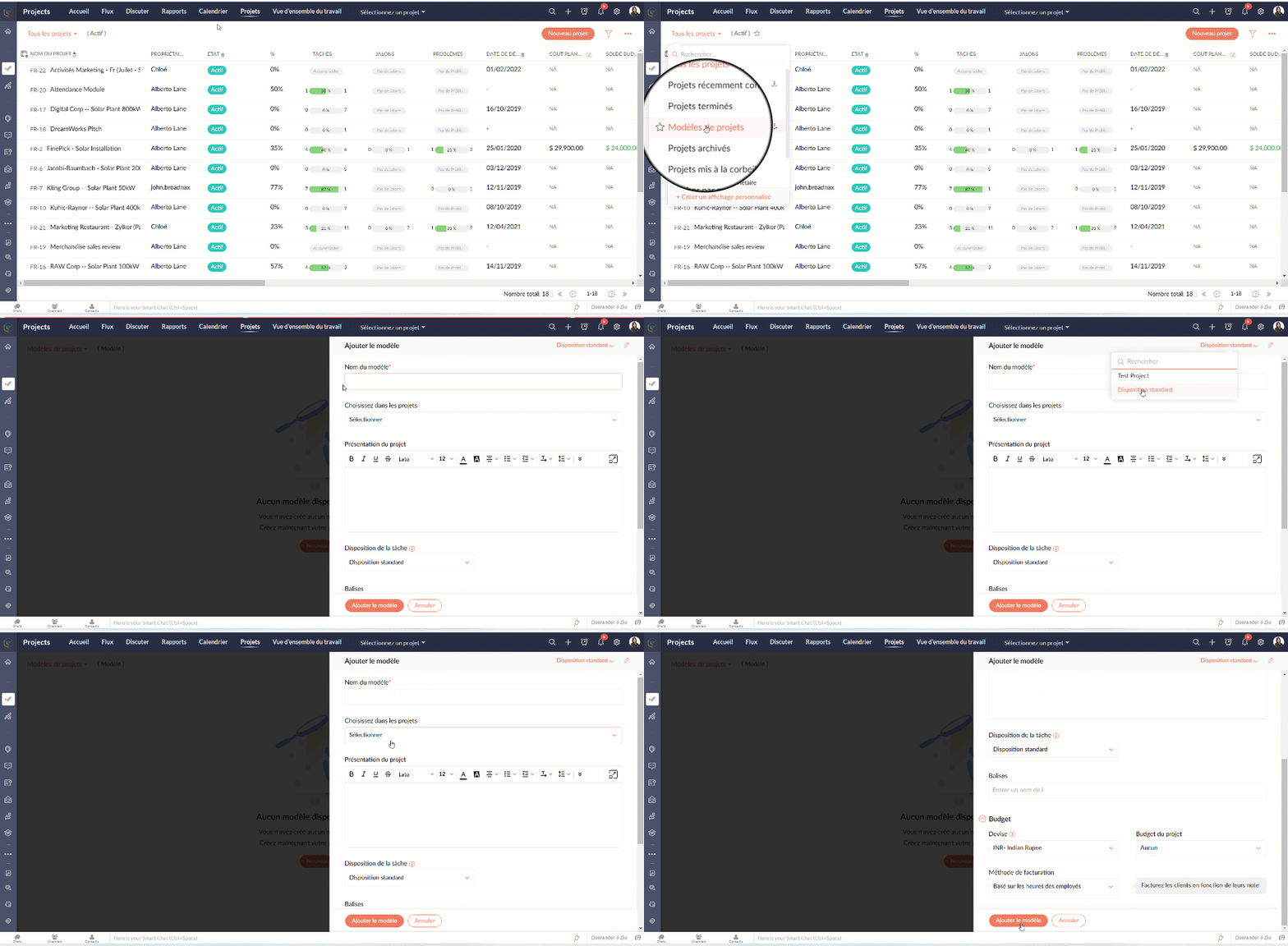
Créer un modèle de projet

  • Allez sur l'onglet "Projets"
  • Depuis la liste déroulante à gauche, sélectionnez " Modèles de projets"
  • Cliquez sur "Nouveau modèle"Sélectionnez la mise en page du projet que vous souhaitez appliquer au modèle. Si vous n'avez pas créé de mise en page de projet, la mise en page standard sera affichée dans la liste déroulante.
  • Remplissez les détails demandés.
  • Cliquez sur "Ajouter le modèle" et voilà : un modèle projet est créé.
Dans l'article suivant nous verrons le module "Rapports" de Zoho Projects.

N'hésitez pas à poser vos questions en commentaire.

L'équipe Zoho France

    • Sticky Posts

    • Collaboration sans faille avec Zoho One

      Bonjour à tous, Dans cet article nous allons voir comment Zoho One permet une collaboration à différents niveaux .       La façon dont nous travaillons évolue. À mesure que les entreprises se mondialisent, la plupart des activités sont menées en équipe.
    • Recent Topics

    • Zoho Desk 2025 Recap

      Hello everyone, Let’s take a look at the major features and enhancements from Zoho Desk in 2025. Zia in web Zia (powered by open source language model [Llama 3.1]), can perform a variety of actions from predicting behavior to automating crucial ticket
    • Print Sales Orders, Purchase Orders or Invoices from API

      Hello, Is it possible to use the print option that is available in Sales Orders Purchase Orders and Invoices with the API?. I don't see any information in the docs about this. Thanks
    • New in Smart Prompt: Record Assistant for contextual assistance, and support for new AI models

      Smart Prompt helps teams stay informed and move faster by providing relevant suggestions where work happens in CRM. With this update, Smart Prompt becomes more adaptable to your organization’s AI preferences. You can now choose which Large Language Model
    • CRM gets location smart with the all new Map View: visualize records, locate records within any radius, and more

      Hello all, We've introduced a new way to work with location data in Zoho CRM: the Map View. Instead of scrolling through endless lists, your records now appear as pins on a map. Built on top of the all-new address field and powered by Mappls (MapMyIndia),
    • Zoho Books - How to Invoke a Custom Function in Schedulers

      We have multiple schedulers that send emails to customers in batches. Currently, we are maintaining the same code across several schedulers. Is it possible to use a custom function inside a scheduler script? If yes, how can we invoke the custom function
    • How to show a hided report??

      in CRM Report , I clicked Hide incidently , how to show the floder again? Nowhere I can find the hided report floder...
    • To print Multiple delivery notes in batches

      In Zoho Books, we can print a Delivery Note from an Invoice using the Print Delivery Note option, but it is non-editable and always prints all line items from the invoice. Our requirement is to deliver invoiced items in batches and print delivery notes
    • Converting Customer Invoice to Purchase Bill

      Hi, In my service-based business, I sometimes create the customer invoice first, and later I receive the purchase bill from the vendor for the same job. Is there any option in Zoho Books to: Convert a customer invoice into a purchase bill, or Link/associate
    • Email tracking inquiry

      I am trying to track when my emails are opened and clicked like I previously did in HubSpot. HubSpot pretty much did the entire process automatically. After digging through, I finally found in settings --> emails --> BCC Dropbox there is an email I can
    • Mass Update of Lookup Fields not possible

      Hello List I've created a custom field for Leads and Contacts 'Current Campaign'. This is very Handy as I can filter leads and then related them to a campaign. Everything ready, but then I realized that mass update doesn't work for lookup fields... a
    • How to apply customized Zoho Crm Home Page to all users?

      I have tried to study manuals and play with Zoho CRM but haven't found a way how to apply customized Zoho CRM Home Page as a (default) home page for other CRM users.. How that can be done, if possible? - kipi Moderation Update: Currently, each user has
    • Blueprint transitions on locked records

      We use the ability to automatically lock records (quotes, sales orders, etc.) based on criteria, such as stage. For instance, if a quote has been sent to a client, the quote is then locked for further edits. Our ideal quote stage process is: Draft>Sent>Won.
    • Collapsible Sections & Section Navigation Needed

      The flexibility of Zoho CRM has expanded greatly in the last few years, to the point that a leads module is now permissible to contain up to 350 fields. We don't use that many, but we are using 168 fields which are broken apart into 18 different sections.
    • Quick Create needs Client Script support

      As per the title. We need client scripts to apply at a Quick Create level. We enforce logic on the form to ensure data quality, automate field values, etc. However, all this is lost when a user attempts a "Quick Create". It is disappointing because, from
    • Instant Messaging Update | Now migrate your WhatsApp Business phonenumber from another BSP to Zoho Desk | Dec'23

      Hi All, Everything seems to move at lightning speed these days, and time is certainly flying by for the IM team. But we are delighted at how much ground we covered this year. 🚀 For one, we enabled WhatsApp business phone number migration so that you
    • Whatsapp Connection Status still "Pending" after migration

      Hello, I migrated my WhatsApp API to Zoho from another provider a day ago. So far the connection status is still “Pending”. There is a problem? How long does it usually take?
    • Zoho Books Items Categorisation/Grouping/Folder

      Is there a way to do items categorisation? a folder structure? Product Type A - Option 1/2/3 Product Type B - Option 1/2/3 Current problem : I have more than 50 items on the list, its hard for team to navigate.
    • Desk DMARC forwarding failure for some senders

      I am not receiving important emails into Desk, because of DMARC errors. Here's what's happening: 1. email is sent from customer e.g. john@doe.com, to my email address, e.g info@acme.com 2. email is delivered successfully to info@acme.com (a shared inbox
    • Ticket layout based on field or contact

      Hi! I want to support the following use-case: we are delivering custom IT solutions to different accounts we have, thus our ticket layouts, fields and languages (priority, status field values should be Hungarian) will be different. How should I setup
    • No funcionan correctamente el calculo de las horas laborales para informe de tickets

      Hola, estoy intentando sacar estadísticas de tiempo de primera respuesta y resolución en horario laboral de mis tickets, pero el calculo de horas en horario laboral no funciona correctamente cree los horarios con los feriados : Ajusté los acuerdos de
    • Sharing URLs and direct access

      Hello, I am storing my team's email signature images on Workdrive. I am creating a public image download share and adding “?directDownload=true” so that the image can be accessed without the Workdrive interface. A few questions: 1) Can we generate friendly
    • Ability to Set a Unified Tab Order/View for All Users in Zoho Projects

      Hello Zoho Projects Team, We hope you are doing well. We would like to submit a feature request regarding tab/menu organization in Zoho Projects. Current Behavior: The tab (module) order in Zoho Projects is user-specific. Each user (internal or external)
    • Zoho Mail Android app update: Set out of office response exclusively for organization members and external users, response interval

      Hello everyone! We have now introduced an option to configure out of office messages exclusively for organization members and external users within the Zoho Mail app. Additionally, now you can also customize response intervals for the Out of office messages.
    • Global Search placement in the new UI

      Having a hard time with the global search placement in the UI redesign. Surely I can't be the only one. Previously global search placement was perfect. A bar at the top/center of the page. Exactly where you would expect it to be. Since the new UI has
    • Cliq iOS can't see shared screen

      Hello, I had this morning a video call with a colleague. She is using Cliq Desktop MacOS and wanted to share her screen with me. I'm on iPad. I noticed, while she shared her screen, I could only see her video, but not the shared screen... Does Cliq iOS is able to display shared screen, or is it somewhere else to be found ? Regards
    • Feature Request: Detailed View - Related Block Links!

      Desperately need a view record link option on records displaying in the related blocks on a Detail View. For the love of god, please add this feature. Thank you!
    • Seamless Round-Trip Navigation for Related Blocks (Detail View)

      As highlighted previously in this post (and here, here, here, and here), we still lack a fundamental capability for seamless navigation in Related Blocks. The popup that appears when adding a related record doesn't exist for viewing/editing existing records,
    • Sub-Form Padding in CSV Export

      Hi, When you use the Sub-Form, and for example you have a Date Field on the Main Page, then Option 1 and Option 2 fields on the Subform, when you export this to CSV the Date column will only have the Date in 1 row, the first row, it would be nice to pad
    • Dependent / Dynamic DropDown in ZohoSheets

      Has anyone figured out a way to create a Dropdown, the values of which is dependent on Values entered in the other cell ?
    • How do I change the order of fields in the new Task screen?

      I have gone into the Task module layout, and moving the fields around does not seem to move them in the Create Task screen. Screenshot below. I have a field (Description) that we want to use frequently, but it is inconveniently placed within the More
    • Zoho → ShipStation Integration – Sales Order–Driven Fulfilment Workflow

      Hello All, I’m reaching out to explore the best way to integrate a shipping tool into our inventory which will speed our process up. We are looking to integrate ShipStation into our existing order-to-fulfilment workflow, as we’re keen to standardise on
    • IA ou je peux trouver comment utiliser IA

      Je voudrais utiliser IA dans l'interface zoho pour m'aider quand j'ai des questions de rôle partage ou autre configuration d'automatisation, j'utiliser ChatGPT externe mais il ne connait pas toujours l'interface zoho et les réponses sont parfois longue
    • Zoho One account closure vs deactivation

      I wonder what are the best practices and guidelines around deactivating vs deleting Zoho accounts in organisations? Any practical considerations?
    • Data Processing Basis

      Hi, Is there a way to automate the data processing for a candidate every time an application arrives from job boards, without requiring manual intervention? That is, to automatically acquire consent for data processing. I've seen a workflow that allows
    • Disable Zoho Inventory Tracking / Delink Zoho Books & Inventory

      We have integrated zoho inventory with zoho books? Now after a long time, we want to disable inventory tracking and delink these 2 modules. Zoho says we cant do it. Anybody else going thru the same ? Any possibility at all? Why does zoho not allow to
    • UPLOAD A CREATED PDF AUTOMATICALLY

      Using the html header pdf+print button, I have managed to find a way to have a user create a pdf using entered form data. Using the schedule button, I can have a "file uploaded" pdf mailed to someone as an attachment. The missing piece is to be able to add the pdf, created in that html page to a file upload field automatically? Right now one has to save it to computer and then upload it in a FILE UPLOAD FIELD. Any help would appreciated !  
    • How create a draft via workflow?

      I wish to create a workflow rule for specific emails that creates a draft response - not an automatic email reply, but just a draft with a set response ready to be verified by an agent who can then manually select recipients. Alternatively, the workflow
    • Zoho vault instal on windows

      I am trying to use Zoho Vault Desktop for Windows, but I am unable to complete the sign-in process. Problem description After logging in to my Zoho account and clicking Accept on the authorization page, nothing happens. The application does not proceed
    • Zoho CRM for Everyone's NextGen UI Gets an Upgrade

      Hello Everyone We've made improvements to Zoho CRM for Everyone's Nextgen UI. These changes are the result of valuable feedback from you where we’ve focused on improving usability, providing wider screen space, and making navigation smoother so everything
    • ZOHO GLITCHES

      Ok, you guys have done a great job at building a platform that has the potential to surmount the competition but these glitches are becoming more than frustrating! This is beyond annoying, I'm trying draft lawsuits and type up privacy and refund policies
    • Next Page