Automating Attendance Tracking with Zoho Cliq Developer Platform

Automating Attendance Tracking with Zoho Cliq Developer Platform

I wish remote work were permanently mandated so we could join work calls from a movie theatre or even while skydiving! But wait, it's time to wake up! The alarm has snoozed twice, and your team has already logged on for the day.


Keeping tabs on attendance shouldn't feel like guiding a flock of rebellious sheep. Hence, let's automate check-in and check-out notifications using the Zoho Cliq Platform Schedulers and the Zoho People API, eliminating the guesswork in attendance management and reducing the risk of errors associated with manual monitoring.

How does this solution benefit a business?

  1. Real-time reminders reduce instances of ghost check-ins and ensure accurate recording of everyone's logged hours.
  2. Essential for attendance tracking, payroll accuracy, compliance with labour laws, and audits.
  3. The entire team stays informed, fostering a cohesive workflow that eliminates the need for micromanagement.      
Pre-requisites:  

Before beginning to script the code below, we must create a connection in Cliq with Zoho People. Once a connection is created and connected, you can use it in Deluge integration tasks and invoke URL scripts to access data from the required service.

Create a Zoho People default connection with any unique name with the scopes - ZohoPeople.Attendance.ALL , ZohoPeople.forms.ALL and ZohoPeople.leave.ALL

ⓘ Document for reference : Connections in Cliq 


How to obtain or locate the channel unique name in Cliq?

  • Navigate to the top right corner of the channel and locate the three dots. Click it.

  • In the menu that appears, select "Channel info" and a pop-up will open, displaying detailed channel information.

Hover over the "Connectors" section and click it. Under "API Parameters," you will find the Channel ID and unique name.
We need to create two schedulers, specifically one for check-in and another for check-out.
  1. After a successful login in Cliq, hover to the top right corner and click your profile. Post clicking, navigate to Bots & Tools > Schedulers.
  2. On the right, click the "Create Scheduler" button.
  3. To learn more about schedulers and their purposes, refer to the Introduction to Schedulers.
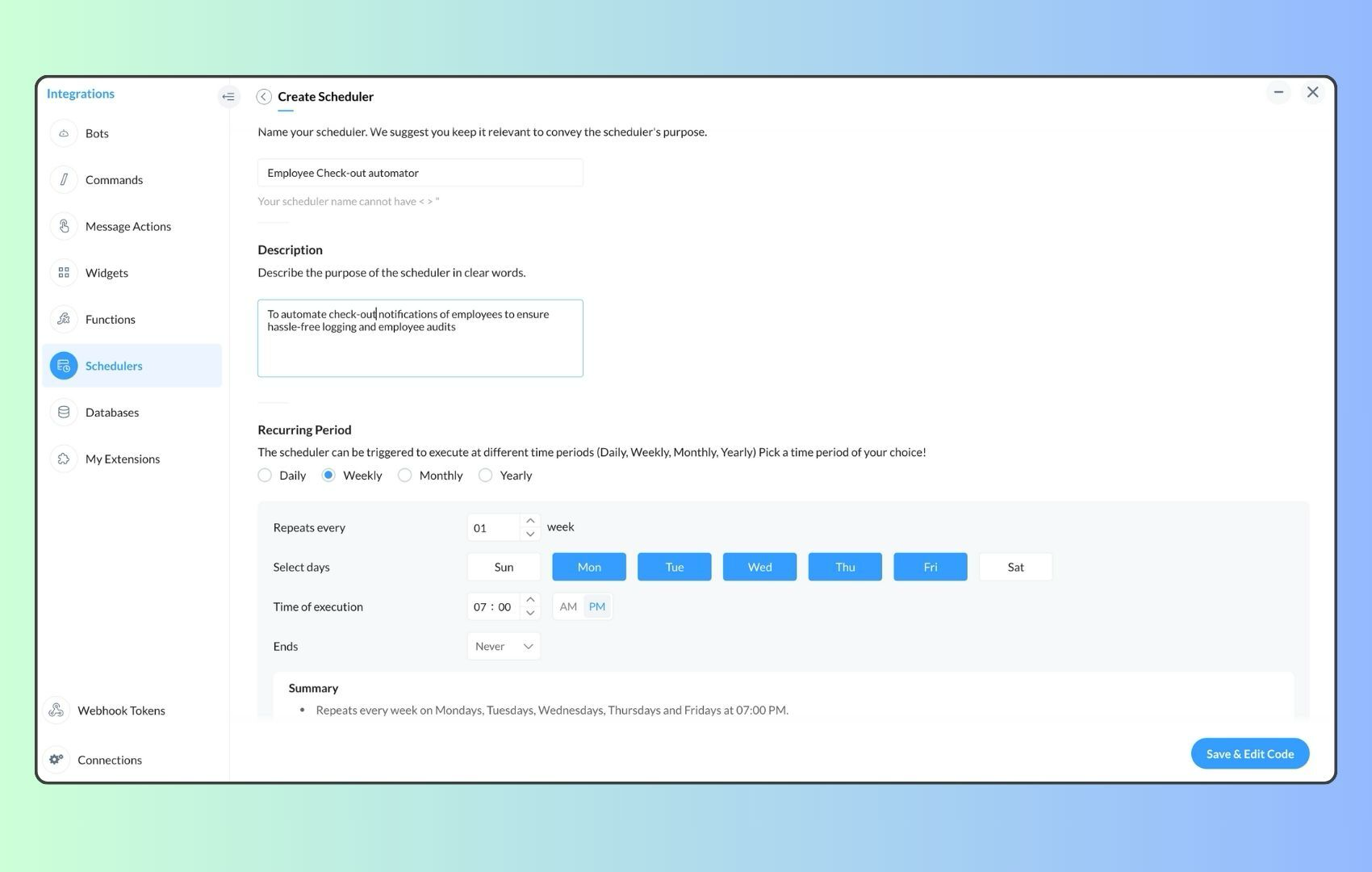
  4. Create a scheduler using your preferred name. Specify the following details: the scheduler name and a description.  

  1. For the recurring period, choose the type "Weekly." Select Monday through Friday and set the time of execution to 11 AM or any other time that aligns with your company's check-in time, or customise the recurring period based on your specific use case.
  2. Finally, click "Save & edit code" and paste the following code.
  1. currentDate = zoho.currentdate;
  2. currentDateString = currentDate.toString("dd-MMM-yyyy");
  3. fromIndex = 1;
  4. toIndex = 200;
  5. // Get all active users
  6. users = zoho.people.getRecords("employee",fromIndex,toIndex,{},"{CONNECTION_LINK_NAME}");
  7. usersList = List();
  8. usersList.addAll(users);
  9. iterations = {1,2,3,4,5,6,7,8,9,10,11,12,13,14,15,16,17,18,19,20,21,22,23,24,25};
  10. // Get All Employees ( 4000 MAX )
  11. if(users.size() == 200)
  12. {
  13. for each  iteration in iterations
  14. {
  15. fromIndex = fromIndex + toIndex;
  16. toIndex = toIndex + 200;
  17. users = zoho.people.getRecords("employee",fromIndex,toIndex,{},"{CONNECTION_LINK_NAME}");
  18. if(users.size() > 0 && users.size() == 200)
  19. {
  20. usersList.addAll(users);
  21. }
  22. else if(users.size() > 0 && users.size() < 200)
  23. {
  24. usersList.addAll(users);
  25. break;
  26. }
  27. else
  28. {
  29. break;
  30. }
  31. }
  32. }
  33.  
  34. // Get all the employees checkedin from the morning.
  35. getAttendenceEntries = invokeurl
  36. [
  37. url :"https://people.zoho.com/api/attendance/fetchLatestAttEntries?duration=240"
  38. type :GET
  39. connection:"{CONNECTION_LINK_NAME}"
  40. ];
  41. latestAttendanceRecords = getAttendenceEntries.get("response").get("result");
  42. checkedInUsers = List();
  43. for each  userRecord in latestAttendanceRecords
  44. {
  45. checkedInEmployeeEmail = userRecord.get("emailId");
  46. checkedInUsers.add(checkedInEmployeeEmail);
  47. }
  48.  
  49. // Get all the employees who applied for leave both approved and pending ( Remove PENDING to exclude only the leave approved employees )
  50. leaveApprovedEmployees = invokeurl
  51. [
  52. url :"https://people.zoho.com/api/v2/leavetracker/leaves/records?from=" + currentDateString + "&to=" + currentDateString + "&dateFormat=dd-MMM-yyyy&approvalStatus=[APPROVED,PENDING]"
  53. type :GET
  54. connection:"{CONNECTION_LINK_NAME}"
  55. ];
  56. info  leaveApprovedEmployees;
  57. leaveApprovedEmployeesList = List();
  58. for each  member in leaveApprovedEmployees.get("records")
  59. {
  60. leaveApprovedEmployeesList.add(member.get("EmployeeId"));
  61. }
  62. info leaveApprovedEmployeesList;
  63.  
  64.  
  65. // Add the users to yet to checkin list if they are not checked from the morning and not applied for leave
  66. usersYetToCheckIn = list();
  67. for each  user in usersList
  68. {
  69. employeeEmail = user.get("EmailID");
  70. employeeId = user.get("EmployeeID");
  71.     employeeStatus = user.get("Employeestatus");
  72. if(!checkedInUsers.contains(employeeEmail) && !leaveApprovedEmployeesList.contains(employeeId) && employeeStatus.equals("Active"))
  73. {
  74. usersYetToCheckIn.add(employeeEmail);
  75. }
  76. }
  77.  
  78. // Mention the list of users in the channel.
  79. if(usersYetToCheckIn.size() == 0)
  80. {
  81. info "No users were found yet to checked-in at 11 PM today. Great to see everyone wrapping in on time! ✅";
  82. }
  83. else
  84. {
  85. usersYetToCheckInString = "";
  86. for each  user in usersYetToCheckIn
  87. {
  88. usersYetToCheckInString = usersYetToCheckInString + "[" + user + "](mail:" + user + ") \n";
  89. }
  90. usersYetToCheckInString = usersYetToCheckInString.subString(0,usersYetToCheckInString.length() - 2);
  91. response = Map();
  92. card = Map();
  93. card.put("title","Employees who haven’t checked in yet ( " + usersYetToCheckIn.size() + " )");
  94. card.put("thumbnail","https://i.pinimg.com/originals/85/e9/f3/85e9f3f5ac31fc5aab586e208297f43d.gif");
  95. card.put("theme","modern-inline");
  96. response.put("card",card);
  97. response.put("text",usersYetToCheckInString);
  98. info zoho.cliq.postToChannel("{CHANNEL_UNIQUE_NAME}",response);
  99. }

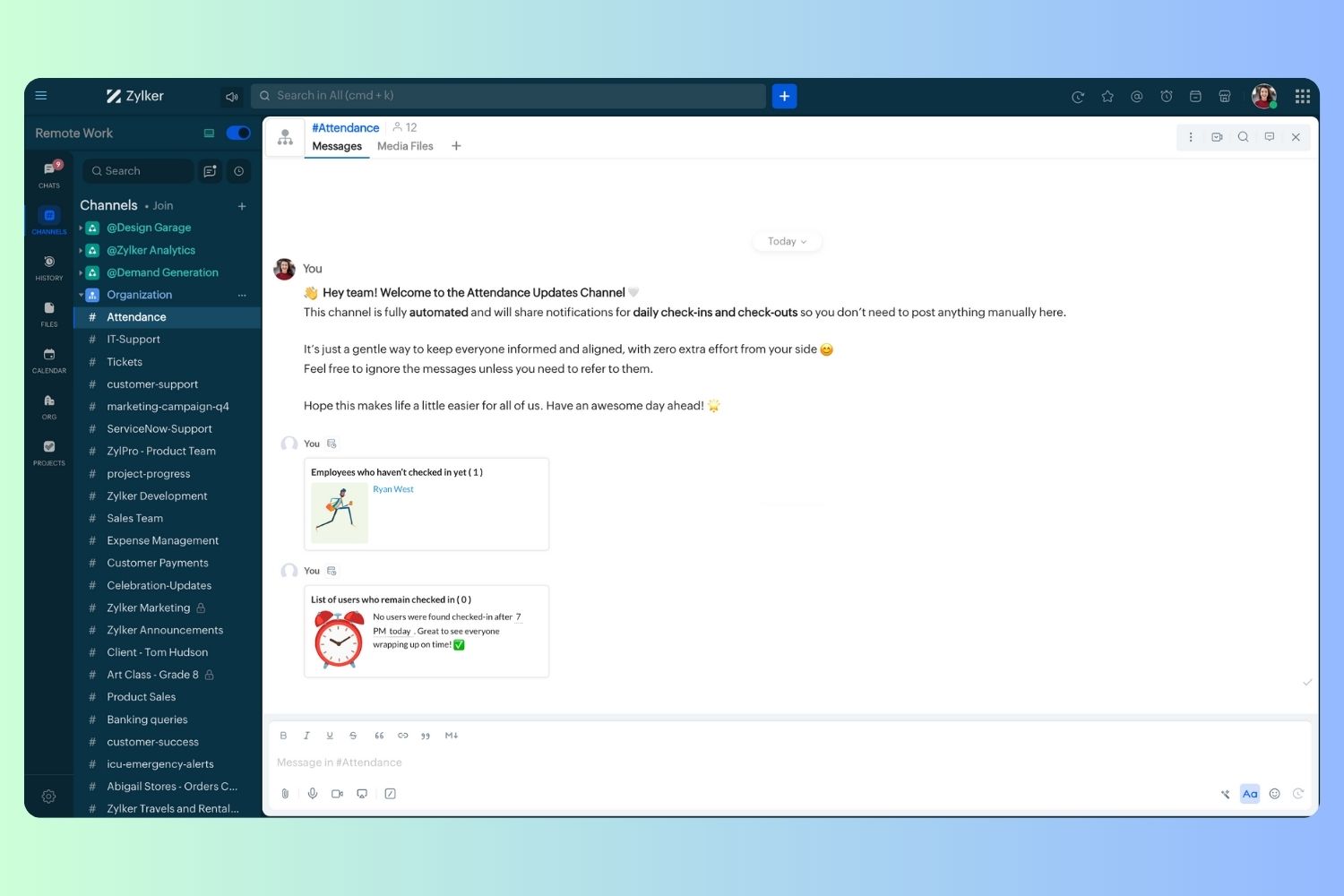
  1. Now, let's follow the same steps and create a scheduler for checkout reminders. Under the recurring period, choose the type as "Weekly." Select Monday through Friday and set the time of execution to 7 PM or any other time that aligns with your company's checkout time, or customise the recurring period based on your specific use case.
  2. Click "Save & edit code" and paste the following code.
  1. attendanceResponse = invokeurl
  2. [
  3. url :"https://people.zoho.com/api/attendance/fetchLatestAttEntries?duration=600"
  4. type :GET
  5. connection:"{CONNECTION_LINK_NAME}"
  6. ];
  7. info attendanceResponse;
  8. todayDate = zoho.currenttime.toString("YYYY-MM-dd");
  9. latestAttendanceRecords = attendanceResponse.get("response").get("result");
  10. usersWithoutCheckout = list();
  11. if(latestAttendanceRecords.size() > 0)
  12. {
  13. for each  userRecord in latestAttendanceRecords
  14. {
  15. userEmail = userRecord.get("emailId");
  16. dailyEntries = userRecord.get("entries");
  17. for each  dailyEntry in dailyEntries
  18. {
  19. if(dailyEntry.containsKey(todayDate))
  20. {
  21. todayEntryDetails = dailyEntry.get(todayDate);
  22. attendanceLogs = todayEntryDetails.get("attEntries");
  23. for each  logEntry in attendanceLogs
  24. {
  25. if(!logEntry.containsKey("checkOutTime"))
  26. {
  27. usersWithoutCheckout.add("{@" + userEmail + "}");
  28. }
  29. }
  30. }
  31. }
  32. }
  33. }
  34. usersWithoutCheckoutString = usersWithoutCheckout.toString("\n");
  35. if(usersWithoutCheckoutString.trim().length() == 0){
  36. usersWithoutCheckoutString = "No users were found checked-in after 7 PM today. Great to see everyone wrapping up on time! ✅";
  37. }
  38. response = Map();
  39. card = Map();
  40. card.put("title","List of users who remain checked in ( " + usersWithoutCheckout.size() + " )");
  41. card.put("thumbnail","https://media.tenor.com/Hd8nLZZTPRYAAAAi/alarm-clock-alarm.gif");
  42. card.put("theme","modern-inline");
  43. response.put("card",card);
  44. response.put("text",usersWithoutCheckoutString);
  45. info zoho.cliq.postToChannel("{CHANNEL_UNIQUE_NAME}",response);

Wrapping up and checking out for the day, hopefully

Whether you're from HR, tired of chasing attendance logs, or an enthusiastic team lead trying to increase your team's visibility and adjust workload accordingly, Cliq Platform's schedulers are essential and ensure that accurate tracking is consistent and compliance is maintained. Additionally, this would be scalable to handle organizations of any size.

If attendance tracking is a binge-watchable series, what plot twist would these reminders add to your team's script? Let us know in the comments below!

    • Sticky Posts

    • Cliq Bots - Post message to a bot using the command line!

      If you had read our post on how to post a message to a channel in a simple one-line command, then this sure is a piece of cake for you guys! For those of you, who are reading this for the first time, don't worry! Just read on. This post is all about how
    • Add Claude in Zoho Cliq

      Let’s add a real AI assistant powered by Claude to your workspace this week, that your team can chat with, ask questions, and act on conversations to run AI actions on. This guide walks you through exactly how to do it, step by step, with all the code
    • Automating Employee Birthday Notifications in Zoho Cliq

      Have you ever missed a birthday and felt like the office Grinch? Fear not, the Cliq Developer Platform has got your back! With Zoho Cliq's Schedulers, you can be the office party-cipant who never forgets a single cake, balloon, or awkward rendition of
    • Automate attendance tracking with Zoho Cliq Developer Platform

      I wish remote work were permanently mandated so we could join work calls from a movie theatre or even while skydiving! But wait, it's time to wake up! The alarm has snoozed twice, and your team has already logged on for the day. Keeping tabs on attendance
    • Customer payment alerts in Zoho Cliq

      For businesses that depend on cash flow, payment updates are essential for operational decision-making and go beyond simple accounting entries. The sales team needs to be notified when invoices are cleared so that upcoming orders can be released. In contrast,
    • Recent Topics

    • Email Parser Not Extracting Fields Correctly with Certain Label Formats

      I’ve been testing the Email Parser functionality in Zoho CRM to automatically extract data from incoming emails and map it to CRM fields. During testing, I noticed that parsing sometimes fails when the email contains field labels formatted like this:
    • ZOHO.CRM.UI.Record.open not working properly

      I have a Zoho CRM Widget and in it I have a block where it will open the blocks Meeting like below block.addEventListener("click", () => { ZOHO.CRM.UI.Record.open({ Entity: "Events", RecordID: meeting.id }).catch(err => { console.error("Open record failed:",
    • Prevent tracking users from specific countries

      Currently, I’m receiving many bot visits from the United States and Malaysia. I would like these visits not to be recorded in SalesIQ. I already enabled the option to exclude traffic from cloud service providers, but I’m still receiving bot visits. Ideally,
    • Zoho CRM Community Digest - February 2026 | Part 1

      Hello Everyone! February has been off to a productive start in the Zoho CRM Community, with several thoughtful product enhancements and helpful technical discussions making their way into the forums. To help you stay up to speed, we’ve rounded up the
    • Nouvelle fonctionnalité : donnez du style à vos pages avec le Branding

      Que vous prépariez un webinaire important. Vous avez investi du temps dans votre contenu, invité des intervenants de qualité, et les inscriptions commencent à affluer. Mais votre page d’inscription ? Elle ressemble à toutes les autres : générique, sans
    • How to sync Zoho CRM Quotes with Zoho Books/Finance Estimates or Quotes

      Hi everyone, We’re building quotes in the Zoho CRM Quotes module because of its strong CPQ features and better communication options (multiple contacts, email customization, etc.). However, these don’t sync directly with Zoho Books/Finance for invoicing.
    • Marketing Tip #24: Encourage customers to leave reviews

      Reviews are one of the strongest trust signals in ecommerce. When shoppers see real feedback from other customers, they feel more confident about buying, especially when they’re choosing a brand for the first time. Not all reviews are equal. Detailed
    • Organization wide Account and Contacts Visibility/Sharing Capabilities?

      Has anyone figured out a way to make visibility or sharing of Accounts and Contacts to be available across the entire organization without having to have every individual user edit their Sharing permissions? For our sales folks they need to be able to
    • Introducing Bigin's all new integration with Microsoft Teams

      Picture this: You are on call with your team to discuss some important deals that need to be closed soon. While discussing each deal, your team has to switch back and forth between your Teams account and Bigin account to refer to details about the deal.
    • Ability to Attach Record-Specific Files Automatically in Workflow Email Templates

      Currently in Zoho CRM, email templates allow attachments to be added, but these attachments are static and remain the same for every recipient. There is no straightforward option to automatically attach a file that is stored within the specific CRM record
    • This version of app doesn't support this notecard type Error

      So this problem is happening for any notes created within the last week, as well as any note recently edited on Android. I can open them on my phone fine, but they don't open on the website version. They DO work on the desktop app version. It's just web
    • Issue with Picklist Dropdown Not Opening on Mobile

      Hello I am experiencing an issue with picklist values on mobile. While the arrow is visible, the dropdown to scroll through the available values often does not open. This issue occurs sporadically, it has worked occasionally, but it is very rare and quite
    • an issue in Zoho CRM where the workflow rule is not triggering

      H I’m currently facing an issue in Zoho CRM where the workflow rule is not triggering when a new lead is created through a webform. I’ve double-checked the criteria and field updates, everything seems fine but it still doesn’t fire. Has anyone faced this
    • {Action Required} Re-authenticate your Google Accounts to Continue Data Sync

      Hello Users! To align with Google’s latest updates on how apps access files in Google Drive, we’ve enhanced our integration to comply with the updated security and privacy standards, ensuring safer and more reliable access to your data. With this update,
    • Allocating inventory to specific SO's

      Is there a way that allocate inventory to a specific sales order? For example, let's say we have 90 items in stock. Customer 1 orders 100 items. This allocates all 90 items to their order, and they have a back order for the remaining 10 items which could
    • Automatically Update Ticket Status in Zoho Desk Based on Actions in Zoho Projects

      Hi Zoho Desk Team, Hope you’re doing well. We’re using the Zoho Desk–Zoho Projects integration to manage tasks related to customer tickets, and it works well for linking and tracking progress. However, there are a few important automation capabilities
    • Is this a SCAM email or is it really Zoho?

      L.S. I received the following message. Is this from Zoho? I have had a Zoho One account for many years and my website has been online for years. If it is a scam, I think you should know about it.
    • How to close an estimate ?

      Hello, I have created estimates, and converted them to invoices to get 50% payment. Now I have 2 cases where the estimate stills shows status partially invoiced, however: 1. for one of them, project stopped half way, so the remaining part will never be
    • Updating Analytical Fields Data

      Dear Zoho team, I'm having an issue with the recently added fields in both Analytical Desk and Analytical. How can I generate the data in Analytical when new fields are added? https://analytics.zoho.com/workspace/2436819000000007005/edit/24368190000
    • My Zoho mail stopped receiving or sending emails about 3 hours ago

      Its a pop 3 account. The emails get into the actual mailbox on the server and I can send emails directly from the server, but they are no longer in Zoho, in neither of my Zoho accounts. All green ticks under Mail Accounts under Settings
    • Can I hide empty Contact fields from view?

      Some contacts have a lot of empty fields, others are mostly filled. Is there a way I can hide/show empty fields without changing the actual Layout? I would like to de-clutter my view, and also be able to add information later as I am able. I would be
    • Zoho Cliq not working on airplanes

      Hi, My team and I have been having this constant issue of cliq not working when connected to an airplane's wifi. Is there a reason for this? We have tried on different Airlines and it doesn't work on any of them. We need assistance here since we are constantly
    • Option in pipeline deal to select which hotel or branch or store if client has more than one local store

      Hi, I would like to know if there is an option in the deal pipeline to select which hotel, branch, or store a deal is related to—if the company has more than one location. For example, I have a client that owns several hotels under the same company, and
    • Request to Recover Deleted Task List – Project ID: RIV-MOD-10722

      Hi Zoho Team, I hope this message finds you well. My Zoho task list associated with Project ID: RIV-MOD-10722 appears to have been deleted. When I clicked on the task link from the email notification, I received the following message: "Task has been deleted
    • Is it possible to use HTML formatting in SMS messages sent from Zoho?

      Hi everyone, I have a question regarding sending SMS from Zoho When we send emails from Zoho, we can include HTML code to format the message (like adding links, styling, etc.). Is it possible to do something similar when sending SMS messages through Zoho
    • Email Insights included in Bigin emals are marked as SPAM everywhere

      Today I noticed that email recipients who use Office 365 never receive emails sent from Bigin. Further examination showed that all Email Insights links in email headers are marked as spam/phishing by Office 365. Example screen included. The problem is
    • How do I import Connected Records for a Deal?

      Can you point me to an example of the CSV file that would add related records to an existing CRM Deal? I imported a Deal, then tried importing a connected record using a unique ID that references the Deal ID, but it doesn't attach it to the Deal rec
    • File Upload Field in Zoho Forms Not Updating Existing File in Zoho CRM

      Hi everyone, I’m trying to understand the behavior of a file upload field mapped from Zoho Forms to Zoho CRM. Scenario There is a File Upload field in a Zoho CRM module. A Zoho Form also has a File Upload field, which is mapped to that CRM field. When
    • Zoho Training

      Greetings! I am trainer. My focus area is Project Management and MS Project. I have used Zoho CRM to a good extent. Though, I was interested in using ZOHO projects, as there were no live projects, I could not take it up for studies. Recently a client
    • Detailed list of scoring rules in Zoho CRM

      Good morning Zoho community, warm greetings The reason for my message today is that I have a problem with my CRM, which I will explain below: Our organization has scoring rules designed to rate our potential customers or leads in the application based
    • How to create a summary document from Projects details

      Hi, Our team is creating many projects inside Zoho Project. When closing a project, they write a summary document containing data from the projects it-self (understand project budget, customers, etc...), and editable (ie the document is either a Writer
    • Host in US Data Centre

      I humble apply to be registered on US Data centre
    • convert the project to templet

      i have some deployment ME product for different customer , i need to create a fixed template for use it rather then keeping creating this template every time
    • Best practices for managing Project Charters, Business Case and RAID logs within Zoho?

      Hello everyone, I’m currently refining our PMO setup within Zoho Projects and I’m curious how others are handling high-level governance documentation. We’ve been using the standardized Project Charter, Business Case and RAID frameworks from projectmanagertemplate.com
    • Resource Management System built using Zoho CRM, Creator, Projects, and People:

      In a Resource Management System built using Zoho CRM, Creator, Projects, and People: CRM Deal Closed → Creator Allocation Engine → Zoho Projects Task Assignment What is the recommended architecture to handle dynamic reassignment when: an employee goes
    • Dynamic Remaining Quantity in Lookup During Allocation

      Hi everyone, From what I understand in Zoho Creator, lookup fields only display the stored value from the source record and do not dynamically update while a form is being filled. Because of this, showing a real-time updated remaining quantity inside
    • connect zoho creator with google drive

      Hello everyone, I need to connect to a folder drive. The idea, is that google drive loads a text document with some data, I must read that text document to be able to autofill a form that I have in zoho creator with that data. I also attach PDFs and place
    • Uploaded files are not included when using "Include user submitted data" in Email Notification

      In Send Email notification workflow in Zoho Creator, there is an option called "Include user submitted data" which allows the email to contain all the form submission details. However, when this option is enabled, files or images uploaded through File
    • kanban view for client portal

      Are kanban views an option for client portals? Access to Kanban views in the client portals would solve some mobile-compliant issues I have with the UI. Kanban functions very nicely on mobile and would be a super asset for my clients and vendors as they
    • Credit Card Pre-Authorization with later Capture/Settlement

      We really enjoy the convenience of being able to pay off a customer's invoice using our Auth.Net integration with Zoho Books. Unfortunately, we can only take advantage of this feature with a small percentage of our customers as it leaves a gaping hole
    • Next Page