Automation#23: Automate Guided Conversations in Zoho Desk with Business Hours

Hello Everyone,
This week's edition introduces a custom function designed to automate Guided Conversations in Zoho Desk, based on your business hours. With this feature, you can align the bot's behavior with your business schedule, ensuring a smooth and professional customer experience.
This week's edition introduces a custom function designed to automate Guided Conversations in Zoho Desk, based on your business hours. With this feature, you can align the bot's behavior with your business schedule, ensuring a smooth and professional customer experience.
Self-service platforms are now a cornerstone of effective customer service, improving productivity for both customers and support agents. With the evolving nature of customer support, self-
service has become indispensable. It saves time and provides quick access to solutions, empowering customers to address their concerns efficiently.
Zoho Desk's Guided Conversations serves as a robust self-service tool, offering Tier-1 solutions to customers through an intuitive interface. For more complex or escalated queries, the bot seamlessly connects customers to a live agent, ensuring both self-service and human assistance for effective issue resolution.
However, businesses often have non-working hours, such as weekends or holidays, when agents are unavailable. In such cases, configuring your Guided Conversations based on your business hours is essential. During non-working hours, the bot can:
- Notify customers that your business is currently closed, along with your operating hours.
- Provide an option for customers to submit a ticket, ensuring their query is addressed promptly during working hours.Configure your Guided Conversations today and streamline your customer support process!
How to incorporate this custom function within your GC flow?
1. Go to Setup (S) >> Self-Service >> Guided Conversation.
2. Choose the Department and click on Create Flow.
(If you would like to add this to your existing flow, click on the ellipsis icon under Published Flows and click on the Edit button.)
3. Select the channels, give a Name and Description, and click Next.
4. Click on the + icon, add the Webhook block, under Perform Actions.
5. Enter the Block name as Business Hours, Choose Get under Method.
 Note: In the Business Hours URL, replace .com with .in/.eu/.ca/.sa based on your DC
How to fetch the Business Hour Id?
6.1 To fetch the Business Id, Go to Setup (S) >> Organization >> Business Hours.6.2 Click on the Business Hours configured within your Zoho Desk Account. Go to the URL of the specific Business Hours, and you can fetch the business Id from the URL.
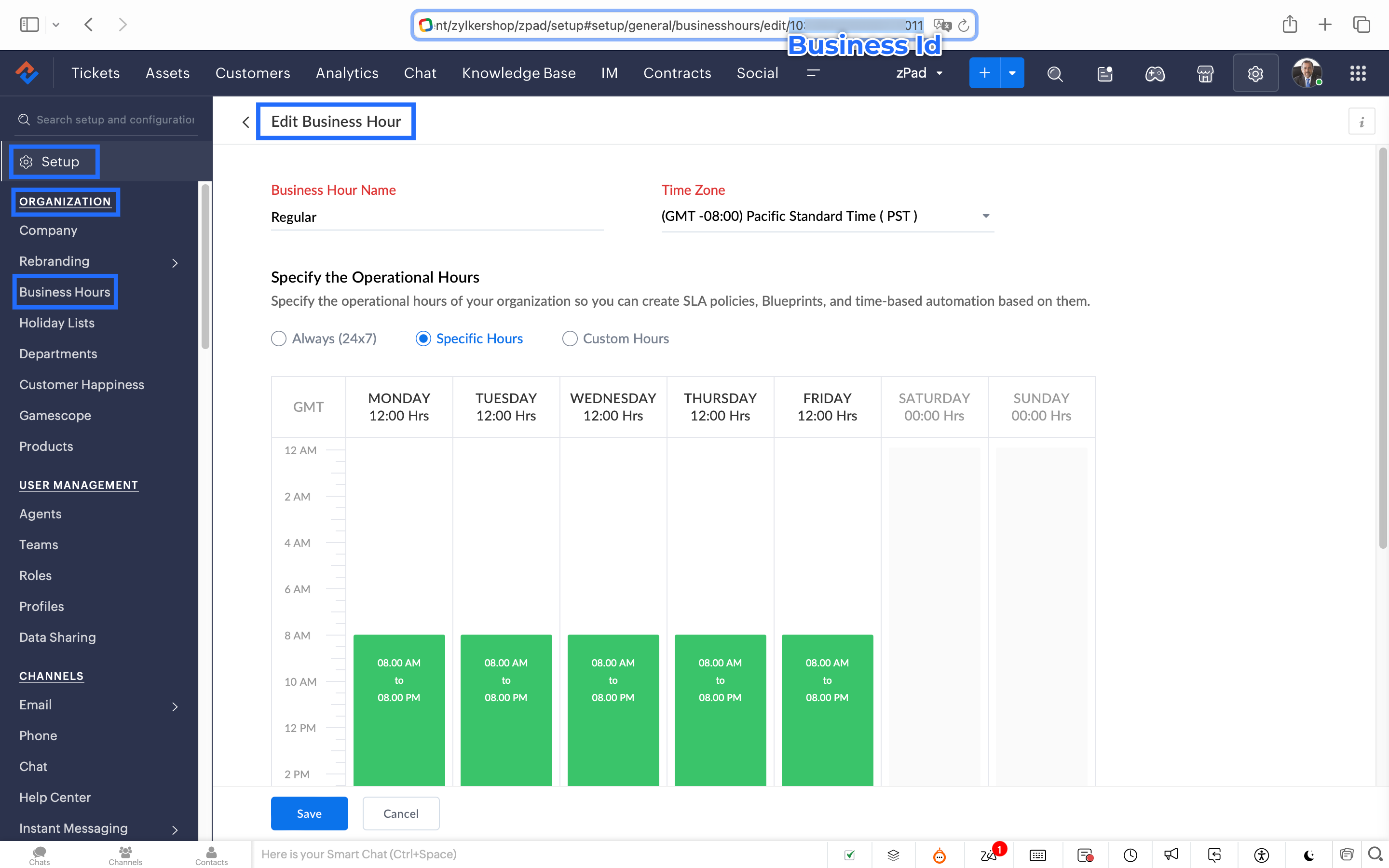
7. After entering the URL, do not make changes to the Query Params and Headers.
8. Under Connections, click on Add.
To Create a connection
8.1 Click Create Connection.
8.2 Select Zoho Desk under Default Services.
8.3 Give a connection name (let's say configureBusiness Hours).
8.4 Disable the toggle for User Credentials of Login User.
8.5 Under Scope, choose the below scope values:
Desk.settings.READ
8.6 Click Create and Connect.
8.7 Click Connect and click Accept.
Connection is created successfully.

9. After creating the connection, click on Refresh and then click on the drop down arrow and select the connection (configureBusiness Hours) created.
10. Click on the gear icon in the Formatter option and paste the below code in the Deluge window:
- dayMAp = {"SUNDAY","MONDAY","TUESDAY","WEDNESDAY","THURSDAY","FRIDAY","SATURDAY"};
- businessTimes = response.get("businessTimes");
- timez = response.get("timeZone").get("id");
- response = Collection();
- createdTime = zoho.currenttime.toString("yyyy-MM-dd HH:mm:ss",timez).toDateTime();
- createdDay = createdTime.getDay();
- //get this from above created time
- createdHour = createdTime.getHour();
- //get this from above created time
- createdMinute = createdTime.getMinutes();
- //get this from above created time
- createdWeekDay = createdTime.getDayOfWeek();
- //get this from above created time
- createdWeekDay = dayMAp.get(createdWeekDay - 1);
- for each businessTime in businessTimes
- {
if(businessTime.get("day") == createdWeekDay)
{
businessTimeStartHour = businessTime.get("startTime").getPrefix(":").toLong();
businessTimeEndHour = businessTime.get("endTime").getPrefix(":").toLong();
businessTimeStartMinute = businessTime.get("startTime").getSuffix(":").toLong();
businessTimeEndMinute = businessTime.get("endTime").getSuffix(":").toLong();
if((createdHour > businessTimeStartHour || createdHour == businessTimeStartHour && createdMinute >= businessTimeStartMinute) && (createdHour < businessTimeEndHour || createdHour == businessTimeEndHour && createdMinute <= businessTimeEndMinute))
{
response.insert({"status":"true"});
}
else
{
response.insert({"status":"false"});
}
}- }
- return response.get(0).get("status");
11. Click Save after pasting the code.
12. Click on the gear icon in the Response icon.
12.1 Click on the gear icon on the Status Code.12.2 Give Status Code as 200, Flow Variables as status, Response Value as /.12.3 Let the Type be single element and the Data Type be String. Click Save. Click Save for the Response List with the updated status.
13. Disable the toggle for the Multi Path.
14. Choose a Request timeout if required. This sets a response waiting time from the server.
15. Set the Error message if required to display in case waiting time exceeds the response time.
16. Click Save.
This is the configuration for setting the business hours through a custom function.
17. After the Webhook, click on the + icon and add the Fork block under the Perform Actions.

18. Give the Block Name as Check, Enter Path list : name it as Check.
Under Criteria 1, click on the drop-down arrow, and enter choose Status under Block variables, from the drop-down menu. Choose operation: contains and give the value : True.
19. Do not add an else path.
20. Click Save.
In the Fork block, under Check, you can add the Transfer to agent block from the Zoho Desk Blocks. Under Else, you can add a text icon/ info card stating you are out of business hours.
Note: This custom function does not include the Holiday Lists configured within Zoho Desk.
You can seamlessly integrate this Guided Conversation flow into your self-service platform to ensure you never miss a customer, even during non-working hours. Keep your customer support running smoothly!
See you next week!
Regards,
Lydia | Zoho Desk
Topic Participants
Lydia | Zoho Desk
Dikka
Shivani | Zoho Desk
Sticky Posts
Register for Zoho Desk Beta Community
With the start of the year, we have decided to take a small step in making the life of our customers a little easier. We now have easy access to all our upcoming features and a faster way to request for beta access. We open betas for some of our featuresShare your Zoho Desk story with us!
Tell us how you use Zoho Desk for your business and inspire others with your story. Be it a simple workflow rule that helps you navigate complex processes or a macro that saves your team a lot of time; share it here and help the community learn and grow with shared knowledge.Tip #1: Learn to pick the right channels
Mail, live chat, telephony, social media, web forms—there are so many support channels out there. Trying to pick the right channels to offer your customers can get pretty confusing. Emails are most useful when the customer wants to put things on record. However, escalated or complicated issues should not be resolved over email because it's slow and impersonal. When you need immediate responses, live chat is more suitable. It's also quick and convenient, so it's the go-to channel for small issues.Welcome to Zoho Desk Community - Say hello here!
Hello everyone! Though we have been here for a while, it’s time to formally establish the Zoho Desk Community; we’re really happy to have you all here! This can be the place where you take a moment to introduce yourself to the rest of the community. We’d love to hear all about you, what you do, what company or industry you work for, how you use Zoho Desk and anything else that you will like to share! Here’s a little about me. I am Chinmayee. I have been associated with Zoho since 2014. I joined hereWebinar 1: Blueprint for Customer Service
With the launch of a host of new features in Zoho Desk, we thought it’ll be great to have a few webinars to help our customers make the most of them. We’re starting off with our most talked about feature, Blueprint in Zoho Desk. You can register for the Blueprint webinar here: The webinar will be delivered by our in-house product experts. This is a good opportunity to ask questions to our experts and understand how Blueprint can help you automate your service processes. We look forward to seeing
Recent Topics
Cross References Do Not Update Correctly
I am using cross references to reference Figures and current am just using the label and number, i.e. Figure #. As seen here: When I need to update the field, I use the update field button. But it will change the cross reference to no longer only includingHow to Track and Manage Schedule Changes in Zoho Projects
Keeping projects on track requires meticulous planning. However, unforeseen circumstances can cause changes to schedules, leading to delays. It becomes important to capture the reason for such changes to avoid them in the future. Zoho Projects acknowledgesIs there a notification API when a new note is addeding
Trying to push to Cliq, or email notification when there's a new note added in module. How to implement this?Collaborate Feature doesn't work
Hello Team. It seems that the collaborate section is broken? I can post something but it all appears in "Discussions". In there is no way how I would mark something as Draft, Approval, post or any of the other filter categories? Also if I draft a postEdit Permission during and after approval?
When a record is sent for approval Can a user request for edit permission from the approver? We don't want to give edit permissions for all the records under approval Only on a case-by-case basis How can we achieve this?Zoho web and mobile application not workingn
Both zoho forms web and mobile application aren't working. I have checked my network connections and they are fine.Bulk Moving Images into Folders in the Library
I can't seem to select multiple images to move into a folder in order to clean up my image library and organize it. Instead, I have to move each individual image into the folder and sometimes it takes MULTIPLE tries to get it to go in there. Am I missingLatest updates in Zoho Meeting | Breakout rooms and End to end encryption
Hello everyone, We’re excited to share a few updates for Zoho Meeting. Here's what we've been working on lately: Introducing Breakout Rooms for enhanced collaboration in your online meetings and End-to-end encryption to ensure that the data is encryptedAccidentally deleted a meeting recording -- can it be recovered?
Hi, I accidentally deleted the recording for a meeting I had today. Is there a way I can recover it?How to access email templates using Desk API?
Trying to send an email to the customer associated to the ticket for an after hours notification and can't find the API endpoint to grab the email template. Found an example stating it should be: "https://desk.zoho.com/api/v1/emailtemplates/" + templateID;Update Portal User Name using Deluge?
Hey everyone. I have a basic intake form that gathers some general information. Our team then has a consultation with the person. If the person wants to move forward, the team pushes a CRM button that adds the user to a creator portal. That process isUnable to retrieve Contact_Name field contents using Web API in javascript function
Hello, I've added a field in the Purchase Order form to select and associate a Sales Order (Orden_de_venta, lookup field). I've also created a client script to complete some fields from the Sales Order (and the Quote), when the user specifies the relatedUpdating Woocommerce Variation Products Prices Via Zoho CRM
I can update product prices with this flow: But I can't update variant products. I got a code from Zoho for this, but I couldn't get it to work. It needs to find the product in the CRM from the SKU field and update the variation with the price there.Emails Disappearing From Inbox
I am experiencing the unnerving problem of having some of the messages in my inbox just disappear. It seems to happen to messages that have been in there for longer than a certain amount of time (not sure how long exactly). They are usually messages that I have flagged and know I need to act on, but have not gotten around to doing so yet. I leave them in my inbox so I will see them and be reminded that I still need to do something about them, but at least twice now I have opened my inbox and foundPower of Automation :: Automatic removal of project users once the project status is changed.
A custom function is a software code that can be used to automate a process and this allows you to automate a notification, call a webhook, or perform logic immediately after a workflow rule is triggered. This feature helps to automate complex tasks andCustomizing Form Questions per Recipient Group in Zoho Campaigns/Forms
Hello everyone, I would like to ask if it’s possible in Zoho Campaigns or Zoho Forms to send out a campaign where the form questions can be customized based on the group of recipients. Use case example: I have prepared 20 questionnaire questions. ForForms - Notification When Response Submitted
How do I set it up to generate an email notification when a response (class request) is submitted?How to disable user entry on Answer Bot in Zobot
Hi, I have an Answer Bot in my Zobot, here is the configuration: I only want the user to choose 1 of the 4 the options I have provided: When no answer found, user chooses 'I'll rephrase the question' or 'Ask a different question When answer is found,More admin control over user profiles
It's important for our company, and I'm sure many others, to keep our users inline with our branding and professional appearance. It would be useful for administrators to have more control over profile aspects such as: Profile image User names Email signaturesPlease Make Zoho CRM Cadences Flexible: Allow Inserting and Reordering Follow-Up Steps
Sales processes are not static. We test, learn, and adapt as customers respond differently than expected. Right now, Zoho Cadences do not support inserting a new step between existing follow-ups or changing the type of an existing primary step. If I realizeClear Tag & Linking Between Quotes and Sales Orders
Hi Zoho Team, In Zoho Books, when a quote is converted into a sales order, it would be extremely useful to have: A clear tag/indicator on the quote showing that it has been converted into a sales order. A direct link in the sales order back to the originatingAdd Direct Ticket Link to Zoho Help Center Portal in Email Replies
Hi Zoho Support Team, We hope you're doing well. We’d like to request a small but valuable improvement to enhance the usability of the Zoho Help Center portal (https://help.zoho.com/portal/en/myarea). Currently, when someone from Zoho replies to a support[Webinar] Deluge Learning Series - AI-Powered Automation using Zoho Deluge and Gemini
We’re excited to invite you to an exclusive 1-hour webinar where we’ll demonstrate how to bring the power of Google’s Gemini AI into your Zoho ecosystem using Deluge scripting. Whether you're looking to automate data extraction from PDFs or dynamicallyNew in Cadences: Option to Resume or Restart follow-ups when re-enrolling records into a Cadence, and specify custom un-enrollment criteria
Managing follow-ups effectively involves understanding the appropriate timing for reaching out, as well as knowing when to take a break and resume later, or deciding if it's necessary to start the follow-up process anew. With two significant enhancementsIm Stuck in an EDIT ONLY WITH WIZARD issue
So I found Wizards to be a really helpful tool in minimizing the exposure of redundant, superfluous fields to staff that would never otherwise have to edit those fields. My issue is, that when the record (in this case a lead) is created with a wizard,Account upgrade
Good evening, I upgraded my account and paid for it. From standard to professional. Unfortunately after the paiment my account was not upgraded. Please your advise. Best Regards Erik van StaverdenHow to set ALL default dates of my organization to DD-MM-YYYY format?
All replies to this question comes from a time where the UI was different. It's extremely frustrating not being able to find how to do this simple setting change. I want everything and everyone in my organizations to have DD-MM-YYYY date format by default.How can I sync from Zoho Projects into an existing Zoho Sprints project?
Hi I have managed to integrate Zoho Projects with Zoho Sprints and I can see that the integration works as a project was created in Zoho Sprints. But, what I would like to do is to sync into an existing Zoho Sprints project. Is there a way to make thatCan we generate APK and IOS app?
Dears, I want to know the availability to develop the app on zoho and after that .. generate the APK or IOS app and after that I added them to play store or IOS store.. Is it possible to do this .. I want not to use zoho app or let my customers use it. thanksZoho Subform Workflows onAdd of Row
Suppose I have a form with attached workflows onLoad. If I use the form as a subform, will it inherit the workflows or do I need to create new ones onAdd of row?Super Admin removal
I brought a sub, and I gave the Super admin rights to a person who is no longer with us, so I need to change, and I need to make myself the Super adminBetter Notes Commenting
Hi, I'd like to suggest better collaboration tools for NOTES. The current notes section for Accounts, Contacts and Deals is not ideally suitable for any degree of communication or collaboration. When responding to a note, there is no ability to leaveExporting Templates
I have just spent 2 hours creating a project template for a Netsuite configuration, and want to share it with other Zoho Projects users - who have a different account. Is there any way to do this?Power of Automation:: Streamline Associated Teams based on the Task Owner update.
Hello Everyone, A Custom function is a user-written set of code to achieve a specific requirement. Set the required conditions needed as when to trigger using the Workflow rules (be it Tasks / Project) and associate the custom function to it. Requirement:No Response from Zoho Support in 8 Days - Typical?
I have a couple of issues I'm trying to work through. Initially, I was getting support from support@zohofsm.com, but I have not received a response in 8 days (11 on another question). Is this typical? Can I pay for support? For context, I am not spammingAdd QUOTE OWNER profile image to a Quote Template
I can add their email address.. phone number, DOB. I need to add a users profile picture so when they assign a template to a quote they own it adds their picture to the cover page. I've tried hacking a solution together but there has to be an easier way.Zoho Connections Desk API relative URL PATTERN_NOT_MATCHED
While i am trying to do this: async function fetchTicketsFromDesk(timeFilter = 'current_month') { try { const response = await ZOHO.CRM.CONNECTION.invoke("desk_connection", { url: "/api/v1/tickets", method: "GET", }); const data = response.details ? JSON.parse(response.details)Zoho CRM - Custom Views for Portal Users
I'm looking for an option to customise custom views for portal users in CRM. It would be great if "portal user" was a permission on custom views.【参加無料】10/17(金) 東京 ユーザ交流会 Vol.3 参加登録 受付開始!
ユーザーの皆さま、こんにちは。コミュニティチームの藤澤です。 10/17(金)に、東京・新橋で「東京 ユーザー交流会 Vol.3」を開催します! 今回のユーザー事例セッションのテーマは、「Zoho Flowを活用した他社の決済サービスとの連携事例」です。 さらに、Zoho Flowに限らず、Analytics や Campaigns などの多彩なZohoサービスの活用方法について、豊富なご経験をもとにご紹介いただきます。 また、Zoho社員セッションでは、Zoho CRMを活用して日々の営業業務を効率化する具体的な事例をお話しします。業界を問わず、幅広い方にご参考いただける内容となっています!Zoho Meeting Plug compatibility with newer versions of Outlook
Documentation states that the zoho meeting plug in for outlook is only compatible with versions up to Outlook 2019 What is available to users of more up to date versions of outlook/office 365?Next Page