Automation#35 : Auto-Add Comments under the Owner's Name in Tickets via Macros

Hello Everyone,
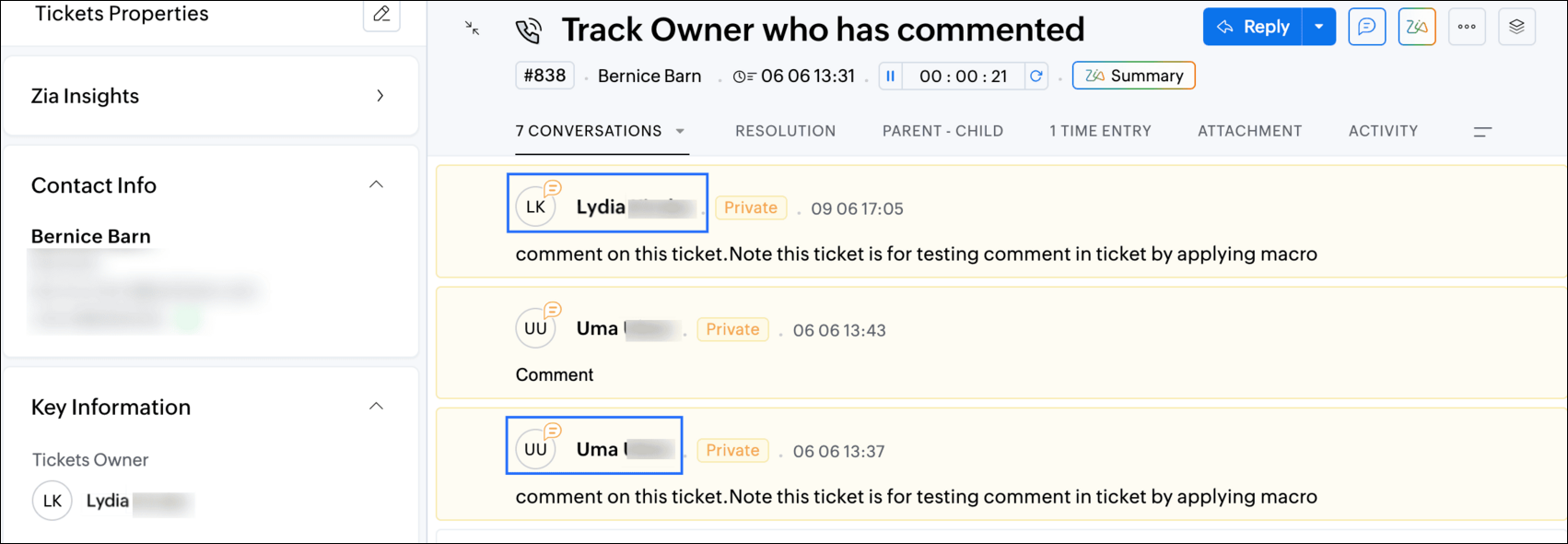
This week's custom function provides simple steps to configure a Macro for adding comments to tickets with the name of the Comment owner.
When managing tickets, you can use the Comment feature to communicate internally with your team and keep everyone updated. If you select Comment(Private), the information will only be visible internally within your Zoho Desk. If you choose Comment(Public), the comment will be visible to your customers on the Help Center.
While automating comments using Macros, it can be challenging to track progress or identify the comment owner if no agent is attributed to the automated entry. This custom function ensures that the comment will appear under the name of the agent who applied it, rather than the person who configured the Macro.
Additionally, this Macro allows you to include a standardized comment to save time for frequently repeated updates.
While automating comments using Macros, it can be challenging to track progress or identify the comment owner if no agent is attributed to the automated entry. This custom function ensures that the comment will appear under the name of the agent who applied it, rather than the person who configured the Macro.
Additionally, this Macro allows you to include a standardized comment to save time for frequently repeated updates.
For example, Zylker Techfix collaborated across multiple departments and often required detailed customer information before transferring tickets between teams. They used comments to inform colleagues about the ticket status. To streamline this process, they automated a frequently used comment: "Awaiting additional information from the customer to proceed further." This clearly communicated to team members why a ticket was on hold. Additionally, this custom function allowed them to track which agent who applied the Macro.
To configure this within your Macros, please follow the steps below.
To configure this within your Macros, please follow the steps below.
Create a connection
1.1 Go to Setup(S) and choose Connections under Developer Space.
1.2 Click Create Connection.
1.3 Select Zoho Desk under Default Services.
1.4 Set the connection name as deskconnection.
1.2 Click Create Connection.
1.3 Select Zoho Desk under Default Services.
1.4 Set the connection name as deskconnection.
1.5 Under Choose Scopes, choose the below scope values:
Desk.basic.READ
Desk.settings.READDesk.tickets.UPDATE
1.6 Click Create and Connect.
1.7 Click Connect.
1.8 Choose the Desk's organization to connect with Deluge, and click Submit.
1.9 Click Accept.
1.7 Click Connect.
1.8 Choose the Desk's organization to connect with Deluge, and click Submit.
1.9 Click Accept.
Connection is created successfully.
Configure Custom Function within the Workflow Rule
1. Go to Setup, choose Macros under Automation.
2. Under Macros, click Create Rule.
3. Check if the right department is selected
4. Under Basic Information, give a Rule Name and Description.
5. Under Availability, select All agents/Specific Agents based on your requirement. If you choose Specific Agents, select the agents for whom you want to make this Macro available. Click Next.
6. Under Actions, click on the drop-down in the + icon and select Custom Functions >> New.
6.1 Under Basic Information, enter Name and Description. Choose Tickets under Module.
6.1 Under Basic Information, enter Name and Description. Choose Tickets under Module.
6.2 Under Argument Mapping, give a desired Method Name. Map the arguments as below:
6.2.1 In the Argument Name field, type ticketId and select Ticket Id in the Tickets Section.
6.2.1 In the Argument Name field, type ticketId and select Ticket Id in the Tickets Section.
7. In the script window, insert the Custom Function given below:
- // ----<<<< User Inputs >>>>----
- // --- Replace ".com" with appropriate domain extension based on customer's location/DC ---
- deskURL = "https://desk.zoho.com";
- commentContent = "<<Your_comment_content>>";
- // ----<<<< Initial Configs >>>>----
- logs = Map();
- ticketCommentParam = Map();
- loginUserEmail = zoho.loginuserid;
- logs.insert("ticketId": ticketId);
- logs.insert("loginUserEmail": loginUserEmail);
- //---------------------------
- try {
- // ---- start your logic from here ----
- agentDetailsResponse = invokeurl
- [
- url :deskURL + "/api/v1/agents/email/" + loginUserEmail
- type :GET
- connection:"deskconnection"
- ];
- logs.insert("agentDetailsResponse":agentDetailsResponse);
- if(agentDetailsResponse != null && agentDetailsResponse != "" && agentDetailsResponse.size() > 0 && agentDetailsResponse.containKey("id"))
- {
- agentId = agentDetailsResponse.get("id");
- ticketCommentParam.insert("commenterId":agentId);
- }
- // ---- Add comment in the ticket ----
- ticketCommentParam.insert("content":commentContent);
- ticketCommentParam.insert("isPublic":"false");
- ticketCommentParam.insert("contentType":"html");
- logs.insert("ticketCommentParam":ticketCommentParam);
- commentAddResponse = invokeurl
- [
- url :deskURL + "/api/v1/tickets/" + ticketId + "/comments"
- type :POST
- parameters:ticketCommentParam.toString()
- connection:"deskconnection"
- ];
- logs.insert("commentAddResponse":commentAddResponse);
- }
- catch(errorInfo) {
- logs.insert("errorInfo": errorInfo);
- }
- info "logs: \n" + logs;
- if(logs.containKey("errorInfo"))
- {
- throws "Error happen in the CF execution";
- }

Note
a. In Line 3, replace .com in the address with .in/.eu/.ca based on your DC.
b.In Line 4, enter the text which you would like to include as a ticket.
8. Click Save to save the custom function.
9. Click Save again to save the Macros.
9. Click Save again to save the Macros.
We hope this custom function helps streamline your team's communication and enhances your ticket management process. If you have any questions or need further assistance, feel free to reach out to us at support@zohodesk.com .
Regards,
Lydia | Zoho Desk
Topic Participants
Lydia | Zoho Desk
Sticky Posts
Register for Zoho Desk Beta Community
With the start of the year, we have decided to take a small step in making the life of our customers a little easier. We now have easy access to all our upcoming features and a faster way to request for beta access. We open betas for some of our featuresShare your Zoho Desk story with us!
Tell us how you use Zoho Desk for your business and inspire others with your story. Be it a simple workflow rule that helps you navigate complex processes or a macro that saves your team a lot of time; share it here and help the community learn and grow with shared knowledge.Tip #1: Learn to pick the right channels
Mail, live chat, telephony, social media, web forms—there are so many support channels out there. Trying to pick the right channels to offer your customers can get pretty confusing. Emails are most useful when the customer wants to put things on record. However, escalated or complicated issues should not be resolved over email because it's slow and impersonal. When you need immediate responses, live chat is more suitable. It's also quick and convenient, so it's the go-to channel for small issues.Welcome to Zoho Desk Community - Say hello here!
Hello everyone! Though we have been here for a while, it’s time to formally establish the Zoho Desk Community; we’re really happy to have you all here! This can be the place where you take a moment to introduce yourself to the rest of the community. We’d love to hear all about you, what you do, what company or industry you work for, how you use Zoho Desk and anything else that you will like to share! Here’s a little about me. I am Chinmayee. I have been associated with Zoho since 2014. I joined hereWebinar 1: Blueprint for Customer Service
With the launch of a host of new features in Zoho Desk, we thought it’ll be great to have a few webinars to help our customers make the most of them. We’re starting off with our most talked about feature, Blueprint in Zoho Desk. You can register for the Blueprint webinar here: The webinar will be delivered by our in-house product experts. This is a good opportunity to ask questions to our experts and understand how Blueprint can help you automate your service processes. We look forward to seeing
Recent Topics
Pie chart in Zoho Analytics shows ridicoulous numer of decimals of a percentage.
Is there a way to set the number of decimals of a percentage value in the Pie chart? Now it displays 15 decimals instead of a round-off value. The value is a count and percentage calculated in the chart, so there is no number of decimals that can be specifiedZoho People > Leave Management > Unable to import balance leave
Hello Zoho I am unable to import balance leave into the system I have follow the steps It show only 5 fields - the date field i am unable to select from date and to date Error Date in excelsheetNarrative 4: Exploring the support channels
Behind the scenes of a successful ticketing system - BTS Series Narrative 4 - Exploring the support channels Support channels in a ticketing system refer to the various communication methods that customers use to contact a business for assistance. TheseTip of the Week #65– Share email drafts with your team for quick feedback.
Whether you're replying to a tricky customer question or sharing a campaign update, finding the right words—and the right tone—can be tough. You just wish your teammates could take a quick look and give their suggestions before you send it. Sometimes,How to Initiate WhatsApp Message on SalesIQ?
I've just activated a Business WhatsApp phone number through SalesIQ because of its touted omnichannel chat approach. Sounds exciting. I understand that when a customer sends me a WA message, I can reply to it on SalesIQ and keep the chat going, perfect.Episode IV:Handling User Inputs in custom functions
Hi Everyone, We've been exploring custom functions which help in performing advanced automation tasks. Custom functions enable you to achieve possibilities based on your organization's requirements. Custom functions require user inputs that allow theSet a lead as non-marketing if they opt out of email marketing
I'm gathering Lead data via an enquiry form and wish to give them the option to opt out of marketing emails (which we send from Marketing Automation) whilst retaining the ability to send them non-marketing emails - so the email opt-out field doesn't work.Set up multiple IMAP email addresses
Hi, I just started using CRM and its great, but I just found out I can only add one imap email address for incoming mail in the included salesinbox ...this is ridiculous. All companies have different email such as sales@domain, info@domain , personal@domainZoho Recruit to Zoho People integration
In the mapping of field from Zoho Recruit to Zoho People i am unable to map all fields What can i doZoho Recruit > Career Site > Customisation
Hi All I have created multiple career site to represent my different organization In my Quanta Media career site > I set it with the with Quanta Malta view In my job opening : Quanta Malta view 2 job opening In my URL for quanta media https://lri.zohorecruit.eu/jobs/Quanta-MaltaFormatting Blueprint Stages (buttons)
Is there a way to format Blueprint transition buttons in Creator like background colour, text colour etc.Disable Default Value in Multi-Select field
Hello, Is there a way to disable the default value feature when setting up a custom Multi-Select field? When creating tickets I would like it so there isn't a value pre-selected in the multi-select custom field that was created.How to set custom business hours for different teams in Zoho Desk?
Hi Zoho Team and Community, I’m trying to set different business hours for multiple departments in Zoho Desk. For example, our tech support team works 24/7, while our billing team is only available from 9 AM to 5 PM (Mon–Fri). Is there a way to assignZia Auto Tag Keyword Clusters
Is there a way to remove a keyword from a keyword cluster? We're finding that Zia auto-tag is tagging things incorrectly based on some words that don't really make sense.Centralized Domain Verification in Zoho CRM Plus
Hi Team, I have a suggestion regarding Zoho CRM Plus. It's quite frustrating to verify the same domain separately for each application within the suite. It would be really helpful if you could introduce a centralized admin console—similar to what's availableHOw do I make a refund?
I have a client that needs a refund. I see a refund history in the Report area... but where do I go to make a refund?Creating a work order for dispatch
We currently uses ZOHO for CRM and Intuit Field Service for creating Work orders and dispatching. This is causing double entry and is not efficient use of time. I would like to use ZOHO for all customer related activities so can you tell me if you can : Create a work order that we could manipulate to meet our needs. Also if you could then dispatch that would be ideal. Thank youResidual Formatting in Text Boxes After Undoing Pasting of Formatted Text
Hi, guys! I have another problem to report. Actually, I have been aware of this for many months, possibly years, but I have been too lazy to report it to you. My apologies! Let's say you've pasted a formatted string into a text box. You change your mindFeature Request: Stripe Terminal Integration
I would like to request the addition of Stripe Terminal integration to Zoho Books, which will help process in-person payments. While Zoho Books already supports online payments through Stripe, extending this functionality to include Stripe Terminal wouldImproved Security in SAML/OIDC Sign-in Redirection Flow
To enhance the security of our authentication system, we’ve made a change to how SAML and OIDC sign-in redirections are handled. This update resolves a potential open redirection vulnerability and adds an extra layer of protection during the sign-in process.GA4 data
Hi, I have data being pulled from GA4 into numerous tables. There are a few major errors in the source data. Eg for a period of time GA4 reported ecommerce sales that were $98 as $9,800 and $42 as $4,200. It's not happening now but my historical dataLost Search Box with new UI Design
I would like to suggest bringing back the Search Box in the new Zoho Project UI. I use the search feature a lot and having to click the magnifying glass to type for a search is one extra click that we did not have with the old UI.Adaptación de zoho books a la nueva regulación de facturación electrónica
La facturación electrónica será obligatoria para todas las empresa en España en 2025, en Francia probablemente también e imagino pronto en todos los países europeos. Ya en 2024 todas las empresa grandes tienen que utilizar el sistema de facturación electrónica.ZOHOBOOK Sales_QUOTE: To Add Discount At Each Line Item Table
Hi, Our quote need to display with discount at each line item level as well. Try to edit template, >CUSTOMISE>EDIT TEMPLATE> Table, I can see template view with discount column, but when hit SAVE the template, view in PDF the discount column not shown.How to account for vat with postponed VAT accounting
Hi everyone, looking for some help with postponed VAT accounting, I use DHL express for my imports and they used to pay the VAT for me and then invoice me. I could then log this as a bill and the VAT element from import was recorded as input VAT, allWeekly Automation Trigger for Equipment Calibration Reminder
Dear Team, I’m currently working on an automation in the Equipment module. The goal is to track calibration schedules for tools — all of which require regular calibration. I’ve created an automation that sends email reminders for tools that are due forADDDATE formula using 2 calculations
Hello, I want to create an ADDDATE formula using 2 calculations, add 1 month and deduct 1 day. the formula that I need should look like this: ADDDATE(due_date, 1, "Months")+ ADDDATE(due_date, -1, "Days") Each row itself works fine, but when I'm tryingUpgrading from Zoho Invoice to Books was a major downgrade in functionality for me
I have been a user for many years of a free plan on Zoho Invoice for my personal consulting business. I recent upgraded my organization to Books since some of the additional functionality looked useful to me, and played around with the free trial for🎉 Dynamic Org Chart for Zoho CRM Extension Published [2025]
Hey Zoho CRM Community! We're thrilled to unveil our latest Zoho extension:🥁 Dynamic Org Chart for Zoho CRM 🎊 This extension is now available to transform the way your teams visualize, manage, and interact with org chart directly inside any Zoho CRM'sDetailed General Ledger has problem of exporting out to excel and missing ledger details for some accounts
I have been encountering some problems generating Detailed General Ledger report with Zoho books. Firstly, I cannot export out the report of Detailed General Ledger to Excel. It will show this error message "invalid value passed for sort column", andUpload a file to a File Upload Field through API
Hello, Is there any way to upload a file to a custom file upload field in a module when doing an Update using the Record API? I've found and I am able to upload files to attachments but I don't know how to upload them to a field. I've checked the documentation at https://www.zoho.com/crm/help/api/v2/#update-specify-records but the File Upload field type does not appear in the examples. ThanksKaizen #131 - Bulk Write for parent-child records using Scala SDK
Hello and welcome back to this week's Kaizen! Last week, we discussed how to configure and initialize the Zoho CRM Scala SDK. This week, we will be exploring the Bulk Write API and its capabilities. Specifically, we will focus on executing bulk writeAutomatic pricing feature for sales orders
I am currently setting up my Zoho Inventory system and would like to implement an automatic pricing feature for sales orders. We have created a custom field called "brandline" for our items. All products with the same brandline value should have the sameAbility to access VAT returns and submit them has disappeared.
I have been using Zoho books successfully to submit quarterly VAT returns. Without reason I have lost that facility. I have followed all available instructions eg going into settings, taxes, VAT etc. without success. My registration number is there andHow to automatically schedule a meeting After Blueprint Transition
As part of our sales process, we require a technician to go to the customer's site and perform an installation prior to advancing to the next stage of the blueprint. So this will require (a) scheduling a meeting for the technician to visit the customer's site and (b) a reminder phone call the day before the scheduled meeting. As I'm designing the Deal Blueprint, I see that I can automatically add a Task to the deal, but I can't add a Meeting or a Call. What am I missing? There seem to be 3 typesZoho Recruit > Workflow
I have created a workflow for my application module Whenever a record is created The condition , application status is 1st call invitation I have set this OI do not receive the email that was suppose to be send outMultiple locations but one parent company
I am trying to configure my accounts that have multiple locations under one parent company to show separate locations in the portal.Stock Count History in Product Details – Zoho Inventory
Hello Zoho Team, When I perform a Stock Count for a product in Zoho Inventory, I would like to view the history of those stock counts later — especially from the product details page. Currently, I can perform the count and update the quantity, but I’mCreate Project while winning potentials - Projects v3 api updated code
Hi all, I've been using the built in function to create a project while a deal is closed won and noticed it had some missing fields when trying to reference the zoho projects v3 api documentation. Specifically the project group had some issues when addingMerge feature parity with writer
Hello Zoho team, I have run into a workflow limitation with Zoho Contracts and the lack of merge feature parity with what Writer can do. We have created a fairly complex merge process to create a statement of work based on several fields in our CRM whichNext Page