Automation#35 : Auto-Add Comments under the Owner's Name in Tickets via Macros

Hello Everyone,
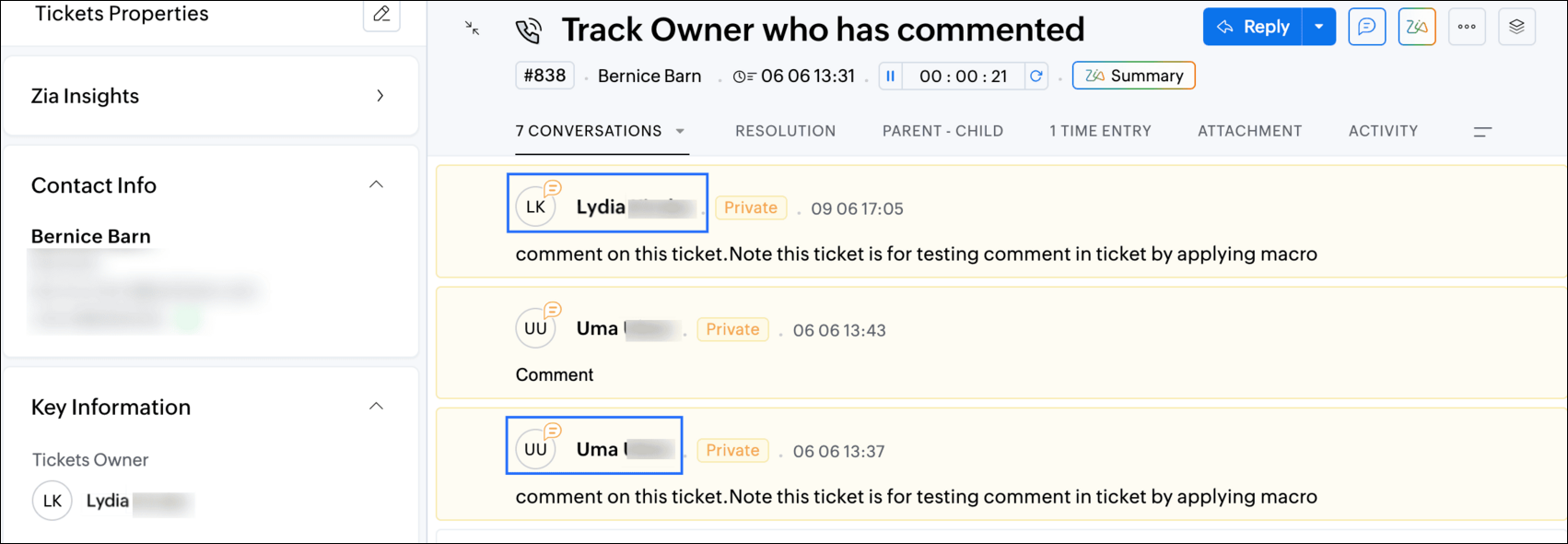
This week's custom function provides simple steps to configure a Macro for adding comments to tickets with the name of the Comment owner.
When managing tickets, you can use the Comment feature to communicate internally with your team and keep everyone updated. If you select Comment(Private), the information will only be visible internally within your Zoho Desk. If you choose Comment(Public), the comment will be visible to your customers on the Help Center.
While automating comments using Macros, it can be challenging to track progress or identify the comment owner if no agent is attributed to the automated entry. This custom function ensures that the comment will appear under the name of the agent who applied it, rather than the person who configured the Macro.
Additionally, this Macro allows you to include a standardized comment to save time for frequently repeated updates.
While automating comments using Macros, it can be challenging to track progress or identify the comment owner if no agent is attributed to the automated entry. This custom function ensures that the comment will appear under the name of the agent who applied it, rather than the person who configured the Macro.
Additionally, this Macro allows you to include a standardized comment to save time for frequently repeated updates.
For example, Zylker Techfix collaborated across multiple departments and often required detailed customer information before transferring tickets between teams. They used comments to inform colleagues about the ticket status. To streamline this process, they automated a frequently used comment: "Awaiting additional information from the customer to proceed further." This clearly communicated to team members why a ticket was on hold. Additionally, this custom function allowed them to track which agent who applied the Macro.
To configure this within your Macros, please follow the steps below.
To configure this within your Macros, please follow the steps below.
Create a connection
1.1 Go to Setup(S) and choose Connections under Developer Space.
1.2 Click Create Connection.
1.3 Select Zoho Desk under Default Services.
1.4 Set the connection name as deskconnection.
1.2 Click Create Connection.
1.3 Select Zoho Desk under Default Services.
1.4 Set the connection name as deskconnection.
1.5 Under Choose Scopes, choose the below scope values:
Desk.basic.READ
Desk.settings.READDesk.tickets.UPDATE
1.6 Click Create and Connect.
1.7 Click Connect.
1.8 Choose the Desk's organization to connect with Deluge, and click Submit.
1.9 Click Accept.
1.7 Click Connect.
1.8 Choose the Desk's organization to connect with Deluge, and click Submit.
1.9 Click Accept.
Connection is created successfully.
Configure Custom Function within the Workflow Rule
1. Go to Setup, choose Macros under Automation.
2. Under Macros, click Create Rule.
3. Check if the right department is selected
4. Under Basic Information, give a Rule Name and Description.
5. Under Availability, select All agents/Specific Agents based on your requirement. If you choose Specific Agents, select the agents for whom you want to make this Macro available. Click Next.
6. Under Actions, click on the drop-down in the + icon and select Custom Functions >> New.
6.1 Under Basic Information, enter Name and Description. Choose Tickets under Module.
6.1 Under Basic Information, enter Name and Description. Choose Tickets under Module.
6.2 Under Argument Mapping, give a desired Method Name. Map the arguments as below:
6.2.1 In the Argument Name field, type ticketId and select Ticket Id in the Tickets Section.
6.2.1 In the Argument Name field, type ticketId and select Ticket Id in the Tickets Section.
7. In the script window, insert the Custom Function given below:
- // ----<<<< User Inputs >>>>----
- // --- Replace ".com" with appropriate domain extension based on customer's location/DC ---
- deskURL = "https://desk.zoho.com";
- commentContent = "<<Your_comment_content>>";
- // ----<<<< Initial Configs >>>>----
- logs = Map();
- ticketCommentParam = Map();
- loginUserEmail = zoho.loginuserid;
- logs.insert("ticketId": ticketId);
- logs.insert("loginUserEmail": loginUserEmail);
- //---------------------------
- try {
- // ---- start your logic from here ----
- agentDetailsResponse = invokeurl
- [
- url :deskURL + "/api/v1/agents/email/" + loginUserEmail
- type :GET
- connection:"deskconnection"
- ];
- logs.insert("agentDetailsResponse":agentDetailsResponse);
- if(agentDetailsResponse != null && agentDetailsResponse != "" && agentDetailsResponse.size() > 0 && agentDetailsResponse.containKey("id"))
- {
- agentId = agentDetailsResponse.get("id");
- ticketCommentParam.insert("commenterId":agentId);
- }
- // ---- Add comment in the ticket ----
- ticketCommentParam.insert("content":commentContent);
- ticketCommentParam.insert("isPublic":"false");
- ticketCommentParam.insert("contentType":"html");
- logs.insert("ticketCommentParam":ticketCommentParam);
- commentAddResponse = invokeurl
- [
- url :deskURL + "/api/v1/tickets/" + ticketId + "/comments"
- type :POST
- parameters:ticketCommentParam.toString()
- connection:"deskconnection"
- ];
- logs.insert("commentAddResponse":commentAddResponse);
- }
- catch(errorInfo) {
- logs.insert("errorInfo": errorInfo);
- }
- info "logs: \n" + logs;
- if(logs.containKey("errorInfo"))
- {
- throws "Error happen in the CF execution";
- }

Note
a. In Line 3, replace .com in the address with .in/.eu/.ca based on your DC.
b.In Line 4, enter the text which you would like to include as a ticket.
8. Click Save to save the custom function.
9. Click Save again to save the Macros.
9. Click Save again to save the Macros.
We hope this custom function helps streamline your team's communication and enhances your ticket management process. If you have any questions or need further assistance, feel free to reach out to us at support@zohodesk.com .
Regards,
Lydia | Zoho Desk
Topic Participants
Lydia | Zoho Desk
Sticky Posts
Register for Zoho Desk Beta Community
With the start of the year, we have decided to take a small step in making the life of our customers a little easier. We now have easy access to all our upcoming features and a faster way to request for beta access. We open betas for some of our featuresShare your Zoho Desk story with us!
Tell us how you use Zoho Desk for your business and inspire others with your story. Be it a simple workflow rule that helps you navigate complex processes or a macro that saves your team a lot of time; share it here and help the community learn and grow with shared knowledge.Tip #1: Learn to pick the right channels
Mail, live chat, telephony, social media, web forms—there are so many support channels out there. Trying to pick the right channels to offer your customers can get pretty confusing. Emails are most useful when the customer wants to put things on record. However, escalated or complicated issues should not be resolved over email because it's slow and impersonal. When you need immediate responses, live chat is more suitable. It's also quick and convenient, so it's the go-to channel for small issues.Welcome to Zoho Desk Community - Say hello here!
Hello everyone! Though we have been here for a while, it’s time to formally establish the Zoho Desk Community; we’re really happy to have you all here! This can be the place where you take a moment to introduce yourself to the rest of the community. We’d love to hear all about you, what you do, what company or industry you work for, how you use Zoho Desk and anything else that you will like to share! Here’s a little about me. I am Chinmayee. I have been associated with Zoho since 2014. I joined hereWebinar 1: Blueprint for Customer Service
With the launch of a host of new features in Zoho Desk, we thought it’ll be great to have a few webinars to help our customers make the most of them. We’re starting off with our most talked about feature, Blueprint in Zoho Desk. You can register for the Blueprint webinar here: The webinar will be delivered by our in-house product experts. This is a good opportunity to ask questions to our experts and understand how Blueprint can help you automate your service processes. We look forward to seeing
Recent Topics
Problema para enviar y recibir correos
Buenos días, mi cuenta de correo secretaria@construccmauro.com presenta problemas y no me permite ni me envía ni recibe correos, me sale este error.No fue posible enviar el mensaje; Motivo: 554 5.1.8 Correo electrónico bloqueado saliente. Aprende más., AgradezcoData access tasks like 'For each record' aren't supported for 'integration forms'.
My code is not running because i get the error "Data access tasks like 'For each record' aren't supported for 'integration forms'." I have my integration setup with Zoho CRM + Zoho Creator, the form is visible and working on my zoho creator however inZoho Reports Not Grouping from Subforms
I have created reports from a subform. We have a budget from a standard field, and the bills added to a subform. I've summarised the bills in a field. In edit mode, the bills are joined per supplier, which is what we want. But then it converts and separates/duplicatesCreate Automation for the Field "Mark up by"
Hello everyone, I'm importing expenses from Zoho Expense to Zoho Books. I want to auto-calculate the "Mark up by" field based on the custom field “Discount” I created before. The trigger of the workflow will be the creation of the expense itself. TheFree Webinar Alert! Before vs After: Proven ROI from Zoho CRM + Workplace Integration
Hello Zoho Workplace Community! Before: Scattered tools, lost leads, fragmented communication. Are you ready to stop the constant back and forth between tools to manage leads, emails, and team communication? After: Connected tools, streamlined processes,Zoho Forms to Zoho Sign Integration - Fields Missing
If a Zoho Form has image fields, it seems these can't be transferred to a Zoho Sign template for digital signature. Is there any way of pre-filling Zoho Form images onto a Zoho Sign template? Many thanks.Is zoho SMTP slow today?
Hi guys, Since yesterday I'm facing a slow communication over SMTP while sending emails. I already tried to use tls and ssl but nothing changes. There is anyone else experiencing related issues? I didn't find any maintenance in progress. Tested anotherLink project invoices to sales orders
As a business owner and project manager I create estimates with my clients which then become sales orders. When billing for project work I want to invoice against the agreed sales order. I see that I can create invoices and link them to sales orders inThe Urgent Need for Native Brazilian Payment Integrations: PIX and Direct Bank Connections
Hello Zoho Team, I am writing to emphasize a critical functionality gap for Zoho Books in the Brazilian market: the lack of modern, native payment gateway integrations. The current options are insufficient. The Mercado Pago integration, for instance,How to Fetch Images from Related Modules in Zoho CRM Mail Merge Templates?
Hi team , Hope this email finds you well. I have a requirement where I need to create mail merge templates within Zoho CRM in such a way that they fetch images from a record stored in a different module. The way it works is I have one module "A" whichZoho Calendar (Refresh Rate)
Why don't the calendars refresh more than every 12 hours? That is crazy. I cannot be the only user who wants to see this change? I see and understand that I can MANUALLY update them, but need them to auto refresh either (1) whenever there is a change"In Zoho CRM, during the Blueprint transition to the QC stage, I want to make the 'Packing Proof' image field mandatory."
@Dr Saurabh Joshi @Haiku Technical Support @Ishwarya SG @Sparrow Hill President @Hugh Marshall "In Zoho CRM, during the Blueprint transition to the QC stage, I want to make the 'Packing Proof' image field mandatory."Flow Error
Hi Zoho Team, Any idea on this? This happens recently. Zoho Desk says "You are not authorized to access this resource."Books/Square integration with multiple bank accounts
Hello, I need some workaround ideas! We have two parts of our business which have their own bank accounts and customers. We use 'locations' in Square to allocate the payments to the correct place and we use 'branches' in Zoho Books to define which transactions[Webinar] Deluge Learning Series - Deluge Learning Series Built-in Functions in Deluge
We’re excited to welcome you to the next session in our Deluge Learning Series – Built-in Functions in Deluge – Part 1. In this focused 1-hour live session, we will explore the practical use of built-in functions in Deluge scripting, with a spotlightZoho Hilfe in NRW für Kundenprojekt gesucht!
Hallo, wir sind auf der Suche für ein Kundenprojekt, wer die Implementierung von Zoho übernehmen kann. Unsere Stärke liegt im Onlinemarketing, bzw. der Automatisierung mit Klick-Tipp und den Tools drum herum. In dem Projekt können wir dem Kunden mit dem jetzigen CRM nicht weiter helfen, bzw. ihn nicht auf die nächste Stufe bringen. Leider komme ich mit meiner Suche in Foren, SocialMedia und sonst wo nicht weiter. Der Idealfall ist ein gemeinsamer Besuch vor Ort beim Kunden und hier eine PräsentationGaps in Core HR Functionalities in Zoho People
Hello People team, We've been using Zoho People for quite some time now and truly appreciate its flexibility and customizability. That said, I wanted to share some feedback based on our experience implementing core HR processes within the platform. SeveralProduct and Service
Hi guys, there is a difference between layout of product and service if Long Description field have some kind of text. Please see screenshot 1 for Service here: https://prnt.sc/7xWwPKd29nWP for Product here: https://prnt.sc/LGmtVd_U6H7q As you can seePhone Number Integration
I would like to be able to track my cell phone calls in the CRM. So if a contact calls my cell phone number, a note of that phone call will be made in the CRM so that I don't have to remember to go back in and add the call manually. Is there a way to connect the CRM and my cell phone via a 3rd party? Such as Google Voice, Skype, etc. Its important that my clients don't have to call a new or different number and that sent calls use the same number as well. So if there is a way to connect my phoneCreate Encrypted Zoho Forms URL for SMS Pre-Population forms using zfcrm_entity=
Hello Zoho Forms Community and Zoho Team, I’m trying to send a Zoho Forms URL via SMS with pre-populated CRM contact data, inspired by a post from four years ago by GlennP (https://help.zoho.com/portal/en/community/topic/passing-the-crm). Our form isSales IQ - Bot Builder - Forward to Operator Action Card Improvement
Hi team, It would be a great improvement to have an additional branch out of the Forward to Operator Action Card. I would like to allow 10 seconds for an operator to pick up the chat, if they don't or if they reject the chat I would like the Bot to continueImportant notice: Migration is needed from the legacy ASAP to the latest ASAP Zoho Desk flow
We recommend upgrading to the latest version, as the older version will eventually be discontinued and will no longer receive any further enhancements or bug fixes. We are announcing an important update concerning the ASAP help widget in Zoho Desk. TheNFC Support
Hi, I would like NFC Support like Zoho Creator, to pre-fill field values by scanning an RFID device. Zoho Creator NFC here: https://www.youtube.com/watch?v=F4JoMWnF82I Both on a Field's User Input (Mobile Apps), in additon to QR Code & Barcode today,Live webinar: Building brand consistency using Zoho Show
Getting people to remember your brand isn’t easy. And if your branding isn’t consistent, it becomes almost impossible. One place where consistency really matters? Presentations. Whether it’s a sales pitch, an event deck, or a team update, your slidesGetting an error "Not able to connect server. Verify your network connection" during proforma invoice converting to invoice.
Getting an error "Not able to connect server. Verify your network connection" during proforma invoice converting to invoice.calendar I created in Zoho Creator not being imported to Google calendar any longer
A calendar that I created in my Zoho Creator app is no longer updating (or showing up at all) in my google calendar. It used to export appointments I set up in my app to google calendar. I cannot figure out how to correct this.Quoting Subscriptions with one Time costs
Hello all, We sell a subscription SaaS service for which we provide one-time services for implementation and customization. Using CRM quotes i was able to create customized total fields to show the total one-time costs, monthly cost, total subscriptionAutomatisez efficacement avec le nouveau concepteur de workflows flexibles
Auparavant, l'automatisation dans les modèles de fusion de Writer se limitait à des actions simples comme « fusionner et stocker », « fusionner et envoyer par e-mail » ou « fusionner et envoyer pour signature ». En revanche, il était jusqu’à présent impossibleMore context, fewer tabs: View lookup modules' data within a CRM Canvas page
Hello everyone, How often do your users juggle multiple browser tabs just to piece together the full context of a record? This update can make their lives easier. You can now add lookup modules' fields to a Canvas detail view page and a Canvas list viewOn click of the Blueprint transition (Qualified or Not Qualified), the 'Convert' option should be enabled in the Lead module.
On click of the Blueprint transition (Qualified or Not Qualified), the 'Convert' option should be enabled in the Lead module. console.clear(); let convertButton = ZDK.Page.getButton('convert'); let leadStatus = ZDK.Page.getField('Lead_Stage').getValue();Show all items making up the composite item in transactions
Dear Zoho, Currently, when we select a composite item in Zoho Inventory for a transaction, we do not receive a breakdown of the individual items that make up the composite. This makes it challenging for our team to accurately pick, pack, and ship theCustom Roles & Granular Permission Control in Zoho SalesIQ
Hello Zoho SalesIQ Team, We appreciate the functionalities offered by Zoho SalesIQ, but we would like to request a crucial enhancement regarding user roles and permissions. Current Issue: At present, Zoho SalesIQ provides fixed roles—Admin, Supervisor,Condition to skip recipient signature
Is there a way, alone or with a Zoho Form integration, to skip a recipient signature when a condition is set? This happens because in this template, not always all the recipients need to sign it. Sometimes its just a few. We are using a Zoho Form integrationWich version of Backstage is included in Zoho One
Hello I am in the event business and i am considering Zoho One to replace my current tools. I will need Backstage to manage my events but I am wondering wich version of backstage will I get if I subscribe to Zoho One. Thank you GuillaumeHow to restore deleted campaigns?
I accidentally deleted my first campaign that went out today (08/21/18). How do I restore it?Organize and Clone Task Custom Views
We have rolled out two new enhancements to task custom views: Custom View Groups and Custom View Clone. Custom View Groups Similar to predefined view groups, we have introduced groups for custom views to help organize and categorize them. My Custom Views:Kits: Option to Hide Associate Items on Documents
The new Kit type of Composite Item is very helpful, and we're already using it in several different ways. One problem is that there seems to be no way to hide the components on some documents, including Package Slips. There is an option given in settingsZoho Books CREDIT LIMIT is completely USELESS due to a BUG!!! Please fix it ASAP!!
Credit Limit should not be taken into account if payment terms on the Invoice are without credit. If selected Credit 0 days (Prepayment) why in this world would a notification pop up saying credit limit is exceeded and not allowing to create an invoice?Configure ChatGPT in Zoho Cliq | Now with GPT-4!
Updated for GPT-4 Support: The post and scripts has been revised to take advantage of the new GPT-4 model's capabilities. Please use the updated version for enhanced performance and accuracy. If you have been on the internet for the past few months, youHave completed Zoho Sign documents attach automatically to contact and/or account
Hello, Just used ZohoSign for the first time to get an e-signature on an important document. Setting up the template was nice and easy and configuring the request to go to the right people and training a member of staff was also very easy. HOWEVER WhyNext Page