Hello everyone!
Client Script Commands feature is a highly anticipated functionality that enables users to trigger Client Scripts anywhere within Zoho CRM, extending the scope of client script beyond standard pages and events. In this Kaizen post, we'll explore how to implement and utilize this feature effectively.
In this post,
What are Client Script Commands?
How to create and use Client Script Commands?
Using Command Palette
Using Keyboard Shortcuts
Scenario - 1
Solution
Scenario - 2
Solution
Summary
Related Links
1. What are Client Script Commands?
Client Script Commands feature is another dimension of Client Script that enables users to trigger them anytime and anywhere in CRM, extending their event-driven functionality beyond just specific modules and pages. This functionality can be accessed through custom keyboard shortcuts or a command palette, making it easier for users to perform repetitive tasks quickly
2. How to create and use Client Script Commands?
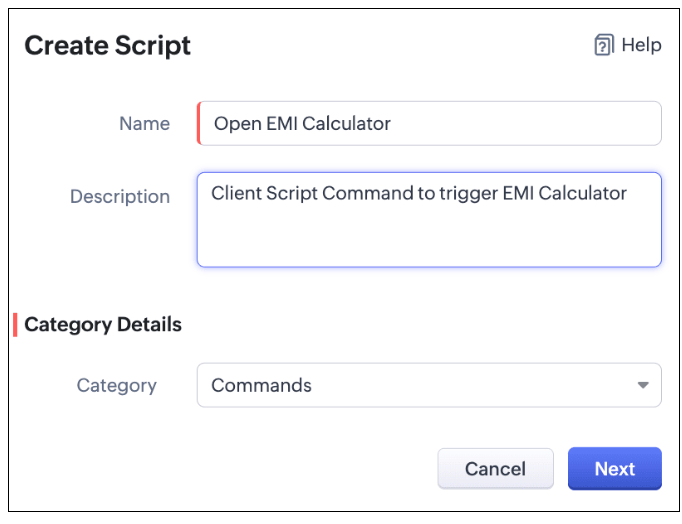
Create a command by specifying the Category as Commands (instead of module) while creating a Client Script.
Check this documentation for more details.
To trigger a Command, you can use one of the following ways.
A. Using Command Palette
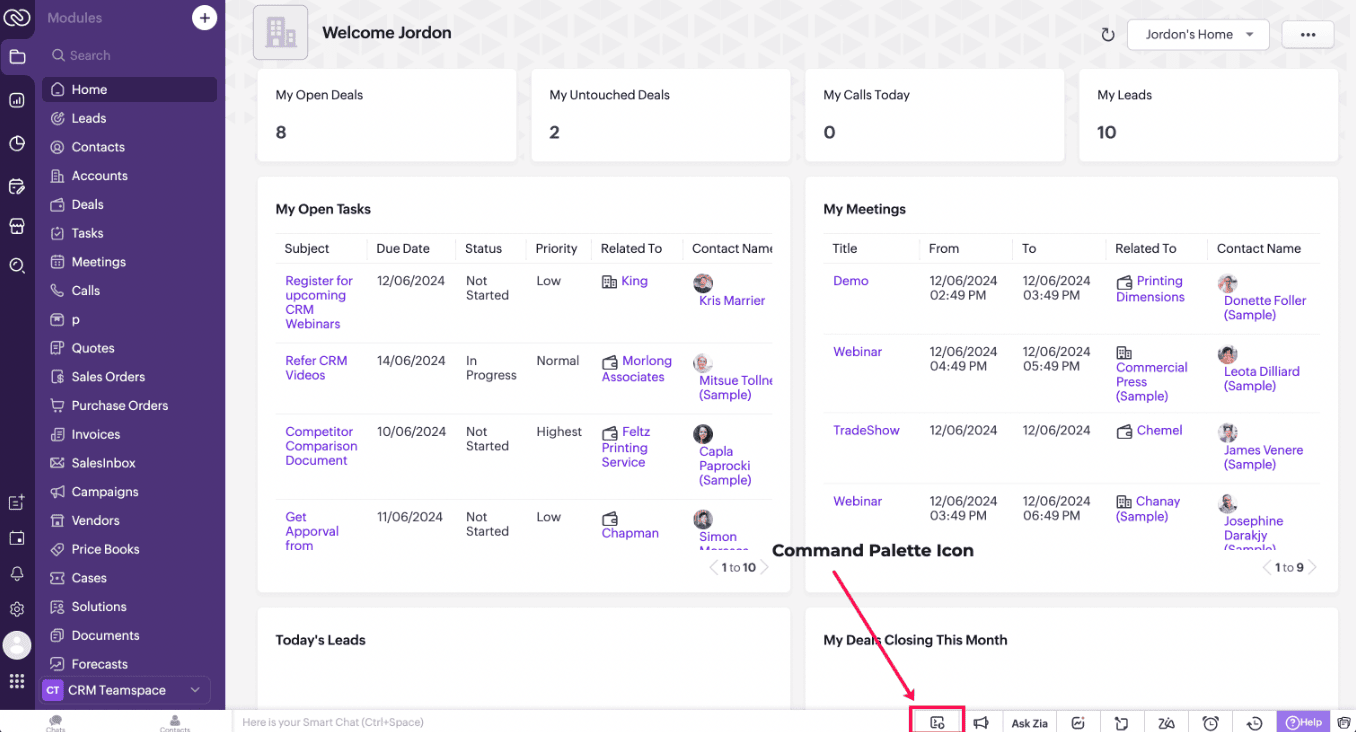
Click on the Command Palette icon in the footer of CRM and select the name of the Command that you want to trigger.
B. Using Keyboard shortcuts
You can also link each of the Commands to a shortcut key and trigger a Command using that designated shortcut key. Each user can set specific shortcuts based on individual preference and use them to trigger a Command.
Check this documentation for more details.
3. Scenario - 1
At Zylker, a financial company using Zoho CRM, Sales Advisors need a quick way to calculate EMI during customer phone calls. The solution should allow seamless access to an EMI Calculator from any page in Zoho CRM.
4. Solution
To achieve this in Zoho CRM, you need to create a Widget for EMI calculator and create a Client Script Command.
A. Create a Widget for EMI calculator
Install Zoho CLI, and follow the steps given in this document to create the Widget app folder. Then update the html, javascript, and css code as per your requirement.
index.html
<!DOCTYPE html>
<html lang="en">
<head>
<meta charset="UTF-8" />
<meta http-equiv="X-UA-Compatible" content="IE=edge" />
<meta name="viewport" content="width=device-width, initial-scale=1.0" />
<title>Document</title>
<link rel="stylesheet" href="style.css" />
</head>
<body>
<div class="loan-calculator">
<div class="top">
<h2>EMI Calculator</h2>
<form action="#">
<div class="group">
<div class="title">Amount</div>
<input type="range" min="1000" value="30000" max="50000" step="500" class="loan-amount" id="loanAmount" />
<div class="slider-label">$<span id="loanAmountValue"></span></div>
</div>
<div class="group">
<div class="title">Interest Rate</div>
<input type="range" min="5" value="6" max="100" step="1" class="interest-rate" id="interesRate" />
<div class="slider-label"><span id="interesRateValue"></span></div>
</div>
<div class="group">
<div class="title">Tenure (in months)</div>
<input type="range" min="6" max="100" step="1" value="12" class="loan-tenure" id="tenureMonth" />
<div class="slider-label"><span id="tenureMonthValue"></span></div>
</div>
</form>
</div>
<div class="result">
<div class="left">
<div class="loan-emi">
<h3>Loan EMI</h3>
<div class="value">123</div>
</div>
<div class="total-interest">
<h3>Total Interest Payable</h3>
<div class="value">1234</div>
</div>
<div class="total-amount">
<h3>Total Amount</h3>
<div class="value">12345</div>
<div class="right">
<canvas id="myChart" width="400" height="400"></canvas>
</div>
</div>
</div>
<script src="https://cdn.jsdelivr.net/npm/chart.js@3.6.2/dist/chart.min.js"></script>
<script src="https://live.zwidgets.com/js-sdk/1.2/ZohoEmbededAppSDK.min.js"></script>
<script src="main.js"></script>
</body>
</html>
Click here to view the complete code.
Once you have added the code, upload the zip file by following the below steps.
Go to Setup > Developer Space > Widgets.
Click Create New Widget and Fill in the details.

Note:
The widget should be of "button" type in order to render through a Client Script.
B. Create Client Script Commands.
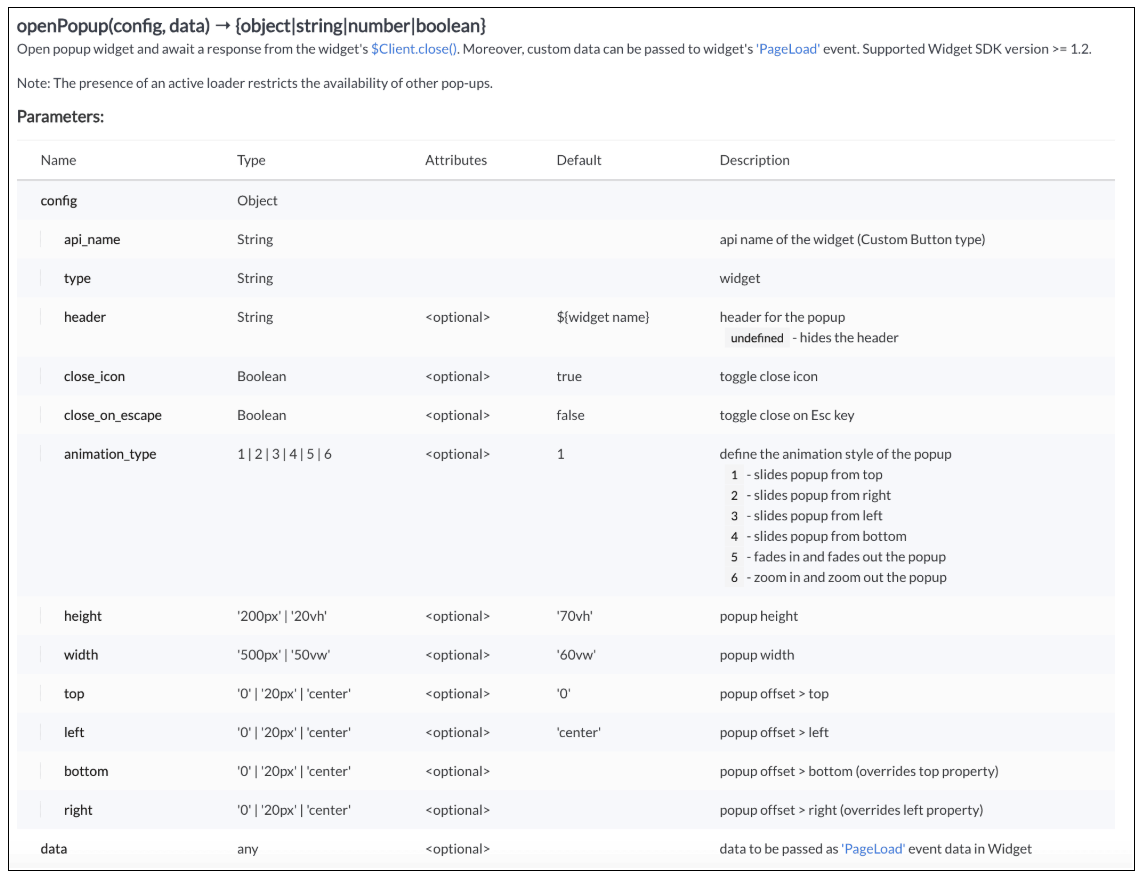
Here "emi_calculator" is the API name of the Widget,
Type is Widget,
Header is EMI Calculator,
animation type is 4 where the popup slides from the bottom.
The other parameters are optional and has default values as shown in the image.
Here is how the EMI Calculator appears as and when the salesperson needs. The user can either click on the Command Palette Icon at the footer or use a keyboard shortcut as per his convenience to open the calculator.
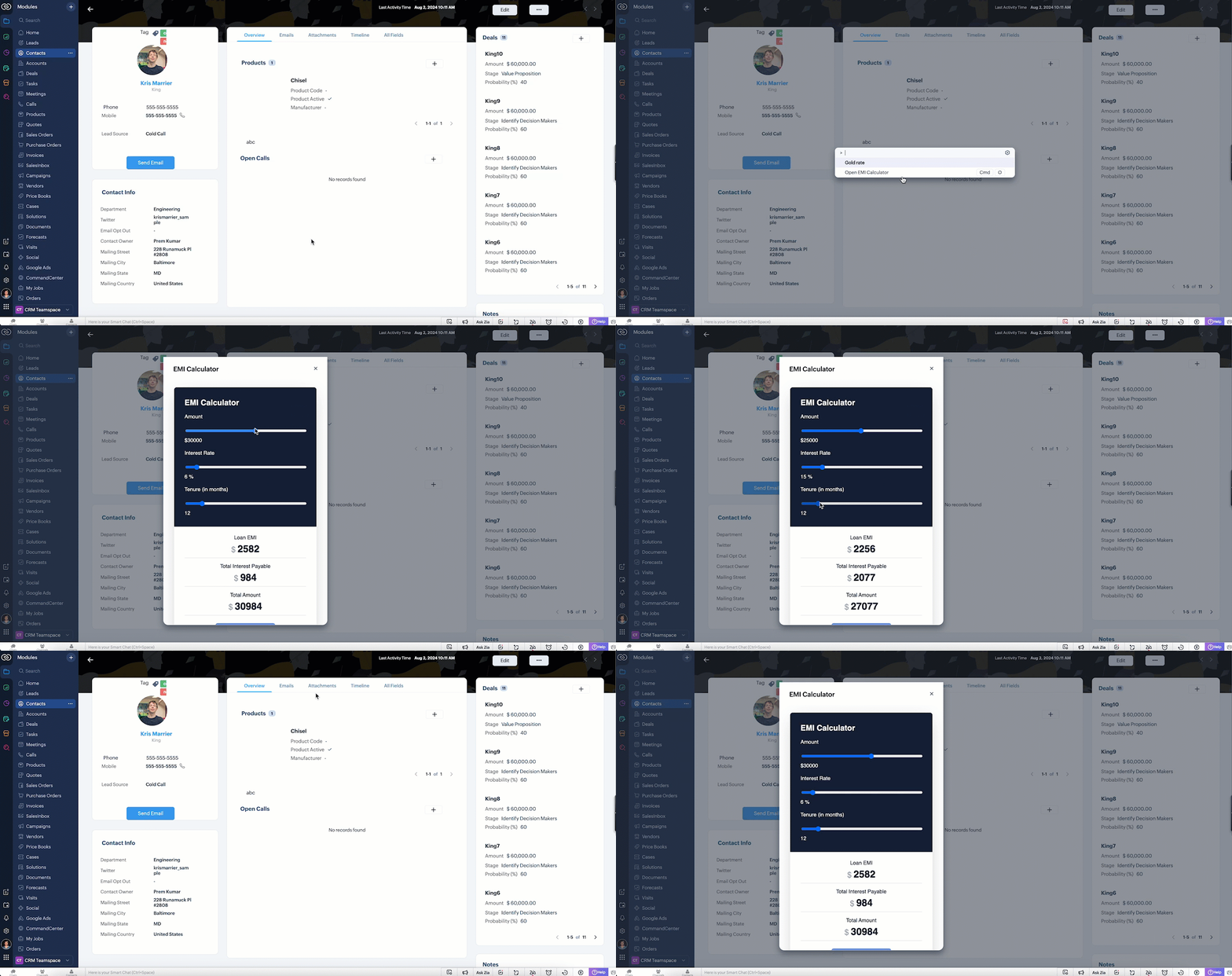
In the above gif, the keyboard shortcut is cmd O.
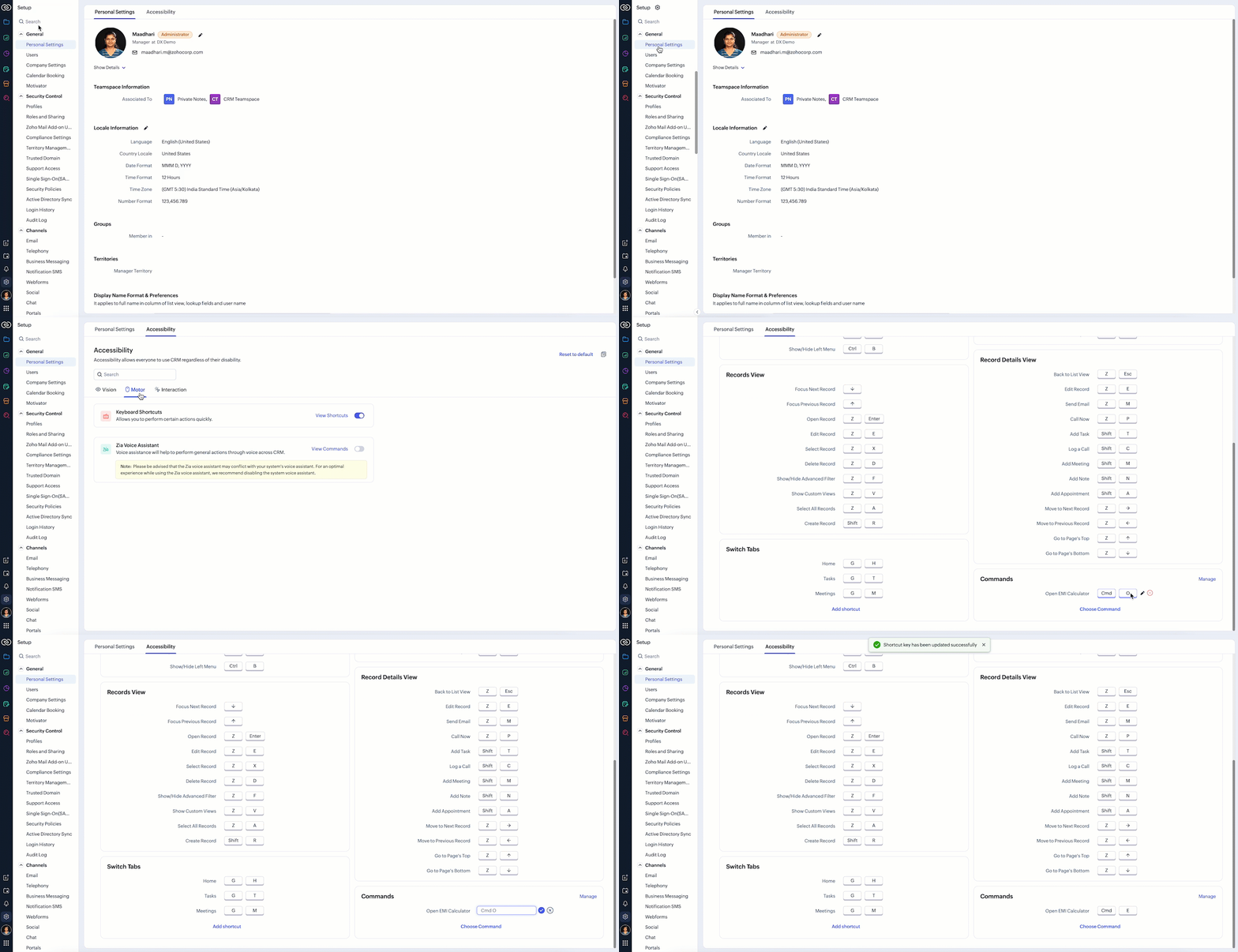
To customize the keyboard shortcut,
Go to Setup → General → Personal Settings. Select "Motor" from the Accessibility Tab and Click "View Shortcuts" as shown in the below gif.
4. Scenario - 2
At Zylker, an international wholesale company using Zoho CRM, salespeople need a quick way to check real-time gold rates from different countries while discussing bulk orders with retailers. The solution should provide seamless access to updated, region-specific gold rates directly within the CRM interface to assist with accurate pricing decisions during customer interactions.
5. Solution
To achieve this in Zoho CRM, you need to create a Widget for EMI calculator and create a Client Script Command.
A. Create a Widget for gold rate
Install Zoho CLI, and follow the steps given in this document to create the Widget app folder. Then update the html, javascript, and css code as per your requirement.
index.html
<!DOCTYPE html>
<html>
<head>
<meta charset="UTF-8">
<script src="https://live.zwidgets.com/js-sdk/1.2/ZohoEmbededAppSDK.min.js"></script>
<div class="container">
<div style="display: flex;">
<label for="country" style="width: 70%;font-weight: bolder;">Today's Gold rate:</label>
<select id="country" onchange="updateGoldRates()" style="width: 30%;">
<option value="USD" >United States</option>
<option value="INR" selected>India</option>
<option value="GBP">United Kingdom</option>
<option value="AUD">Australia</option>
</select>
</div>
<table id="goldRatesTable">
<thead>
<tr>
<th>Type</th>
<th>Rate (Per Gram)</th>
</tr>
</thead>
<tbody>
</tbody>
</table>
</div>
<script>
const goldRatesData = {
};
const symbol = ['₹', '$', '£', 'A$'];
async function getLiveData (currency) {
var myHeaders = new Headers();
myHeaders.append("x-access-token", "goldapi-4wvh4nslzb5p0d5-io");
myHeaders.append("Content-Type", "application/json");
var requestOptions = {
method: 'GET',
headers: myHeaders,
redirect: 'follow'
};
let response = await fetch(`https://www.goldapi.io/api/XAU/${currency}`, requestOptions);
let res = await response.text();
let data = JSON.parse(res);
let desig;
if(data.currency === 'INR'){
desig = symbol[0];
}
else if(data.currency === 'USD'){
desig = symbol[1];
}
else if(data.currency === 'GBP'){
desig = symbol[2];
}
else if(data.currency === 'AUD'){
desig = symbol[3];
}
goldRatesData[`${data.currency}`] = [
{ type: '24K Gold', price: `${desig + " " + data.price_gram_24k}` },
{ type: '22K Gold', price: `${desig + " " + data.price_gram_22k}` },
{ type: '18K Gold', price: `${desig + " " + data.price_gram_18k}` }
];
};
async function updateGoldRates() {
var currency = document.getElementById("country").value;
console.log("Event:: ",currency);
const country = document.getElementById('country').value;
const tableBody = document.querySelector('#goldRatesTable tbody');
tableBody.innerHTML = '';
await getLiveData(currency);
if (country && goldRatesData[country]) {
const rates = goldRatesData[country];
rates.forEach(rate => {
const row = document.createElement('tr');
row.innerHTML = `
<td>${rate.type}</td>
<td>${rate.price}</td>
`;
tableBody.appendChild(row);
});
}
}
updateGoldRates();
ZOHO.embeddedApp.on("PageLoad",function(res){
document.getElementById('msg').innerText = res.data;
});
ZOHO.embeddedApp.init();
</script>
</body>
</html>
Once you have added the code, upload the zip file by following the below steps.
Go to Setup > Developer Space > Widgets.
Click Create New Widget and Fill in the details.
B. Create Client Script Commands
Script
ZDK.Client.openPopup({ api_name: 'goldrate', type: 'widget',header: undefined, animation_type: 4,
height: '350px', width: '300px', top:'100px',left: '500px' }, { data: 'sample data to be passed' }); |
Click here to know more about openPopup().
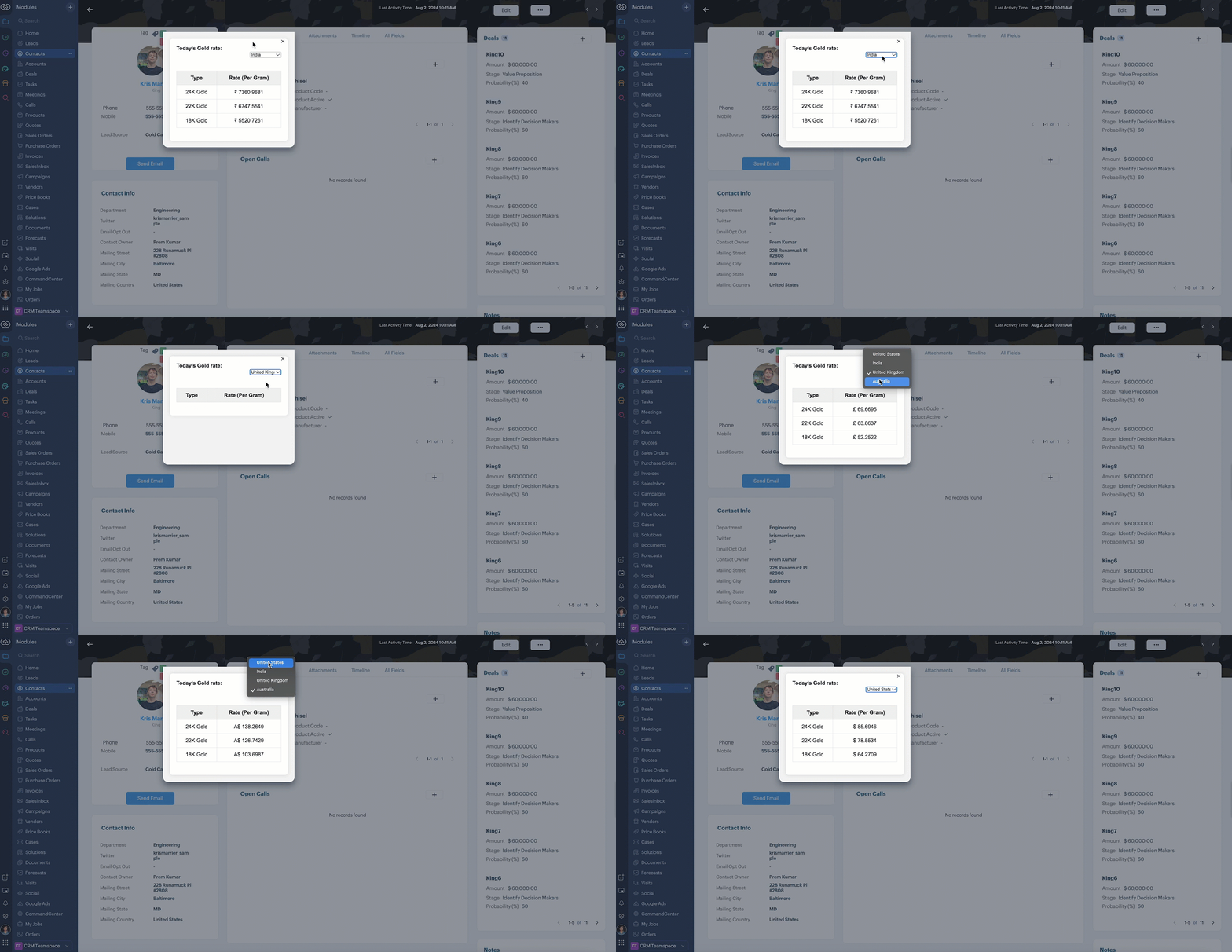
Consider that the user has created the shortcut CMD G to trigger Client Script.
Here is how the Gold Rate appears as and when the salesperson used the shortcut keys CMD G.
6. Summary
We have seen,
how to use Client Script Commands
how to create keyboard shortcuts for Commands
how to view Widget as a popup using Commands
7. Related Links
Recent Topics
Bring real app analytics into Zoho Creator apps with Zoho Apptics
We’re kicking off the year with a release we’ve been looking forward to for a long time. After being in the works for a while, Zoho Creator and Zoho Apptics are now officially integrated, bringing in-depth product analytics directly into the Zoho Creator
Discontinuing Zoho Showtime service on May 30, 2026
Hello everyone, As a follow-up to our earlier announcement, we’d like to share an important update regarding Zoho ShowTime’s discontinuation timeline. Zoho ShowTime, our online training platform, reached its end of life on December 31, 2025, and its services
emailing estimates
Shows up in the customer mail logs as sent but nobody is receiving them, even when I send them to myself I don't get them ??? Something wrong with the mail server or my end ?
Ability to CC on a mass email
Ability to CC someone on a mass email.
No background for video recordings, no playback speed, can't even playback longer recordings - have to download…
Hi. We utilize heavily video messages on Slack, but wanted to migrate to Cliq with Zoho One, however very basic yet very frequently used feature is missing: backgrounds for video recordings and playback speed. We were not happy with Slack's 5 minute limits
Bookings duration - days
Hi team, Is there any way to setup services/bookings that span multiple days? I am using Zoho Bookings for meeting room bookings. Clients may wish to book a room for more than one day, for up to a month. If not, is there a plan to allow services to be setup with durations of Days as well as hours and minutes? Many thanks, Anna.
Customer address in Zoho Bookings
Hello, Is it possible to add customer address information to the Zoho bookings appointment screen? Or have it pull that information automatically from the CRM? We are wanting to use this as a field management software but it is difficult to pull the address from multiple sources when it would be ideal to have a clickable address on the appointment screen that opens up the user's maps. It would also be advantageous for the "list view" to show appointment times instead of just duration and booking
Organize and manage PDFs with Zoho PDF Editor's dashboard
Hello users, Zoho PDF Editor's dashboard is a one-stop place to upload, sort, share PDF files, and more. This article will explore the various capabilities that Zoho PDF Editor's dashboard offers. A few highlights of Zoho PDF Editor's dashboard: Upload
Feature Request - Allow Customers To Pick Meeting Duration
Hi Bookings Team, It would be great if there was an option to allow customers to pick a duration based on a max and minimum amount of time defined by me and in increments defined by me. For example, I have some slots which are available for customers
New feature: Invite additional guests for your bookings
Hello everyone, Greetings from Zoho Bookings! We are happy to announce the much-awaited feature Guest Invite, which enhances your booking experience like never before. This feature allows additional participants to be invited for the bookings to make
Changing the owner of a call
Am I correct in my conclusion that I cannot change the owner of a call in Zoho? The field does not show up in the screen, nor can I make it show up as the systems does not give me that option. I cannot "mass update" it either. I tried it, but Zoho refuses to change the name of the owner. Please help out: how do I change the owner of a call.
Unified Notes View For Seamless Collaboration
To facilitate better coordination among different departments and team members, the notes added to a record can now be accessed in all its associated records. With this, team members, from customer service representatives to field technicians, can easily
Remove Profiles from "Forecast" Module
How can I remove Profiles from My forecast Module? Image Below The only revenue generators are the VP's, and the Estimation Managers, and the Estimators subordinate to the Est. Managers. How can I remove the unused Profiles? Its frustrating to see them
Uplifted homepage experience
Editions: All editions. Availability update: 17th February 2026: All editions in the CA and SA DC | JP DC (Free, Standard and Professional editions) 23 February 2026: JP (All Editions) | AU, CN (Free, Standard, Professional editions) 27 February 2026:
Logging Out of FSM
I have tried to log out of FSM app of the last person and it will not let me do so. I need to log in to my account.
Restoring records from the recycle bin programatically
Background I'm working on a piece of software to automate conversion of Leads into Deals based on order status from my company's website. The process is mostly complete, right now I'm just working on handling a few edge cases to ensure data integrity.
Does Zoho Learn integrate with Zoho Connect,People,Workdrive,Project,Desk?
Can we propose Zoho LEarn as a centralised Knowledge Portal tool that can get synched with the other Zoho products and serve as a central Knowledge repository?
All new Address Field in Zoho CRM: maintain structured and accurate address inputs
Availability Update: 29 September 2025: It's currently available for all new sign-ups and for existing Zoho CRM orgs which are in the Professional edition exclusively for IN DC users. 2 March 2026: Available to users in all DCs except US and EU DC. Latest
Create static subforms in Zoho CRM: streamline data entry with pre-defined values
Last modified on (9 July, 2025): This feature was available in early access and is currently being rolled out to customers in phases. Currently available for users in the the AU, CA, and SA DCs. It will be enabled for the remaining DCs in the next couple
SalesIQ Identity Update for Logged In Wordpress User
Hey folks, SalesIQ does not automatically detect when a visitor logs in to WordPress and update their identity to match. For example, if a client of ours visits the site and logs in, SalesIQ will not track them correctly by default. The Solution The solution
Feature Request – Conditional Visitor Information Request in Zoho SalesIQ
We would like to request the ability to conditionally ask for visitor details based on the communication channel used in Zoho SalesIQ. Specifically: When a visitor initiates a conversation through the live chat widget on the website, we want to continue
Zoho Sign Not Delivering
I have sent several contracts out via Zoho Sign. They do not seem to be getting delivered. I had one person receive it, but the others have not. I had one person tell me they sent it back to me and never got it and doesn't show as signed. I've sent
Add zoho calendar to google calendar
Hi I keep seeing instructions on how to sync Zoho CRM calendar with google calendar but no instructions on how to view Zoho calendar in my google calendar.
Paragraph spacings in Zoho Notebook are double-spaced only. Is there a way to keep the original spacing format?
Sorry I don't know the proper terminologies but the best way I can put it is all single-spaced paragraphs that I copy to Zoho Notebook become double-spaced paragraphs. It's very inconvenient and counterproductive when copying and pasting things from and
Changing line space in Notebook
My lines are double spaced. How do i change to single space?
Promote a layout to standard so I can delete one layout
Similar to this and many other topics: https://help.zoho.com/portal/en/community/topic/set-layout-as-standard The problem, every model has a standard layout, which is what we use most of the time... But as the business grows and evolves we may have to
Workdrive on Android - Gallery Photo Backups
Hello, Is there any way of backing up the photos on my android phone directly to a specific folder on Workdrive? Assuming i have the workdrive app installed on the phone in question. Emma
Auto sync Photo storage
Hello I am new to Zoho Workdrive and was wondering if the is a way of automatically syncing photos on my Android phone to my workdrive as want to move away from Google? Thanks
Is anyone experience missing functions in the new UI until hard refresh?
The set of functions including search is almost always missing upon loading an app in the new UI. If you refresh, the functions return. (see second screenshot) Anyone else experiencing this?
Conversion Rate – Won Deals over Assigned Prospects
Hello, I would like assistance configuring a KPI in Zoho Analytics titled: Objective of the calculation: Number of Won Deals divided by Total number of assigned prospects (not only converted prospects). Important clarification: The denominator must include
Not receiving New Ticket Emails
Hello! The company I work for uses the Zoho ticketing system, however, I've noticed I'm not receiving email notifications when new tickets are published. I have admin rights to see these tickets on Zoho Desk and respond to them, but am not receiving the
Can't update a field on a parent form from a child form's On Success workflow
Title: Can't update a field on a parent form from a child form's On Success workflow Hi everyone, I'm building a simple Golf Lesson Tracker app and I'm stuck on what should be a basic operation — updating a number field on a parent form when a child form
Approvals in Zoho Creator
Hi, This is Surya, in one of my creator application I have a form called job posting, and I created an approval process for that form. When a user submits that form the record directly adding to that form's report, even it is in the review for approval.
Upload from Zoho Creator File Upload field to OpenAI Vector Store
I’ve struggled for quite a while to get this working properly. For a long time we relied on Azure Functions as a workaround to handle file transfers between Zoho Creator and OpenAI Vector Stores. It worked, but added unnecessary infrastructure and complexity.
Calendar start time limit
Hi all, Has anyone found a magical way to filter calendar reports to start from, let's say 8:00, and not 0:00? Or at least to auto scroll there like Google Calendar for example?
Enable Free External Collaboration on Notecards in Zoho Notebook
Hi Zoho Notebook Team, I would like to suggest a feature enhancement regarding external collaboration in Zoho Notebook. Currently, we can share notes with external users, and they are able to view the content without any issue. However, when these external
EU Problem
Hi all, we've been facing issues with the Europe data center for two days. It's starting to disrupt our daily workflow. Any word on when this will be resolved?
How can I clone my website in order to try new templates?
I want to try a new template for my existing Zoho website without the risk of changing the current site or accidentally publishing the wrong template. Therefore I thought a 'clone website'-option should be somewhere, but I can't find it. How do I try
Is it possible to update multiple work items at once?
Hi, Is it possible to update the statuses/release tags of multiple work items at once? I came across this thread that says it's not possible at the moment, but it was related to the Sprints mobile app. Does this feature not exist in the website as well?
Custom Module Missing from Roles & Permissions List
Hi Zoho Community, I created a new Custom Module in Zoho Expense. The module is fully built and I can see it in the Module Builder (Settings > Customization > Modules). However, I am unable to deploy this to my users because the module does not appear
Next Page