Collaboration autour des fichiers

Collaboration autour des fichiers


S'il est aujourd'hui évident de travailler sur des outils de bureautique, la technologie a elle-même pu mettre des obstacles sur son propre chemin. En effet, bien que l'objectif ait été de simplifier les opérations et de partager l'information, de nombreux chefs d'entreprise constatent que leurs employés sont confrontés à un ensemble frustrant de problèmes courants liés aux documents et à la collaboration parce que les systèmes qu'ils utilisent ne sont pas alignés.
 
7 problèmes courants liés à la collaboration autour des documents :
  • Duplication de fichiers et difficulté d'accéder à la version la plus récente du document. Les utilisateurs sont ne sont pas sûrs de savoir quelle est la version finale.
  • Des documents importants sont accidentellement supprimés.
  • Perte de temps à rechercher des documents qui, souvent, ne sont jamais retrouvés.
  • Les conventions de dénomination des documents sont compliquées.
  • Les autorisations d'accès aux documents portent à confusion.
  • La collaboration avec les clients et le partage des fichiers ne sont pas clairement définis.
  • Les utilisateurs sont incapables d'accéder aux documents, formulaires et modèles standard.
Le temps où nous annotions nos documents au stylo est derrière nous ; aujourd'hui, nous disposons d'outils qui permettent de co-créer en temps réel dans le cloud et tout est en zéros et en uns derrière des couches de cryptage et des mots de passe.

Dans WorkDrive, la collaboration n'a pas besoin d'être présentée ; mais il convient de rappeler qu'il ne s'agit pas d'un simple stockage de documents : depuis WorkDrive, on peut collaborer directement.

Les dossiers d'équipe

Le travail d'équipe à l'aide de plateformes de collaboration de contenu traditionnel implique le partage de fichiers avec vos coéquipiers, la gestion de leurs autorisations d'accès, mais cela ne s'arrête pas là. Chaque fois que vous avez besoin d'accéder à un fichier créé par quelqu'un d'autre, vous devez demander l'accès et attendre qu'il le partage avec vous. Il est encore plus difficile de garder ces fichiers organisés pour un accès facile. Ces problèmes de collaboration font désormais partie du passé. Zoho WorkDrive introduit une toute nouvelle façon de créer, stocker et partager des fichiers pour collaborer avec les membres de votre équipe - les dossiers d'équipe.
 
Les dossiers d'équipe sont de deux types : les dossiers d'équipe privés et les dossiers d'équipe publics.

 Dossiers d'équipe privés

Vous pouvez créer des dossiers d'équipe privés pour stocker et travailler sur des fichiers qui sont exclusifs à votre département ou liés à un projet spécifique. Seuls les membres de l'équipe qui ont été ajoutés à un dossier d'équipe privé peuvent accéder à ceux-ci.

Dossiers d'équipe publics

Vous pouvez créer des dossiers d'équipe publics pour stocker des fichiers d'équipe communs auxquels tous les membres de votre équipe ou organisation peuvent accéder. Tout membre de l'équipe ou de l'organisation peut rejoindre un dossier d'équipe public et accéder à ses différents fichiers et dossiers.

Les dossiers d'équipe facilitent votre travail quotidien

Une intégration en toute simplicité pour les nouveaux membres de l'équipe.
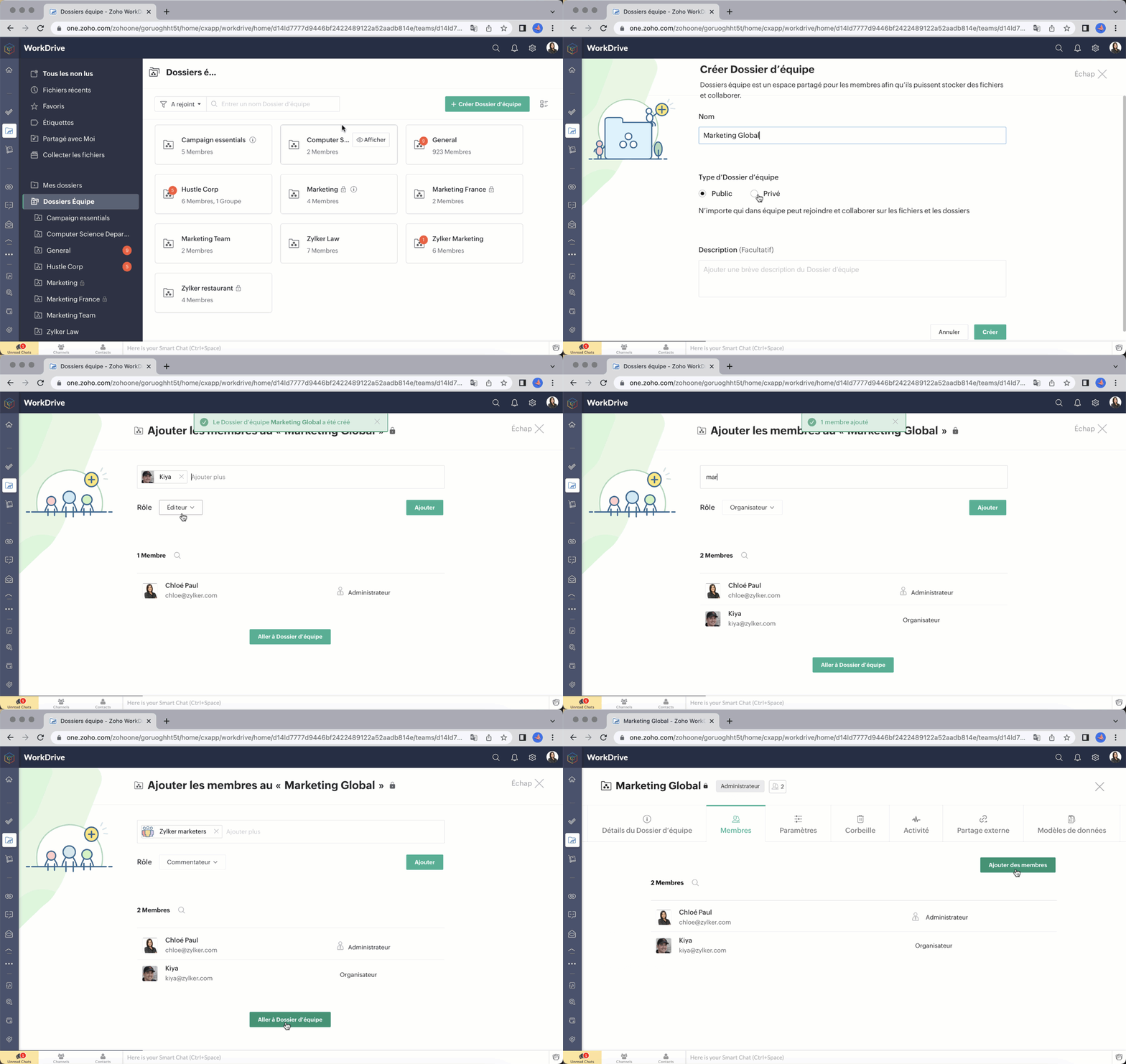
Ajouter des membres à votre dossier d'équipe est simple et rapide. Il suffit de saisir l'adresse e-mail, d'attribuer un rôle approprié (administrateur/ organisateur/ éditeur/ commentateur/ visiteur) et de les ajouter.

Vous pouvez également ajouter des groupes à un dossier d'équipe. Si votre équipe ou organisation utilise des groupes dans WorkDrive, vous pouvez facilement ajouter un groupe entier à un dossier d'équipe et attribuer au groupe un rôle spécifique au lieu d'ajouter chaque membre individuellement. Tous les membres du groupe recevront le rôle attribué à leur groupe dans ce dossier d'équipe. Vous pouvez ajouter des groupes, modifier les rôles des membres et supprimer des groupes des dossiers d'équipe à tout moment.

Rôles et autorisations à structure précise

WorkDrive vous permet d'attribuer à un membre d'un dossier d'équipe des autorisations d'accès plus élevées à un fichier ou à un dossier au sein de celui-ci. Par exemple, un membre ayant le rôle de visiteur dans un dossier d'équipe peut recevoir un accès de modification ou un accès plus élevé à un sous-dossier ou à un fichier.


Partage de fichiers avancé

L'objectif des dossiers d'équipe est de réduire le nombre de fois où vous devez partager des fichiers individuellement avec vos coéquipiers. Les fichiers ajoutés à un dossier d'équipe sont déjà disponibles pour tous ses membres.
Notre fonction avancée de partage externe vous permet de créer plusieurs liens pour partager le même fichier avec différentes personnes, comme des clients et des partenaires. Vous pouvez définir des autorisations d'accès, des mots de passe et des dates d'expiration, et décider qui peut télécharger un fichier. Vous pouvez également demander les données de l'utilisateur, comme son nom, son numéro de téléphone et son e-mail.
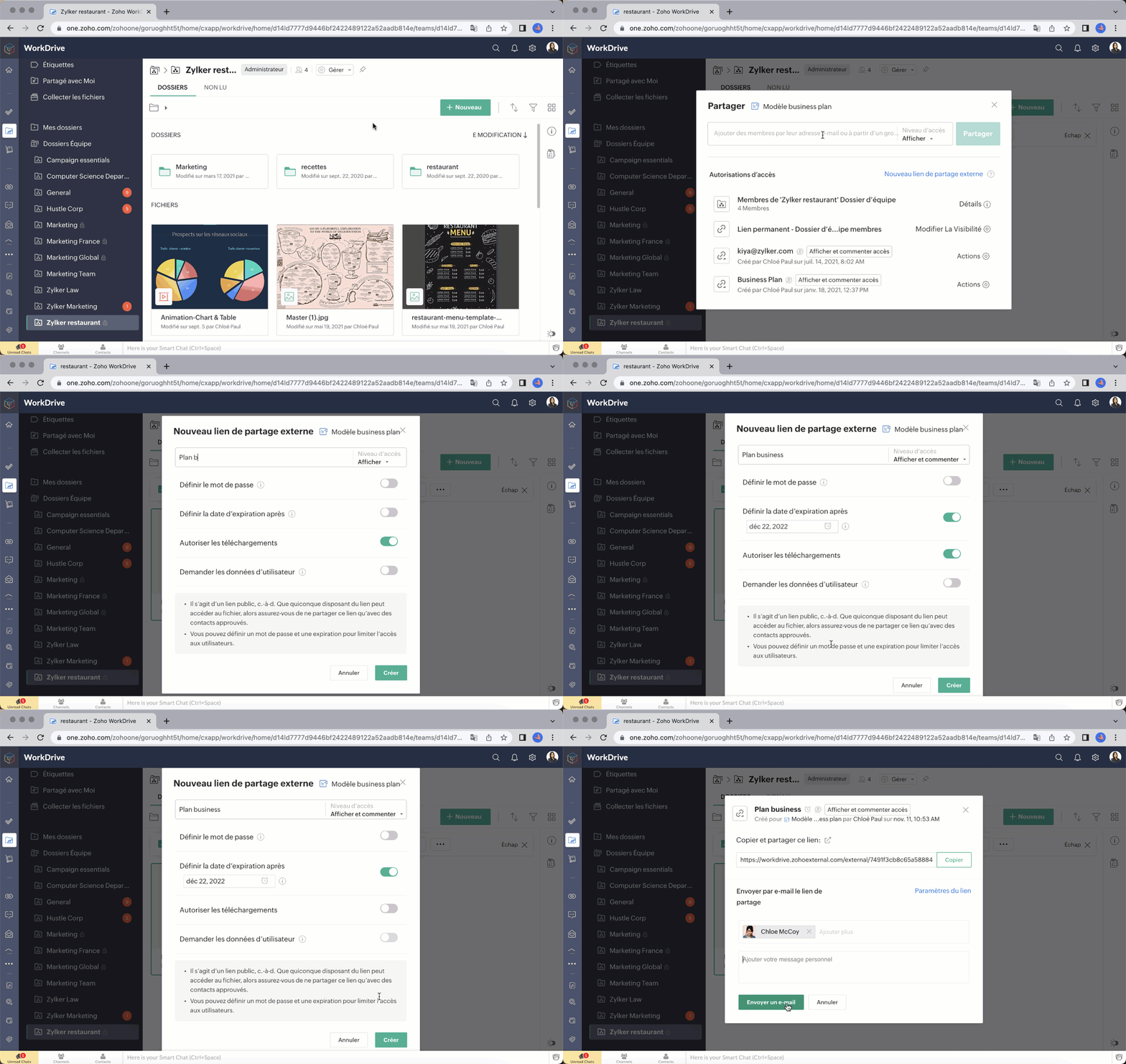

Bon à savoir : en tant qu'administrateur, vous pouvez désactiver complètement le partage externe pour votre Dossier d'équipe si nécessaire.

Souhaitez-vous nous faire part de votre expérience avec Zoho Work Drive ? N'hésitez pas à laisser vos commentaires dans la section ci-dessous.

L'équipe Zoho France 
    • Sticky Posts

    • Collaboration sans faille avec Zoho One

      Bonjour à tous, Dans cet article nous allons voir comment Zoho One permet une collaboration à différents niveaux .       La façon dont nous travaillons évolue. À mesure que les entreprises se mondialisent, la plupart des activités sont menées en équipe.
    • Recent Topics

    • CRM project association via deluge

      I have created a workflow in my Zoho CRM for closing a deal. Part of this workflow leverages a deluge script to create a project for our delivery team. Creating the project works great however, after or during the project creation, I would like to associate
    • How to manage task lists in Zoho Desk?

      Hello, I use Zoho Desk for IT customer support. I have a list of standard operating procedures (SOPs), including SOPs for onboarding new users, offboarding users, losing a device, etc. These are lists of tasks to be performed depending on the situation.
    • How to compare a subform lookup field that allows multiple entries when edited

      I have a form with a subform with multiple fields. One of the fields is a lookup field that allows a multi select. On edit validation, I want a workflow to execute only when the entries in that subform field has changed. The old. function is not working
    • Is Zoho Shifts included in the Zoho One plan?

      In case the answer is no: there's any plan to make it available via One? Thank you
    • Creating a Chart from a Report

      In Zoho Analytics, is it possible to create a chart from a Pivot View report? We are looking to use Zoho Analytics to replace Excel for Sales reports and would like to be able to show both the table and the chart together.
    • No funcionan correctamente el calculo de las horas laborales para informe de tickets

      Hola, estoy intentando sacar estadísticas de tiempo de primera respuesta y resolución en horario laboral de mis tickets, pero el calculo de horas en horario laboral no funciona correctamente cree los horarios con los feriados : Ajusté los acuerdos de
    • Zoho Tracking Image location

      So we've been having an issue with tracking email opens. Specifically in Gmail. Our emails are not that long either, maybe 4 sections of image/250 characters of text/button per section.  But all my test accounts I used via Gmail we're showing opens. But then come to find out the tracking image is at the very bottom of the email. So If the message is clipped (It always just clips our social icons on the bottom) and the user doesn't click the show more button it never tracks the open.  Looking at other
    • Zoho → ShipStation Integration – Sales Order–Driven Fulfilment Workflow

      Hello All, I’m reaching out to explore the best way to integrate a shipping tool into our inventory which will speed our process up. We are looking to integrate ShipStation into our existing order-to-fulfilment workflow, as we’re keen to standardise on
    • Is there a plan to integrate zoho voice with zoho books?

      Hello, Is there a plan to integrate zoho voice with zoho books? Right now we are using the Twilio SMS integration into zoho books, but have recently decided to switch to zoho voice for calls and sms. Is there a plan to integrate zoho voice natively into
    • Zoho Tables is now live in Australia & New Zealand!

      Hey everyone! We’ve got some great news to share — Zoho Tables is now officially available in the Australian Data Center serving users across Australia and New Zealand regions! Yes, it took us a bit longer to get here, but this version of Zoho Tables
    • Introducing Dedicated Modules for Plans, Addons, and Coupons in Zoho Billing

      We’ve enhanced the way you manage Plans, Addons, and Coupons in Zoho Billing. Previously, all three grouped together under Subscription Items. Now, each one has its own dedicated module, giving you a cleaner and more intuitive experience. This update
    • Sortie de Zoho TABLE ??

      Bonjour, Depuis bientôt 2 ans l'application zoho table est sortie en dehors de l'UE ? Depuis un an elle est annoncée en Europe Mais en vrai, c'est pour quand exactement ??
    • Zoho Forms API

      Is there any way to get all form entry list using API? Looking forward to hear from you
    • Adding a new section to the related details sidebar when creating a new ticket.

      Hello, I was wondering if you can add a new section to the related details sidebar when creating a new ticket. I was wanting to have it to where it also shows the account information related to the contact chosen as well. This is the section I am referring
    • Issue with WhatsApp Template Approval and Marketing Message Limit in Zoho Bigin

      We are facing issues while creating and using WhatsApp message templates through Zoho Bigin, and we request your clarification and support regarding the same. 1. Utility Template Approval Issue Until December, we were able to create WhatsApp templates
    • How to install Widget in inventory module

      Hi, I am trying to install a app into Sales Order Module related list, however there is no button allow me to do that. May I ask how to install widget to inventory module related list?
    • Zoho Social - Feature Request - Reviewer Role

      Hi Social Team, I've come across this with a couple of clients, where they need a role which can review and comment on posts but who has no access to create content. This is a kind of reviewer role. They just need to be able to see what content is scheduled
    • Zoho Social - Feature Request - Non-US Date Format

      Hi Social Team, I have noticed that there is no option to change the date format from US mm/dd/yyyy to others like dd/mm/yyyy. It would be great to see this added as the platform matures. Thanks for considering this feedback.
    • Drop Down Value

      Hi, May I know why Zoho Flow treat this drop down as number and not as string. If so, how can I fetch the right value for filtering. This field is from Creator, in Creator upon checking by default it is a string since it's not a lookup field.
    • Zoho CRM's mobile apps: A 2025 Recap

      2025 marked a year of steady progress for Zoho CRM's mobile apps. We rolled out several updates and features to improve usability and make everyday CRM work a lot easier to manage. Here’s a look back at some of the key releases from 2025. Android releases
    • Dependent / Dynamic DropDown in ZohoSheets

      Has anyone figured out a way to create a Dropdown, the values of which is dependent on Values entered in the other cell ?
    • Facebook follower count doesn't match FB Analytics

      Hi all, I am wondering if anyone else has issues with follower counts for Facebook not matching FB's native analytics tool. On the Zoho dashboard, it's showing 1,007, but FB shows 1,060. All the other channels match up. Any insights are much appreciated!
    • Unable to mass update a picklist field

      Hello, I have the records within our Accounts module divided between two account types: Parent Accounts & Member Accounts. I am attempting to mass update accounts from one picklist value to the other (within other specific criteria in our custom fields)
    • Meta and Facebook data report discrepancy

      I have been currently gathering manually facebook follower data thru meta. In zoho marketing plus the social media reporting only allows for page likes, and so there is a discrepancy with the data. please the difference in files attached. Is there way
    • Develop and publish a Zoho Recruit extension on the marketplace

      Hi, I'd like to develop a new extension for Zoho Recruit. I've started to use Zoho Developers creating a Zoho CRM extension. But when I try to create a new extension here https://sigma.zoho.com/workspace/testtesttestest/apps/new I d'ont see the option of Zoho Recruit (only CRM, Desk, Projects...). I do see extensions for Zoho Recruit in the marketplace. How would I go about to create one if the option is not available in sigma ? Cheers, Rémi.
    • Unlocking New Levels: Zoho Payroll's Journey in 2025

      Every year brings its own set of challenges and opportunities to rethink how payroll works across regulations and teams. In 2025, Zoho Payroll continued to evolve with one clear focus: giving businesses more flexibility, clarity, and control as they grow.
    • Can I export all attachments from Zoho CRM?

      Can I export all attachments from Zoho CRM?
    • Please can the open tasks be shown in each customer account at the top.

      Hi there This has happened before, where the open tasks are no longer visible at the top of the page for each customer in the CRM. They have gone missing previously and were reinstated when I asked so I think it's just after an update that this feature
    • What's new in Zoho Sheet: Simplify data entry and collaboration

      Hello, Zoho Sheet community! Last year, our team was focused on research and development so we could deliver updates that enhance your spreadsheet experience. This year, we’re excited to deliver those enhancements—but we'll be rolling them out incrementally
    • Displaying only unread tickets in ticket view

      Hello, I was wondering if someone might be able to help me with this one. We use filters to display our ticket list, typically using a saved filter which displays the tickets which are overdue or due today. What I'd really like is another filter that
    • Community Digest — Noviembre y Diciembre 2025

      ¡Hola, Comunidad de Zoho en Español! Cerramos el año de la mejor forma con nuestro último Community Digest de 2025, donde podrás encontrar las últimas novedades de nuestros productos. ¿Todo listo para empezar 2026 con el mejor pie? ¡Vamos a ello! Zoho
    • Passing the CRM

      Hi, I am hoping someone can help. I have a zoho form that has a CRM lookup field. I was hoping to send this to my publicly to clients via a text message and the form then attaches the signed form back to the custom module. This work absolutely fine when
    • Zoho Projects Plus’ 2025- the year we launched

      We’ve been building project management tools for the past 19 years, and a question we often hear is: Different teams in our organization prefer different project management methods; while the development team prefers agile, the marketing and sales teams
    • Why can't we change the Account type from an Expense to an Asset?

      Like the question. Why in QuickBooks for example if I mistakenly created an account as an expenses and I already captured information in those accounts, I can just change the account type from expense to asset
    • Move email between inboxes?

      Is it possible to move emails from one team inbox to another? We would like to be able to have a single "catch-all" inbox for incoming requests, and then move the email to the appropriate department inbox. I was hoping we would be able to accomplish this
    • Zoho Books emails suddenly going to Spam since 11 Nov 2025 (Gmail + now Outlook) — anyone else?

      Hi everyone, We migrated to Zoho Books in July 2025 and everything worked fine until 11 Nov 2025. Since then, Zoho Books system emails are landing in customers’ Spam (first Gmail, and now we’re seeing Outlook/Office 365 also starting to spam them). Impacted
    • Default Tagging on API-generated Transactions

      If one assigns tags to an Item or Customer, those tags get auto-populated in each line item of an Invoice or Sales Order when one creates those documents. However, if one creates the Sales Order or Invoice via the API (either directly coding or using
    • How do you print a refund check to customer?

      Maybe this is a dumb question, but how does anyone print a refund check to a customer? We cant find anywhere to either just print a check and pick a customer, or where to do so from a credit note.
    • Data Import | Zoho Analytics Custom Query Window Size

      Please increase the window size for the Custom Query Data Import. It's impossible to work with such a small query window.
    • Company Multiple Branch/ Location Accounting

      Hi All, anyone know whether company can maintain their multiple Branch Accounting in Zoho  Books. It will be chart of Accounts & Master Data will be same but different report available as per per Branch. Thanks & regards, Vivek +91 9766906737
    • Next Page