Connect - Messages et flux
Zoho Connect vous permet de créer des messages à deux niveaux : celui de l'organisation et celui du groupe.
Le mur de l'entreprise ou du réseau est un endroit idéal pour découvrir toutes les activités pertinentes qui se font. Tenez tous les membres de votre réseau au courant de ce qui se passe dans l'entreprise en partageant des mises à jour sur le mur du réseau. Tous les messages publiés sont accessibles à tous les membres du réseau. Les messages peuvent également être consultés sur la page Mon fil d'actualité de chaque membre.
Le mur du groupe est un espace de communication au sein du groupe. Le mur du groupe est réservé aux membres des groupes privés, alors que dans un groupe public, les personnes extérieures au groupe peuvent également consulter le mur du groupe et y publier des messages.
Mon Flux
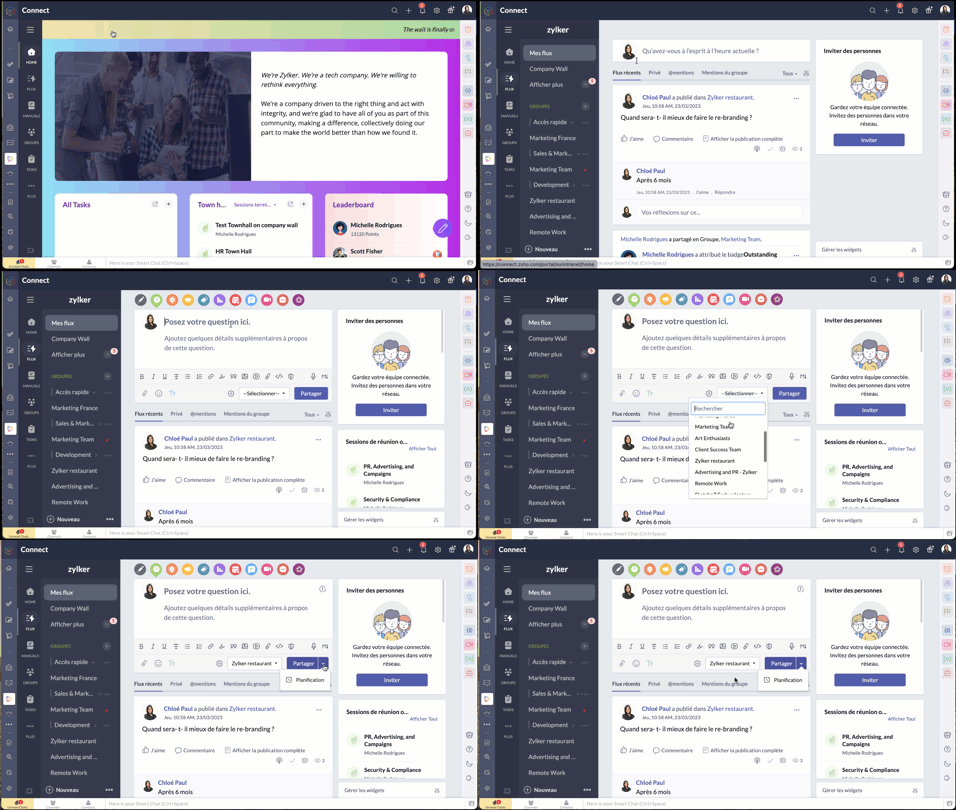
La page Mon flux vous donne un aperçu de toutes les conversations et mises à jour qui vous concernent. Cette page vous permet de voir les mises à jour des groupes auxquels vous appartenez, des membres que vous suivez, des messages et des commentaires qui vous @mentionnent et des messages publiés sur le mur du réseau.
Publier une annonce
Les annonces sur le mur de l'entreprise ou du groupe de Zoho Connect permettent aux équipes de ne rater aucune mise à jour importante. Vous pouvez fixer une date jusqu'à laquelle l'annonce s'affichera au-dessus de tous les autres messages sur le mur en question. Dès qu'une annonce est faite, une notification par e-mail est envoyée à tous les membres du réseau (pour les annonces sur le mur de l'entreprise) ou aux membres du groupe (pour les annonces sur le mur du groupe).
À partir de l'onglet "Permissions" sous la page paramètres, les administrateurs du réseau et du groupe peuvent décider qui peut publier des annonces sur leurs murs respectifs.
- Passez par l'icone "+" en haut à droite de votre portail Zoho Connect.
- À partir de la liste déroulante, sélectionnez "Faire une annonce".
- Saisissez votre annonce, joindre des documents si nécessaire à partir de l'icône du trombone. La limite de taille par fichier est de 30 Mo.
- Vous pouvez épingler l'annonce en haut jusqu'à une date précise. Après avoir défini la date, l'annonce s'affichera en haut de tous les autres messages publiés sur ce mur particulier jusqu'à la date définie. Cela permet de s'assurer que personne ne rate les annonces.
- Sélectionnez le mur du groupe ou de l'entreprise sur lequel vous souhaitez publier.
- Cliquez sur la flèche à côté du bouton de partage pour programmer une publication à un moment précis et partagez.
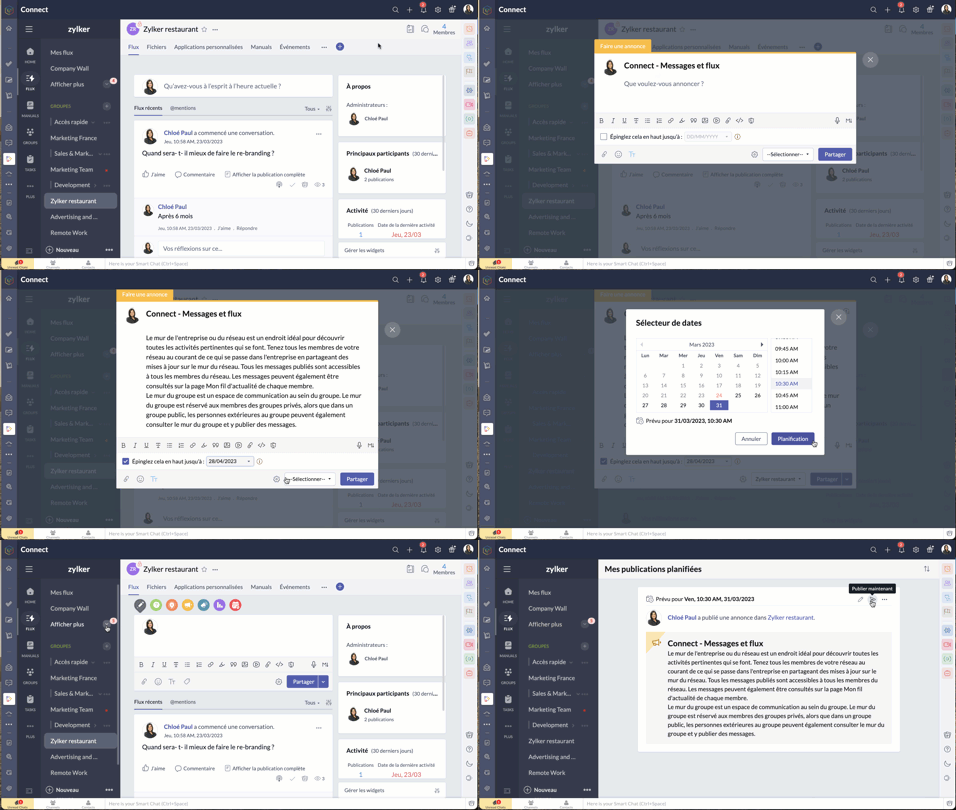
- Pour connaître la liste des membres qui ont consulté votre annonce, cliquez sur l'icône en forme d'œil dans le coin en bas à droite de l'annonce.
Poser votre question dans Zoho Connect
Pour trouver des réponses à vos questions, il vous suffit de les poster dans votre réseau. Les réponses sont ajoutées sous forme de commentaires et vous pouvez choisir la meilleure réponse à votre question.
- Passez par l'onglet "flux" depuis le panneau à gauche.
- Cliquez sur l'icône de question dans l'éditeur de message en haut de la page. Les réponses partagées sont ajoutées en tant que commentaires.
Démarrer un sondage
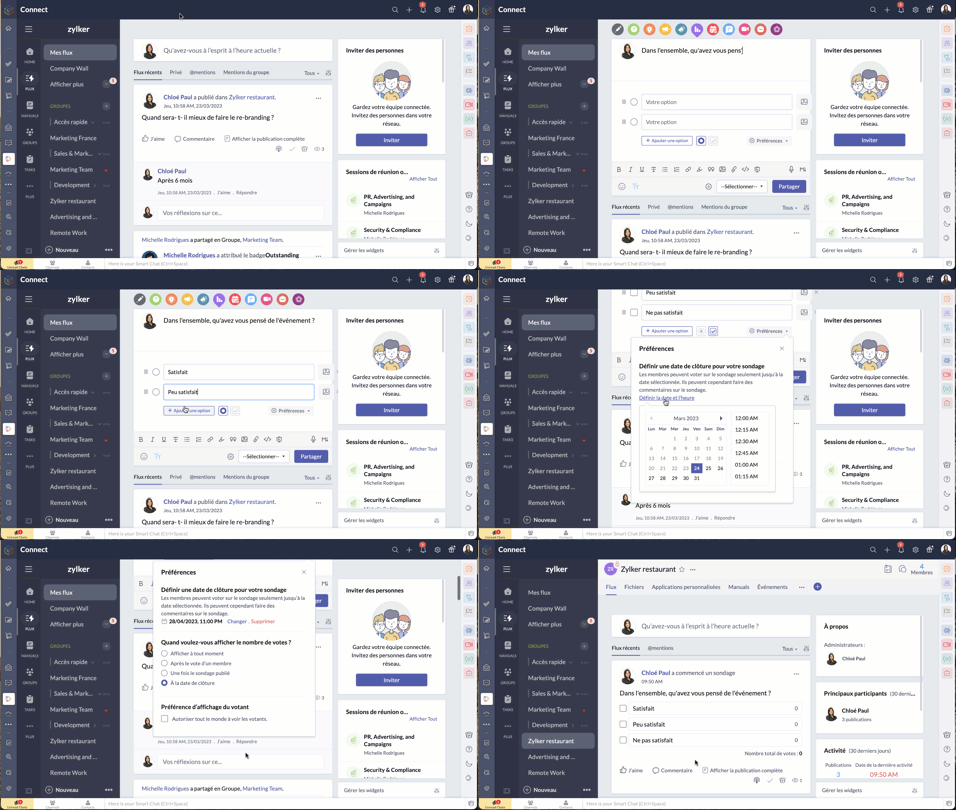
- Organisez un sondage et demandez aux membres de votre réseau de voter pour la meilleure idée ou solution.
- Comme expliqué ci-dessus, à partir de l'éditeur de message, sélectionnez l'icône de sondage.
- Saisissez la question et les options.
- Le bouton "Preferences" vous permet de définir la date et l'heure de la clôture, préférences d'affichage du votant et plus encore.
- Choisissez le groupe à qui s'adresser, et partagez.
Bon à savoir
- La limite de caractères pour la question du sondage est de 10 000, et celle pour les options du sondage est de 200. Il est possible d'ajouter jusqu'à 25 options à un sondage.
- Si vous n'avez pas fixé de date de clôture pour le sondage, vous pouvez le cesser à tout moment.
- Zoho Connect vous permet de prolonger la date de clôture du sondage.
- Vous pouvez choisir d'afficher en permanence le nombre de votes reçus pour chaque option ou de ne pas afficher le nombre de votes jusqu'à la clôture du sondage.
- Si vous souhaitez permettre aux membres de modifier leur choix après avoir voté pour une option, utilisez la case à cocher dans la section "Préférences" du sondage.
Partager des commentaires et des messages par e-mail
Les messages par e-mail
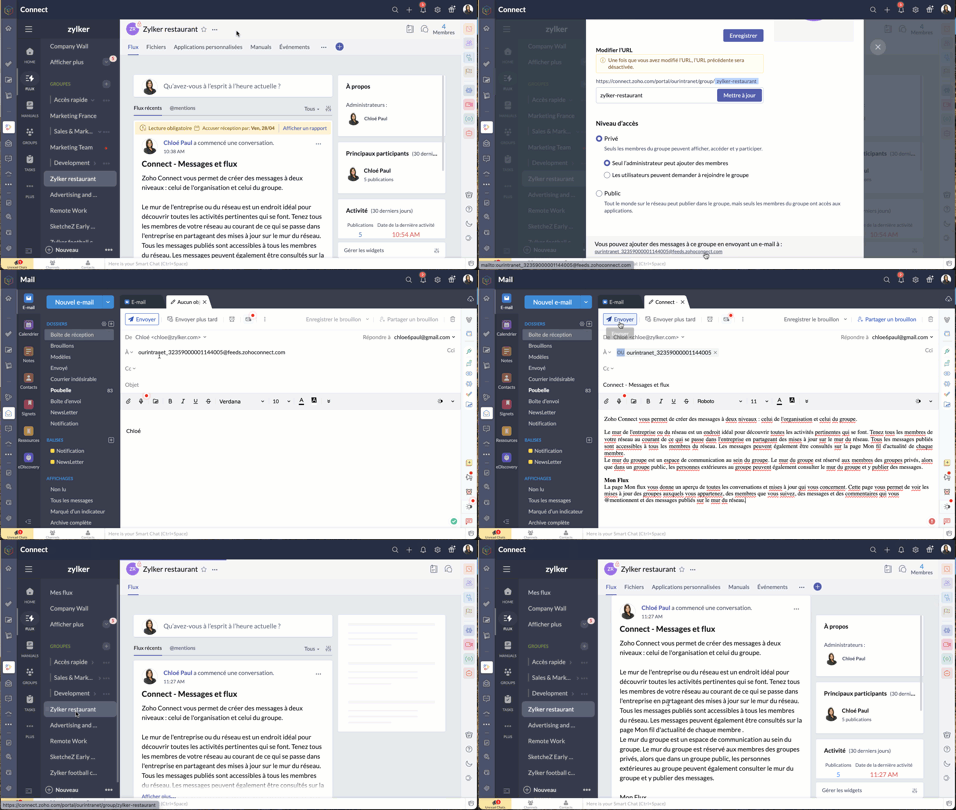
Vous pouvez ajouter des messages sur Zoho Connect par e-mail à l'adresse indiquée dans la page de configuration d'un groupe.
Les commentaires par e-mail
Vous pouvez ajouter des commentaires dans les messages et les forums en répondant à la notification par e-mail que vous avez reçue. Cette option est disponible par défaut si les notifications par e-mail est activée dans le réseau, si bien qu'il n'est pas nécessaire que les administrateurs la configurent séparément pour leur réseau.
Bien à savoir
- Bien que cette fonctionnalité soit disponible par défaut, les réseaux qui utilisent des adresses e-mail avec le domaine de leur entreprise (exemple : user@zylker.com) doivent ajouter un enregistrement SPF et un signe DKIM dans le gestionnaire de domaine pour s'assurer que cette fonctionnalité fonctionne.
- Cette option n'est pas prise en charge pour la réponse automatique et la redirection d'e-mail.
Messages à lire obligatoires
Comme son nom l'indique, un message marqué comme obligatoire doit être lu par les membres. Cela permet aux organisations de tenir leurs employés informés de certaines annonces essentielles. Il est également possible pour les administrateurs de savoir qui a lu ce message et d'envoyer des rappels aux membres qui ne l'ont pas encore lu.
Il n'y a que les administrateurs de réseau qui peuvent marquer un message comme lecture obligatoire dans le mur du réseau, tandis que les administrateurs de groupe peuvent marquer un message en lecture obligatoire dans leurs groupes respectifs.
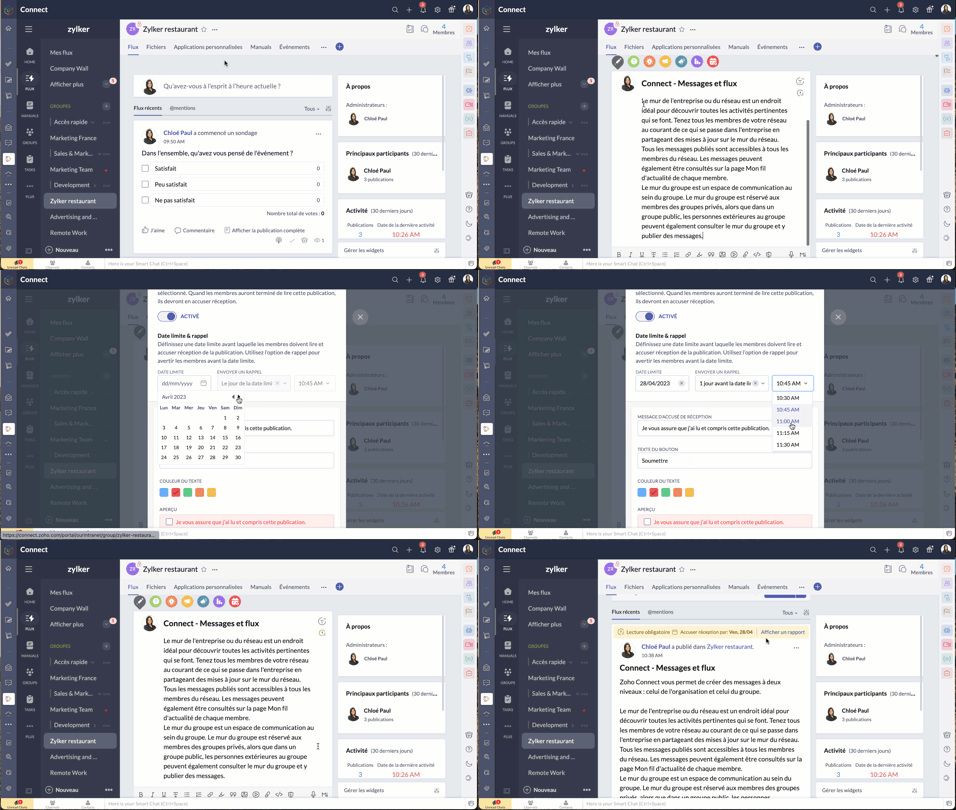
- À partir de l'éditeur de message, passez par le bouton "Lecture obligatoire", activez-le.
- Configurez la date limite et le message de rappel.
- Choisissez le thème de couleur que vous souhaitez utiliser pour les accusés de réception et enregistrez.
- Le message aura une étiquette obligatoire pour aider les utilisateurs à le distinguer des autres messages. Les membres recevront une notification concernant le message. Après avoir lu le message, ils devront compléter l'action d'accusé de réception. Celle-ci ne s'applique pas à l'utilisateur qui a créé ou marqué le message à lecture obligatoire.
N'hésitez pas à nous faire part de la fonctionnalité de Zoho Connect que vous utilisez le plus dans votre organisation et de quelle manière.
L'équipe Zoho France
Topic Participants
Kinjal Lodaya
Stéphanie
Sticky Posts
Collaboration sans faille avec Zoho One
Bonjour à tous, Dans cet article nous allons voir comment Zoho One permet une collaboration à différents niveaux . La façon dont nous travaillons évolue. À mesure que les entreprises se mondialisent, la plupart des activités sont menées en équipe.
Recent Topics
facing error 550 5.4.6 while sending emails
Please help me fix this issueAllow Itemization for Recurring Expenses
For whatever reason, one cannot itemize a Recurring Expense. This capability should be added. The use cases to support this are largely the same as what they were to allow for itemization in Expenses. Anything that would need to be itemized for a regularZoho reply to not working. just reply to my self
Hello. i using on my wordpress website a contact form from Wsform. i can set the reply to email there. normally it works. but since i am using your wordpress plugin zoho mail it doesn`t work. its not using the reply to (email from customer). I just canCan't receive any email from other platform
Hello,everyone, i'm just join zoho and create two email accounts for my own business. I was using it to get a verified email from stripe, but can't receive it. and I use my private gmail account to send test email twice, first time show below reply, butYour Incoming has been blocked and the emails will not be fetched in your Zoho account and POP Accounts
Can some on help me regarding our account . thank you so muchZoho Creator integration with Sage 50
Hi, Wondering if anyone has had any experience connecting Zoho to Sage 50 and could share any information on this matter. Thank you.Conditional Email Forwarding
How can I set conditional email forwarding of the users? For example: Mail should be forwarded to a address only if it comes from a particular sender. So, I want such email forwarding, which forwards mails based on particular conditions, like the incomingIncoming emails not appearing in Inbox
Hello, I have an issue with incoming emails sent from my website (domain: h2ostop.si). Emails are visible in the Sent folder, which means they are successfully sent through Zoho SMTP, but they never appear in my Inbox. Nothing arrives in Inbox, Spam,Email Opt Out Question
Has the problem where if a customer is emailed opt out prevents you sending standard emails? For me this feature is simply to stop any email marketing and should not block people from receiving emails via Zoho mobile, which makes no sense.Can No Longer Access Zoho Email Accounts from iPhone or iPad Apple Mail Apps ,.
Keeps asking for password, Says ID or password incorrect. Tried creating a new app specific password. Same result. Is this possibly related to the server maintenance. Have verified all email settings, userid and password. This has worked for years untilLatest update caused issue in using marathi typingzoho
With latest update now marathi typing does Not work in zohonotebook. I preferred zoho over other because it was supporting marathi font without any distortion.. But after new update,keyborad simply does not workLogin verification emails never received.
I can't login to my account. You send a verification email, but it never arrives. This is a common problem, frequently caused by some relay point out there classifying the sender as a spammer. Is there anything I can do to bypass this? Maybe get a textGlobal lists for Multi select
It would be great if I could select a global list to use for a multi select dropdown filed.Yahoo is rejecting e-mails sent from a Zoho server
Diagnostic-Code: 4.7.0 [TSS04] Messages from 136.143.169.51 temporarily deferred due to unexpected volume or user complaints - 4.16.55.1; see https://postmaster.yahooinc.com/error-codes Remote-MTA: dns; mta5.am0.yahoodns.netYahoo blocks e-mail sent from Zoho servers
Getting this for a bunch of Yahoo addresses. Do you know if some of your servers got blacklisted? Diagnostic-Code: 4.7.0 [TSS04] Messages from 136.143.169.51 temporarily deferred due to unexpected volume or user complaints - 4.16.55.1; see https://postmaster.yahooinc.com/error-codesWorking with dates and Function Field
Hello friends! I'm trying to add days to a date, however the field function will always shows 00:00:00 after the resultant date. How can I display only the date, whithout the time? toDate(input.request_date.addDay(input.Prazo_acordado),"MM,d,yyyy") The code above will result something like "11-Feb-2020 00:00:00", but I want to display only "11-Feb-2020"What's New in Zoho Analytics - November 2025
We're thrilled to announce a significant update focused on expanding your data connectivity, enhancing visualization capabilities, and delivering a more powerful, intuitive, and performant analytics experience. Here’s a look at what’s new. Explore What'sUnable to send message;Reason:550 5.4.6 Unusual sending activity detected. Please try after sometime.
Please help my account got blocked automatically, can you help me how to avoid it? Thanks so muchtemporary system errorlouis
J'essaye d'envoyer des mails avec mes 2 adresses mail qe nous avons sur le compte arthur@lepunch.fr et louis@lepunch.fr mais j'ai toujours le message temporaire system error, je reçois les mails mais impossible d'en envoyer a qui que ce soitHow to Cancel/Delete Queued Mail Merge?
Hi. I just tried to do a mail merge before realizing there's a limit on number of sends. I accidentally sent one of my lists twice, and all of those emails are currently queued. Is there any way to cancel or delete a queued mail merge? Would love to beSOLVED: Stopping Multiple Invitations when sync with Google Calendar
I wanted to share this solution as I wasn't able to find it when searching through the Zoho community and via web search. The issue: When requestor books a meeting through Zoho Bookings, the requestor receives a confirmation email from both Bookings andNeed to add a new admin for my domain
Hello Zoho Support, I am the owner of the domain localeistanbul.com. The current super admin account (admin@localeistanbul.com) is not accessible. I do not want to reset or delete the existing account because I need to keep all existing emails. PleasePossible Fraud Site.
Hello. I received a text with the sender's name as zoho, claiming that my account was at risk and that I should sign in at https://verify.zohomails.ru/signin to verify my account. I signed in on the web address above, and a few days later someone hackedZoho mail to Teaminbox
Hello, We're searching for new mail program. Now I'm testing a bit with zoho mail and team inbox. My findings in the research: Pop mail throught zoho mail is almost instant. Any pop or imap via external provider takes a couple minutes to 15 minutes beforeCrear tarea CRM con recordatorio desde Zoho Flow
Hola, estoy intentando crear desde Zoho Flow una tarea en CRM. Lo he logrado hacer pero sin recordatorio, ya que no se como se debe escribir el string adecuado. He probado varias alternativas, pero ninguna me funcionó hasta ahora. - FREQ=NONE;ACTION=EMAIL;TRIGGER=DATE-TIME:${FechaVto}Inquiry Regarding Automated Assignment of Zoho TeamInbox Messages using Zoho Flow and Deluge
Hello, Our company is currently using Zoho TeamInbox, and we are interested in automating the assignment of responsible parties using tools such as ZOHO Flow and Deluge. Is it possible to achieve this? Allow me to provide more details. Currently, whenMultiple clients in one project
Hi team, What is the possibility to have more than one client to be linked for one project in the Zoho Books? Our business model is to have a project, and this project have expenses/bills, as well, we issue invoices for this same project to several customers.Upgrade Zoho Desk Agent-Side Answer Bot to GenAI
Hello Zoho Desk Team, We hope you're doing well. Following the recent announcements and rollout of the GenAI-based Answer Bot in Zoho SalesIQ (Nova '25), we’d like to formally request a similar upgrade for the Answer Bot used by agents inside Zoho Desk.Marketers' Space: The importance of warming up your sender domain
Hello Marketers, Welcome back to yet another post! Today, we'll talk about why warming up your sender domain matters. Imagine you've recently started a business and want to share the news with your customers. You've designed a great email campaign usingAn Exclusive Session for Zoho Desk Users: AI in Zoho Desk
A Zoho Community Learning Initiative Hello everyone! This is an announcement for Zoho Desk users and anyone exploring Zoho Desk. With every nook and corner buzzing, "AI's here, AI's there," it's the right time for us to take a closer look at how the AISearch Just Got Smarter in Notebook
Hello there! Introducing Our New & Improved Search Experience! We heard your feedback! Many of you shared that our previous search had some challenges like • Inconsistent results across different clients • Limited accuracy in finding the right contentZoho Desk app update - AI Integration for IM Chats
Hello everyone! We have now introduced AI integration for IM Chats within the Zoho Desk mobile app. To access the feature, please enable the 'Generative AI' settings on the desktop site(desk.zoho.com). Please refer to the help link attached below: ZohoOpen A.I assistant Connect with Zoho Desk instant Message Conversations
I would like to know how do I connect my instant messenger in Zoho desk with my Open A.I Gpt Assistant. this is very easy to setup using the Salesiq Zobot but when it comes to Zoho Desk i cannot figure how to make the connection. Ideal workflow CustomersCannot upgrade subscription plan due to payment error message
Hi Zoho team, This is to request support on an issue I am facing during an upgrade I am trying to make to our company's yearly Zoho subscription. I am trying to add 3 more license to my plan and during the payment phase I get the below error as in theEnhancing Zia's service with better contextual responses and article generation
Hello everyone, We are enhancing Zia's Generative AI service to make your support experience smarter. Here's how: Increased accuracy with Qwen One of the key challenges in AI is delivering responses that are both contextually accurate and empathetic whileZoho Desk app update: AI powered features
Hello everyone! We’ve introduced various AI-powered services on the Zoho Desk app. Let's take a look at what's new. Generate Content: Generate Content uses AI to formulate responses based on the your query and provides a ready-to-use reply which can beBulk update Archived Ticket
Dear All We would like to update the "Category" values to the new filed. We found the archived Ticket seems to be don't support the bulk action. Do we have any way to update it. Finally, we would to generate a report for our ticket system. Regards IChannel Configuration and Default Channels
There are some of the default fields that cannot be removed or changed. Examples are the social media ones, such as Facebook. It would be nice to be able to remove these fields as it would be confusing if someone selected this but it's not configureDelay function execute
I've got a workflow which uses a webhook to send information to Flow, which in return updates a record in Creator. Problem is, by the time this has executed, the rest of my script has run and can't find the (yet to be) updated info in the record. Is thereSupport www.camcard.com
Hi, Is it possible CRM Zoho have integrations with https://camcard.com/? Thanks Br, AndyNext Page