Easily perform calculations using dates with the new DATEDIF function

Easily perform calculations using dates with the new DATEDIF function

Hey Zoho Writer users!
 
We've enhanced Zoho Writer's formula capabilities with the new DATEDIF function. This allows you to calculate the difference between dates in days, months, and years.
 
Function syntax:
 
=DATEDIF(start_date, end_date, unit)

Inputs:
start_date
The date from which the calculation begins
end_date
The date till which the calculation is needed
unit
The format (day, month, year) in which the difference should be calculated.
 
You can also have the start_date and end_date as a merge field or an auto-date field.

List of supported units:

Unit
Description
Y
Calculates the difference in years
M
Calculates the difference in months
D
Calculates the difference in days
MD
Calculates the difference in days, excluding months and years
YM
Calculates the difference in months, excluding years
YD
Calculates the difference in days excluding years
 
D(Days) will be used as the default unit if no unit is specified.
DATEDIF returns the difference as an integer.


How to insert a DATEDIF function in Zoho Writer:
 
  1. Click the hamburger menu located on the top left side of the editor and click Fields.
  2. Click Formula located under the Dynamic Fields category.
  3. In the popup, click Choose Function and choose DATEDIF from the list of functions.


Here are some examples of the DATEDIF function:
 
Example
Syntax
Output
Calculate the difference between Dec. 28, 2023 and Feb. 28, 2024 in months
=DATEDIF([28/12/2023], [28/02/2024],"M")
2
Calculate the difference between Jan. 15, 2024 and March 16, 2024 in days, excluding months and years
=DATEDIF([15/01/2024], [16/03/2024],"MD")
1 (Because the difference is 1 day and 2 months, this formula returns 1 day)
Calculate the difference between Feb. 20, 2023 and April 20, 2024 in months excluding years
=DATEDIF([20/02/2023], [22/04/2024],"YM")
2 (Because the difference is 1 year and 2 months, this formula returns 2 months)

Please ensure the end_date is greater than the start_date.
To use the DATEDIF function in Writer's merge templates please make sure the field type is date and configured in a date format supported in Zoho Writer.
 
A real-world example:
 
Let's say you're sending reminder emails to your event attendees mentioning the number of days until the event. The DATEDIF function allows you to easily insert this number without doing the calculations manually.
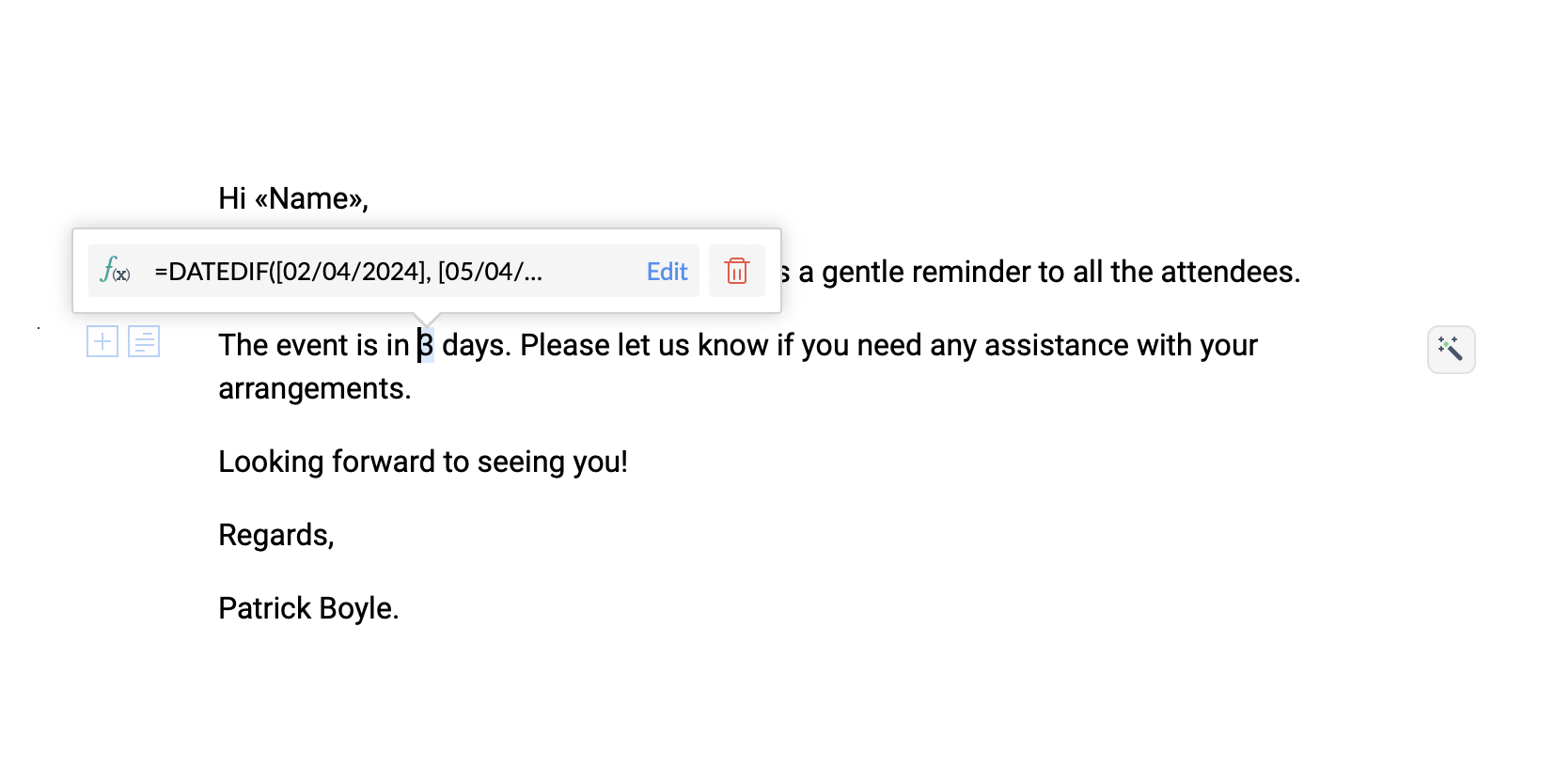


Try the new DATEDIF function in Zoho Writer and let us know your suggestions and feedback in the comments section below or email us at support@zohowriter.com or support@eu.zohowriter.com.
 
If you have any function that you want us to add in Zoho Writer, please let us know in the comments.
 
Regards,
Team Writer


    • Sticky Posts

    • Easily perform calculations using dates with the new DATEDIF function

      Hey Zoho Writer users! We've enhanced Zoho Writer's formula capabilities with the new DATEDIF function. This allows you to calculate the difference between dates in days, months, and years. Function syntax: =DATEDIF(start_date, end_date, unit) Inputs:
    • Zoho Writer's WordPress extensions

      Hey Zoho Writer users! Say goodbye to all your WordPress content publishing woes with Zoho Writer's WordPress extensions. Publish content with all your formatting and images, republish content when you update a document, and more—from a single window
    • Date-based conditions and filters

      Configure conditions with date  Hi everyone! We are excited to announce that you can now compare and filter data with date-based conditions. This update lets you compare date fields in a document to a reference date and display a text or value if the
    • Introducing group by, aggregation, and repeating regions in mail merge templates

      Display data exactly the way you want and highlight key insights with Zoho Writer's enhanced merge templates. We've supercharged Zoho Writer's merge templates with the capability to dynamically group, aggregate, and repeat data as blocks. You can now
    • Say hello to an improved way to merge documents!

      Automating all your documents from start to finish is now easier than ever with Writer's new merge tools.   If you haven't seen it yet, you can read the main announcement here. Here is the full list of the features we've rolled out: 1. Dynamic Table Headers
    • Recent Topics

    • Kaizen #210 - Answering your Questions | Event Management System using ZDK CLI

      Hello Everyone, Welcome back to yet another post in the Kaizen Series! As you already may know, for the Kaizen #200 milestone, we asked for your feedback and many of you suggested topics for us to discuss. We have been writing on these topics over the
    • How do I save audio files to my PC that I record into Zoho Notebook from my phone?

      I was thinking of using Zoho Notebook as a way to store composition ideas, as well as for other things if it can handle this. For this to be useful for me though, I need to be able to have an easy way to download those audio files to my PC, either individually
    • Introducing Radio Buttons and Numeric Range Sliders in Zoho CRM

      Release update: Currently out for CN, JP, AU and CA DCs (Free and standard editions). For other DCs, this will be released by mid-March. Hello everyone, We are pleased to share with you that Zoho CRM's Layout Editor now includes two new field formats—
    • How to filter subform report based upon main form report in dashboard

      Hi Team, I am creating a dashboard in Zoho Analytics. I want to have a main form report and below I want to show subform report of main form. If I filter the main form with date then I want to show subform records based upon main form. how can I achieve
    • Search mails in shared mailbox

      Hi everyone, is there a way to search mails in shared mailbox's? Search in streams or mail doesn't return anything from mails in shared mailboxes. Thanks! Rafal
    • Zoho CRM for Everyone's NextGen UI Gets an Upgrade

      Hello Everyone We've made improvements to Zoho CRM for Everyone's Nextgen UI. These changes are the result of valuable feedback from you where we’ve focused on improving usability, providing wider screen space, and making navigation smoother so everything
    • Kaizen #186 : Client Script Support for Subforms

      Hello everyone! Welcome back to another exciting Kaizen post on Client Script! In this edition, we’re taking a closer look at Client Script Support for Subforms with the help of the following scenario. " Zylker, a manufacturing company, uses the "Orders"
    • Change eMail Template for Event-Invitations

      Hello ZOHO-CRM Team How I can change the eMail Template for Event-Invitations? I work with the German Version of the Free Version. I know how I can modify eMail alerts or Signature Templates, but where I can other eMails modify you send out? Thank you for your answer. Regards, Juerg
    • Changes to the send mail Deluge task in Zoho CRM

      Hello everyone, At Zoho, we continuously enhance our security measures to ensure a safer experience for all users. As part of our ongoing security enhancements, we're making an important update on using the send mail Deluge task in Zoho CRM. What's changing?
    • Fail to send Email by deluge

      Hi, today I gonna update some email include details in deluge, while this msg pops up and restrict me to save but my rules has run for one year. can you tell me how to use one of our admin account or super admin account to send the email? I tried to update
    • Writing SQL Queries - After Comma Auto Suggesting Column

      When writing SQL Queries, does anyone else get super annoyed that after you type a comma and try to return to a new line it is automatically suggest a new column, so hitting return just inputs this suggested column instead of going to a new line? Anyone
    • Introducing Multiple Sandbox Types and Support for Module's Data Population

      Register here for the upcoming Focus Group webinar on Multiple Sandbox | Help documentation to learn more about the new enhancements Hello everyone,  Sandbox in CRM is a testing environment for users to create and test new configurations like workflow
    • Is It Possible to Convert a Custom Module to a Quote?

      I recently created a custom module in our CRM environment for RFQs so that our sales team can submit quote requests directly in Zoho rather than by email/phone. This allows for a cleaner overall process, minimizing potential errors and potentially encouraging
    • Convert invoice from zoho to xml with all details

      How to convert an Invoice to XML format with all details
    • Importing into the 'file upload' field

      Can you import attachments into the file upload field. I would expect it to work the same way as attachments do, But can't seem to get it to work.
    • Sync your Products Module for better context.

      In customer support, context is everything. The integration between Zoho Desk and Zoho CRM helps your sales and support teams function as one, delivering better customer experiences. With the latest update to this integration, you can now sync the Product module in your Zoho CRM with your Zoho Desk portal. This feature enables products from Zoho CRM to reflect in the "product" field in Zoho Desk. This can save your support team valuable time and effort.    Some things to note when syncing the two:
    • CRM verify details pop-up

      Was there a UI change recently that involves the Verify Details pop-up when changing the Stage of a Deal to certain things? I can't for the life of me find a workflow or function, blueprint, validation rule, layout rule ect that would randomly make it
    • Does Zoho Writer have Dropdowns

      I want to add a drop down field in Zoho writer. Is this possible?
    • How can Data Enrichment be automatically triggered when a new Lead is created in Zoho CRM?

      Hi, I have a pipeline where a Lead is created automatically through the Zoho API and I've been trying to look for a way to automatically apply Data Enrichment on this created lead. 1) I did not find any way to do this through the Zoho API; it seems like
    • Transitions do not update fields until the record moves to next stage

      We have a blueprint where a couple of stages have multiple transitions. If only some of the transitions are completed, but not all, Zoho does not update any of the fields impacted by the completed transitions. Is there any way Zoho can udate the fields
    • Blueprint enhancements - Parallel and multiple transitions, and more

      Last modified on Sep 4, 2023: All Zoho CRM users can now access these enhancements. Initially, these features were available only on an early access basis and by request. However, as of August 2, 2023, they have been made available to all users in all
    • Optimum CRM setup for new B2B business

      Can some advise the most common way to setup Zoho CRM to handle sales for a B2B company? Specifically in how to handle inbound/outbound emails. I have spent hours researching online and can't seem to find an accepted approach, or even a tutorial. I have
    • using the Client script on the load of the form if service no is empty means then i want to make issue relate to is Service

      using the Client script on the load of the form if service no is empty means then i want to make issue relate to field is Service if Purchae no is empty means then i want to make issue relate to is Purchase
    • Multiple header in the quote table???

      Hello, Is it possible in Zoho CRM to add multiple headers or sections within the Quote product table, so that when the quote is printed it shows separate sections (for example “Products” and “Services”)? To clarify, I’m asking because: This does not appear
    • using the Client script I want to Hide Show the Fields

      if Related to service means some of the field like service no want to shoe and hide Amc no , purchase no how i achive this let issu = ZDK.Page.getField('Issue_Related_To').getValue(); if (issu == 'Service') { var field_obj = ZDK.Page.getField('Warranty_Cases');
    • openUrl in blueprints

      My customer wants to open a URL at the end of a blueprint transition. Seems this isn't possible right now but it would be very useful. In this thread, https://help.zoho.com/portal/en/community/topic/openurl-not-working the Zoho agent said that it's logically
    • Dropshipping Address - Does Not Show on Invoice Correctly

      When a dropshipping address is used for a customer, the correct ship-to address does not seem to show on the Invoice. It shows correctly on the Sales Order, Shipment Order, and Package, just not the Invoice. This is a problem, because the company being
    • Prepayment of a sales order

      How does everyone handle this common (at least it is common for us!) situation? We require all our orders to be fully prepaid before shipment since we manufacture made to order, custom products. Since ZOHO does not allow a sales order to be prepaid, we are forced to create an invoice at the time an order is placed to allow the customer to pay it. Our sales category is therefore skewed, since the sale was actually booked at the time an order was placed, rather then at the time it is shipped, which
    • Access to Specific Zoho Desk layout for external parties

      Hi, We have a partner who handles for us sales requests from specific markets. He is not a Zoho Desk user. But we want him to b part of a specific Zoho Desk layout to handle inquiries.  How to achieve it in the easiest way possible?
    • Deposit on a Sales Order

      Good day, 100% of my business is preorders, no inventory. I am trying to run away from QB for one of my businesses, but I require two options that I don't seem to find with Zoho Books. 1 - If there is a way to apply a deposit on a sales order, as with
    • How Does Knowledge Base Search and Article Recommendation Work?

      Hello, I would like to understand how the Knowledge Base search engine works. Specifically, does it search based on: The article title only? The full article content? Both, the article and the content? Keywords? Tags? Also, how does the system determine
    • validation rules doesn't work in Blueprint when it is validated using function?

      I have tried to create a validation rule in the deal module. it works if I try to create a deal manually or if I try to update the empty field inside a deal. but when I try to update the field via the blueprint mandatory field, it seems the validation
    • Bulk Delete Attachments

      Is there a way to bulk delete attachments on the form entries? our storage is full and deleting files one by one is pain taking process.
    • How do I sync multiple Google calendars?

      I'm brand new to Zoho and I figured out how to sync my business Google calendar but I would also like to sync my personal Google calendar. How can I do this so that, at the very least, when I have personal engagements like doctor's appointments, I can
    • Zoho CRM || Unable to Bulk Assignment of Territories for Contacts

      Dear Zoho CRM Support Team, I hope this email finds you well. We recently performed a bulk upload of Contacts into Zoho CRM using the official sample Excel template downloaded from the CRM. The upload itself was completed successfully; however, we encountered
    • Cannot get code to work with v2.mergeAndStore!

      Please can someone help me pass subform items into a repeating mail merge table row using v2.mergeAndStore? I have a mail merge template created in Writer and stored in Workdrive. This template is referenced by a custom CRM function which merges all of
    • Ability to CC on a mass email

      Ability to CC someone on a mass email.
    • Ability to Disable System Banner Messages in Chat Flow Control

      Dear Zoho SalesIQ Team, Greetings, We would like to request an enhancement related to the system banner messages in Zoho SalesIQ chat flow control. Current Behavior: SalesIQ allows configuring various automatic banner/system messages such as: Waiting
    • How do you do ticket add ons in Backstage?

      Hi Everyone, If you wanted to have general admin tickets and allow for add ons, like camping, or car or Carbon offset. What would you do? Peace Robin
    • Sort Legend & stacked bar chart by value

      I'd love to see an option added to sort the legend of graphs by the value that is being represented. This way the items with the largest value in the graph are displayed top down in the legend. For example, let's say I have a large sales team and I create
    • Next Page