Advance Your Churn Predictions with Zia's Usage Data Feature: Event Mapping
Greetings all,
This is an important and exciting update about feeding usage data into Zoho CRM. To expand the scope of how usage data can be used by Zia, we are introducing a new section called Usage Data under Zia. Users can now easily import, edit, and update usage data within their CRM.
This feature helps you understand if your customers are losing interest or satisfaction with your service, experiencing technical difficulties, or switching to a different platform with the usage data you feed. Identifying these behavioral changes early on can provide valuable insights for businesses to step in and re-engage customers.

Through this enhancement,
- Improve the CRM's capability to leverage usage data for Zia-generated insights such as churn prediction, recommendations, and engagement signals.
- Enable users to link key attributes from usage data to terms that the system can understand for accurate Zia processing.
- Facilitate the seamless import of usage data from different sources into Zoho CRM.
What's new?
When AI models sometimes struggle to interpret the usage data, customers often find it challenging to use their usage data in CRM systems effectively. Event mapping is a proper mapping mechanism to utilize usage data fully, not missing any opportunity on customer engagement, retention, and personalized service delivery.
With the new Usage Data under Zia, you can map each static set of events to the fields of the custom module. This enhancement helps Zia provide a deep analysis that can help predict more insights. Likewise, your churn prediction goes on, and the data is automatically updated with incoming data whenever your customers engage.
Zia can expand the range of applications for the usage data beyond Churn prediction after being trained with the data. The scope of Zia expands with the full utilization of usage data, helping with the following use cases in other features.
- Recommendations help you decide what products you can cross-sell or upsell to which customers.
- Analyze your customers' signals and engagement rates to gain deeper insights.
- Bring in more accuracy to churn predictions, like when a specific customer is likely to churn.
Additionally, Zoho CRM can now access usage data sourced via API, URL, or any supported file format from any tool to be stored in a custom module. This lowers your dependency on restricted tools.
Let's get started with the details of the enhancement.
What is usage data?
All businesses need transactional data as a base to study user purchase behavior on metrics like customer details, date and time, payment methods, discounts, and inventory movements.
Unlike transactional data, which only includes information about customer purchases and subscription details, usage data tracks how these customers interact with or use them, through an app or a website, concentrating on metrics like frequency, duration, and patterns of usage, helping businesses understand user behavior and preferences.
Tools like Google Analytics track customer actions, such as logins, interests, purchases, and location, to provide us with this data. It is used for behavior analysis, engagement metrics, churn prediction, and more.

What is event mapping?
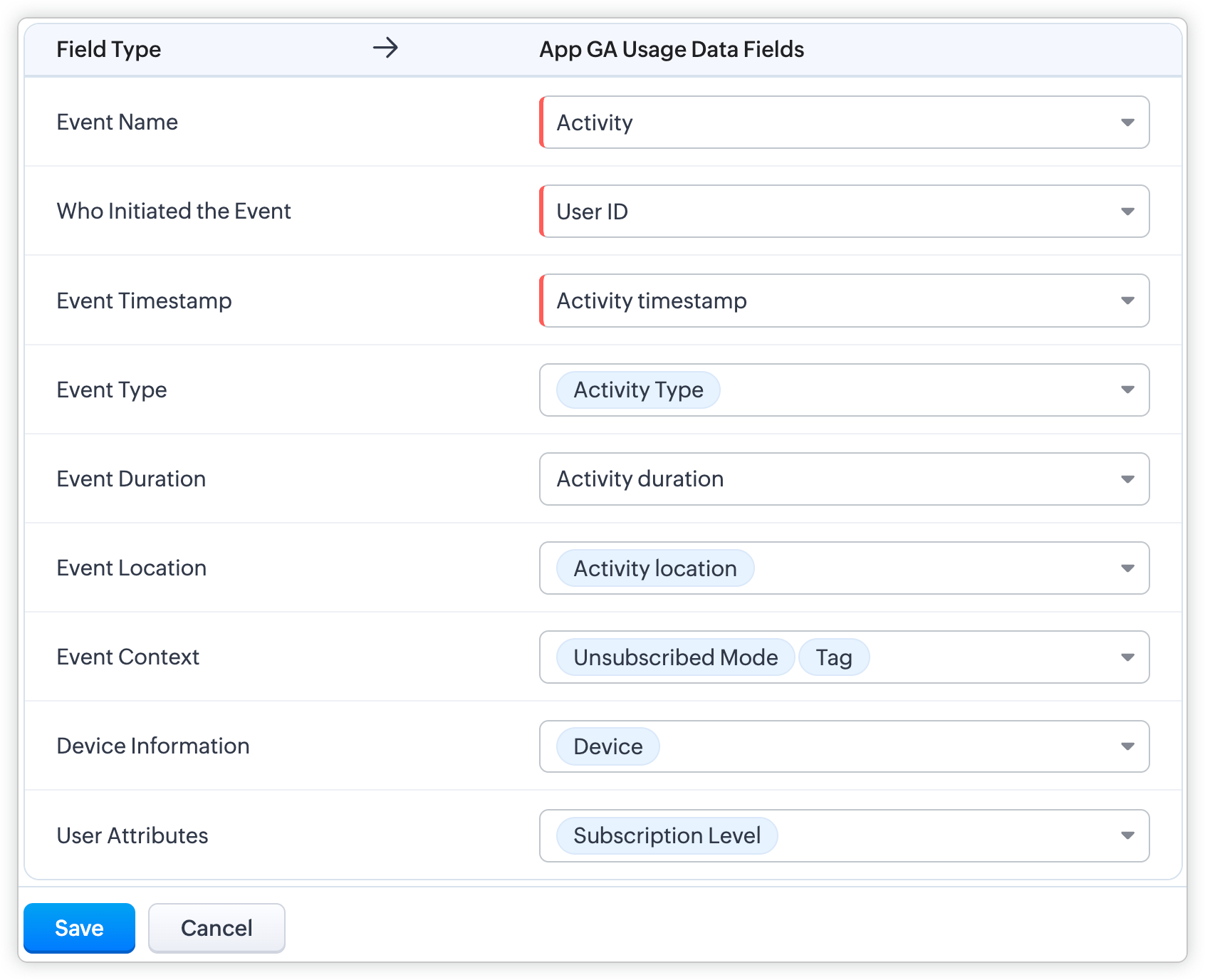
Event mapping is a learning technique for the system so the user can activate Predictions, such as churn prediction. Through event mapping, the system will learn and understand how to interpret usage data. Mapping involves certain data attributes like event name, event timestamp, event initiator, and others.
Why event mapping?
Since event mapping requires the mapping of information, you are directly feeding in more details about the user interactions, easing the accuracy of churn prediction. In simple words, more details give you more accurate prediction.
For instance, a sudden reduction in the amount of logins serves as a significant indication of decreasing engagement, potentially indicating churn. Through event mapping, Zia can anticipate the reasons why a certain demographic of users cease logging in at specific times and whether device-related factors impact their logins.
Moreover, event mapping unlocks various functionalities like calculating churn scores, generating personalized recommendations, and monitoring customer engagement. For example, through Workflow Rules, users can send promotional emails to encourage customers who have not logged in for over 30 days to stay engaged.
Steps to configure:
With the enhancement, import usage data into a CRM custom module, create a mapping of the data called event mapping, and utilize that data for churn prediction and more Zia insights. Through event mapping, AI increases the accuracy of Zia-driven predictions and also widens its scope for personal recommendations and other predictions.
Let's look at this activation in the below steps:
- Create a custom module and three (mandatory) fields to store the following data: event name, event timestamp, and event initiator.
- Import the usage data from other sources (via API, DataPrep, CSV, or any supported file format) to the created custom module and map the fields.
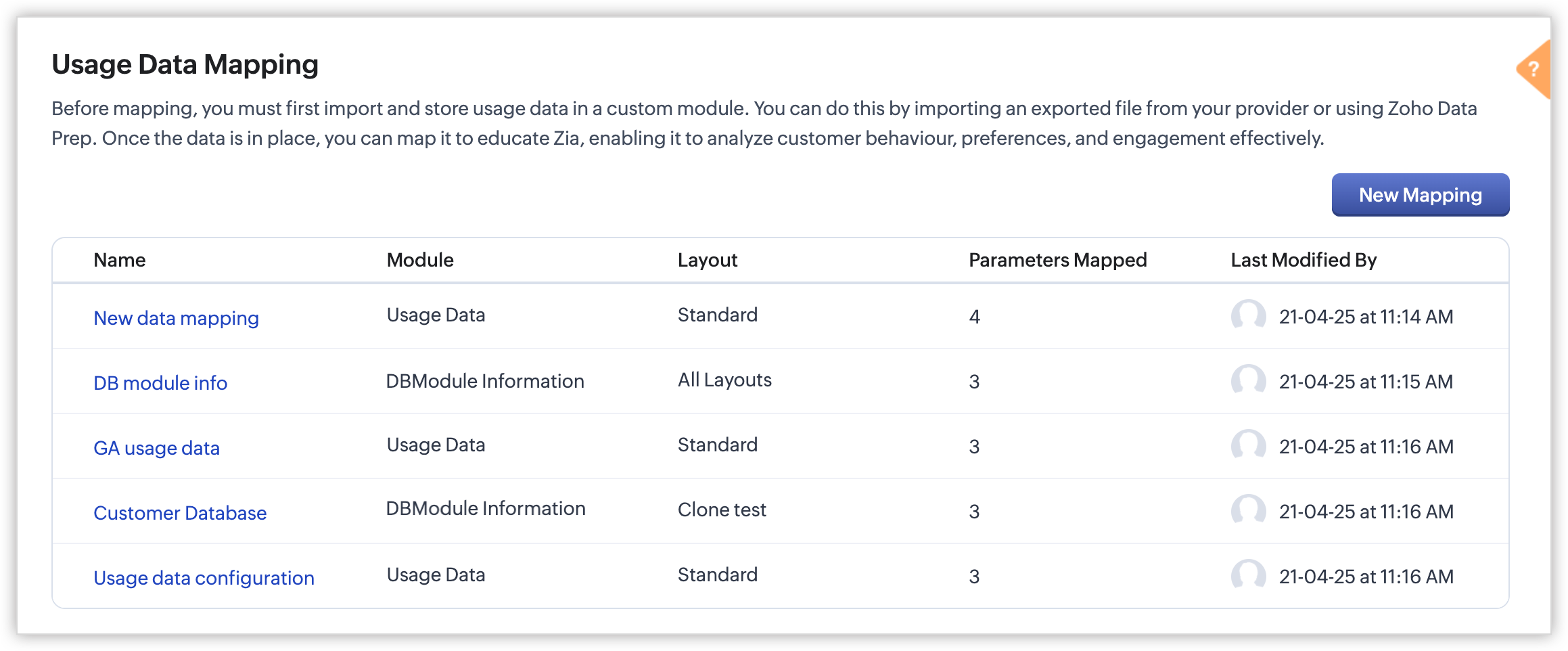
- In Usage Data under Zia, perform the event mapping to create a way that the system understands.
Availability
DC: All DCs
Editions: Enterprise and Ultimate editions
Release Plan: This feature will be released phase-wise to all DCs
For detailed description and guide, refer to our resources:
Topic Participants
Pauplin Fiona Peries G
Rich Brandwein
Sunderjan Siddharth
Sticky Posts
Presenting ABM for Zoho CRM: Expand and retain your customers with precision
Picture this scenario: You're a growing SaaS company ready to launch a powerful business suite, and are looking to gain traction and momentum. But as a business with a tight budget, you know acquiring new customers is slow, expensive, and often deliversGood news! Calendar in Zoho CRM gets a face lift
Dear Customers, We are delighted to unveil the revamped calendar UI in Zoho CRM. With a complete visual overhaul aligned with CRM for Everyone, the calendar now offers a more intuitive and flexible scheduling experience. What’s new? Distinguish activitiesCreate and populate a record in an instant: Introducing zero-shot field prompting to Zia's ICR
A couple of months ago, we upgraded our in-house AI image detection and validation tool, Zia Vision, with intelligent character recognition (ICR). By training Zia with sample images, you could create and enrich CRM records with data extracted from standardIn-person ZUG Meetups for Real Estate Professionals - US Q1 2026
The Real Estate Zoho User Group is going on a multi-city, in-person meetup tour across the US, and we’d love to see you there! These meetups are a great opportunity to: Connect with fellow real estate professionals using Zoho Share challenges and discoverNimble enhancements to WhatsApp for Business integration in Zoho CRM: Enjoy context and clarity in business messaging
Dear Customers, We hope you're well! WhatsApp for business is a renowned business messaging platform that takes your business closer to your customers; it gives your business the power of personalized outreach. Using the WhatsApp for Business integration
Recent Topics
Admin Control Over Profile Picture Visibility in Zoho One
Hello Zoho Team, We hope you are doing well. Currently, as per Zoho’s design, each user can manage the visibility of their profile picture from their own Zoho Accounts page: accounts.zoho.com → Personal Information → Profile Picture → Profile PicturePublished Course Not Reflecting In Hub
Hi! I am trying to create micro-learning courses for our team to be available for self-guided learning. I have published the courses with enrollment settings open to all users of the hub, but they don't appear to be available for enrollment. Am I missingUnlock Locked Users via Zoho One Mobile App
Hello Zoho One Team, We have noticed that in the Zoho One web admin panel, we can unlock a locked user when needed. However, when using the Zoho One mobile app, there is no indication that a user is locked, nor is there an unlock button similar to whatTip #47- Stay Ahead with Automated Scheduled Reports in Zoho Assist- 'Insider Insights'
We’ve made it easier for you to stay informed, even when you’re busy managing remote sessions! With Scheduled Reports in Zoho Assist, you can now automatically receive detailed insights about your remote support and unattended access activities directlyColour Coded Flags in Tasks Module List View
I really like the colour coded flags indicating the status of the tasks assigned to a Contact/Deal in the module list view. It would be a great addition to have this feature available in the list view of activities/tasks. I understand you have the DueUploading data to S3
Has anyone successfully uploaded data from Creator to S3 using the InvokeURL command or any other method in Deluge? (keywords: S3, AWS, Amazon, bucket)UPS Label size when generated via Zoho
We've integrated UPS with Zoho inventory. When creating and downloading the shipping labels they are created in a larger paper size. I'd like them to be generated to print on a 4x6 printer. Zoho have told me I need to do this within our UPS portal. UPSCredit Management: #4 Credits on Unused Period
Recall a familiar situation. You sign up for a monthly gym membership. You pay the subscription fee upfront, get motivated, and show up consistently for the first week. Then, suddenly, you get caught up in work deadlines, travel plans, or a dip in motivation.Zoho Analytics Automatically Deletes Queries and Reports When a Synced CRM Field Is Removed
We’ve encountered a serious and recurring issue that poses a massive data integrity risk for any Zoho Analytics customer using Zoho CRM integration. When a field is deleted in Zoho CRM — even an unused one — Zoho Analytics automatically deletes everyPrevent new Record Association
Hello all, We have a small sales organization therefore, it's helpful for everyone on the sales team to be able to view the full list of accounts to assist in preventing duplicate accounts from being created. However we want to prevent people from creatingTip of the Week #73– Automate workflow with Make integration.
Make is a no-code workflow automation platform designed to connect your favorite apps and automate repetitive tasks across services. By integrating Make with Zoho TeamInbox, you can streamline everyday inbox management and save valuable time. With thisViewing attachments
I'm using a Web Form integrated in my web site to collect Leads several info, including a image upload. In order to to approve each lead, we have to view the image uploaded. Unfortunately, in the Leads view, the Attachments can only be downloaded, notKaizen #89 - Color Coding using Client Script
Hello everyone! Welcome back to another exciting Kaizen post. Today let us see how you can apply color codes to the List and Detail Pages of Zoho CRM using Client Script. Need for color code in Zoho CRM When you mark things with different colors as aInstant Sync of Zoho CRM Data?
With how valuable Zoho Analytics is to actually creating data driven dashboards/reports, we are surprised that there is no instant or near instant sync between Zoho CRM and Zoho Analytics. Waiting 3 hours is okay for most of our reports, but there areIs it possibly to directly set the tax amount on order instead of indirectly via tax rates?
We own an eCommerce application and want to funnel submitted orders from that system into Zoho. We're already calculating tax in our application and just need a way to set it in Zoho. We tried to use Zoho's tax objects for tax by setting the rates toZoho account sign in with passkey
Hello, I am trying to sign in using passkey, but the option doesn't show up in the web and is disabled in Oneauth on mobile, saying the admin has restricted the use. On the Admin page in Security MFA I can find no option for passkey. Help would be greatlyRescheduled US meetups: Zoho Desk user meetups are coming to seven U.S. cities in October and November, 2025
Hello to our Zoho Desk users in the United States, We're excited to share the revised dates for the upcoming Zoho User Groups happening across the US this summer. Our product experts are heading to seven cities throughout the country, and for the firstChecklists as templates
Is it possible to save checklists as templates to reuse them in other tasks? Example: I have a web project. I maintain individual web URLs as tasks. Within the tasks the same checklist should be used again and again: - Page created in CMS - PropertiesSend mass email using my secondary email
Hello, When I send an email to just one person from Zoho CRM, a complete email editor appears, where I can choose which of my email addresses I want to use in the From field. When I send a mass email, there is not such option. I can only select the emailZOHO TEAM INBOX Calendar Integration
The Problem: Clients send meeting invitations to our TeamInbox address. TeamInbox receives these invites, but we cannot accept them. We do not use individual inboxes for transparency purposes. Ideal Solution: A way to accept calendar invites sent to ourWhy Can't I add unicode emoji's to my signature?
Why would Zoho Mail prevent me from adding unicode emojis to my email signature? Every time I try to save the signature, Zoho Mail erases the emoji and any nearby content. Every time I setup something with Zoho, I know I'm going to run into some incrediblyUnearned / Deferred Revenue Automatic Calculation for Subscriptions
As a SaaS business, we have multiple active subscriptions with varying dates and amounts. Is there a way to have a monthly automatic calculation for all of them that debits or credits the unearned revenue and revenue accounts accordingly? Alternatively,Zoho Desk Limit for Comma Separated Queries
Hi, I have just discovered a limit that I believed is not mentioned in any of Zoho's documentations. My search query looks like so: "query: {"accountId":"786050000091629966,786050000163589273,786050000163589427,786050000162753705,786050000162112971,786050000161987643,786050000160752868,786050000167089504,786050000167089378,786050000167089024,786050000167070005,786050000166295256,786050000128153693,786050000110560021,786050000046594575,786050000039106461,786050000002225356,786050000076889093,786050000047895103,786050000043365354,786050000044765191,786050000041790249,786050000040359116,786050000037945198,786050000024605077,786050000000525015,786050000155333895,786050000157741437,786050000000718125,786050000011574353,","departmentId":"786050000042648070","status":"Finished","sortBy":"createdTime","customField2":"cf_completion_date:2025-01-28T03:00:00.000Z,2025-10-28T03:00:00.000Z","customField3":"cf_billed:false"}"Module Name doesn't exist
I am trying to create a module named Activity, with plural Activities, but I have an error that module name already exists. This module is doesn't exist, and I don't have a single field called Activity or Activities.Zoho Desk iOS and Android app update: AI powered: Reply Assistance and Refine Messages on IM module.
Hello everyone! We are excited to introduce new AI powered features on the IM module of the Zoho Desk app. Reply Assistance: Reply Assistance generates suggested responses for incoming chat messages, which you can directly insert into the conversationIs it possible to embed Youtube shorts?
Hi Zoho desk support, This is Ryan from Accuver America. While I'm trying to create a knowledge base article with embed video, I ran into this issue. "www.youtube.com refuse to connect" A little bit background is that because this video is recorded onSplit functionality - Admins need ability to do this
Admins should be able to split an expense at any point of the process prior to approval. The split is very helpful for our account coding, but to have to go back to a user and ask them to split an invoice that they simply want paid is a bit of an inDelegates - Access to approved reports
We realized that delegates do not have access to reports after they are approved. Many users ask questions of their delegates about past expense reports and the delegates can't see this information. Please allow delegates see all expense report activity,How to include total km for multiple trips in expense report.
Whenever I create a mileage report it only shows the total dollar amount to be reimbursed. The mileage for each individual trip is included but I also need to see the total distance for all trips in a report? How do I do this?I didn't receive my domain verification mail
I didn't receive my domain verification mailGet logged in user ID in Deluge script
Hello all, How do I get the id of the logged-in user in a deluge script? the "zoho.loginuserid" function actually returns the users email address or whatever the user id they use to login to zoho with and not the id of the user record, and given thatItem Details Field - New Barcode / Document option?
Is this a new feature??? its in both books and inventory.Shared Mailbox - Mark as read for all users
Hi all, Maybe someone can help me out. At the moment we have a shared mailbox without streams. When a users reads an mail or marks it as read other users will not see this. How can we resolve this? We now archive the mails when read and followed up. HoweverCan I export to PDF in Zoho Learn
I have seen help pages where export to pdf options are available but I do not see that option available from the application. I see that exprt is available in my free trial version but that is only to html pages. I need to be able to export my manualsStaff rules
Hi! Do you people know what are the default staff rules when a new booking is created? We have two staff members in my team (me as the admin, and my employee). As we share the same services, I'm wondering how Zoho will pick the staff for new apointments.Add Image Upload Field to Zoho Bookings Registration Form
Hi, We would like to request the addition of an image upload field to the Zoho Bookings registration form. Currently, Zoho Bookings only supports text-based fields (e.g., Single Line, Multi-Line, Email, Checkbox, Dropdown, Radio Button, and Date), butMerge Tags Output Incorrect Placeholder Text After CRM Sync
Hi everyone, I’m experiencing an issue with merge tags in Zoho Campaigns after last sync of contacts and leads from Zoho CRM (days before everything worked perfectly). Here’s the situation (seems like a default configuration in Campaigns) : My leads haveUI Improvement - Ability to Collapse Flow
The UI for Flow is generally pretty good. However, when multiple decision trees are used, the layout can get pretty convoluted and hard-to-follow (see one of my Flows below): In these cases, even the auto-arrange fails to make this something that a normalWindows agent 2025_M02 release notes
Agent Version: 111.0.3.300 Release date: 24 February, 2025 Various Major enhancements to improve overall performance and optimize the user experience. Squashed a few bugs to improve overall product quality.Windows agent 2025_M01 release notes
Agent Version: 111.0.3.299 Release date: 05 February, 2025 Major Enhancement: Live Monitor feature compatibility released. Major Enhancement: Updated Scaling for multi technician cases with Android and Web based viewers. Various other bug fixes and performanceNext Page