Design & Print Data Directly using Canvas Print View
Hello Everyone,
We are excited to announce a new addition to your Canvas in Zoho CRM - Print View. Canvas print view helps you transform your custom CRM layouts into print-ready documents, so you can bring your digital data to the physical world with ease.
Whether you’re printing labels for shipping, creating personalized forms, or need to document one particular record's information, this feature gives you the control and flexibility to design, customize, and print right from your CRM.
What can you do with Print View?
With Canvas Print View, you can print out a single record's data or a few selected records' data or even the total number of records per page onto physical sheets directly from your CRM account to your hands. Simply :
- Design a custom layout using Canvas by pulling details automatically from your CRM modules
- Generate a clean, printable sheet of mailing labels
- Print information out on standard paper sizes like A4 or Letter from your selected module,
- Automatically display cutting lines to guide separation for
- Save time and reduce manual errors without leaving your CRM
Scenario 1: Print Shipping labels from your CRM Account
Imagine you’re running a shipping or courier service, and you manage all your customer data within Zoho CRM. Your team needs to generate address labels for daily deliveries. You can use the print view to :
- Create a custom mailing label layout using Canvas and get customer contact details automatically from your contact module.
- Generate a clean, printable sheet of mailing labels
- Choose to display cutting lines to guide label separation
- Finally, print them out on standard paper sizes like A4, Letter from your selected module
And, Voila! Your team now has all the address labels they need for daily deliveries.
Look at the GIF below to understand how Canvas Print View works for print mailing labels.
Scenario 2 : Print Service Report Forms in an Auto-shop Repair Firm
Say, you run an automobile service centre, and you use Zoho CRM to track customer vehicles, service requests, complaints, and repair details. After completing a repair job, the technician updates the service record in CRM with details such as the vehicle model, service type, parts replaced, labour cost, and total cost.
Using the Print View feature in Canvas, the service centre generates a Service Report that includes:
- Customer name, email, and phone number
- Service number and Service date
- Vehicle Name, Complaint, and Feedback
Now, you can hand this printed report to the customer as proof of service where both the technician and the customer can be signed for acknowledgment and stored in the customer’s file as part of their service history. This is any day better than giving customers a rough invoice or verbal update, and encourages repeat visits for future services.
The GIF below will help you understand how Canvas Print View works for such scenarios.
Other examples where you can use this feature
Similarly, you can use the Print View feature of Canvas to create printable sheets for other scenarios, such as :
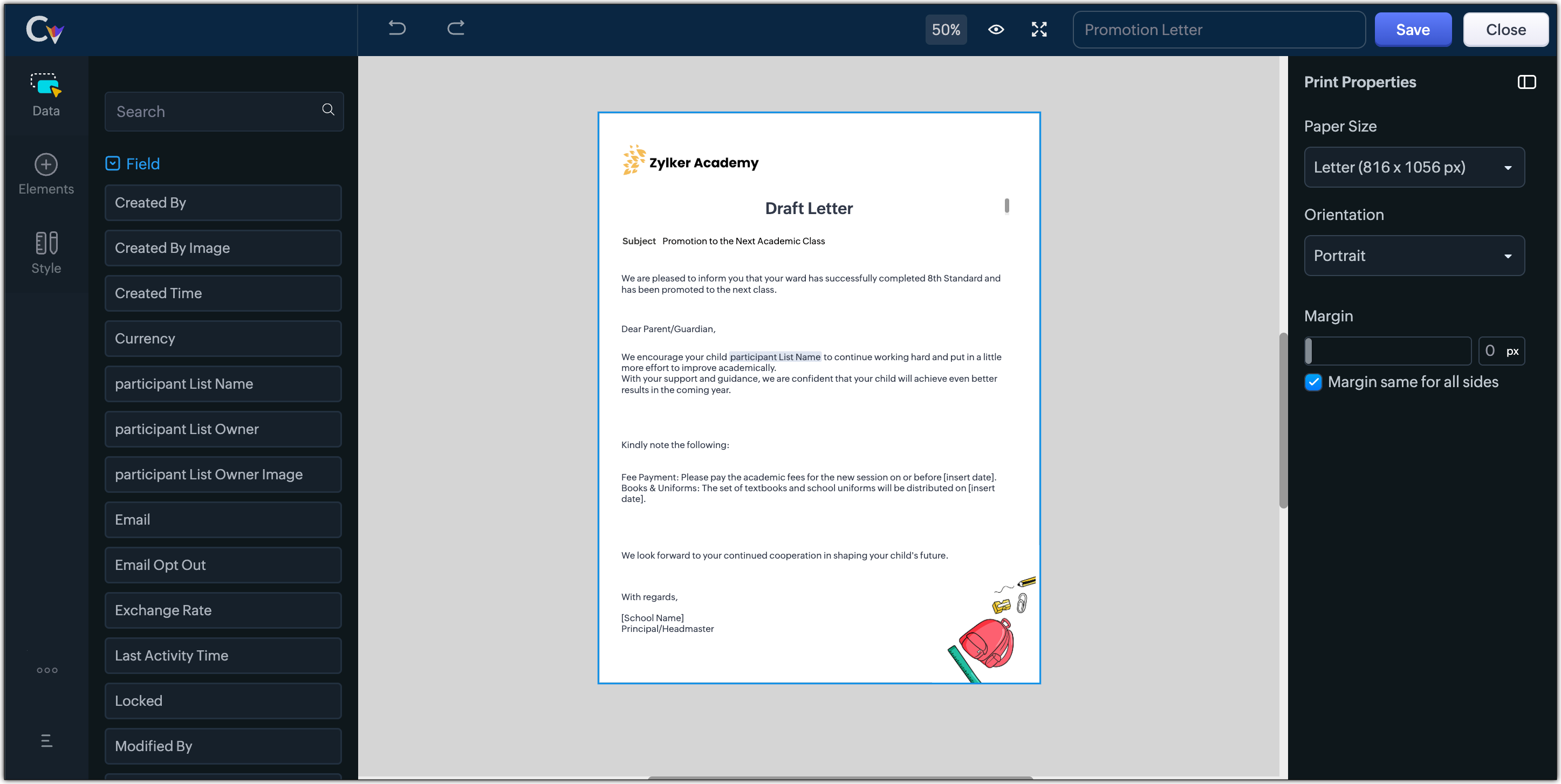
- Create academic course sheets, promotion letters and more automatically from the courses module,
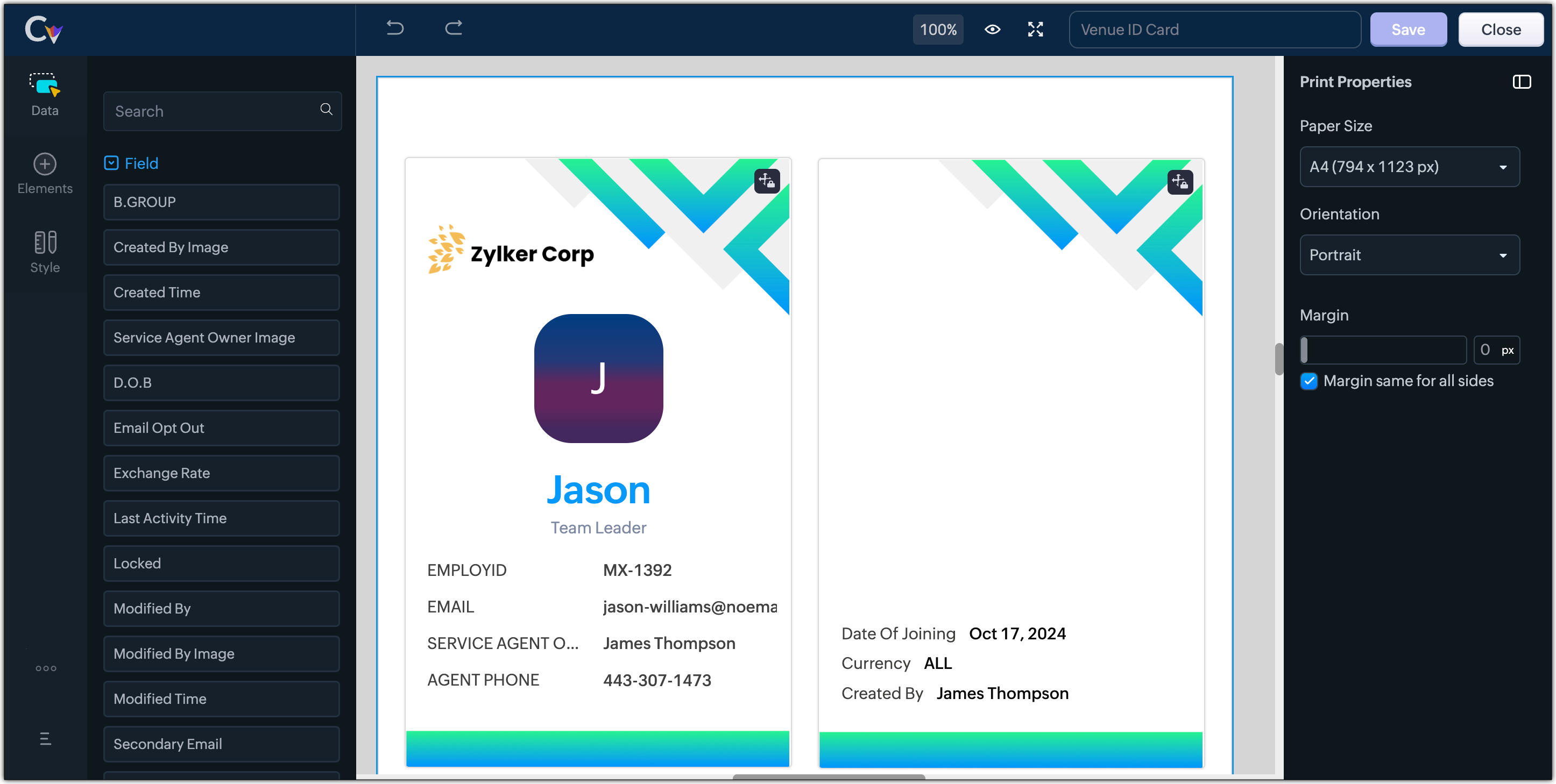
- Resume, id card, or other identification forms for marketing activities or related events,
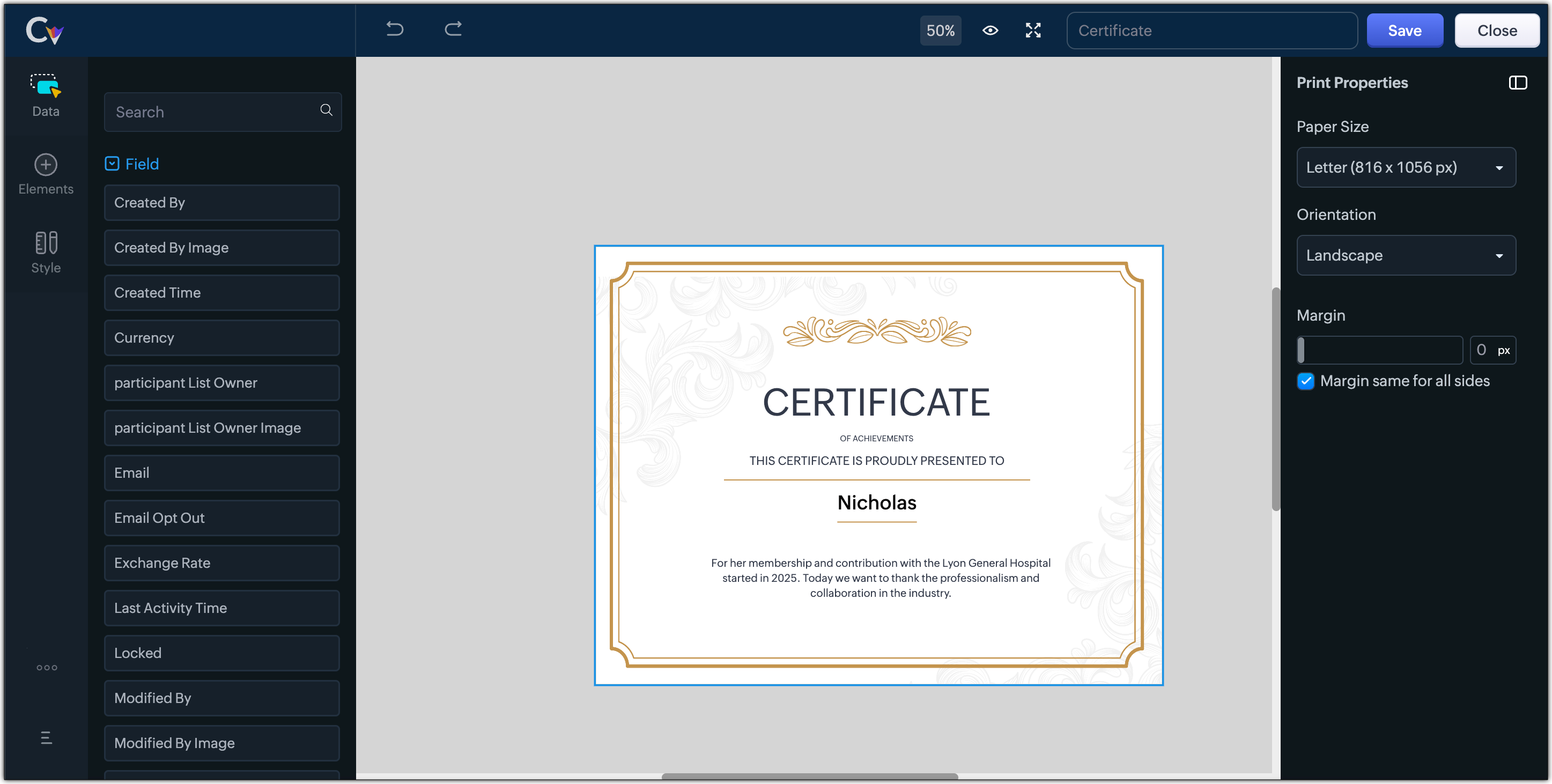
- Certificates, contracts, agreements, or guarantees that need to be manually attested by customers
Customization Options to print Mailing labels
Canvas Print View offers a wide range of customization options to help you design exactly how you want to print out your mailing labels. The options available are :
- Paper Sizes: Choose from Mailing Label formats based on your printing needs
- Orientation: Switch between Portrait or Landscape mode to suit your layout design
- Margins: Define precise margins for your printout or apply the same margin on all sides with a single click
- Print record in :
- Choose to print the mailing labels per page or in a list or in a Grid.
- To print mailing labels per page, users can choose the same margin for all sides and align center options.
- To print mailing labels in a list, users can choose the same margin for all sides, align center and cutting lines options.
- To print mailing labels in a grid, users can choose the same margin for all sides, align center, auto width, and cutting lines options.


Note :
- Align Center : Aligns your content to the center of the page or adjust freely
- Auto Width : Enable this setting to fit content dynamically within the layout
- Cutting Lines : Add visible cutting guides to clearly separate labels or sections on the page
Customization Options to print A4 or Letter format information
The customization options available for printing information in A4 or Letter paper sizes are :
- Margins: Define precise margins for your printout or apply the same margin on all sides with a single click.
- Print record in : Choose to print the information per page or in a list.
- To print information per page, users can only choose to apply the same margin for all sides.
- To print mailing labels in a list, users can choose to apply the same margin for all sides and enable cutting lines to guide separation.


Availability : This feature is available to all users except for IN DC users. It will be opened up for the Indian data centre users shortly.
No more exporting, formatting, or jumping between tools to generate print-ready documents. Canvas Print View can be your print-buddy that can let you tailor documents to suit your business requirements.
Head over to your Canvas builder, select the Print View option, and start creating beautifully customized templates that work on paper just as well as on screen.
Feel free to comment below if you need any assistance from us!
Thanks & Regards
Serena Woolridge
Topic Participants
Serena Woolridge
Andres
Emily Verger
Zohoboy
Ishwarya SG
Sticky Posts
Good news! Calendar in Zoho CRM gets a face lift
Dear Customers, We are delighted to unveil the revamped calendar UI in Zoho CRM. With a complete visual overhaul aligned with CRM for Everyone, the calendar now offers a more intuitive and flexible scheduling experience. What’s new? Distinguish activitiesVoC in Zoho CRM is now data savvy: Explore response drilldown, summary components and participation in CRM criteria
VoC has all the goods when it comes to customer intelligence—which is why we're constantly enhancing it. We recently added the following: A customer drilldown component that shows you the list of prospects and customers behind a chart's attribute ExpandedWrapping up 2025 on a high note: CRM Release Highlights of the year
Dear Customers, 2025 was an eventful year for us at Zoho CRM. We’ve had releases of all sizes and impact, and we are excited to look back, break it down, and rediscover them with you! Before we rewind—we’d like to take a minute and sincerely thank youPresenting ABM for Zoho CRM: Expand and retain your customers with precision
Picture this scenario: You're a growing SaaS company ready to launch a powerful business suite, and are looking to gain traction and momentum. But as a business with a tight budget, you know acquiring new customers is slow, expensive, and often deliversCreate and populate a record in an instant: Introducing zero-shot field prompting to Zia's ICR
A couple of months ago, we upgraded our in-house AI image detection and validation tool, Zia Vision, with intelligent character recognition (ICR). By training Zia with sample images, you could create and enrich CRM records with data extracted from standard
Recent Topics
Agent Availability Report
From data to decisions: A deep dive into ticketing system reports Businesses need to track when their support agents check in and check out from work. This report, titled Agent Availability, is one of the static reports that helps managers track the numberAI-driven construction analytics using Zoho Projects Plus
Construction projects thrive on timelines; if a project is completed on or before the expected time, it makes headlines, but if it gets delayed, the company’s credibility will be at risk. Such projects require precise planning and constant monitoring,Canadian payroll
Hello ZOHO, is any updates on when payroll for Canada will be available?Unified customer view: Bringing product intelligence into your CRM data
For businesses today, applications and digital interfaces are the main touch points in the customer journey. While Zoho CRM data already tells who your customers are and what they buy, Zoho Apptics tells you how they interact and engage with your product.Zoho Creator SaaS app with multiple client AND multiple users
I am close to finalizing a Zoho Creator app that will be used by different companies to manage sale info, and each company can have multiple users using the app. Things were going perfectly until I tried a search on a report. I use a database field in each table to separate the data for each company, which works great. BUT when I do a search, I get to see ALL the data. This means that Company A could easily see the data from Companies B and C via the built-in search. Is there a way to set up thePossible to send Zoom AI Companion transcripts and summaries to contacts in CRM?
Title says it all. Is it possible to send Zoom AI Companion transcripts and summaries to contacts in Zoho CRM?Clarity on extended contract status
Clarity on “extended” status- How does Zoho “extend” a contract? E.g. if client extends by 1 month, can the “end date” be adjusted accordingly in Zoho and tagged as “Extended” with a clear audit trail that also captures the client’s email? Note- EmailCustomizing contract status
Can we customize/add/remove status on Zoho contracts ourselves or does Zoho needs to do this? Context- There is a long list of status on Zoho but not all of them are relevant for us . There are few status which are missing and needs to be added. E.g-Set Custom Business Calendars and Holidays for Global Teams
Managing a project across diverse teams means accounting for more than just tasks and deadlines; it means acknowledging how and when each team actually works. Users might follow different working days or observe region-specific holidays that cannot be[Integration edition] Deluge learning series - Integrations between Zoho apps and Third-party services with Deluge | 28 August 2025
We’re excited to welcome you to the Deluge learning series: Integration edition! The Integration edition will run for three months: Session 1 – Integrating Zoho Apps with Deluge using inbuilt integration tasks Session 2 – Integrating Zoho Apps with DelugeCritical Vulnerability in all major password manager plugins - is Zoho Vault affected?
Hi Zoho, a security researcher found a critical clickjacking vulnerability in all major browser password managers: DOM-based Extension Clickjacking: Your Password Manager Data at Risk | Marek Tóth Is Zoho Vault affected as well? Apparently the Vault extensionNeed Your Insights
Hi Zoho, I'm confused why the flow only sends to one output. setVariable15 is from a list. It doesn't consider the 2nd entry. Any thoughts?Map Dependency Fields - How can can I limit picklist values from a multi-select Parent field?
I know the "Map Dependency Fields" feature doesn't allow a multi-select parent field. However, I need the functionality. Can I do it through a deluge function, and would it still support color coding picklists? We need the color coding for quick scanningDYK 1 - Color Palette for Enhanced Visual Identification of Status
Introducing the Did You Know series of posts. The goal of this series is to familiarize users with certain features or enhancements in Zoho Projects that may not be evident at first glance. The first post in this series deals with color palettes for indicatingInvalid field in the COQL query
Dear Zoho Support! I believe that you already helped me with a similar problem a few years ago. One of my clients has a custom field named "LOB" in the "Deals" Module (see the field's metadata below). The COQL query using this field: : "select id, Deal_Name,Transferring domain registration to new registrar and switching email hosting at the same time?
I need to transfer an existing domain uv cure adhesive that's currently with SiteGround to Porkbun. I also need to move the existing custom email addresses from SiteGround to Zoho Mail. I'm not sure if I should transfer the domain first and then tackleSplit deposits
Can Zoho do split deposits. One deposit, two checks for two separate invoices from different customers. This is one of the most common tasks I can imaging. When I mark the two invoices paid, there are two deposits in bank register. When I try to match,Deactivate Desk Contact without Deleting Contat
We have a client who has multiple tenants for regulatory purposes, and as such, has a few users that have email addresses in both tenants. They've then emailed into the ticketing system, so we have multiple contacts (no big deal, we want to keep their[Free Webinar] Learning Table Series - Zoho Creator for Asset Management with AI Enhancements
Hello Everyone! We’re excited to invite you to another edition of Learning Table Series, where we showcase how Zoho Creator empowers industries with innovative and automated solutions. Each month highlights a specific sector, and this time our focus isIs there any way to get notified when a failure execution happens on a Workflow ?
Hello, I wanted to know if it was possible to get notified (like with a mail for example) when a single failure happens on a specific flow of my organization ? I know that there's a mail which warns you when there's 20 failure in a row on the same flow,Menu Building is completely broken
I have been 3 hours, I have not been able to edit the menu. Either it is completely broken, very little intuitive or I do now know anything... There is no way to create a megamenu, no way to create a menu. Despite the fact I go to menu configurartionCan you sell Subscriptions using Zoho Commerce?
In addition to physical products and the apparently coming soon 'Digital Products', it is possible to sell Subscriptions using Zoho Commerce?Kaizen #197: Frequently Asked Questions on GraphQL APIs
🎊 Nearing 200th Kaizen Post – We want to hear from you! Do you have any questions, suggestions, or topics you would like us to cover in future posts? Your insights and suggestions help us shape future content and make this series better for everyone.Multiple Languages for Product Names
Hi, I use 2 languages: spanish and english. I want to have for every product a name in spanish and a name on english. I want to have to possibility of choosing one of these languages when making an invoice or a purchase order. Is there any way to doItem with name in different languate
Hello, is there a way to have an item with its name in different languages? For example: I sell an item in different markets and I'd like to have a Proposal and the Invoice with the Item Name in a specific language. Rino Bertolotto Zoho Specialist, STESA srlContacts with most tickets? Alarm for multiple tickets?
Is it possible to see through the analytics/reports which contacts are creating the most tickets (not the most discussed ones)? Also, is there a way to set up a notification if a contact creates multiple tickets within a certain time frame?Issue with Template Subject Line Format in Zoho CRM
Hi Team, I’ve noticed that when I update the subject line of an email template in Zoho CRM, it sometimes appears in an incorrect format when used. Please see the attached screenshot for reference. Kindly look into this issue and fix this issue from backendTwo Data Labels in Bar Chart
I need to create a bar chart that has both the SUM and COUNT. I've concatenated them into a formula but it converts it into a stacked bar / scattered chart. The bar chart is no longer accessible. Since i'm comparing YOY, it would be best to have it inDisable field on subform row
Hi, Is it currently possible to disable a row item on a subform? I was just trying to do something whereby until another value is entered the field is disable but for the deluge scripting interface threw up an error saying such a function is not supported on a subform. Thanks in advance for your help. ShaheedLeads - Kanban view fit to screen
Hey guys, I created a custom layout for my leads, staged by lead status. I have 10 types of status. In Kanban view I see only 4 columns/stages and need to scroll to the right to see the rest. Is there a way to make columns/stages be displayed all together?Request to Differentiate Auto-Closed WhatsApp Conversations in SalesIQ
Hi Zoho Support, I’d like to raise a request related to the way WhatsApp conversations are auto-closed in SalesIQ. Every Monday, our Sales team has to manually review each closed WhatsApp conversation from the weekend to identify which ones were automaticallyKanban View UI gets a revamp
Hello everyone, In the coming week you will notice design related enhancements in Kanban View. The UI has been changed and a new option is introduced under Kanban View Settings that allows to change the color of the category headers. Please, note that the functionality is not changed. These changes will not apply to the Activities and Visits modules. Here are the details of the changes: 1. The column widths have been fixed to 300 px. The records will have a box around them for clear distinction.Issue with Anchor Link on Zoho Landing Page (Mobile/Tablet View)
Hi Team, I have created a landing page using Zoho Landing Page and added an anchor link to it. The anchor link is working fine on desktop view; however, it does not work properly on mobile or tablet view. I’ve tried debugging this issue in multiple ways,Simplest way to convert XML to a map?
I've reviewed the help info and some great posts on the forum here by Stephen Rhyne (srhyne). At the moment I'm using XPath to generate a list of xml nodes, iterating through that to fetch the field name/value pairs and adding them to a map (one map for each record in the data). I then convert the row map to a string and add it to a list. Here's the function: list xml.getRecordListFromXML(string xml_data, string ele_name) { result = List(); // get list of record nodes rec_list = input.xml_data.toXML().executeXPath("//"Introducing Creator Simplified: An exclusive learning series to enhance your app development skills
Hey Creators! Welcome to Zoho Creator's new learning series, Creator Simplified. In this series, we'll dive into real-world business use cases and explore how to translate your requirements into solutions in your Creator application. You can also expect[Product update] Updated Data Synchronization Process for QuickBooks - Zoho Analytics Integration.
Dear QuickBooks integration users, We’re making an important update in the way data is currently synced in your QuickBooks integration within Analytics workspace. What’s changing: Previously, with every data synchronization, Zoho Analytics used to fetchZoho CRM new calander format cannot strikethrough completed task
Hi, Recently there is a new format for calendar within Zoho CRM However, found out that a completed task will not cross out or strikethrough like previous format. Without strikethrough, it will be difficult to identify which task is still in Open status.Employees not Users
Hello, We are a construction company that has +180 employees and most of them are in remote location working onsite with no access to internet. Is it possible that we have data stored for all employees but have only 5-10 users who will be in charge of entering employees data? or do we have to pay for all +180 employees? even though they won't be using the system?Zoho people generatimg pdf
Hello , now i want to make a customm button in zoho people that is inside a deduction module , that fetches all the records and generate a pdf with a template that i have done in the mail merges template , i was told that i have to upload template onzohorecruit.com career form postcode bug
Dear, When I select a postcode from the drop down on a zohorecruit.com career form, the street text field is automatically filled with the name of the city, which should not happen. Any idea how I can fix this? Thanks, BartNext Page