Function #12: Approve purchase orders automatically
The transaction approval feature in Zoho Books helps establish an authorization process, allowing business owners to closely monitor transactions created by their employees. This process ensures that all transactions created by employees undergo a thorough review by the approvers before being sent to their customers.
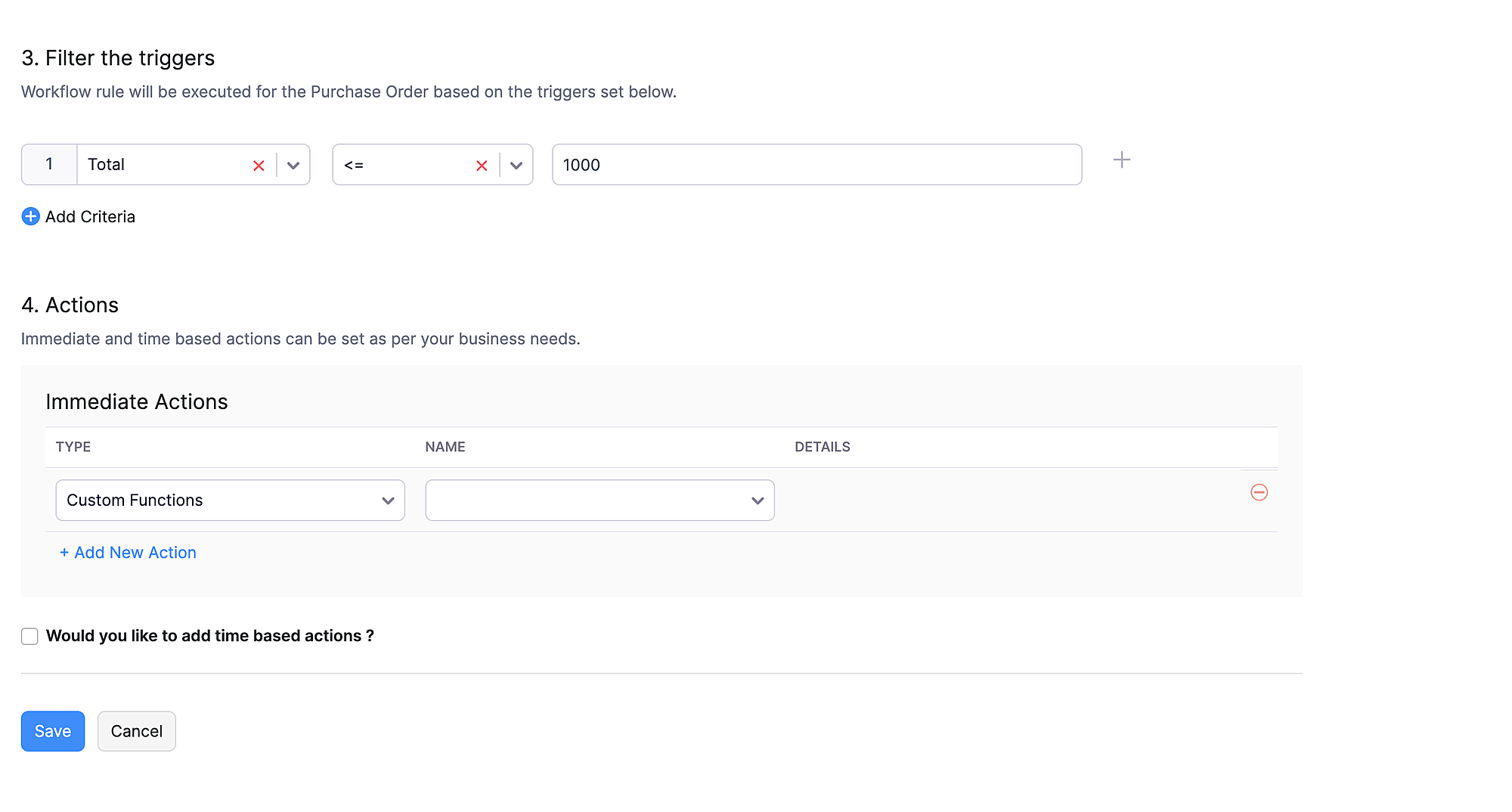
There may be cases when certain low-value transactions may not require review by the approvers and can be marked as "Approved" directly. In those cases, today's custom function can be employed. This function automatically marks the purchase orders as "Approved" when the total is less than or equal to $1000. You have the flexibility to define the base limit, so that purchase orders with a total below this limit are automatically approved.
Create a Connection named "zbooks" to successfully execute the function. You can watch the GIF attached below to know how to create the connection.

Custom Function:
Go to Settings -> Automation -> Custom Functions -> +New Custom Function > Add the function code from this GitHub link.
Workflow Rule:
Go to Settings -> Automation -> Workflow Rules -> +New Workflow Rule and set up the workflow rule as shown below:-

If you need to configure this custom function for any other module, please feel free to reach out to us at support[at]zohobooks[dot]com.
Regards,
Shireen Farhana S