Function #48: Manage fixed installment payments using Zoho Books

Hello everyone, and welcome back to our series!
Businesses offer installment payment options to their customers, particularly for expensive purchases, to ease the financial burden on them. By breaking down the total cost into smaller, more manageable payments, businesses can attract a wider audience who may not be able to afford large upfront payments. This approach not only increases the likelihood of making more sales, but also helps to spread revenue over time, improve cash flow, enhance customer satisfaction and loyalty, and provide a competitive advantage in the market.
We receive numerous requests from our users regarding the handling of these installment scenarios. We heard you loud and clear. Today, we are excited to share a solution that utilizes custom functions to manage installment payments in Zoho Books.
Let's take the example of Mr. John Hector, who wants to buy a 75-inch TV from Zylker Electronics, priced at a hefty $2,300. He is finding it difficult to pay the entire amount upfront. Therefore, Zylker Electronics offers him the option to pay in installments. They mutually decide that John will spread the payment over 5 months, committing to monthly installments of $460 until he settles the entire purchase amount. Let's delve into how this process can be efficiently managed within Zoho Books using custom functions.
Firstly, Zylker Electronics should create a sale invoice of $2,300 in their Zoho Books organization. While creating it, they should input the start date of the installment and the number of installments in two custom fields. For instance, if the sale was made on 01.04.2024 and Mr. John agreed to pay in 5 installments starting on 10.05.2024, the start date should be entered as 10.05.2024, and the number of installments as 5.
Two custom functions will come into play: one to generate the retainer invoices to collect the installment payments and another to apply the retainer payments to the sale invoice.
Based on the number of installments entered the function will determine the amount to be charged as monthly installments.
Installment amount = Total Amount Payable / No of installments = $2300 / 5 = $460.
On the specified start date, the first function will create and send the retainer invoice for the first installment. Once the payment for this installment is recorded, the second function will apply it to the sale invoice, reducing the balance accordingly. The process repeats each month, generating and sending retainer invoices for subsequent installments until all 5 are completed. Each retainer invoice will be for $460 and due on the 10th of every month for 5 consecutive months. As each retainer invoice is paid, the second function will automatically apply it to the sale invoice, thereby recognizing the income.
Prerequisites:
1. Create a Connection named "zbooks" to successfully execute the scheduler. You can watch the GIF attached below to know how to create the connection.

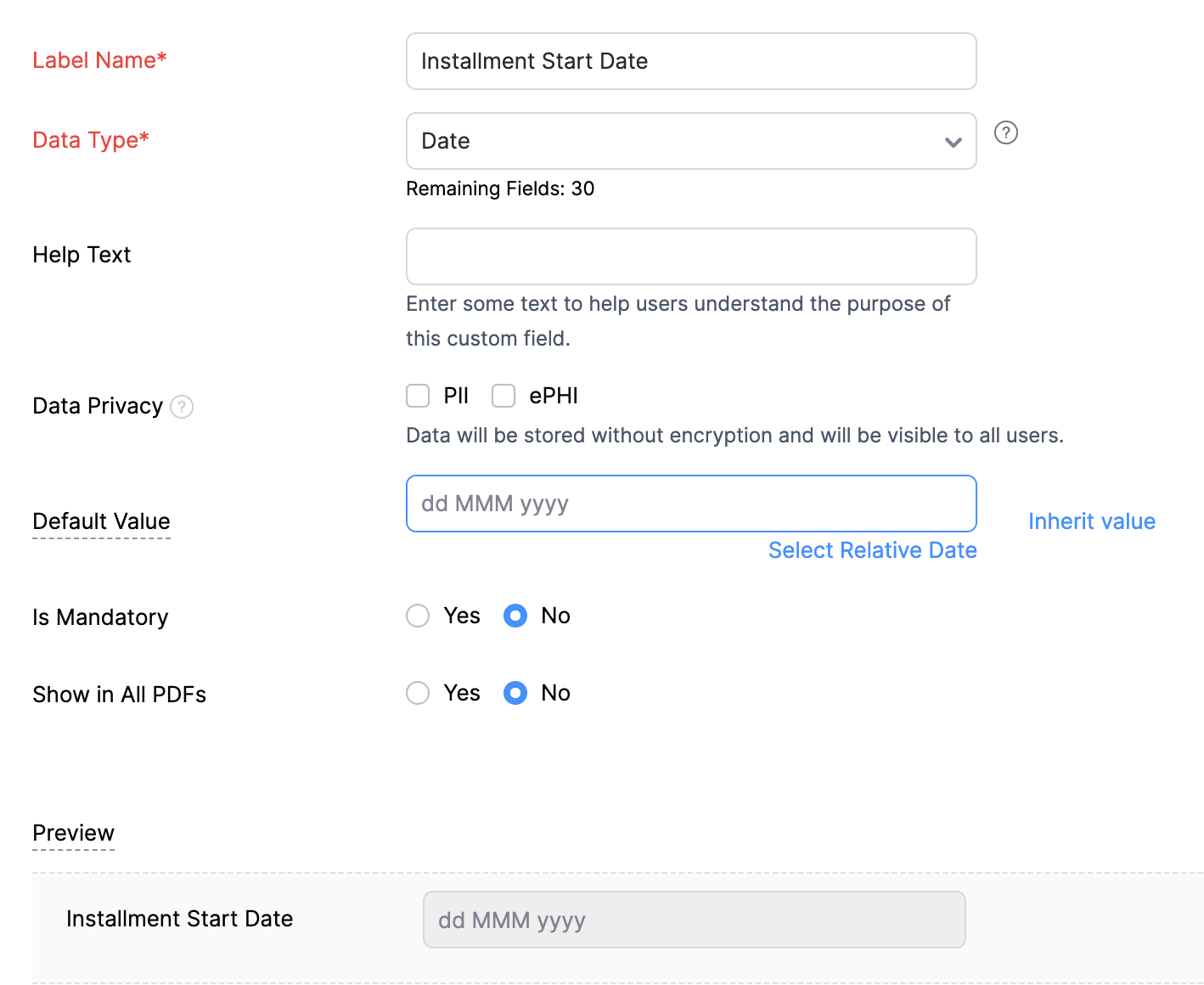
2. Create a Date-type custom field called "Installment Start Date" for the Invoices. This field will be used to input the starting date for installment payments.
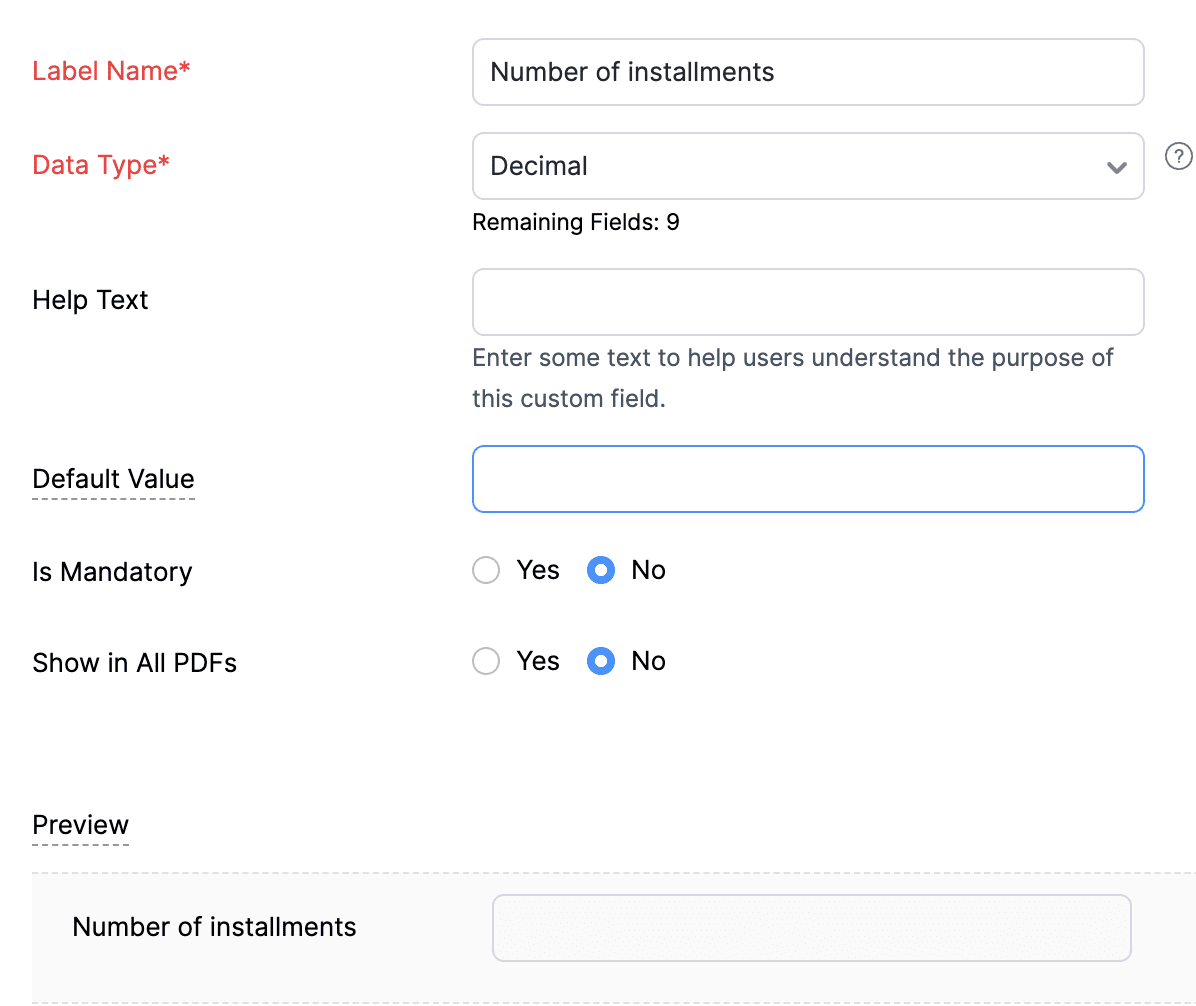
3. Create a Decimal-type custom field called "Number of installments" for the Invoices. Here, you'll specify the agreed-upon number of installments. Using this information and the total invoice amount, the function will determine the monthly installment amount.
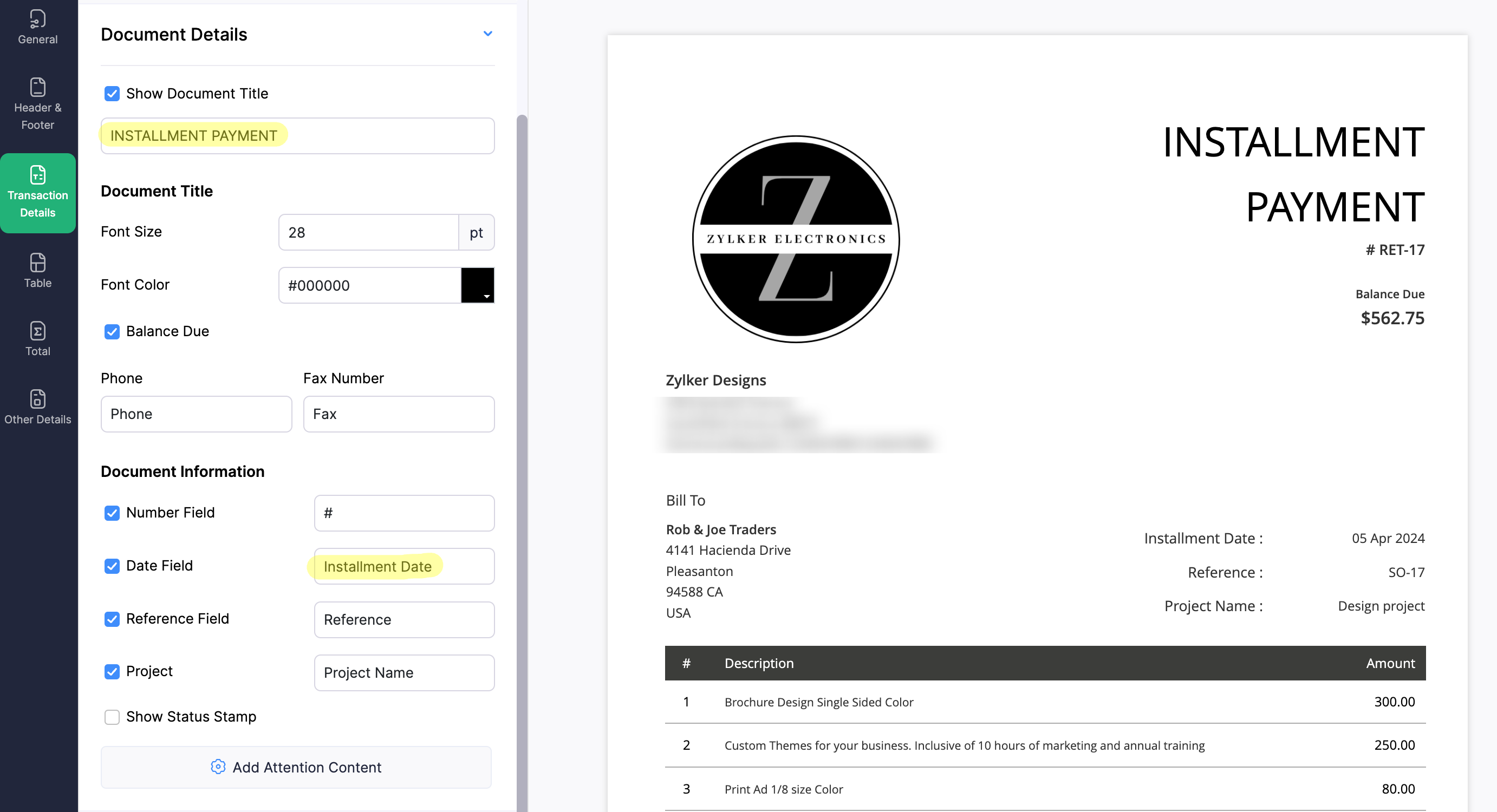
4. Create a new Retainer Invoice template with the document title "Installment Payment". Then, copy the template ID (You can get the ID from the URL of the webpage) and substitute it into line 26 of the first function. This ensures that all the retainers sent for collecting installment amounts are correctly labeled.
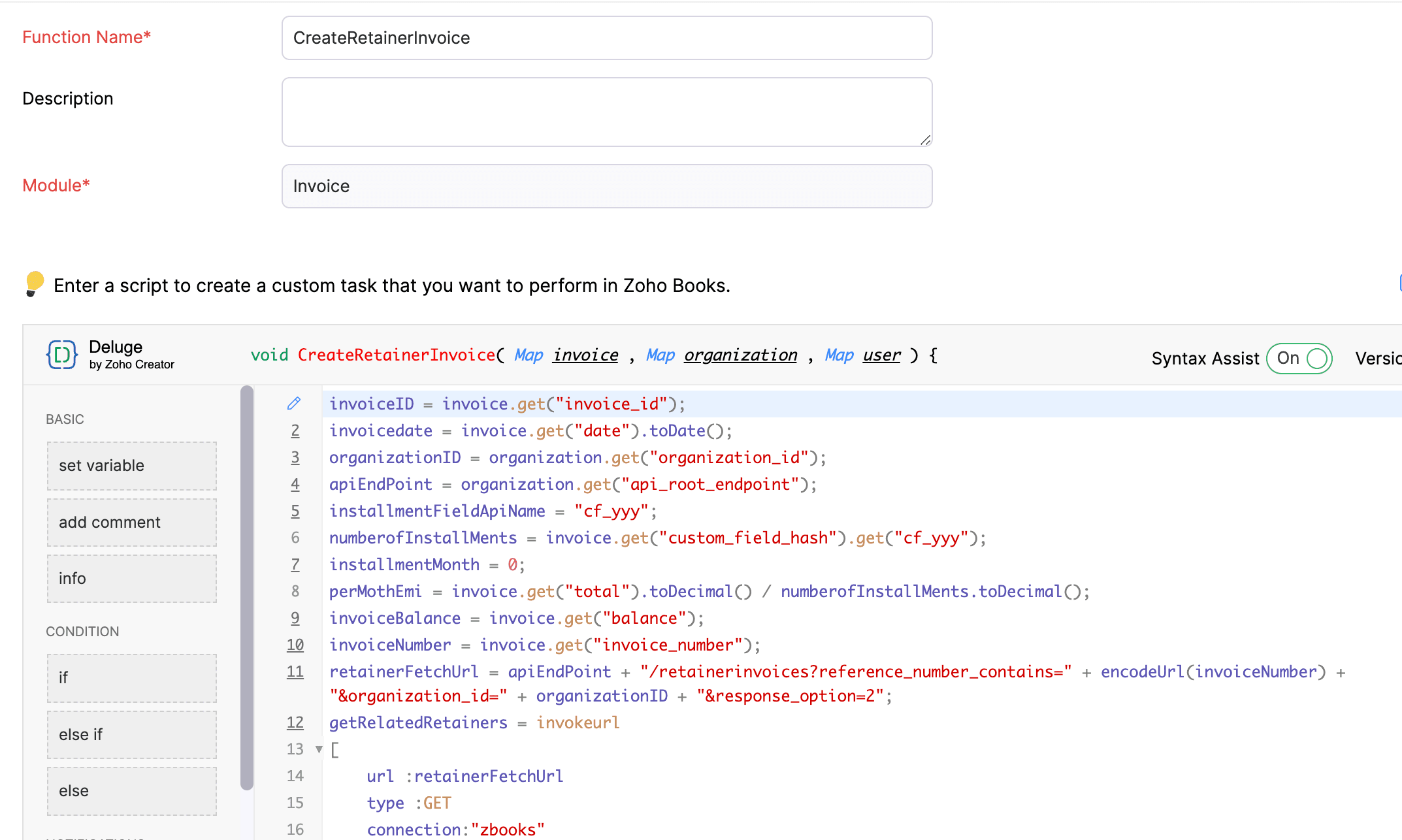
(1) Custom Function to create Retainer Invoices:
Navigate to Settings -> Automation -> Workflow Actions -> Custom Functions -> +New Custom Function -> Module -> Select Invoice -> Add the function code from this GitHub Link -> Save.
(2) Workflow Rule to create Retainer Invoices:
Go to Settings -> Automation -> Workflow Rules -> +New Workflow Rule and set up the workflow rule as shown below:-


In the final step of this workflow rule, associate the custom function you created and then hit Save.
(3) Custom Function to apply installment payments to the sale invoice:
Navigate to Settings -> Automation -> Workflow Actions -> Custom Functions -> +New Custom Function- > Module -> Select Retainer Invoice -> Add the function code from this GitHub Link -> Save.

(4) Workflow Rule to apply installment payments:
Go to Settings -> Automation -> Workflow Rules -> +New Workflow Rule and set up the workflow rule as shown below:-
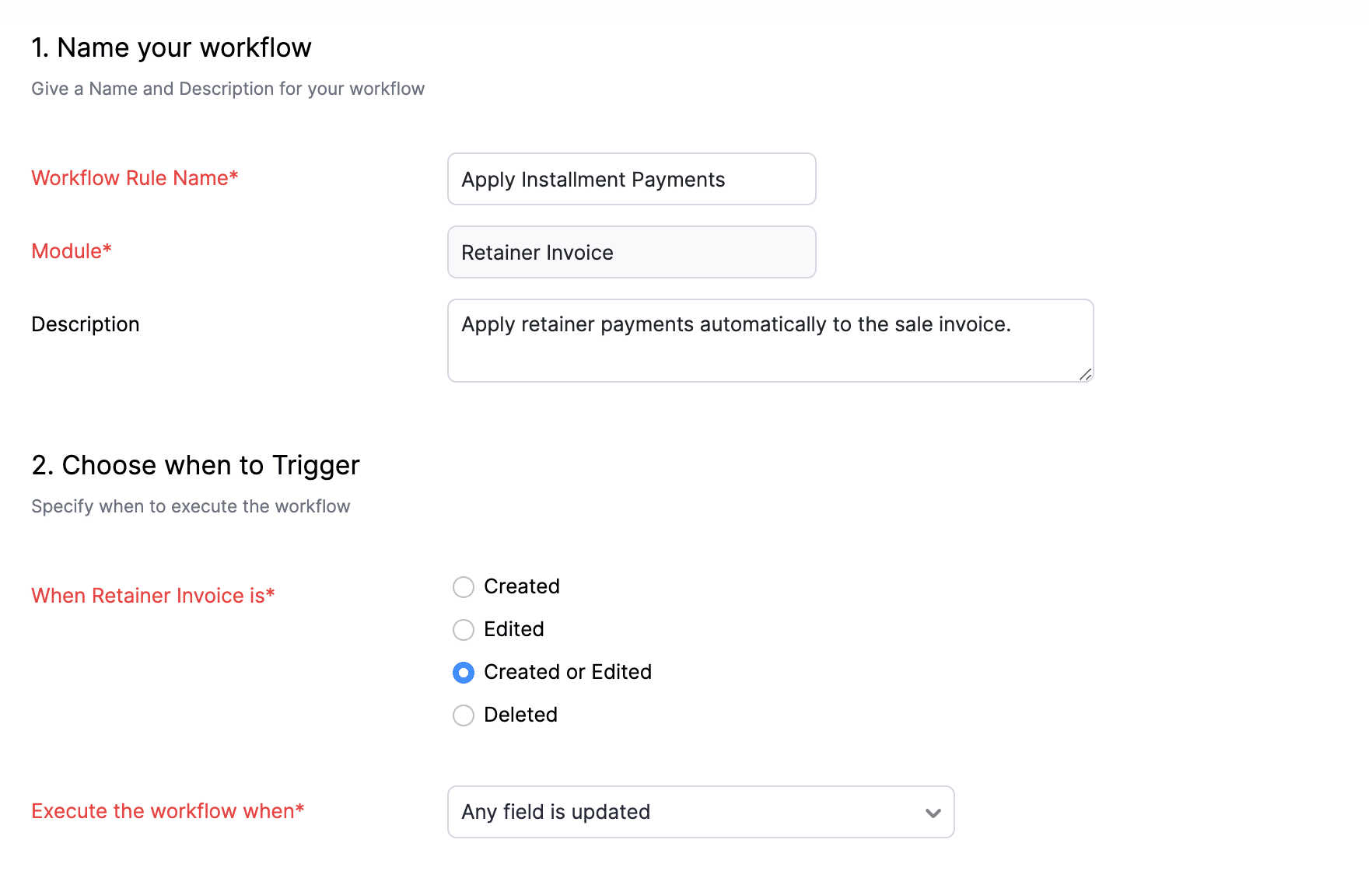
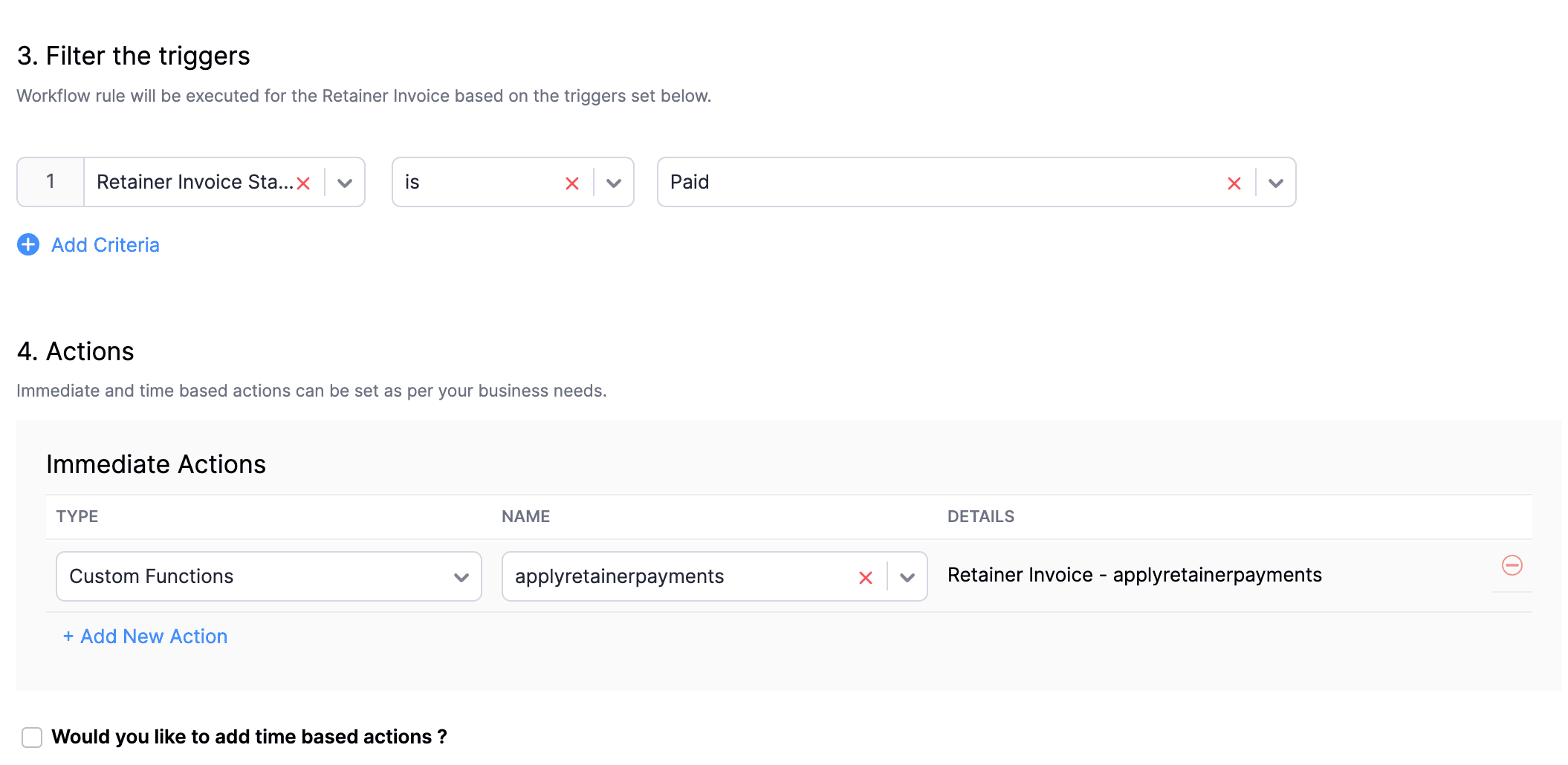
In the final step of this workflow rule, associate the custom function you created and then hit Save.
We really hope that today's functions help you streamline the process of handling installments in Zoho Books. If you need any assistance in customizing the functions to better suit your needs, please do not hesitate to contact us at support[at]zohobooks[dot]com. We are always happy to help you.
Also, for those looking to collect varying percentages of the invoice total as installments, stay tuned!
Regards,
Shireen Farhana
Zoho Books
Topic Participants
Shireen Farhana
Dmitry Solovyev
Dylan Cleppe
Julio Cazaroto
Maj
Sticky Posts
Introducing Invoice Consolidation for Offline Subscriptions
Hello Folks, Glad to announce the feature of Invoice Consolidation for Offline Subscriptions. If you are having multiple subscriptions for your customers, now, you can send a single consolidated invoice for all the Offline Subscriptions that are getting renewed on the same date. Advantage? Customers will be receiving single invoice instead of multiple invoices upon renewal. Also reduces your efforts in follow-up with your customers for payment collections. For Example: If Customer has SubscriptionNew feature: Create back-dated subscriptions
Hello from the Zoho Subscriptions team. :) We’re happy to announce that today marks the launch of a much-awaited feature: creating back-dated subscriptions! From here on out, whenever you create a new subscription with an activation date that is earlier than the present date, you’ll no longer get an error. Instead, you'll be creating a back-dated subscription. This means that the subscription started at that earlier point in time. The next billing date will be calculated automatically based onAnnouncement Regarding Notification Emails
Hello Everyone! This announcement is regarding the admin notification emails which you've been receiving from the email address "support@zohosubscriptions.com". From the 1st of October, 06:00 GMT, the emails with the following subjects will be sent from "no-reply@zohosubscriptions.com". Unable to send invoice for the profile - {profile_name} Unable to process auto payments. If you have set up any filters or workflow in your email account, please add "no-reply@zohosubscriptions.com” and “support@zohosubscriptions.com”Zoho Subscriptions plugin for WordPress
Zoho Subscriptions plugin for WordPress allows you to easily embed your plan specific checkout page in an iframe with just a few mouse clicks and without a single line of code. How can WordPress Zoho Subscriptions Plugin boost your productivity? It's now easier to embed Zoho Subscriptions checkout page in your WordPress site. Forget the old method of logging in to Zoho Subscriptions, copying a URL and scripting to make adjustments. All this can be done automatically through this plugin. A great timeIndian GST organisation Migration Guide
With respect to the new GST regime releasing on July 1, 2017in India, Zoho Subscriptions Indian edition is also gearing up to make your business GST Ready. This article focuses on how to get your existing organisation in Zoho Subscriptions to migrate to the new GST regime. Note: Any organisation created on or after July 1, 2017 will already be GST ready. You wouldn't have to migrate your organisation. Migrating your existing organisation to support GST To migrate your existing organisation to
Recent Topics
Batch Emails in CRM Plus without using a template?
Hi guys. Is it possible to send the same email to multiple people at the same time within CRM Plus without using an email template? At the moment we create a custom view in Contacts to display the people that we need. We then click the boxes on the left, and click 'Send Mail', but always need to select a template. Sometimes its better to write a quick one off message, without needing to set up a template first. Thanks.bank charge
a charge to my account was made that I did not authorize, of $16.46, for something that looks like "computer maintenance or something to that matter". please refund.[Free Webinar] Product Updates: Quick Catch-Up Session - Part II - Creator Tech Connect
Hello Everyone! We welcome you all to the upcoming free webinar on the Creator Tech Connect Series. The Creator Tech Connect series is a free monthly webinar featuring deep-dive technical sessions designed for developers, administrators, and app builders.Introducing Liquid Glass UI on the Zoho Mail iOS app
Hello everyone! We're excited to announce that the Zoho Mail app is now fully optimised for iOS 26's Liquid Glass design on both iPhone and iPad! The updated interface features transparent layers, smooth animations, and refined visual elements that enhancePlan change from Zoho One to Zoho Workplace
Hello Zoho, Following the recent pricing update for Zoho One, we are interested in transitioning to Zoho Workplace products. Please inform us about the necessary steps for this process so we can proceed promptly. Kind regards,Links in Instagram
Hi there, I have been using Later for a while now but keen to come back to Zoho Social as Later doesn't offer tagging of pages on Facebook but they offer something Zoho doesn't. You can add a link to your bio which opens up your profile feed where imagesSpotlight #7 - Automatic Transitions in Blueprint
Previously, records could not be moved from one state to another without user intervention. With automatic transitions, move records from one state to another automatically, when it elapses its pre-defined time. This Spotlight discusses how automaticSub Folders
It would be great if there could be sub-folders in reports. We have a ton of individual reports and folders that would be easier to navigate this wayZoho CRM Community Digest - November 2025 | Part 2
Hello Everyone! Second half of November brought several exciting updates, especially around Zia, making AI assistance smarter, faster, and more context-aware. We also feature engaging community snippets highlighting members who went the extra mile toZoho CRM - Writing Assistant Tone
Hi Zoho CRM Team, Text in my emails often gets underlined in yellow because I tend to use a more informal tone with my client's, like using "I'm" instead of "I am". Is there some way for me to tell the system that this is my preferred writing tone, soHide Contact Number for Field Users & Agents
Is it possible to hide the contact number in both the Service Appointment and Work Order modules for field users and agents? The agents are using the Zoho FSM mobile app, and we want to restrict them from viewing the contact number.Form Submission Emails
Is there a current delay with submission emails being sent? We've had 10-20 forms completed today but only a handful of emails.Subform edits don't appear in parent record timeline?
Is it possible to have subform edits (like add row/delete row) appear in the Timeline for parent records? A user can edit a record, only edit the subform, and it doesn't appear in the timeline. Is there a workaround or way that we can show when a user【Zoho CRM for Everyone】設定画面のアップデート
ユーザーの皆さま、こんにちは。コミュニティチームの藤澤です。 今回は「Zoho CRM アップデート情報」の中から、Zoho CRM for Everyone の設定画面のアップデート情報をご紹介します。 目次 設定ホーム画面の追加 設定画面での検索結果の表示形式の変更 設定画面でのよく使用する機能の表示 設定メニューの展開/折りたたみ状態の保持 1. 設定ホーム画面の追加 ホーム画面の設定項目は、直感的に分類できるように"カテゴリごと"で分けられています。 このような一元化された表示により、各ツールが1つの画面に集約され、必要な機能をより簡単に見つけられるようになりました。What's New - November 2025 | Zoho Backstage
A new month, a new set of updates. With a mix of new features and thoughtful improvements, you get smoother workflows and better control across registrations, exhibitors, and communications. Let's take a look at what's new and enhanced in Zoho BackstageZoho Checkout - Duplicate Customer record created for each payment received
Hi All. We are using Zoho Checkout to capture online payments for a club membership form (in Zoho Forms). We've noticed that each new payment seems to create a new customer record, regardless of whether the customer already exists in the Zoho FinanceTemplates for Zoho Desk - Knowledge Base
We are looking at migrating our Knowledge base into Zoho Desk. Is there a way of creating templates for article in Knowledge base. We want to be able to set templates for certain types of content. Is this possibleImport KB template OR Export template for zoho desk?
Greetings. Can you tell me if there is a way to get an EXPORT of my KB articles? OR is there a template you supply for importing KB articles into my zoho desk? I am looking for a method of understanding what fields can be imported, and what their possibleWhat KPIs Do You Use to Measure Your Support Team’s Performance in Zoho Desk?
Hi everyone, We hope you’re all doing well. We are trying to improve how we measure the performance and effectiveness of our support department, and we would really appreciate learning from the community. We assume there are several common and widely-usedBackorder quantity change
New Purchase Order × Almost there, but... Quantity of items in this purchase order is greater than the quantity that can be backordered from that sales order. Why can't I change the quantity of a backorder purchase? It looks like a normal order form and I would like to use it as one because I increased the amount and added some items.How to Associate multiple contacts with deal in Sales Inbox
Hello, I have many deals that have multiple potential customers associated with a single deal, for example an engineer and a manager. The manager is the Deal's primary contact in CRM and the Engineer is added to the deal in the "Contact Roles" Associated"code": "500","description": "Account not exists", mail api
I have been through all the steps and have a functioning Oath access_token etc etc... I then GET https://mail.zoho.com/api/organization And get my zoid then GET http://mail.zoho.com/api/organization/<hidden>/accounts and get the account details, whichRTL Support for Webforms in Zoho CRM
Dear Zoho CRM Support Team, We are writing to request an enhancement to the webform builder functionality within Zoho CRM. Currently, to create a webform in a right-to-left (RTL) language, the entire CRM instance must be set to RTL, which can be inconvenientImported contacts succesful but contacts do not show up in Contacts
I imported +300 contacts. I can see them in import history. When clicking on a contact in import history I see all the imported contact details for any given contact. So import seems to be successful. However the imported contacts do not show up in the contacts tab. Not in All contacts, and not in a filtered view where they absolutely should show up. The search function also does not find any imported contact. Help?Saving sent email campaign as PDF
I'm looking to add all campaigns sent to an archive folder in sharepoint. Is there anyway to accomplish this in Zoho Flow ? I'm falling at the first hurdle ... can I automatically save a sent campaign as a PDF to a folder location ?Zoho Voice lance BYOC (Bring Your Own Carrier) : intégrez votre opérateur
Pour accompagner sa croissance, une entreprise a besoin d’une infrastructure téléphonique flexible et évolutive. Les solutions de téléphonie s’adaptent aux exigences du centre de contact, tout en intégrant aisément les opérateurs locaux de votre choix.Zoho Social API for generating draft posts from a third-party app ?
Hello everyone, I hope you are all well. I have a question regarding Zoho Social. I am developing an application that generates social media posts, and I would like to be able to incorporate a feature that allows saving these posts as drafts in Zoho Social.Digest Novembre - Un résumé de ce qui s'est passé le mois dernier sur Community
Bonjour chers utilisateurs, Avec l'arrivée du dernier mois de l'année, il est temps de résumer les activités de novembre dans la communauté Zoho France. Ce mois-ci, Zoho Webinar se dote de deux nouvelles intégrations ! La première est avec Zapier : connectezE-Invoicing in Belgium with Zoho Books
Starting January 1, 2026, Belgium is introducing mandatory electronic invoices (e-invoicing) for all B2B transactions between VAT-registered businesses. This means that invoices and credits notes must be exchanged in a prescribed digital format. How E-InvoicingAnnouncing new features in Trident for Mac (1.30.0)
Hello everyone! We’re excited to introduce the latest updates to Trident, bringing you a more seamless, intuitive, and secure communication experience. Let’s take a quick look at what’s new. Work with PST/EML files more efficiently. You can now do moreOpen Form in Same window as Page from embedded Report
I have a page that has an embedded report, as shown below. When I click the + sign to add a new record, the form shows up inside the page where the report was embedded. I know that I can add a custom action to the report grid or report detail view andPricing Strategies: #4 Counting on Discounts
"Is there any chance I can get a little discount on this month's service?" Maya hears this almost every time at her fitness studio. She offers monthly subscription plans for various services, including yoga, strength training, wellness sessions, and personalIntroducing Query Workbench in Zoho CRM
Hello everyone! We’re excited to announce the Query Workbench, a brand-new interface designed to improve developer experience of building Queries in Zoho CRM faster, simpler, and more intuitive. In the past, constructing queries required navigating acrossLimitation with Dynamic Email Attachment Capture
I've discovered a flaw in how Zoho Creator handles email attachments when using the Email-to-Form feature, and I'm hoping the Zoho team can address this in a future update. The Issue According to the official documentation, capturing email attachmentsAdd Customer in Books on Creator Form Submit Params
Hi guys, Were integrating a creator app with books however what were doing is adding a books customer on submit of creator form. We have some parameters but some fields aren't coping, All were seeing is the contact name in books,. Any help of the params for this would be great. below is a sample of the script... response = zoho.books.createRecord("contacts", "XXXXXXXXX", { "contact_name" : input.Name, "address" : input.Email });Weekly Tips: Protect Confidential Information with PGP in Zoho Mail
We deal with confidential information almost every day, whether it is being sent out or received. Though emails sent using Zoho Mail are encrypted both during transit and at rest, attempts to access and steal your sensitive data are always a threat thatSuggestion : link KB with Accounts
Hi Zoho teams. I think it could be good to link KB articles with : accounts in order to easily find articles dedicated to some account specificities. I tried to use tags , but tags are free text with not easy way to retrieve it directly from ticket or list article for one tag. Tickets : It would be a good way to measure usage of KB directly from ticket when we don't need to copy/paste KB in solution. And : Great Tool , keep going !Drag and Drop in Creator Application
Hi, I am in the planning phase of a new application and I would like to use 'Drag and Drop' in the user interface of my new Creator application that I am sketching out, but I don't seem to be able to find any reference that this is available to developers. In my instance I have table of entries and I would like to be able to allow users to move an entry to another table (much like you do in your own interface when creating a Pivot Table report. In addition, I would like the user to be able to re-orderIs there any way to integrate Zoho with Zapier?
Is there any way to integrate Zoho with Zapier? I'd like to use it to create a workflow, sharing posts from our Wordpress website to all our channels.Popular Articles Report
From data to decisions: A deep dive into ticketing system reports Content management teams can use various metrics to assess the effectiveness of knowledge base articles, improve content quality, and ensure articles are regularly updated. Predefined articleNext Page