Function #48: Manage fixed installment payments using Zoho Books

Hello everyone, and welcome back to our series!
Businesses offer installment payment options to their customers, particularly for expensive purchases, to ease the financial burden on them. By breaking down the total cost into smaller, more manageable payments, businesses can attract a wider audience who may not be able to afford large upfront payments. This approach not only increases the likelihood of making more sales, but also helps to spread revenue over time, improve cash flow, enhance customer satisfaction and loyalty, and provide a competitive advantage in the market.
We receive numerous requests from our users regarding the handling of these installment scenarios. We heard you loud and clear. Today, we are excited to share a solution that utilizes custom functions to manage installment payments in Zoho Books.
Let's take the example of Mr. John Hector, who wants to buy a 75-inch TV from Zylker Electronics, priced at a hefty $2,300. He is finding it difficult to pay the entire amount upfront. Therefore, Zylker Electronics offers him the option to pay in installments. They mutually decide that John will spread the payment over 5 months, committing to monthly installments of $460 until he settles the entire purchase amount. Let's delve into how this process can be efficiently managed within Zoho Books using custom functions.
Firstly, Zylker Electronics should create a sale invoice of $2,300 in their Zoho Books organization. While creating it, they should input the start date of the installment and the number of installments in two custom fields. For instance, if the sale was made on 01.04.2024 and Mr. John agreed to pay in 5 installments starting on 10.05.2024, the start date should be entered as 10.05.2024, and the number of installments as 5.
Two custom functions will come into play: one to generate the retainer invoices to collect the installment payments and another to apply the retainer payments to the sale invoice.
Based on the number of installments entered the function will determine the amount to be charged as monthly installments.
Installment amount = Total Amount Payable / No of installments = $2300 / 5 = $460.
On the specified start date, the first function will create and send the retainer invoice for the first installment. Once the payment for this installment is recorded, the second function will apply it to the sale invoice, reducing the balance accordingly. The process repeats each month, generating and sending retainer invoices for subsequent installments until all 5 are completed. Each retainer invoice will be for $460 and due on the 10th of every month for 5 consecutive months. As each retainer invoice is paid, the second function will automatically apply it to the sale invoice, thereby recognizing the income.
Prerequisites:
1. Create a Connection named "zbooks" to successfully execute the scheduler. You can watch the GIF attached below to know how to create the connection.

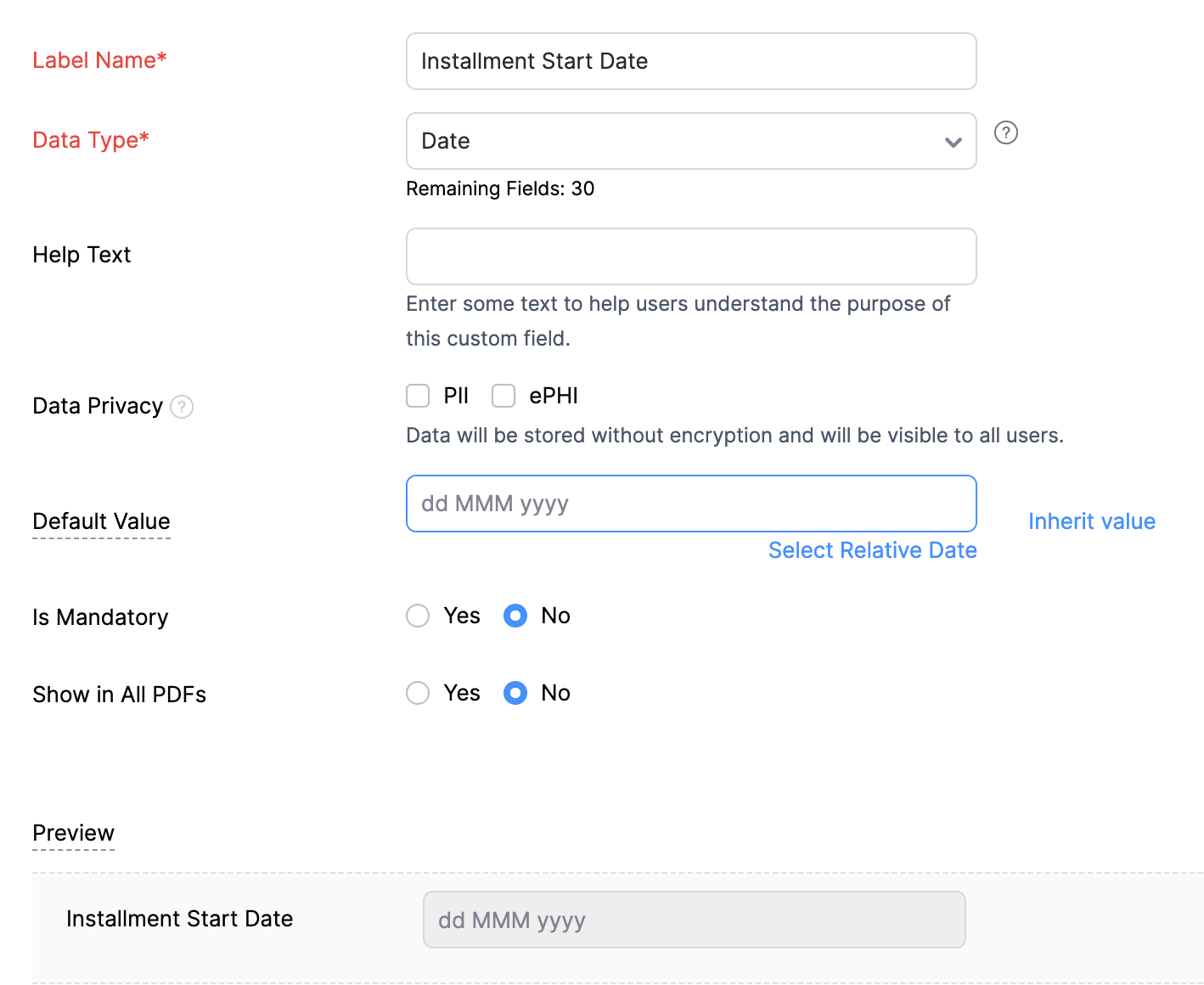
2. Create a Date-type custom field called "Installment Start Date" for the Invoices. This field will be used to input the starting date for installment payments.
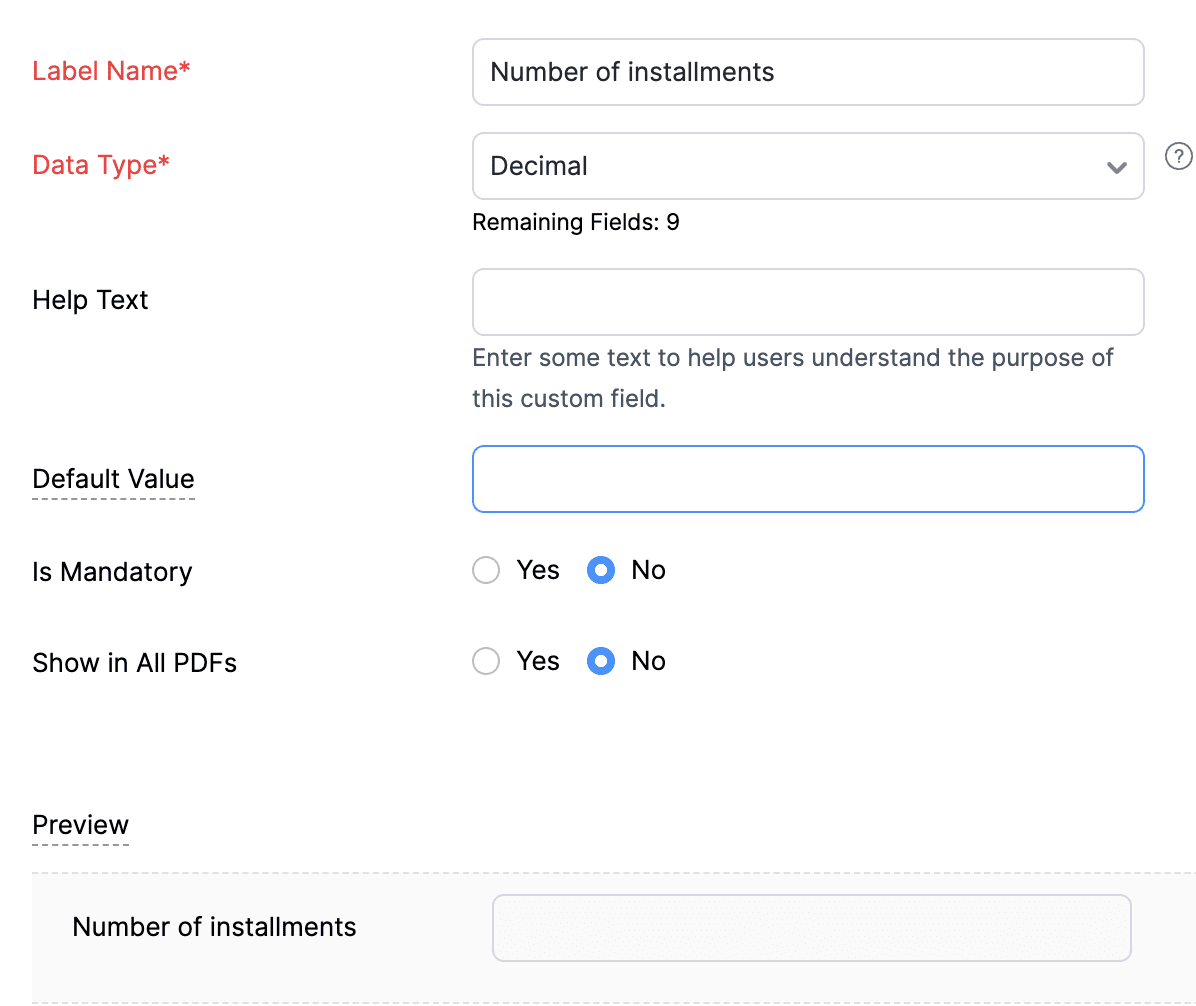
3. Create a Decimal-type custom field called "Number of installments" for the Invoices. Here, you'll specify the agreed-upon number of installments. Using this information and the total invoice amount, the function will determine the monthly installment amount.
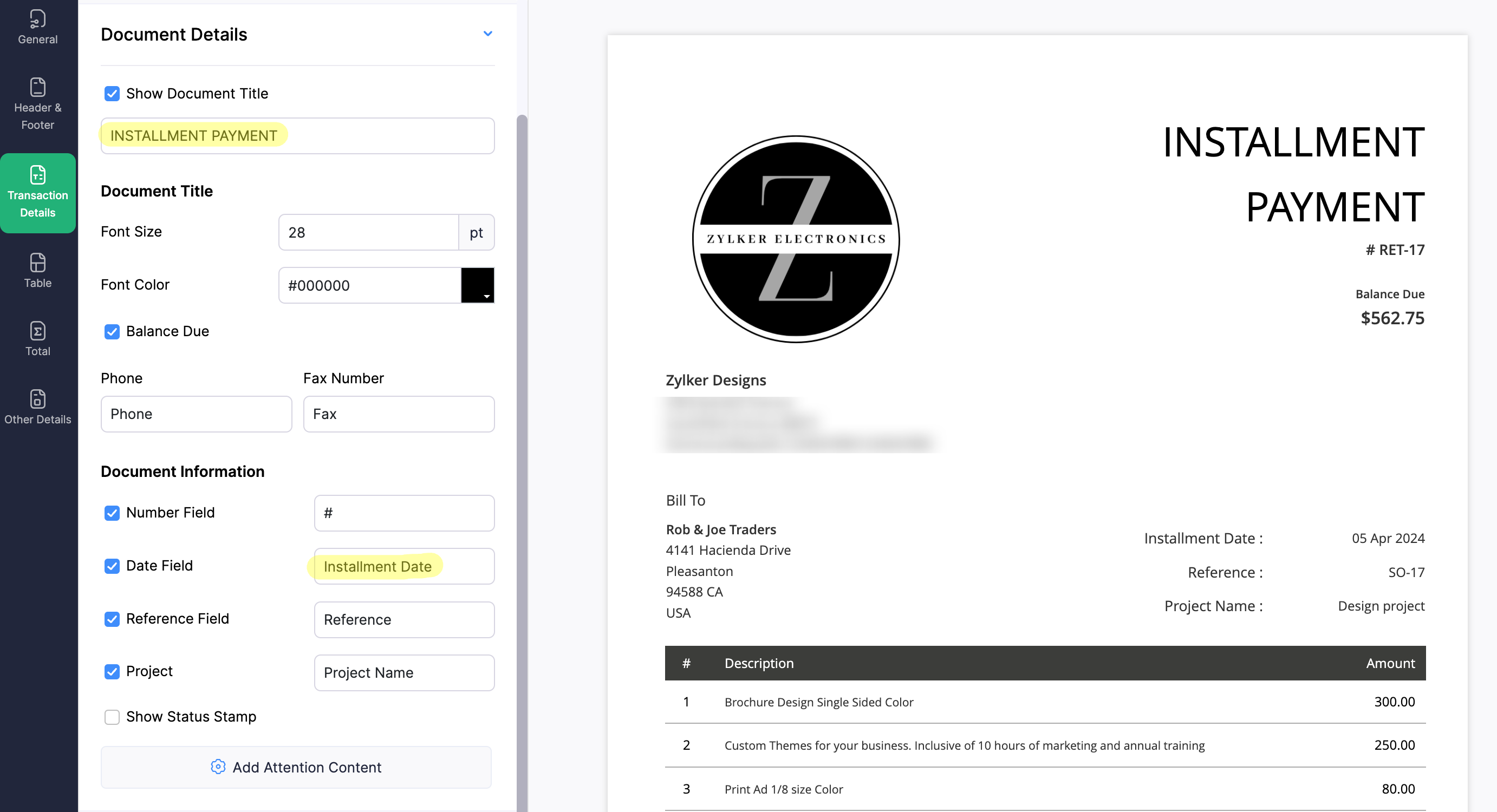
4. Create a new Retainer Invoice template with the document title "Installment Payment". Then, copy the template ID (You can get the ID from the URL of the webpage) and substitute it into line 26 of the first function. This ensures that all the retainers sent for collecting installment amounts are correctly labeled.
(1) Custom Function to create Retainer Invoices:
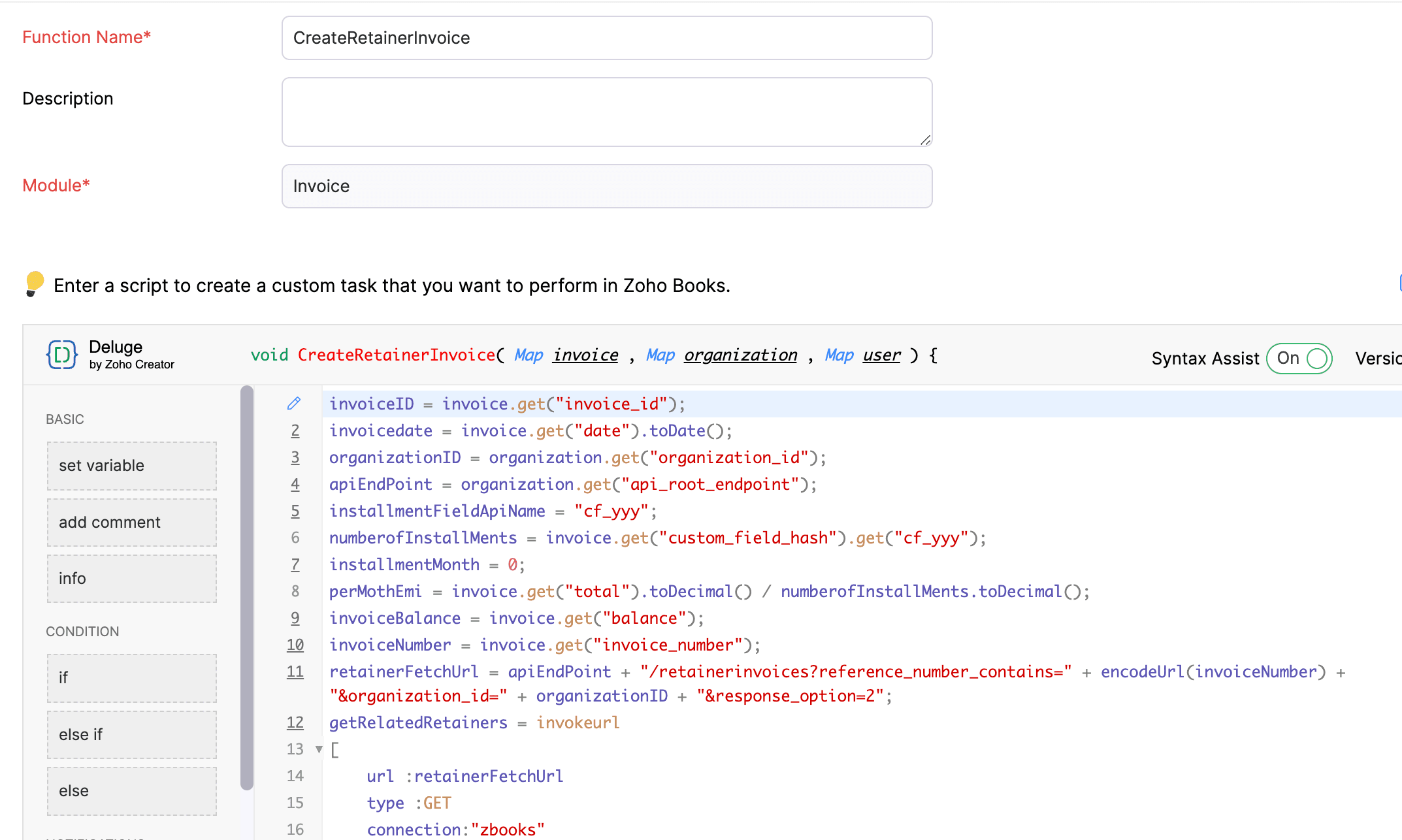
Navigate to Settings -> Automation -> Workflow Actions -> Custom Functions -> +New Custom Function -> Module -> Select Invoice -> Add the function code from this GitHub Link -> Save.
(2) Workflow Rule to create Retainer Invoices:
Go to Settings -> Automation -> Workflow Rules -> +New Workflow Rule and set up the workflow rule as shown below:-


In the final step of this workflow rule, associate the custom function you created and then hit Save.
(3) Custom Function to apply installment payments to the sale invoice:
Navigate to Settings -> Automation -> Workflow Actions -> Custom Functions -> +New Custom Function- > Module -> Select Retainer Invoice -> Add the function code from this GitHub Link -> Save.

(4) Workflow Rule to apply installment payments:
Go to Settings -> Automation -> Workflow Rules -> +New Workflow Rule and set up the workflow rule as shown below:-
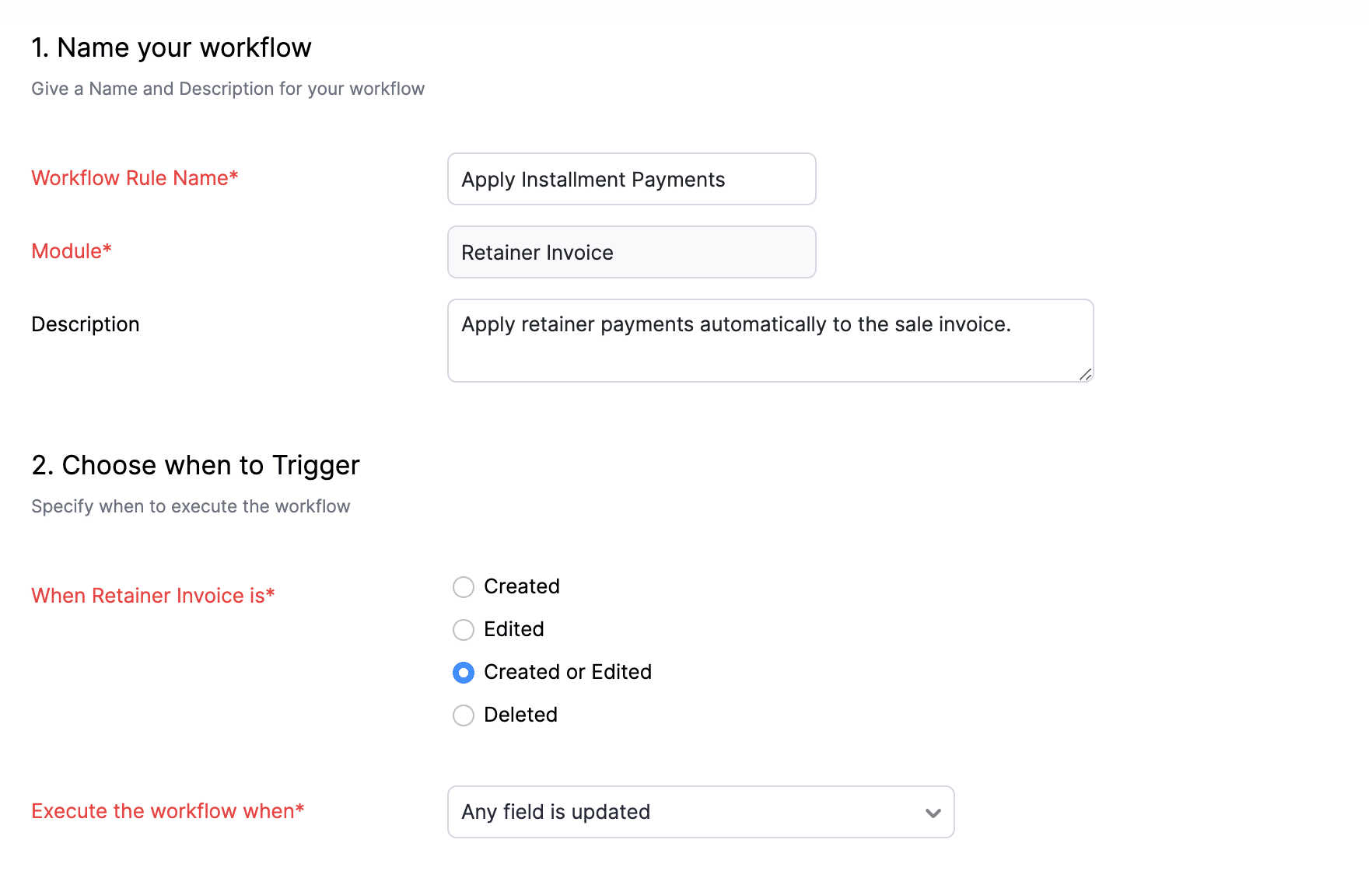
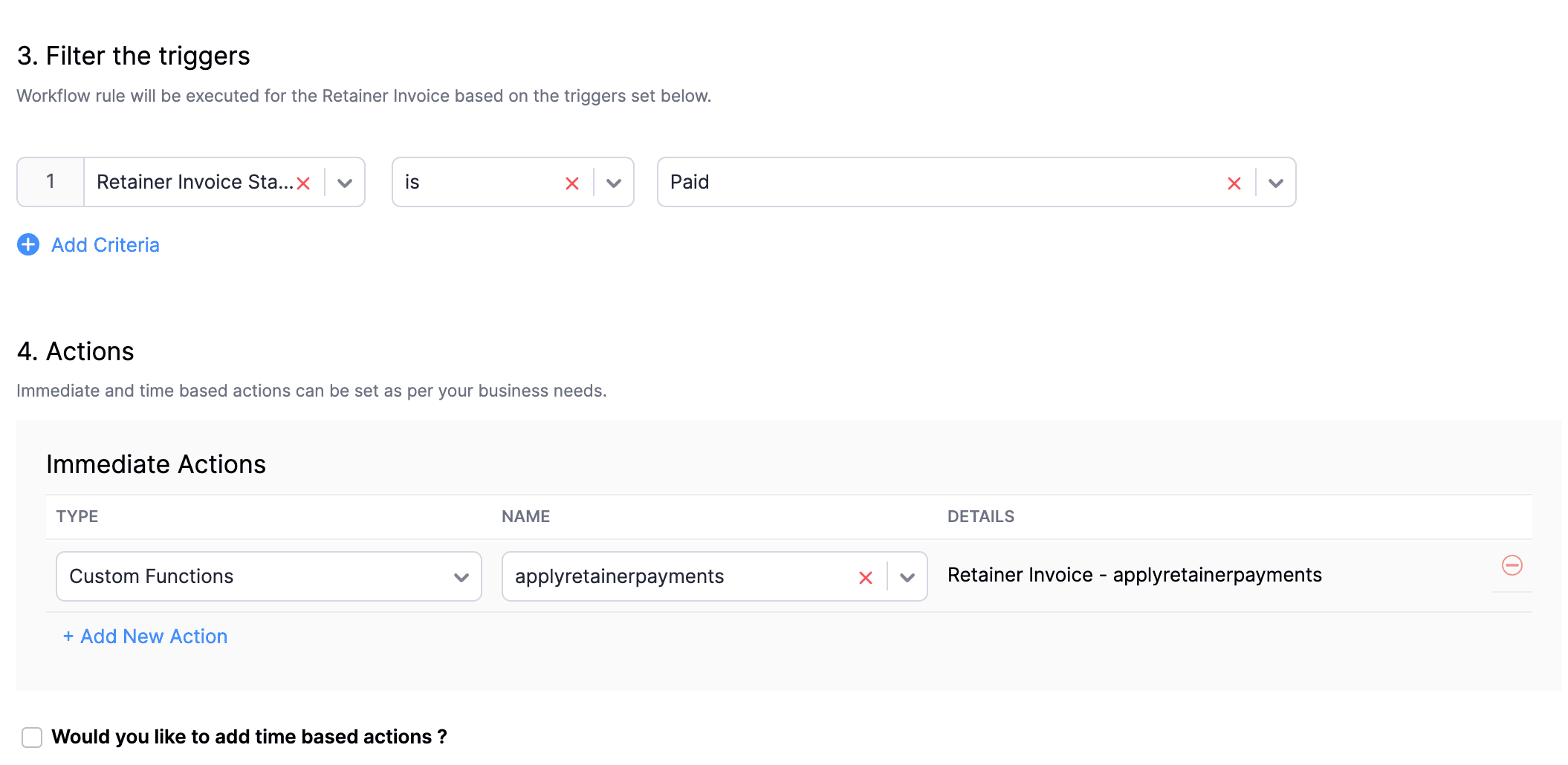
In the final step of this workflow rule, associate the custom function you created and then hit Save.
We really hope that today's functions help you streamline the process of handling installments in Zoho Books. If you need any assistance in customizing the functions to better suit your needs, please do not hesitate to contact us at support[at]zohobooks[dot]com. We are always happy to help you.
Also, for those looking to collect varying percentages of the invoice total as installments, stay tuned!
Regards,
Shireen Farhana
Zoho Books
Topic Participants
Shireen Farhana
Dmitry Solovyev
Dylan Cleppe
Julio Cazaroto
Maj
Sticky Posts
Introducing Invoice Consolidation for Offline Subscriptions
Hello Folks, Glad to announce the feature of Invoice Consolidation for Offline Subscriptions. If you are having multiple subscriptions for your customers, now, you can send a single consolidated invoice for all the Offline Subscriptions that are getting renewed on the same date. Advantage? Customers will be receiving single invoice instead of multiple invoices upon renewal. Also reduces your efforts in follow-up with your customers for payment collections. For Example: If Customer has SubscriptionNew feature: Create back-dated subscriptions
Hello from the Zoho Subscriptions team. :) We’re happy to announce that today marks the launch of a much-awaited feature: creating back-dated subscriptions! From here on out, whenever you create a new subscription with an activation date that is earlier than the present date, you’ll no longer get an error. Instead, you'll be creating a back-dated subscription. This means that the subscription started at that earlier point in time. The next billing date will be calculated automatically based onAnnouncement Regarding Notification Emails
Hello Everyone! This announcement is regarding the admin notification emails which you've been receiving from the email address "support@zohosubscriptions.com". From the 1st of October, 06:00 GMT, the emails with the following subjects will be sent from "no-reply@zohosubscriptions.com". Unable to send invoice for the profile - {profile_name} Unable to process auto payments. If you have set up any filters or workflow in your email account, please add "no-reply@zohosubscriptions.com” and “support@zohosubscriptions.com”Zoho Subscriptions plugin for WordPress
Zoho Subscriptions plugin for WordPress allows you to easily embed your plan specific checkout page in an iframe with just a few mouse clicks and without a single line of code. How can WordPress Zoho Subscriptions Plugin boost your productivity? It's now easier to embed Zoho Subscriptions checkout page in your WordPress site. Forget the old method of logging in to Zoho Subscriptions, copying a URL and scripting to make adjustments. All this can be done automatically through this plugin. A great timeIndian GST organisation Migration Guide
With respect to the new GST regime releasing on July 1, 2017in India, Zoho Subscriptions Indian edition is also gearing up to make your business GST Ready. This article focuses on how to get your existing organisation in Zoho Subscriptions to migrate to the new GST regime. Note: Any organisation created on or after July 1, 2017 will already be GST ready. You wouldn't have to migrate your organisation. Migrating your existing organisation to support GST To migrate your existing organisation to
Recent Topics
Free webinar alert on October 16 - Less Complexity, More Security: Workplace + Directory
Hello Zoho Workplace Community! Security and productivity shouldn't be at odds—and with Zoho, they're not. Discover how Zoho Workplace + Directory delivers seamless collaboration with enterprise-grade security, all in one integrated ecosystem. Join ourWorkdrive and ChatGPT Team Synced Connectors
Hi, we want to be able to integrate Zoho Workdrive with OpenAI’s ChatGPT Team plan. Google Drive and OneDrive both offer this, zoho please catch up asap. We dont want to have to put our company files in google drive, we want to allow chatgpt Team editionAlias Name (on items) use case in Zoho inventory
Hey, Hope everyone is well. Wondering if anyone can shed some light on the use case of Alias Names on Products in Zoho Inventory? Cheers, ChrisUpdating an Invoice Line Item's Discount Account via API Call / Deluge Custom Function
I need help updating an invoice line item's discount account via API. Below is a screenshot of the line item field I am referring to. Now the field to the left of the highlighted field (discount account) is the sales income account. I am able to modifySend e-mail with attachments
Dear Zoho, How is that possible in Zoho Flow to send an e-mail with attachment? Just a simple example: Zoho Flow checks my Zoho mails and if the conditions starts the trigger then I would like to send an email with the original email's attachment. Any idea? BR, AdamHow to I get checkboxes on a subform to update via deluge
Hello, would someone be able to tell me what I'm doing wrong here? I am trying to take the contents of a Deals subform and add them to an invoice then update the checkbox on each row so that 'add to invoice' is unticked and 'invoiced' is ticked. The outputUnified customer portal login
As I'm a Zoho One subscriber I can provide my customers with portal access to many of the Zoho apps. However, the customer must have a separate login for each app, which may be difficult for them to manage and frustrating as all they understand is thatZoho Projects - Task Owner filter at Project level
Hi Projects Team, The feature requests I would like to raise is the ability to create a custom view at the project level for projects with tasks owned by a user or users. For example "Ashley's Projects" custom view might contain a list of project in whichCadences
I have just started using Cadences for follow-up up email pipeline. Is it just me or do you find the functionality very basic? For example, it will tell me (if I go looking for it) if someone has replied to a follow-up and been unenrolled; but it won'tWould be really awesome to have Created Time and Modified Time showing for custom functions list
It would be SO HELPFUL to be able to sort custom functions by created time/ modified time. Also seeing a created by/ modified by with the little profile picture would be supremely helpful as well. Just really hard sometimes to find a function you wereTicket Export Does Not Include Ticket Threads
Dear Zoho Desk Support Team, I hope you’re doing well. I would like to report an issue regarding the ticket export functionality in Zoho Desk. Currently, when exporting tickets, the ticket threads or conversation history are not included — only the ticketPayments made notification
This is a really wonderful feature but we can only use it for about 50% of payments made & have to revert to sending statements which is a real chore. Credits applied to the bills paid in the notification aren't included & this causes great confusion in the accounts receivable departments. Please, please add this required feature asap ! .....ZOHO DESK link with Power BI
HI, I am using ZOHO Desk for last two years and now my client is asking to integrate ZOHO desk data to Power BI so that they can use Data for reporting. Kindly guide in details so that i can give access to ZOHO desk export data for more visibility.URLs being masked despite disabling tracking
Hey, We had disabled click tracking from an email update we are sharing with our users. Despite this, the URL the end user is receiving is masked, and looks like "https://qksyl-cmpzourl.maillist-manage.net/click/1d8e72714515cda6/1d8e72714515ca70" insteadDashboard Autorefesh
Good day, I am a dashboard that displays the number of tickets based on "Product Name". This dashboard is displayed on a big TV for the team to monitor. Can the dashboard auto-refresh every few minutes to display the new values? Currently, we have closedDeferred/ Unearned revenue
Dear Zoho Team, Just in case you have missed out my query posted few days ago: We issue invoices relating to 12-month web hosting service. When we issue the invoice, we should record the entire amount of the invoice as DEFERRED/UNEARNED REVENUE (ie. $10Bigin Android app update: Zoho Books integration
Hello everyone! We’re excited to introduce Zoho Books integration on the latest version(v1.8.5) Bigin Android app. Once the integration is completed in the web(bigin.zoho.com), the Zoho Books tab will be visible in detail View of Contacts, Companies,Audit Log enhancements: Increased retention period, better user visibility, and more
Hello everyone, The Audit Log brings in the following enhancements which improve the overall ability to manage data. Why did we make these updates? Extended Data Retention: Audit data can now be filtered and exported for a 60-day period, doubling theQuestion Regarding Managing Sale Items in Zoho Books
Good day, I was wondering about something. Right now, Zoho Books doesn’t seem to have a way to flag certain items as being on sale. For example, if I want a list of specific items to be on sale from October 1 to October 12, the user would have to exportSystem flaws and lack of response from Zoho
I have had to go on here as no-one is replying to my emails regarding my problem (been 10 days and no email reply) and your chat facility online through your Zoho Books software opens and closes immediately, so not functioning properly. I actually calledCustomer Grouping
Hi, how can I group multiple customers into single group. So that I can have idea of accounts receivables of all the customers in single group. Like if there are multiple subsidiaries of same company we have having a business with, and want to view theTwo currencies
More and more I am finding that internattional payments' fees are unpredictable. I would like, on my invoices that are in a foreign currency (eg. USD$ or EUR€) for there to be a GBP£ TOTAL display alongside the invoice's currency total. This would makeGST Slabs Redefined: Stay Compliant Using Zoho Books!
Hello Everyone! The Government of India is rolling out new GST rates, a major reform aimed at simplifying the current tax structure starting 22 September 2025. GST will move from four slabs (5%, 12%, 18%, 28%) to two main slabs (5% and 18%), plus a specialEdit item custom fields
Getting this error : Transactions have been created with the custom field. Hence it cannot be deleted. Not trying to delete it, just trying to change which modules to show in or to not show at all in transactions !Use Zoho Books to bill for work done in Zoho Desk??
I'm trying to see if something is possible (and if yes, how). We use Zoho One to manage our business. We have a lot of clients that will put in a ticket (via portal) to have work done. Out techs will pick up the ticket, do the work, and then log the timeZoho Finance Suite - Customer Custom Tabs - Dynamic Link
Hi Finance Suite team, When creating a Custom Tab for a Client Portal, there is no option to add dynamic parameters. This would be very helpful for adding Zoho Analytics dashboards which can be dynamically filtered through the URL to only show informationBank Receipt Catagorization
Hi, how can I match a bank deposit to multiple customer's invoices ? For e.g. A single person paid to us on behalf of different five customers. I need to keep the separated invoices for each customerPayment on a past due balance
Scenario: Customer is past due on their account for 4 months. We suspend their billing in Zoho books. Customer finally logs into the portal and enters a new credit card. We associate that cardwith their subscription, which will permit the card to be usedHow to export all line-item descriptions for a specific item in Zoho Books?
I am trying to audit a specific item (“Item X”) that has been invoiced multiple times with different line-level descriptions. Here’s the situation: I am using Zoho Books (Professional). Each invoice may contain the same item but with different descriptionsList of hidden features
Hi Friends, I had another support chat today and low and behold the feature that I wanted just simply needed to be "enabled". I thought I'd share, and maybe see if others had some similar experiences. 1. This one is from 5 ish years ago. I asked if thereHow to change a BAS that has been filed
I have discovered that a group of expense transactions were accidentally placed in a asset account rather than an expense account. As a result I need to adjust the transaction and consequently most of my BAS to correct the error. Because the BAS haveHow to Export PDF with a custom Template
I need to export Sales Order with a Custom Template I have created How can I do it? I see an API to export the PDF but how can I choose which template to choose to generate the PDFAssociate email with a potential or project.
I have a pivotal requirement to associate emails from various suppliers (contacts) with different potentials or projects, on an email by email basis as they come in. This question appears to have been raised before but I cannot find a definitive yes "it can be done". Could anyone please tell me, yes or no. If the later I can stop wasting time and look at alternative crm systems. I would love not to have to do this. Thanks in advance.Function with Search Records was working until a few weeks ago, around when "Connected Records" was released
I have a custom function that has been running for nearly a year now, which suddenly stopped working around the time Zoho released the "Connected Records" update. The function is no longer finding the record using the searchRecords function. I've changedIs CRM On Premise available
Hi Zoho team, Can you please let me know that CRM Zoho is available for On Premise as well? Thanks, DevashishHow to sync from Zoho Projects into an existing Sprint in Zoho Sprints?
Hi I have managed to integrate Zoho Projects with Zoho Sprints and I can see that the integration works as a project was created in Zoho Sprints. But, what I would like to do is to sync into an existing Zoho Sprints project. Is there a way to make thatOnline Assessment or any aptitude test
This video is really helpful! I have one question — if I share an assessment form link (through email or with the application form on my career page), how does Zoho Recruit evaluate it? Can a candidate use Google or external help while taking the test,Has anyone built a custom AI support agent inside Zoho (SalesIQ/Zobot)?
Hi all, I’ve been experimenting with building my own AI support assistant and wanted to see if anyone here has tackled something similar within Zoho. Right now, I’ve set up a Retrieval-Augmented Generation (RAG) pipeline outside of Zoho using FAISS. ItIncoming Threads Report
From data to decisions: A deep dive into ticketing system reports Customers raise questions and issues through multiple channels, such as email, chat, or tickets. To monitor the number of queries received on a specific day from each channel, leads canConditional layouts - support for multi-select picklists
Hi, The documentation for conditional layouts says the following: "Layout Rules cannot be used on the following field types: Auto Number Lookup Multi Select Lookup User Lookup Formula File Upload Multi Line" I have a custom module with a multi-pick listNext Page