Gestion des clients et des fournisseurs
Chaque entreprise accorde une grande importance à ses données clients et fournisseurs et il est désormais essential d'enregistrer les coordonnées de ces derniers pour créer des transactions rapidement et conclure des affaires.
Le module "Clients/ Fournisseurs"de Zoho Inventory vous permet d'enregistrer des détails tels que le nom, l'adresse e-mail, le numéro de téléphone, ládresse de facturation et d'expédition, les informations sur le site web. En complément de ces informations, vous pouvez envoyer des e-mails, consulter les relevés des clients et créer des transactions de vente pour le client dans la page de coordonnées elle-même.
Créer un client/ fournisseur
Il existe plusieurs façons d'ajouter de nouveaux clients/fournisseurs dans Zoho Inventory :
À partir du module "Clients"
- Sélectionnez le module "Clients" dans le panneau de gauche.
- Cliquez sur "+ nouveau".
- Saisissez les informations du client.
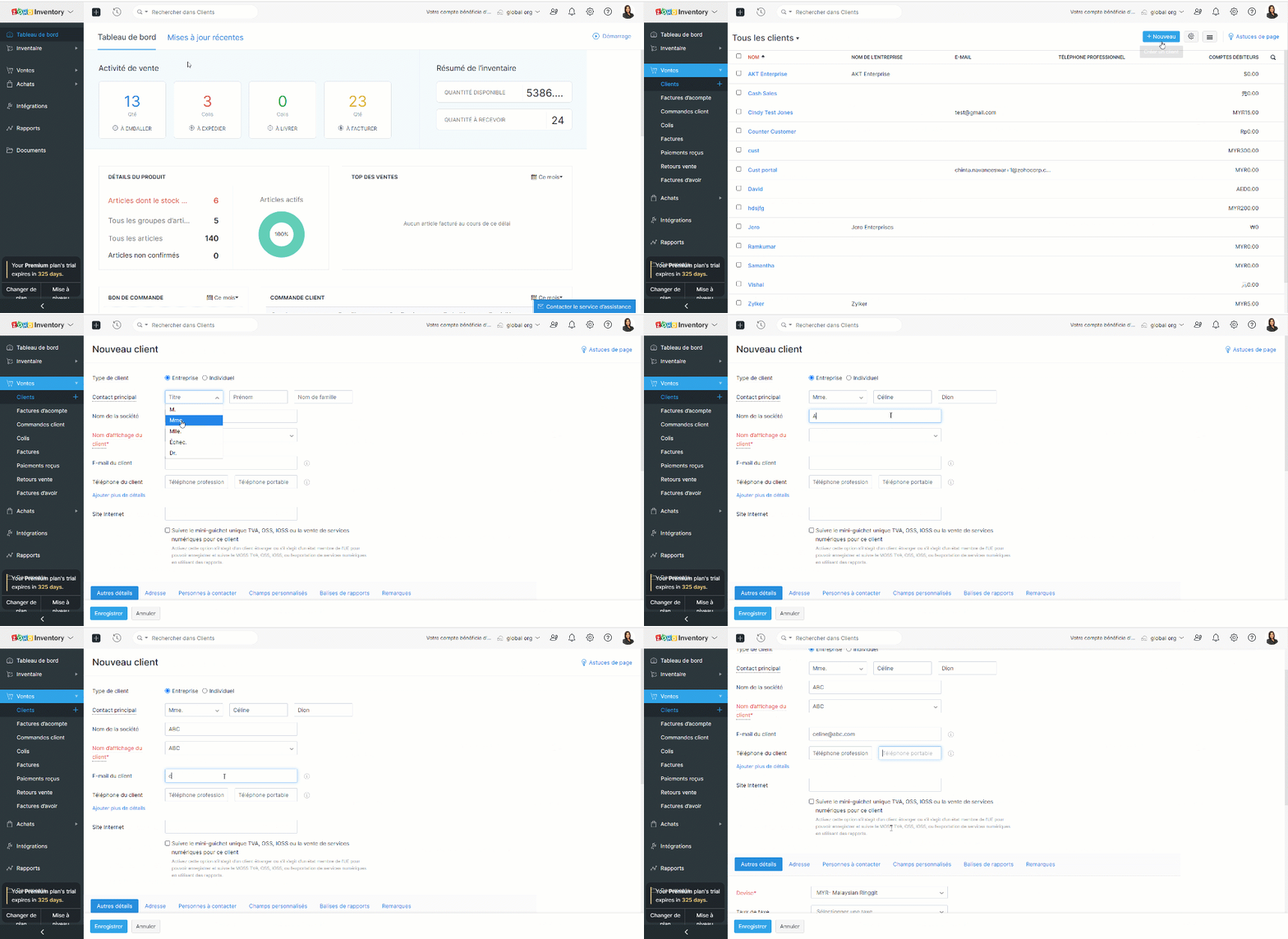
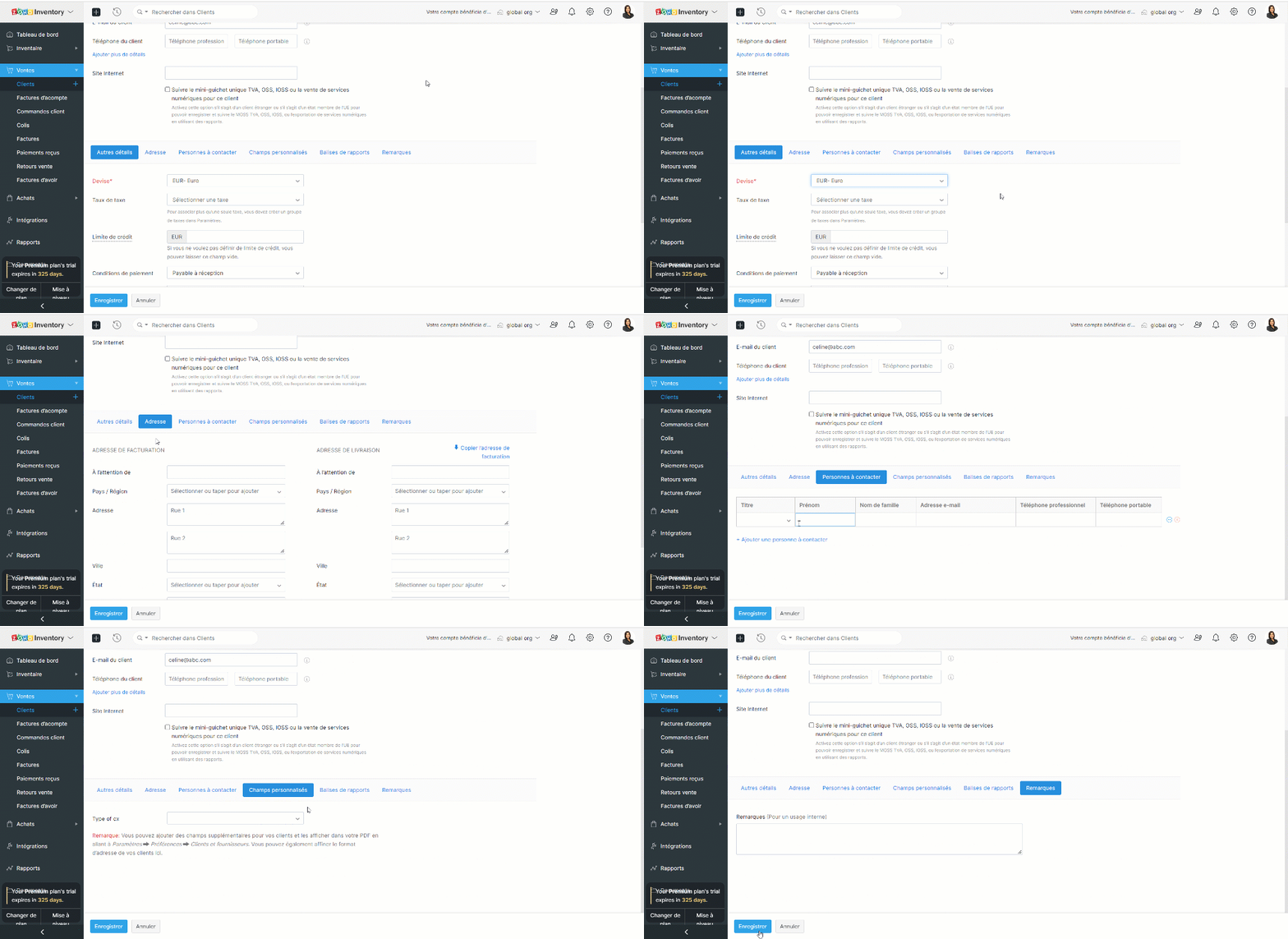
- Sous la section "Autres détails", vous pouvez saisir la devise et les conditions de paiement du client. Cette section comprend également des éléments permettant de saisir les détails des taxes et les liens vers les médias sociaux officiels de votre client.
- L'onglet "Adresse" vous permet de saisir les adresses de facturation et d'expédition de votre contact. Si l'adresse d'expédition est la même que l'adresse de facturation, cliquez sur "Copier l'adresse".
- L'onglet "Personnes à contacter" vous permet d'ajouter des coordonnées supplémentaires de votre client.
- Sous l'onglet "Champs personnalisés", vous pouvez afficher les champs que vous avez ajoutés dans votre préférence de contact. Les champs personnalisés sont des champs supplémentaires que vous ajoutez pour inclure des informations complémentaires concernant votre client. Avant de pouvoir ajouter ces informations ici, vous devez créer des champs personnalisés dans la section "Préférences".
- Sous l'onglet "Remarques", vous pouvez ajouter des notes sur ce client donné pour votre référence interne.
À partir du module "Fournisseur"
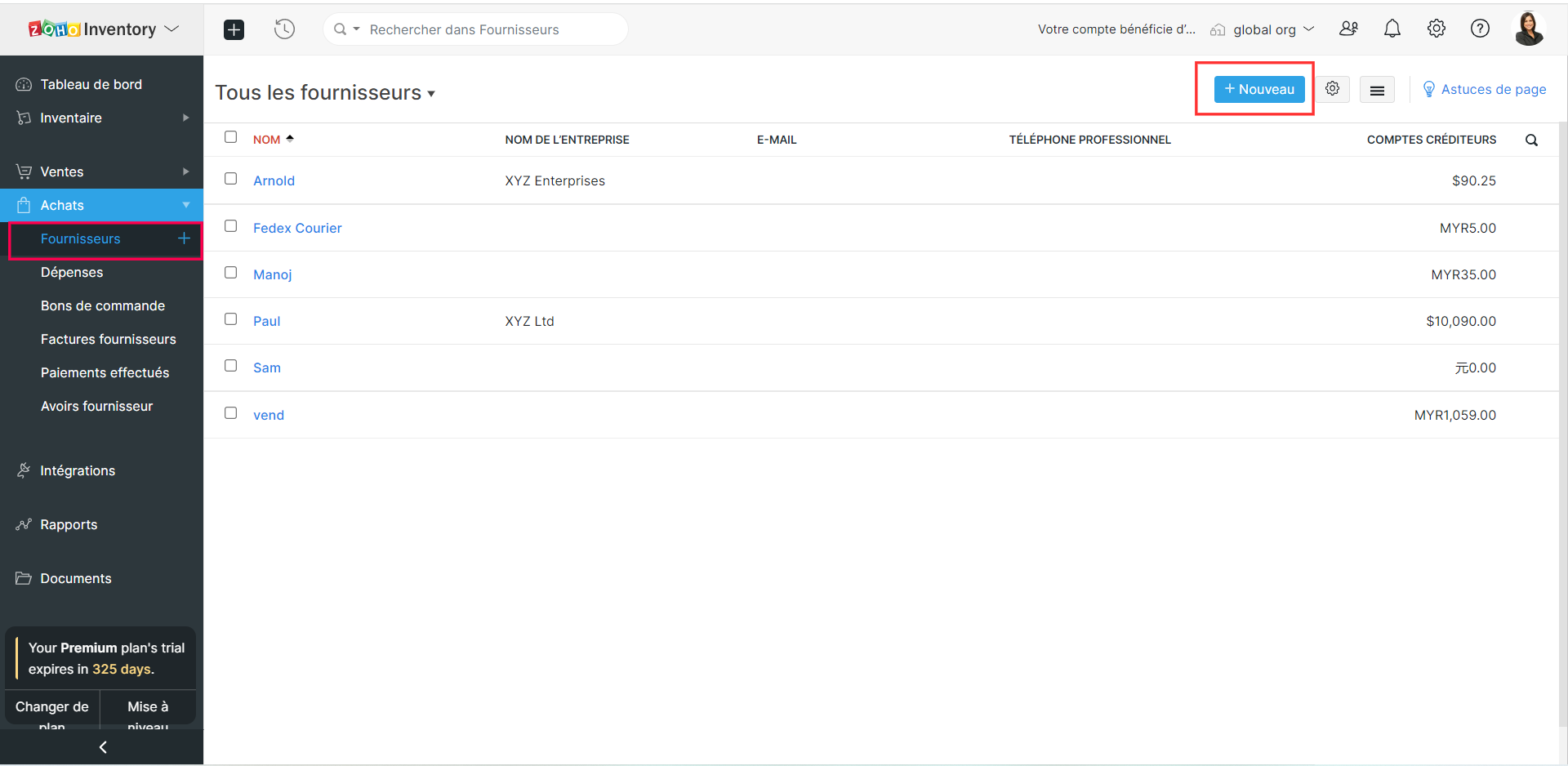
- Sélectionnez le module "Fournisseur" depuis le panneau de gauche.
- Suivez les étapes comme indiqué ci-dessus et enregistrez.
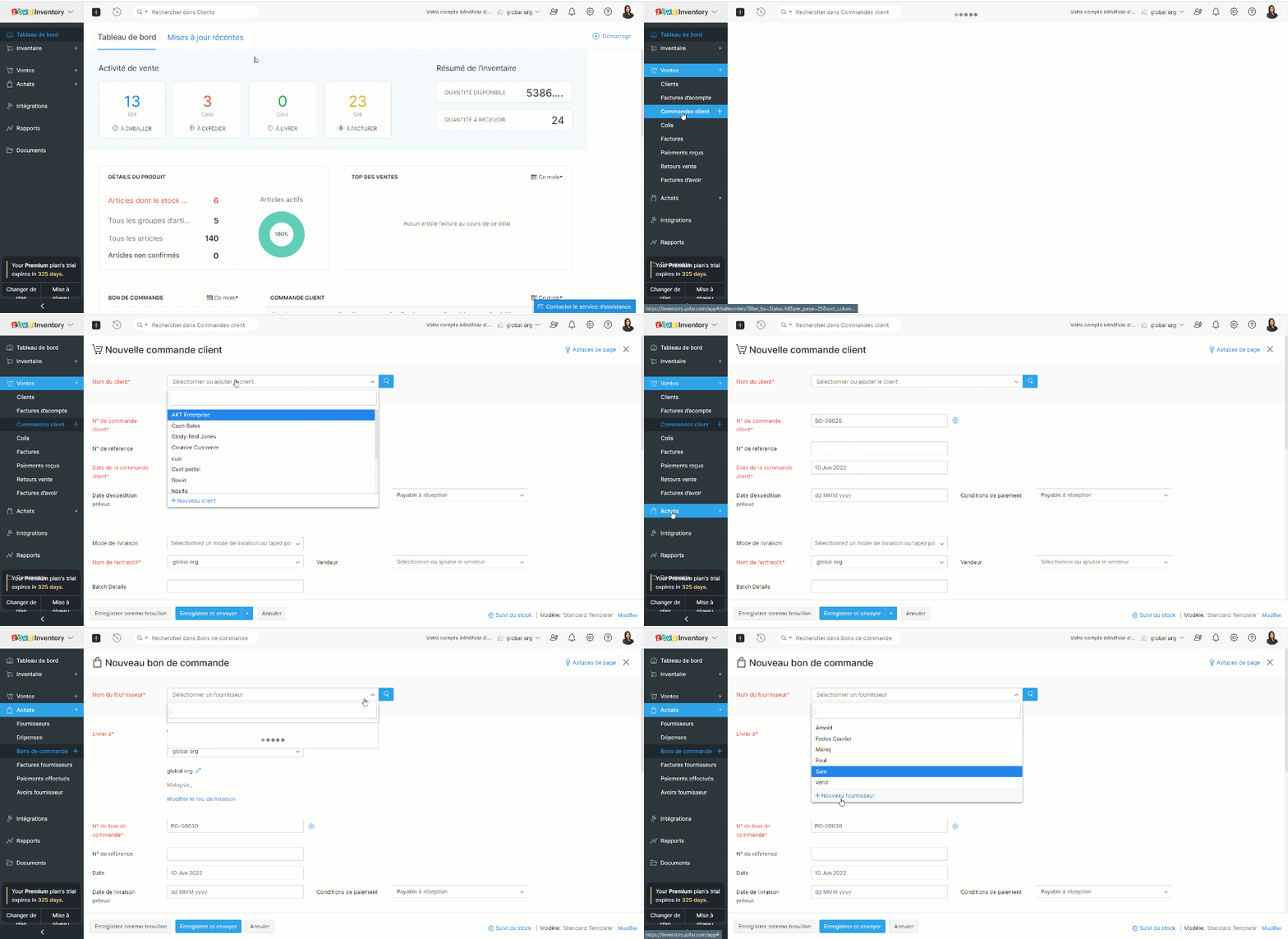
Créer des clients/ fournisseurs à partir d'une transaction
- Prenons un exemple, vous avez rempli les informations de la commande mais vous n'avez pas créé un client/fournisseur plus tôt.
- Créez une nouvelle transaction depuis l'onglet "Commande Client"/ "Bons de commande".
- Cliquez sur la liste déroulante dans le champs "Nom du client" / "Nom du fournisseur".
- Sélectionnez l'option "+ Nouveau client" / "+ Nouveau fournisseur".
- Suivez les étapes comme indiqué ci-dessus et enregistrez.
Importer des clients et des vendeurs
Si vous migrez d'un système existant vers Zoho Inventory, vous pouvez importer tous vos contacts sous la forme d'un fichier .CSV ou .TSV. La limite de fichier est de 1 MB.
Importer depuis Zoho Books
Les applications Zoho Inventory et Zoho Books sont parfaitement intégrées : toutes vos données seront synchronisées, c'est-à-dire que lorsque vous ajoutez un nouveau contact dans Zoho Books, le contact sera disponible dans Zoho Inventory et vice-versa.
Importer depuis Zoho CRM
Zoho Inventory peut être intégré avec votre compte Zoho CRM. En utilisant cette intégration, vous serez en mesure de synchroniser vos comptes, contacts et fournisseurs dans Zoho CRM, avec le module de contacts dans Zoho Inventory. Il s'agit d'une intégration bidirectionnelle. Ainsi, lorsque vous convertissez un prospect en client dans Zoho CRM, il est automatiquement ajouté comme client dans Zoho Inventory lors de la prochaine synchronisation. De même, lorsque vous obtenez un nouveau client dans Zoho Inventory, ce client est ajouté à votre base de données Zoho CRM.
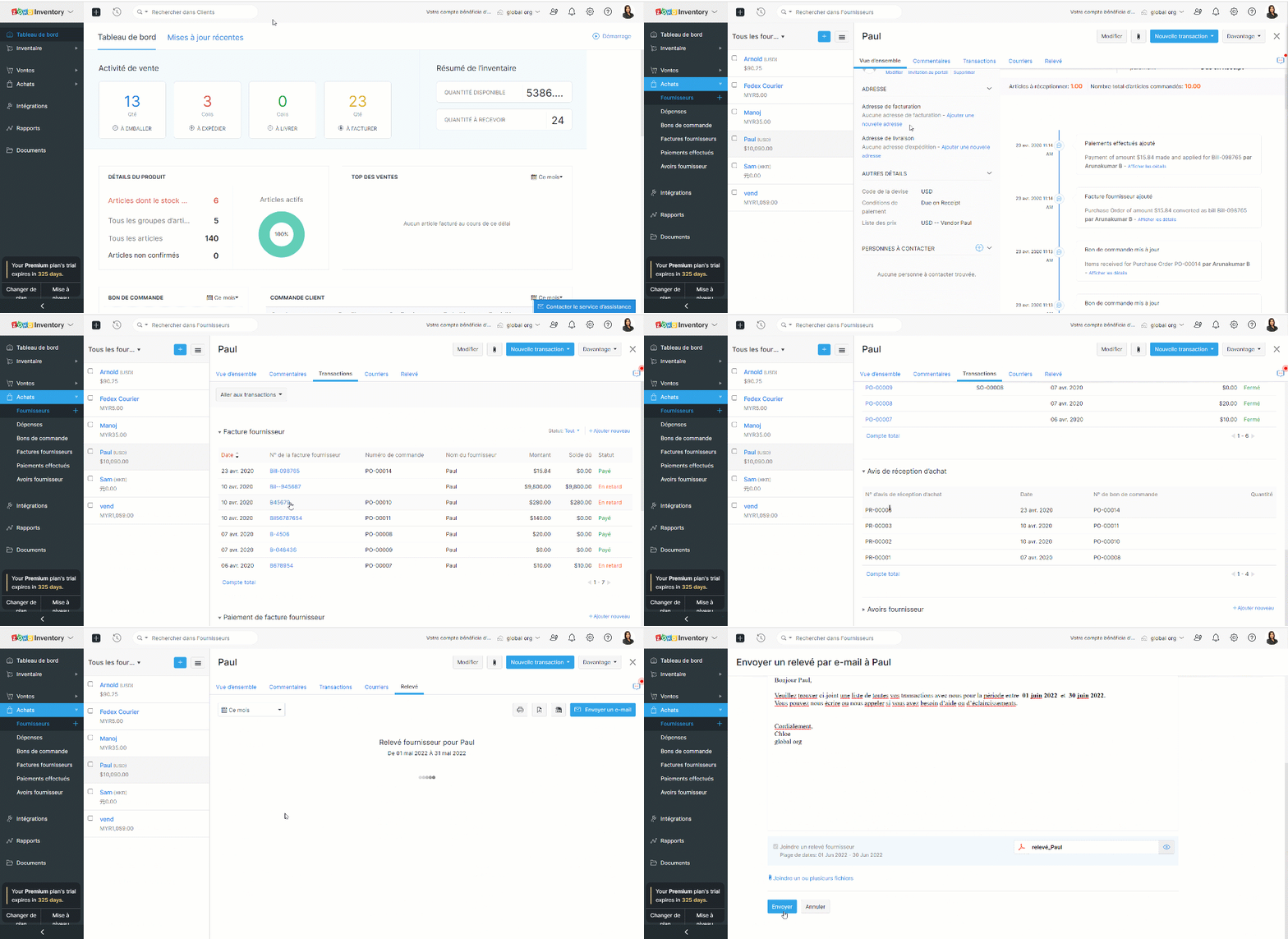
Page de détails des clients et des vendeurs
Cette page donne un aperçu des détails essentiels d'un client/fournisseur tels que le nom, l'adresse e-mail, le numéro de téléphone, l'adresse, les personnes de contact, le résumé de la transaction et les activités récentes. Vous pouvez également créer des transactions, enregistrer des paiements, envoyer des e-mails et des relevés à partir de cette page.
L'équipe Zoho France
Topic Participants
Kinjal Lodaya
admin sebban
Ramona Gheorghiu - MOBIXSAS
Horth
Stéphanie
Sticky Posts
Collaboration sans faille avec Zoho One
Bonjour à tous, Dans cet article nous allons voir comment Zoho One permet une collaboration à différents niveaux . La façon dont nous travaillons évolue. À mesure que les entreprises se mondialisent, la plupart des activités sont menées en équipe.
Recent Topics
Zoho One Home Dashboard - My Tasks (Projects) & My Overdue Work Items (Projects) have no data.
The title basically covers the situation. I've set up the dashboard cards, and for a while, they were showing data. Now, they are both blank. Is anyone else experiencing this, or has anyone else experienced this, and if so, is there a fix?Zakya - Release in North America?
At Zoholics it was pitched like Zakya was already released in North America. However, when looking for it I couldnt find it. There isnt an integrated app available in Zoho. I figured maybe it was being released at Zoholics. Now over a month later, itsCustom Field Mapping in Outlook
I have 10 custom fields in Zoho is there a way to create and map them to the outlook contact?Enhanced Zoho CRM and Office 365 calendar synchronization features!
Dear customers, We're excited to share some significant improvements to our Office 365 calendar synchronization features, aimed at providing you with more control and a more personalized experience. What’s new Choose your Office 365 calendar: During theProblemas de usarmos no Brasil
Somos usuários a exatamente um ano do Zoho Recruit, agora migramos para o Zoho One. Temos enfrentado por diversas vezes problemas da ferramenta não estar realmente preparada para funcionar corretamente na lingua portuguesa. Problema esse não específicoCERTIFICADO DIGITAL - BRASIL
Olá, Temos o ZOHO ONE e no Sign vemos de forma simples a assinatura digital, temos nos BRASIL certificado digital, de no CERTISIGN homologado pelo GOVERNO do BRASIL, há possibilidade de gerar a assinatura diante deste certificado?Zoho Duplicate Reference Numbers
I have 2 accounts through zoho. On one account if I enter a bill with the same number as a previous bill I get a warning message saying that there is already a bill with this number. However on the other account I do not get this message. How do I turnintegration between Zoho Site and Zoho Learn
integration between Zoho Site and Zoho Learn so that when a user registers on the Zoho Site, their account is automatically created in Zoho Learn!! the use case i have pro plan in zoho site and zoho learn and i have puted the zoho learn domain in zohoAutomation #6 - Prevent Re-opening of Closed Tickets
This is a monthly series where we pick some common use cases that have been either discussed or most asked about in our community and explain how they can be achieved using one of the automation capabilities in Zoho Desk. Typically when a customer submitsNot able to list or add contacts
I am not able to get a list of contacts via api request. Tickets for example are listed via api even without orgId, so it shoud be similar. What is missing to reach the requirement. My aim ist to add a contact via API and then add a ticket with the contactSee contrat information from an account under the ticket
Hi there, How can I program something to display created and selected contract on the ticket itself so my agents see it and can support correctly according to the contract and SLA ? Thank you :)Weekly time log view
The Weekly Time Log view is pretty nice. My users really like it when I show it to them. They like being able to pin ongoing tasks. Anyway, it's sort of hard to find. It is grouped with the Add Time Log button as a pull down. In my opinion, it shouldAny Impact of Amazon Listings API on E-commerce Integration?
Amazon sent the following message about changes to their APIs. Our only Amazon app / integration is Zoho Inventory's eCommerce for Amazon US, so the message below in bold gives us concerns about if Amazon's warning is referencing Zoho's Amazon US integration.Working with Products that are non-tangible
How does one create a 'service' in products? Is there a way to disable inventory functions for things like Sofware as a service? The services module doesn't look to be much help either. Not sure how to do this in CRMePOD Devices
Has anyone tried and tested and devices that deliver ePOD (electronic proof of delivery)? We would like our drivers to use an ePOD device to get the customer signature The app should then be capable of updating the sales order to show delivery.API Integration
Why are we unable to do API Integration for Job boradsRemind/Recall Document API
When I recall a document through the Sign API, I would like to be able to specify the reason that gets sent in the user notification email. Same with including a unique message when sending a document reminder through the API. Is there a way to includeZoho Books API Creating Invoice and Address API
I'm trying to create an invoice with zoho books api and i get the following error: Error creating invoice in Zoho Books: { message: 'Request failed with status code 400', details: { code: 15, message: 'Please ensure that the "billing_address" has lessConvert Multiple PO in 1 Bill
Does anyone know how to convert multiple POs in 1 Bill? Thank youmerge the Multiple POs to single PO if Vendor of PO"s --in Zoho Inventory
HI Merge the Multiple POs to single PO if Vendor of PO"s are Same ----in Zoho inventory Please provide any work around to achive this .How to add categories to community
In my Community, I would like to add several Categories but I don't readily see how this is accomplished. Currently, I have one category in my community with several forums. But I would like to add more categories. Thanks.Knowledgeable Image Quality is very poor, any recommendations how to improve this?
Hi All, We are looking at migrating our current knowledge base to Zoho so it can be kept in one location. Our current KB utilises a lot of images to try and make it easier for users and less wordy. Unfortunately, when I upload an image within an article,Assistance Required: Displaying Dynamic HTML Table in Zoho Creator Dashboard Page
I am currently stuck while creating a custom dashboard page in Zoho Creator. I want to display a designed HTML table showing Teacher Registration data with this condition: If Total Allowed Leaves < 10, display those teachers in the table. Page ScriptsVisibility of Custom Questions in the Question Pool
A colleague is adding our own questions in the question pool for our Employee Engagement survey, but I can't see the questions she has entered, even after refreshing the webpage. Are the custom questions in the question pool only visible to the one whocampaigns contact lists not exporting
I'm trying to export a specific lead source from my contract list in 'campaigns'. Every time I have to do this the contacts won't export. I have done a search and selected the specific contacts I want to export. The box appears to choose the file type,Recipient Field on replies doesn't update with Contact change
Some emails that come into our system come from an online form and the sender address is a noreply@whateverthedomainis.org So in order to reply to the original sender, we need to update/change the contact for the tickets. However, after we change theMulticolumns fields for native forms
It would be nice to be able to create forms with multiple columns. Currently, each field occupies a single column, which makes a fairly complex form seem too long.Assign values to hidden fields in native forms
It would be great to be able to assign values (static or dynamic) to hidden fields in a form. Currently, I can only assign a value via the URL. I currently have a form integrated with a webhook, but I don't have a way to send useful form data as parameters,Migrating Email Content to a Shared Mailbox Address
I am moving my email to Zoho Mail (currently hosted through GoDaddy). I have created a user (me) and I have also created a "Shared Mailbox" Group (through the admin panel) with an email address I will be using as an organization address. My personal emailLive webinar: Mastering financial presentations with Zoho Show
Hey there finance professionals! We know many of you are currently knee-deep in report creation mode to wrap up the fiscal year for your organization. Creating a presentation to communicate essential financial data isn’t simple, with all the calculations,Zoho Desk Android app update: Accessing the guided conversation bots in the IM module
Hello everyone! In the latest version(v2.9.8) of the Zoho Desk Android app update, we have brought in support for Guided conversation bots within the IM Module. These bots use predefined conversation flows to automate initial responses, handle routineZoho Analytics Embed - Zoomed Right In?
Hey all, I am using the Zoho Show app on an android TV and cannot figure out why, but the Zoho Analytics embed is zoomed right in. When I preview on my laptop it looks fine, when I go in and edit the code, it looks zoomed? Then when it displays on theAssistance with Image File Upload in Zoho Creator
Hi , I'm building an application for storyboard creation using Zoho Creator, integrating Gemini AI for automated image generation. In the "Generate Frame" form, user inputs are collected to construct image prompts. Current Workflow: On Validation (FormMigrating all email accounts from cpanel shared hosting and email boxes to zoho
I have already read previous articles posted on this forum but none of them suit my needs.So i am currently working for a small company. The company website runs on cPanel shared hosting and the company page is a WordPress website. I recently redesignedDomain Change from apkbark.com to apkbark.io – Do I Need to Setup Zoho Mail Again?
I recently migrated my website from the old domain https://apkbark.com to the new domain https://apkbark.io. The Zoho Mail setup was previously configured and working perfectly on the old domain. Now I would like to know: Will my Zoho Mail setup automaticallyHow to add different type of revenue under sales ?
How to add different type of revenue under sales ?Types of Revenue
i have different types of revenue , I want to see under sales in different categories , while preparing invoice I want to allocated if possibleZoho books account recovery
I had submitted a request to restore zohobooks account, but I am yet to get a feedback till now. The email addresses used to access the zohobooks can not access it again. I don't know what went wrong. I need quick attention to this. More details are providedPayments calendar for receivables and liabilities by due dates
Hello guys! What method can you recommend for tracking and planning future payments against expected income? We operate on the principle - we expect some income this month, then we look at what expenses are due this month and pay accordingly. I've seenEmail Search
Has search stopped working for people? Searched on Zoho email content, I get nothing back. Signed out and back in, still same issuesNext Page