How Zylker doubled their webinar registrations!

How Zylker doubled their webinar registrations!

Webinars are good educational resources to gather qualified leads for your product. But what if your visitors are dropping off from your webinar landing page without signing up? What more could you do to convert visitors into registrants?

This is the story of Zylker's marketing hack to grow webinar registrations.

Zylker is a SAAS-based company that helps businesses create custom apps to digitize business processes. For example, if you're an event management company, you could create an app for registrations and collect attendee data in one place, securely. Also, you may create granular reports based on data collected.

Zylker's product is a hit since it simplifies data collection on complex business processes with minimum effort. To create a seamless user experience, the Zylker team works hard to understand the needs of different markets across verticals. A finance company might need an app to automate the workflow of a loan grant based on data collected, while a hotel might need an app to book rooms and block the booking when they are out of inventory. Different verticals have different challenges to solve using Zylker. The Zylker team is tasked with educating users on building apps to enable customers from varied verticals to build their own apps.

Webinar works like a charm when it comes to educating users. The Zylker team organized a webinar every week for the users to get their doubts cleared on creating and automating the app. Although the webinar was invaluable for the beginners, the number of registrations to the webinar did not justify the number of users signing up to the product. It was a matter of concern that the webinar registrations were less than 5% of total product sign-ups per month. If the users are not educated enough on the product, they might drop off after the trial period. On the other hand, if the users learn the product during trial, the chances of upgrades were as high as 25%. (This is NOT the conversion ratio of webinar attendees to customers, but the conversion of hot leads to customers. A webinar is just one of the many lead nurturing practices that heats the lead).

Like any other marketing team, the Zylker team created a beautiful landing page for webinars where they showcased the details of the webinar with a "Register Now" button as CTA. Upon tracking the visitor's behavior on the landing page, they realized that a good number of people landed on the page, but most of them were dropping off. So, while the email and social media marketing for the webinar was working as intended, something on the landing page was putting people off.

The challenge in hand was to analyze the landing page and seal the leakage. The team saw the visitors' imprints and did heat map analysis using Pagesense. They figured out a few issues that needed attention.
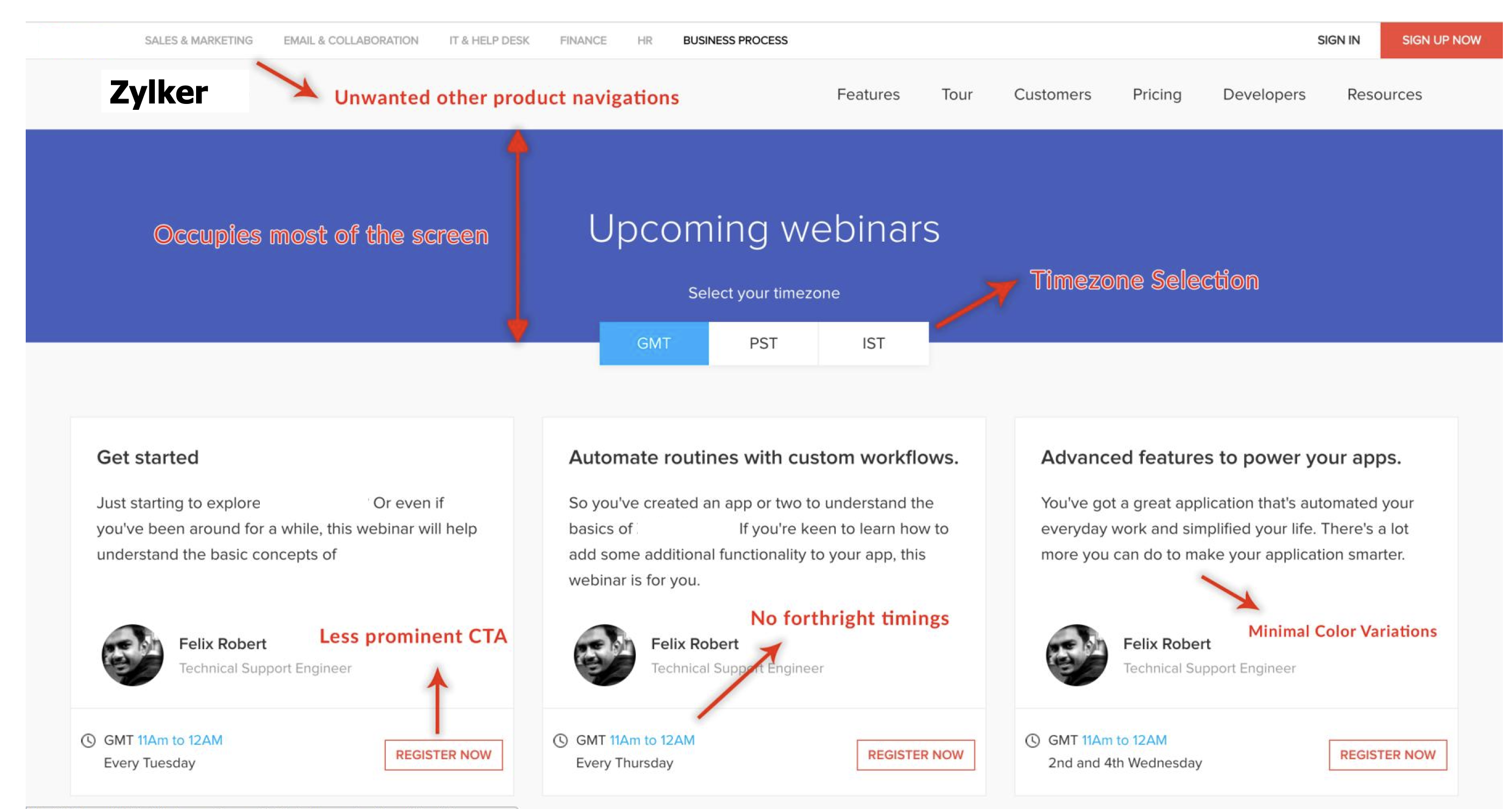


Zylker team asked themselves the following questions:
  • How do I know which webinar is suitable for my standard timing?
  • I'm a Zylker customer, and yet why do I need to fill in the form to register? Why is it not pre-filled?
  • Why am I seeing a completed webinar listed?

The team realized that the visitors should see only those webinars that are relevant to them, geographically. That could be the key.

So, they made tweaks to the page to list only the webinars that are relevant to the visitor's local timings. This and a few other design improvements led to improved visits-to-webinar registration ratio.
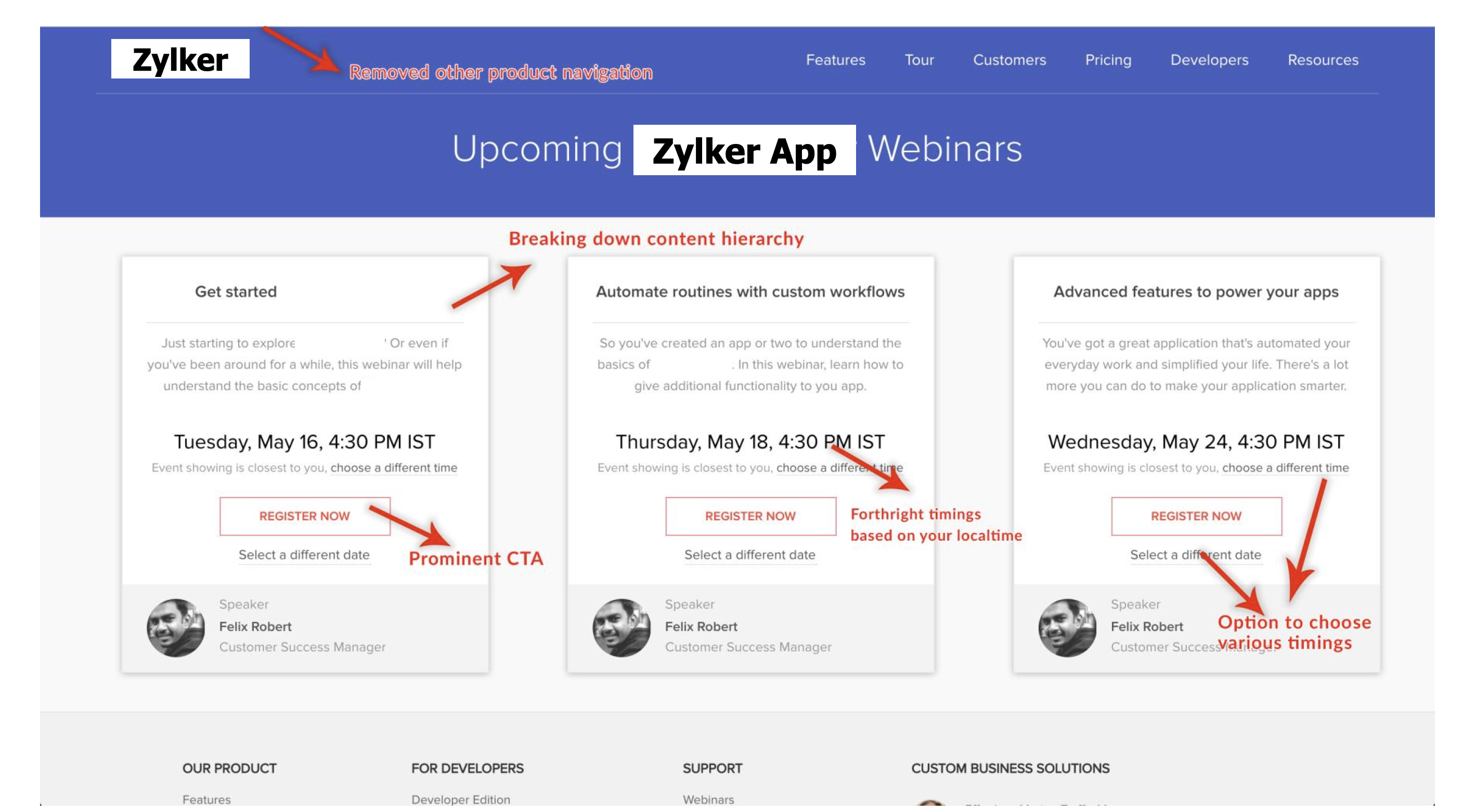


The team decluttered the page, showcased the webinar local timings for visitors and served them with pre-filled forms to register. In addition, if for some reason, the visitors were not shown their local time, they were provided the option to change the local time zone by selecting from drop-down.

There was an uptick in the webinar registrations. In the first month of implementing the change, the number of registrations doubled and the drop-offs from the landing page reduced by half.

The percentage of monthly webinar registrants against the monthly product sign-ups now stands a little north of 9%. If other aspects like lead nurturing go right, this small design tweak will lead to a revenue boost of around 12% in the Zylker books.

    • Sticky Posts

    • 10 simple e-commerce marketing tips to boost sales

      Congratulations! You've finally set up that e-commerce store you've been thinking about for a long time. Hopefully it wasn't too difficult. Even if it was, the effort will be totally worth it when you start seeing some orders come through. Now that the store is live, let's take a look at some marketing tips you can apply for sales growth. 1. Avoid cart abandonment If you've ever shopped online, you might have added a product to the cart but then decided not to purchase it. This is known as cart abandonment.
    • Marketing in a post COVID-19 world!

      Consumers across countries are increasingly spending more time on a wide variety of digital activities, right from online grocery shopping, to video conferencing, to tele-medicine. There is a good chance that you performed one or more of the following activities during this lockdown, thanks to COVID 19: Cooked a meal Made a TikTok Video Signed up for a remote learning session Consulted a doctor online (or ordered medicines online) Shopped for groceries online A study by Hunter, a food and beverage
    • Inbound Marketing 101: The Foundational Blocks of Inbound Marketing Strategy

      According to a behaviour survey, 68% of the buyers use sources such as blogs to evaluate the product even before considering it. Before buying a product, we do a lot of research to learn more about the product through communities, blogs, social media,
    • How Zylker doubled their webinar registrations!

      Webinars are good educational resources to gather qualified leads for your product. But what if your visitors are dropping off from your webinar landing page without signing up? What more could you do to convert visitors into registrants? This is the
    • The ideology behind why features tell, but benefits sell

      Do you think there's any truth to this? Do features only tell, and benefits sell?  Well, let's see why we should focus on benefits rather than features as the great marketing wizards, David Ogilvy and Steve Jobs proved to be the best examples leveraging
    • Recent Topics

    • Introducing SlyteUI : From Idea to a Working Interface in Minutes

      Hello everyone! Are you spending hours building basic UIs? Does even the smallest customization feel like a major task? CRM customization should feel intuitive and straightforward, not time consuming or exhausting. SlyteUI makes this possible by simplifying
    • How to install Widget in inventory module

      Hi, I am trying to install a app into Sales Order Module related list, however there is no button allow me to do that. May I ask how to install widget to inventory module related list?
    • Sync Task Status from Zoho Projects to Zoho Desk

      Hi Zoho Desk Team, Hope you’re doing well. We’re actively using the Zoho Desk–Zoho Projects integration, which helps our support and project teams stay aligned. However, we noticed that when we change a task’s status in Zoho Projects, the change is not
    • Is there a way to sync Tags between CRM and Campaigns/Marketing Hub?

      I wonder if there is a way to synch the tags between CRM and Marketing-Hub / Campaigns?
    • Host not reachable when sending

      For few partner that I send regular emails now got error and they don't receive emails Temporary failure fam-xxx.hr/185.xx.xx.xxx Host not reachable. Have more than 20 mails in https://mailadmin.zoho.eu/cpanel/home.do#mailSettings/retryEmail please
    • Negative Quantity on an Invoice

      I need to be able to put a negative quantity on an invoice in books and inventory. Example, customer is buying part A, which has a removeable part, part B. Customer wants Part C which replaces Part B. We swap them for the customer. On an invoice we should
    • Button Duplication when emails forwarded or replied

      When I create a new email template in campaigns and send it out it looks fine to all the users, however if that email is then on forwarded or replied to then all buttons within the email duplicate.  See below The one on the left is the original one.
    • Super Admin Logging in as another User

      How can a Super Admin login as another user. For example, I have a sales rep that is having issues with their Accounts and I want to view their Zoho Account with out having to do a GTM and sharing screens. Moderation Update (8th Aug 2025): We are working
    • What's New in Zoho POS - March 2026

      Hello everyone, Welcome to Zoho POS’s monthly updates, where we share our latest feature updates, enhancements, events, and more. Let’s take a look at how March went. Zoho POS Android app with Arabic and RTL Support for Saudi Arabia We have launched the
    • Zoho Projects Android and iOS app update: Custom modules

      Hello everyone! We are excited to introduce the custom modules within the Zoho projects mobile app. Custom modules allow you to define your own entities with relevant fields, enabling you to capture and manage information specific to your workflows beyond
    • Zoho Projects iOS app update: Flag type(Internal/ External) information in Task list header

      Hello everyone! We have now included the Flag(Internal/ External) type information on the Task list header within the Tasks listing screen of the Zoho Projects iOS app. This enhancement enables you to distinguish between the internal and external tasks
    • How to close an estimate ?

      Hello, I have created estimates, and converted them to invoices to get 50% payment. Now I have 2 cases where the estimate stills shows status partially invoiced, however: 1. for one of them, project stopped half way, so the remaining part will never be
    • Will Zoho Search work with Zoho Learn

      Currently, Zoho Search only works with Zoho Wiki which will be phased out.  Moving forward, will Zoho Search be enabled for Zoho Learn? Thanks.
    • No possibility to make acknowledgement checkbox be not preselected and mandatory

      There is functionality available to enable a checkbox for the acknowledgment of the user confirming that the lesson has been completely read and understood. Currently, it is pre-selected but not mandatory. This leads to learners simply ignoring it. The
    • Ability to modify what displays in calendar invite?

      I am a long time calendly user and want to make the switch to bookings.  I understand that there is not currently a meets/hangouts integration, is one on the roadmap? Is there anyway I can modify the calendar invite to include the meet link?  I can add it to the emails no problem, but I would also like it to display on their calendar.  Is there some work around I can do to get it on the calendar?  Also am I able to modify the calendar event title?
    • since the new interface of ZOHO writer can't turn of automatic reminder option for merge documents

      Since the new interface of ZOHO writer I have this problem. I have a large set of templates that I use to send documents to ZOHO Sign. But now in all those templates the box for Sending reminders is ticked, which i don't want. But even if I untick the
    • Global "Search" in FSM

      I'm missing the global Search function like in CRM. This should save us a lot of time. We don't now upfront if the customer is a Contact or a Company. So now we have to guess in what module to start a search/filter. Also looking up an address, phone number,
    • Set Default Status of Assembly to "Assembled" When Entered in UI

      I've just discovered the new "confirmed" status of Assemblies within Inventory. While I understand the intent of this (allowing for manufacturing planning and raw material stock allocation), it was initially confusing to me when manually entering some
    • Announcing Zoho Sheet desktop app for macOS and Windows (Beta)

      Hello Sheet users, We know you’ve been waiting for this one. It has always been the top priority on our roadmap to provide a single native desktop app for macOS and Windows that works both online and offline. Today, we are excited to announce that the
    • Unable to Access /crm/v7/taxes – OAuth Scope Mismatch in Zoho CRM API

      I am currently integrating Zoho CRM (v7 API) with our system and I need clarification regarding the Taxes API and OAuth scopes. Context: We are creating Quotes via the API (/crm/v7/Quotes) Each quote contains line items with taxes (e.g., TVA 19%, 10%,
    • Reading emails sent from Zoho

      Hi there, How do I view an email sent from Zoho, for example an email which contains an estimate? I can see there is a tab in the screen for that estimate which is labelled 'Emails' and I can see a summary of the email sent listed there, but I cannot
    • Can't View Project Names in Mobile App

      I can't view project names on PO's in the app, nor can I add that as a viewable PDF field in inventory on the computer. I've attached screenshots showing that in the mobile version whether you are on the PO, editing the PO, or viewing the PO line items,
    • Looking for other Zoho users in Canada

      I would like to find other users in Canada to share ideas and suggestions. To see if you are experiencing same issues re HST/taxes, banking, etc.
    • Zoho Books' 2025 Wrapped

      Before we turn the page to a new year, it’s time to revisit the updates that made financial management simpler and more intuitive. This annual roundup brings together the most impactful features and enhancements we delivered in 2025, offering a clear
    • Intergrating multi location Square account with Zoho Books

      Hi, I have one Square account but has multiple locations. I would like to integrate that account and show aggregated sales in zoho books. How can I do that? thanks.
    • Columns with no data still displayed despite "Show missing values" disabled

      I have a table with missing data, but columns are still being displayed even though the "Show missing values" option is disabled. The table contains 3 columns split across 12 months. I suspect the issue is caused by one of the columns using an aggregation
    • What's New in Zoho Inventory | January - March 2026

      Hello users, The first quarter of 2026 has been dynamic! We’ve shipped a powerful set of updates in Zoho Inventory to enhance item control, improve warehouse efficiency, expand integration and reporting capabilities. From a unified item creation experience
    • Business Day Logic Update: More Accurate Scheduling for Your Workflows

      Hello everyone, We’re improving how business-day calculations work in workflows, especially when triggers happen on weekends. This update ensures that offsets like +0, +1, and +2 business days behave exactly as intended, giving you clearer and more predictable
    • Permission Denied - Reports Module - Super Admin

      "Permission Denied Sorry, you cannot view this report because you do not have permission to access one or more of its modules. To view the report, please provide permission to access those modules in the Profiles and Organize Tabs settings." Fresh new
    • Allocating inventory to specific SO's

      Is there a way that allocate inventory to a specific sales order? For example, let's say we have 90 items in stock. Customer 1 orders 100 items. This allocates all 90 items to their order, and they have a back order for the remaining 10 items which could
    • Changing naming convention for Estimates

      Hi there, How do I customise the naming of the filenames for estimates when sending them? Currently they are named literally just ES11.PDF or whatever the number of the estimate is. There is no Company name, description of the work, customer name, date
    • Please design a better spam filter

      Hi Team, While I love Zoho Mail for all the awesome features you have designed - this is the one you need to do a lot of work on - Spam Filter. Your spam categorization seems to be very inefficient - any email containing brand images or a tracking pixel
    • Change Default Currency in Zoho Reports

      Is it possible to default all currency fields in my Reports and Tables to my local currency without having to reformat them every time?
    • Zoho Project - Total Forecasted Hours

      Does anyone know an easy way to get a total of all the forecasted hours across the portfolio? I'm aware trying to create a custom report that can generate this figure for each task and the total up but the completion percentage doesn't seem to come back
    • All new Address Field in Zoho CRM: maintain structured and accurate address inputs

      Availability Update: 29 September 2025: It's currently available for all new sign-ups and for existing Zoho CRM orgs which are in the Professional edition exclusively for IN DC users. 2 March 2026: Available to users in all DCs except US and EU DC. 24
    • Zoho Books recurring invoicing link to a Zoho CRM Deal?

      With the Zoho CRM Finance Integration setup, normally when creating an invoice via Zoho CRM Finance Integration on a Deal, it creates the invoice in Zoho Books with the CRM Deal *Potential link for that invoice. Alternatively, if you create the invoice
    • Editing Estimates

      Hi team, How do I delete line items in an estimate when editing it? I can't see any option to do this - no X, no trashcan, no drop down... And how do I revert to the original estimate after cloning? I cloned to see if the option to edit were disabled
    • Drop Down Menu - Adding up values

      I have a form that has 22 drop down fields each having a value of 0-10 to choose from. Is it possible to have it add up the total value of those selected numbers and have it tally it up in another field at the end? So example: if each of the 22 fields
    • Stage-probability mapping feature in custom module

      Hi, I'm building a custom module for manage projects. I would like to implement the stage-probability feature that Potentials has. Is this possible?
    • Cross Module Fields Merging between Zoho Sign and Zoho CRM for custom module

      Hello everyone, I've been exploring custom integration between Zoho Sign and Zoho CRM, and I've encountered some interesting findings and would need advanced help. To integrate Zoho Sign with Zoho CRM, there are two primary methods: Installing the extension
    • Next Page