Integrating Custom Zia Agents with Bigin

Integrating Custom Zia Agents with Bigin

Hello Biginners!

With the introduction of Zoho's Zia Agents, automation in Bigin has moved beyond predefined rules into something much more dynamic and intelligent. Instead of building rigid workflows, you can now create custom Zia Agents that understand context, process instructions, and perform actions across your applications.

Using Agent Studio, you can construct these custom Zia agents to handle specific business needs such as responding to leads, updating CRM records, or executing communication workflows on behalf of Bigin users.

What You'll Learn in This Post 

In this post, we'll cover:
  1. Real-world scenario
  2. Deploying a custom Zia Agent
  3. Understanding the Agent API
  4. Triggering the agent using Zoho Flow
  5. Setting up required connections in Flow
  6. Implementing a custom function for Agent API
  7. Understanding the function workflow
  8. Integrating Bigin with the agent via Flow
  9. Testing the integration flow

How the Custom Zia Agent Integration Works

Before we begin, here’s a simple flow diagram showing how a custom Zia Agent connects with Bigin through Zoho Flow to automatically handle new contacts and send personalized welcome emails.

Real-world Scenario

To understand how this works in implementation, let's consider a common use case in Bigin:

Let's say you use Agent Studio to build a custom Zia Agent called Auto-Reply Agent for Leads. This agent is set up to generate and send a personalized email automatically whenever a new lead (contact) is created.

Info
For detailed instructions on how to create and configure agents, refer to the Creating Agents guide.


In most sales workflows, when a new contact is created, the next step is to acknowledge the lead with a quick response—something that's often done manually or through predefined workflows using generic email messages.

With Auto-Reply Agent for Leads, we can now take this a step further by integrating it with Bigin so that the entire process happens automatically with personalized email messages.

Now that the Auto-Reply Agent is ready, the next step is to deploy the agent and make it available for integration.

Watch the Integration in Action 

Before we begin the implementation, here's a quick demo of the complete configuration in action. It covers from deploying a custom Zia agent to generating and sending a personalized welcome email.

Deploying a Custom Zia Agent 

Zia's Agent Studio provides two ways to deploy a Zia Agent, depending on how you want to use it. One way is to deploy it as a digital employee, which allows the agent to act as in-app assistant within Zoho apps. The other way is to deploy it as a connection, where the agent is exposed via an API endpoint.

In this scenario, we deploy the agent as a connection because we want it to be triggered automatically whenever a new contact is created in Bigin. By deploying it as a connection, we can use the agent's API and integrate it with Zoho Flow to handle the automation seamlessly.

To deploy the agent, navigate to the Deploy dropdown button in Zia's Agent Studio configuration page and select Deploy using connection.

In the Tools Param Mapping sliding panel, review the configured parameters. Modify these settings if required, and then click Next to proceed.

Next, choose an existing connection from the dropdown or click New to create a new connection for the required service.


Follow the prompts to authorize the connection. Once completed, the agent will be successfully deployed and ready to be triggered via its API.

Understanding the Agent API

Let's now review the Agent API details by navigating to Integrate > Agent API. These details are essential for integrating the agent with your automation.


The deployed agent exposes an Agent API endpoint that allows you to send instructions along with contextual data.

Endpoint:
  • https://agents.zoho.com/ziaagents/api/v1/agents/3989000000030001/trigger
Method: POST

Authentication: OAuth

Headers:
  • {
          "X-ZIAAGENTS-ORG": "903723720",
          "X-ZIAAGENTS-AGENT-SESSION-ID": "",
          "Authorization": "Zoho-oauthtoken <token>"
    }
Request body:
  • {
          "query": "",
          "reasoning": false,
          "attachments": [
                ""
          ],
          "systemArgs": {}
    }
At a higher level, this API works like this:
  1. We send a prompt as a query, which tells the agent what to do.
  2. We pass the contact ID through systemArgs, so the agent can fetch full details from Bigin.
  3. The agent processes the request and performs the action.
In our use case, the action is generating and sending a personalized welcome email.

To ensure the request is routed correctly and securely, the Agent API provides the following headers:
  1. X-ZIAAGENTS-ORG - Identifies the Zia Agent Organization.
  2. X-ZIAAGENTS-AGENT-SESSION-ID - Helps track execution sessions.
  3. Authorization - Provides OAuth token for secure access.
Optionally, we can also use X-ZIAAGENTS-AGENT-ID to specify which agent to trigger.

Triggering the agent using Zoho Flow 

Now that the agent is deployed, the next step is to trigger it automatically whenever a new contact is created in Bigin.

To achieve this, we use Zoho Flow to build the automation.

Setting up the connections

Before building the flow, we need to configure the required connections to ensure that data can be fetched from Bigin and the Zia Agent can be triggered securely.

The Bigin connection is used to fetch details of the newly created contact. Since Bigin is available as a default server in Zoho Flow, this connection can be created directly while configuring the trigger.

To set up a Bigin connection, go to Settings > Connections in Zoho Flow. Click on Create Connection, then select Bigin from the list. Provide a name of your choice for the connection and click Authorize to complete the setup.

Ensure the connection has the Contact Created trigger access while authorizing the connection:


This allows the flow to access contact data and pass it to the custom function.

The Zia Agent is not available as a default service in Zoho Flow, so we must create a custom connection using an Auth Profile.

This connection is used to authenticate and trigger the agent via its API.

To configure this, we create an OAuth2-based Auth Profile using client credentials obtained from the Zoho API console.

First, navigate to the Zoho API Console and register a server-side application. While registering, use the redirect URI:

https://flow.zoho.com/oAuth/callback

Once the client is created, you'll receive the Client ID and Client Secret, which are required to set up the Auth Profile in Zoho Flow.


In Zoho Flow, go to Settings > Auth Profiles and click Create to add a new authentication profile. Choose OAuth v2 as the authentication method, then enter a name of your choice for the auth profile.

Once done, do the following:
  1. Provide the Client ID and Client Secret from the Zoho API Console.
  2. Provide the Authorization URL, Access Token URL, and Refresh Token URL. For details, refer to the Zoho Accounts API documentation.
  3. Set the scope as: ZiaAgents.agents.TRIGGER.
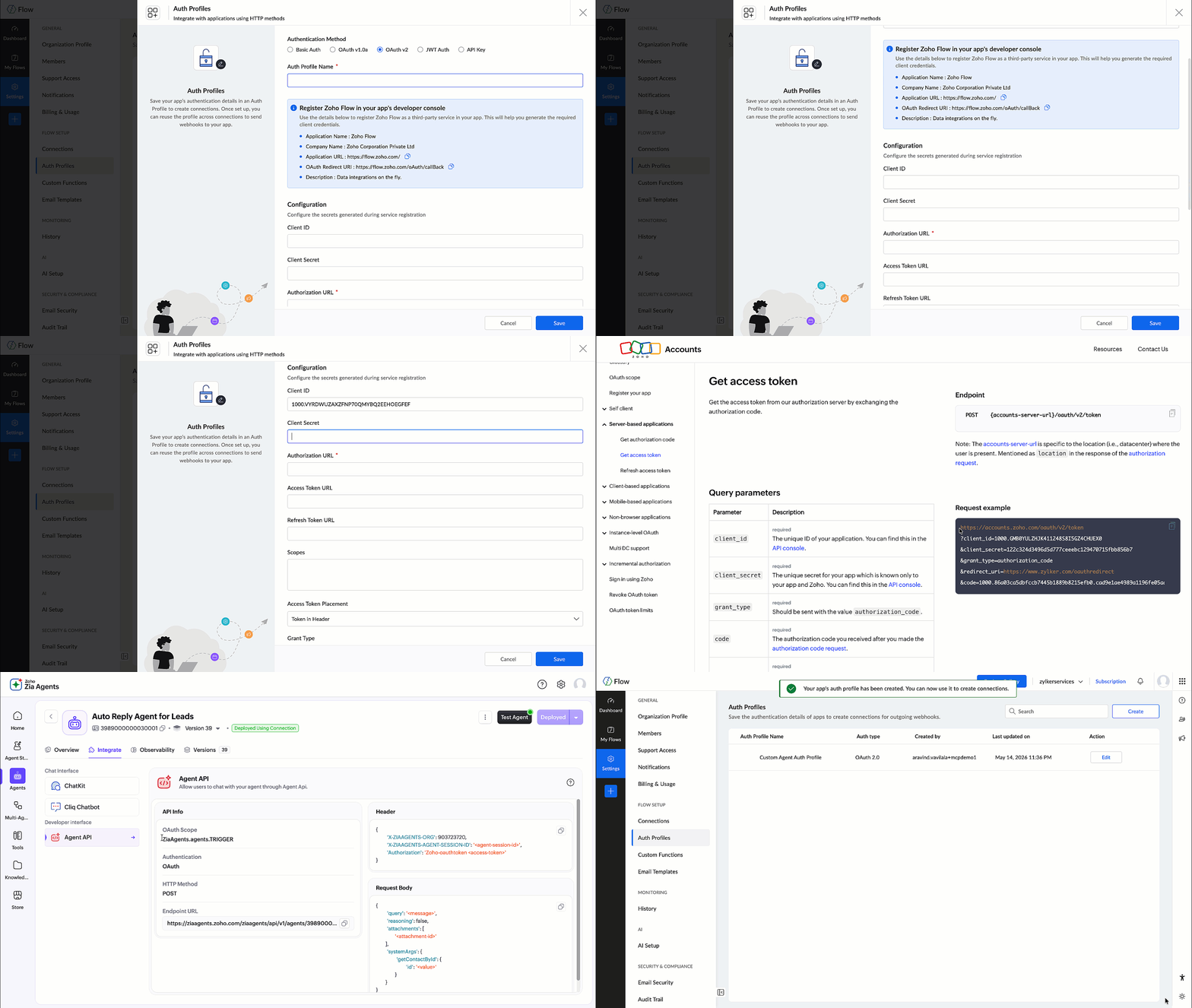

Using OAuth ensures that the connection remains active and secure, without relying on access tokens that expire frequently.

This Auth Profile is then used to create the Zia Agent connection.


Once the connection is created, it's used in the custom function during the API call:
  • connection:"ziaagentconnection"
This allows the function to invoke the Zia Agent API securely.

Implementing the custom function

In Zoho Flow, navigate to Settings > Custom Functions and click Create Custom Function.

Provide a function name and set the return type as void, since this function is only used to trigger the agent. Add an input parameter named id with the type string, which represents the contact ID from Bigin.


Once created, the Deluge editor will open where you can define the function logic as shown below:

  • void trigger_lead_auto_reply(string id)
    {

          // Instruct the agent to fetch contact and send welcome email
          query = "New lead added. Send a short, friendly welcome email to the newly created contact based on auto-reply-agent-skill instructions.";

          // Build request body
          body = Map();
          body.put("query",query);
          body.put("reasoning",false);
          body.put("attachments",List());

          // Pass the contact ID nested under the tool name — required for agent to extract it
          recordInfo = Map();
          recordInfo.put("id",id);
          sysArgs = Map();
          sysArgs.put("ContactId",recordInfo);
          body.put("systemArgs",sysArgs);

          // Headers
          headers = Map();
          headers.put("X-ZIAAGENTS-ORG","111860686");
          headers.put("X-ZIAAGENTS-AGENT-ID","2307000000029001");
          headers.put("X-ZIAAGENTS-AGENT-SESSION-ID","10000");
          headers.put("Content-Type","application/json");
          
          // Trigger the agent — fire and forget, no return needed
          response = invokeurl
          [
                url :"https://agents.zoho.com/ziaagents/api/v1/agents/2307000000029001/trigger"
                type :POST
                body:body.toString()
                headers:headers
                connection:"ziaagentconnection1"
          ];
          info response;
    }

How this custom function works

This function acts as the bridge between Bigin and the Zia Agent API, constructs the API request, sends it to the agent, and triggers the required action.

Let's understand how it works step by step.

A. Defining the instruction (query)
  • query = "New lead added. Send a short, friendly welcome email ..."
This is the instruction sent to the agent. It tells the agent what action needs to be performed and how the response should be generated.

B. Building the request body
  • body = Map();
    body.put("query",query);
    body.put("reasoning",false);
    body.put("attachments",List())
Here we construct the request body based on the Agent API format:
  1. query: defines the task
  2. reasoning: disabled to keep the response concise
  3. attachments: not used in this scenario 
C. Passing contact context using systemArgs
  • recordInfo = Map();
    recordInfo.put("id",id);
    sysArgs = Map();
    sysArgs.put("ContactId",recordInfo);
    body.put("systemArgs",sysArgs)
Instead of passing all contact details, we pass only the contact ID.

The agent uses this ID to fetch complete contact information from Bigin. This ensures that the agent works with latest data without increasing the request payload.
 
D. Setting headers
  • headers = Map();
    headers.put("X-ZIAAGENTS-ORG","111860686");
    headers.put("X-ZIAAGENTS-AGENT-ID","2307000000029001");
    headers.put("X-ZIAAGENTS-AGENT-SESSION-ID","10000");
    headers.put("Content-Type","application/json");
These headers help identify the organization and the specific agent being triggered.

X-ZIAAGENTS-AGENT-ID is the agent's unique identifier. You can find it on the agent's overview page in Agent Studio.

X-ZIAAGENTS-AGENT-SESSION-ID is the session ID, which you can define per your preference.
 
Authentication is handled through the configured connection in the function.
 
E. Triggering the Agent API
response = invokeurl
  • [
          url :"https://agents.zoho.com/ziaagents/api/v1/agents/2307000000029001/trigger"
          type :POST
          body:body.toString()
          headers:headers
          connection:"ziaagentconnection1"
    ];
This is where the API call is made.

At this stage:
  1. The request is sent to the Zia Agent.
  2. The agent processes the query.
  3. It fetches the contact details using the provided ID.
  4. It generates and sends the personalized welcome email.

Integrating Bigin with Custom Function 

Once the connections and custom function is set up, the next step is to configure the flow.

Create a new flow in Zoho Flow and define the following:
  1. Trigger: Select Bigin and choose the event Contact Created.
  2. Action: Add the Custom Function created earlier.
Map the required input parameter:
  1. Pass the Contact ID from the Bigin trigger to the function input parameter id.
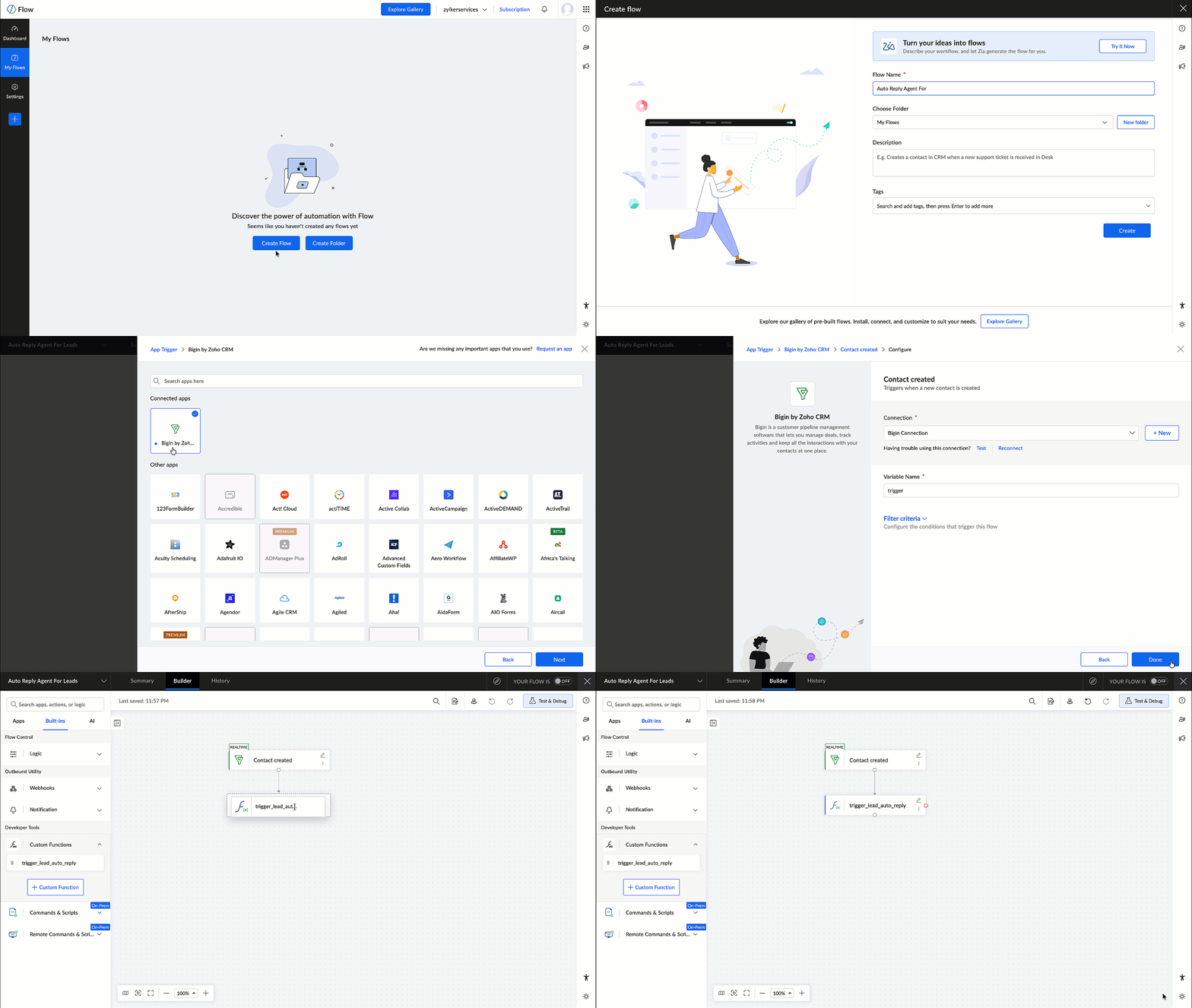

This ensures that wherever a new contact is created in Bigin, the flow is triggered and the contact ID is passed to the custom function, which in turn invokes the Zia Agent.

Testing the Flow

After configuring the flow, it's important to test the setup to ensure everything works as expected.

Create a test contact in Bigin and verify the following:
  1. The flow is triggered successfully.
  2. The custom function is executed.
  3. The Zia Agent is invoked.
  4. A welcome email is generated and sent to the contact.
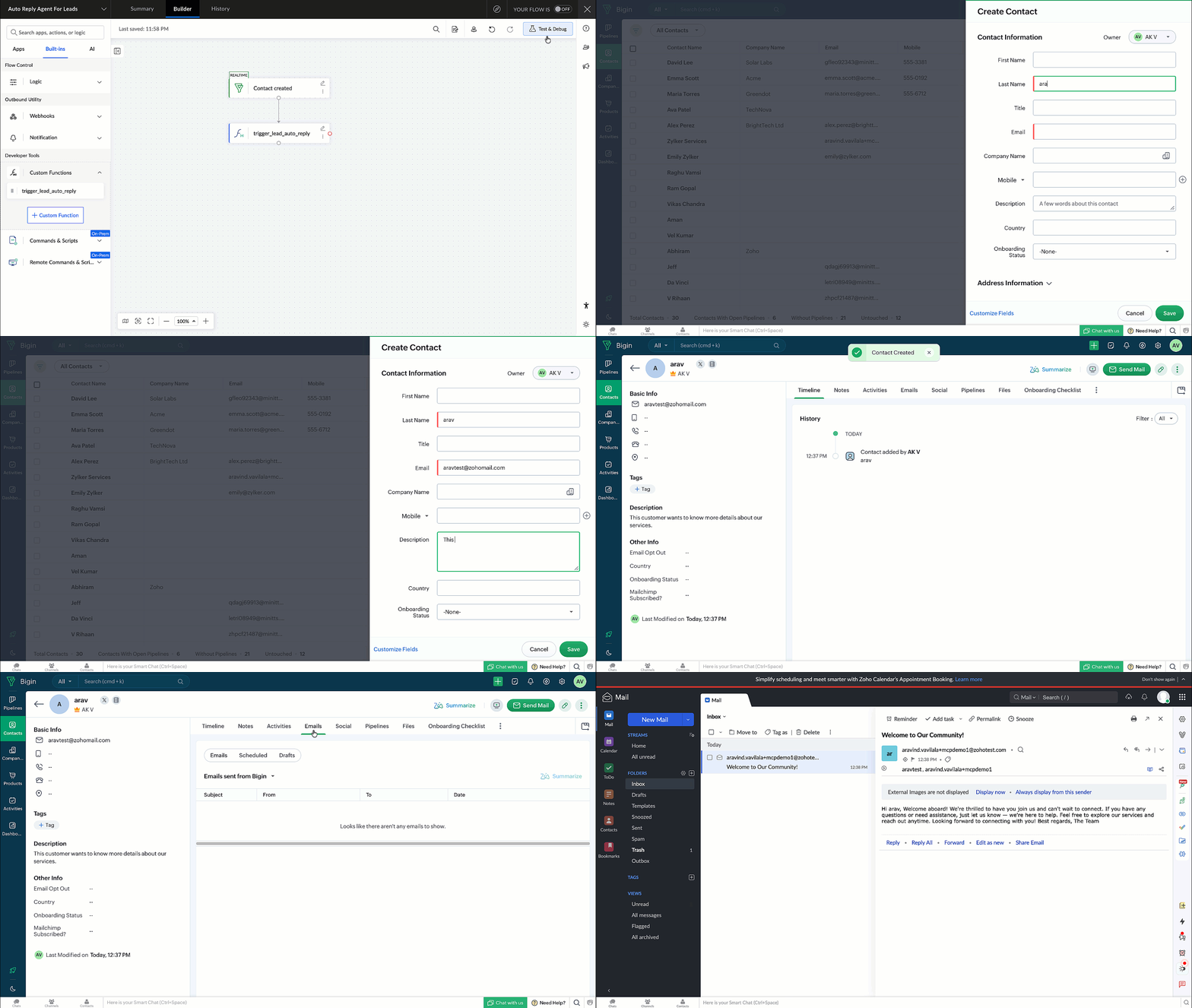

Once verified, the flow can be enabled for real-time execution.

In this post, we explored how to deploy and integrate a custom Zia Agent with Bigin using Zoho Flow.

This approach enables you to move beyond predefined workflows and build intelligent, automated communication systems using Zia Agents.

    • Recent Topics

    • Zoho Webinar not sending calendar entry into Outlook or other calendars

      Dear All, I am using Zoho Webinar for last few months and noted that when a attendee registers at the webinar link he gets an email will intimating his registration and link to webinar. He also get few file ( for Outlook, Google calendar etc) which he
    • Turning off the recorded welcome in Zoho Webinar

      Is there a way to turn off the recorded voice that comes up at the beginning of every webinar session? It devalues the experience for attendees from feedback, interrupting their connection with our brand and delaying webinar start unnecessarily.
    • Client Script | Update - Client Script Support For Custom Buttons

      Hello everyone! We are excited to announce one of the most requested features - Client Script support for Custom Buttons. This enhancement lets you run custom logic on button actions, giving you greater flexibility and control over your user interactions.
    • Save embed widget personalizations

      Ok, Zoho, Great work on providing PRICING TABLES via the embed widget. Thanks so much. This changed the game for me Only one slight problem....I can't seem to save my widget settings. I'm still building my products and plans but I'm testing how they look
    • Problem with UTM Parameters: Zoho Forms - Zoho Desk Integration

      Hi Zoho Support Team, I want to automatically capture UTM Parameters from my website URLs and pass it from Zoho Forms into Zoho Desk. I have activated the UTM tracking feature. I've integrated the UTM Tracking code in my website footer on all pages. I've
    • Team folder not created when creating project using zoho flow

      When I try to automate project creation using zoho flow, and I have enabled workdrive integration to automatically create team folders to attach to the project, this only works when I create a new project through the UI. But I am trying to automate project
    • Zoho CRM upload files error

      Since today, we have been experiencing issues with uploading photos to opportunities. The message indicates that the storage is full, but as far as I can see, there is still plenty of space available. Could there be an issue or a bug?
    • Add an option to deactivate Zoho Meeting "Welcome" message

      My request is to provide an option to deactivate the annoying Zoho Meeting "Welcome" voice when participants join meetings... or remove it all together. First impressions count, especially with new clients. This notification reminds me of the AOL "You've
    • Service line items

      Hello Latha, Could you please let me know the maximum number of service line items that can be added to a single work order? Thanks, Chethiya.
    • SalesIQ > My Chat sort by Unread or Follow-up

      Hi Zoho SalesIQ Team, I would like to submit a feature request regarding the My Chat > Sorting in the SalesIQ UnRead Follow-up Conversation tags Thank you for considering. Best regards, CJ
    • Record sharing for Activities modules in CRM

      Hello everyone, We've got a few quick enhancements to what we covered in this previous announcement: record sharing is now available for Activities modules. 1. Sharing Tasks, Meetings, and Calls Until now, activity records could only be shared indirectly
    • SalesIQ : How to disable "Idle chat handling" ?

      Hello SalesIQ Team. SalesIQ, How to disable "Idle chat handling" ? I would like to disable the option “Automatically close chats that have been idle for a specified amount of time.”
    • How do I create an update to the Cost Price from landed costs?

      Hi fellow Zoho Inventory battlers, I am new to Zoho inventory and was completely baffled to find that the cost price of products does not update when a new purchase order is received. The cost price is just made up numbers I start with when the product
    • Function and workflow to create customer payment and send receipt

       I am attempting to set up a workflow/custom function for the automatic creation of a customer payment and sending the email receipt, but am receiving the error "Improper Statement Error might be due to missing ';' at end of the line or incomplete expression" I've been over everything several times and cannot see where the error is (code is copied into the attached document).  I haven't used custom functions before with Deluge, so it's very likely something very simple, or I've completely mucked
    • Smart Alerts: Protect users with configurable email alerts

      Email-based threats are becoming harder to identify and manage. Administrators need proactive ways to protect users from phishing, fraud, and policy violations. Standard filters can block emails, but blocking alone isn't always the most effective response.
    • Facturation électronique 2026 - obligation dès le 1er septembre 2026

      Bonjour, Je me permets de réagir à divers posts publiés ici et là concernant le projet de E-Invoicing, dans le cadre de la facturation électronique prévue très prochainement. Dans le cadre du passage à la facturation électronique pour les entreprises,
    • Ticket Status

      HI, Any idea on how to create other options for this header??? I want to add an "Ordered" status. Its under "tickets" in Overview, I need a new status created (see second picture)
    • Power up Zoho CRM with project intelligence

      Dear user, You're probably one of those businesses using your CRM as a single source of truth. It's where sales, project execution, and finance teams go to analyze past decisions and formulate future strategies. But what happens when project data is either
    • Print multiple uploaded images in an HTML snippet in a Page

      I have a Form: Job_Preparation It stores details of each new item that must be built by the fabricators in our workshop. The form has a field: Documents I upload 4 image files to the Documents field. I want to print a sheet for our workshop staff with
    • "Track Inventory for this item" is forced checked by default for goods items (eTims issue?)

      Hello, Since connecting our Zoho books to eTims (Kenya) the "Track Inventory for this item" is forced checked by default (eTims issue?) in the Item creation page for any type of goods. So when purchasing anything that the company does not intend to sale,
    • Its 2022, can our customers log into CRM on their mobiles? Zoho Response: Maybe Later

      I am a long time Zoho CRM user. I have just started using the client portal feature. On the plus side I have found it very fast and very easy (for someone used to the CRM config) to set up a subset of module views that make a potentially extremely useful
    • Why can't we choose Fixed Asset account for Purchased Items? (eTims issue?)

      Hello, When the company purchase items not for sale and not supposed to be in the inventory stock, like equipment for operational use, there is no way to access the Fixed Asset accounts in the drop down list. Is that an eTims limitation again? Or something
    • Zoho Team Inbox - roadmap

      Hi, would be good to understand the Teaminbox roadmap, in particular: 1. API / Zoho Deluge connections. We have a process where the each email needs to be either tagged or assigned daily. It would be great if we could automate a 5pm alert for any exemptions
    • SalesIQ Integration with LINE: API Rate Limit Issue and Pre-Chat Flow Concerns

      Hello SalesIQ Developer Team. I have investigated the issue and found that the LINE Rate Limit is being consumed unusually quickly. LINE API free usage limit: 300 messages per month per band. This limit will be reached within the first few days. 1. LINE
    • Free webinar! Sign documents across borders: AES, QES, ID verification

      Hello all, Signing paperwork across geographies sounds simple, until critical questions around legality, security, and compliance pop up. Join our upcoming webinar to see how Zoho Sign helps businesses worldwide sign documents with confidence. Agenda:
    • Blueprint Not Triggering When Lead Status Is Updated by Workflow (IndiaMART Integration)

      I have set up a blueprint that triggers when a lead’s status is “New Lead.” Our CRM is integrated with IndiaMART, and when leads are created from IndiaMART, their Lead Status is initially set to None. To handle this, I created a workflow that automatically
    • Add field "Expected Availability Date" to Purchase Orders

      Hi there. We drop ship and 'make to order' whereby we backorder sales order items directly with factories for manufacturing. One of the leading questions from Customers is "when is the order ready". Currently there is an 'Expected Delivery Date', which
    • Related list view for Assets

      We first set up all our parent assets in FSM and now we are adding child assets which are the parts for the parent assets. When under the customer related list, since it only displays 5 rows of data, I have to click through many assets to locate the parent
    • How To Invoice Immediately for Future Subscription

      Hi, When a new subscription is created that has a future start date, Zoho Subscriptions does not invoice the customer until the start date of the subscription. Is there a way to immediately invoice the customer as soon as the subscription is created,
    • Problem with the blueprint flow.

      Scenario: 3 departments in a single environment: A-B-C agents from department 1 D-E-F agents from department 2 G-H agents from department 3 Since we've been using Zohodesk (2023), agents can assign tickets to the correct department using the blueprint
    • Create Tasklist with Tasklist Template using API v3

      In the old API, we could mention the parameter 'task_template_id' when creating a tasklist via API to apply a tasklist template: https://www.zoho.com/projects/help/rest-api/tasklists-api.html#create-tasklist In API v3 there does not seem to be a way to
    • Spell Check Red Underlines Keep Appearing Even After Disabling

      Hello Zoho Support, I'm facing an issue in Zoho Writer where red spell-check underlines keep appearing even after I disable Spell Check. I have already: Turned OFF Spelling Errors Turned OFF Grammar Turned OFF Writing Quality Turned OFF browser spell
    • Add multiple users to a task

      When I´m assigning a task it is almost always related to more than one person. Practical situation: When a client request some improvement the related department opens the task with the situation and people related to it as the client itself, the salesman
    • iOS Books app shows filtered view after changing to All sales orders

      My boss often checks sales orders on his iPhone. The app is mostly working fine, but there's an ongoing issue: When switching between different filters (also called custom views on the web), going back to All doesn't often work. It typically gets stuck
    • Empowered Custom Views: Cross-Module Criteria Now Supported in Zoho CRM

      Hello everyone, We’re excited to introduce cross-module criteria support in custom views! Custom views provide personalized perspectives on your data and that you can save for future use. You can share these views with all users or specific individuals
    • Recurring Invoices

      I'm looking to set up recurring invoices on a monthly basis, using GoCardless as a payment gateway. I've done this successfully, however there's a big problem with the Invoice Date and Due Date. We prefer to provide sufficient notice of collection (10
    • Recurring Events Not Appearing in "My Events" and therefore not syncing with Google Apps

      We use the Google Sync functionality for our events, and it appears to have been working fine except: I've created a set of recurring events that I noticed were missing from my Google Apps calendar. Upon further research, it appears this is occurring
    • Vorrei disdire l'abbonamento

      Vorrei disdire l'abbonamento, ma non trovo il modo. Mi assistete?
    • Has anyone successfully gotten conditional rendering to work in Zoho Books Sales Order HTML PDF templates?

      I’m trying to hide a custom field box when the custom field is blank. The value placeholder itself works perfectly: ${salesorder.cf_distribution_reference_numb} If the Sales Order has a value, it renders correctly. Example: 45488045. But when I wrap that
    • What's New in Zoho Inventory | April & May 2026

      Hello users, We're excited to roll out the latest Zoho Inventory updates for April and May 2026. These enhancements are designed to make your daily operations smoother and more efficient, from advanced inventory management and flexible pricing to automated
    • Next Page