Introducing Bot Filtering for Accurate Email Campaign Analytics

Introducing Bot Filtering for Accurate Email Campaign Analytics


Alert
Update : This feature has been revamped. For the most current information and improved functionalities, please visit the updated version here.


Dear Marketers,


We're excited to announce a new feature designed to enhance the accuracy of your email campaign analytics: bot filtering. This feature helps you filter out bot-generated opens and clicks, ensuring your campaign reports reflect genuine recipient engagement.


What are bot clicks? 

Bot clicks are actions performed by automated software, not humans. These programs often scan emails for security threats like viruses or malicious links. As a result, they can inflate your engagement metrics by showing multiple clicks from a single contact, even if no one actually interacted with the email.


Why bot filtering matters 

Bot-generated activity can distort your campaign performance metrics. Our bot filtering feature helps you eliminate this noise, providing a more accurate picture of your audience's engagement.


Key features of bot filtering

  • Easy toggle: Enable or disable bot filtering with a simple switch in Settings > General Settings.

  • Accurate reporting: When enabled, bot filtering automatically excludes bot activity from your campaign reports, offering clearer insights.

  • Transparency: A visual indicator in your reports shows whether bot filtering is active, ensuring full transparency in your data analysis.


How it works

Default setting: Bot filtering is initially turned off to include all opens and clicks in your reports.

By leveraging bot filtering, you can gain a more accurate understanding of your email campaign performance and make data-driven decisions with confidence. 


NotesNote: To provide more granular insights, we're incorporating detailed bot data into our email campaign reporting. This will empower users to monitor performance closely and take informed actions.Due to the simultaneous development of report handling improvements, we have revised the anticipated release date. You can expect this release to go live by Jan 2025.


Here's how to enable the bot filtering option in Zoho Marketing Automation.

Step 1: Bot filtering option

Locate the Bot Filter link under Settings > General settings.
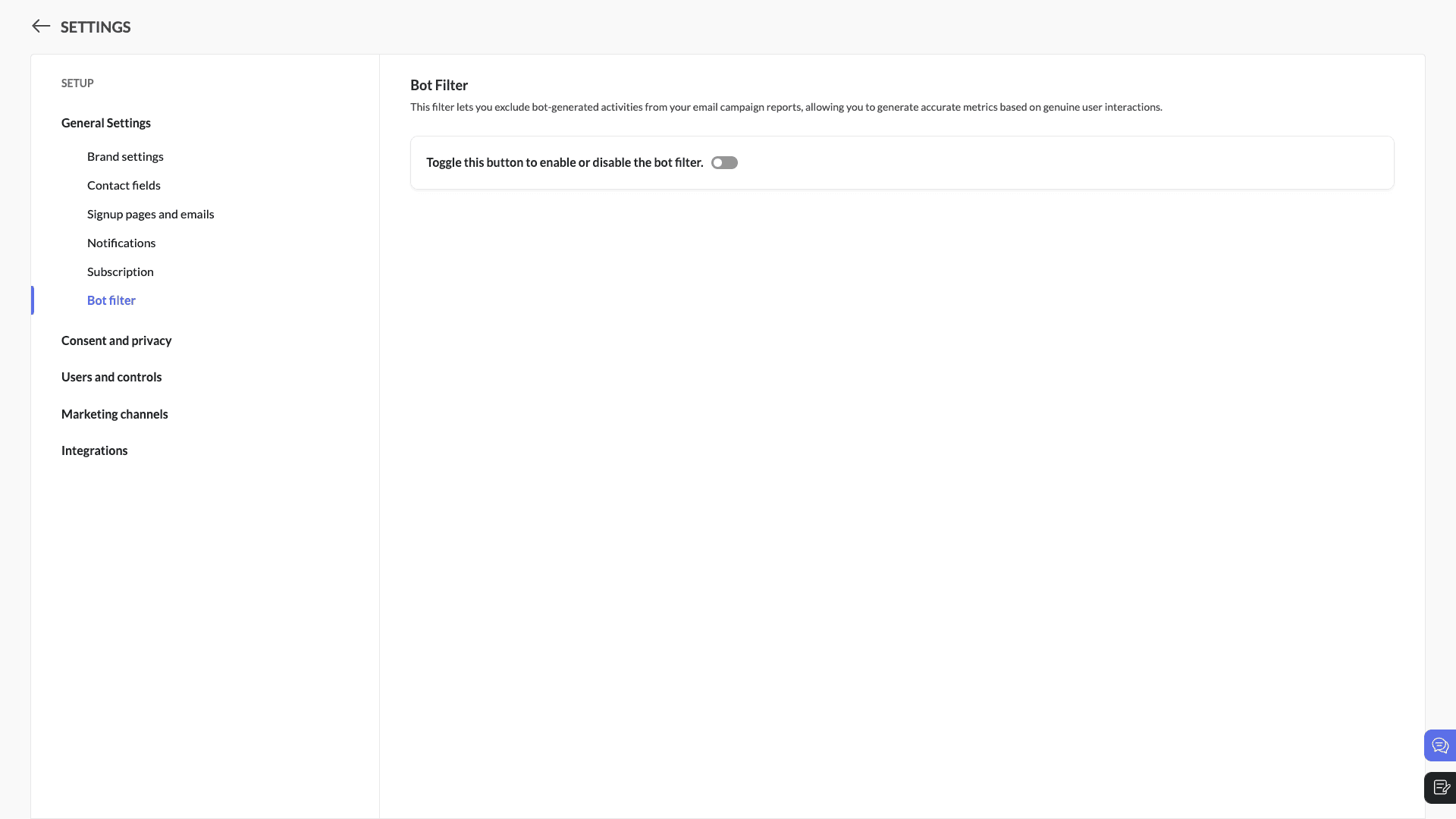


Step 2: Toggle the bot filtering option
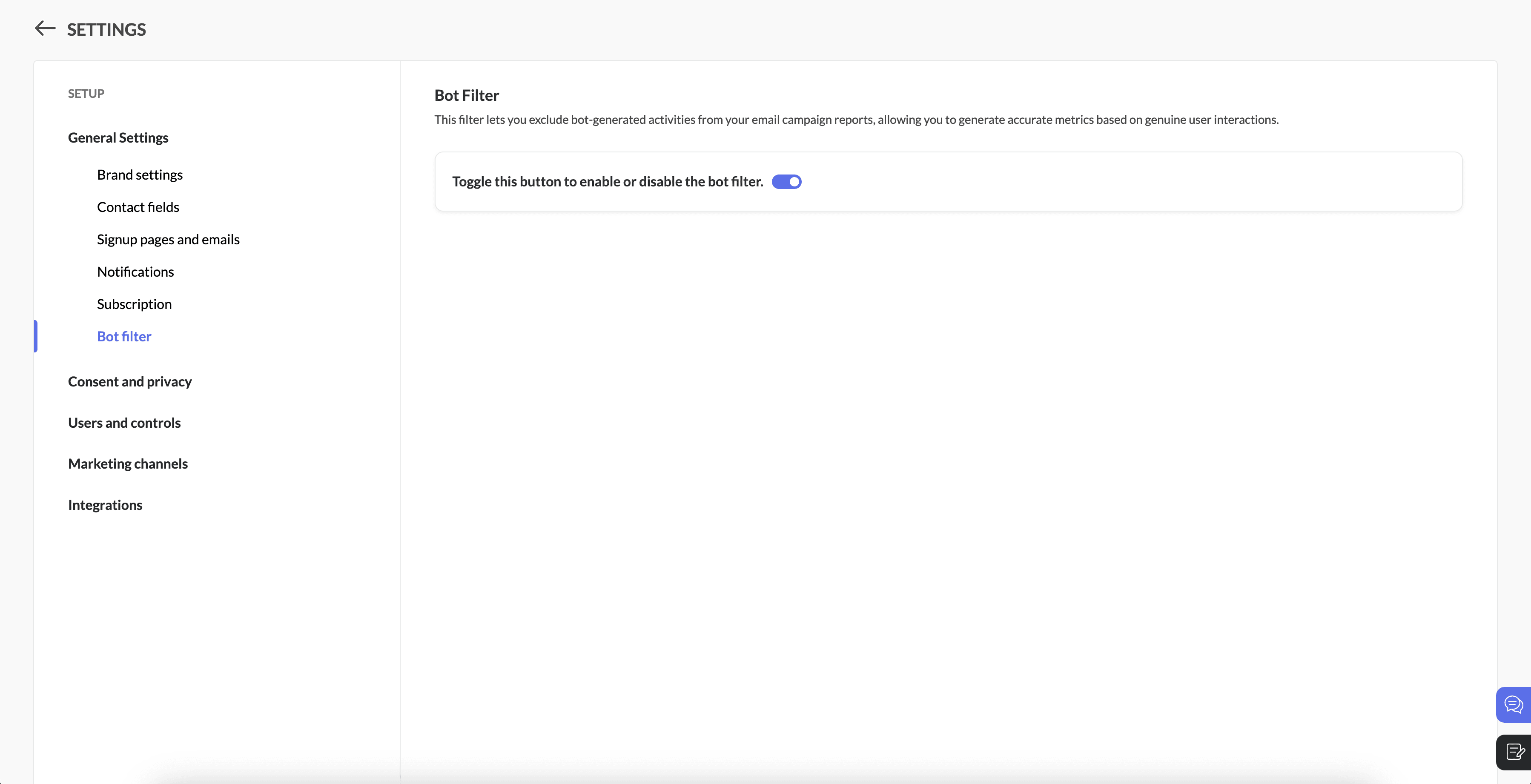
In the Bot Filter setting, click the bot filtering toggle to enable the feature.


When you enable this option, a pop-up will appear to confirm your decision. Click enable to activate this feature, which will be applicable to all upcoming campaigns.

Step 3: Enable/disable the option

Filter enabled: If the bot filter setting is enabled, all bot opens/clicks will be excluded from email campaign reports and overall reports.

Filter disabled: If the bot filter setting is disabled, all bot opens/clicks will be included in email campaign reports and overall reports.
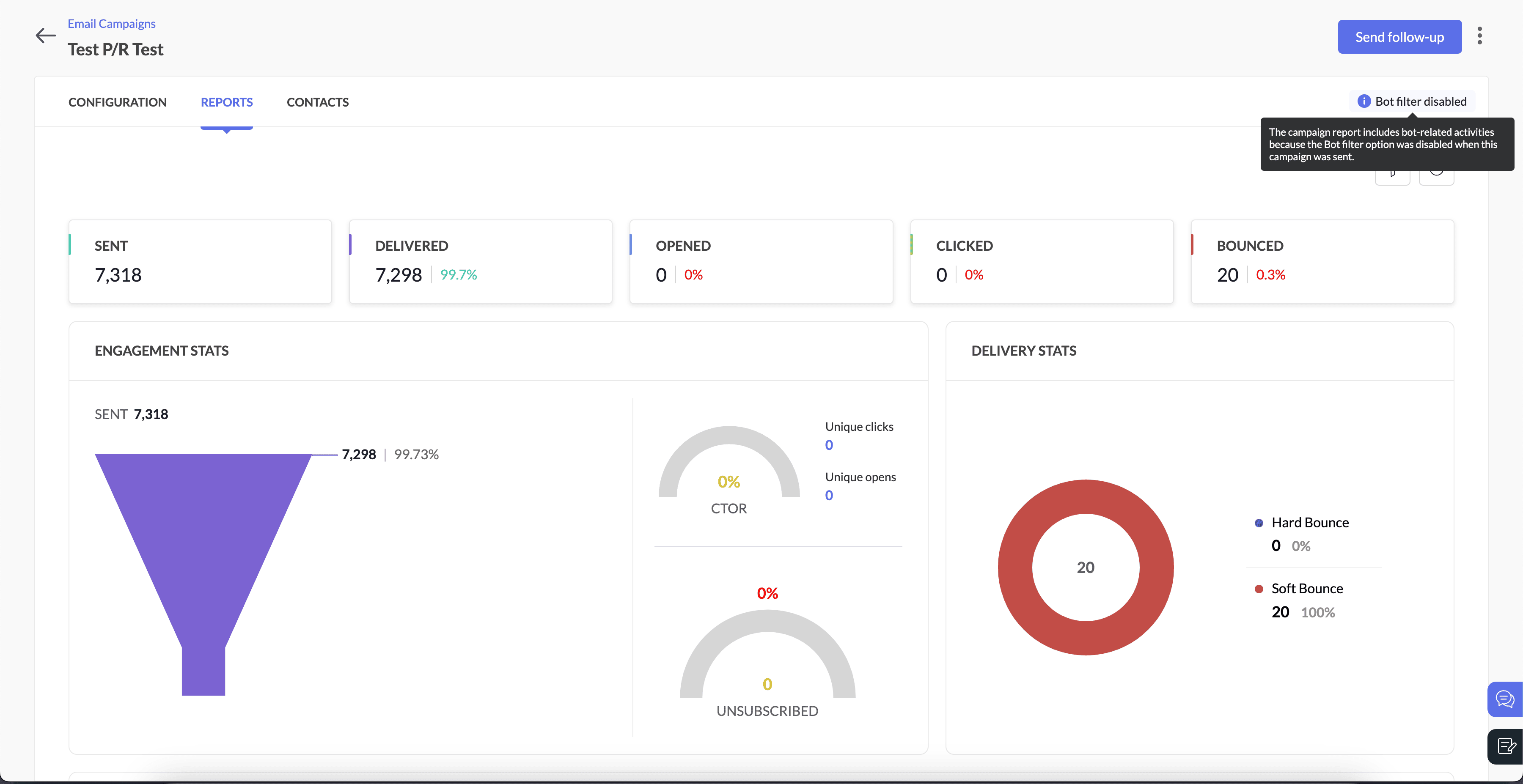

Here's how you can see it in the campaign reports, When the bot filter setting is disabled 


When the bot filter setting is enabled


Info
Note
  • Open rates may decrease when the bot filter is enabled.

  • Follow-up actions, such as journeys and response action components, will not be triggered by bot interactions.

  • Campaigns that have already been sent or are in progress will not be affected by new changes. We'll roll this update out in two weeks, and after that, users might notice an increase in opens and clicks, as the bot filter will be disabled by default.

  • We'll examine the bot settings when sending the campaign.

  • Please note that Apple Mail Privacy Protection (MPP) opens are not currently filtered in this update.  We are working on a solution to handle Apple MPP opens and will provide another update soon.

For example, if a user disables bot filtering before sending a campaign but re-enables it afterward, the email campaign report will still reflect bot-related activities. This occurs because the settings were disabled at the time the campaign was sent

Bot filter option when campaign was sent

Bot filter option after the campaign was sent

Bot-related activities in campaign reports

Enabled

Disabled

Excluded

Disabled

Enabled

Included


Step 5: Pop-up confirmation to disable bot filtering
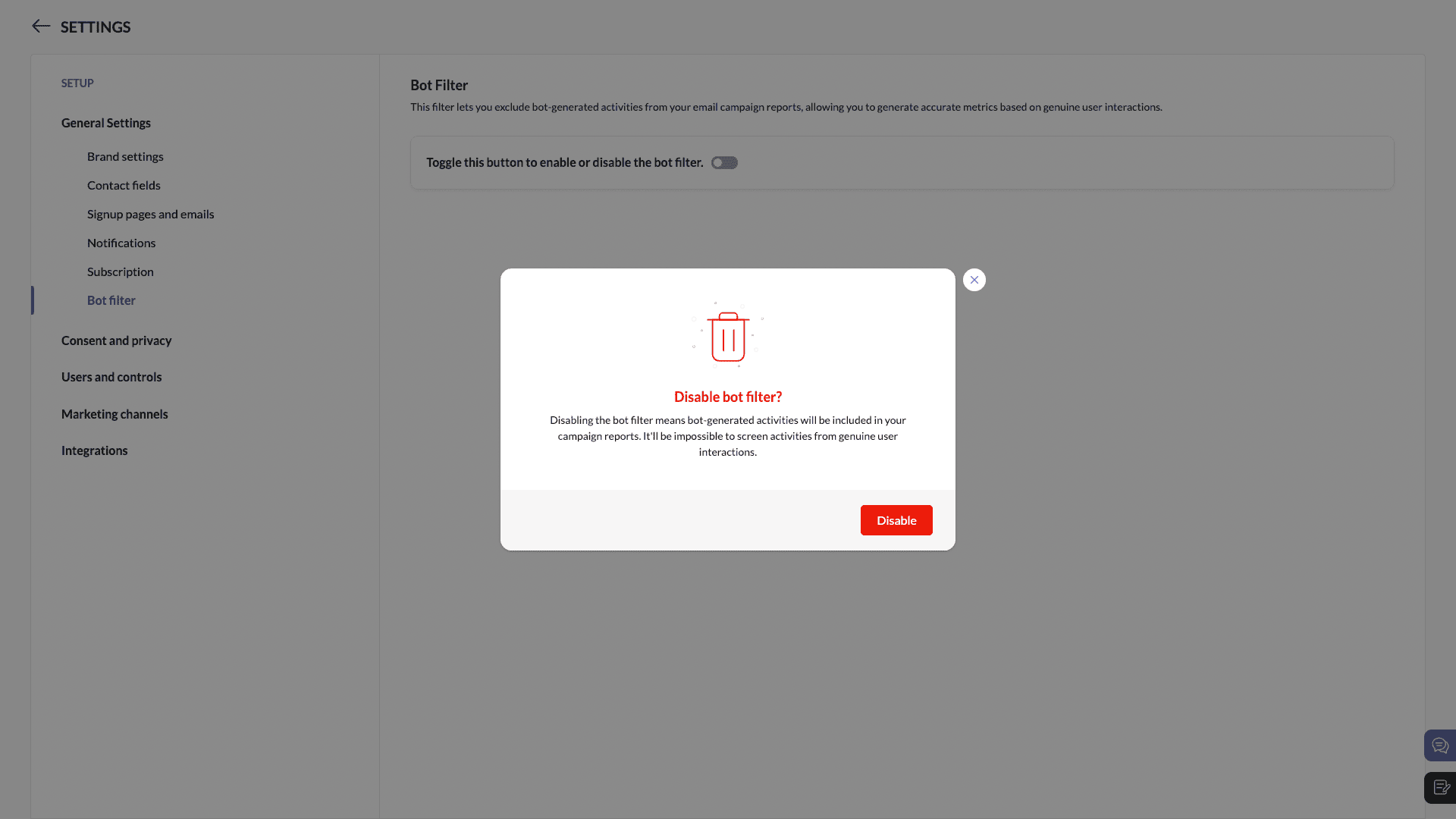
You'll see a pop-up while disabling bot filtering.


We're here to help

As always, our support team is ready to assist you with any questions you may have about bot filtering or any other feature in Zoho Marketing Automation.

We're confident that bot filtering will provide you with more reliable insights and enable better decision-making and more optimal marketing strategies.

Happy marketing!

Best regards
Zoho Marketing Automation Team

    • Sticky Posts

    • Marketer’s Space - Automating CRM Actions with Journeys – Part 2

      Hello marketers! Welcome back to another post in Marketer’s Space. In our previous post, we explored how CRM actions in Journeys help marketing and sales teams work together by nurturing CRM leads and pushing only engaged prospects back to sales. If you
    • Introducing automation and utility conversations in WhatsApp marketing

      We’re excited to announce the addition of two new features to our WhatsApp integration: Automation and Utility conversations. These enhancements will allow you to streamline your marketing efforts and engage with your customers more effectively by automating
    • Tip of the week 02 - The art of 'seeing' your leads

      What's the last page that your lead visited before signing up for your brand? What was the page that first convinced your lead to explore more about you? Where are your leads coming in from? Well, these are some perennial questions today's marketers live upon. And, knowing the answers to these questions is crucial, considering the vitality of leads in every business. In the journey of finding lead opportunities, it's important to understand that every detail about a lead is useful. While the channels
    • Zoho Marketing Automation Update: Topics, Contacts, and List Management

      At Zoho Marketing Automation, our highest priority is making it easier for you to use our product to accomplish your business goals. With that in mind, we are updating three of our pivotal features: Topic, Contacts, and List Management.   These existing
    • Important: Zoho MarketingHub is now Zoho Marketing Automation

      Hello Everyone,   We hope you all are doing well. We'd like to notify you that we have rebranded Zoho MarketingHub to Zoho Marketing Automation. We'll discontinue using the term "MarketingHub" from May 26, 2021. However, there will be no changes in the
    • Recent Topics

    • CRM x WorkDrive: We're rolling out the WorkDrive-powered file storage experience for existing users

      Release plan: Gradual rollout to customers without file storage add-ons, in this order: 1. Standalone CRM 2. CRM Plus and Zoho One DCs: All | Editions: All Available now for: - Standalone CRM accounts in Free and Standard editions without file storage
    • How do I associate pricebooks to a customer?

      I setup a few pricebooks, that worked fine. But now the only thing I can do with it, when I enter a quote or sales order, I can select which pricebook to use, but I have to do this product by product every time I add one. Is there a way to connect a pricebook
    • Write-Off multiple invoices and tax calculation

      Good evening, I have many invoices which are long overdue and I do not expect them to be paid. I believe I should write them off. I did some tests and I have some questions:  - I cannot find a way to write off several invoices together. How can I do that,
    • Changing field types

      Question im a Zoho CRM user and curious, if I change a flied type from single or multi line text to a URL field type will i lose the data in the field or will it be converted to website link automatically. Thanks
    • Leave Report Emailed Weekly

      I am wondering if someone knows how to have a report generated either weekly or monthly or both for department heads and ownership of upcoming employee leave. For instance, it would be nice to get an emailed report on Friday for the upcoming week of who
    • auto close automated alert tickets which are similar

      Hello ZOHO Community, we are using ZOHO Desk to process automated monitoring alerts. Scenario: Our monitoring system creates a ticket when a threshold is exceeded, e.g. Subject: Computer 1 – CPU usage 100% – Error A few minutes later, once the issue resolves
    • Zoho desk desktop application

      does zoho desk has a destop applicaion?
    • Tip #54- Exploring the Files Icon in Zoho Assist- 'Insider Insights'

      As we’re already in mid-December, it’s a good time to take a closer look at one of the most useful options in the Zoho Assist remote support dashboard—the Files icon. To get started, log in to Zoho Assist using your credentials. Once you’re in, navigate
    • Tip#47: Estimation planner

      Sprint planning becomes easier, smoother, more collaborative and more accurate with the Estimation Planner extension. Most work items involve multiple users, and each user's role and effort vary. To provide an unbiased and fair estimation point to the
    • Painfully Slow Zoho mail

      Since yesterday Zoho Mail seems to have starting functioning very slowly and having a few bugs. It's slow to open mails, slow to send, slow to change between email accounts. Sometimes clicking on a particular folder (eg Sent folder) stops working and
    • Upcoming update to Google Drive integration in Zoho Creator

      Hello everyone, We're writing to inform you about an upcoming update to how Zoho Creator integrates with Google Drive. In Zoho Creator, during actions like importing files to create an app or attaching files to fields, you can choose files directly from
    • Changing Default PDF Name

      Is it possible to change the default name of a PDF? As of right now, all of my quotes are named 'QT_$QuoteNumber' (i,e: 'QT_19803471298374) - would it be possible to change this to: '$CompanyName - $AccountName - $QuoteNumber' for instance?
    • Time Tracking on Iphone doesn't stop

      When I start a time tracking session the timer starts as expected. However when I hit stop, the timer remains on that project. The only buttons available are discard and start. Start runs the timer more and discard says it will throw away the data from
    • Zoho Sign - Zoho CRM extension upgrade

      Hi everyone, We've updated Zoho Sign extension for Zoho CRM with significant internal changes. Impact on existing Zoho Sign extension users Users using the extension without customization If you are using the integration without implementing Zoho Sign's
    • Zoho Books blocks invoicing without VeriFactu even though it is not mandatory until 2027

      I would like to highlight a very serious issue in Zoho Books for Spain. 1. The Spanish government has postponed the mandatory start of VeriFactu to January 1st, 2027. This means that during all of 2026 businesses are NOT required to transmit invoices
    • Group by Owner/ Owner Kanban /Group by Custom Field

      Hi, We are missing the option of viewing Tasks grouped by their owner, as it is an essential function for us to manage our employees' working tasks. We find it hard to inspect what are the tasks that our employees are working on.  We are seeking an option
    • Flow using way too many tasks

      I built a flow that is using way too many tasks for what it is doing. I reached out to support a week ago but never heard back so hoping the community can help. Does a filter count as a task? I am seeing tons of records filtered with < 1 Sec Time Taken
    • Regarding the integration of Apollo.io with Zoho crm.

      I have been seeing for the last 3 months that your Apollo.io beta version is available in Zoho Flow, and this application has not gone live yet. We requested this 2 months ago, but you guys said that 'we are working on it,' and when we search on Google
    • Start Workflow from Deluge Script

      I have developed a customized process from our CRM that leverages a deluge script to create a statement of work document. Once the document has been created via the merge and store function, I would like the ability to start a workdrive review & approve
    • Saved Sections?

      In sites editor, the + button reveals options to add a section, element, etc. It includes Saved Sections, but I can find no way to save a section I've already created. Otherwise, is there a way to copy a section from one page to another?
    • Marketer's Space: Unable to select a sender address? Here's the fix

      Hello Marketers, Welcome back to yet another post! So you've added a sender address in Zoho Campaigns and later found that you're not able to select it while creating an email campaign. Has this ever happened to you? If so, don't worry—you're not alone.
    • Loading Project Balances in ZOHO Books for each project

      Hello, What is the best method for loading project balances actual and budget into ZOHO books to provide tracking to our project managers. We have projects and federal awards (also treated as projects) which span multiple years. We are converting from
    • Auto-Invite Users to Portals in Zoho CRM based on Conditions

      Hello Everyone, You can now automate portal invitations in Zoho CRM with the new Auto-Invite users feature in Portal management. No more manually enabling portal access one by one. With this enhancement, you can automatically send invites for users to
    • Scale up your writing style with content analysis tool in Knowledge Base

      Hello everyone, Sometimes writers may have strong knowledge about the subject but may find it challenging to articulate clearly or produce comprehensible, jargon free content. To make the process easier and to ensure consistent, high-quality articles,
    • Zoho Books "Update" Trigger for Zapier?

      Hi Zoho Team, I've been in talks with Zapier about using their services to connect my Zoho Books account to various apps, but I require an additional trigger beyond the "New" trigger. I require an "Update" trigger, which will allow me to filter and create Zaps only when certain conditions are fulfilled on the Zoho Books end before I automate a separate app. Specifically this will help me create invoices in QuickBooks Online only when payments are recorded in Zoho Books, rather than when a new invoice
    • How to prevent editing of closed tickets in Zoho Desk?

      I would like to confirm whether it is possible to completely prevent agents from editing tickets once their status is set to Closed. Is there any configuration, permission, or best practice in Zoho Desk to ensure that closed tickets remain read-only and
    • Zoho Desk Limitations

      Good day, all, I would like to know whether others share my frustration with some of Zoho's limitations. Don't get me wrong, I like Desk (and I also have a subscription for Analytics), I have been with them for close to 10 years, and unfortunately, I
    • Cliq iOS can't see shared screen

      Hello, I had this morning a video call with a colleague. She is using Cliq Desktop MacOS and wanted to share her screen with me. I'm on iPad. I noticed, while she shared her screen, I could only see her video, but not the shared screen... Does Cliq iOS is able to display shared screen, or is it somewhere else to be found ? Regards
    • Is it possible to remove filtering options?

      My CRM has a lot of custom fields that should not be used in filters or views. Fields that are automated and exist only to store temporary values that get used in functions. These create a lot of noise in the list of fields to filter. Isn't there any
    • New Mandatory One-Click Unsubscribe Link Overshadowing Custom Unsubscribe Link

      I was recently informed by Zoho CRM Support that they are now mandated by the large email service providers like Google and Yahoo to provide a one-click unsubscribe option in the header (not the body) of all mass emails. I have a custom unsubscribe link
    • how to undoreconciled transaction

      how to undo reconciled transaction
    • Can I export all attachments from Zoho CRM?

      Can I export all attachments from Zoho CRM?
    • Exciting Updates to the Kiosk Studio Feature in Zoho CRM!

      Hello Everyone, We are here again with a series of new enhancements to Kiosk Studio, designed to elevate your experience and bring even greater efficiency to your business processes. These updates build upon our ongoing commitment to making Kiosk a powerful
    • Change eMail Template for Event-Invitations

      Hello ZOHO-CRM Team How I can change the eMail Template for Event-Invitations? I work with the German Version of the Free Version. I know how I can modify eMail alerts or Signature Templates, but where I can other eMails modify you send out? Thank you for your answer. Regards, Juerg
    • Right-Click Pipeline to Open in New Tab

      Please add the ability to right-click on a pipeline to open it in a new tab
    • Service Title in Service Report Template Builder

      I am currently working on the Service Report Template Builder in Zoho FSM. I have created three separate service report templates for different workflows: Preventive Maintenance Report Requested Service Report Installation Report My issue is that I cannot
    • Zoho Sign for Zoho Projects

      Documents authorization and validation with signature is now easier in project management with Zoho Projects' Zoho Sign extension. Sign documents or send them for signatures directly from tasks and issues using Zoho Sign extension in Zoho Projects. Extension
    • Deluge Learning Series – Best Practices in Deluge | December 2025

      We’re excited to bring you the next session of the Deluge Learning Series, focused entirely on writing cleaner, faster, and more reliable Deluge code. In this edition, we’ll dive deep into the essential best practices every Deluge developer should follow
    • Associate a Contact to a Campaign using deluge?

      If I want to add one record to another related list, which zoho function do I use? zoho.updateRelatedRecord is not it I don't think.  I simply want to take a "Contact" and associate it to a "Campaign" using deluge.  Can anyone help? contactId = 5122008000000796037;
    • Add "Groups" above "Users" in the Zoho Forms Left Menu

      Hi, We have Groups but you have to go to a Form and Share or use the Directory App to manage them, please add "Groups" above "Users" in the Zoho Forms Left Menu so you can manage them in 1 place within Zoho Forms too. Thanks Dan
    • Next Page