Introducing Radio Buttons and Numeric Range Sliders in Zoho CRM

Introducing Radio Buttons and Numeric Range Sliders in Zoho CRM

Info
Release update:
1. 2 March 2026: Currently out for CN, JP, AU and CA DCs (Free and standard editions). 
For other DCs, this will be released by mid-March.
2. 26 March 2026:
CA, SA, AU, JP, CN DCs - Free, Standard, Professional, Enterprise, Ultimate, CRM Plus, ZohoOne
IN DC -  Free, Standard
EU, US DCs - Free, Standard, Professional, Enterprise.
3. 30 April 2026: Rolled out for all users!

Hello everyone,

We are pleased to share with you that Zoho CRM's Layout Editor now includes two new field formats— Radio Buttons and Sliders for Numeric Fields. These additions will make it easier for your users to fill out forms across all your modules, given the convenience they offer, as well as visual appeal.


Let's take a closer look at how these new elements work.

Radio Buttons


Radio Buttons
are ideal when a user has to input a single choice from a minimal set of options that are presented upfront, making selection clearer and faster.

Here are some common use cases where Radio buttons work the best:

  • Billing cycle, such as Monthly or Yearly

  • Subscription plan, such as Basic, Pro, or Enterprise

  • Property type in real estate, such as 1 BHK, 2 BHK, or 3 BHK
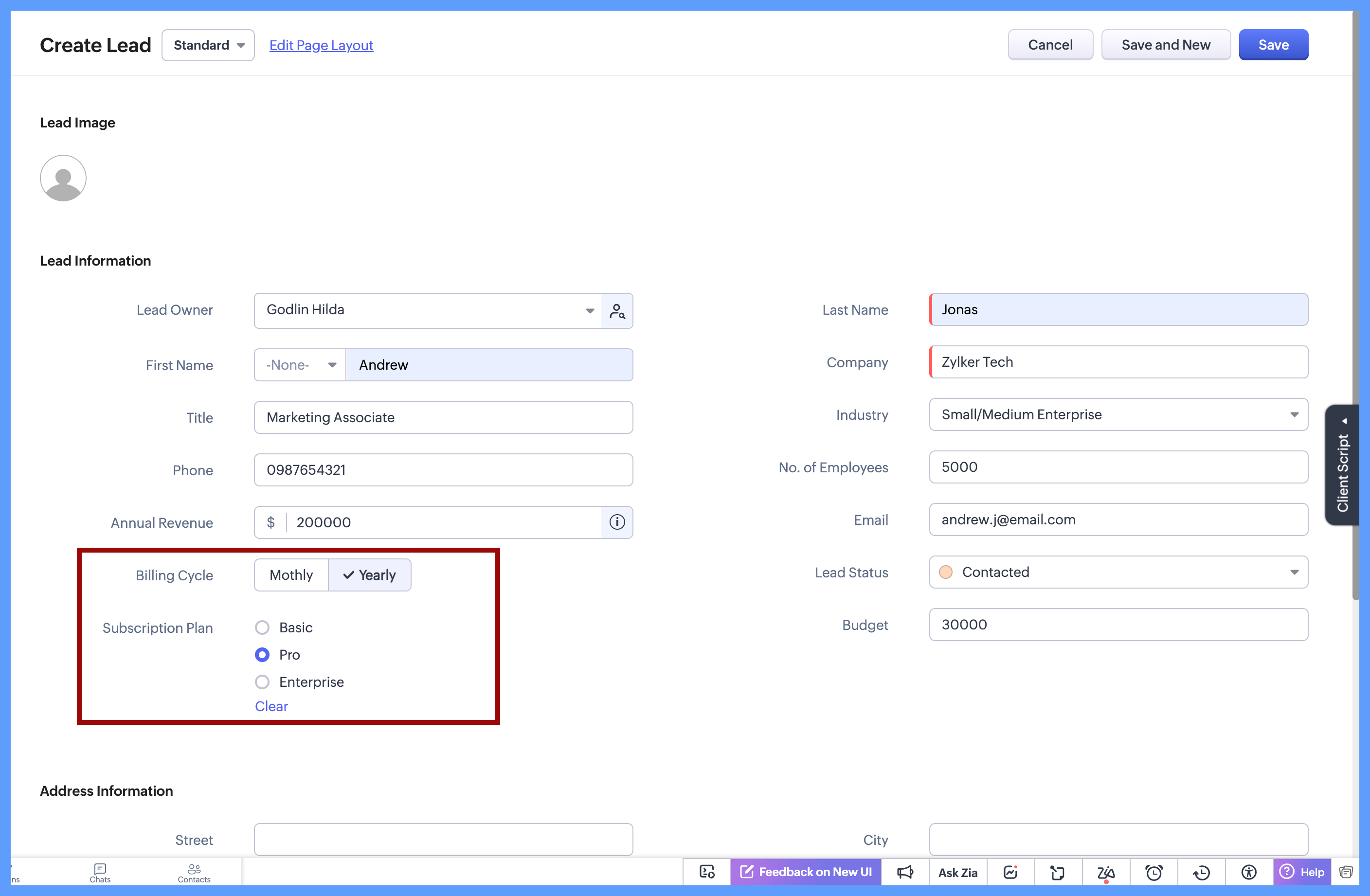


In each of these cases, the choices are limited to 2 or 3 options which are clearly defined, and the user needs to select just one option. Since all options are visible upfront, there’s no need to open a dropdown or scroll, making the selection quick and effortless.

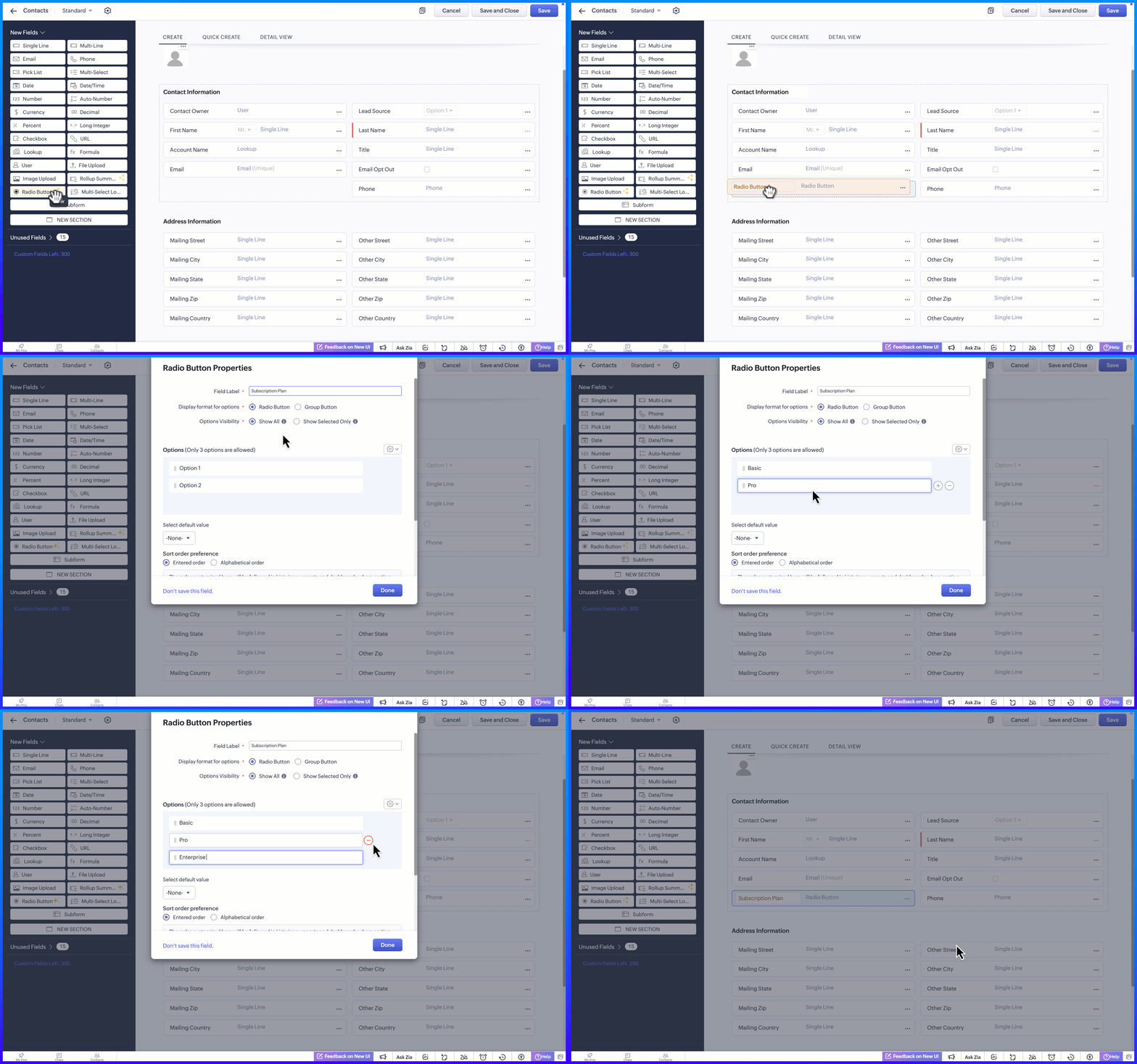
Here's how to configure a radio button on the module's layout page:


Display Format for options

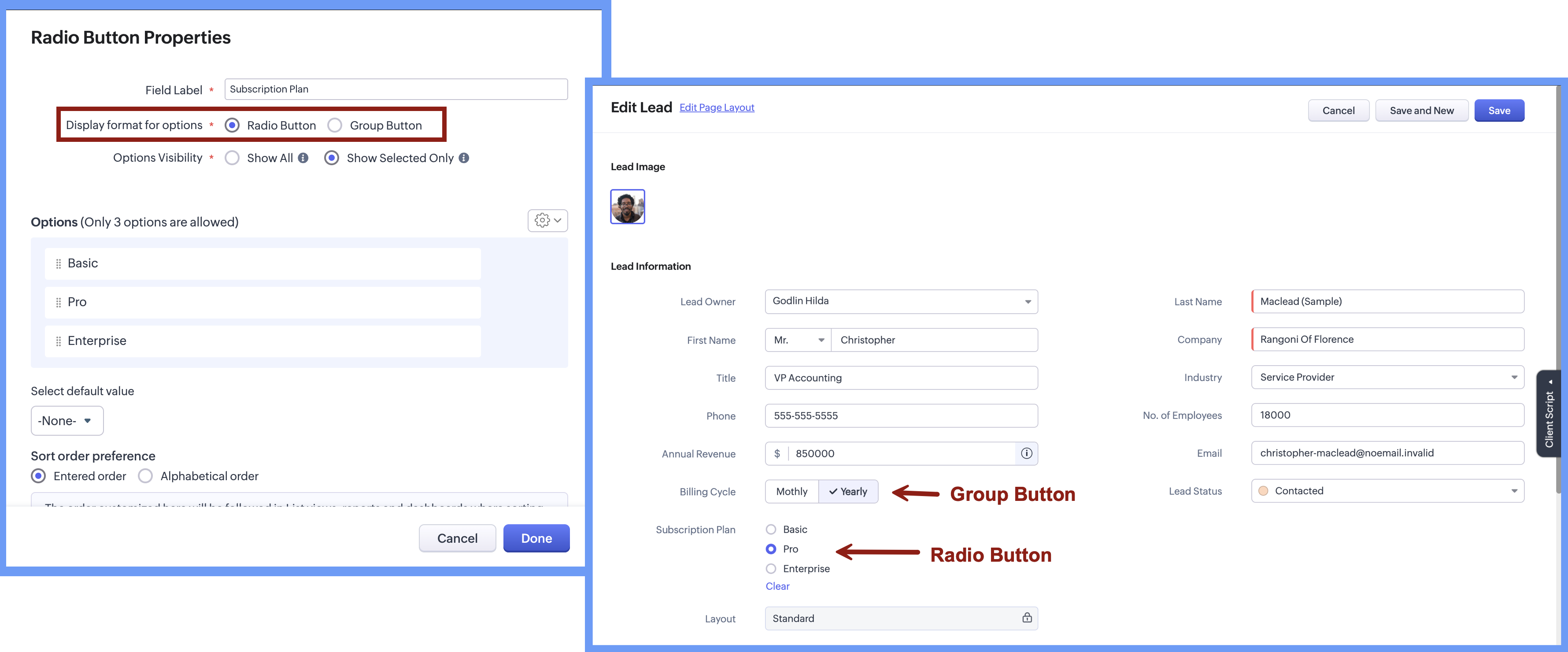
When adding the radio button, the Radio Button Properties pop-up lets you choose how the options appear on the screen. Rather than using a fixed format, you can select a display style that best suits the field, making it easier for users to see and choose from the available options.


There are two display format options:

  • Radio button, where options are listed one below the other.

  • Group button, where options appear as a compact set of selectable buttons.

This flexibility helps you design forms that feel clear and easy to use, while letting users quickly understand their choices and select the right option.


Option Visibility

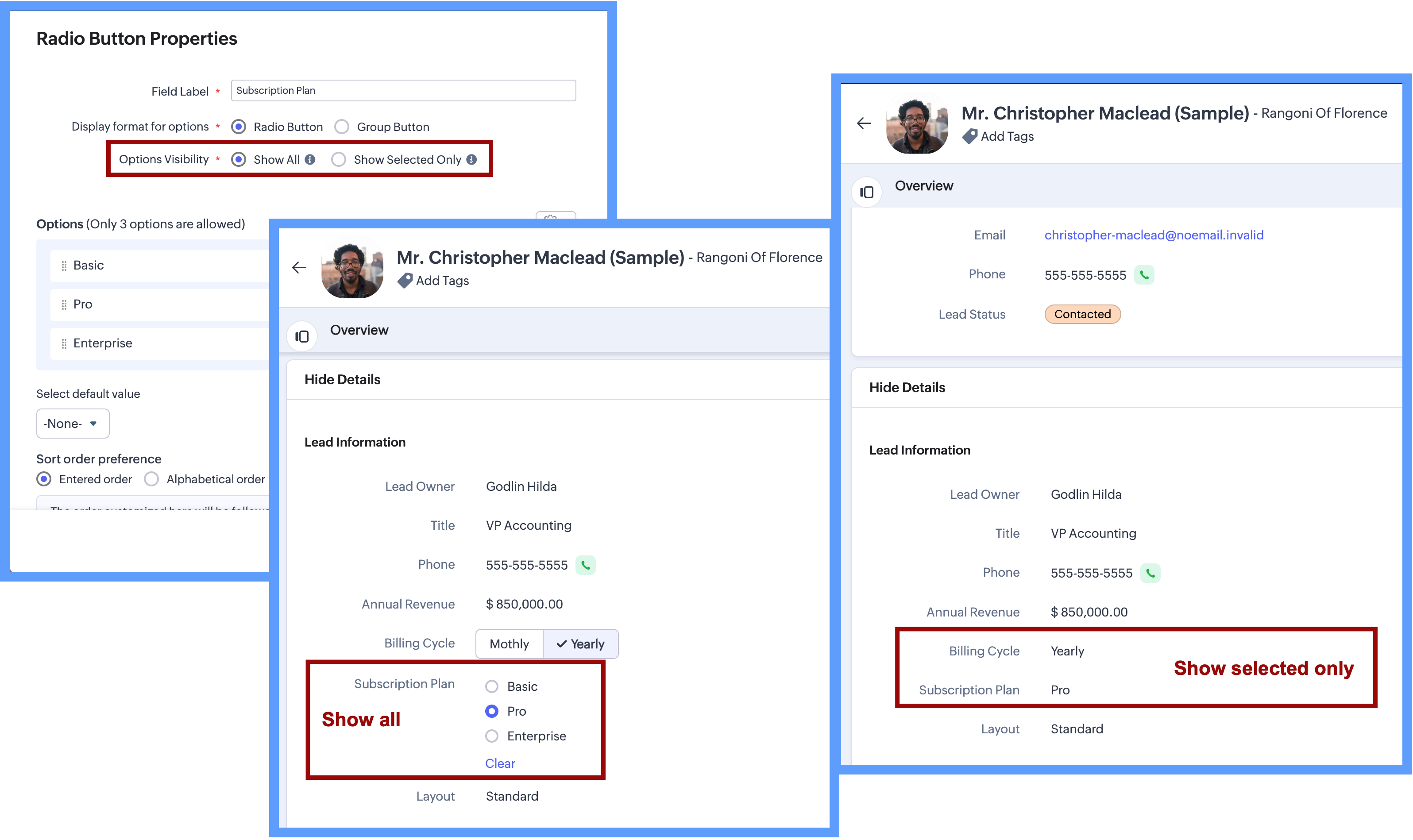
The Option Visibility setting helps you decide how much information users need to see after a value is selected.

  • Show all: If users need to view all available options at all times and quickly update their choice on the go, you can select Show All. This keeps every option visible on the screen, making it easy to compare options and change the selection whenever needed.

  • Show selected only: If the field is mainly required during record creation and showing all options later adds little value, you can choose Show Selected Only. In this case, only the chosen value is displayed after selection, keeping the details page clean and focused while still capturing the required input.

NotesImportant Notes:
  1. Consistent data, every time - Once a Radio Button field is configured with a fixed set of options, users can select only from those defined values while creating or updating records from any source. Any value outside the configured options is not accepted by the system, ensuring clean and consistent data across all records.

  2. Options limit - 3 options per field in each layout. (Excluding Unused options)

  3. Field Limits - This field is included under Text Field limits.

  4. Edition Availability - In all editions except Free.

  5. Modules Supported - Supported in all Modules, except Users.


Range and Sliders for Numeric Fields


Earlier, defining a default range for numeric fields was not straightforward. Users were not aware of what range was expected or acceptable until they saved the form. Let's say, for example, a Customer Satisfaction Score is being captured after a sales interaction. If the score is meant to be recorded on a scale of 1 to 5, there was previously no direct way to enforce or clearly communicate this range upfront.


Now, as we bring the setting of range for numeric fields, you will be able to define the minimum and maximum value for numeric fields. This sets clear boundaries on the values that can be entered, so the users know the expected range before they add any data.


Sliders
are another prominent aspect that will help users to visually select a value within a defined range. When you choose to display sliding scale, the user can simply click on any interval or drag the slider to choose a value directly, making the selection more visual and guided.
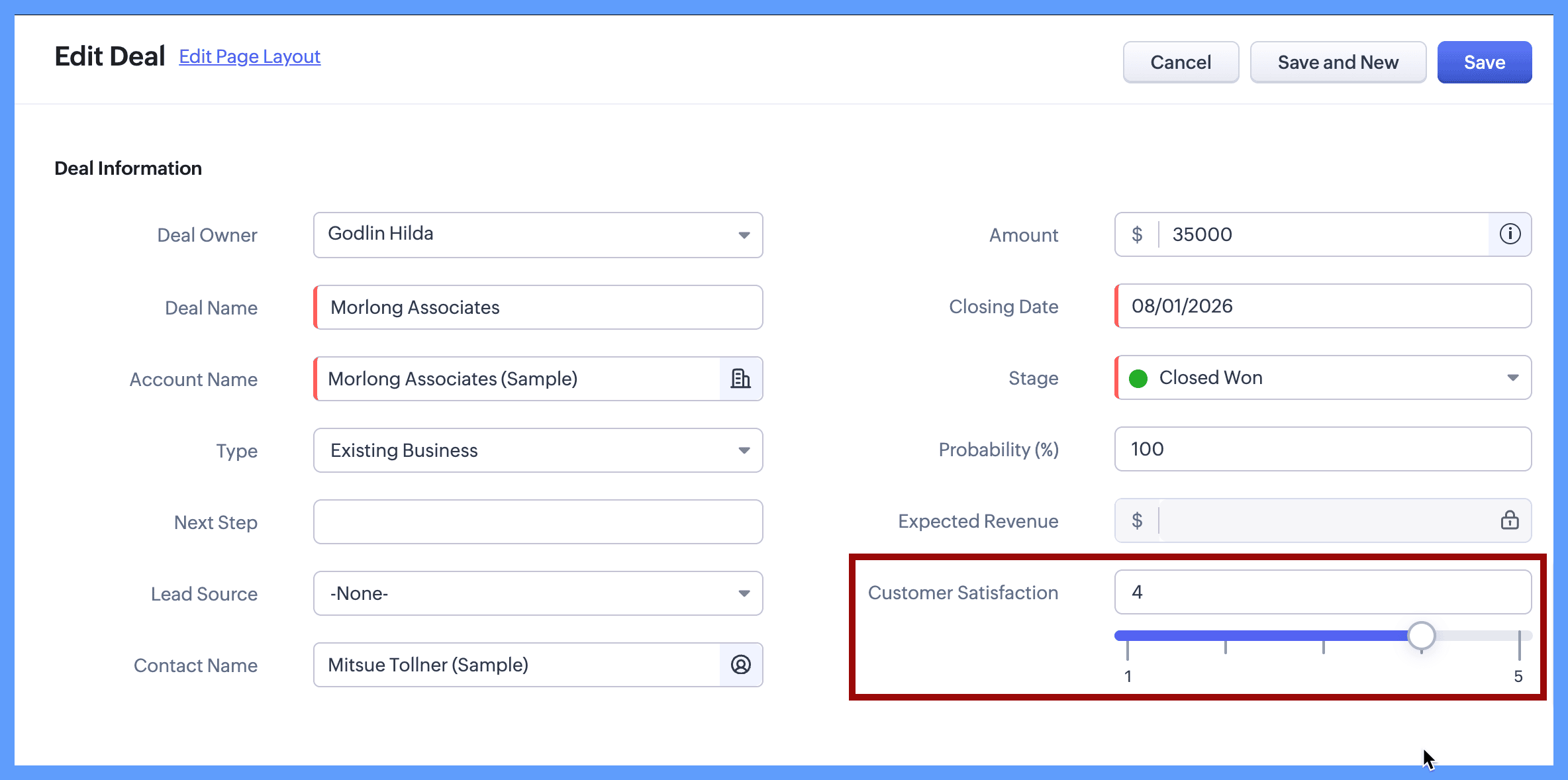


Continuing with the same example, you can define the customer satisfaction score by setting its minimum value to 1 and maximum value to 5. When the users create or edit a new record, they will clearly see that the value must fall within this range and can either type a number or use the sliding scale to select the score visually. The spaced intervals help users quickly understand the scale and choose the right value with confidence.

The same approach works well for other controlled scales, such as:

  • Setting a budget

  • Defining a probability range such as 10% to 100%

  • Defining priority levels on a numeric scale

Here's how to configure a sliding scale for a numeric field on the module's layout page:
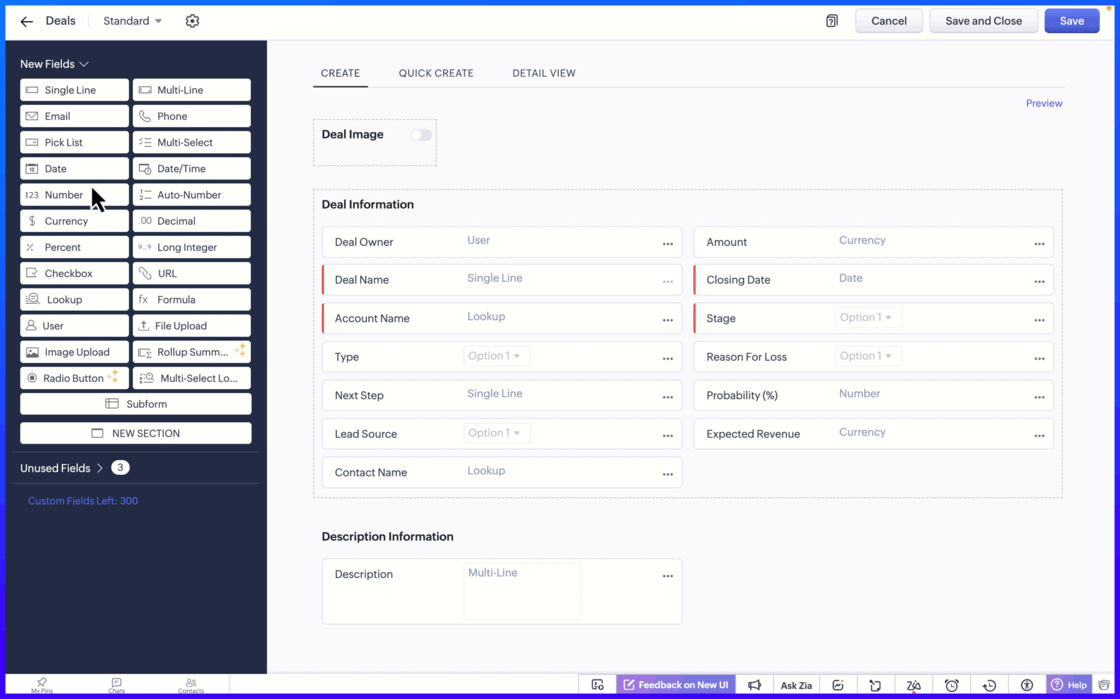


Setting the minimum and maximum limit values ensure that users can only enter values within an allowed range.

Notes

Important notes:

  1. Sliding Scale depends on Limit Values: When you enable the Sliding Scale, you must define minimum and maximum liit values. However, Limit Values can be used on their own. If you do not need a Sliding Scale, you can simply set the limits to restrict the allowed range.
    If the user tries to enter a value outside the allowed limits, an error message appears, preventing incorrect entries. This helps to keep the data accurate and consistent across records.

  2. Fields Supported: Number, Long Integer, Decimal, Percent, Currency.

  3. Edition Availability: All editions

  4. Module Availability: All Modules

  5. Sliding Scale is not supported for Subforms.

We hope you find this update helpful!

To learn more check out our help resource here.

    • Recent Topics

    • All new Address Field in Zoho CRM: maintain structured and accurate address inputs

      Availability Update: 29 September 2025: It's currently available for all new sign-ups and for existing Zoho CRM orgs which are in the Professional edition exclusively for IN DC users. 2 March 2026: Available to users in all DCs except US and EU DC. 24
    • Zoho Flow - Zoho Desk trigger "Ticket created or updated" overrides Department

      Just in case anyone else has this issue. We had a Zoho Flow with the Zoho Desk trigger "Ticket created or updated". In the trigger I had selected a Department (Sales). What happens is that the Department ID (Sales) is submitted as part of the request
    • Layout rules in Zoho FSM

      As titled, is there an item in the pipeline or an ETA for the implementation of layout rules in Zoho FSM? Similar to how they work in Zoho CRM https://help.zoho.com/portal/en/kb/crm/customize-crm-account/customizing-page-layouts/articles/create-conditional-layouts
    • 2026 Product Roadmap and Upcoming Features

      This is your guide to what is coming in Zoho Vertical Studio throughout 2026. We’ll update this post throughout the year as items move from development to release, and as and when new initiatives are added. Once a feature is released, it will be reflected
    • Introducing Canvas templates: Design once, apply everywhere

      Greetings all! We're happy to introduce Canvas templates, a Forms view enhancement that enables you to design form layouts just once and apply them seamlessly across multiple modules. Imagine you use five CRM modules (Contacts, Deals, Leads, and more),
    • Zoho Projects - Will there ever be a send email feature in Zoho Project?

      Hi team, Are there plans to or will there ever be a sendemail feature in Zoho Projects, brining it in line with other similar platforms like Asana, ClickUp and Monday? I know that you can add comments via email to a specific task, but I believe this only
    • Why cant i see the Campaigns module in my Zoho app

      I am on the ZOHO CRM Standard edition. I can clearly see and use the Campaign module when viewing the ZOHO CRM desktop. When I switch to my phone, the Campaign Module does not show. I have gone through all the settings I can think of, but I still can't
    • 📣 Ask the team behind Zoho SalesIQ: Summer '26 Q&A

      Hi everyone! Following our recent webinars, Summer '26 Release: What's New in Zoho SalesIQ—where we walked you through all the new features, what they do, and how they work—and Driving the AI Evolution: Building Smarter Customer Experiences with Zoho
    • Always display images from this sender – Is this feature available?

      In Zoho mail, I had my "Load external images" setting set to "Ask me", and that's fine. That's the setting I prefer. What's not fine though is I always need to tick "Display now" for each email I get, regardless if I've done that multiple times from several
    • Set Custom Icon for Custom Modules in new Zoho CRM UI

    • Displayed sample tracking for multi branch setup.

      We have multiple branches and one of the biggest challenges for us to be able to track if a particular item is in display or not. I am shooting in the dark but I am wondering if there is a solution for the following : Each product used for display is
    • How do I migrate from Office 365 to Zoho Mail?

      Check out Advik Email Migration Wizard, this software is specially developed to move mailboxes from Office 365 to Zoho Webmail. In addition you can migrate from Gmail, Yahoo, Rediffmail and 80+ webmail servers to ZOHO MAIL. Isn't it amazing? This is an all in one email migration solution. Steps to export emails from Office 365 to Zoho Webmail are as follows; Run Advik Email Migration Tool in your system. Select Office 365 as source and enter its login credentials. Select mailbox folders and choose
    • Connection Issues

      Morning. Seems like a few of my colleagues that are offsite are having issues with connection to cliq, even when their internet is working perfectly fine and only 1 person onsite has issues. Can you please explain? Thanks
    • Goals API - Zoho People

      Hi Team, I would like to get the API details for retrieving organisation-wise Goals from Zoho People. Currently, I am able to retrieve individual employee goals using the following API: https://people.zoho.com/api/v3/performance/goal/{emp_id} However,
    • Backorder process review - Automating Removal of Sales Order from "On Hold" When PO is Received

      Hello Zoho Inventory Team, Currently, sales orders in On Hold status are released only when the bill for the purchase order is created. In our workflow, it would be much more efficient if the sales order could automatically move out of On Hold as soon
    • Cliq iOS can't see shared screen

      Hello, I had this morning a video call with a colleague. She is using Cliq Desktop MacOS and wanted to share her screen with me. I'm on iPad. I noticed, while she shared her screen, I could only see her video, but not the shared screen... Does Cliq iOS is able to display shared screen, or is it somewhere else to be found ? Regards
    • Which Is the best online store to buy office furniture in Australia ?

      The most important part of your office is the office furniture. Your office is not complete when you have not put the required furniture in place. You need a furniture in your office so that you and your employees have desks, tables, and chairs which
    • Add "Product Code" as available column and search criteria for Assemblies

      Hi Zoho Community. For product (item) assemblies, it would be helpful to be able to create a custom view search criteria that limits the view by product code or perhaps product category. Currently, Product Code is not an available option to display as
    • What's New - July 2026 | Zoho Backstage

      Hello everyone, We hope you’re having an expectation-exceeding event experience! We’ve been hard at work bringing you a bunch of enhancements designed to make event management even easier. Let’s take a look at what’s new in Zoho Backstage. Export delivery
    • Zoho Mail Does Not Integrate with Analytics

      Hello everyone, Just wanted to make a quick post about the problem with zoho mail. Currently it does not connect to Zoho Analytics, which I think is crazy considering both of these applications have existed for a long period of time. Even zoho voice a
    • Delete Field that is used in a Zoho Flow connection

      I'm trying to delete a Field used in a Webhook created by Zoho Flow with CRM Connection and i get the following alert: When going to the alert i get to the following issue, can't edit it since its been deployed by a pluggin But yes i have here the prompted
    • Zoho Books | Product updates | August 2026

      Hello users, July has been an exciting month for Zoho Books! This month, we're excited to introduce HTML PDF Templates, Placeholders as Pills, expanded approval workflows for Sales Returns and Journals, and significant compliance updates across the India,
    • Q3 USA ZUG Meetups - Build AI Agents with Zoho

      Hi everyone! What if you could build your own AI agent from scratch in just one session? That's exactly what we're going to do at the upcoming ZUG Meetups across the United States, where you'll get hands-on experience with Zia Agents and explore how AI
    • Data Export is forcing Creation/Modified date just like reports

      The data export now forces you to select a created or modified date. There is not an All-Time option. This severely cripples the whole function of data export for audit purposes. If the data export (or reports for that matter), requires a date, there
    • Default ticket template in helpcenter

      Hello, I have a web form and a ticket template created. How can I make that my default ticket template? If an user clicks New ticket or create a ticket, I want that template to be the default one. Thank you for the time and info.
    • Zia Agents looks promising, but I still cannot deploy my first agent or connect WhatsApp after weeks of support tickets

      Hi Everyone, I am posting here because I am stuck and need practical help from someone who has successfully deployed a Zia Agent with WhatsApp. Zia Agents looks like a very promising product. I have watched the platform expand quickly, and I have noticed
    • Valid characters for use in email addresses using Zoho's apps/APIs

      We have found an issue with the + sign character in zoho subs - we are allowed to create a customer with an email address that has a plus sign but the API doesn't allow the + so the billing portal is not created. We are going to prevent users from using
    • Feature Request – Per-Channel Pre-Chat Form Controls

      We'd like the ability to enable/disable the pre-chat form on a per-channel basis, rather than having a single global setting. On the website widget, asking for name and email before chat starts makes sense. On WhatsApp, however, email isn't necessary
    • Remove the mandatory Name Card buttons (or at least make them optional)

      Please remove the mandatory Name Card buttons (or at least make them optional) A recent change to the Name Card in Zoho SalesIQ (currently affecting WhatsApp) introduced mandatory buttons before a visitor can provide their name. I believe this change
    • Copy + Paste in Notes: Text color and text background are not retained

      I've recently started using Zoho Notebook as an Evernote replacement. When copying and pasting text within Zoho Notes, I notice that the formatting of the text (text color and background color) is not retained when pasting. Only the attributes "Bold"
    • Need to show discount before total after subtotal

      Need to show discount before total after subtotal on my estimate template (see attachment)
    • Google Ads Data is Publicly available in Zoho CRM

      We recently discovered that ALL of the following Google Ads fields are visible to all users in our CRM that have access to either Leads or Contacts modules. Not only is this troubling and inconvenient, it should be unacceptable. It also creates a mess
    • Zoho Books bill pay option not available with zoho one

      Why isn't Zoho Books bill pay add-on not available for Zoho one customers not even as a purchasable option. I think this is very inconvenient for companies wanting to use this feature all in one system
    • Bounce rates

      Where can I see my bounce rates for: 1. Each email I send out, and 2. in total?
    • Add a Parameter to the ZOHO CRM Deluge sendmail to denote priority (defaulting to normal if unspecified)

      Hello! There is a similar thread for Creator out there that is 2 years old, but I'd like to raise it in the ZOHO CRM category as well. Would you kindly update the existing Deluge sendmail function to allow a priority parameter? The parameter should allow
    • Email outbox is now available in the sandbox

      Hello all! Testing emails without visibility has always been a blind spot in the sandbox. With the new Outbox, that gap is closed. You can now view and verify every email triggered from your sandbox, whether it’s through workflows, approvals, or mass
    • Transform your line of items into line items: ICR can now record your table values as subform values

      Enhancement in Zoho CRM Dear Customers, We hope you're well! Zia Vision’s ICR capability can now recognize, extract, and store tabulated values in your subforms. An ideal example is a university application form. It has printed fields and handwritten
    • is it possible to add more than one Whatsapp Phone Number to be integrated to Zoho CRM?

      so I have successfully added one Whatsapp number like this from this User Interface it seems I can't add a new Whatsapp Number. I need to add a new Whatsapp Number so I can control the lead assignment if a chat sent to Whatsapp Phone Number 1 then assign
    • Add the ability to Hide Pages in Page Rules

      Hi, We have Field Rules to show and hide fields and we have page Rules, but we can't hide a page in Page Rules so it isn't completed before the previous page (And then have the Deny Rules to prevent submitting without both pages completed), we can only
    • Calendar Year View?

      Is there a way I can view the calendar in year view? Maybe create a page with a view like this?
    • Next Page