Kaizen #157: Flyouts in Client Script

Kaizen #157: Flyouts in Client Script


Hello everyone! 

Welcome back to another exciting edition of our Kaizen series, where we explore fresh insights and innovative ideas to help you discover more and expand your knowledge!In this post, we'll walk through how to display Flyouts in Client Script and break down the key differences between Flyouts and pop-ups in Client Script, including when to use each one.

In this Kaizen post, 


1. What are Flyouts in Client Script?
2. Flyout- ZDKs and functions in Client Script
3. Use Case
4. Solution
        4.a. Create a Widget for EMI Calculator.
        4.b. Create a Client Script to render the Widget as Flyout.
5. Difference between flyout and popup in Client Script
6. Summary
7. Related links


1. What are Flyouts in Client Script?

Flyouts are floating User Interface that can be moved around and controlled using Client Script. Widgets can be used to render a flyout. The flyout can run independently, and any Client Script can communicate with it. 

2. Flyout- ZDKs and functions in Client Script :

  • createFlyout(name, config) - Creates a flyout. You can specify the heading, dimensions, and animation type using the config parameter.
  • getFlyout(name) - To Fetch the details of a flyout.
  • open(config, data) - Opens the created flyout.
  • notify(data, options) - Notifies and waits for data in a flyout. The options can be wait: true (Client Script execution will wait for a response from the widget) or wait: false - (Client Script execution will not wait for a response from the widget)
  • close() - Closes the active flyout.

Click here for more details about the ZDKs and functions related to flyouts.

3. Use Case :

Sales Advisors in a Finance Consulting Company regularly rely on an EMI calculator to help customers with loan queries. To improve their efficiency and eliminate the need to switch between different windows, the admin manager intends to integrate the calculator directly into CRM. The EMI calculator should appear on the Create Page of the Loans module and remain active until the user closes it.

4. Solution: 

To achieve this in Zoho CRM, we can use Widgets to create an EMI calculator and render them using flyouts in client script whenever the create Page of Loan page loads.

4.a. Create a Widget for EMI Calculator
Install Zoho CLI, and follow the steps given in this document to create the Widget app folder. Then update the html, javascript, and css code as per your requirement.

index.html
  1. <!DOCTYPE html>
  2. <html lang="en">
  3.   <head>
  4.     <meta charset="UTF-8" />
  5.     <meta http-equiv="X-UA-Compatible" content="IE=edge" />
  6.     <meta name="viewport" content="width=device-width, initial-scale=1.0" />
  7.     <title>Document</title>
  8.     <link rel="stylesheet" href="style.css" />
  9.   </head>
  10.   <body>
  11.     <div class="loan-calculator">
  12.       <div class="top">
  13.         <h2>EMI Calculator</h2>
  14.         <form action="#">
  15.           <div class="group">
  16.             <div class="title">Amount</div>
  17.             <input type="range" min="1000" value="30000" max="50000" step="500" class="loan-amount" id="loanAmount" />
  18.             <div class="slider-label">$<span id="loanAmountValue"></span></div>
  19.           </div>
  20.           <div class="group">
  21.             <div class="title">Interest Rate</div>
  22.             <input type="range" min="5" value="6" max="100" step="1" class="interest-rate" id="interesRate" />
  23.             <div class="slider-label"><span id="interesRateValue"></span></div>
  24.           </div>
  25.           <div class="group">
  26.             <div class="title">Tenure (in months)</div>
  27.             <input type="range" min="6" max="100" step="1" value="12" class="loan-tenure" id="tenureMonth" />
  28.             <div class="slider-label"><span id="tenureMonthValue"></span></div>
  29.           </div>
  30.         </form>
  31.       </div>
  32.       <div class="result">
  33.         <div class="left">
  34.           <div class="loan-emi">
  35.             <h3>Loan EMI</h3>
  36.             <div class="value">123</div>
  37.           </div>
  38.           <div class="total-interest">
  39.             <h3>Total Interest Payable</h3>
  40.             <div class="value">1234</div>
  41.           </div>
  42.           <div class="total-amount">
  43.             <h3>Total Amount</h3>
  44.             <div class="value">12345</div>
  45.         <div class="right">
  46.           <canvas id="myChart" width="400" height="400"></canvas>
  47.         </div>
  48.       </div>
  49.     </div>
  50.     <script src="https://cdn.jsdelivr.net/npm/chart.js@3.6.2/dist/chart.min.js"></script>
  51.     <script src="https://live.zwidgets.com/js-sdk/1.2/ZohoEmbededAppSDK.min.js"></script>
  52.     <script src="main.js"></script>
  53.   </body>
  54. </html>
  • Click here to view the complete code.
  • Once you have added the code, upload the zip file by following the below steps.
  • Go to Setup > Developer Space > Widgets.
  • Click Create New Widget and Fill in the details.
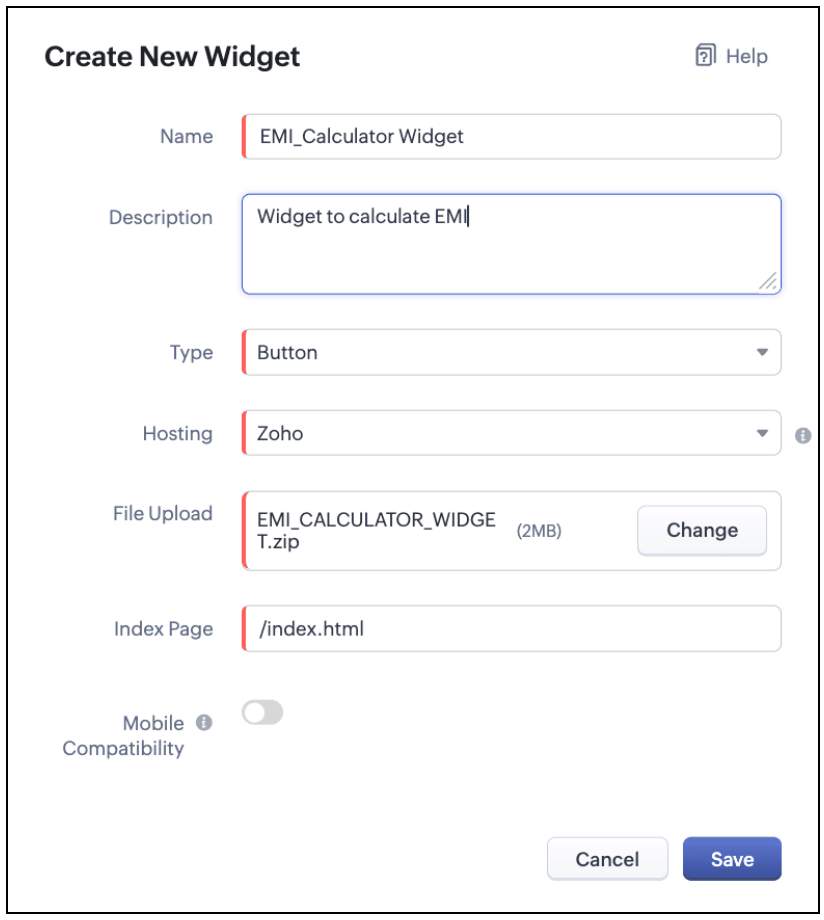
The Hosting should be "Zoho" and mention the html page of the app folder that you uploaded.

Note: 
The widget should be of "button" type in order to render through a Client Script.

4.b. Create a Client Script to render the Widget as Flyout

Configure a Client Script for Create Page(Standard) Loans module, that triggers during onLoad event as shown below. Click Next. Click here to know how to configure a Client Script.


Enter the following script and click Save.
  1. ZDK.Client.createFlyout('EMIFlyout', {
  2.     header: 'EMI Calculator',
  3.     animation_type: 1,
  4.     height: '400px',
  5.     width: '450px',
  6.     close_on_exit: false
  7. });

  8. ZDK.Client.getFlyout('EMIlyout').open(
  9.     { api_name: 'EMI_CALCULATOR_WIDGET', type: 'widget' },
  10.     { data: loanDetails }
  11. );

In the above script, createFlyout() will create a new flyout with header.
Below is the syntax and parameter detail.


Now Open the flyout and render the Widget in the flyout using open() method and specify the api_name of the widget.


Here is how the Client Script renders the flyout.
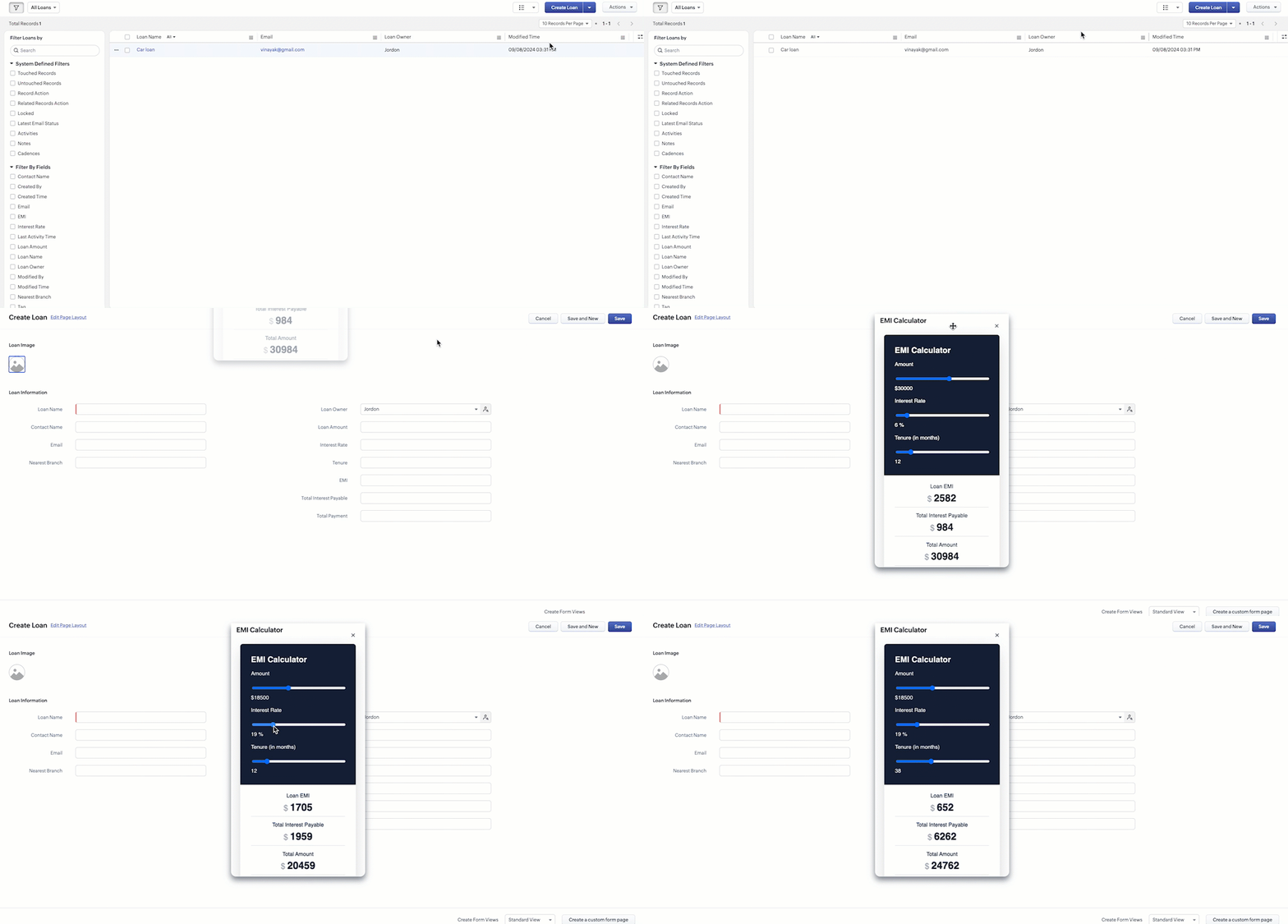


5. Difference between flyout and popup in Client Script

Flyout
Pop up
A flyout can be moved around the page.

A pop-up cannot be moved anywhere on the page.


It can run independently in a separate thread. The user can interact with the background interface without closing the flyout.

The user cannot interact with the background without closing the flyout.

Use flyouts, when you need to exchange data to and fro between a Widget and Client Script. You can use ZDK.Client.sendResponse() to pass data from a widget rendered as a flyout to the Client Script.


Use popup, when you need to interrupt the screen to gather input from the user or display a message before proceeding. Use $Client.close() to pass data to the Client Script, which will also close the popup.


In the scenario discussed in this post, if you want to make it mandatory for the user to read or interact with the EMI Calculator before entering any value in the create Page(Standard), then you can use pop-up instead of Flyout. Both pop up and flyout can be used to display widgets, and their dimensions can be altered.
Refer to this post to know how to render widgets as pop up using Client Script.

6. Summary
  • In this post, we have seen,
  • Flyouts in Zoho CRM.
  • ZDKs and methods to render a Flyout(Widget) using Client Script.
  • When to use a Flyout and when to use a pop up.


    • Recent Topics

    • Introducing Profile Summary: Faster Candidate Insights with Zia

      We’re excited to launch Profile Summary, a powerful new feature in Zoho Recruit that transforms how you review candidate profiles. What used to take minutes of resume scanning can now be assessed in seconds—thanks to Zia. A Quick Example Say you’re hiring
    • How to copy value from a single line field into a picklist field within a module's subform?

      Hello there, I have a single line field in a module's subform. I would like the value in the field to automatically update a picklist field within the same subform (both have items with the same names). Is this possible via function? Unfortunately, workflows
    • Send Whatsapp message from Whatsapp template with custom variables

      Hi, I'm trying to do some basic integration for sending WhatsApp messages from Zoho CRM using Zoho Desk whatsapp templates. When creating new whatsapp template in Zoho Desk we can choose ticket related fields as variables but it's not clear how to use
    • Recurring Events Not Appearing in "My Events" and therefore not syncing with Google Apps

      We use the Google Sync functionality for our events, and it appears to have been working fine except: I've created a set of recurring events that I noticed were missing from my Google Apps calendar. Upon further research, it appears this is occurring
    • Dissociate account from contact

      Hello, When I make the call through the API to "Dissociate account from contact" using, /api/v1/contacts/**integer**/accounts/**integer**/dissociate I get this response back, 422Unprocessable Entity (WebDAV) (RFC 4918) { "errorCode": "INVALID_DATA", "message":
    • Zoho Desk and Zoho People Integration - is it possible in order to alert whether an agent is available

      Hi, We use Zoho People for our employees to log absence (Paid Time Off etc). I was wondering if it was possible that this information can be shared in to Zoho Desk, so that when allocating a ticket to an agent, if they are on leave there is an onscreen
    • Create View to See Tickets Closed within the last 3 days

      I'm trying to create a view in Zoho Desk that shows me "recently closed ticket," which I will define as tickets closed in the last 3 days. I want this view to update so that whenever I click to view it is recalculates and shows me tickets closed within 3 days from that moment. When I try to Create a view and use the criteria of "Ticket Closed Time" I have to specify a discrete time frame (on or before a specific date). It doesn't allow me to define time/date dynamically like I can do with date fields
    • Slow Performance on desk.zoho.com. 11/3/2025

      I’m not seeing any active service alerts for desk.zoho.com, but everyone on our account is currently experiencing very slow load times when opening or navigating tickets. We’ve already tried the standard troubleshooting steps — clearing cache and cookies,
    • Add Save button to Expense form

      A save button would be very helpful on the expense form. Currently there is a Save and Close button. When we want to itemize an expense, this option would be very helpful. For example, if we have a hotel expense that also has room service, which is a
    • Change Currency symbol

      I would like to change the way our currency displays when printed on quotes, invoices and purchase orders. Currently, we have Australian Dollars AUD as our Home Currency. The only two symbol choices available for this currency are "AU $" or "AUD". I would
    • Call transcrition working for ringcentral?

      I don't see anything about what telephony providers can be used. The Zoho support person A said that RingCentral isn't supported. Zoho support person B said that it works, just make sure the call recording link works. Excellent instructions here: Call
    • How to Send Email from within a custom module (with or without an email template)

      It is possible to send an email from the Deals module. However, I can't find a way to send an email from any of our custom modules. I have tried adding an email field to the modules (even though we don't really want one or need it there). That doesn't
    • All new Address Field in Zoho CRM: maintain structured and accurate address inputs

      The address field will be available exclusively for IN DC users. We'll keep you updated on the DC-specific rollout soon. It's currently available for all new sign-ups and for existing Zoho CRM orgs which are in the Professional edition. Managing addresses
    • Zoho Inventory - Managing Items With Multiple Suppliers

      Hi community, I'm working on a project at the moment for a car parts wholesale business. Each Item (part) has its own original manufacturer part number (sometimes more than one part number for the same item). When purchasing parts from 3rd party suppliers,
    • Empowered Custom Views: Cross-Module Criteria Now Supported in Zoho CRM

      Hello everyone, We’re excited to introduce cross-module criteria support in custom views! Custom views provide personalized perspectives on your data and that you can save for future use. You can share these views with all users or specific individuals
    • Zoho Creator customer portal limitation | Zoho One

      I'm asking you all for any feedback as to the logic or reasoning behind drastically limiting portal users when Zoho already meters based on number of records. I'm a single-seat, Zoho One Enterprise license holder. If my portal users are going to add records, wouldn't that increase revenue for Zoho as that is how Creator is monetized? Why limit my customer portal to only THREE external users when more users would equate to more records being entered into the database?!? (See help ticket reply below.)
    • Super Admin Logging in as another User

      How can a Super Admin login as another user. For example, I have a sales rep that is having issues with their Accounts and I want to view their Zoho Account with out having to do a GTM and sharing screens. Moderation Update (8th Aug 2025): We are working
    • Bug tracking

      Hi, does anyone know how to track errors during picking or packing? This way I can keep track and see how to improve and prevent errors in this area.
    • Retainer invoice in Zoho Finance modlue

      Hello, Is there a way of creating retainer invoices in the Zoho Finance module? If not can I request this is considered for future updates please.
    • Is it really true that I can't set the default 'deposit to' account in 2025?

      I've been using Books for 7 years and the default account has never been a problem. I usually manually reconcile invoices and have never had a thought about which account. It has always been my account. However, I recently noticed that for the past 4
    • How do I see the total leads during a certain period?

      I understand I can get the count of leads and potentials but the total number of leads in a certain period should be equal to Leads+potentials because when we convert a lead it gets moved to potentials and no longer exists there. is there a way i could
    • Unable to Add Asset to Work Order Due to Different Contact and Company

      Hello Zoho Team, I’m facing an issue in our environment related to asset linking in Work Orders. Here’s the situation: When our engineers go for field activities, they initially create the Work Order using the salesperson’s contact details. After completing
    • Where is the Global Search field?

      I am looking for an alternative to SF.com. Zoho CRM seems to be work fine, and be customizable in terms of the fields and reports. But there's one big thing missing and it's going to prevent us from using it: there's no global search box at the top of
    • API 500 Error

      Hello amazing ZOHO Projects Community, I get this message. How can we solve this? { "error": { "status_code": "500", "method": "GET", "instance": "/api/v3/portal/2010147XXXX/projects/2679160000003XXXX/timesheet", "title": "INTERNAL_SERVER_ERROR", "error_type":
    • In place field editing for candidates

      Wondering about any insight/best practices for efficiently updating candidate records while reviewing them in a Job Opening pipeline. We can do in-field editing (e.g. update job title or City) only when we have the full candidate record open, however
    • Audio/video quality issues with Zoho Meeting – Any roadmap for improvement?

      Hi Zoho Team, We’ve been using Zoho Meeting for both internal and external meetings, and unfortunately, the experience has been consistently poor. The video and audio quality are so unreliable that it often renders meetings ineffective—especially with
    • Default tax type for mileage?

      Where we are, mileage includes a government tax. Is there any way to set a default tax for the Personal Car Mileage category of expense? (Or any other way?)
    • Analytics Portal

      I have the "standard plan" and want to explore the portal option; I activated the 15-day trial but do not see the pricing for the add-on. How can I get the price under "Upgrade add-ons." Thanks Rudy
    • The Social Wall: October 2025

      Hello everyone, As we head toward the end of the year, we’re bringing you a few updates to help give your social media efforts a strong finish. This month, we’re rolling out new enhancements across both the web and mobile app. Post Preview Have you ever
    • Show price book list price

      When using price books, once you add products to the price book in the Products related list you can display the Unit price which is the default list price; however, there is no option to show the price book list price. To see the price book list price
    • Zoho CRM - Scheduled Reports Which Contain Chart

      Hi Zoho CRM Team, I'm requesting that the Report Export and Scheduling feature be enhanced to include a chart, if one has been created on a report. At the moment I have a report which shows Sales This Week by Deal Owner and a pie chart at the top of the
    • Cliq File Upload

      While uploading large file like 500MB, it takes time, that fines. But if you resize window or move window in other screen, that uploading disappears. After upload complete & sent it will be visible
    • Resizing a Record Template Background Inage

      Hi everyone, I have an issue which I can't seem to resolve: Basically, I'm designing a record template in certificate form. I've specified A5 landscape. I've set my background image the same dimensions with total pixels at 443,520. Whatever I try, when
    • Analytics : How to share to an external client ?

      We have a use case where a client wants a portal so that several of his users can view dashboards that we have created for them in Zoho Analytics. They are not part of our company or Zoho One account. The clients want the ability to have user specific,
    • Zia Actions: AI-powered Workflow Automation for Faster and Smarter Execution

      Hello everyone, Workflows got a notch better with AI-based actions. Actions such as field extraction, prediction, auto reply, and content generation facilitate quick execution with improved speed and accuracy. Zia can intercept useful details in newly
    • Constant color of a legend value

      It would be nice if we can set a constant color/pattern to a value when creating a chart. We would often use the same value in different graph options and I always have to copy the color that we've set to a certain value from a previous graph to make
    • What's New in Zoho POS - October 2025

      Hello everyone, Welcome to Zoho POS's monthly updates, where we share our latest feature updates, releases, changes, and more. Let’s take a look at how October went. Process returns for refunds, exchanges, or offer store credit Returns and exchanges can
    • Loan and purchase

      My husband is lending me mobey to buy a vehicle intersst free ... I need to know how to record the cash receipt and how I pay it back... the money is for a vehicle do I just post the invoice for that as I normally would usung the loan money to pay for
    • Zoho Connect Module in Zoho Trident

      Hi I really like where Zoho Trident is going. Having Mail and Cliq in one place is especially powerful. However, Zoho Connect really needs to be included to make this a true communication and collaboration hub. I would like to request that Zoho Connect
    • Zoho FSM API Delete Record

      Hi FSM Team, It would be great if you could delete a record via API. Thank you,
    • Next Page