Hello everyone!
Welcome back to another week of Kaizen!
We released the Queries feature sometime back and hope you have tried it out.
A little gist about this feature before we move on to our post.
Zoho CRM's Queries feature enables dynamic data retrieval from both CRM modules and external services, facilitating seamless integration and informed decision-making.
Key Components
- Sources: Pre-configured sources like Modules and COQL are available, with the option to add custom sources via REST APIs.
- Queries: Fetch data by selecting modules, writing COQL statements, or specifying REST API endpoints, headers, and parameters.
- Variables: Incorporate variables in criteria, COQL statements, and endpoints to pass dynamic values during execution.
- Schema: Auto-generated schemas define the structure of query responses, with editable paths, field types, and labels for customization.
- Serializer: Utilize JavaScript to manipulate and customize query responses, ensuring data is in the desired format for further processing.
Types of Queries
- Modules: Retrieve records by selecting specific modules and fields, applying conditions to filter data as needed.
- COQL (CRM Object Query Language): Write SQL-like queries to fetch data, supporting complex operations like joins and aggregations.
- REST API: Fetch data from external services by specifying endpoints, headers, parameters, and connections.
With the Queries feature, you can efficiently access and display relevant data within Zoho CRM, enhancing workflow efficiency and decision-making capabilities.
A little insight into Functions before we dive into today's Kaizen!
Functions, Queries, you get the connection, right? Read on!
Many of us use Functions in Zoho CRM extensively to perform our business logic and customize the way things work in Zoho CRM. You can use Functions in blueprints, workflows, Circuits etc.
Let's say you have a function that gets the employee records from the Employees module. Technically, the function executes an API call or an integration task, and gives a response.
The response can be a string or map(JSON), depending on how the function is written and where it is used. Since functions can be used in many places, the same response format may not be the right one to be used in a circuit or a workflow.
This is where the genie 'crmAPIResponse' object comes into picture!
The power of the 'crmAPIResponse' object
The crmAPIResponse object to be returned in the CRM function should encapsulate the response in a way that it can be used in Queries, Circuit, workflow etc. The details needed are encapsulated as a map. It should include details like crmStatusCode, status, message, body in order to construct the desired format for handling data and customizing the error handling logic.
Let's consider the following example function where we use the getRecordByID integration task.
The response of the integration task contains all the fields in that module, but we want only certain parts of the response JSON and also add custom error messages, to be used in other components like Queries, Circuits, etc,.
Here is the code.
{ leadId = "3652397000018025772"; // Replace with a valid Lead ID
// Initialize customAPIResponse map customAPIResponse = map();
// Fetch lead details crmResponse = zoho.crm.getRecordById("Leads", leadId);
// Log the raw response for debugging info "CRM API Raw Response: " + crmResponse;
// Validate and process the response to include only the required fields if (crmResponse != null && crmResponse.containsKey("id")) { // Extract required fields filteredData = map(); filteredData.put("id", crmResponse.get("id")); filteredData.put("Last_Name", crmResponse.get("Last_Name")); filteredData.put("Email", crmResponse.get("Email"));
customAPIResponse.put("crmStatusCode", 200); customAPIResponse.put("status", "success"); customAPIResponse.put("message", "Lead data retrieved successfully."); customAPIResponse.put("body", filteredData); // Include only filtered data } else { customAPIResponse.put("crmStatusCode", null); customAPIResponse.put("status", "error"); customAPIResponse.put("message", "Invalid or null response from Zoho CRM API."); customAPIResponse.put("body", null); }
// Return the customAPIResponse return {"crmAPIResponse": customAPIResponse};
} |
Here, you can see that we have parsed the response of the integration task to get the Last_Name, Email, and record ID using the crmResponse.get("field_API_name") statement and constructed the customAPIresponse object using the customAPIResponse.put("key", "value") statement.
The statement return {"crmAPIResponse": customAPIResponse}; returns the response body as depicted in the previous statements.
Response to the info "CRM API Raw Response: " + crmResponse; statement
"CRM API Raw Response: {"Owner":{"name":"Patricia Boyle","id":"3652397000000186017","email":"p.boyle@zylker.com"},"$field_states":null,..}}} |
Response of the return {"crmAPIResponse": customAPIResponse}; statement
{ "crmAPIResponse": { "crmStatusCode": 200, "status": "success", "message": "Lead data retrieved successfully.", "body": { "id": "3652397000018025772", "Last_Name": "Math", } } } |
Error response
{ "crmAPIResponse": { "crmStatusCode": null, "status": "error", "message": "Invalid or null response from Zoho CRM API.", "body": null } } |
You can see that we have used the crmAPIResponse object to get only the required keys from the response and constructed a much simpler response.
Finally, to today's Kaizen!
We've established that you can use the crmAPIResponse object to construct responses in a way that's suitable to be consumed at another place like a circuit or a workflow.
We also know that Queries allows you to have sources of the REST API type to fetch data from various sources. This means that you can have a standalone function that is enabled as a REST API as a source in Queries.
Let's see an example.
There is a simple function that uses the getRecords integration task to get the records from the Employees module.
I have used the crmAPIresponse object to construct a response as shown in the following code.
string standalone.getRecords() { result = zoho.crm.getRecords("Employees"); response = Map(); response.put("status_code",200); response.put("body",{"code":"success","details":result,"message":"function executed successfully"}); return {"crmAPIResponse":response}; } |
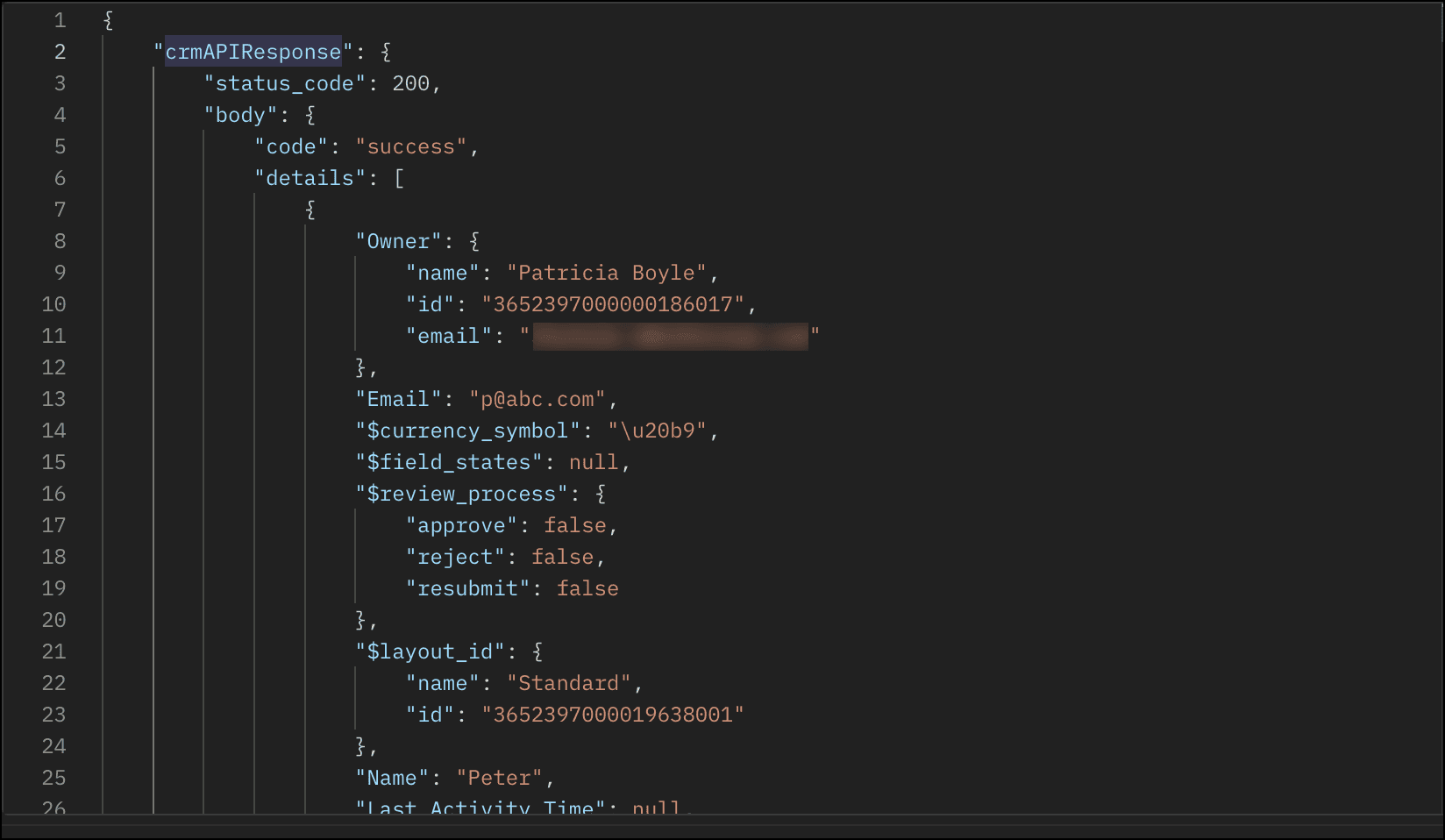
The response of this function is a string in the crmAPIResponse object as shown in this image.
- Save this function and enable REST API.
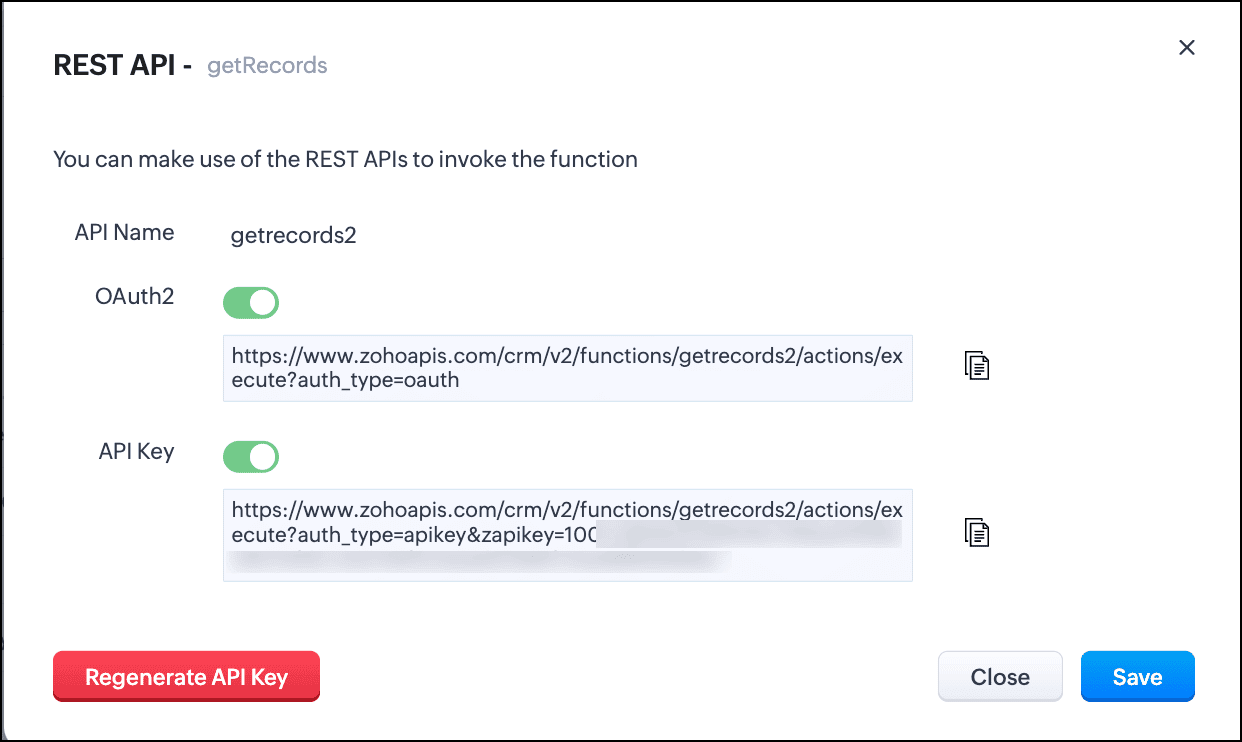
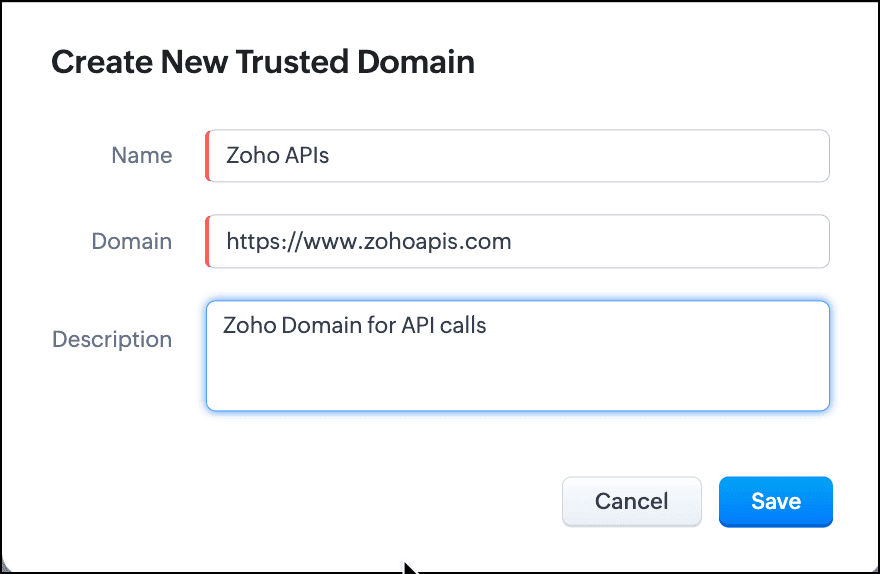
- You can see that the domain is https://www.zohoapis.com. To be able to use this in a Query, register this domain in Trusted Domain.
- To create a REST API type source, you must add the source. Go to Setup > Developer Hub > Queries > Sources tab.
- Click Add Source and give the details like the name, base URL, headers, and parameters under the Information section.
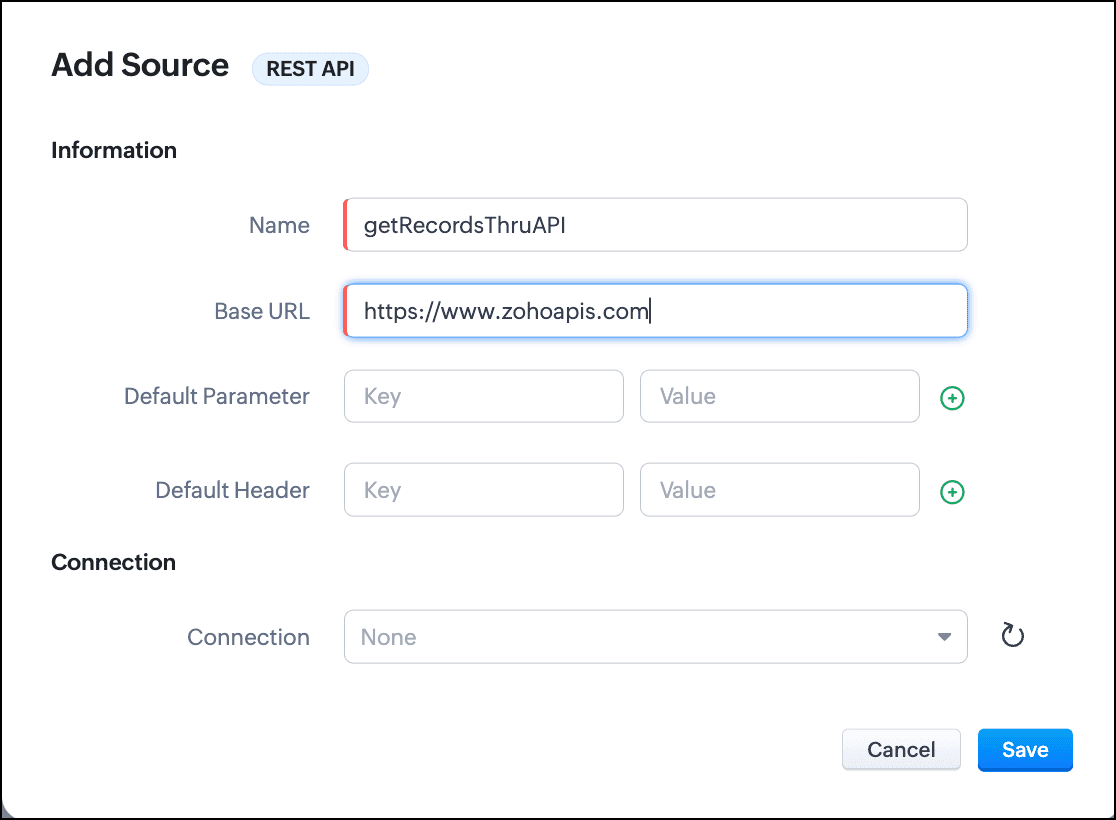
- Click Save.
- Go to the Queries tab and click Add Query.
- For Source, choose the source you just added.
- Under Information, enter the name, API name of the query.
- For the endpoint, enter the API Key URL of the function.
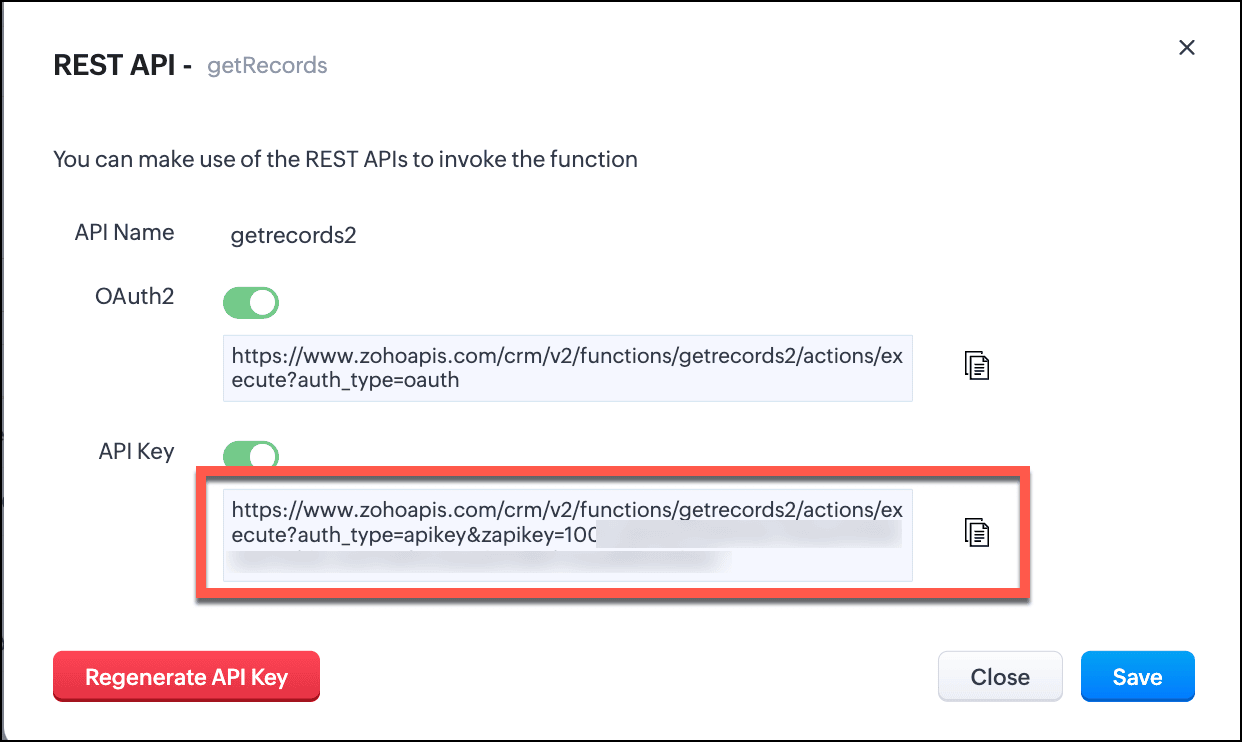
- Enter the parameter name and values in the Parameter field.
Click Add Serializer if you want to serialize the response. In this example, I have serialized the response to include only the Name, Email, and Position fields in the output. The result contains the 'body' object that we returned in the crmAPIResponse object of the function.
- Click Save to save the serialization.
- Click Next to view the schema of the query. Make changes as required.
- Save the query.
You can now use this query in Canvas or associate it with Kiosk to solve your business needs.
Let us see how the crmAPIResponse object in the function affects the response of the query.
Query with the function without crmAPIResponse:
Let's consider that the function getRecords() does not use the crmAPIResponse object. In that case, the function returns a response that is a string. This response string cannot be serialized or used elsewhere.
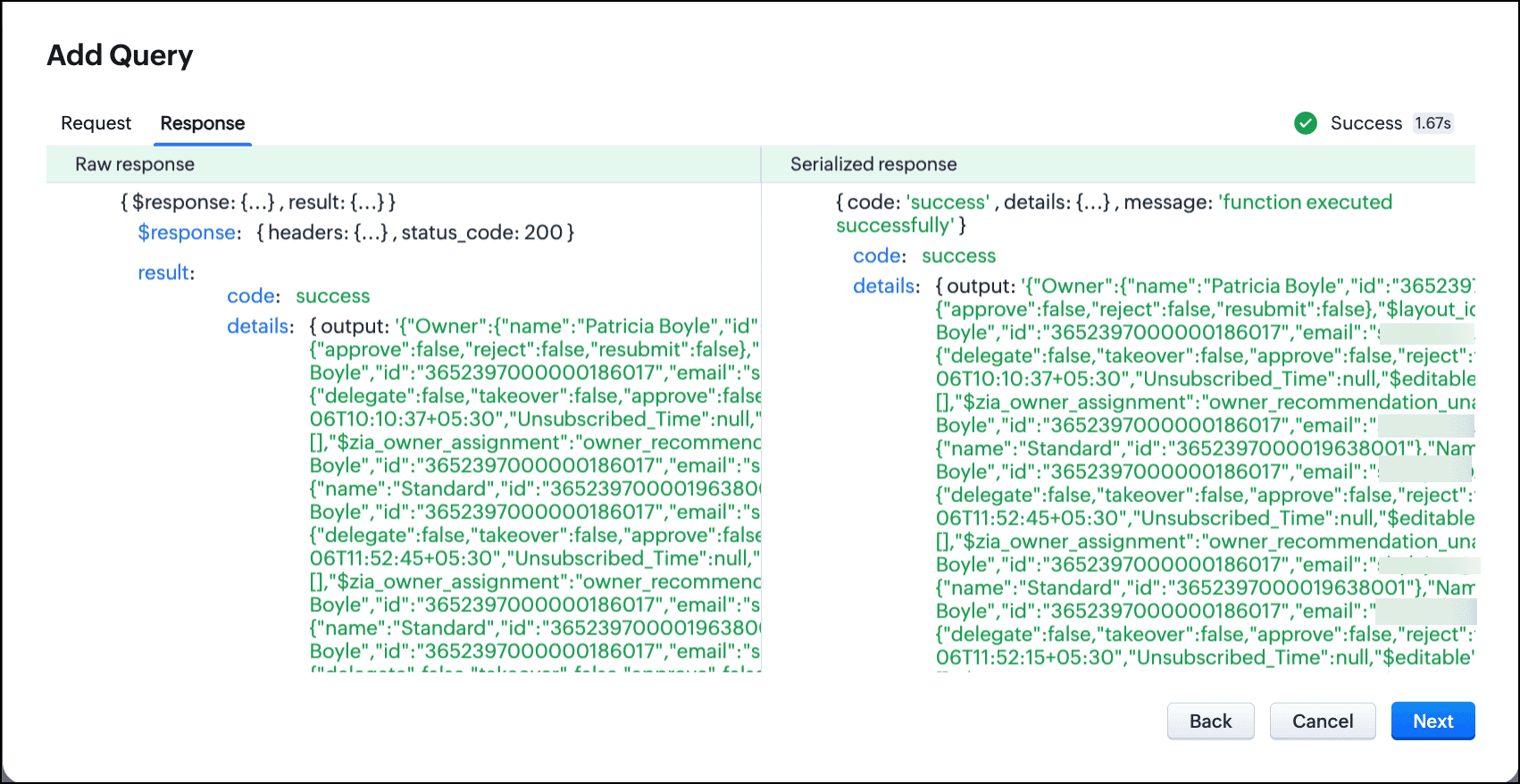
Schema of the query without crmAPIResponse:
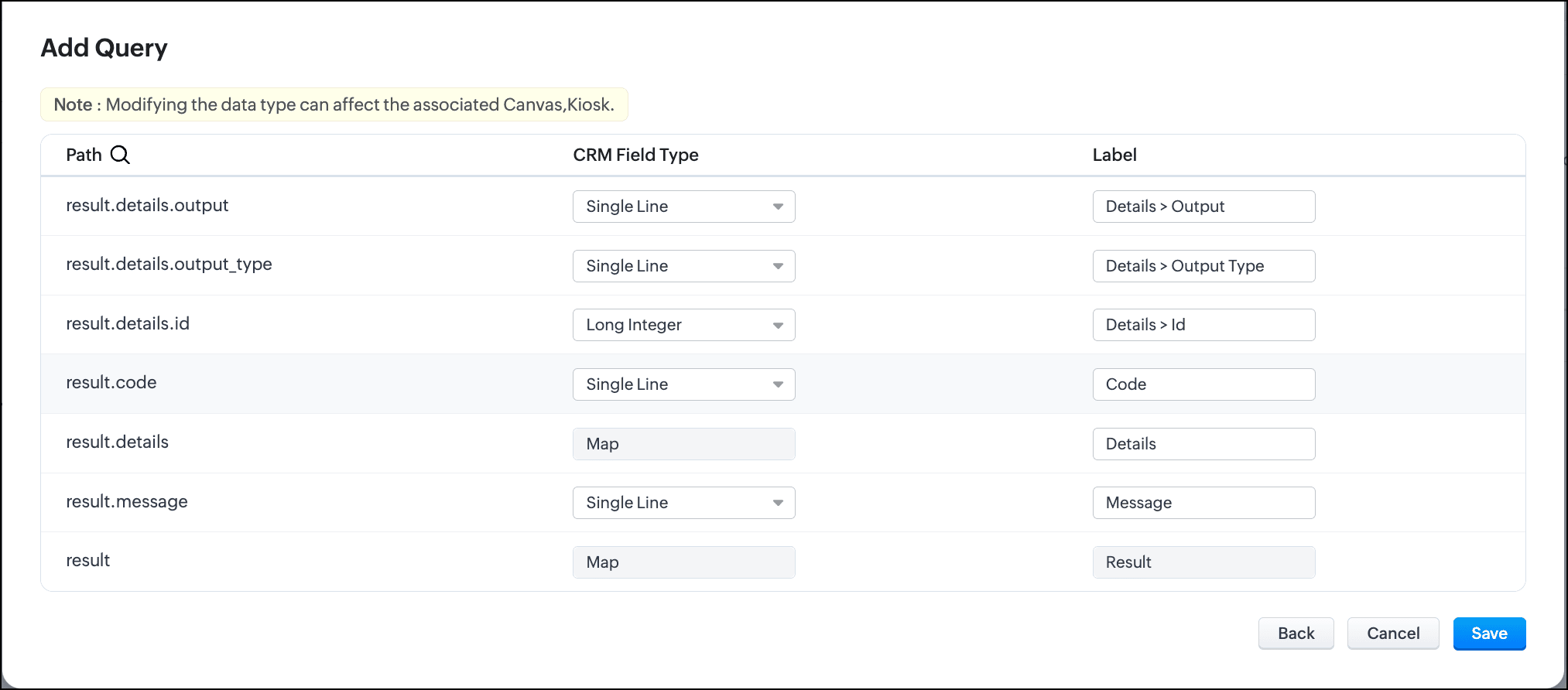
Query with the function with crmAPIResponse and serialization:
The same getRecords() function that uses the crmAPIResponse object allows you to construct the response as JSON. You can serialize this response easily and use it in a circuit, query, workflow etc.
You can see here that the response is now a JSON.
Schema of the query with crmAPIResponse:
In conclusion, you can use the crmAPIResponse object in Functions to construct the desired response and use the REST API-enabled function as a source in Queries.
Leveraging the advantage of the crmAPIResponse object in functions and using it in Queries increases the prospect of solving many more business cases easily and customize more efficiently.
We hope you liked this post and found it useful. Let us know your thoughts in the comments.
If you'd like us to cover any other topic in this series, feel free to comment or reach us at support@zohocrm.com.
Cheers!
------------------------------------------------------------------------------------------------------------------------------------------------

See Also
Recent Topics
Converting Sales Order to Purchase Order
Hi All, Firstly, this code works to convert a sales order(SO) to a purchase order (PO) via a button, however I am running into an issue when I convert the SO where the values from the line items are not pulled across from the SO to the PO. The ones in
CRM x WorkDrive: File storage for new CRM signups is now powered by WorkDrive
Availability Editions: All DCs: All Release plan: Released for new signups in all DCs. It will be enabled for existing users in a phased manner in the upcoming months. Help documentation: Documents in Zoho CRM Manage folders in Documents tab Manage files
Ask the Experts 26: Brighten every customer interaction with Zoho Desk all year long
Hello everyone, Greetings and welcome to Ask the Experts 26. As we wrap up 2025, we are excited to invite you to the 26th episode of our Ask the Expert series. 🎄The Merry Metrics Edition = Best of Zoho Desk [Best Practices + Holiday Automation + Year-End
HTML Tags added to Reports with Notes
Recently Zoho added the ability to markup text within notes. That way, users can change font size, colors, etc. It's a great change. However, since the change, reports that include a column for "Note Content" are printing HTML tags within the report.
What is the difference between Zoho Campaigns and marketing hub?
Zoho Campaigns is a permission-based email marketing tool for sending marketing emails and mass emails. Marketing Automation is a multichannel marketing automation tool that caters to organizations looking for tools to engage their users across multiple
All new Address Field in Zoho CRM: maintain structured and accurate address inputs
The address field will be available exclusively for IN DC users. We'll keep you updated on the DC-specific rollout soon. It's currently available for all new sign-ups and for existing Zoho CRM orgs which are in the Professional edition. Latest update
Horrible Connectivity!
I have used Meetings several times, but most of the time the connection is horrible. The video freezes, the audio freezes, and we end up cancelling the meeting. I am on a high speed internet connection, and Zoom works fine, so I know it's not a problem
Is it really true that I can't set the default 'deposit to' account in 2025?
I've been using Books for 7 years and the default account has never been a problem. I usually manually reconcile invoices and have never had a thought about which account. It has always been my account. However, I recently noticed that for the past 4
Zoho DataPrep switching Date Format
When using a pipeline that is importing Zoho Analytics data into Zoho DataPrep, the month and day of date fields are switched for some columns. For example, a Zoho Analytics record of "Nov. 8, 2025" will appear in Zoho DataPrep as "2025/08/11" in "yyyy/MM/dd"
Using Another Field Value for Workflow Field Update
I'm trying to setup a Workflow with a "Field Update" action on the Lead module, but I would like the new value to actually be taken from a DIFFERENT Field's on the Lead record (vs just defining some static value..) Is this possible? Could I simply use
Auto-Invite Users to Portals in Zoho CRM based on Conditions
Hello Everyone, You can now automate portal invitations in Zoho CRM with the new Auto-Invite users feature in Portal management. No more manually enabling portal access one by one. With this enhancement, you can automatically send invites for users to
Greek character in Deluxe script
Hi, We have been using a script since 2022 which replaces characters in Greek contact names using replaceAll. Since this morning, all the Greek characters used in the script have turned to question marks. I tried retyping the characters, copy-pasting
Tax information
Hello, I need help/guidance on how to add my organization's Tax/VAT information. Thank you Pavly
Build smarter Guided Conversations with Fork Blocks
When your customers arrive on your support channel, they're not there to explore. They are usually confused and stuck while trying to fix something important. We understand how stressful that moment can feel and we want your bot to make things easier,
Custom item field won't allow decimal.
Hello, I have a custom item field that needs to be able to have a value with a decimal place such as 6.7 or 6.18. I have tried custom formatting the input format but can not get the correct syntax to allow this. Is this possible in Zoho?
Free webinar: Zoho Sign unwrapped – 2025 in review
Hey there! 2025 is coming to an end, and this year has been all about AI. Join our exclusive year-end webinar, where we'll walk you through the features that went live in 2025, provide answers to your questions, and give you a sneak peek on what to expect
Customer ticket creation via Microsoft Teams
Hi all, I'm looking to see if someone could point me in the right direction. I'd love to make it so my customers/ end users can make tickets, see responses and respond within microsoft teams. As Admin and an Agent i've installed the zoho assist app within
HubSpot CRM to Zoho Creator Integration
I'm trying to create an integration between HubSpot CRM and Zoho Creator with HubSpot being the push source (if a contact is created or updated in HubSpot, it pushes the information to Zoho Creator). I have two questions: 1- Is it best to use Zoho Flow
Zoho Sign - Zoho CRM extension upgrade
Hi everyone, We've updated Zoho Sign extension for Zoho CRM with significant internal changes. Impact on existing Zoho Sign extension users Users using the extension without customization If you are using the integration without implementing Zoho Sign's
Custom Fields
There is no way to add a custom field in the "Timesheet" module. Honestly, the ability to add a custom field should be available in every module.
Contact data removes Account data when creating a quote
Hi, Our customer has address fields in their quote layout which should be the address of the Account. They prefill the information, adding the account name - the address data is populated as per what is in the account - great. However when they then add
Gain control over record sharing with portal users through our new enhancement: criteria-based data exposure
Dear Customers, We hope you're well! Portals is a self-service avenue through which your clients can access and manage their direct and related data in Zoho CRM. This empowers them to be more independent and enables them to experience a sense of transparency
Best-practice setup in Zoho One for managing combined candidate pools and exporting anonymised CVs
We are new users of the Zoho One bundle and operate a consulting and engineering company. Our workforce model includes a mix of permanent employees, active job applicants, and freelance/independent consultants. All three groups need to be searchable,
Meet Canvas' Grid component: Your easiest way to build responsive record templates
Visual design can be exciting—until you're knee-deep in the details. Whether it's aligning text boxes to prevent overlaps, fixing negative space, or simply making sure the right data stands out, just ironing out inconsistencies takes a lot of moving parts.
hard-bounced email list
Hi, Below pops up when I try to send an Email to some of my customer. Please guide me how to take it out from hard-bounced list? I am not sure how they were marked in hard-bounced list
Register the 'Contact Role' addition and change as a Potential edition so it can trigger Workflows
We are trying to use "Contact Roles" in Potentials. Contact Roles are special and different than the other Related lists, so, it may have a special behavior. Something to keep in mind is that you will never have 100 Contact Roles as you can have 100 Tasks, Calls, or any other Related list. In our case we will have 2 in average and up to 4 or 5 maximum. The problem is that we need to bring information from 3 key Contact Roles to the Potential and adding a Contact to the Contacts Roles area never trigger
Can I change the format of the buttons in the email templates?
Hi all! We have been working hard trying to brand our email templates, and have some way to go yet. One of the things we can't seem to edit is the green ${Cases.CUSTOMER_PORTAL_BUTTON} button and the font of the View Ticket text. Is there any way of doing
Best practice to structure reporting to include events covering multiple months / quarters.
Hi, I'm new to Zoho, have some experience of more "enterprise" tools, looking for some input from the community. I'm looking to create a report that includes events that cover a long period, each event has a start / end date and I'm struggling undertanding
Marketing Tip #11: Turn features into benefits that sell
We all love talking about our products, but here’s a secret: customers don’t just buy features, they buy benefits. Instead of just saying "Made from 100% organic cotton," try "Soft, breathable comfort that lasts all day." Benefits tell shoppers how your
Zoho Sheet - Printing - Page Breaks and Printing Customization
I think the title is descriptive enough in that I cannot find help documentation on a simple task of adding in page brakes for separating pages on print. Thanks
Synchronise item image between Zoho Commerce and Zoho Books/Inventory/CRM
Here is a blindingly simple idea to tie several Zoho products together. Zoho - please include a method to synchronise the item image (or images) from one Zoho application to another. For example, if you upload an item image in Zoho Inventory, a user should
How do I migrate from zoho mail to Office 365?
The manual migration of Zoho Mail to Microsoft 365 typically requires using IMAP to move emails and configuring Microsoft Outlook to sync Zoho Mail. This approach can be error-prone, especially if there are multiple accounts or large email archives. Moreover,
Exciting Updates to the Kiosk Studio Feature in Zoho CRM!
Hello Everyone, We are here again with a series of new enhancements to Kiosk Studio, designed to elevate your experience and bring even greater efficiency to your business processes. These updates build upon our ongoing commitment to making Kiosk a powerful
New Update: Convert External Users in Bulk in Zoho Directory
Greetings to all Zoho Directory users out there! We’re excited to introduce a new update that makes user management in Zoho Directory even more efficient; you can now convert external users in bulk! Earlier, admins could convert only one external user
New Update: Convert External Users in Bulk in Zoho One
Greetings to all Zoho One users out there! We’re excited to introduce a new update that makes user management in Zoho One even more efficient; you can now convert external users in bulk! Earlier, admins could convert only one external user at a time.
How to edit form layout for extension
I am working on extension development. I have created all the fields. I want to rearrange the layout in Sigma platform. But there is no layout module in Sigma. How can I achieve this for extensions other than Zet CLI and putting the fields into widget
Website not properly connecting with Zoho Creator app portal (embed & data sync issue)
Hello Zoho Community, I’m currently facing an issue while trying to connect my external website with a Zoho Creator app portal. I have a tool-based website ( https://mygardencalculator.com/ ) where users interact with calculators and dynamic content.
日本語フォントの選択肢拡充についての要望
日本語フォントの選択肢がとても少ないと感じたことはありませんか? 多くのアプリ(たとえば Invoice)ではフォントが1種類しかなく、正直あまり使いやすい・見た目が良いとも言えません。 そろそろ、もっと多くの日本語フォントを追加してほしい、そしてすべてのアプリで同じフォント選択肢を使えるようにしてほしいと、私たちユーザーが声を上げる時期だと思います。 ご存じのとおり、現状ではアプリごとにフォント周りの仕様にほとんど一貫性がありません。 みなさん、一緒に要望を出していきましょう!
Does anyone know how to setup Zoho Desk or Zoho CRM as a custom outgoing/incoming Call Centre?
I need to setup a call center so I can setup agents to make phone calls across Canada to market our services. I am trying to figure out the most reliable and cost efficient way to do this? I am currently paying for two phone services and neither seem
Display actual mileage on an invoice
My users are creating expenses in Zoho expense. For example, they expense 10 miles and get paid 7 dollars (10 miles * IRS rate of .70). If I look at the expenses in Zoho Books, it does show them at 10 miles at .70 cent When I add these expense to an invoice
Next Page