Kaizen 225 - Making Query-based Custom Related Lists Actionable with Lookups and Links

Kaizen 225 - Making Query-based Custom Related Lists Actionable with Lookups and Links


Hello everyone!
Welcome back to another post in the Kaizen series!

This week, we will discuss an exciting enhancement in Queries in Zoho CRM.

In Kaizen #190, we discussed how Queries bridge gaps where native related lists fall short and power custom related lists to present relevant and contextual information right alongside the CRM records. With Queries in related lists, you can dynamically fetch data from other modules, external services, or custom integrations, at runtime!

To take it up a notch, you can now use Queries and make custom related lists actionable with lookups and links!
This is super helpful when a record needs context across multiple related modules and the user experience must still remain intuitive and navigable.

This Kaizen explains a practical use case built using a Module-type Query, and explains how the serializer’s lookup and href support turns a static list into an actionable workspace.

Use case

Fetch Deals related to a Contact that are actively in negotiation or proposal stages, with account context preserved.

Business problem

Zoho CRM’s native related lists already provide a strong baseline experience.
For example, in the Deals related list on a Contact record, both Deal Name and Account Name are rendered as clickable lookups, but they show all related records, apply minimal filtering, and offer limited control over actions and presentation.

However, with Queries, you can precisely control which records appear, decide how navigation should work, introduce contextual actions alongside native navigation.

So, here's the requirement we will try to solve today.
From a Contact record, I want to see
  1. Only active Deals whose Stage is Proposal/Price Quote or Review/Negotiation.
  2. With Deal navigation preserved
  3. With intentional account-level actions, not just navigation

In short, I want the query to show me the Deals in these stages that this Contact is currently involved with and let me quickly research the associated Account externally.

Why a Module-type query?

This scenario requires
  1. Filtering Deals by Stage
  2. Selecting a focused set of fields
  3. Embedding the result as a related list on Contacts

Query configuration

Follow the steps in the help document to create a module-type query.
The following image offers a glimpse of the query.

Serializer - where the difference happens

The serializer is not used to recreate native behavior, but to redefine intent of displaying the Deal as an explicit lookup and the Account as a contextual action.
Here is the serializer code used in this example.
return result.map(record => ({
...record,
Deal_Name: {
id: record.id,
name: record.Deal_Name,
module: "Deals"
},
"Account_Name.Account_Name": {
id: record.id,
name: record["Account_Name.Account_Name"],
module: "Accounts"
},
Link: {
label: "Search Account on Google",
}
}));

Follow the steps in this Kaizen post to create a custom related list and associate it with a query.

The output
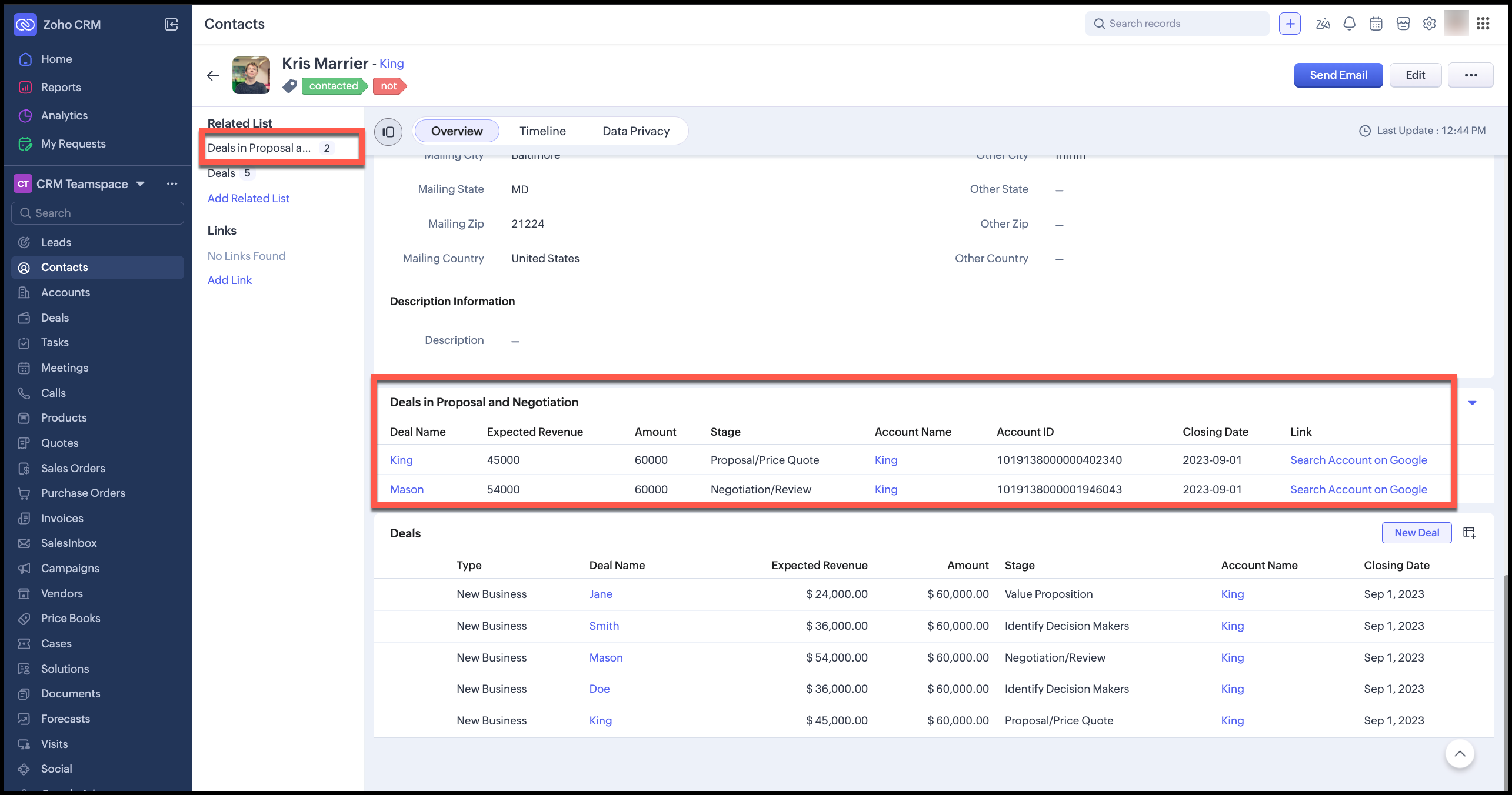

You can see that the related list Deals in Proposal and Negotiation has clickable Deal and Account lookups, and a link to search by the Account Name on Google, while the default Deals related list includes all Deals associated with this contact.

This approach is especially useful when you need filtered or curated views, introduce non-CRM actions, reduce click depth, and want the UI to guide user behavior subtly without peeling them away from the interface they are used to.

The design rule is to

  1. Use lookups when the destination is inside CRM
  2. Use href when the action is external or exploratory. Eg: open external systems, launch contextual research, pass params to external tools, etc.

Summary

By combining module-type queries for precise data selection, serializer lookups for native navigation, and serializer links for contextual actions, you can create related lists that are purpose-built, not generic.

That distinction is what makes Queries and serializers a powerful extension point in Zoho CRM.


We hope you found this post useful. Let us know your thoughts in comments or at support@zohocrm.com.
See you next week!

Cheers!

===============================================================================


    • Sticky Posts

    • Kaizen #198: Using Client Script for Custom Validation in Blueprint

      Nearing 200th Kaizen Post – 1 More to the Big Two-Oh-Oh! Do you have any questions, suggestions, or topics you would like us to cover in future posts? Your insights and suggestions help us shape future content and make this series better for everyone.
    • Kaizen #226: Using ZRC in Client Script

      Hello everyone! Welcome to another week of Kaizen. In today's post, lets see what is ZRC (Zoho Request Client) and how we can use ZRC methods in Client Script to get inputs from a Salesperson and update the Lead status with a single button click. In this
    • Kaizen #222 - Client Script Support for Notes Related List

      Hello everyone! Welcome to another week of Kaizen. The final Kaizen post of the year 2025 is here! With the new Client Script support for the Notes Related List, you can validate, enrich, and manage notes across modules. In this post, we’ll explore how
    • Kaizen #217 - Actions APIs : Tasks

      Welcome to another week of Kaizen! In last week's post we discussed Email Notifications APIs which act as the link between your Workflow automations and you. We have discussed how Zylker Cloud Services uses Email Notifications API in their custom dashboard.
    • Kaizen #216 - Actions APIs : Email Notifications

      Welcome to another week of Kaizen! For the last three weeks, we have been discussing Zylker's workflows. We successfully updated a dormant workflow, built a new one from the ground up and more. But our work is not finished—these automated processes are
    • Recent Topics

    • Support for tags on mobile apps?

      Hi, please could you suggest when support for tags on the mobile apps is coming?
    • Zoho Social API for generating draft posts from a third-party app ?

      Hello everyone, I hope you are all well. I have a question regarding Zoho Social. I am developing an application that generates social media posts, and I would like to be able to incorporate a feature that allows saving these posts as drafts in Zoho Social.
    • mail did't send for particular email

      mail did't send for particular email
    • Group settings in Zoho Mail: Manage members, moderation, and spam controls for your organization's groups

      When teams rely on group email addresses like team@org.com, hr@org.com, or sales@org.com, managing them without clear controls leads to unapproved senders, flooded inboxes, and no accountability over what gets delivered. Zoho Mail's Group settings in
    • Update to Free plan attendee limit

      Hi everyone! A quick update about Zoho Webinar's Free plan. We’ve adjusted the Free plan attendee limit from 100 to 20 attendees. Everything else in your Free plan stays the same; you'll continue to have access to all your existing features. If your webinars
    • Possibility to modify a standard wedget to create my own customized wedget

      Below is the std wedget available for dashboard which is great to show the the overdue, current, and all tasks as well as issues for each team member. My problem is this; The list of users cannot be edited (there are admin users which are not relavant
    • Feature Request: Include Creator-applicable Deluge updates in the Creator Release Notes

      I'd like to put forward a suggestion about how Deluge updates are surfaced to Zoho Creator developers, and I'm hoping the Creator team will consider it. Zoho Creator is built on Deluge. Every workflow, custom function, validation and schedule we write
    • Add home page or dashboard in CRM customer portal

      is it possible to add home page or dashboard in CRM customer portal?
    • Close task on Completion Date entry

      This discussion is similar to my issue: "backdated-task-completion-date" discussion Scenario: A bunch of tasks have been completed. But, they have not been closed. Time goes by You finally get around to closing those tasks Projects assigns the date the
    • Introducing Color and Order Preferences for Blueprint Transitions

      Blueprints exist to improve the efficiency of your company's processes and ensure compliance — but only if your users follow them promptly. More often than not, your users may find it challenging to adopt your processes and follow through on them, especially
    • Groups and Moderation

      Hi, I have set up a Group in my organisation but am having trouble with moderation. The members are a mix of addresses within the organisation and external emails addresses. The issue is how to set moderation to be off whenever any of the members sends
    • Introducing Radio Buttons and Numeric Range Sliders in Zoho CRM

      Release update: 1. 2 March 2026: Currently out for CN, JP, AU and CA DCs (Free and standard editions). For other DCs, this will be released by mid-March. 2. 26 March 2026: CA, SA, AU, JP, CN DCs - Free, Standard, Professional, Enterprise, Ultimate, CRM
    • Zoho CRM Sandbox now supports integrations

      Hello everyone, We are now expanding Zoho CRM Sandbox to support integrations with other Zoho products. You can connect, configure, and validate the behavior of your integrated tools within a safe, isolated environment - testing end-to-end without touching
    • Archiving Contacts

      How do I archive a list of contacts, or individual contacts?
    • Introducing the New Zoho Assist Quick Support Plugin

      We are thrilled to announce the new Zoho Assist Quick Support Plugin, the upgraded and enhanced version of the Zoho Assist Customer Plugin. This new plugin allows organizations and IT administrators to deploy it directly onto their customers’ devices,
    • What's New - June 2026 | Zoho Backstage

      Hello everyone! We’ve rolled out a new set of improvements across Zoho Backstage to help you manage events more efficiently and provide a better experience for your attendees. Take a look at what’s new in this month’s update. Assign attendees later and
    • More Zia AI capabilities are included across additional Zoho Desk editions

      Hello everyone, We are expanding the availability of AI-powered features in Desk to the other paid subscriptions from 7th July 2026. Right now, the following AI-based features are available for Enterprise edition users: Intelligence: Sentiment analysis,
    • Summer release '26 should be called Enterprise Summer Release '26

      Summer release '26 should be called Enterprise Summer Release '26 because almost all updates or the more useful ones, are limited for Enterprise subscriptions. us with Basic or Premium susbcriptions are basically left in the cold.
    • Previous conversation title on new messenger widget translation

      The title of previous conversations title on the new messenger widget personalisation appears in english even when spanish is selected as default language
    • Export Tickets from the Help Center

      Hello everyone! We are now allowing end users to export tickets directly from the help center. The ticket export allows users to: Filter tickets by Department, Priority, and Account before exporting. Download files from Export History (Setup > Data administration
    • Account Duplication Control in Zoho CRM

      The Goal Prevent users from creating duplicate Account records in Zoho CRM. Accounts should be sourced from ERP and synced into Zoho—no. Allow to create Accounts if they don't exist in our ERP. What I've Implemented removed Account creation permissions
    • Error 1011 saving website personalisation — blocking all changes (corrupted "home_page.content" field)

      When trying to save changes under Settings → Brands → MY COMPANY → Website → Personalisation → Messenger, I receive the following error: "Either the request parameters are invalid or absent" upon checking on the developer console of the browser I get
    • Canvas View: Add font family selection (incl. Google Fonts / Hebrew & RTL fonts)

      Hi Zoho CRM team, The Canvas design suite (List View, Tile View, Table View and Record Detail) currently allows customizing font weight, size, color, alignment and case - but there is no option to choose the font family. All text is rendered in the built-in
    • This user is not allowed to add in Zoho. Please contact support-as@zohocorp.com for further details

      Hello, Just signed up to ZOHO on a friend's recommendation. Got the TXT part (verified my domain), but whenever I try to add ANY user, I get the error: This user is not allowed to add in Zoho. Please contact support-as@zohocorp.com for further details I have emailed as well and writing here as well because when I searched, I saw many people faced the same issue and instead of email, they got a faster response here. My domain is: raisingreaderspk . com Hope this can be resolved.  Thank you
    • Issue embedding image Zoho Books email signature

      I am trying to embed my company logo to my email signature using the image url tool on the settings but I keep getting the following error: Enter a valid public image URL I am using a public link from either WorkDrive or OneDrive and I still get the same
    • E-Mail Distribution List

      How do I create an e-mail distribution list in Zoho Mail?
    • Tip #80- Secure Connect: Add an Extra Layer Before You Connect – 'Insider Insights'

      Tip 80 – Secure Connect: Add an Extra Layer Before You Connect – 'Insider Insights' Hello Zoho Assist Community! Picture this: your support team relies on unattended access to keep the business running. Servers need overnight patches. Remote workstations
    • Business Whatsapp is not Showing

      I’ve attached a screenshot from the Zoho CRM Android app when clicked the call button. It is showing Personal WhatsApp, which is not installed on the phone. Also, the installed WhatsApp Business account is not showing.
    • How to access a unified inbox for more than one zoho accounts (using paid workplace services)

      Hello, we are using zoho for a few months and also suggest your services, setting them up for our clients. Several from our clients, our company as well, use more than 1 email addresses. Using the web version, we are only able to add them as accounts
    • Modify a standard wedget to create my own customized wedget ?

      Below is the std wedget available for dashboard which is great to show the the overdue, current, and all tasks as well as issues for each team member. My problem is this; The list of users cannot be edited (there are admin users which are not relavant
    • Advanced Formatted Resume Templates for Applications

      Advanced Formatted Resume Templates can now be created and used directly from the Applications module, with support for application module fields. Until now, Advanced templates were limited to the Candidates module. That meant resumes generated from Applications
    • Zoho Books | Product updates | July 2026

      Hello users, We’re excited to bring you the latest updates in Zoho Books for July 2026! This month's release introduces Terminal Payments, CMP-08 filing for composition taxpayers, SEPA Credit Transfer support, the new Receipts and Payments Report for
    • Boost your CRM communication with new font types, sizes, and default reply-to options while composing emails

      Hello Everyone, We’re excited to introduce a series of impactful enhancements to the email composer settings in Zoho CRM. These updates enable you to personalize and optimize your customer interactions with greater efficiency. So what's new? Add custom
    • Zoho CRM Community Digest - June 2026| Part 2

      Hello Everyone! Welcome to the second half of our June Zoho CRM Community Digest! We are keeping the momentum going with powerful updates to filter out unnecessary email syncs, a revamped CRM Import tool, smarter follow-up updates in cadences, and Zia
    • Migrate from Zoho Mail to G Suite

      I am unable to find any documentation on how one can migrate from Zoho Mail to another platform, like G Suite or Office 365. Please point me to the right documentation. Thank you.
    • Zoho Desk Android app - Option to set an email template as default

      Hello everyone! We have enhanced the Email Template section in our app by introducing the ability to set a template as default directly from the Zoho Desk Android app, making it easier to access your preferred template without repeated manual selection.
    • Zoho Desk Android and iOS app update: Odia Language

      Hello everyone! We have now brought in support to access the Zoho Desk app in Odia language. Please update the app to the latest version directly from the Play Store/ App Store or using the links below: Zoho Desk - Play Store Zoho Desk - App Store Once
    • How to check Leads with no Task (open activity)

      Hi everyone, I was wondering if there’s a way to view leads that don’t have any tasks assigned or open activities linked to them.
    • How do I migrate from Office 365 to Zoho Mail?

      Check out Advik Email Migration Wizard, this software is specially developed to move mailboxes from Office 365 to Zoho Webmail. In addition you can migrate from Gmail, Yahoo, Rediffmail and 80+ webmail servers to ZOHO MAIL. Isn't it amazing? This is an all in one email migration solution. Steps to export emails from Office 365 to Zoho Webmail are as follows; Run Advik Email Migration Tool in your system. Select Office 365 as source and enter its login credentials. Select mailbox folders and choose
    • Bridging the gap between incident management and project delivery

      As an organization, you can have structured backup plans to handle issues that arise during project execution. Despite best efforts, even efficient processes can fall into an escalation trap where a red flag travels up the tiers but no real action follows.
    • Next Page