Kaizen #262 - Using Zoho CRM Skill to build Queries

Hello everyone!
Welcome back to another edition of the Kaizen series, where we uncover powerful ways to extend and customize Zoho CRM.
In the previous Kaizens, we explored how the zoho-crm skill can help developers work with Zoho CRM APIs, Client Scripts and COQL.
In this Kaizen, let's take this further and see how the skill can help us build Zoho CRM Queries using natural language.
Queries provide a flexible way to retrieve data from Zoho CRM and transform the response before using it in CRM features such as Canvas, Kiosk, and other custom UI components. A Query can use a CRM module, COQL, or other supported sources, and its response can also be modified using a serializer.
In this Kaizen, we will cover:
- About Zoho CRM Skill
- How the Skill Helps with Queries
- Business Scenario
- Requirement 1 - Retrieving CRM Data Using Queries
- Requirement 2 -Transforming Query Responses with Serializers
- Requirement 3 -Calculating Derived Values with Query Serializers
- Summary
- Related Links
1. About Zoho CRM Skill
The zoho-crm skill acts as an orchestration layer across different Zoho CRM developer capabilities, including REST APIs, Deluge Functions, Client Scripts, Widgets, COQL, Queries, and Connections.
The skill follows a five-step approach:
- Understand the requirement.
- Identify the appropriate CRM capability.
- Load the relevant references.
- Generate the solution.
For Queries, you can describe the data you need in natural language, and the skill can help determine the appropriate Query configuration, source, fields, criteria, sorting, and serializer logic.
For example, instead of manually determining how to configure a Query, you can provide a requirement such as:
"Fetch all upcoming events that are currently open for registration and sort them by event date."
The skill can then help build the corresponding Query.
Refer to Kaizen#258 : Getting Started with zoho-crm SKILL.md for more details.
2. How the Skill Helps with Queries
The zoho-crm skill simplifies Query development by helping you translate a natural-language requirement into the appropriate Query configuration. It can help with:
- Identifying the Query source - such as Module, COQL, or other supported data sources.
- Building the Query - defining the fields, criteria, sorting, and other required configurations.
- Configuring variables - identifying values that need to be passed dynamically to the Query.
- Defining the schema - structuring the Query response based on the required output.
- Creating serializers - transforming the Query response and performing calculations or deriving additional values.
- Following Zoho CRM Query guidelines - using the relevant Query and CRM references while generating the solution.
- Validating the implementation - helping identify missing fields, incorrect configurations, and potential edge cases.
- Associating Queries - help you understand how a Query should be associated with the appropriate CRM component based on the requirement.
This allows developers to focus on describing what data they need and how it should be processed, while the skill helps determine how to implement the Query.
The user needs to:
Verify the CRM setup → Create/configure the Query → Associate it with the required component → Test and validate the result

3. Business Scenario

Zylker Events, an event management company that conducts workshops, conferences, and training programs, uses a custom module called Programs to manage its events.
The event management team wants to use Queries to display useful event information in CRM. Let's consider three requirements using the same Programs module, with each requirement introducing an additional level of Query configuration and complexity.
4. Retrieving CRM Data Using Queries
Let's start with a straightforward requirement.
Requirement 1
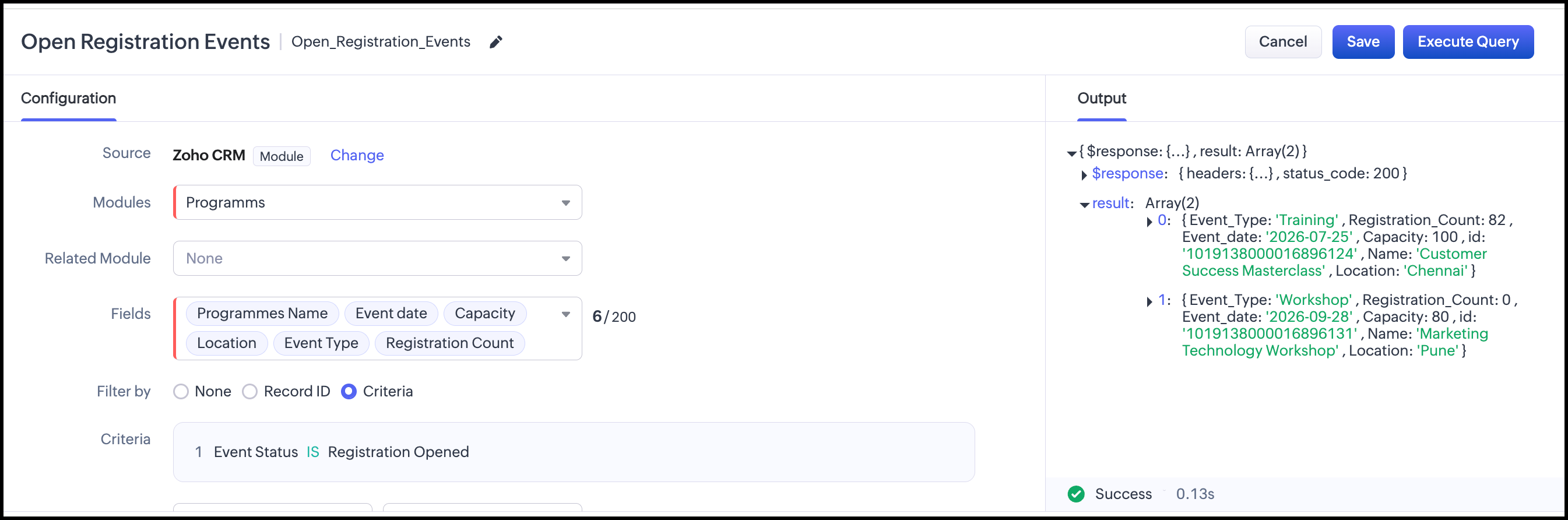
The event manager wants to see all upcoming events for which registration is currently open in a Kiosk.
The results should contain:
- Program Name
- Event Type
- Event Date
- Location
- Capacity
- Registration Count
The events should be displayed in ascending order of the Event Date.


Prompt
/zoho-crm
Create a Zoho CRM Query for the Programs custom module. Fetch events where Event Status is "Registration Opened".Return the following fields: Program Name, Event Type, Event Date, Location, Capacity, and Registration Count. Sort the results by Event Date in ascending order and associate with Kiosk.

The API names may differ, so we need to verify them against our API names as this is a custom module.
What did the skill do?
- Read the Query documentation: Reviewed Query sources, configuration, and Kiosk association guidance.
- Analyzed the requirement:
- Fetch Programs with Event Status = Registration Open.
- Sort by Event Date ascending.
- Retrieve the required programme and event fields.
- Use the Query in a Kiosk.
- Selected the Query source: Chose the Module source since the requirement involves retrieving and filtering records from a single CRM module.
- Configured the Query: Mapped the requirement to the module, criteria, sort order, and required fields.
- Considered Kiosk association: Identified that the Query should be associated with a Kiosk screen to display multiple Program records.
- Verified assumptions: Noted that the API names should be verified against the actual CRM setup before implementation.
5. Transforming Query Responses Using a Serializer
Now let's make the requirement slightly more useful.
Requirement 2
The event manager wants to know:
- How many seats are remaining?
- What percentage of the capacity has already been filled?
- Is the event nearly full?
Instead of storing these values as additional fields in CRM, we can calculate them when the Query executes.
Prompt
/zoho-crm
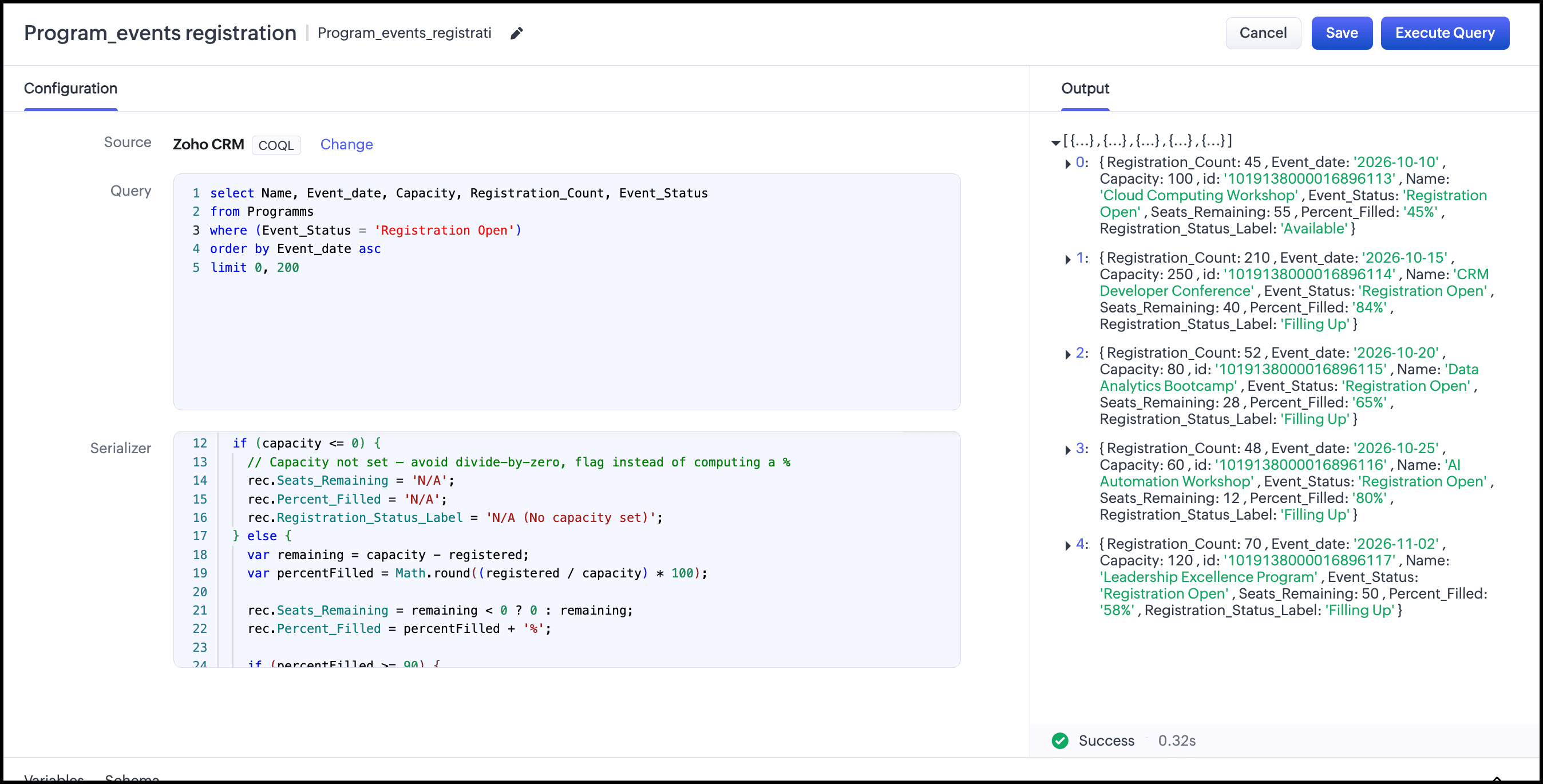
For the custom module "Programs", using Queries, help me understand the current registration status of events that are open for registration.
For each event, I want to know:
How many seats are remaining?
What percentage of the event capacity has been filled?
Is the event Nearly Full, Filling Up, or Available?
Also show the Program Name, Event Type, Event Date, Location, Capacity, and Registration Count.
Show the earliest events first.
What Did the Skill Do?
- Selected COQL as the Query source based on the filtering, sorting, and field requirements.
- Created the COQL query to fetch registration-open programs sorted by Event Date.
- Mapped the required fields such as Program Name, Event Type, Event Date, Location, Capacity, and Registration Count.
- Designed the serializer to calculate Remaining Capacity, Registration Percentage, and Registration Status.
- Handled edge cases, including zero capacity and division-by-zero errors.
- Defined the response schema to include both CRM and calculated fields.
- Identified API-name dependencies that must be verified in the target CRM.
- Considered Query association with components such as Canvas, Kiosk, or Custom Related List.
In short: The skill converted the requirement into a COQL Query → Serializer → Schema → Component association workflow.
6. Calculating Derived Values with Query Serializers
Let's take the same scenario one step further.
The event manager now wants to analyze events that have already been completed.
Requirement 3: Completed Event Analysis
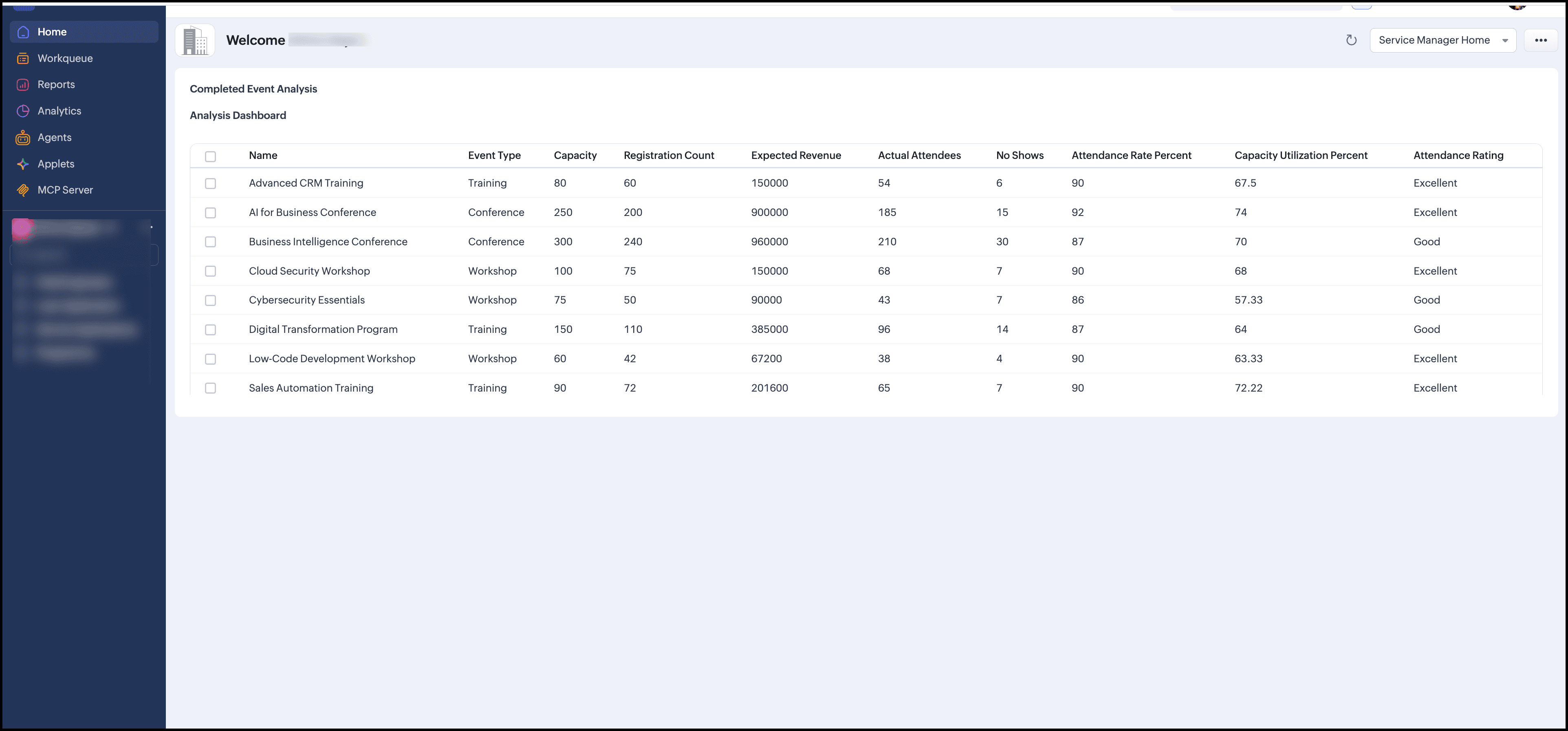
For each completed event:
- Expected Revenue = Registration Count × Registration Fee
- Attendance Rate = Actual Attendees / Registration Count × 100
- Capacity Utilization = Actual Attendees / Capacity × 100
- No-show Count = Registration Count − Actual Attendees
- No-show Rate = No-show Count / Registration Count × 100
- Attendance Classification:
- Excellent: ≥ 90%
- Good: 70–89%
- Needs Attention: < 70%
Prompt
/zoho-crm
For the custom module "Programs", using Queries, help me understand how completed
events performed.
For each completed event, I want to know:
How much revenue was expected from registrations?
What percentage of registered participants attended?
What percentage of the event capacity was utilized?
How many registered participants did not attend?
Was the attendance Excellent, Good, or in Need of Attention?
Also show the Program Name, Event Type, Capacity, Registration Count and Actual Attendees.
What did the skill do?
The skill converted the requirement into a COQL-based Query with a Serializer and worked through the complete configuration.
- Loaded the relevant Query references for structure, sources, and serializers.
- Selected the Module source with Event_Status = Completed.
- Identified the required CRM fields such as Event Type, Event Date, Capacity, Registration Count, Registration Fee, and Actual Attendees.
- Designed the serializer to calculate Expected Revenue, Attendance Rate, Capacity Utilization, No-show Count, No-show Rate, and Attendance Performance.
- Added zero-value checks and error handling to prevent calculation errors.
- Defined the schema to expose both CRM and calculated fields.
- Prepared the implementation steps for Query creation, source, schema, serializer, and associating to Kiosk.
- Noted that API names must be verified against the actual CRM setup.
In short:Module Query → Filter → Retrieve data → Serializer calculates derived values → Schema exposes the results.

This is how it looks after implementing it through Kiosk:
7. Summary
In this Kaizen, we used a single Event Management scenario to explore three levels of Query development with the zoho-crm skill.
What the User Does
- Define the requirement: Specify the data, source/module, fields, filters, sorting, and target component.
- Provide the requirement to the AI coding agent: Give the requirement to an AI coding agent with the zoho-crm skill enabled. The skill analyzes it and suggests a Query implementation.
- Review the Query configuration: Verify the source, fields, criteria, sorting, variables, and other configuration.
- Review the serializer: If needed, provide the expected transformation logic and verify the serializer's filtering, formatting, renaming, or calculations.
- Verify CRM details: Confirm the actual module names, field API names, and field types in the target CRM organization.
- Configure the Query in Zoho CRM: Create and validate the Query using the reviewed source, schema, serializer, and other configuration.
- Associate the Query: Add the Query to the required component, such as a Kiosk, Canvas, or related list.
- Test and validate: Verify the data, filtering, sorting, serialized output, and displayed fields against the original requirement.
The zoho-crm skill simplifies this workflow by helping developers turn natural-language requirements into appropriate Query configurations and implementations.
Have an advanced scenario you’d like to see solved using the skill? Drop it in the comments or write to us at support@zohocrm.com.
Happy Querying!
Related Links
Kaizen #258 – Getting Started with zoho-crm SKILL.md - Introduction to the zoho-crm skill and how it works across Zoho CRM developer capabilities.
Kaizen #259 – Working with Zoho CRM APIs using the zoho-crm skill - Using the skill to work with Zoho CRM APIs.
Kaizen #260 – Using Zoho CRM Skill to generate Client Script - Using the skill to generate Client Scripts.
Zoho CRM Queries – Developer Documentation - Learn more about Query sources, variables, serializers, and schema management.
Topic Participants
Athira Rajan
Sticky Posts
Announcing the new SKILL.md for Zoho CRM and the updated OAS repository!
We are introducing a new zoho-crm skill to make working with Zoho CRM Developer tools (like APIs, functions, widgets, client scripts, queries etc) easier and faster, with the help of AI in your preferred AI harness like Claude Code, Codex, Cursor, VSCodeKaizen #261 : Using Zoho CRM Skill to generate complex COQL queries
Hello everyone, In the previous Kaizen posts, we introduced the zoho-crm SKILL.md and discussed how it can help you when you are working with Zoho CRM APIs and Client Script. In this Kaizen, we will focus on using the Zoho CRM `SKILL.md` with GitHub CopilotKaizen #256 - Build an Arrival Readiness Web Tab in Zoho CRM
Hi everyone! Welcome back to the Kaizen series! In the post, we discuss a use case in hospitality industry: how an Arrival Readiness web tab widget can be used to let reception staff identify and resolve issues before arrival of guests. Use case In theKaizen #198: Using Client Script for Custom Validation in Blueprint
Nearing 200th Kaizen Post – 1 More to the Big Two-Oh-Oh! Do you have any questions, suggestions, or topics you would like us to cover in future posts? Your insights and suggestions help us shape future content and make this series better for everyone.Kaizen #226: Using ZRC in Client Script
Hello everyone! Welcome to another week of Kaizen. In today's post, lets see what is ZRC (Zoho Request Client) and how we can use ZRC methods in Client Script to get inputs from a Salesperson and update the Lead status with a single button click. In this
Recent Topics
Duplicate Record Creation
Hello Team, I would like to check whether there are any options available in Zoho FSM to prevent duplicate record creation in the following modules: Assets Companies Contacts Ideally, we would like the system to check for existing records before allowingAdmin Logging in as another User
How can a Super Admin login as another user. For example, I have a sales rep that is having issues with their Accounts and I want to view their Zoho Account with out having to do a GTM and sharing screens. Latest Update (27th April 2026): With the earlyKB Articles - Can't See Content or Trigger Immediate Sync
Once a file has been submitted to the KB, there's no way to check what it actually contains. There's also no way to force an immediate sync with the source document. These are issues when one is developing and testing an agent. It makes troubleshootingTool Parameter UI - Freeze Header
When one has a number of tools with a number of parameters, scrolling down hides the heading information, forcing one to scroll back up to get confirmation which radio button is which: Seems like simply freezing the header would eliminate that issue.Cannot replace custom tools
This is so incredibly frustrating. Create a tool group. Add your custom schema to create your custom tools. Attach to an Agent. Now you need to update your schema to make an adjustment? You can't edit the schema or even re-upload a new schema. It blocksTesting Tools - Can't View Response
When adding a custom tool and trying to test it, one can see whether or not the test has a successful http response, but the actual payload cannot be viewed to verify the tool's performance. I thought that's what the little hover link was for, but mousingmore native app support for linux
Dear zoho,pls build additional apps like zoho valt,zoho sheets,zoho show,zoho authenticator apps for linux ,because more and more people are increasing switching to linux this days,Quick Reference Guide on join.zoho.com
Joining a remote session can be difficult for the people who need it the most. Please add a quick reference guide and better documentation that my Grandma can read on the join.zoho.com site. It's not uncommon to spend 10minutes or longer in a sessionZoho Projects - Auto Populate Project on Project Invoices
Hi Projects team, I noticed that when creating an invoice from a Project in Zoho Projects, the project is not selected on the invoice. Is this something which you would consider as a feature request? It seems silly that when you create an invoice fromTimes prepopulating in Date/Time field on deal records
Support tells me that there is no workaround to having the time auto-fill on a date/time field in our deal records -- that is HUGELY inconvenient and creates massive opportunity for error. Our deals involve several parts over various days/times, noneEmail-Data Synchronization with Zoho Analytics
Hello, Enterprise Support Community! We're excited to announce the availability of Email Data Synchronization with Zoho Analytics! This highly requested enhancement allows you to sync email data from Zoho CRM into Zoho Analytics, making it easier to analyzeMulti-Day Installations
We schedule technicians on multi-day installations. A single appointment from Monday 8 AM through Friday 5 PM counts as 105 working hours, causing false overbooking. We need one appointment spanning five days but only 40 hours counted toward technicianMaking shared forms available offline
Hi, We used to be able to have our forms available offline even if it was a shared form. now we can't. Is this a new bug?Zoho Forms API
Is there any way to get all form entry list using API? Looking forward to hear from youDocuments greater than 40MB Preview
hello, Documents bigger than 40 MB cannot be previewed in WorkDrive Web App or Mobile App. would it be resolved in future?Calendar Booking - Related Deal
Is it possible to automatically associate a Calendar Booking with an existing Deal in Zoho CRM? We're trying to use the native Calendar Booking feature. Our goal is to send a booking link to a customer from an existing Deal record, so that when the customerApproval Process configuration is now more flexible and fully customizable
Hello everyone! Approval Process is back with a better user experience that makes it easier to add rules to your processes. This enhancement includes some UI updates that help you create highly structured approval stages—and more. Let's look at the enhancementsKaizen #268: Using Zoho MCP to Build and Configure Zoho CRM Cadences
Hi everyone! Welcome back to the Kaizen series! In the previous Kaizen posts, Kaizen #265 and Kaizen #266, we explored how Zoho MCP can be used to work with Zoho CRM records, retrieve metadata, customize CRM, configure automation, and even coordinateDeliverability Update: Impact of the Ongoing Microsoft 365 Service Disruption on Email Delivery
Zoho Campaigns is operating normally. Microsoft is still recovering from a global incident that affects multiple Microsoft 365 services, including Exchange Online and Outlook. If your mailing lists include Microsoft-hosted addresses (@outlook.com, @hotmail.com,Trigger a Workflow Function if an Attachment (Related List) has been added
Hello, I have a Case Module with a related list which is Attachment. I want to trigger a workflow if I added an attachment. I've seen some topics about this in zoho community that was posted few months ago and based on the answers, there is no triggerZoho Inventory - Imporoved Order Fulfillment Reporting
Hi Inventory Team, i've tried to contact you through support@eu.zohoinventory.com but haven't received a response. I am contacting you on behalf of a client. Our client is a car parts wholesale business and we set them up on Zoho Inventory earlier thisSay Hello to Telephony in Zoho FSM
Zoho FSM now brings complete telephony support so your team can manage inbound and outbound calls without switching tabs. Faster responses, smarter routing, and total call visibility—all in one place. Choose the telephony setup that works for you Zoho’sIncreasing API Credits
Hello everyone! Organizations consume Zoho CRM APIs for various business needs, and it's a show-stopper when you exhaust your API credits before the 24-hour rolling window replenishes your credits. To meet your growing needs and help you keep your business[Online Training] Zoho RPA masterclass: Fundamentals, SAP® automation, & AI workflows
Hello everyone! Greetings from the Zoho RPA Training Team! We're excited to announce our upcoming Online Training on Zoho RPA. Manual, repetitive tasks like entering data, updating spreadsheets, managing files, and extracting information from documentsZoho Inventory | Can't uncheck/turn off Advance Tracking
Hi, I wanted to know if there's a way to turn off Advanced Tracking (such as Serial Number or Batch Tracking) for an item in Zoho Inventory. I’ve read that you might need to delete associated transactions and clear the opening stock to disable these features.CNIL - Suivi de Pixel
Bonjour à tous, À la suite de la nouvelle recommandation de la CNIL sur les pixels de suivi dans les e-mails, savez-vous si Zoho Campaigns permet : de conditionner le suivi des ouvertures au consentement de chaque contact ; de proposer un lien permettantJoin Zoho Meeting only via Web browser and not with Zoho Meeting App
Dear Zoho team, according to the documentation [1], Zoho Meeting only offers web view for Chrome and Firefox on a desktop. For other browsers and devices, participants can only join a Zoho Meaning with the Zoho Meeting App installed. This is a big hurdleGetting an error when trying to use the Zoho Desk Resources with our Zobot chat
Hello, When I try to set our Zobot AI Card Training to Zoho Desk resources I get an error when testing it and it bypasses the bot completely. When I try to switch it to the Zoho SalesIQ resources option in there it will list some articles but not giveKB Articles from Zoho Learn - Import as .md
I love the concept of being able to use articles from Zoho Learn as knowledge base articles for Zia Agents. This will absolutely help with proper documentation and organization of company processes and SOPs. This was a great concept. However, even whenRequest for Zoho Desk Version and Module Details
Kindly help us confirm the version of Zoho Desk currently being used in our portal, along with the module/edition name. We require this information urgently for our internal documentation.Cannot reorder fields in Page Layout in Expenses and Purchase Requests
It is very inconvenient that the custom fields in Page Layout cannot be re-ordered. The only way is to remove the fields and re-create them; however, it is impractical. This would affect the reports and dashboards we are having. Not able to re-order thePurchase Requisition in Zoho Books
I want to understand if Zoho Books is having the following workflow: PR ( Purchase Requisition ) >> PO ( Purchase order) >> GRN/SRN ( Goods/Services receipt note) >> BillTips & Tricks #8 | Zoho Mail: Seguridad, privacidad y control para tu empresa
El correo electrónico sigue siendo una herramienta fundamental para cualquier organización. Por él circulan comunicaciones internas, información de clientes, documentos confidenciales y datos esenciales para el negocio. Por eso, elegir un proveedor dePersonalize Email Campaigns using CRM Data
Recently, few of our CRM users wanted to send an email campaign with personalized sender details and signature so that recipients can instantly recognize the sender. We are happy to announce the new enhancement in campaign creation through which you can personalize your email campaign using CRM Contact/Lead Owner's data. Let’s see how we can use those data to send emails. Personalize sender details Using Zoho Campaigns, you can send an email campaign with a personalized sender name and email address集めて終わりにしない。― Zoho FormsからCRMへデータをつなぐ
ユーザーの皆さま、こんにちは。ゾーホージャパンの友田です。 Zoho Formsで問い合わせや資料請求を受け付けた後、その情報をどうしていますか? 例えば、 フォームから届いた氏名や会社名、メールアドレスを確認して、Zoho CRMにも同じ情報を入力している。 そんな作業が発生している場合、FormsとCRMをつなぐことで、その手間を減らせるかもしれません。 Formsに入力された情報をCRMへ Zoho Formsは、Zoho CRMと連携できます。 例えば、Webサイトから資料請求を受け付ける場合、Sheet co-edit: no live presence — also on Collaborate demo?
Two Sheet co-edit sessions open OK (same document_id, document.edit: true), but there’s no real-time collaboration: no cell highlights, Group Chat → Users stays empty. Writer co-edit works on the same Office Integrator setup. We see the same on the officialShort product videos on Zoho Commerce product pages: what works?
Short product videos are becoming a normal part of online store pages, and I have been thinking about how to use them well on a Zoho Commerce store. A few points that seem to matter: Keep them short. 6 to 15 seconds showing the product from a few anglesHow to embed Google Analytics GA4 tracking on a standalone Public Page (outside Customer Portal)?
Hi, Is there an official or recommended way to embed Google Analytics (GA4) tracking directly onto a standalone public Zoho Creator Page (outside of a Customer Portal)? I’m considering using an invisible Custom JS Widget as a workaround, but I’d loveUnable to integrate Whatsapp Messaging into Zoho CRM - Business Messaging
Hello, I want to set up Business Messaging in our Zoho CRM and am struggling to set it up. I have logged into the account and our facebook business page, our business shows in the dropdown for WhatsApp Business Account but does not for WhatsApp BusinessZoho CRM calendar merge with outlook
Hi Zoho team! I did the steps for syncing the zoho CRM calendar with outlook. Everything works well as long as the user creates meetings inside the newly created Zoho CRM calendar in outlook, but I need a way to also display the meetings which are receivedNext Page