Kaizen #78 : How to disable clone record?

Kaizen #78 : How to disable clone record?

Hello everyone!
Welcome back to another interesting Kaizen post.
In this post, let us discuss a workaround solution for the use case - How to disable clone record for a user.

Requirement

Consider that you want to disable the clone option for the Deals module for all users other except the users with Administrator profile.


Solution

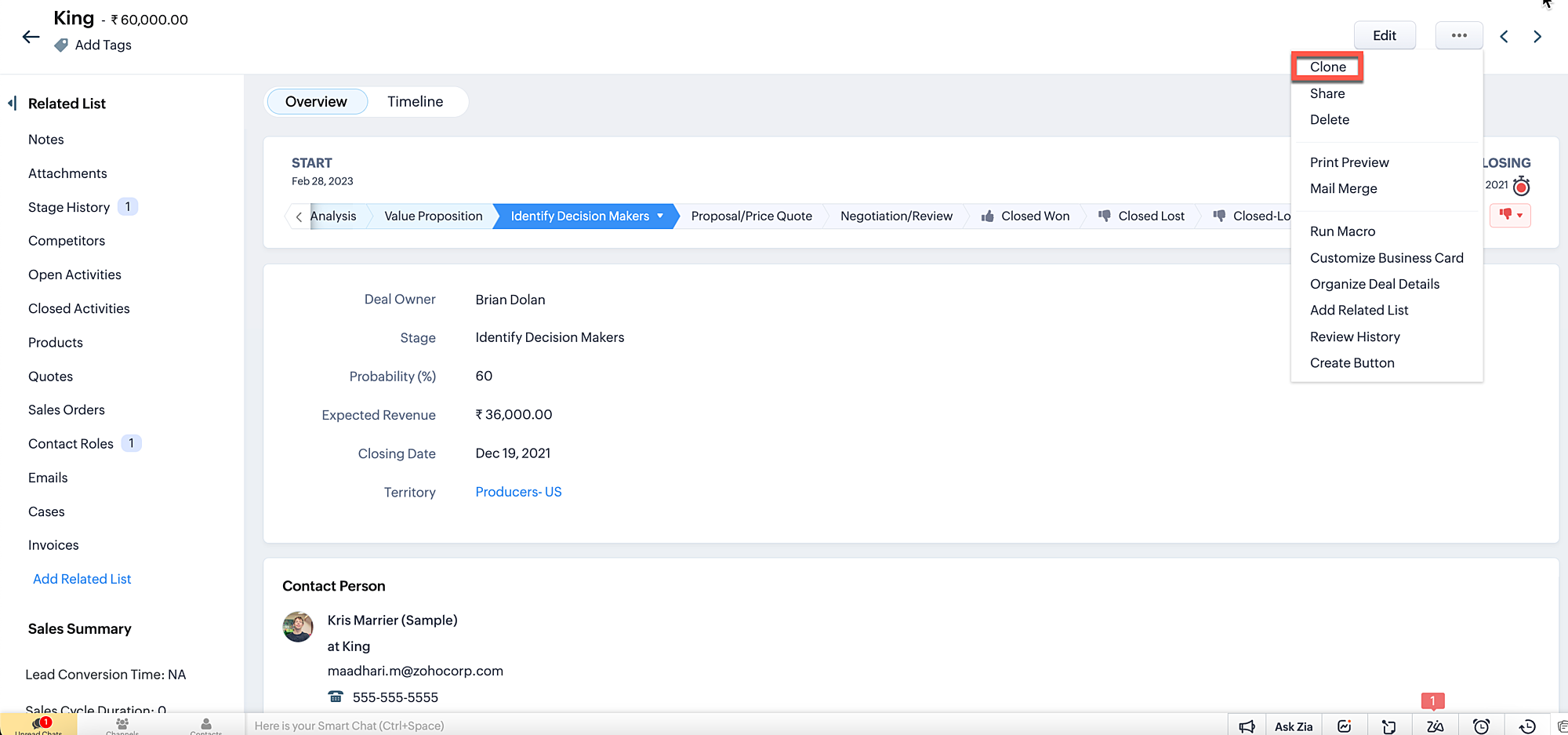
We don't have a straightforward option to disable the clone button that appears on every module. If a profile is given "create" access to a module, then the user with that profile will be able to clone the record also. But in real time, there are high chances for an approved record to get cloned by the user, which cannot be permitted. The ultimate aim is that any user other than the users having an Administrator profile should not be allowed to save a cloned record. 

Currently there are two possible ways to prevent a cloned record from getting saved.

1. Prevent record saving when the user clicks Save button.
2. Disable save button for clone Page.

1. Prevent record saving when the user clicks save button.
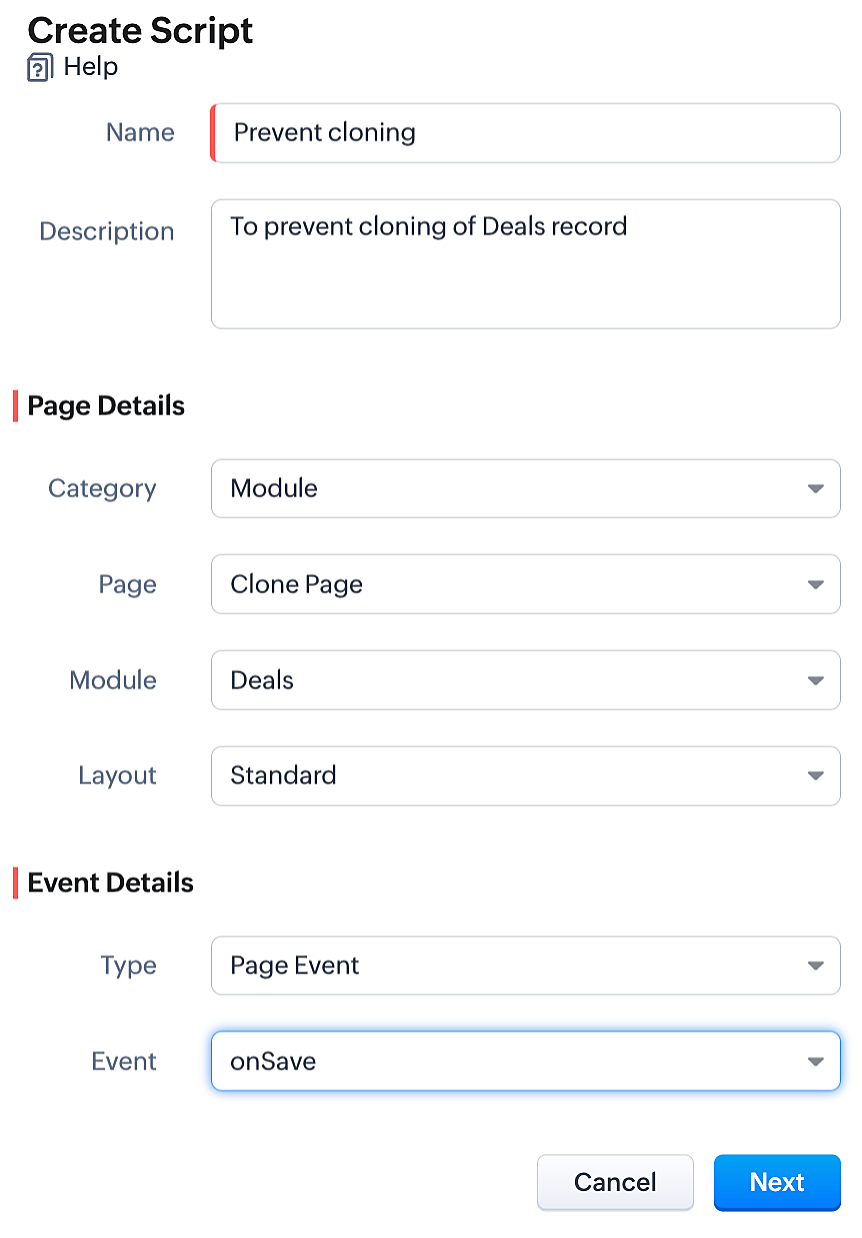
  • To achieve this, you need to create a Client Script for the clone page of the Deals module with onSave Page Event.
  • Go to Setup > Developer Space > Client Script. Click +New Script.
  • Specify the details to create a script and click Next.
  • Enter the following script and click Save.


var user = ZDK.Apps.CRM.Users.fetchById($Crm.user.id);
if (user.profile.name != 'Administrator') {
      ZDK.Client.showAlert('Hi '+user.first_name+' ' +user.last_name+', you do not have the access to clone this deal. Contact your Administrator');
      return false;
  }


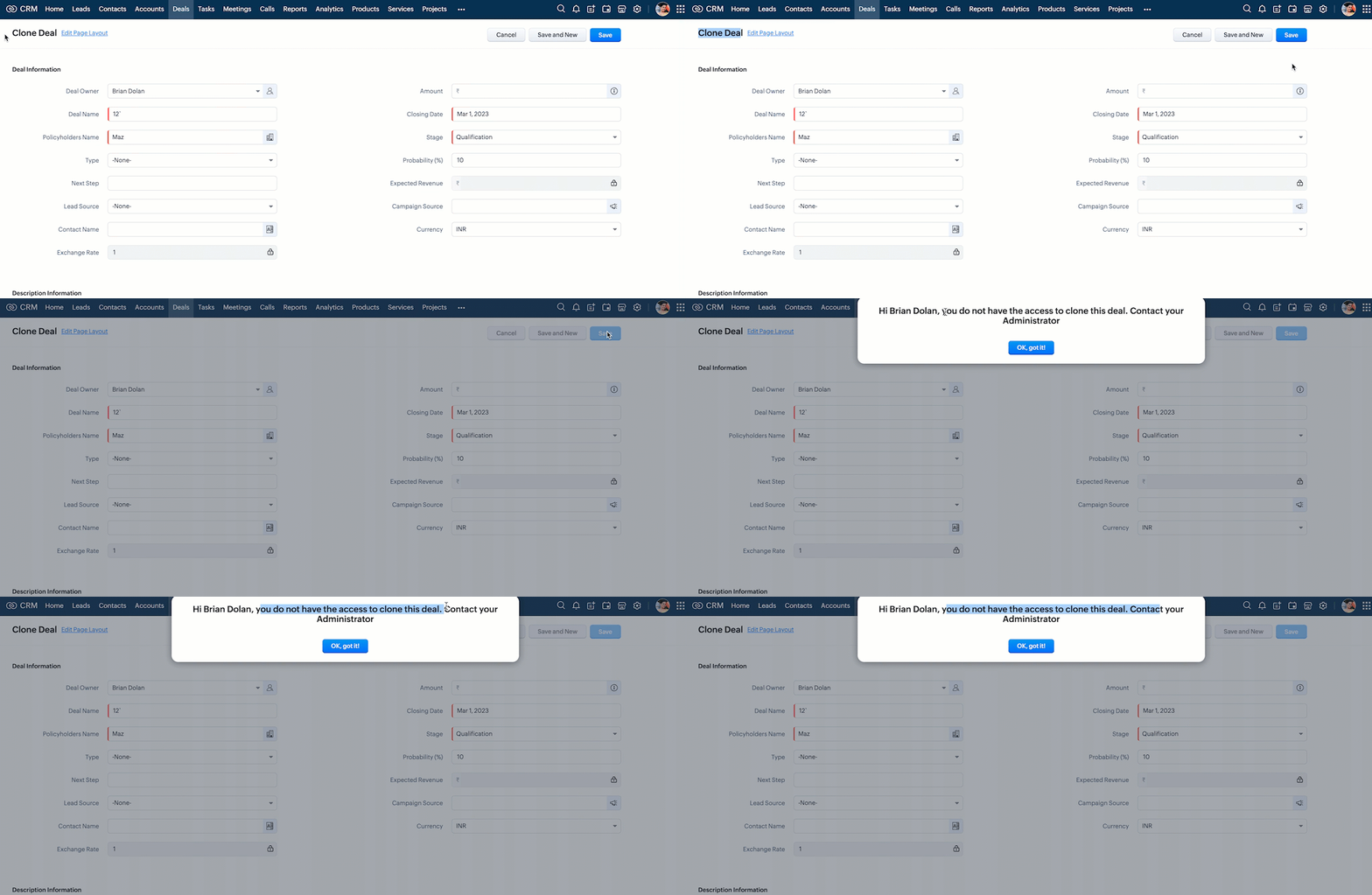
  • Here is how the Client Script works.


Thus the user can no longer save a cloned record when you implement this workaround solution. In addition to the above, you can also add an alert message when the clone Deal record gets loaded, (i.e) before the user enters value to the fields in the clone record. So that the user will be aware that he cannot save the cloned record.

 2. Disable save button for clone page
  • You can disable the save button in Clone page using Client Script. 
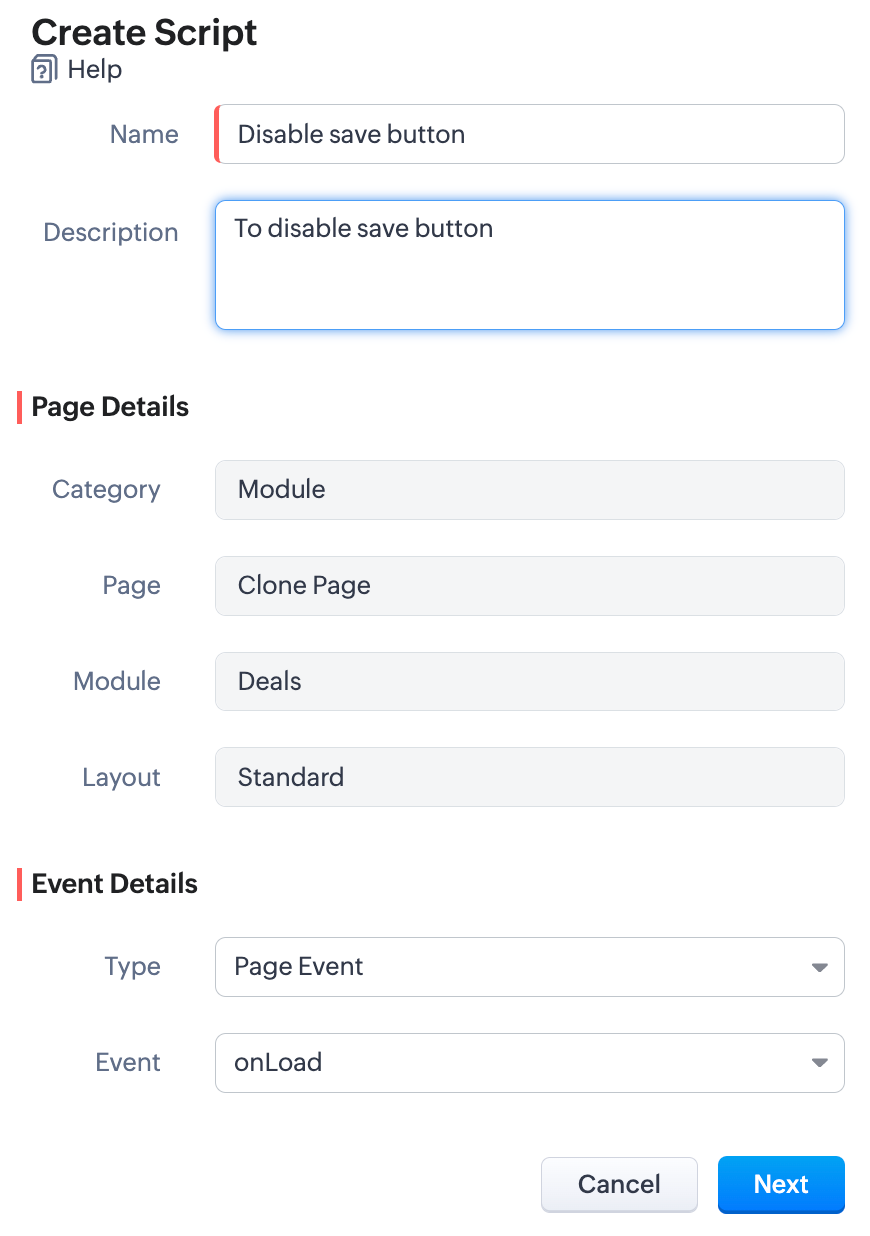
  • To achieve this, you need to create a Client Script for the clone page of the Deals module with onLoad Page Event.
  • Go to Setup > Developer Space > Client Script. Click +New Script.
  • Specify the details to create a script and click Next.
  • Enter the following script and click Save.

var user = ZDK.Apps.CRM.Users.fetchById($Crm.user.id);
if (user.profile.name != 'Administrator') {
var save_btn = ZDK.Page.getButton('record_save');
save_btn.disable();
}

  • Here is how the above Client Script works.
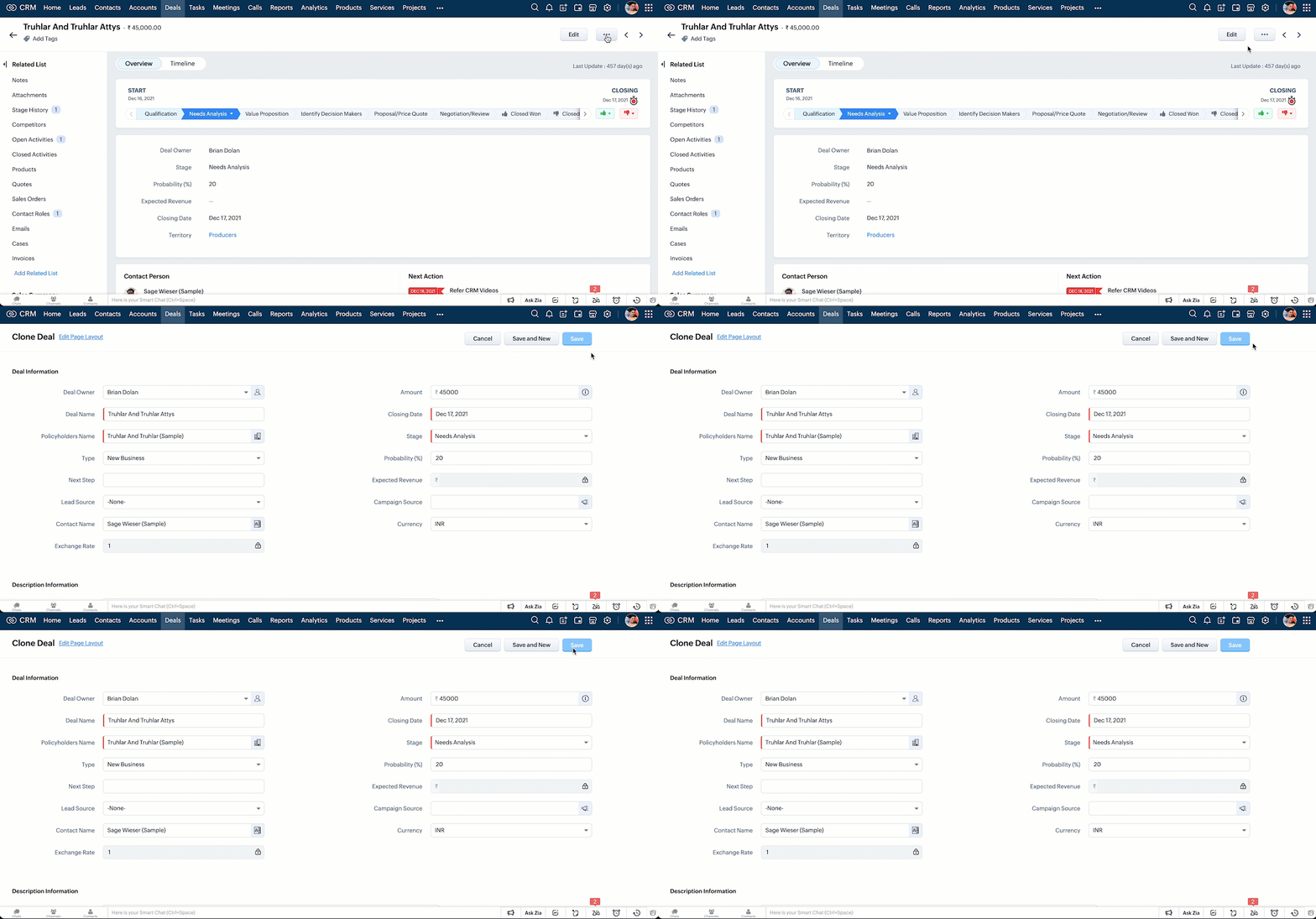

Note:
In the upcoming release of Client Script, you will be able to disable the clone button directly in the Detail page (Standard) of any module based on custom criteria.

We hope you found this post useful. We will meet you next week with another interesting topic!
If you have any questions let us know in the comment section.
Click here for more details on Client Script in Zoho CRM.


Related Links

    • Sticky Posts

    • Kaizen #198: Using Client Script for Custom Validation in Blueprint

      Nearing 200th Kaizen Post – 1 More to the Big Two-Oh-Oh! Do you have any questions, suggestions, or topics you would like us to cover in future posts? Your insights and suggestions help us shape future content and make this series better for everyone.
    • Kaizen #226: Using ZRC in Client Script

      Hello everyone! Welcome to another week of Kaizen. In today's post, lets see what is ZRC (Zoho Request Client) and how we can use ZRC methods in Client Script to get inputs from a Salesperson and update the Lead status with a single button click. In this
    • Kaizen #222 - Client Script Support for Notes Related List

      Hello everyone! Welcome to another week of Kaizen. The final Kaizen post of the year 2025 is here! With the new Client Script support for the Notes Related List, you can validate, enrich, and manage notes across modules. In this post, we’ll explore how
    • Kaizen #217 - Actions APIs : Tasks

      Welcome to another week of Kaizen! In last week's post we discussed Email Notifications APIs which act as the link between your Workflow automations and you. We have discussed how Zylker Cloud Services uses Email Notifications API in their custom dashboard.
    • Kaizen #216 - Actions APIs : Email Notifications

      Welcome to another week of Kaizen! For the last three weeks, we have been discussing Zylker's workflows. We successfully updated a dormant workflow, built a new one from the ground up and more. But our work is not finished—these automated processes are
    • Recent Topics

    • Need Easy Way to Update Item Prices in Bulk

      Hello Everyone, In Zoho Books, updating selling prices is taking too much time. Right now we have to either edit items one by one or do Excel export/import. It will be very useful if Zoho gives a simple option to: Select multiple items and update prices
    • Upgraded sentiment analysis model for more accurate detection

      Hello everyone! Sentiment Analysis in Zia is being upgraded to a newer model to improve how customer sentiment is detected and interpreted. This transition is aimed at getting better contextual understanding across all supported channels. As part of this
    • Notebook Al

      Why was our organisation's Notebook AI disabled, even though our admin said it wasn't done on their side?
    • Dashboard Filtering with 2 query tables using one filter field

      Hi There, I have been using user filters on the dashboard and for the most part they are fine. However I have one issue I would like to see if there is a fix for it. I have a main query that most of my widgets use. Then I have a second query for another widget. The dashboard uses the field "brand" in the main query for the filter.  The second query uses the main_query.brand field alongside fields from a second table. I have set the widget to use main_query.brand as a filter, but when the dashboard
    • How to get static reports via Desk API

      Hello, we are hoping to use the Desk API to automatically export the default static reports in Zoho Desk, or reconstruct them via other API calls. What's the best way to do this? For example, if I want to recreate the Response Time static report via the
    • What's New in Zoho POS - April 2026

      Hello everyone, Welcome to Zoho POS’s monthly update, where we share our latest feature updates, enhancements, events, and more. Let’s take a look at how April went. Access and manage other web applications in Zoho POS with Web Tabs You can now access
    • Issue with adding “Roblox” as an answer option in Zoho SurveyО

      Hello Zoho Support Team, I’m experiencing an issue while editing a survey in Zoho Survey. For some reason, I’m unable to add “Roblox” as an answer option. The same issue occurs with any answer option that contains this exact combination of letters, regardless
    • How to import MBOX to Gmail?

      In order to import or restore MBOX file backup Gmail account you can go for Advik MBOX to Gmail Import utility. This utility will import MBOX to Gmail or G Suite account without any configuration. This tool is considered as the most easiest and simplest process to perform email migration. Key Feature of this tool Import MBOX to Gmail in Bulk Maintain folder struture Retain Key elements Single Panel Interface 100% accuracy rate Download source : http://www.adviksoft.com/mbox/gmail.html
    • Free webinar! Accelerate deals with Zoho Sign for Zoho CRM and Bigin by Zoho CRM

      Hello, Paperwork shouldn’t slow you down. Whether you’re growing a small business or running a large enterprise, manual approvals and slow document turnaround can cost you time and revenue. With Zoho Sign for Zoho CRM and Bigin by Zoho CRM, you can take
    • Sort or filter CRM report by count value

      Hi there, I'm trying to create a report that will show me high frequency bookings (leads) coming through within a time period for any particular account - this is so we can proactively reach out to these accounts. I have a report that shows the information
    • Automatically set the default VAT percentage on a quote

      Every time I create a quote, I have to manually adjust the VAT and activate the checkbox for 21%. But all of our quotes include 21% VAT. So now occasionally, it happens that the checkbox is forgotten, and the customer receives an incorrect quote (without
    • Don't understand INVALID_REQUEST_METHOD when I try to post up an attachment

      When I make the POST request (using python requests.post() for files): https://www.zohoapis.com/crm/v8/Calls/***************01/Attachments I get this response: r:{ "code": "INVALID_REQUEST_METHOD", "details": {}, "message": "The http request method type
    • Bigin & Booking. Associate the appointment with existing customers in bigin.

      I tried to change the stage of the pipeline associated to a existing contact after he book a appointment in Booking. I use flow to create a event in booking when a appointment is done. But.... How can I relate the appointment with the existing contact
    • Can Zoho Books support an Asset account as an item's purchase/COGS account? (Prepaid reseller use case)

      Hi everyone, I run a prepaid digital plan reseller business where I fund a vendor account upfront and draw it down as I make sales — essentially a float-based model, similar to a gift card or prepaid airtime reseller. The correct accounting treatment
    • Quotes - Freehand line items - zoho crm

      Hi, In the zoho crm quotes module is it possible to add line items that are freehand typed? We have a business need to use the quotes module but the product nams/description, quantity, price, etc. needs to be freely typed rather than from a defined list
    • TDS Payable report not Generating

      TDS Payable report for Last Quarter of FY 25-26 is not generating and giving error. Please get it rectified as soon as possble.
    • Remove Zoho Header from Portals

      I have a portal page with custom domain. But when I print directly from a webpage, the Zoho CRM header shows. It kind of kills the branding aspect. Is there a way to get rid of this?
    • Multi-column sorting

      Is multi-column sorting a planned feature for CRM? We are needing to sort by one column and then subsort by another column. I am just wondering if there is a planned feature that will allow this?
    • Clearing Fields using MACROS?

      How would I go about clearing a follow-up field date from my deals? Currently I cannot set the new value as an empty box.
    • Webinar Alert: Turn campaign leads into conversions with Zoho LandingPage and Zoho CRM

      Landing pages are great at capturing leads, but what happens after that is just as important. In this webinar, we’ll walk through how Zoho LandingPage and Zoho CRM work together to create a smooth flow from lead capture to follow-up and conversion. You’ll
    • Catch-All Address: A safety net for misdirected emails

      Email is often the first point of contact with an organization. In many cases, a simple typo in a recipient's address can quietly turn into a missed message—a customer query never reaches support, a partner’s reply goes unnoticed, and the sender has no
    • Need Assistance on Redirect URL or Button Based on Deal Stage

      Hello, I’ve developed a custom application and would like to achieve the following scenario: When a deal is moved to the Billing stage, an automatic trigger should execute and redirect to a URL that includes deal details such as Deal Name and Deal Owner.
    • Zoho IMAP Access to mail doesn't sync messages

      As stated in the topic - I have company account email address setup, and it has ( as in the picutre ) ActiveSync and Imap access enabled. However the messages does not show up while logged in in Zoho Mail however when I log in in thunderbird everything
    • Upload own Background Image and set Camera to 16:9

      Hi, in all known online meeting tools, I can set up a background image reflecting our corporate design. This doesn't work in Cliq. Additionally, Cliq detects our cameras as 4:3, showing black bars on the right and left sides during the meeting. Where
    • 【無料/オンライン】5/21(木)開催|Zoho ワークアウト ― ユーザー同士で作業・議論するもくもく会

      ユーザーの皆さま、こんにちは。 コミュニティグループの中野です。 5月開催の「Zoho ワークアウト」のご案内です。 本イベントは、Zohoユーザーが各自のテーマを持ち寄り、 作業を進めながら参加者同士で意見交換する「もくもく会」形式のオンラインイベントです。 「設定を進めたいけれど、一人だと手が止まってしまう」 「他社がどう活用しているのか知りたい」 「同じ課題を抱える仲間と話したい」 そんな方にぴったりのイベントです。 ▶︎ 参加登録はこちら(無料 / 残り3枠) URL:https://us02web.zoom.us/meeting/register/6ojuA778RqqWPOWzCaCU5Q
    • i keep see there is a connetion issue connecting 3rd party api on zoho when using zia

      hi there , i have set up open ai api to zoho zia (copied and pasted to zoho zia) but I keep getting notificaiton "there is a connetion issue connecting 3rd party api on zoho" when using zia on top when click zia and try to type in word there
    • Can't access google from toppings menu

      So... When I click the manage button in toppings, nothing happens. it won't let me access the settings.
    • Marketer's Space: Bookmarks by Zoho Campaigns

      Hello Marketers, In this week's Marketer's Space, we'll look at a simple yet powerful feature that makes a big difference in your workflow: Bookmarks. Bookmarks is a built-in feature in Zoho Campaigns that enables you to create a personalized library
    • Introducing the revamped What's New page

      Hello everyone! We're happy to announce that Zoho Campaigns' What's New page has undergone a complete revamp. We've bid the old page adieu after a long time and have introduced a new, sleeker-looking page. Without further ado, let's dive into the main
    • Cliq iOS can't see shared screen

      Hello, I had this morning a video call with a colleague. She is using Cliq Desktop MacOS and wanted to share her screen with me. I'm on iPad. I noticed, while she shared her screen, I could only see her video, but not the shared screen... Does Cliq iOS is able to display shared screen, or is it somewhere else to be found ? Regards
    • Tip #71 - Exploring Technician Console: Send Clipboard Keystrokes - 'Insider Insights'

      Hello Zoho Assist Community! Say you are helping a customer remotely and need to log into a system on their machine. You have the password ready on your end, but the moment you try to paste it into the login field, nothing happens. The remote screen just
    • Images not saved in notes

      Created noteboards and create a note, copy pasted the image, close the note and open again, image is not coming this same problem occurs in note on notebook I have attached the replication steps as video url to analyse it, and also attached the videos
    • New in Office Integrator: Apply conditional formatting to entire rows

      Hi users, We are pleased to introduce the ability to highlight entire rows based on a cell's value in Zoho Office Integrator's spreadsheet editor. For example, if your finance team tracks invoice payments in a spreadsheet, you can highlight overdue invoices
    • Zoho books - Project Module - Itemised expenses

      Hi All, I heavily use the projects function in Zoho books and can work for one client for successive weeks, providing labour and incurring the occasional general expenses.  As an example, during the one purchase, I purchase 10 widgets and of these 10, 
    • How to get REST API of extension function in CRM

      I create a an extension using ZOHO Sigma for integrate ZOHO CRM and XERO and established two way sync but when I public my extension it's standalone function are not provide any type of access so I can't get REST API Key of standalone functions without
    • A few Issues when using "Pay Bill via Check"

      We have quite a bit of issues with how paying for Bills via Check works. Would love some feedback from the Zoho team in case we are doing something incorrectly. 1. When we go from a vendor and select "Pay Bill via Check" option, we see ALL the outstanding
    • Show backordered items on packing slip

      Is it possible to show a column on the Packing Slip that shows number of backordered items when a PO is only partially filled? I would also like to see the Backordered column appear on POs after you receive items if you didn't get ALL of the items or partial amounts of items. And lastly, it would be nice to have the option of turning on the Backordered column for invoices if you only invoice for a partial order. -Tom
    • Elevate your Radar experience: Best practices part 1

      In the Spotlight: Zoho Desk's Radar app Think about RADAR (Radio Detection and Ranging)? The system used to track and identify aircraft, ships, and vehicles using electromagnetic waves. Imagine what a similar “Radar” experience looks like for customer
    • Mise à jour de Zoho Books – France

      Chers clients, Merci pour votre patience et votre soutien continu. Avec les évolutions réglementaires à venir en France nous introduisons de nouvelles fonctionnalités dans Zoho Books pour les clients français. Ces mises à jour ont été conçues pour répondre
    • Automation Series: Auto-update Budget When Time is Logged

      In Zoho Projects, Summary fields enable instant budget sync by capturing Actual Cost and showcases it at project-level when a time log is added. This allows real-time budget visibility and helps teams stay within financial thresholds. Consider an event
    • Next Page