Keep your forms spam-free with CAPTCHA
Is your online form getting loads of unwanted responses? Tired of spam ruining your valuable form data? CAPTCHA is the solution you are looking for.
CAPTCHA (Completely Automated Public Turing test to tell Computers and Humans Apart) is a simple yet effective security measure that helps protect your online form from spam and automated submissions. Bots disrupt the data collection process by flooding the form with multiple spam responses. Placing an CAPTCHA prevents these unwanted responses by using simple tests to distinguish between humans and bots. Zoho Forms offers three different types of captcha to keep spam responses at bay. They are:
-
Zoho Forms CAPTCHA
-
Google reCAPTCHA v2 (I'm not a robot)
-
Google reCAPTCHA v2 (invisible reCAPTCHA badge)
Zoho Forms CAPTCHA - Contains distorted numbers and letters that the user must type correctly to submit the form.
Google reCAPTCHA v2 (I'm not a robot) - Users are presented with a checkbox labeled "I'm not a robot". It validates by analyzing the underlying mouse movement, browser history, and typing pattern to determine the likelihood of a bot. If the system suspects a bot, additional challenges like image verification might be presented.
Google reCAPTCHA v2 (Invisible reCAPTCHA badge) - Similar to Google reCAPTCHA v2, but without any explicit checkbox. It validates the user using mouse movements and cookies stored by the browser. If still unable to determine whether the user is a human, it provides tests like image recognition to prevent spam responses.
How to add CAPTCHA?
To add a CAPTCHA to your form,
-
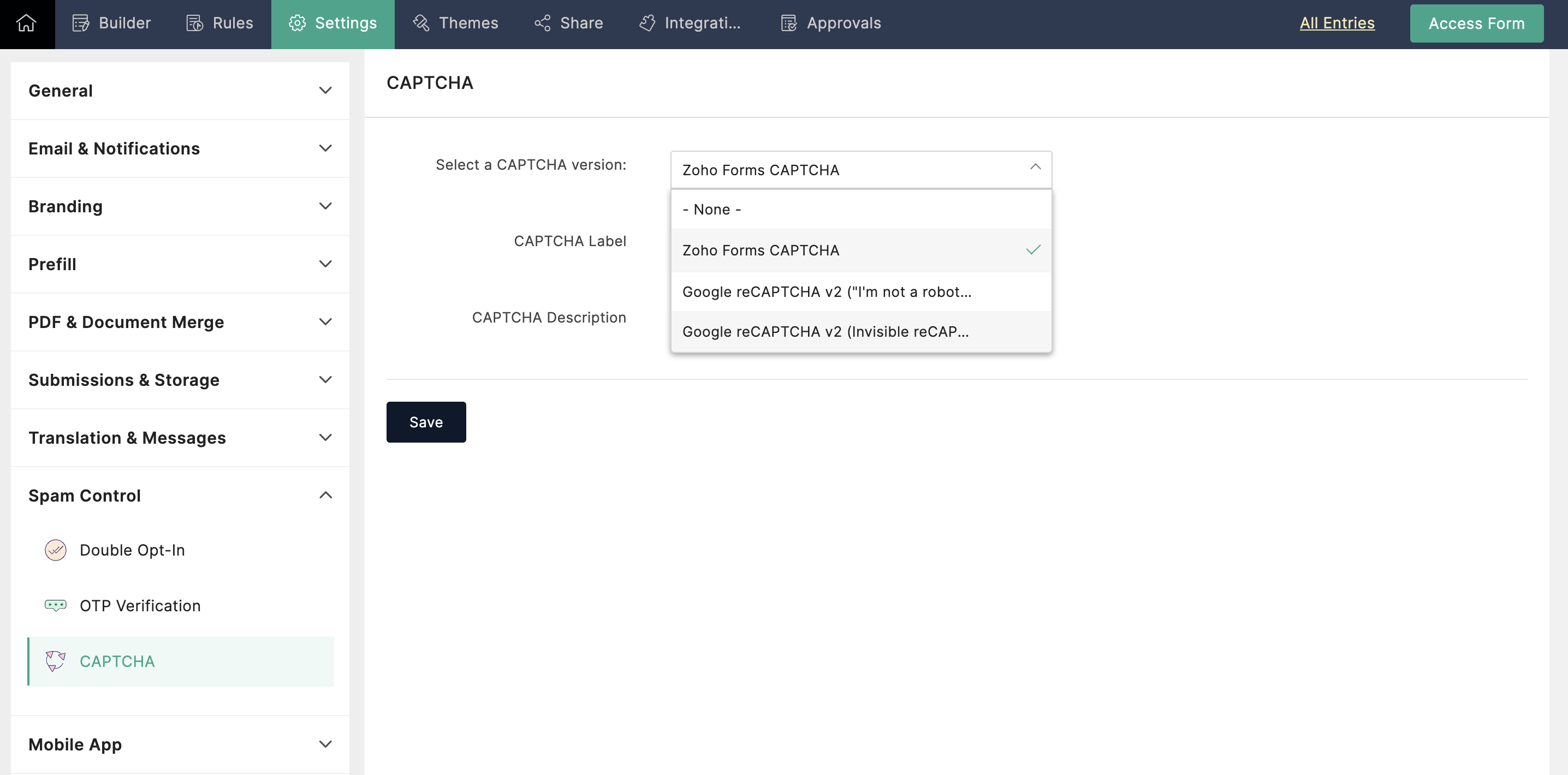
In your form builder, navigate to Settings.
-
Under Spam Control, select CAPTCHA.
-
From the dropdown, select the CAPTCHA version you want to add to your form and configure it.
When to use CAPTCHA?
High spam volume: If your form is receiving a significant amount of spam, CAPTCHA can be a valuable tool to filter out automated submissions.
Sensitive data: For forms collecting sensitive information (e.g., contact details, financial information), adding CAPTCHA can provide an extra layer of security.
Embedded Forms: Forms placed directly on websites are more vulnerable to spam and require CAPTCHA for added security.
Which CAPTCHA to choose?
-
If you are looking for a straightforward solution that provides security while maintaining a familiar user experience, then opt for Zoho Forms CAPTCHA.
-
If user experience is top priority and you have a low bot traffic risk, the invisible badge can be a smooth option.
-
If clear user feedback and strong bot protection are crucial, the "I'm not a robot" checkbox might be the better choice.
-
Few CAPTCHA can present challenges for users with disabilities. Prioritize accessible CAPTCHA options or explore alternative verification methods to ensure inclusivity.
While CAPTCHA is a valuable tool for combating spam, it's essential to recognize its limitations. No CAPTCHA is entirely foolproof, but they can significantly deter bots. Carefully consider your form's needs and audience to effectively implement CAPTCHA to protect your data without compromising user satisfaction. For optimal protection, use CAPTCHA with other security measures.
Topic Participants
Ramya A
Sticky Posts
Easily track referrals with Zoho Forms
Referral tracking can be a powerful way for businesses to understand where their leads are coming from. With Zoho Forms, tracking the referral sources of your leads is an easy and straightforward process. Here are some tips to help you make the most of9 Ways to use Zoho Forms this Navratri
Hello form builders!Navratri is almost here! It is a time for celebration and culture in the Indian community, and organizing such a grand event can be overwhelming. But with the right tools, you can streamline the process and focus on creating unforgettableThe secret to collecting data from valid users
Collecting accurate data is crucial for making informed decisions. Zoho Forms offers two efficient ways to validate user data and ensure that you collect entries exclusively from valid users. Double Opt-in: Double Opt-in is a privacy feature that ensuresStorage space in Zoho Forms: The ultimate guide to efficiently managing your data
Are you using Zoho Forms for data collection? As with any data-intensive application, understanding how storage space is calculated is essential. That's why we've created this guide— to show you everything you need to know about managing storage spaceLinking primary form submissions to a second form submission
Let's imagine you have a form that you use to request a minimal amount of data from your users. To collect additional information, you redirect them to another form either automatically or based on a condition. During the course of redirection, you can
Recent Topics
No feedback from Zoho Books regarding Yodlee feeds for Investec
I reported on 6 Feb 2025 that the Bank Feeds for Investec bank via Yodlee are not working. To date there has been no resolution. You are charging us for a suite of products where the functionality does not work. Please advise how you will refund me forInappropriate Removal of Features
It's the first with any software where I am experiencing that an existing customer has some of his exiting features removed. Moreover, new Zoho One users are paying less than us. Is this going to be Zoho's "normal behaviour". If so, it is going to beFiltering report embeded in page
Right now we are using a page variable to filter a report on a page. However, it being a page variable makes it reset if you go to another report/form, we want the filter to be kept the same. I tried using an application variable according to zoho youZia summarizes your IM bot chats in real time
Hello everyone! Let's say you’re an agent taking over a chat where a customer was booking a flight through a bot on WhatsApp. They've already shared key details, like their destination, travel date, and number of passengers. You need to understand theMegamenu
Finally! Megamenu's are now available in Zoho-Sites, after waiting for it and requesting it for years! BUT ... why am I asked to upgrade in order to use a megamenu? First: Zoho promised to always provide premium versions and options for all included Zoho-applicationsCancel and refund
Hi, Yesterday I paid for the Zoho email subscription. Within a few minutes, I realized that the subscription counts one email ID as one user. To make another email ID for the same domain name, I'd have to pay for another user. I emailed right away toOne Contact with Multiple Accounts with Portal enabled
I have a contact that manages different accounts, so he needs to see the invoices of all the companies he manage in Portal but I found it not possible.. any idea? I tried to set different customers with the same email contact with the portal enabled andKaizen# 209 - Answering Your Questions | All About Client Script
Hello everyone! Welcome back to another exciting Kaizen post! Thanks for all your feedback and questions. In this post, let's see the answers to your questions related to Client Script. We took the time to discuss with our development team, carefullyTo Do: shareable task links without login
Hi! I’m using Zoho Mail and ToDo in my daily work, and I’ve run into one limitation that’s a real blocker for me. Right now, to share tasks with managers or directors, they need to have a Zoho account and be added to a group. In practice, many of themAbility to turn off "Would you like this amount to be reflected in the Payment field?" message
Team, Is there any way to turn off the message" Would you like this amount to be reflected in the Payment field?" when I make a payment? This is so annoying. This happens EVERY TIME I put an amount in the Payment Made field.Unlock agreement intelligence with Zoho Sign's latest AI updates
Hello! If you've been struggling with long, complex agreements and spending way too much time on them, here's exactly what you'll want to hear: Zoho Sign now integrates with OpenAI's ChatGPT to make agreement management smarter and simpler. Acting likeCurrency abbreviations
Hello, Im stuck, and need help. I need the currency fields for example, opportunity value, or total revenue, to be abbreviated, lets say for 1,000 - 1K, 1,000,000 - 1M, and so on, how should I do this?Embed Sign Document
Has anyone tried embedding a document in a webpage? I'm building a webpage (using PowerPage) and I'm trying to embed it using an iframe then I got this error: Refused to display 'https://sign.zoho.com/' in a frame because it set 'X-Frame-Options' toWe’re transitioning from Zoho ShowTime to TrainerCentral
Hello everyone, Zoho ShowTime was originally built as a training platform to serve training agencies, HR teams, and individual trainers. As the platform grew, we realized that more creators and businesses could benefit from its capabilities. That’s whyEmails Are Not Being Delivered to My Inbox
Hello Zoho Support Team, I am experiencing an issue with my Zoho Mail account. The most important problem is that emails are not being delivered to my inbox. Details: My Zoho Mail address: info@coreforcelife.com What happens: I am not receiving any incomingRadar In Focus: Track customer support metrics using Radar's static reports
Hello everyone, Welcome back to the Radar In Focus series, where we explore how Radar features can add value to your business. In this episode, we're looking at Radar static reports. The help desk is filled with vast amounts of data that can be analyzedMail ToDo & Tasks Webhooks
Our company uses Zoho ToDo inside Mail to manage our tasks. When I create a task and assign it to a team member it does not notify them unless I add a reminder via mail. I'm trying to create a webhook for when a task is created to send a cliq messageAllocating inventory to specific SO's
Is there a way that allocate inventory to a specific sales order? For example, let's say we have 90 items in stock. Customer 1 orders 100 items. This allocates all 90 items to their order, and they have a back order for the remaining 10 items which couldImproved UI for a Seamless User Experience - Calls, Tasks, and Meetings
Hello all, We are making UI unification across CRM so that the UI experience is seamless across the product. As part of that effort, we have made changes to the details page of activity-based module records—Meetings, Calls, and Tasks. Let's look at theseWhere can I find rejected inbound mails and their reason for rejection
Hi, I was recently made aware by a mailing list which I am subscribed to (ffmpeg-devel@ffmpeg.org) that my Zoho mail Mail account is rejecting some emails. If I look under Admin Panel > Security & Compliance > Quarantine > Incoming, the list there isRefund
Hi There, Please refund me asap possible, because of no support given. Thank youتغيير عمله الدفع"Change payment currency"
ما هى طريقه تغيير عمله الدفع "ما هي طريقة تغيير عملة الدفع؟"How do I fix this? Unable to send message; Reason:554 5.1.8 Email Outgoing Blocked.
How do I fix this? Unable to send message; Reason:554 5.1.8 Email Outgoing Blocked.Attention API Users: Upcoming Support for Renaming System Fields
Hello all! We are excited to announce an upcoming enhancement in Zoho CRM: support for renaming system-defined fields! Current Behavior Currently, system-defined fields returned by the GET - Fields Metadata API have display_label and field_label propertiesZia's ability to generate and improve content extended to Desk mobile app (iOS and Android)
In support, agents will have to understand customers' pain points completely to provide empathetic personalized solutions and a positive experience. However, at times, agents might find it challenging to comprehend the customer issues and connect withBANK FEED - MAYBANK , provider from YODLEE IS NOT WORKING
As per topic, the provider YODLEE is not working for the BANK FEED. It have been reported since 2023 Q3, and second report on 2023 Q4. now almost end of 2024 Q1, and coming to 2024 Q2. Malaysia Bank Maybank is NOT working. can anyone check on this issue?Zoho Sign product updates - Q3 2025
Hello everyone! Q3 was all about AI. Here's the list of features and enhancements that have gone live, along with a list of what we have in pipeline for the last quarter: AI-powered agreement management Sending documents and authenticating recipientsZoho sites header
Good day, Im stuck with this situation. I choose a template for my website creation. I have tweaked every instance of the visual editor, regarding the header, I have created created customize fonts presets... I have followed every single step. and myQuick Create needs Client Script support
As per the title. We need client scripts to apply at a Quick Create level. We enforce logic on the form to ensure data quality, automate field values, etc. However, all this is lost when a user attempts a "Quick Create". It is disappointing because, fromKaizen #152 - Client Script Support for the new Canvas Record Forms
Hello everyone! Have you ever wanted to trigger actions on click of a canvas button, icon, or text mandatory forms in Create/Edit and Clone Pages? Have you ever wanted to control how elements behave on the new Canvas Record Forms? This can be achievedDNS set up
I want to create an email with my company domain. When I tried to add new record with cloudflare it didn't work. The DNS record can't be manually added. I followed the instruction but still can't add it. Could you help?Pocket from Mozilla is closing shop. Don’t lose your favorites . Move them to Zoho Mail Bookmarks now! 📥🔖
The end of Pocket shouldn't mean the end of your important links and content. Easily import them into Zoho Mail's Bookmarks and continue right where you left off. You can bring over your entire Saves, Collections, and tags just the way they are. BookmarksGeneral suggestions
Hello, I've picked this forum as it is at the top of the list! :) First suggestion: A general forum for issues and comments that are not specific to a particular Zoho application. Second suggestion: Put a link on the home page to "Zoho Identity Access Manager" The first suggestion came about because I didn't know where to post the second! ;) Regards MarkCan't upload attachments.
I can't upload attachment in Zoho Mail.Need Guidance on SPF Flattening for Zoho Mail Configuration
Hi everyone, I'm hoping to get some advice on optimizing my SPF record for a Zoho Mail setup. I use Zoho Mail along with several other Zoho services, and as a result, my current SPF record has grown to include multiple include mechanisms. My CloudflareHow use
Good morning sir I tried Zoho MailZoho Mail Desktop App Not Loading + Can’t Manage Multiple Accounts
Hi everyone, I’ve been having ongoing issues with the Zoho Mail desktop app for the past few weeks. The app starts to load but gives up midway and never actually opens — there’s no error message, it just stops loading. The main reason I use the desktopError when sending emails from Zoho
Hello, When trying to send an email from Zoho CRM I keep getting the below error: javax.mail.AuthenticationFailedException: 535 5.7.139 Authentication unsuccessful, the user credentials were incorrect. Any support on this will be much appreciated. Thanks,Zoho Tables is now live in Australia & New Zealand!
Hey everyone! We’ve got some great news to share — Zoho Tables is now officially available in the Australian Data Center serving users across Australia and New Zealand regions! Yes, it took us a bit longer to get here, but this version of Zoho TablesNot all emails from outlook365 migrated to my new zoho account
I recently setup a new email address hosted by zoho. I migrated all my folders and email from my Outlook365 account to my new zoho account, but not all my emails migrated. Looks like only the past 12 months, or so, made the move. How do I get the restNext Page