Let's build a dashboard with Cliq Widgets!

While juggling multiple tasks and tracking real-time data, you face a strict deadline for delivering a quarterly analysis report on a blank canvas while switching between different apps. Sounds exhausting, right? What if you could streamline everything into one interactive space?
With its vibrant tile-based design and internal components like widgets packed with elements like charts, graphs, tables, and custom fields, Cliq can transform your static data into visual dashboards that deliver business value.
Business benefits
- Rapid decision-making: Visual data representation ( with charts and graphs ) makes it easier to spot trends instantly, track KPIs, and identify areas that require immediate action. With clear insights, decision-makers can respond proactively.
- Enhanced collaboration: Interactive widget elements, such as tables, fields, and charts, allow teams to view, update, and share critical information without communication gaps. This ensures data consistency and fosters a more connected and agile workflow, minimizing the need to leave the chat interface.
- Improved efficiency: Constantly switching between apps to gather insights slows productivity. By consolidating key metrics in a centralized location, teams can reduce context-switching and make well-informed decisions faster.
- Proactive problem solving: Addressing potential issues before they escalate is crucial for maintaining business continuity. Automated alerts and notifications triggered via bots and schedulers in Cliq allow teams to respond quickly to emerging concerns.
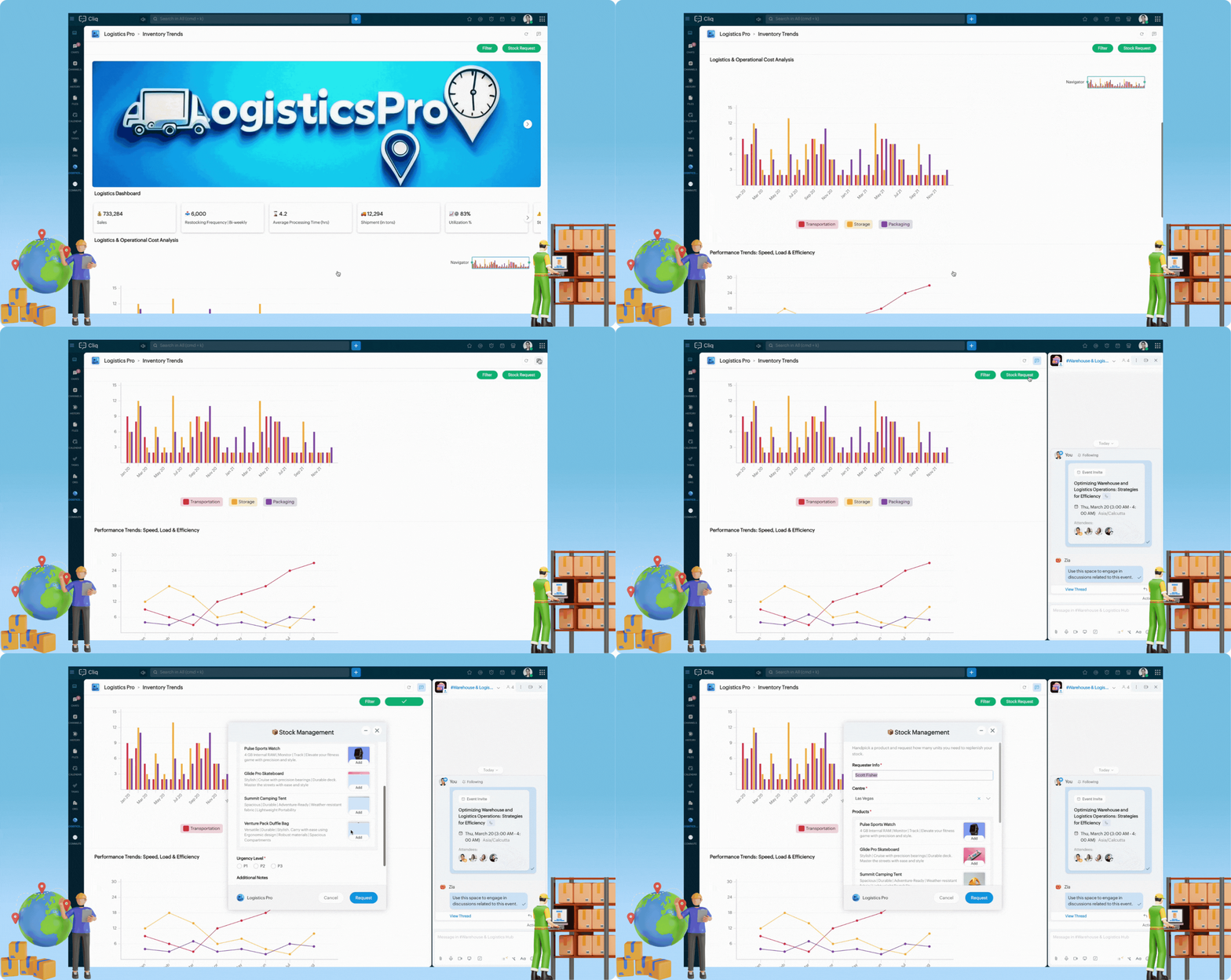
- Utilize the image element to enhance your business brand, strengthen your identity and recognition, and create a professional dashboard that stands out.
- For real-time visibility, use the cards element with the carousel type to display key logistic metrics such as shipment status, fleet utilization, delivery performance, etc.
- Incorporate vertical bar graphs to analyze operational costs, differentiating between storage, transportation and packaging expenses.
- These graphs support legend-based filtering. Click on a category in the legend to remove it and focus on specific cost metrics.
- Use the navigator to zoom in or expand the X-axis, allowing for precise monitoring within a specific range.
- Monitor speed, load, and efficiency trends over time using graphs to identify performance patterns and operational bottlenecks. Hover over data points to see tooltips displaying exact values for each category, providing quick insights.
- Use the table element to showcase supplier statistics and a doughnut chart to illustrate orders by delivery status. Add widget buttons to the header for tasks such as filtering dashboards by date range and requesting stocks via Cliq forms.
- Use the catalogue form input to present detailed product information and images for a rich and intuitive experience in stock requests.
Sample code :
- tabsList = {{"label":"Inventory Trends","id":"reports"}};
- if(target.containsKey("id"))
- {
- id = target.get("id");
- }
- else
- {
- id = "reports";
- }
- sections = List();
- if(id == "reports")
- {
- elements = list();
- // Cover Image for the Widget
- data = list();
- imgMap = Map();
- imgMap.put("url","https://www.zoho.com/sites/zweb/images/cliq/dev-helpdoc/image_31_1.jpg");
- data.add(imgMap);
- elements.add({"type":"images","data":data,"style":{"view":"carousel","size":"large"}});
- elements.add({"type":"text","text":"\n\n"});
- sections.add({"id":"coverImage","elements":elements});
- elements = list();
- elements.add({"type":"title","text":"Logistics Dashboard"});
- sections.add({"id":"tagline","elements":elements});
- dataList = list();
- eachData = Map();
- eachData.put("title","💰 733,284");
- eachData.put("description","Sales");
- dataList.add(eachData);
- eachData = Map();
- eachData.put("title","📥 6,000");
- eachData.put("description","Restocking Frequency | Bi-weekly");
- dataList.add(eachData);
- eachData = Map();
- eachData.put("title","⌛ 4.2");
- eachData.put("description","Average Processing Time (hrs)");
- dataList.add(eachData);
- eachData = Map();
- eachData.put("title","🚚 12,294");
- eachData.put("description","Shipment (in tons)");
- dataList.add(eachData);
- eachData = Map();
- eachData.put("title","📈⚙️ 83%");
- eachData.put("description","Utilization %");
- dataList.add(eachData);
- eachData = Map();
- eachData.put("title","⚠️📦 5%");
- eachData.put("description","Stockout Risk");
- dataList.add(eachData);
- elements = list();
- elements.add({"type":"cards","data":dataList,"style":{"view":"carousel","size":"small"}});
- elements.add({"type":"text","text":"\n\n"});
- sections.add({"id":"cardstats","elements":elements});
- // Add buttons based on your preferred usecase
- button1 = {"label":"Filter","type":"invoke.function","name":"LPWidgetbuttons","emotion":"positive","id":"filter"};
- button2 = {"label":"Stock Request","type":"invoke.function","name":"LPWidgetbuttons","emotion":"positive","id":"stockRequest"};
- elements2 = list();
- elements2.add({"type":"title","text":"Logistics & Operational Cost Analysis"});
- operationalCostData = {{"category":"Transportation","values":{{"label":"Jan 20","value":9},{"label":"Feb 20","value":8},{"label":"Mar 20","value":5},{"label":"Apr 20","value":2},{"label":"May 20","value":2},{"label":"Jun 20","value":2},{"label":"Jul 20","value":2},{"label":"Aug 20","value":2},{"label":"Sep 20","value":9},{"label":"Oct 20","value":8},{"label":"Nov 20","value":5},{"label":"Dec 20","value":2},{"label":"Jan 21","value":2},{"label":"Feb 21","value":2},{"label":"Mar 21","value":2},{"label":"Apr 21","value":2},{"label":"May 21","value":9},{"label":"Jun 21","value":8},{"label":"Jul 21","value":5},{"label":"Aug 21","value":2},{"label":"Sep 21","value":2},{"label":"Oct 21","value":2},{"label":"Nov 21","value":2},{"label":"Dec 21","value":2}}},{"category":"Storage","values":{{"label":"Jan 20","value":6},{"label":"Feb 20","value":12},{"label":"Mar 20","value":3},{"label":"Apr 20","value":7},{"label":"May 20","value":3},{"label":"Jun 20","value":13},{"label":"Jul 20","value":5},{"label":"Aug 20","value":8},{"label":"Sep 20","value":9},{"label":"Oct 20","value":8},{"label":"Nov 20","value":5},{"label":"Dec 20","value":2},{"label":"Jan 21","value":2},{"label":"Feb 21","value":2},{"label":"Mar 21","value":2},{"label":"Apr 21","value":12},{"label":"May 21","value":3},{"label":"Jun 21","value":8},{"label":"Jul 21","value":5},{"label":"Aug 21","value":2},{"label":"Sep 21","value":8},{"label":"Oct 21","value":2},{"label":"Nov 21","value":2},{"label":"Dec 21","value":2}}},{"category":"Packaging","values":{{"label":"Jan 20","value":6},{"label":"Feb 20","value":11},{"label":"Mar 20","value":2},{"label":"Apr 20","value":5},{"label":"May 20","value":2},{"label":"Jun 20","value":6},{"label":"Jul 20","value":3},{"label":"Aug 20","value":5},{"label":"Sep 20","value":6},{"label":"Oct 20","value":11},{"label":"Nov 20","value":5},{"label":"Dec 20","value":3},{"label":"Jan 21","value":5},{"label":"Feb 21","value":7},{"label":"Mar 21","value":4},{"label":"Apr 21","value":6},{"label":"May 21","value":9},{"label":"Jun 21","value":8},{"label":"Jul 21","value":5},{"label":"Aug 21","value":2},{"label":"Sep 21","value":4},{"label":"Oct 21","value":6},{"label":"Nov 21","value":2},{"label":"Dec 21","value":3}}}};
- elements2.add({"type":"graph","styles":{"preview":"vertical_bar"},"data":operationalCostData});
- elements2.add({"type":"divider"});
- sections.add({"id":2,"elements":elements2});
- trendGraphData = {{"category":"Loading Time ⏳","values":{{"label":"Jan","value":9},{"label":"Feb","value":6},{"label":"Mar","value":3},{"label":"Apr","value":12},{"label":"May","value":15},{"label":"Jun","value":18},{"label":"Jul","value":24},{"label":"Aug","value":27}}},{"category":"Weight ⚖️","values":{{"label":"Jan","value":12},{"label":"Feb","value":18},{"label":"Mar","value":14},{"label":"Apr","value":6},{"label":"May","value":8},{"label":"Jun","value":4},{"label":"Jul","value":2},{"label":"Aug","value":10}}},{"category":"Processing Time ⏲️","values":{{"label":"Jan","value":4},{"label":"Feb","value":3},{"label":"Mar","value":7},{"label":"Apr","value":3},{"label":"May","value":4},{"label":"Jun","value":2},{"label":"Jul","value":6},{"label":"Aug","value":5}}}};
- elements3 = list();
- elements3.add({"type":"title","text":"Performance Trends: Speed, Load & Efficiency"});
- elements3.add({"type":"graph","styles":{"preview":"trend"},"data":trendGraphData});
- sections.add({"id":3,"elements":elements3});
- elements4 = list();
- elements4.add({"type":"table","headers":{"Supplier Name","Product Category","Avg. Delivery Time (Days)","Fulfillment Rate (%)","Contract Expiry Date","Price Variability (%)"},"rows":{{"Supplier Name":"GlobalTech","Product Category":"Laptops","Avg. Delivery Time (Days)":"6.5","Fulfillment Rate (%)":"92 %","Contract Expiry Date":"2025-12-31","Price Variability (%)":"1.5 %"},{"Supplier Name":"MedSupply","Product Category":"Medical Devices","Avg. Delivery Time (Days)":"4.2","Fulfillment Rate (%)":"96 %","Contract Expiry Date":"2026-06-30","Price Variability (%)":"2.8 %"},{"Supplier Name":"FreshAgri","Product Category":"Perishables","Avg. Delivery Time (Days)":"5","Fulfillment Rate (%)":"93 %","Contract Expiry Date":"2025-09-15","Price Variability (%)":"5.4 %"},{"Supplier Name":"AutoPartsCo","Product Category":"Auto Components","Avg. Delivery Time (Days)":"3","Fulfillment Rate (%)":"95 %","Contract Expiry Date":"2025-11-20","Price Variability (%)":"3.2 %"}},"style":{"text_align":{"center","center","center","center","center","center"}}});
- sections.add({"id":4,"elements":elements4});
- deliveryInfo = {{"label":"Delivered","value":1050},{"label":"In Progress","value":493},{"label":"Not Delivered","value":440}};
- elements5 = list();
- elements5.add({"type":"title","text":"Orders by Delivery Status"});
- elements5.add({"type":"percentage_chart","styles":{"preview":"doughnut"},"data":deliveryInfo});
- sections.add({"id":5,"elements":elements5});
- header = {"title":"","navigation":"new","buttons":{button1,button2}};
- }
- return {"type":"applet","tabs":tabsList,"active_tab":id,"sections":sections,"header":header};
Time to build your own dashboard!
Cliq Widgets is not just for logistics. Do you want to track sales performance, monitor system health, or analyze customer support tickets? You can craft a dashboard that drives your unique business needs, turning static data into an interactive and actionable experience.
Topic Participants
Harsha SS
Sticky Posts
Automating Employee Birthday Notifications in Zoho Cliq
Have you ever missed a birthday and felt like the office Grinch? Fear not, the Cliq Developer Platform has got your back! With Zoho Cliq's Schedulers, you can be the office party-cipant who never forgets a single cake, balloon, or awkward rendition ofCustomer payment alerts in Zoho Cliq
For businesses that depend on cash flow, payment updates are essential for operational decision-making and go beyond simple accounting entries. The sales team needs to be notified when invoices are cleared so that upcoming orders can be released. In contrast,Accelerate Github code reviews with Zoho Cliq Platform's link handlers
Code reviews are critical, and they can get buried in conversations or lost when using multiple tools. With the Cliq Platform's link handlers, let's transform shared Github pull request links into interactive, real-time code reviews on channels. ShareApp Spotlight : PagerDuty for Zoho Cliq
App Spotlight brings you hand-picked apps to enhance the power of your Zoho apps and tools. Visit the Zoho Marketplace to explore all of our apps, integrations, and extensions. In today's fast-paced world, seizing every moment is essential for operationalAutomate your status with Cliq Schedulers
Imagine enjoying your favorite homemade meal during a peaceful lunch break, when suddenly there's a PING! A notification pops up and ruins your moment of zen. Even worse, you might be in a vital product development sprint, only to be derailed by a "quick
Recent Topics
Tax Deductible Donations to a Charity Organisation
For Australia, what's the best/proper method for entering an expense that is a tax deductible donation to a charitable organisation. And thus is appears correctly in Accounts and BAS as a GST payable deduction?Simultaneous use of WhatsApp Account in SalesIQ and ZohoDesk
Hi, We have only one number registered in Meta, it's possible use same account for two apps? All times here we try is stopping in SalesIQ. Regards,External lookup fields to synchronise with Analytics
Hello. I suggest adding external lookup custom fields to the Zoho Analytics integration settings. Currently, these types of fields are not available for synchronisation, so they cannot be used to generate reports with related tables in Analytics. ThankWe should have an option to Toggle Off KB Article Links in AI Answer Bot Replies
Hi everyone, I'm creating this topic to share a feature idea that I think would improve the customer experience when using the AI Answer Bot for self-service. The Current Behavior (The Problem) Currently, when the AI Answer Bot generates a summary orBoot Loop After Removing Service from Client via Admin
We have multiple laptops experiencing a boot loop / unable to login after the Zoho Remote service was removed from their machine remotely via the desktop client. The Windows sign-in screen is not available, and users are unable to login. This seems likeRequest Backend Correction — Domains Mapped to Same Help Center (Multi-Brand Setup Failure)
Hello Zoho Desk Support Team, I need assistance correcting a domain-to-brand mapping issue in our Zoho Desk instance (The Blue Ribbon Project). Both of our verified domains currently point to the same Help Center instead of separate brand portals. Currentis there any option to enable the participants interact - can write on the screen, while the screen is shared by the host?
this is most expected features - for teaching children. is there any option to enable the participants interact - can write on the screen, while the screen is shared by the host?How to disable the Login button in Desk Helpcenter
Hey there, I'm testing out whether the help center within Zoho Desk could replace our existing Customer FAQ. I tried to customize the themes for the public help center frontend, but stumbled across the login button in the navigation bar. Is there anySubforms in stateless forms
I think the title says it all. We need to be able to add subforms to stateless forms. Currently the only workaround is to create a Form and delete each record upon submission of the form. I need to build an interface to update our inventory. BasicallyStandard Payment Term is not pulled from account to quotation
Hey Team There seems to be something off. I do have "Net 30" as my default payment term in Zoho Books for my customers. If, from the customer overview or quote section, I create a new Quotation, the payment terms field stays blank and doesn't get theBest way to display complex Bookings Consultation Descriptions on Zoho Site?
I am a new user so apologies if this has been asked before. I couldn't find any answers in the forum. We offer 18 complex Consultations to our subscribers. Our current platform lets me put detail on these Consultations thoroughly (200-300 words) duringGmail is ramping up its email sender policy as of November 2025
Hello marketers, As you may be aware, Gmail introduced a guideline for bulk senders starting February 2024. If not, here's a quick refresher straight from Google: After this policy was announced first in 2023 and soft-implemented in February 2024, weModifying iframe data of Zoho booking iframe
Hello, I have integrated a Zoho Bookings embedded iframe into my website. Currently, I am pre-filling the booking form with default values as part of our process flow. However, I want to ensure that if an input field is already populated with a defaultZoho CRM Workflow and Function Backup Options
Hi everyone! I have been able to make several backups of my CRM data and noticed that the Workflows and Functions are not included in these backups. To my knowledge, there is no backup feature for workflows and functions, which is problematic in of itself.Enhance Sign CRM integration
Hello all, I'm working on a custom Deluge script to enhance the integration between Zoho CRM and Sign by using a writer merge template for additional flexibility. I want to replicate the post-sign document integration that exists between CRM and SignYouTube Live streaming? how to? Zoom has this feature, built-in. Can't find it on zoho meetings.
YouTube Live streaming? how to? Zoom has this feature, built-in. Can't find it on zoho meetings.Is or will be possible to associate meeting transcription and summary, made by Zia, to meeting/contact/account record in CRM?
Would be useful to keep context and track jobs, better if it will be autoDesk Field Not Showing in Analytics
Hi there, I recently added a field to our Zoho Desk Ticket Information. I went and added the data retrospectively to the tickets. It is also marked as required, so all new tickets cannot be closed off without it being filled in. When I try to run a reportExport data using advanced export options and customizable settings
Hello everyone, The user interface for exporting data has been revamped with updates to make data exports more flexible and efficient for users. These updates not only enhance usability but also bring advanced capabilities to help users extract preciseMoving data from one pipeline to another
Hey all, I've got some complex pipelines to build and I'd like to seperate them into seperate pipelines rather than have one mammoth one. If I create 2 pipelines, is there any easy way to use the output of Pipeline1 to be the input into Pipeline2? OrHow to export/find all deluge code.
Hi, I have a large app wich contains several forms, reports, html views, I need to find thow my application if any contains specific word, I could find it manually by editing app and see on every section(field code, on succes, on load, etc) but I would like to do it faster. Is there a way to at least export it to a file the whole deluge code on my application?Have Some Bugs in Zoho CRM Ask Zia Assistant
Hi Support Team, I have found some bugs in Zoho CRM Ask Zia Feature Please Check below screenshot, insight option is showing twice i think its in early access that's why its have some bugs .COD with Partial payment
Two reasons why we need COD with partial payment option. 1) Since we deal heavy weight products our shipping costs are too high. If shipment is rejected by customer we incur huge loss. 2) Some competitors place fake orders with different names and returnSlicers are now available in Zoho Sheet—filter your data interactively
At Zoho Sheet, we diligently track user requests and feedback. In line with this, based on extensive user requests, we've integrated Slicers to pivot tables and are delighted to announce its release. Slicers are interactive visual filters that have add,Resizing a Record Template Background Inage
Hi everyone, I have an issue which I can't seem to resolve: Basically, I'm designing a record template in certificate form. I've specified A5 landscape. I've set my background image the same dimensions with total pixels at 443,520. Whatever I try, whenUpdated font library: New font styles and custom font options in Zoho Sheet
Zoho Sheet's font library now supports 500+ font styles in 60+ languages! The updated font library is stacked with new font styles, and some of the previously available font styles have been replaced with equivalent options. There are two ways you canIntroducing Data Bars: Graphically represent changes in data within the cells
Conditional formatting has helped millions of spreadsheet users analyze and highlight their data more efficiently. In addition to the classic rules, color scales, and icon sets available in Zoho Sheet, you can now apply Data Bars, a convenient methodDefault Font Size in Desk
How do I set my default font size in Desk? It takes me about 45 minutes to find the place to set it, then, when I sign out of Zoho and log back in, it's back to font 10 again. Seems like this would be simple, but like everything with Zoho, it's buriedTip #19 - Create checkbox tracker in your spreadsheet
Hello Sheet users! We are here with yet another tip to help you get the most out of Zoho Sheet. Spreadsheets can be used to handle a variety of tasks, but ever tried using checkboxes to track the progress of your action items dynamically? Here's a sampleTip #20 - Three things you probably didn't know you can do with picklists
Hello Zoho Sheet users! We’re back with another quick tip to help you make your spreadsheets smarter. Picklists are a great tool to maintain consistency in your spreadsheet. Manually entering data is time-consuming and often leaves typos and irregularPer Level Approval for admins
We need Process admins like Zoho CRM in Zoho Books for per stage approval Currently in books, admins only have the option for Final Approval But for example, in cases like when an employee is on leave, we can't just approval one level we only have optionFeature enhancement: Highlight rows based on a cell value
Hello Sheet users, We're excited to announce a new feature enhacement, shaped directly by your valuable feedback! As you might know, conditional formatting is a great tool for anyone dealing with large data sets. Previously, if you’ve ever wanted to drawUpdating custom fields in Zoho Projects
Hi I am wondering if anyone has experience with custom fields in Zoho Projects. I am struggling to update the field using either deluge or the api endpoint. My code is: //custom_Map = map(); custom_Map = {"UDF_DOUBLE_1":"0.27"}; update_Map = map(); update_Map.put("custom_fields",custom_Map.toList());Markdown for Desk?
Hi, my company wants to use markdown for formatting text in Desk (in all modules there, especially Tickets and Helpcenter). Zoho already offers use of markdown in several products (see https://help.zoho.com/portal/en/kb/backstage/microsite-guide/formatting-with-markdown/articles/formatting-with-markdo)Change Currency symbol
I would like to change the way our currency displays when printed on quotes, invoices and purchase orders. Currently, we have Australian Dollars AUD as our Home Currency. The only two symbol choices available for this currency are "AU $" or "AUD". I wouldCalendar not working
Are we the only ones. On any browser we cannot click on any of our calendar appointments and get them to open. They just make the browser loop. WE have reached out and have been told they are working on it. The office staff are really stuck. The pointWhatsApp Message Template Quick Reply Buttons
Hello, I created my first Message Template to overcome the 24-hr messaging window and it was approved by WhatsApp/Meta. When I go to Meta, I also see that template brought from Zoho Desk, and used it via Zoho Desk IM. However, I notice that when in Meta'sAccount in Quick View Filter
I have a report that I often run against a specific Account. Every time, I have to go into the edit menu and change the Advanced Filter. I would prefer to use the Quick View Filter, but it does not allow me to use the one and only field that makes anyCollapsible Sections & Section Navigation Needed
The flexibility of Zoho CRM has expanded greatly in the last few years, to the point that a leads module is now permissible to contain up to 350 fields. We don't use that many, but we are using 168 fields which are broken apart into 18 different sections.Set Display for Numbers/Currency/etc with Client Script/Customization in Canvas List Page
Is it possible to set a display mask for a number/currency field using Client Script or customization? I have custom fields that I would like to keep the decimal places for calculation purposes, but do not need them displayed to the user. So 101.3568Next Page