Let’s Talk Recruit: LinkedIn Cheatsheet

Let’s Talk Recruit: LinkedIn Cheatsheet


Welcome to the first edition of Let’s Talk Recruit for 2026. We are kicking off the year by revisiting one of the most asked about topics in Zoho Recruit.

Quote
How our LinkedIn integrations actually work and how recruiters can get the most value from them.

LinkedIn continues to be a critical sourcing and application channel for recruiters. But when it connects with an ATS, the experience depends heavily on how features are activated and used. In this post, we break down LinkedIn integrations in Zoho Recruit, explain when to use each option, and show you how to set them up the right way.

Understanding Our LinkedIn Integrations

Zoho Recruit’s LinkedIn integrations fall into two clear categories. One helps you publish jobs on LinkedIn and the other helps you capture applications from LinkedIn. Understanding this split helps you choose the right setup for your hiring process.
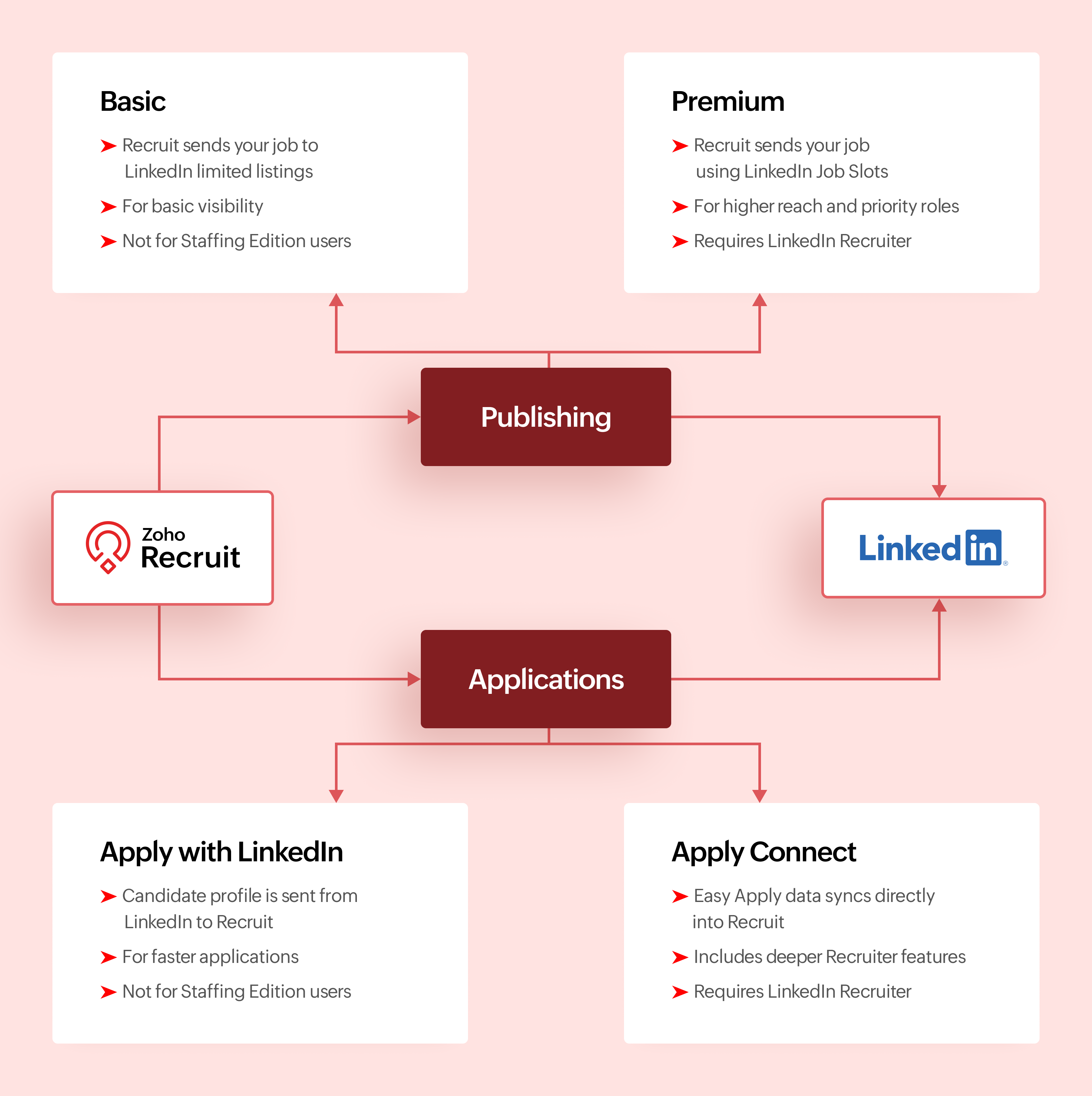

Activation Checklist

Use this checklist to set up LinkedIn with Zoho Recruit so jobs and Easy Apply applications flow correctly.

Step #1: Connect LinkedIn Easy Apply to Zoho Recruit

  1. Connect your LinkedIn account to Zoho Recruit
  2. Turn on Apply Connect so Easy Apply applications are sent directly to Zoho Recruit
Info
Why this matters
This ensures candidates who apply through LinkedIn Easy Apply appear automatically in Zoho Recruit.

Step #2: Choose how you post jobs on LinkedIn

  1. Decide how jobs will be posted from Zoho Recruit.
  2. If you use LinkedIn Job Slots, enable Premium Job Posting
  3. If you do not use Job Slots, enable Basic Job Posting
  4. Do not post the same job manually on LinkedIn outside Zoho Recruit
Info
Why this matters
Posting jobs from Zoho Recruit keeps LinkedIn jobs and ATS records in sync.

Step #3: Test Easy Apply and start hiring

  1. Post a test job to LinkedIn from Zoho Recruit
  2. Apply using LinkedIn Easy Apply
  3. Confirm the candidate shows up in Zoho Recruit
Once verified, please continue posting jobs and managing applications only from Zoho Recruit.

Comparing Integrations

Feature
Basic Job Posting
Premium Job Posting
Apply with LinkedIn
Apply Connect
Primary purpose
Publish jobs
Publish jobs with higher visibility
Simplify applications
Deep LinkedIn and Recruit integration
Category
Job publishing
Job publishing
Application capture
Application capture
Publishes jobs from Recruit
Yes
Yes
No
No
Captures applications into Recruit
No
No
Yes
Yes
Requires LinkedIn Job Slots
No
Yes
No
No
Requires Recruiter contract
No
No
No
Yes for advanced features
Available for Staffing Edition
No
Yes with Job Slots
No
No
Supported with self serve job posts
Yes
No
Yes
No
Candidate applies using LinkedIn profile
No
No
Yes
Yes
In ATS LinkedIn profile widgets
No
No
No
Yes
Applicant notifications
No
No
No
Yes
Best suited for
Standard visibility
High priority roles
Faster applications
End to end LinkedIn sourcing

Make the most of LinkedIn and Recruit together

LinkedIn delivers the best results when it is part of a connected hiring process.

Use Premium Job Posting for roles where visibility directly impacts hiring speed. Combine Apply with LinkedIn or Apply Connect with clear application stages in Zoho Recruit. Track candidate sources to understand where LinkedIn performs best. Keep candidate records clean so
LinkedIn data enriches your database instead of creating duplicates.

When LinkedIn sourcing and Zoho Recruit work together, recruiters spend less time managing tools and more time hiring the right talent.

What's Next?

Recruiter System Connect (RSC) is coming to Zoho Recruit. This upcoming capability will further strengthen how LinkedIn Recruiter data connects with Zoho Recruit, especially for teams that spend significant time sourcing inside LinkedIn Recruiter.

Why wait for RSC? 

  1. Everything in one place
    Post jobs, receive applications, and manage candidates directly in Zoho Recruit without switching tools.
  2. Cleaner data, better tracking
    Candidate profiles come in structured, making it easier to track sources and analyze hiring performance.
  3. Made for consistent hiring
    RSC supports repeat hiring on LinkedIn with reliable workflows and better visibility for recruiting teams.
More updates will be shared soon.

Let’s Talk!

LinkedIn can support hiring in many ways, but the real value comes from choosing the right integration for your Zoho Recruit setup and using it intentionally.

If you are already using any of these features, share what is working well for you. If you are exploring these integrations for the first time, tell us what you would like to learn next.

Questions? Suggestions? Leave a comment below or drop an email to support@zohorecruit.com

    • Sticky Posts

    • Zoho Recruit Community Meet-up - India (Venues Finalised)

      Zoho Recruit Community Meet-up - India (Venues Finalised) Namaste, India. 🙏🏼 The Zoho Recruit team is hitting the road—and we're absolutely excited behind the scenes. Join us for the Zoho Recruit India Meet-up 2026, a morning designed to make your recruiting
    • Zoho Recruit Community Meetup - London 🇬🇧 (Venue Finalised)

      Hello Recruiters! We’re excited to announce that the Zoho Recruit team is coming to the UK for an in-person Zoho User Group (ZUG) Meetup in London! This is your chance to connect with fellow Zoho users, learn from experts, and walk away with actionable
    • An update to improve email delivery | Email Authentication & Relay

      Update Rollout Latest Update: Enterprise users (8th July, 2025) This update is now live for Enterprise plan users in all regions. This includes People Plus, but not Zoho One, which will be covered in an upcoming update. Professional users (31st May 2025)
    • Zoho Recruit User Group Meet-up | INDIA 2025 (Venue Finalised)

      Hello Zoho Recruit users from India, We’re pleased and excited to announce our 2025 edition of Zoho user group meet-up in India in five cities! In this meet-up, our team of experts will help you understand the intricate nuances to use Zoho Recruit better,
    • Zoho Recruit is coming to the UK | Zoho Community Learning Series

      Customers from the United Kingdom, Exciting news: We will be in London for the Zoho Recruit user meet up. Our team will help you better understand the intricate nuances of Zoho Recruit to help you hire faster, inform about new and upcoming features, and
    • Recent Topics

    • Ability to add VAT to Retainer Invoices

      Hello, I've had a telephone conversation a month ago with Dinesh on this topic and my request to allow for the addition of VAT on Retainer Invoices.  It's currently not possible to add VAT to Retainer Invoices and it was mutually agreed that there is absolutely no reason why there shouldn't be, especially as TAX LAW makes VAT mandatory on each invoice in Europe!   So basically, what i'm saying is that if you don't allow us to add VAT to Retainer Invoices, than the whole Retainer Invoices becomes
    • Zoho Bookings Forge: A hands-on workshop series

      Hello all! We’re hosting a five-part, hands-on workshop series to help you optimize Zoho Bookings for your business. In these sessions, we’ll cover key features, practical use cases, and clear steps to get started or improve your current setup. Here are
    • Introducing parent-child ticketing in Zoho Desk [Early access]

      Hello Zoho Desk users! We have introduced the parent-child ticketing system to help customer service teams ensure efficient resolution of issues involving multiple, related tickets. You can now combine repetitive and interconnected tickets into parent-child
    • Update Existing Records greyed out in Free Version

      Trying to update records from an Excel sheet, and not getting the option to update. Only option is to add as new accounts. All documentation I can see says update should be an option! Accounts, Leads, Contacts, all the same.
    • Help with deluge script

      Hi Community, this is my first Deluge script. I've pieced it together from reading various articles I want to use it in a workflow to 1 Convert a lead to a contact 2. Create a record in a custom module Below is what I have got so far but it does not fire
    • Introducing Workqueue: your all-in-one view to manage daily work

      Hello all, We’re excited to introduce a major productivity boost to your CRM experience: Workqueue, a dynamic, all-in-one workspace that brings every important sales activity, approval, and follow-up right to your fingertips. What is Workqueue? Sales
    • Delete button

      Hi, The delete button were hide into the three dot button. Can I display outside? why Zoho make this update?
    • Zoho Vault CLI for Developers and Automations

      Hi everyone, If you're managing credentials in scripts, CI/CD pipelines, or automation workflows, Zoho Vault's Command Line Interface (CLI) can help you securely access and manage secrets directly from your terminal. Zoho Vault was launched in 2013 as
    • On Edit Validation Blueprint

      Hello, I have a notes field and a signature field. When the Approve button is clicked, the Signature field will appear and must be filled in. When the Reject button is clicked, the Notes field will appear and must be filled in. Question: Blueprint will
    • Zoho Subscriptions -- Zoho Commerce integration

      Is there integration between Zoho Subscriptions and Zoho Commerce? I would like to create subscription plans in Zoho Subscritpions and list them for on my Zoho Commerce store.
    • Synching changes to Stripe when changes are made in Zoho Billing

      We have a situation where we have merged customers in Zoho BIlling and then found out later that the payment in Stripe was not updated and still associated with the old customer record. The card gets updated and billed, but that payment is still associated
    • How can I link Products in a Deal Subform to the Products Module

      Hello, I have a pricing subform on our Deals page and use a lookup field to associate a product with each line. I want to be able to look at a product page within the Products module and see a list of the deals connected to that product. I have this working
    • Help Center and SEO: Any Benefit to My Domain-Mapped Website Ranking?

      First of, I love the Help Center which I've just decided to integrate into my website to replace its old-fashioned FAQs. So much more to achieve there now! Lots of new benefits to the site visitors and to me in terms of organizing and delivering all the
    • Business Hours with lunch break

      Our business hours are: mon - fri 08:30 - 13:00, 15:00 - 18:30. How can I handle the lunch break? If I use 8:30 - 18:30 it obviously breaks SLA. Thanks
    • Automatically Update Ticket Status in Zoho Desk Based on Actions in Zoho Projects

      Hi Zoho Desk Team, Hope you’re doing well. We’re using the Zoho Desk–Zoho Projects integration to manage tasks related to customer tickets, and it works well for linking and tracking progress. However, there are a few important automation capabilities
    • Zoho Desktop App- Unable to Minimize/Freezes

      I'm having issues with my Zoho Mail desktop app (PC). When go on my desktop and open the app this is what happens: - Unable to minimize and close app (in the screenshot attached you can see at the top right there is no option to minimize/close) - Unable
    • Enable Free External Collaboration on Notecards in Zoho Notebook

      Hi Zoho Notebook Team, I would like to suggest a feature enhancement regarding external collaboration in Zoho Notebook. Currently, we can share notes with external users, and they are able to view the content without any issue. However, when these external
    • Zoho Commerce

      Hi, I have zoho one and use Zoho Books. I am very interested in Zoho Commerce , especially with how all is integrated but have a question. I do not want my store to show prices for customers that are not log in. Is there a way to hide the prices if not
    • Multi-currency in Zoho CRM Forecast and Reports

      As a company we have branches in 4 different countries with as many different currencies. Our Sales Teams would like to work with their local currency as much as possible. The Forecast module using only 1 currency is practically usable only by the sales
    • Zoho Sprints iOS app update: Global view, screen capture control, file encryption, tags enhancement

      Hello everyone! We are excited to introduce new features in the latest version(v2.1) of the Zoho Sprints iOS app update. Let’s take a quick look at what’s new. 1. Global view Global view brings all your project items into one centralised space. You can
    • Zoho Projects Android and iOS app update: Conditional layout rules for Tasks

      Hello everyone! Task conditional layout rules configured on the web app(projects.zoho.com) are now applied on the Zoho Projects Android and iOS app. Conditional layout rules can be set for the Add/ edit task form and it allows you to change the property
    • How to account for vat with postponed VAT accounting

      Hi everyone, looking for some help with postponed VAT accounting, I use DHL express for my imports and they used to pay the VAT for me and then invoice me. I could then log this as a bill and the VAT element from import was recorded as input VAT, all
    • Introducing Formula Fields for performing dynamic calculations

      Greetings, With the Formula Field, you can generate numerical calculations using provided functions and available fields, enabling you to derive dynamic data. You can utilize mathematical formulas to populate results based on the provided inputs. This
    • Zobot with Plugs

      Hello, I am having a problem with Zobot using Plugs. Here is my current flow: When I run the flow, I should immediately see the messages from the initial cards (Send Message cards), then after running the plug, and finally, see the messages after the
    • Is there a way to show contact emails in the Account?

      I know I can see the emails I have sent and received on a Contact detail view, but I want to be able to see all the emails that have been sent and received between all an Accounts Contacts on the Account Detail view. That way when I see the Account detail
    • Invalid scope choice: Workdrive integration in CRM

      Bug: There is an invalid option in the permission choices for Workdrive integration in CRM. If the entry "WorkDrive.teamfolder.CREATE" is selected, it will return a message indicating invalid OAuth scope scope does not exist.
    • Dark Mode - Font Colors Don't Work

      When editing a document in Dark Mode and selecting font colors, they don't show up on screen.  Viewing/editing the same document in Light Mode shows them just fine.
    • Good news! Calendar in Zoho CRM gets a face lift

      Dear Customers, We are delighted to unveil the revamped calendar UI in Zoho CRM. With a complete visual overhaul aligned with CRM for Everyone, the calendar now offers a more intuitive and flexible scheduling experience. What’s new? Distinguish activities
    • Zoho mail admin panel not opening

    • Zoho CRM WooCommerce Integrtation

      Looking for a solution for my 50 client to show detailed analytics on source of traffic that led to events, leads, conversions. Hi all, I have not been able to find a workable guide or solution to how exactly step by step integrate the Zoho CRM with WooCommerce
    • Attaching files to emails within CRM Deals.

      Hello, We have recently started using the extension "Workdrive for CRM" (Related List) to view/store our documents for each Deal, instead of using Attachments. Overall it feels like a better way to go but the user experience is not so great when it comes
    • 500 internal server error on opening an iframe through a deluge script

      Hi Team I am trying to open an external url in an iframe through my deluge script which is associated to a custom button . By doing this i am getting an "Internal Server Error" . Please can you help me with this.
    • Kaizen #225 - Making Query-based Custom Related Lists Actionable with Lookups and Links

      Hello everyone! Welcome back to another post in the Kaizen series! This week, we will discuss an exciting enhancement in Queries in Zoho CRM. In Kaizen #190, we discussed how Queries bridge gaps where native related lists fall short and power custom related
    • Filter button in the Zoho Sheet Android App doesn't toggle on

      I am a new Zoho Sheets user and experiencing a specific issue with the filter functionality in the Android mobile application. Detailed Issue Description: The filter icon appears correctly in the toolbar. Upon tapping the filter icon/button, the toggle
    • Is Zoho Sites still actively being developed?

      Hello, Is Zoho Sites still actively being developed as part of the Zoho ecosystem? I noticed that the What's New page (https://www.zoho.com/sites/whats-new.html) does not show any updates since Q1 2025. We were considering migrating our website from Squarespace
    • Project Notifcatiion Emails - Milestone

      Hello: I cannot get myself, or most importantly my portal client user to recieve an email upon completion of a milestone. I have set up our 1st project. I have set up a test client user. (accepted the invitation and is listed in the system as a client
    • Zoho Forms - Feature Request - Year Field

      Hi Zoho Forms Team, You currently have the following date and time fields: Date Time Date and Time Year and Month It would be useful if you could include a "Year" field For example a recent application I completed said "What year was your house built?"
    • Integrate Excel or Zoho Sheet functions / calculations to CRM product module

      Hello Community, I hope someone more experienced can help me with this question. Our price / payment plan calculations are in an Excel spreadsheet and I would like to use all those functions / calculations in my Products module. So when we send a quote
    • Sync CRM Contacts to USER'S contacts on Office 365

      I can see that the O365 sync is transferring contacts backwards and forwards between Zoho CRM and Office365. But it has created a separate address book in Office 365 called "Zoho CRM Contacts". This address book is not used by Office/Outlook's email function
    • Manage Every Customer Conversation from Every Channel inside Zoho SalesIQ

      Your customers message you from everywhere. But are you really able to track, manage, and follow through on every conversation, without missing anything? With interactions coming in from websites, mobile apps, and messaging platforms like WhatsApp and
    • Next Page