If your teams use multiple Zoho services to handle different business functions, such as support, sales, or other Zoho tools, you might have asked this question:
Can we manage all WhatsApp conversations using the same business phone number across these services?
The answer is yes. You can now use a single WhatsApp Business number and associate it across multiple Zoho services.
What changes when customers and teams use one WhatsApp number across services
- Customers interact with one number, regardless of which team responds
- Teams across different Zoho products can work on the same conversation thread
- Agents can see the conversation timeline, even if it started in another service
This keeps the interaction continuous, instead of splitting it across multiple channels or numbers.
Note: While the timeline is visible across services, the full message content may not always be displayed.
How a single WhatsApp number keeps conversations in sync across multiple Zoho services
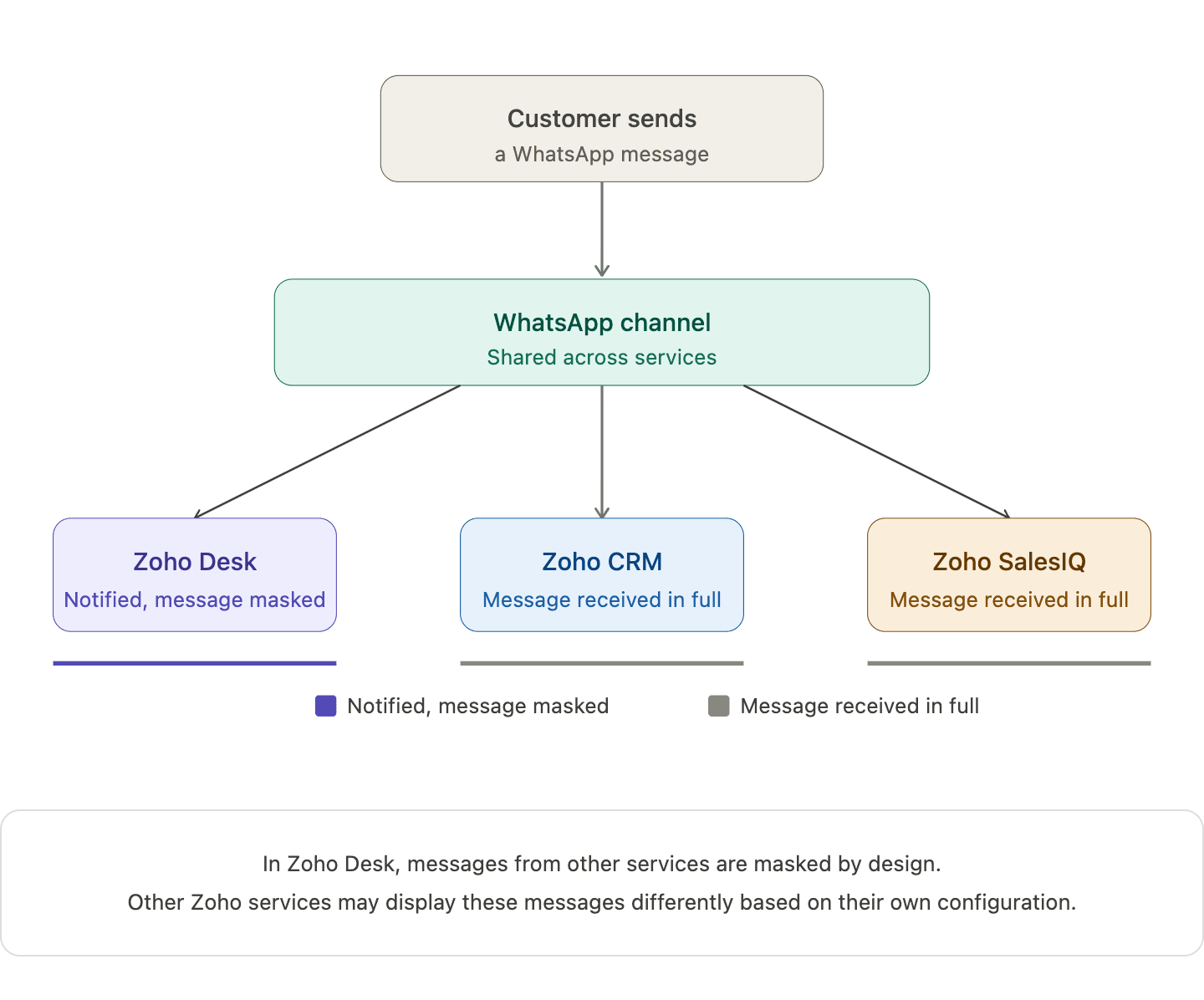
When you connect one WhatsApp number across multiple Zoho services, a single WhatsApp channel is created and shared across those services. Incoming messages appear in all connected services, and the underlying WhatsApp conversation continues as one unified thread.
When an agent replies from one service, that response is reflected in others as well. For example, in Zoho Desk, replies from other services appear in a masked format. This helps teams stay aware of the interaction without exposing the full message content.
What your team actually sees when different Zoho services handle the same conversation
Action
| What happens
|
Customer sends a WhatsApp message
| Appears in all connected Zoho services
|
Agent replies from one service
| Reply appears in Zoho Desk in masked form (Masked replies indicate that a response was sent from another service, without showing the full message content)
|
Another agent opens the conversation
| The conversation timeline is visible, while message content may remain masked
|
Two agents attempt to handle the same conversation
| The system shows a warning but does not block access
|
Note: In Zoho Desk, messages from other services are masked by design. Other Zoho services may display these messages differently based on their own configuration.
How one Zoho service becomes the owner of the shared WhatsApp channel
When a WhatsApp number is connected across multiple Zoho services, the first service where the number is configured becomes the parent service.
Other Zoho services that use the same number are automatically subscribed to this channel, allowing different teams to stay connected to the same conversation.
If the parent service is removed later, another subscribed service is automatically assigned as the new parent, without affecting ongoing conversations or message history.
What the parent service actually controls in this setup
The parent service is the Zoho service where the WhatsApp number is first configured. Once your WhatsApp number is shared across Zoho services, this parent service becomes the control point for automation.
This is where automation such as chatbots (including Guided Conversations), auto-replies, workflow-triggered messages, and outbound notifications are managed.
Other services can still participate in conversations, but they don’t control or trigger automation on that number.
How different types of automation behave across services
Chatbots
- Bots run only from the parent service
- Customer messages trigger bot responses from that service
- Other services can see the interaction but cannot run their own bots
Auto-Replies
- Only the parent service can send automatic replies
- Auto-replies configured in other services will not trigger
Workflow-Based Messages
- Messages triggered by workflows (like ticket creation or lead updates) run only from the parent service
- Workflows in other services cannot send WhatsApp messages using the shared number
Notifications and Outbound Messages
- Scheduled or event-based messages are sent only from the parent service
- Other services cannot use the same number for outbound automation
What changes when one service disconnects from the shared WhatsApp number
When one Zoho service disconnects from the shared WhatsApp number, only that service is unsubscribed from the channel. Other subscribed services continue to receive incoming messages, and customer conversations remain active without any disruption.
Note: WhatsApp connectivity stops only if the number is removed from all connected services.
The following Zoho bundles support shared WhatsApp numbers :
- Zoho One
- Zoho CRM Plus
- Other Zoho bundles with appropriate access
A few products, plans, or portals currently have restrictions:
- Standalone Zoho product licenses
- Portals upgraded from standalone plans
- Applications like Zoho Books, Inventory, Invoice, Subscriptions, Expense, Commerce, Checkout, and Payroll
Note: The same WhatsApp number can still be connected the above-listed services, but each product maintains its own Channel and conversation history.
What teams should align on before and after sharing a WhatsApp number
Identify which service will act as the parent before setup. You can check this in Zoho Desk under the WhatsApp channel configuration, where the parent service is indicated.
Ensure agents understand what it means when another service has already picked up a conversation.
Define how conversations should move between support, sales, and other teams.
If your teams are already working across multiple Zoho services, this setup can simplify how conversations are handled day to day.
We're curious to know how others are approaching this. Are you already using a shared WhatsApp number across teams, or planning to try it out?
FAQ
Does this create multiple WhatsApp conversations for the same customer?
No. There is only one underlying WhatsApp conversation shared across the connected services.
Can two agents reply at the same time from different services?
The system shows a warning if another agent has already picked up the conversation, which helps reduce duplicate replies.
Why do replies appear as masked in other services?
Masked replies help other teams stay aware that a response was sent, without exposing the full message content across services.
Which service controls automation and bot behavior?
Automated features such as chatbots, auto-replies, and workflows are controlled by the parent service where the WhatsApp number was first configured.
Recent Topics
I dont have acess to my own domain emails
an agency made these 3 emails for us , including the one im using here. but the super admin access is through the agency email. i want to reclaim my admin console access to these emails. how can i contact zoho support?
Email Parameter in Create Lead API
In the Create Lead API , the email parameter as mandatory. This is creating issues because many leads only have mobile numbers and no email address. This is especially a problem for businesses focusing on WhatsApp marketing in Zoho Marketing Automation,
Domain Activation Pending
Hello Zoho Support, I have resent the domain activation email for abovecapital.online several times, but I still have not received the activation link. Please check the email delivery status and help me resend the activation email or update the registrant
Zoho Webinar - Sharing System Audio (NOT AVAILABLE)
Hi, We are having a serious problem with Zoho Webinar. In the webinars we run, we very often share the audio from a video we are streaming directly from YouTube or other applications. Until recently we were using Zoom, but as we use other Zoho applications
IP blocked on SMTP
Please unblock my server IP: 135.181.19.115 We are using WP Mail SMTP for legitimate transactional emails.
Zoho rejecting external email – “Email policy violation detected”
Hello, I was informed by external senders that their emails to my addresses were rejected by Zoho Mail. The emails were sent from external domains (including pfms.ba.gov.br domains), not from my own domain. However, Zoho rejected the messages with the
unable to log in on iphone and unable to log in one auth
im unable to log in to my mobile
Tip #48: An exclusive system for risk management
Zoho Sprints' risk management feature gives teams a structured, industry-grade system for identifying, quantifying, and mitigating risks to eliminate probable impact. Project or product teams that run on Zoho Sprints might be using sprints, work items,
Follow-Up: No Response to Previous Inquiry on Workplace Plan Scalability
I have previously sent a few emails to your support address but have not received any response. I am unsure whether my messages are being delivered successfully or possibly filtered as spam. My most recent inquiry was regarding clarification on user scalability
Unable to receive any email
Hello I have several problems. I am unable to receive any emails sent to my Zoho account. Also, when I send an email, my account appears in the spam folder, and my profile picture doesn't appear; instead, a question mark appears.
Block opening tickets vía email DESK
Hello, I want to block the functionality of opening tickets when someone send an email to our support email address. Actually everybody in the world can open a ticket in our systen just sending an email to our support email address I don´t want this feature!!!! Please help! Thank you, Unai
Zoho Books | Product updates | May 2026
Hello users, We're back with the latest updates and enhancements we've rolled out in Zoho Books. From sales tax automation to scanning receipts for free, explore the updates designed to upgrade your bookkeeping experience. Sales Tax Automation [US & Canada
Edit a previous reconciliation
I realized that during my March bank reconciliation, I chose the wrong check to reconcile (they were for the same amount on the same date, I just chose the wrong check to reconcile). So now, the incorrect check is showing as un-reconciled. Is there any way I can edit a previous reconciliation (this is 7 months ago) so I can adjust the check that was reconciled? The amounts are exactly the same and it won't change my ending balance.
Not able to receive mails
Am able to send mails. But not able to receive. The mail bounces back saying Your message wasn't delivered because the address couldn't be found, or is unable to receive mail.
Loading Zoho Webmail
Zoho Webmail don't work. Yesterday webmail works in the same web browser (Firefox). Webmail works on google chrome. Try to repair for Firefox.
Account blocked
My account contato@fernandovarella.com.br was blocked due to suspicious login activity. I am the owner of the account and domain. Please unblock web access and outgoing mail.
Can anyone tell me my setup right or wrong?
Tell me about this, my root domain not receive mails from other senders, only receiving from mails connected with zoho network , i have to need sender.net camp... also For MX MX | dandakaranya.com | mx3.zoho.in | 50 | Auto MX | dandakaranya.com | mx2.zoho.in
Cannot sign up customer for Zoho Mail
I tried last morning to sign up a customer for Zoho Mail, but it says it is unable to create the account right now. I contacted the support, but did not get any response yet. I am located in Iceland, if that helps. Anyone else experiencing this as well?
Subject: Issue creating temporary mailbox due to OTP verification requirement
Hello Zoho Mail Support, We are following your recommended approach for email migration and need clarification on how to proceed correctly. Our intended migration approach is: Create a temporary mailbox katja.migration@nellajanuttu.fi Copy all emails
The response from the remote server was: 554 5.7.1 : Relay access denied
Team I am getting the below error when i send email from gmail to my zoho email. I am receiving few emails from other domains. Can you please verify attached config and let me know how to fix this issue ?
Zoho mail not working from yesterday
Zoho mail for server ninjamedia.in not working from yesterday. Please look into it. Error
First Response Time, Where to find?
Hi Currently I'm building a feeder file that auto-fetch ticket details when created/updated. On my table headers, apart from custom fields, I'm specifically looking for First response time. Currently I'm checking capabilities using Zoho Flow but couldn't
Issue with Zoho Emails Going to Spam Despite Verified DNS Records
Dear Zoho Support Team, I am writing to report an issue with my Zoho email account. All emails sent from my domain are consistently being delivered to recipients' spam folders, even though all required DNS records have been correctly configured and verified.
Delink of mail id from one auth
Hi , Please help me to do delink my email id from one auth , the phone is not supporting the higher version i would like to have options with ease process Please help and unable to view the inbox due to the same issues Regards Rekha
Outgoing blocked for almost a week – ticket #2472334 – no response yet
Hi, My Zoho Mail account has been blocked for outgoing messages due to “unusual activity.” The reason is that I forwarded all of the messages from my website contact form (95% spam) from my ZOHO to my personal Gmail. I submitted a support request (Ticket
Límite archivo adjunto
Buenos días Actualmente tengo el plan mail lite, 7 usuarios de 10gb de almacenamiento para correos, quisiera saber cuáles son los límites para adjuntar un archivo adjunto, exceptuando la opción de archivo pesado, ya que últimamente tengo problemas para
How to prevent users from switching price lists in an order?
Hi, I have Zoho Finance integrated with Zoho CRM. My team will be placing orders through the CRM using the Finance module. When creating a new customer I will assign it a price list, I don't want the sales rep to switch to a different Price List, other
Undelivered Mail uncategorized-bounce errors when sending invoices
Recently we have been getting Undelivered Mail bounce notification when sending invoices. Reason: uncategorized-bounce Some go through no problem some bounce back. We recently sent 10 invoices, 6 received bounce notifications. After reaching out to the
Unable to activate orphaned accounts on a existing domain.
When I attempt to tag this customer through the partner portal, the Check Availability step first indicates the email is available, but on submission returns this error: "This user does not have account in this service or this user is not an admin. Please
Ability to Edit the "Current Job Title" dropdown field
Current experience/Issue: When a user (candidate) uploads resume to Zoho Recruit candidate portal, some fields are prefilled with the info from the resume/cv correctly. However, we've observed that; 1. the "Current Job Title" dropdown field is usually
Unable to Add Users - Zoho Mail Restriction
I am trying to add new users to my Zoho Mail organization, but I am getting the error: "This user is not allowed to add." We are a legitimate business using Zoho Mail for email hosting only. Our company is based in Saudi Arabia, and we may be accessing
Bigin Forms Enhancement: Acknowledge visitors via WhatsApp
Greetings, We hope all of you are doing well! We're excited to share a new enhancement to Bigin's forms. Let's take a look at it in detail. Acknowledge visitors via WhatsApp The Acknowledge Visitor option in Bigin Forms means visitors receive an instant
Integrate your Outlook/ Office 365 inbox with Zoho CRM via Graph API
Hello folks, In addition to the existing IMAP and POP options, you can now integrate your Outlook/Office 365 inbox with Zoho CRM via Graph API. Why did we add this option? Microsoft Graph API offers a single endpoint to access data from across Microsoft’s
Cliq iOS can't see shared screen
Hello, I had this morning a video call with a colleague. She is using Cliq Desktop MacOS and wanted to share her screen with me. I'm on iPad. I noticed, while she shared her screen, I could only see her video, but not the shared screen... Does Cliq iOS is able to display shared screen, or is it somewhere else to be found ? Regards
No Ability to Rename Record Template PDFs in SendMail Task
As highlighted previously in this post, we still have to deal with the limitation of not being able to rename a record template when sent as a PDF using the SendMail Task. This creates unnecessary complexity for what should be a simple operation, and
Zoho Customer Grievance Escalations Matrix
We have been with Zoho for little over a 24 months having several licenses for Zoho One and with standalone license for Zoho Commerce Advanced Plan along with their so called "Premium Support" for which they charge you a pretty hefty amount. It's been
Switch between multiple LLMs instantly for tailored Zia experiences
Availability Editions: Professional , Enterprise, Ultimate , CRMPlus , ZohoOne Release Plan: Available for all DCs Hello everyone. Earlier, the Multi-LLM feature supported only one LLM at a time for Zia Record Assistant bot restricting flexibility from
Data entry and automatic barcode sticker printing
Hello there I am very new to Zoho.. and not sure if it can do, or should I say, I can easily set it up to do, or first basic requirement. We take in up to 1000 unique used products every week. They come from up to 50 regular suppliers. The are used household appliances. We try to fix most of them. For waste regulation purposes we have to track every machine from the source/supplier it cam from to if it was repaired and put back on the market? or stripped and scrap for material recovery. Is it possible
Inventory Barcode Creation - Add Picture of Item
Hi I am trying to set up bar code labels and include a picture of the item on the label - any idea on how to add that field to the barcode generator?
Setting up a barcode system with Zoho Creator
Hello! I am researching how to set up a barcode inventory system that is compatible with Zoho Creator. I am working with an art inventory, and I want to be able to refer to each piece of artwork with a barcode. My goal is to be able to generate a barcode, store that barcode in a Zoho Creator database, be able to print out a barcode label from that database, and have the database pull up a record when the barcode associated with that record is scanned. I understand that there are barcode generating
Next Page