Marketing and sales go hand in hand, yet teams often struggle with inefficiencies in lead management. Leads may go cold due to delayed follow-ups, and valuable prospects might get lost in the shuffle. This is where integrating Zoho CRM with Zoho Marketing Automation (ZMA) comes into play. By utilizing CRM actions in Journeys, businesses can automate lead nurturing, push only engaged leads to sales, and ensure seamless collaboration between the marketing and sales teams. This integration helps marketers target the right prospects at the right time while allowing sales teams to act on high-intent leads without delays.
In this post, we’ll explore how leads that originate in Zoho CRM are nurtured through ZMA before being handed off back to sales.
Syncing Leads from Zoho CRM, Engaging Them, and Automating Sales Follow-Ups
Many businesses capture leads first in Zoho CRM—through website forms, inbound inquiries, or sales outreach. However, not all leads are immediately ready for sales engagement. That’s where marketing steps in, using Zoho Marketing Automation to nurture these leads until they show clear interest. Here’s how you can set up a CRM-integrated Journey to automate this process from start to finish.
Sync Leads from Zoho CRM to Zoho Marketing Automation
To ensure a smooth transition of records between Zoho CRM and ZMA, you first need to sync your CRM leads into Marketing Automation. This allows marketers to send targeted campaigns to the right audience. Ensure all relevant fields (such as Name, Email, Lead Source, and Lead Stage) are mapped properly. Once synced, these leads will now be available in ZMA for segmentation and targeted campaigns.
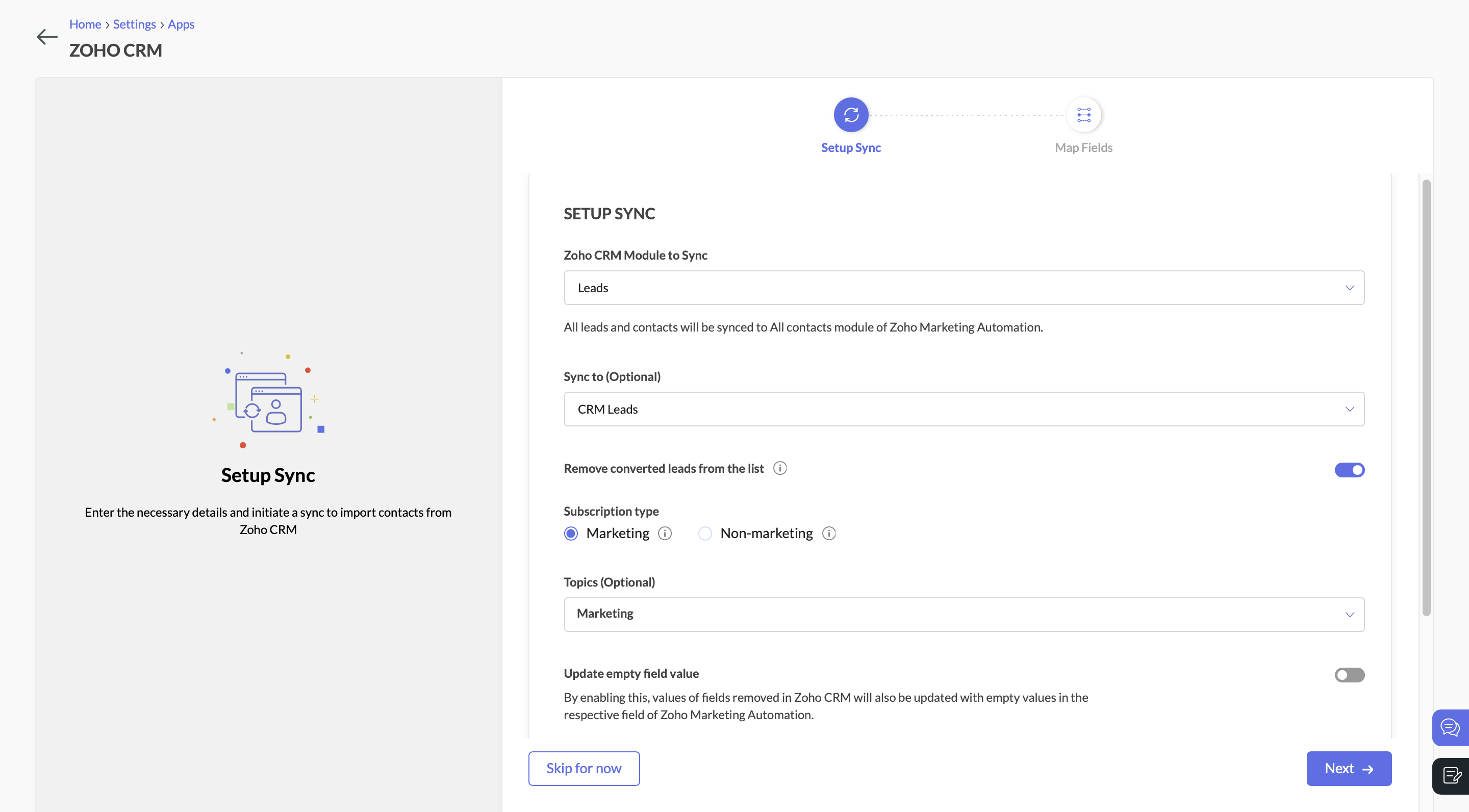
Sync Leads from Zoho CRM to Zoho Marketing AutomationSend a Marketing Campaign to Engage CRM Leads
With the leads synced, you can now target them with an email campaign. Let’s say you’re promoting a product demo or a free consultation. You send an email with a call-to-action (CTA) button, inviting leads to learn more.
Create a Journey to Target Interested Leads
Navigate to the Journeys section in Zoho Marketing Automation and create a new Journey. This Journey will track engagement and ensure that interested leads are identified, categorized, and updated in both ZMA and Zoho CRM.
- Add the Email Action Trigger . Click on “Specific Email” and choose the email campaign.
- Then select the email action “Specific link clicked” and choose the CTA that you included in the campaign.
- Specify the exact URL you want to track (e.g., a demo request page, a pricing page, or a consultation booking link).
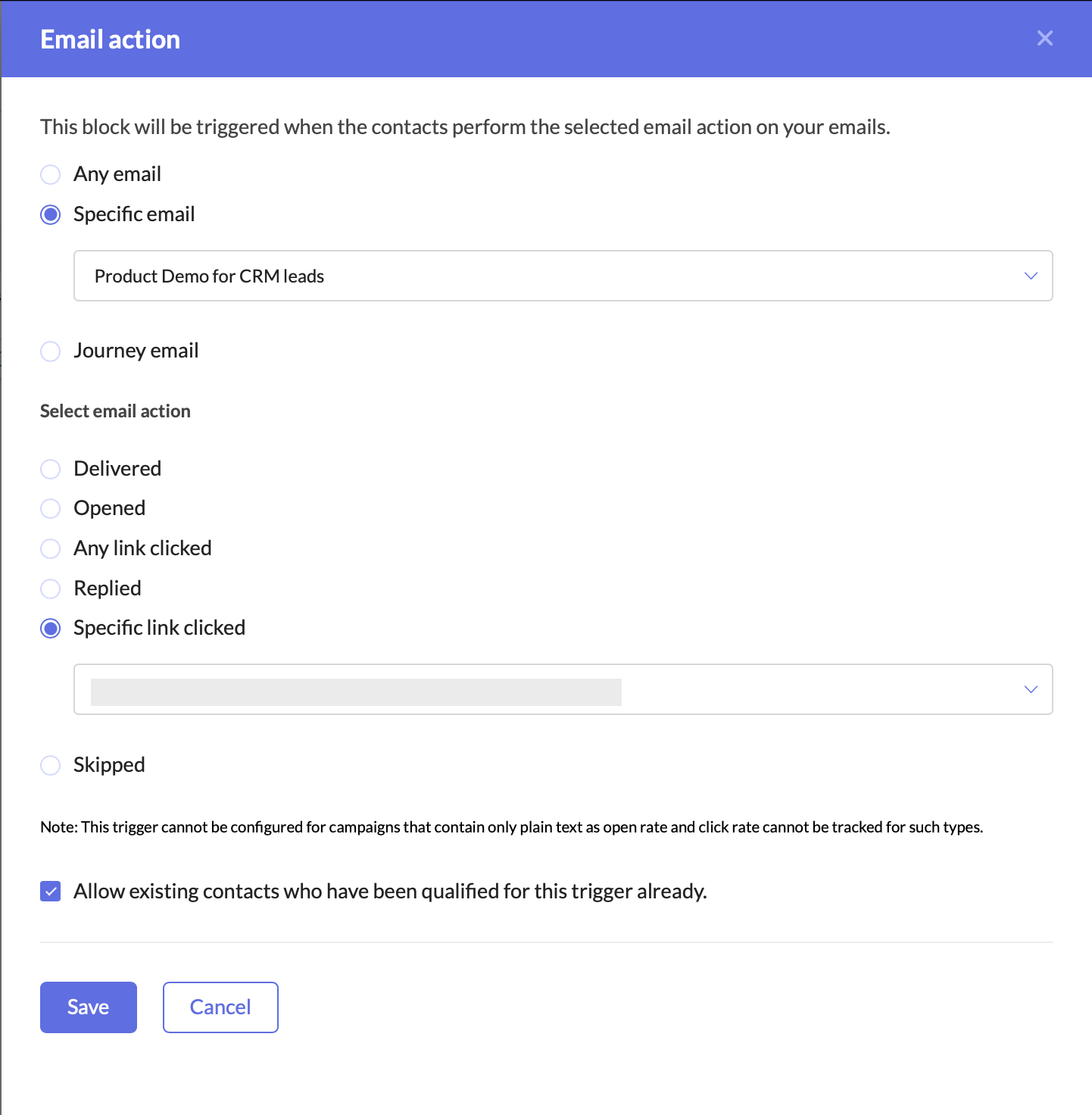
Create a Journey to target interested leadsAdding this trigger ensures that your Journey only targets leads who have shown clear intent by clicking on your email’s CTA. This helps you:
- Identify engaged leads who are actively interested in your offering.
- Filter out unresponsive leads, allowing marketing and sales teams to focus their efforts on high-potential prospects.
- Automate lead qualification without manual tracking.
Once a lead clicks on the CTA, they enter the Journey, signaling that they are engaged and should be prioritized for further marketing and sales efforts.
Update the Lead Stage in Zoho Marketing Automation
Now that the lead has clicked on the CTA and entered the Journey, the next step is to update their lead stage to reflect this new level of engagement.
- Add the Update Lead Stage action component right after the Email Action Trigger.
- Configure it to move these contacts to the “Marketing Engaged” stage in ZMA.
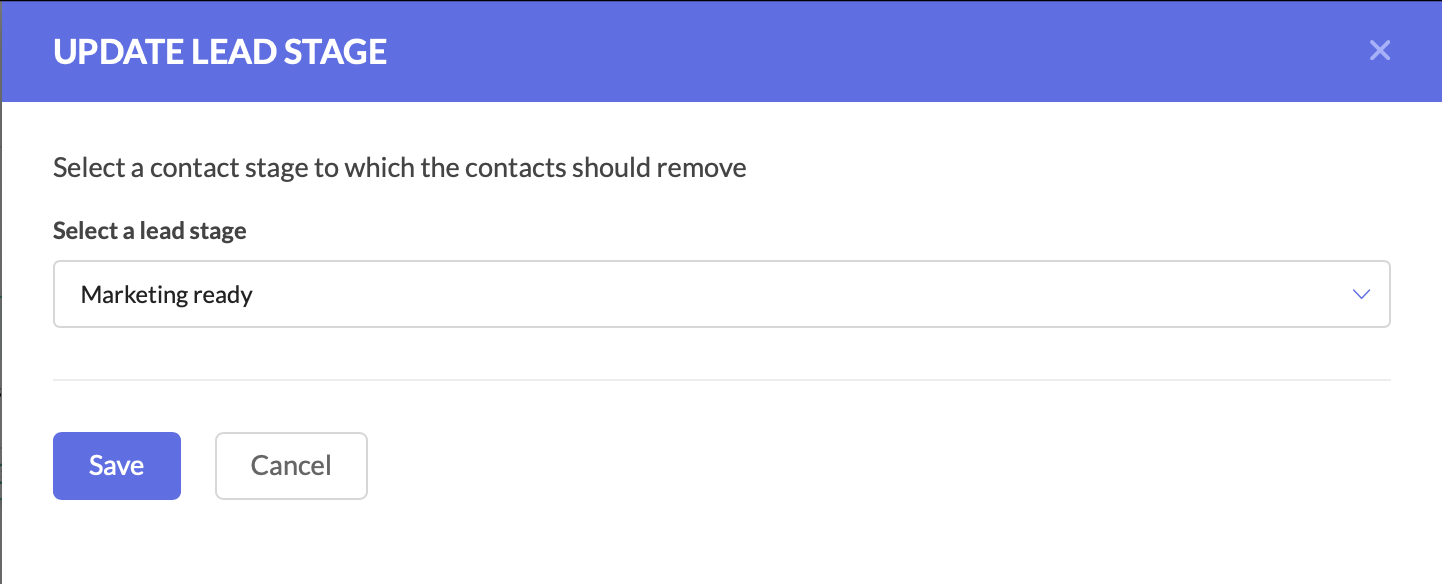
Update the Lead Stage in Zoho Marketing AutomationBy moving them to the Marketing Engaged stage, you’re ensuring that these leads are recognized as actively interested, making it easier to track their Journey through your funnel.
Push the Updated Lead Data to Zoho CRM
At this stage, the lead stage has been updated in Zoho Marketing Automation, but we also need to reflect these changes in Zoho CRM. Since both platforms need to have the latest details, we now push the updated lead information back to Zoho CRM.
- Add the Push Data to CRM action component after the Update Lead Stage action.
- Configure it to push the lead’s latest details into the Leads module in Zoho CRM.
- Ensure that all relevant fields are mapped correctly.
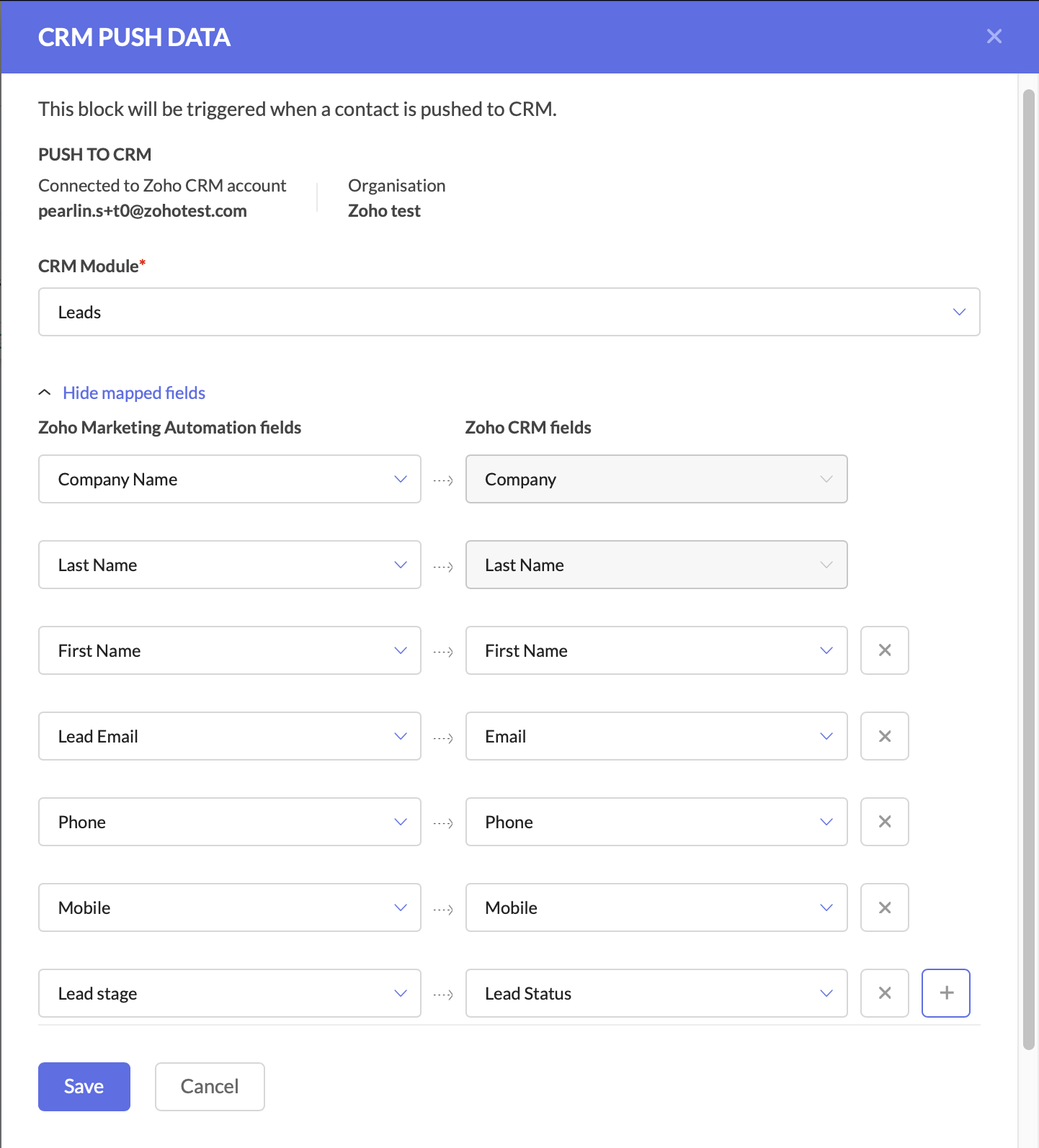
Push the Updated Lead Data to Zoho CRM
Keeping Zoho CRM up to date is critical for sales teams, as it ensures they are always working with the latest information.
At this point, your Journey has:
- Tracked engaged leads through the Email Action Trigger.
- Updated the lead stage in ZMA to “Marketing Engaged.”
- Pushed the updated lead data back to Zoho CRM.
With these foundational steps in place, you are now ready to take the next action—automating deal creation and assigning follow-up tasks to the sales team.
Create a Deal for the Interested Lead
At this stage, the lead has shown interest, so we should automatically create a deal in Zoho CRM.
- Add the Create Deal CRM Action Component and configure the deal name, due date, stage, amount, and deal assignment.
- You can also map fields at this stage.
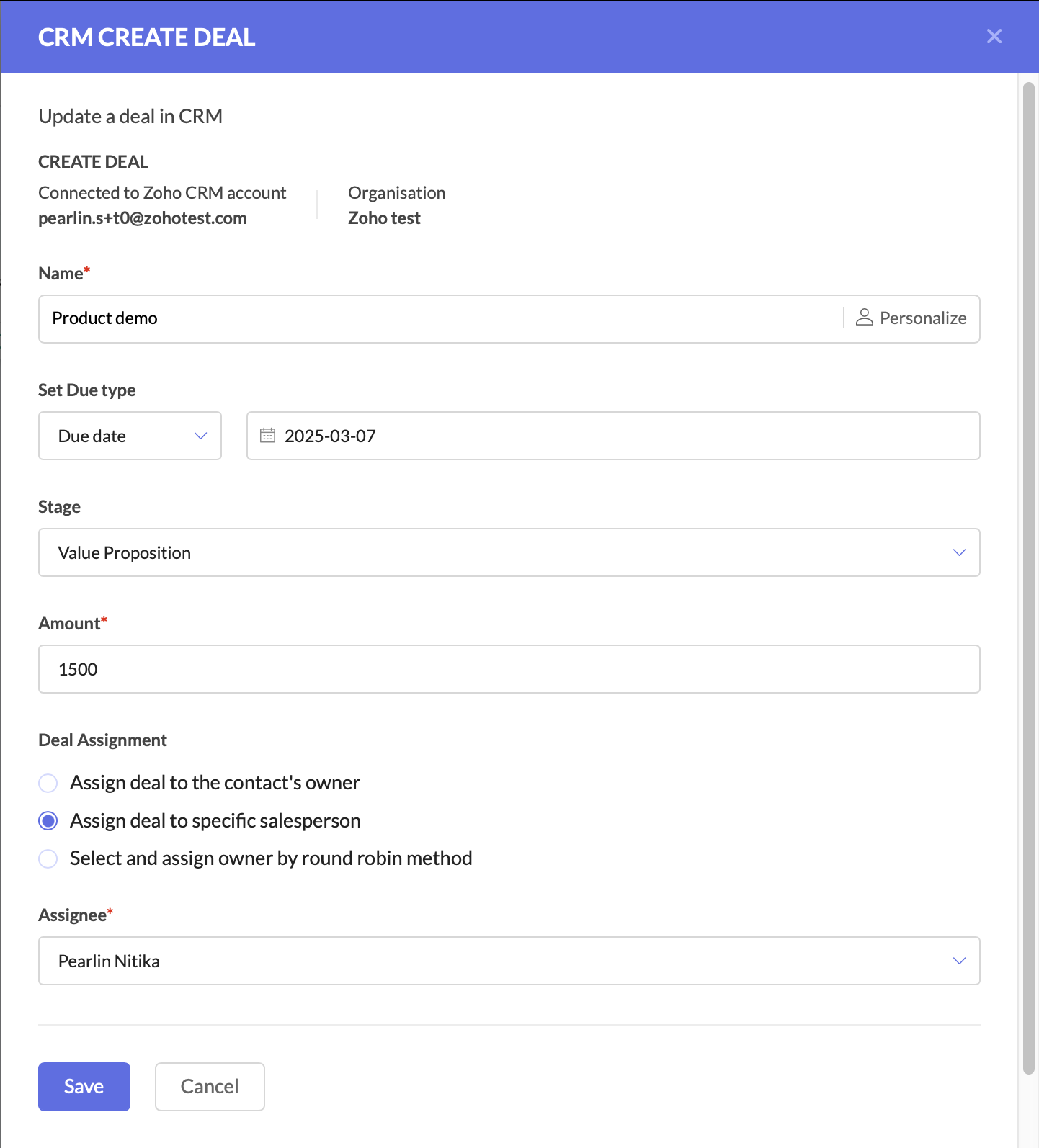
Create a deal for the interested lead Create a Task for Follow-Up
The final step is to ensure a salesperson takes action on the newly created deal.
- Add the Create Task CRM Action Component.
- Configure the CRM module, subject and description, due date, priority, status, and assign the task to the deal owner in CRM.
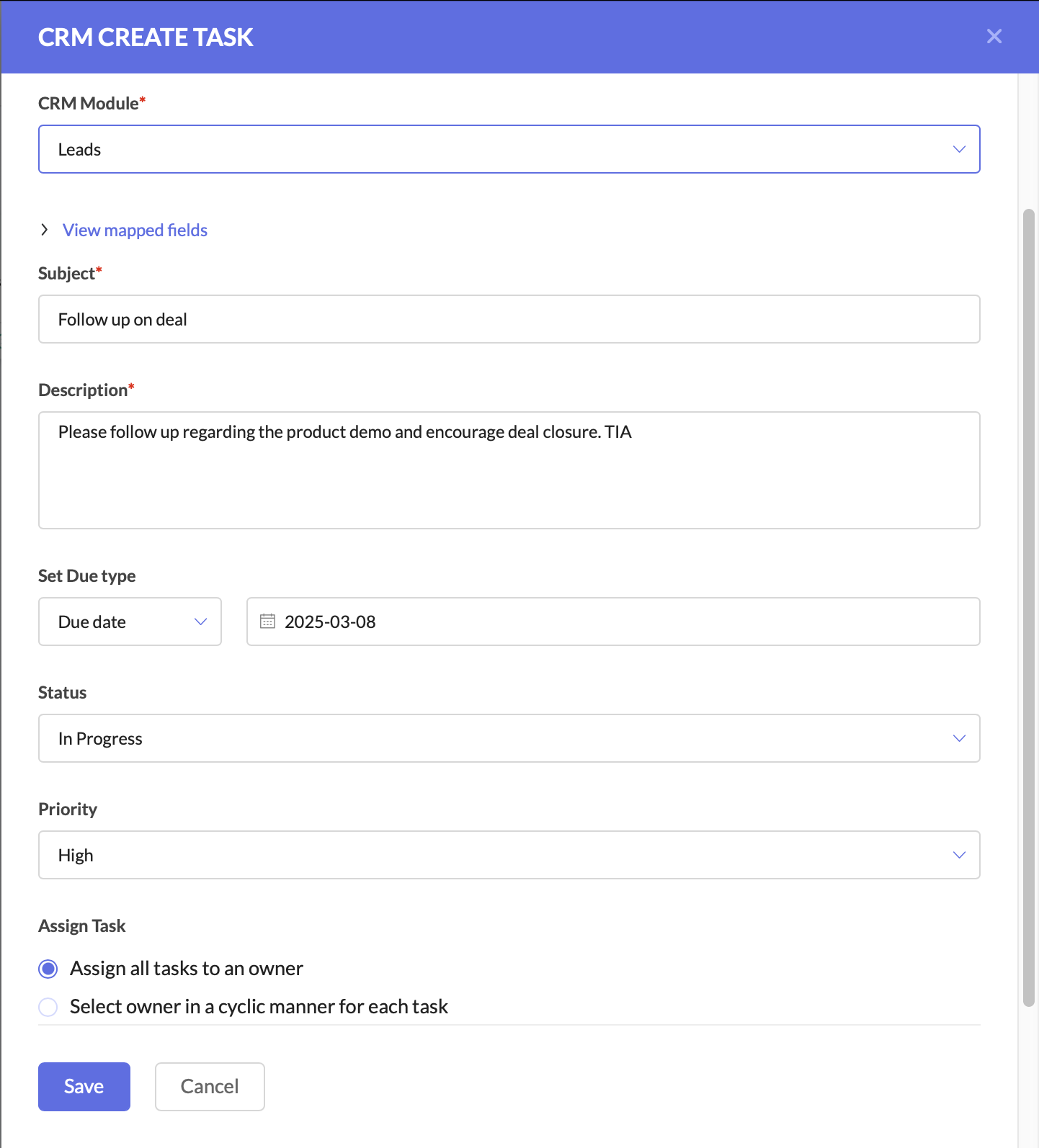
Create a task for follow-up
After this, you can connect the components to ensure a seamless flow.
This setup ensures that leads are not just nurtured, but also seamlessly handed off to sales when they show interest. The sales team receives up-to-date CRM records, active deals, and clear follow-up tasks, increasing their chances of closing the deal faster.
Why This Matters for Businesses
By using Zoho CRM and ZMA together, marketing and sales teams need not waste time on cold outreach, and can focus on high-intent leads.
For businesses, this means:
- Higher revenue by focusing only on engaged leads.
- Stronger collaboration between marketing and sales.
- Better customer experience with timely follow-ups.
This is just one of the many ways you can use Zoho CRM actions in ZMA Journeys to refine your lead management process and ensure that only high-intent prospects reach your sales team. In the next post, we’ll explore another powerful use case—how to handle leads that originate in ZMA and transition them seamlessly into Zoho CRM for sales follow-up. Stay tuned for part two, and until then, happy marketing!
Regards,
Pearlin Nitika
User education | Zoho Marketing Automation
Recent Topics
Add Pause / Resume Option to Zoho Quartz Recordings
Hi Zoho Team, We would like to request an enhancement to Zoho Quartz recordings: the ability to pause and resume an ongoing recording. Current Limitation: At the moment, when recording an issue with Zoho Quartz, the recording continues even when we are
Custom Fields Not Showing Up in Invoice PDF Template Document Information
I have added 2 custom fields under Sales > Invoices > Manage Custom Fields. They are set to show in all PDFs. However when I am editing my Invoice PDF template, i do not see the custom fields under Document Information.
Tracking Non-Inventory Items
We have several business locations and currently use zoho inventory to track retail items (sales and purchase orders). We were hoping to use zoho inventory to track our non-inventory items as well (toilet paper, paper towels, etc). I understand that we
Can I use a Standalone CRM Function as the Callback URL For Async Export Data API?
I am creating an export job using this API https://www.zoho.com/analytics/api/v2/bulk-api/export-data-async/create-export/view-id.html There is a "callbackUrl" key in the CONFIG object. I tried copying the URL for a standalone function in CRM which can
ZOHO Books
Hi there, Why after I upgrade my Zoho invoice > Books then i wanted to add plugin which i cannot do. Please advise.
How is Your eCommerce Experience w/Zoho Inventory?
First off, I'm SUPER grateful for the advent of Zoho Inventory and now the Zoho Commerce Suite. Overall, Inventory is a great product, especially for customers without an eCommerce presence. For eCommerce companies (especially those shipping more than ~10 packages/day), however, there are certain drawbacks that keep my clients from moving over to Zoho Inventory: Cons: 1. Invoice + Package Creation from Shopify/Other eCommerce Integrations: Zoho Inventory makes the somewhat perplexing decision to
Error AS101 when adding new email alias
Hi, I am trying to add apple@(mydomain).com The error AS101 is shown while I try to add the alias.
Simplify Mass Replies with Predefined Templates and Snippets
Hello everyone, We are happy to introduce a new enhancement to Mass Reply that helps agents respond to customers quickly and consistently. With the addition of Email Templates and Snippets in the reply window, agents can use predefined messages while
Mapping custom fields from one module to another
I have a custom field, "Subscription Period" that appears as a required field in every Opportunity (Potential). I want that field to appear on any Quotes derived from that Opportunity (and have created a custom field of the same name in Quotes for that
Passing the CRM
Hi, I am hoping someone can help. I have a zoho form that has a CRM lookup field. I was hoping to send this to my publicly to clients via a text message and the form then attaches the signed form back to the custom module. This work absolutely fine when
The Social Wall: November 2025
We’re nearing the end of the year, and the holiday season is officially kicking in! It’s that time when sales peak and your social media game needs to be stronger than ever. We’re back with exciting new updates across AI, analytics, and the mobile app
Item name special charaters <>
Im trying to input speical characters such as < and > into item name and item description but comes up with following error: Invalid value passed for Item Name and Invalid value passed for Item Description How do i allow speical characters?
How to update Multi File upload field
Assume that i have a multi file upload field,how can i update the same field again?
Customer Address Not on Standard Invoice when Address is on Contact Record
Hi, I entered the customer billing and shipping address in Zoho CRM. I created an invoice in Zoho Books with the same customer contact. The contact is correctly in Zoho Books with the billing and shipping address. The invoice for the customer does not
Apply partial payments to invoices from the Banking Module
We need this! Why is this not possible?
Welcome to the Zoho Show Community Forums page!
Hello everyone, The Zoho Show community is a place for you to discuss and share anything and everything related to Zoho Show Presentations, our online presentation software. It includes users from all over the globe and all walks of life. Our community helps answer your Zoho Show questions with responses from other knowledgeable community members to give you the best experience creating and designing exciting presentations. Along the way, you'll meet recognized experts from our software team and
How can I convert an existing contact into a lead?
I imported many contacts into ZOHO CRM. In order to select a few of them as leads, I want to mark or convert a few hundred as Leads. Who can I do that?
Introducing Dedicated Modules for Plans, Addons, and Coupons in Zoho Billing
We’ve enhanced the way you manage Plans, Addons, and Coupons in Zoho Billing. Previously, all three grouped together under Subscription Items. Now, each one has its own dedicated module, giving you a cleaner and more intuitive experience. This update
Price book functionality enhancement
A common use of price books is to create a price book for a given customer level or contract with a specific company. Given that this is done at a company/customer level it would be great to see a way to associate a price book to a given customer and
Tracking Emails sent through Outlook
All of our sales team have their Outlook 365 accounts setup with IMAP integration. We're trying to track their email activity that occurs outside the CRM. I can see the email exchanges between the sales people and the clients in the contact module. But
Contact data removes Account data when creating a quote
Hi, Our customer has address fields in their quote layout which should be the address of the Account. They prefill the information, adding the account name - the address data is populated as per what is in the account - great. However when they then add
Important update about notification security in Business Messaging SDK
As part of our ongoing effort to strengthen the security of notification data, we have enhanced how notifications are processed and protected in our applications. These improvements ensure that all notification related data follows the most up-to-date
年内最後のユーザー向けイベント:5名限定! 課題解決型ワークショップイベント Zoho ワークアウト開催のお知らせ (12/18)
ユーザーの皆さま、こんにちは。コミュニティチームの中野です。 12月開催のZoho ワークアウトについてお知らせします。 今回はZoomにて、オンライン開催します。 参加登録はこちら(無料) https://us02web.zoom.us/meeting/register/QHn6kJAcRs-znJ1l5jk0ww ━━━━━━━━━━━━━━━━━━━━━━━━ Zoho ワークアウトとは? Zoho ユーザー同士で交流しながら、サービスに関する疑問や不明点の解消を目的とした「Zoho ワークアウト」を開催します。
Sync Zoho Marketing Automation with Zoho Forms
I can't find a section where the integration between Zoho Marketing Automation and Zoho form is explained. And how form subscription works with opt-in and consents.
What is the difference between Zoho Campaigns and marketing hub?
Zoho Campaigns is a permission-based email marketing tool for sending marketing emails and mass emails. Marketing Automation is a multichannel marketing automation tool that caters to organizations looking for tools to engage their users across multiple
Webhook not firing.
I created a webhook using the Web UI, it looks very nice and the testing worked without an issue, but when i save/ update a ticket, the webhook is not firing. Here are the details of the web-hook i get from using the API "modifiedTime": "2019-10-22T09:23:37.380Z",
Duplicate customers being created in Desk
Hi I've trying to work out why I've getting duplicated customers being created in my desk. I have an external booking system that generates an email when I get a customer booking a job. A booking email gets sent to Desk where I manage the booking and
Creating a custom CSV file using deluge script/
I have an application I have developed and the client wants us to place an export file in csv onto an ftp server daily. Now I don't see au options in creator to change the separator to anything else. The client wants the separator to be the pipe symbol "|" I think i would be able to create schedule with some code to create the appropriate data in a string using deluge script but I haven't seen any functionality that would allow me to deposit that data as a file anywhere or attach it to an email
Zoho Sheet - Desktop App or Offline
Since Zoho Docs is now available as a desktop app and offline, when is a realistic ETA for Sheet to have the same functionality?I am surprised this was not laucned at the same time as Docs.
Can we add custom fields to portal community profiles?
How do we add custom fields to our profile pages in our portal community? If we have the ability to add custom fields, will we be able to access those fields via API? We want to use our Desk community in our help portal as our primary community and would
Customer ticket creation via Microsoft Teams
Hi all, I'm looking to see if someone could point me in the right direction. I'd love to make it so my customers/ end users can make tickets, see responses and respond within microsoft teams. As Admin and an Agent i've installed the zoho assist app within
E-Invoicing in Belgium with Zoho Billing
Starting January 1, 2026, Belgium is introducing mandatory electronic invoices (e-invoicing) for all B2B transactions between VAT-registered businesses. Invoices and credits notes must be exchanged in a prescribed digital format. How E-Invoicing works
HTML Tags added to Reports with Notes
Recently Zoho added the ability to markup text within notes. That way, users can change font size, colors, etc. It's a great change. However, since the change, reports that include a column for "Note Content" are printing HTML tags within the report.
delayed: host mx2.zoho.com (136.143.183.44): Network error: Unexpectedly disconnected (STARTTLS)
Hi Team, I'm not receiving any email. Seems to be an issue. Sender sent me the error message they received: "delayed: host mx2.zoho.com (136.143.183.44): Network error: Unexpectedly disconnected (STARTTLS)" Please advise.
Interview booked through Invite but no Notifications
We have a workflow that was developed through a developer/partner that was tested and worked. Today, we pushed a candidate through the process and invited them to an in-office interview. They were sent the booking link (as usual and as tested before successfully)
Additional Address - Company Name
It would be very helpful to have a "Company Name" field in the Additional Address shipping section. In a situation where you drop-ship orders to a different address or different company entirely, it may be necessary to list the company name of the receiver. I understand that the Attention field can be used for that purpose, but that's not really the intended purpose of that field.
Incorrect Email Notifications for Product Reviews
Dear Zoho Commerce Support Team, I am writing to report a technical issue that occurs frequently on our platform. Problem Description: We regularly receive email notifications informing us of new product reviews awaiting approval. However, when we access
In App Auto Refresh/Update Features
Hi, I am trying to use Zoho Creator for Restaurant management. While using the android apps, I reliased the apps would not auto refresh if there is new entries i.e new kitchen order ticket (KOT) from other users. The apps does received notification but would not auto refresh, users required to refresh the apps manually in order to see the new KOT in the apps. I am wondering why this features is not implemented? Or is this feature being considered to be implemented in the future? With the
How to Rank Tables by Row Count in Descending Order
I am trying to understand the consume of lines that grow up so fast in the last week. Is there any way to create a pivot table or query to get TABLE NAME LINES in descending order?
Can we do Image swatches for color variants?
We want to do something like the attached screenshot on our new zoho store. We need image swatches instead of normal text selection. We want to user to select an image as color option. Is this doable? I don't see any option on zoho backend. Please h
Next Page