Hello Marketers,
Welcome back to Marketer's Space! Today, we'll talk about the importance of creating mobile-friendly email designs.
While mobile phones were once used only to make phone calls, today they're used for almost everything, including texting, reading, browsing, shopping, and much more. As marketers, this shift means one thing: We must ensure that our email campaigns are mobile-friendly. This isn't an exaggeration; it's a real challenge that many marketers and business owners face, especially during peak seasons. Let's look at one such example.
David's challenge: Great email but low engagement
David runs a handmade gift store. He and his team create customized gifts and greeting cards. For the holiday season, he has crafted a thoughtful email from scratch to send to his new contacts and recurring customers to introduce his new festive collection. His email content is on point; he personalizes it with merge tags, segments his audience, automates his workflows, and even schedules the campaign to go out at his recipients' optimal open times. In short, David has done everything right—or, at least, that's what he thought.
Despite all his efforts, the results aren't as expected. When he analyzes his campaign reports, he sees that the emails have been successfully delivered and that most of his contacts have opened them. But that's it; he hasn't received any clicks, orders, or engagement from his contacts. Confused, David digs deeper into his email reports and notices that most of his recipients opened the email on their mobile devices. He gets curious and checks how his email looks on his phone—and is a bit taken aback! His email is readable but not mobile-friendly.
David's checklist to create mobile-friendly emails
David immediately decides to fix this and make his next campaign mobile-friendly. Here's what he does differently:
Use simple layouts
The first and most effective change David makes is removing the column layout in his email. While the layout looks stylish on his laptop, it doesn't render well on mobile screens. Having multiple columns of images increases the scroll time and makes the email harder to navigate on smaller devices. Fewer columns enable the content to flow more smoothly from top to bottom and makes it easier for recipients to read and scroll through on their phones.
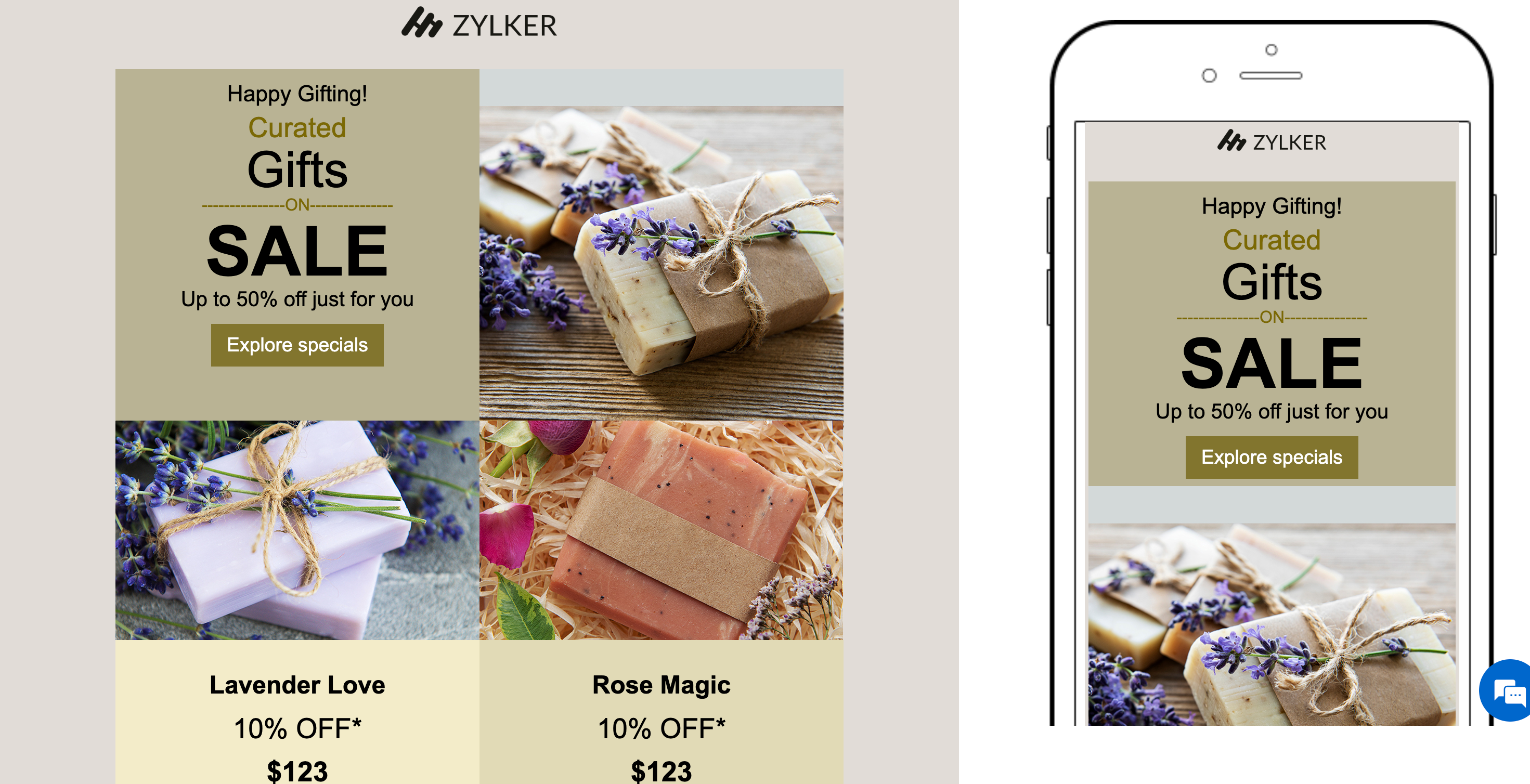
Keep the content concise
Recipients who read emails on mobiles decide within seconds whether to keep reading or move on to a different screen. That's why brevity and structure matter. David breaks his content into short paragraphs, uses bullet points for clarity, and adds subheadings to guide the reader's eye.
Optimize visuals and CTAs
Images can enhance an email's appeal when they're optimized to suit different screen sizes. David uses lightweight images that load quickly and avoids large files that can slow down loading times. He also makes his call-to-action (CTA) buttons prominent, surrounds them with ample white space to prevent accidental taps, and uses action-oriented text like "Shop now" and "Get the offer."
Focus on readability
Tiny fonts that look elegant on desktops can be hard to read on mobile screens. David ensures that he uses at least 14px for body text and 22px or more for headings. He also makes sure there's proper spacing between lines, images, and buttons to make the design visually comfortable.
Test across devices before sending
Even the best-designed emails can appear differently across multiple devices and email clients. Using the Preview and Test feature in Zoho Campaigns, David previews his campaign to gauge how his email will look both on desktop and mobile screens. He also sends test emails to his team to identify any inconsistencies before finally sending the campaign to his contacts.
Avoid large, fixed-width elements
Fixed-width components like wide banners or tables can force users to scroll horizontally on small screens. David switches to flexible, percentage-based widths to ensure his content automatically adjusts to fit any device without users needing to pinch or zoom.
How Zoho Campaigns helps David get it right
Let's look at which features in Zoho Campaigns have helped David create mobile-friendly email campaigns in no time:
- Mobile-friendly templates: All pre-designed email templates available in Zoho Campaigns are mobile-friendly by default.
- Drag-and-drop editor: Zoho Campaigns' template editor enables users to customize text, image, and button elements. You can easily adjust font, color, size, and padding to create mobile-optimized designs.
Preview and test options: View how your email looks on desktop and mobile screens and send test emails to your team before sending campaigns to your audience.
- Customize using HTML: If you're comfortable with coding, you can use the built-in HTML editor to code your content manually or import your own HTML and CSS files through the Import/Upload HTML option. Learn more
In a nutshell
By making these small yet impactful changes, David ensures that his emails not only reach his contacts but also engage with them effectively—regardless of the devices they use.
Regards,
Aiswarya Jayaprakash
User Education
Zoho Campaigns
Recent Topics
How do I change (error) display messages
Hi! I would like to edit display messages like "invalid entries" and "enter a value for Nome" and so on into Italian language messages. How can I do that? Already tried on Validate on form submit. Where I am failing? Thanks in advance.
Subforms and automation
If a user updates a field how do we create an automation etc. We have a field for returned parts and i want to get an email when that field is ticked. How please as Zoho tells me no automation on subforms. The Reason- Why having waited for ever for FSM
Permissions on Views
Having the option of any agent creating custom views is firing back and got a situation where there are a hundred different views across the team and tickets are not being dealt in the most efficient of ways. Tickets seems to be missed by some agents,
Credit card transactions are backwards after importing statements
I am new to Zoho Books so I'm importing my firm's bank and credit card statements in. My credit card statements have a single column with negative numbers so that is the option I chose. But when I went to categorize the credit card transactions, I can
Ability to Edit Ticket Subject when Splitting a Ticket
Often someone will make an additional or new request within an existing ticket that requires we split the ticket. The annoying part is that the new ticket maintains the subject of the original ticket after the split so when the new ticket email notification
import data from Apollo.ai into zoho crm via zoho flow
I might be asking this question in the wrong forum. We use Apollo.ai to find potential new leads for our business, there are around 10000 leads that we have initially found. We have an Apollo.ai account but just to do searches, we dont use it as a crm.
Report grouping
I have added a grouping in a report but it is not working how i had expected. I wanted to group a summary on a field named Size but when i add the grouping the report is still showing me each record and making a summary at the bottom of the report. What
MS Teams for daily call operations
Hello all, Our most anticipated and crucial update is finally here! Organizations using Microsoft Teams phone system can now integrate it effectively with Zoho CRM for tasks like dialling numbers and logging calls. We are enhancing our MS Teams functionality
Knowledgebase SEO
We have a custom-domain mapped help center that is not restricted via login. I have some questions: a) will a robots.txt file still allow us to control indexing? b) do we have the ability to edit the sitemap? c) do category URLs get indexed by search
Filter contacts based on selected category in Zoho Desk ticket
Hello community, I’m setting up the Tickets module in Zoho Desk and I need help implementing the following: When a category is selected in a ticket, I want the Contact field to be filtered so that it only displays contacts that are related to that category.
Adding Markdown text using Zoho Desk API into the Knowledge Base
Hi Zoho Community members, We currently maintain the documentation of out company in its website. This documentation is written in markdown text format and we would like to add it in Zoho Knowledge Base. Do you know if there is REST API functionality
VIsual maindmaps in Zoho notebook Ai
Can I create and export VIsual maindmaps in Zoho notebook Ai
1stDibs Integration to Zoho Inventory
Hello is it possible to integrate my Zoho inventory and 1stDibs?
Develop and publish a Zoho Recruit extension on the marketplace
Hi, I'd like to develop a new extension for Zoho Recruit. I've started to use Zoho Developers creating a Zoho CRM extension. But when I try to create a new extension here https://sigma.zoho.com/workspace/testtesttestest/apps/new I d'ont see the option of Zoho Recruit (only CRM, Desk, Projects...). I do see extensions for Zoho Recruit in the marketplace. How would I go about to create one if the option is not available in sigma ? Cheers, Rémi.
Can a default task Priority be set?
The "Priority" field in the Task layout does not allow a default to be set. Is there another way of doing it? Because the current default is "None" and the Zoho Kanban board design has selected this field as critical information to surface by including
Community Question: Renewal vs Invoicing
This is a question for the community. Does anyone else consider there to be a difference between a subscription renewal event and sending out a recurring invoice for a subscription? For example, let's say customer XYZ purchases a 1-year subscription to
Scheduled Reports - Do not send empty report
Hello, We are intensively using reports in the CRM, especially for sales managers. When data is empty, they still receive an email. Can you add an option to avoid sending the report when data is empty?
Improved Contact Sync flow in Google Integration with Zoho CRM
Hello Everyone, Your contact sync in Google integration just got revamped! We have redesigned the sync process to give users more control over what data flows into Google and ensure that this data flows effortlessly between Zoho CRM and Google. With this
Automatic Matching from Bank Statements / Feeds
Is it possible to have transactions from a feed or bank statement automatically match when certain criteria are met? My use case, which is pretty broadly applicable, is e-commerce transactions for merchant services accounts (clearing accounts). In these
Is Zoho One Desktop more secure than Zoho One Web SaaS?
Is Zoho One Desktop more secure than using Zoho One in browser? Inherently, it seems desktop would be unless you don't do things like share your pw or leave pc on. I am concerned about data being on the cloud or someone else's server and database.
Reminder Settings - Time Tracker
On the time tracker in Reminder Settings I created a reminder according to the Zoho manual. But a manager asked me to change the message that goes in the email. Is it possible to change the message? I didn't find that in the Zoho manual. Another question: I configured to receive the reminder everyone who logged in less than 40 hours. Does Zoho consider less than 40 hours of the current week or the whole month? Another situation, I put it so that I and another specific user would receive the notification,
Why hybrid project management might be the best fit for you?
Project management techniques are designed to equip teams with proven methods for easy and efficient project execution. While management teams may have apprehensions about adopting the hybrid method of project management, we’ve compiled the top reasons
Main difference of Zoho Recruit Corporte version and Staffing HR vesion
Hi Zoho, I need help to fully understand what is the main key point differences of Recruit Corporate version versus the Staffing HR version? We are currently using Corporate HR version and we are looking on having an insightful automated reporting, does
IF Statement in Zoho CRM Formula Field
Hi, I am attempting to write a formula field that will give me one result if one statement AND another statement are true, then a different value if the first statement AND a different statement are true, else 0. Stated differently: if account = destination
Out of Stock items showing in Commerce
I have over 6000 items and most are not in stock, but all items are showing up in Commerce whether they are inventory or not. What option or feature can you use to hide items in Commerce at zero or negative quantities? I currently am using Commerce for
CRM gets location smart with the all new Map View: visualize records, locate records within any radius, and more
Hello all, We've introduced a new way to work with location data in Zoho CRM: the Map View. Instead of scrolling through endless lists, your records now appear as pins on a map. Built on top of the all-new address field and powered by Mappls (MapMyIndia),
Support for Custom Fonts in Zoho Recruit Career Site and Candidate Portal
Dear Zoho Recruit Team, I hope you're doing well. We would like to request the ability to use custom fonts in the Zoho Recruit Career Site and Candidate Portal. Currently only the default fonts (Roboto, Lato, and Montserrat) are available. While these
Is it possible to transfer data from one related list to another within the same module ?
In the Leads module, there is an existing default Product related list that already contains data. Recently, I added a custom multi-lookup field, which created a new related list in the same Leads module. Now, I need to move the existing data from the
How to implement new online payment gateway?
Hello, Can you tell me how to proceed to implement my local payment gateway? DIBS has an open avaiable API that should be easy to implement into ZOHO BOOKS. http://tech.dibspayment.com/dibs_payment_window
Custom Footer – Zoho Writer Document
Hello everyone, I’m having an issue adding a custom footer in a Zoho Writer document. I would like to insert my company information (including a logo + address) in the footer. The problem is that when I add these elements, the main content of my pages
How to use MAIL without Dashboard?
Whenever I open Mail, it opens Dashboard. This makes Mail area very small and also I cannot manage Folders (like delete/rename) etc. I want to know if there is any way to open only Mail apps and not the Dashboard.
Formula working in MS Excel , is not working in Zoho Sheets, Filter fuction which is working in MS sheets per the attached workbook / Daily update.
Filter function , which is working in MS Excel is not working in Zoho sheets. Please help on function of filter of particular class sheets and extract students name who has more than 3.5 hours of study hours on particular day depending on date in D7 cell.
New in Smart Prompt: Record Assistant for contextual assistance, and support for new AI models
Smart Prompt helps teams stay informed and move faster by providing relevant suggestions where work happens in CRM. With this update, Smart Prompt becomes more adaptable to your organization’s AI preferences. You can now choose which Large Language Model
Improved Integration Failure Information (And Notification Options)
Hi, When an attachment service for example fails, you just get "Field x - Error", I can check the field it is failing on and find nothing wrong, same file size, type, dimensions, etc. so more information as to the actual issue would be helpful. And an
Create static subforms in Zoho CRM: streamline data entry with pre-defined values
Last modified on (9 July, 2025): This feature was available in early access and is currently being rolled out to customers in phases. Currently available for users in the the AU, CA, and SA DCs. It will be enabled for the remaining DCs in the next couple
Zoho Learn and Zoho CRM integration
I would like to see an integration between Zoho Learn and Zoho CRM. 1. To be able to add articles in a related list in all modules 2. Zia to suggest related articles in a Deal or Case or Lead 3. Ability to read / search articles during a call / follow
Change User Role in a Form
Hi, When in a form, it would be good (And consistent) to be able to change the user role/permission like you can with Shared Reports, All Entries or the actual User itself, rather than having to delete the users permission and then add it back again with
Reassign Partially Saved Entries
Hi, I would like to be able to go to Partially Saved Entries and like the option to delete them I would like the option to multi-select and be able to reassign them to another user to complete (Such as when a user has left the company). Thanks Dan
Increase the "Maximum Saved Entries per User" Options Limit
Hi, You can create lots of saved entries, yet the Limit when you apply one is 25, we may often expect 32 to be in draft, and therefore want to enforce that, can we increase the limit of this field from 25 to 100 (As you can just turn it off and have more
Dynamic Field Folders in OneDrive
Hi, With the 2 options today we have either a Dynamic Parent Folder and lots of attachments all in that one folder with only the ability to set the file name (Which is also not incremented so if I upload 5 photos to one field they are all named the same
Next Page