Showing description in timesheet and timelogs.

Showing description in timesheet and timelogs.

I am wondering if it’s possible in version 5 of Zoho People to have the description show by default or with a manipulation on the user’s part.


Let me show you what I mean.
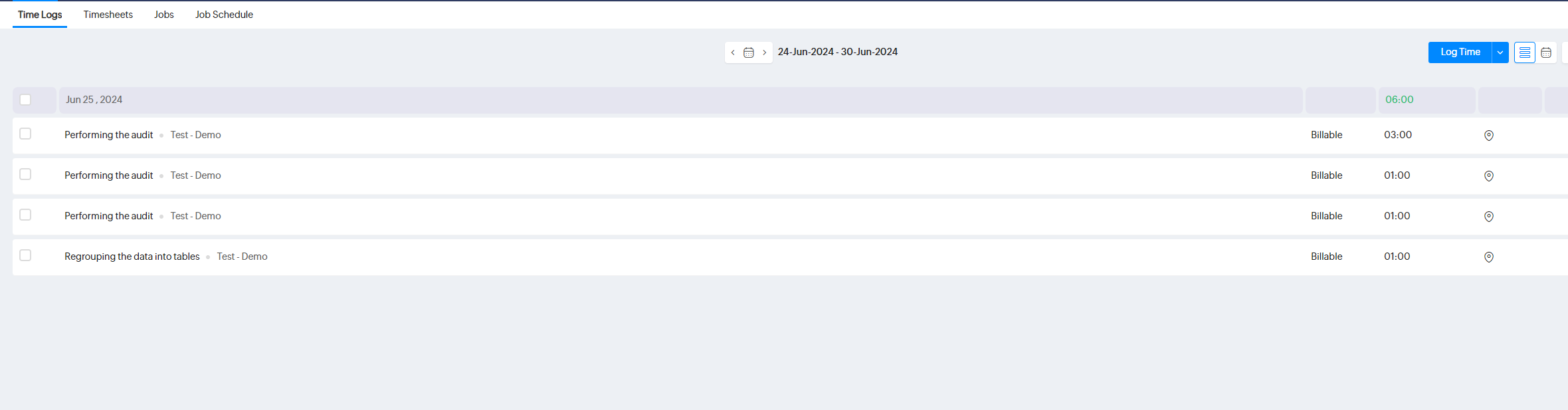


As you can see this is the view for the users. Now if they want to see the full details (as description is mandatory) to make sure everything is fine they need to open one by one. We have some users who can make up to 6 or 7 entry per day as they work on many difrent projects.

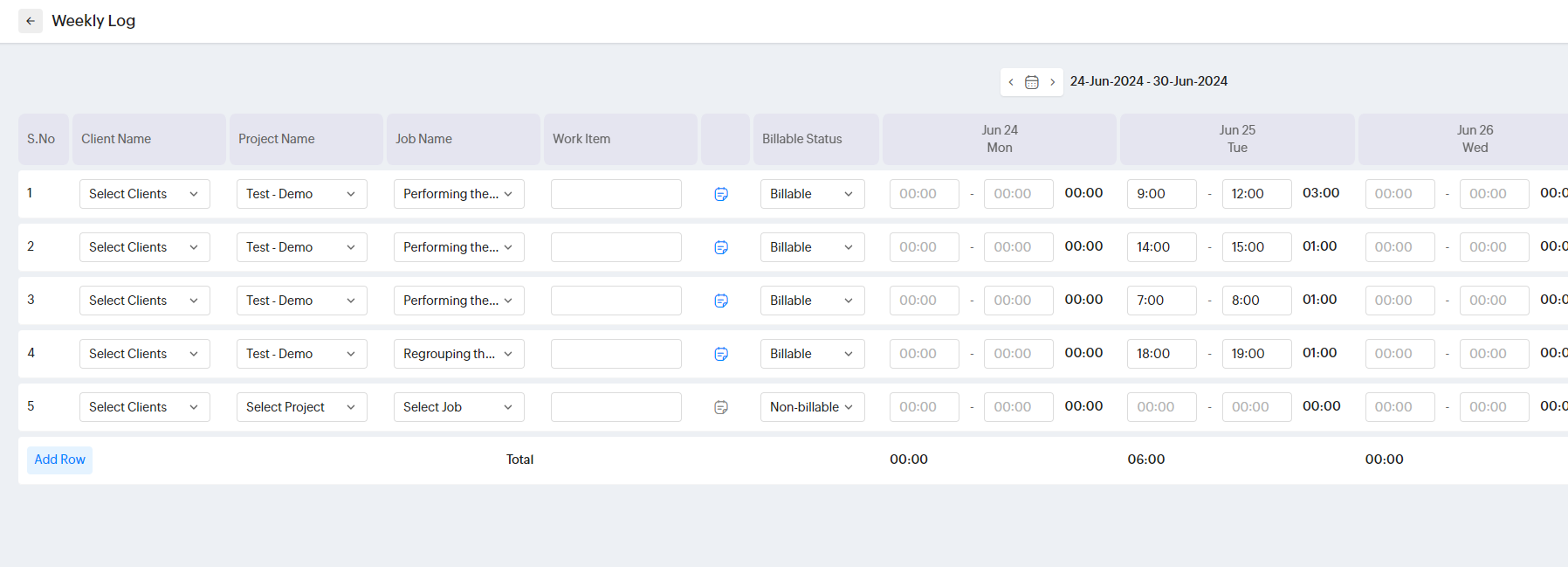
Now if we use the weekly view you can see that you have a description but still doesnt show.
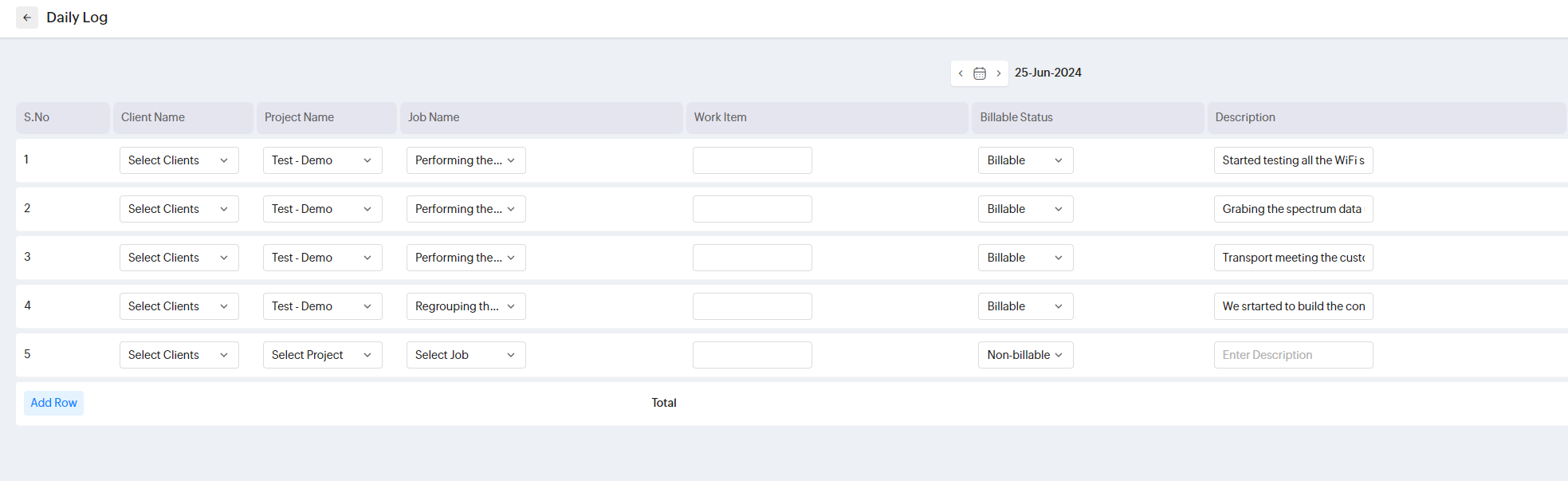
The description is only showing you use the daily log but even that the description get's cut.

Now for the timesheet it's the same thing the desciption is not showing and this is an issue for the people who perform the approval.
This is the view from a user perspective
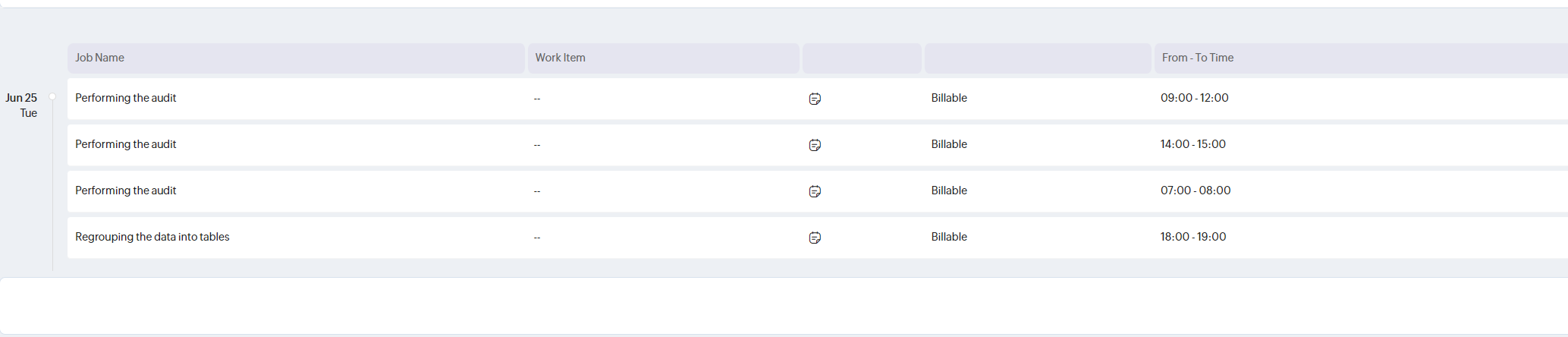
This is the view from some one trying to approuve the timesheet. Imagine if you have 35 entry over 5 days you would need to click on all the little description icon for all them. This is kind of a oversight.
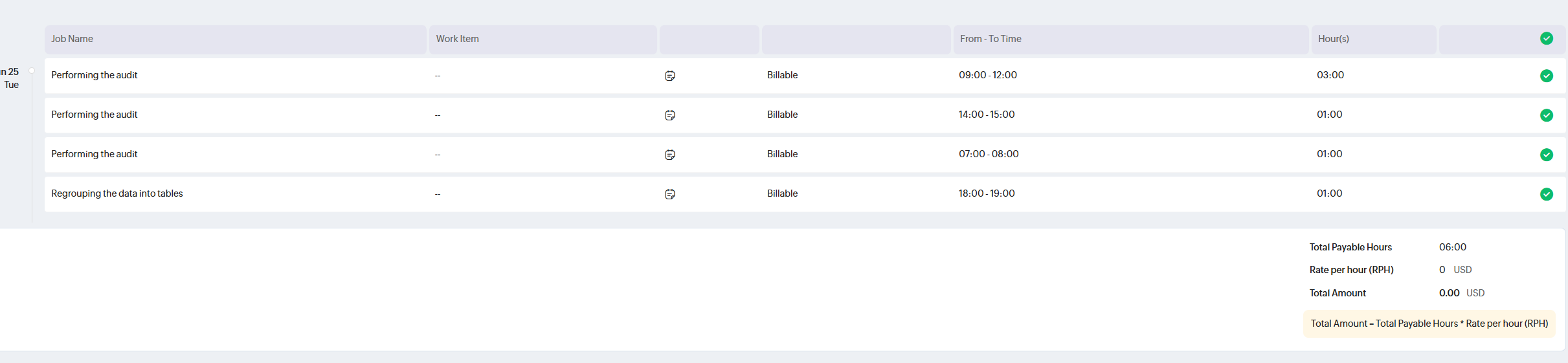

Now I hope I just dont see the option to enable the description to be always shown. 
If this is not possible it's a huge oversight having to approve 30 timesheet and clicking on all those little icon over and over. 
My work around for the time being is that I made report in Zoho Analytics to show those time sheet but they can't approve so they kind of have to juggle 2 application.

The other issue with the time sheet approbation is that if the employe made an error in the project/task he choose the person doing the approval can't change it they can the duration but they can't change the anything else.
So the work around is that the approver as to delete the time sheet so the user can make the change and after he resumit the timesheet.
No way for a user to change the entry even if the timesheet is save as draft. So if the approver reject the timesheet the employee as to take that timesheet save it as a draft and than delete it make the correction on the timelogs entry and resumit. This is very annoying and complex.
    • Sticky Posts

    • Zoho People 2.0 Help Manual

      Hello All, Zoho People Help Documentation is now available at this link. Please go through and get in touch with us at support@zohopeople.com in case of any questions. Regards, Hemalatha Chandrasekaran | Zoho People
    • Team Zoho People in your city!

      We are back with our next series of community events to meet you at your city! We are delighted to invite you to join us for a day of insightful sessions, interactions with other Zoho People users, and one-on-one sessions with our product experts. This
    • Come, join our HR Community!

      Hello everyone, We are delighted to invite you to join the HR Community, an exclusive forum for HR professionals around the world to collaborate, learn and grow together. In the HR community, you will be part of a tight-knit HR group, wherein you can,
    • Ask the experts: A 5-hour live Q and A session on Zoho People

      We are back with the 'Ask the experts' session of the month! Your platform to get instant answers to your questions on Zoho People is now open. Our team of experts is here, on a continuous 5-hour stretch, to answer and give expert solutions. What to ask? Your questions, doubts or any hiccup revolving Zoho People. If you do not have any questions, you can follow the post to add it to your knowledge.   Where to ask? Simply use the comments' space of this post to type in your questions.You can start
    • Ask the experts: A 5-hour live Q and A session on Zoho People

      The awaited 'Ask the experts' session of the month is here to give instant answers to your questions on Zoho People.  Our team of experts is here, on a continuous 5-hour stretch, to answer and give expert solutions.   What to ask? Your questions, doubts or any hiccup revolving Zoho People. If you do not have any questions, you can follow the post to add it to your knowledge.   Where to ask? Simply use the comments' space of this post to type in your questions. You can start posting your questions
    • Recent Topics

    • MS Teams for daily call operations

      Hello all, Our most anticipated and crucial update is finally here! Organizations using Microsoft Teams phone system can now integrate it effectively with Zoho CRM for tasks like dialling numbers and logging calls. We are enhancing our MS Teams functionality
    • IF Statement in Zoho CRM Formula Field

      Hi, I am attempting to write a formula field that will give me one result if one statement AND another statement are true, then a different value if the first statement AND a different statement are true, else 0. Stated differently: if account = destination
    • Out of Stock items showing in Commerce

      I have over 6000 items and most are not in stock, but all items are showing up in Commerce whether they are inventory or not. What option or feature can you use to hide items in Commerce at zero or negative quantities? I currently am using Commerce for
    • CRM gets location smart with the all new Map View: visualize records, locate records within any radius, and more

      Hello all, We've introduced a new way to work with location data in Zoho CRM: the Map View. Instead of scrolling through endless lists, your records now appear as pins on a map. Built on top of the all-new address field and powered by Mappls (MapMyIndia),
    • Support for Custom Fonts in Zoho Recruit Career Site and Candidate Portal

      Dear Zoho Recruit Team, I hope you're doing well. We would like to request the ability to use custom fonts in the Zoho Recruit Career Site and Candidate Portal. Currently only the default fonts (Roboto, Lato, and Montserrat) are available. While these
    • Is it possible to transfer data from one related list to another within the same module ?

      In the Leads module, there is an existing default Product related list that already contains data. Recently, I added a custom multi-lookup field, which created a new related list in the same Leads module. Now, I need to move the existing data from the
    • How to implement new online payment gateway?

      Hello, Can you tell me how to proceed to implement my local payment gateway? DIBS has an open avaiable API that should be easy to implement into ZOHO BOOKS. http://tech.dibspayment.com/dibs_payment_window
    • Custom Footer – Zoho Writer Document

      Hello everyone, I’m having an issue adding a custom footer in a Zoho Writer document. I would like to insert my company information (including a logo + address) in the footer. The problem is that when I add these elements, the main content of my pages
    • How to use MAIL without Dashboard?

      Whenever I open Mail, it opens Dashboard. This makes Mail area very small and also I cannot manage Folders (like delete/rename) etc. I want to know if there is any way to open only Mail apps and not the Dashboard.
    • Formula working in MS Excel , is not working in Zoho Sheets, Filter fuction which is working in MS sheets per the attached workbook / Daily update.

      Filter function , which is working in MS Excel is not working in Zoho sheets. Please help on function of filter of particular class sheets and extract students name who has more than 3.5 hours of study hours on particular day depending on date in D7 cell.
    • Improved Integration Failure Information (And Notification Options)

      Hi, When an attachment service for example fails, you just get "Field x - Error", I can check the field it is failing on and find nothing wrong, same file size, type, dimensions, etc. so more information as to the actual issue would be helpful. And an
    • Create static subforms in Zoho CRM: streamline data entry with pre-defined values

      Last modified on (9 July, 2025): This feature was available in early access and is currently being rolled out to customers in phases. Currently available for users in the the AU, CA, and SA DCs. It will be enabled for the remaining DCs in the next couple
    • Zoho Learn and Zoho CRM integration

      I would like to see an integration between Zoho Learn and Zoho CRM. 1. To be able to add articles in a related list in all modules 2. Zia to suggest related articles in a Deal or Case or Lead 3. Ability to read / search articles during a call / follow
    • Change User Role in a Form

      Hi, When in a form, it would be good (And consistent) to be able to change the user role/permission like you can with Shared Reports, All Entries or the actual User itself, rather than having to delete the users permission and then add it back again with
    • Reassign Partially Saved Entries

      Hi, I would like to be able to go to Partially Saved Entries and like the option to delete them I would like the option to multi-select and be able to reassign them to another user to complete (Such as when a user has left the company). Thanks Dan
    • Increase the "Maximum Saved Entries per User" Options Limit

      Hi, You can create lots of saved entries, yet the Limit when you apply one is 25, we may often expect 32 to be in draft, and therefore want to enforce that, can we increase the limit of this field from 25 to 100 (As you can just turn it off and have more
    • Dynamic Field Folders in OneDrive

      Hi, With the 2 options today we have either a Dynamic Parent Folder and lots of attachments all in that one folder with only the ability to set the file name (Which is also not incremented so if I upload 5 photos to one field they are all named the same
    • Product Updates in Zoho Workplace applications | December 2025

      Hello Workplace Community, Let’s take a look at the new features and enhancements that went live across all Workplace applications this November. Zoho Mail Block emails without notifying the sender Block emails without sending a rejection notification
    • Zoho CRM for Gmail Extension Not Working in Brave Browser?

      Is anyone able to get the Zoho CRM Chrome Extension working in the Brave browser? They're both built on the Chromium platform and every other Chrome Extension works with the exception of Zoho CRM for Gmail so any ideas here?
    • Set Frozen Cells in the Report Settings

      Hi, It would be nice to be able to set the frozen cells in the report Settings, and have an option if this is fixed or can be changed after loading (On the next load it still goes back to the Settings). Thanks Dan
    • Microsoft Teams now available as an online meeting provider

      Hello everyone, We're pleased to announce that Zoho CRM now supports Microsoft Teams as an online meeting provider—alongside the other providers already available. Admins can enable Microsoft Teams directly from the Preferences tab under the Meetings
    • Tip of the week #26: Import/ Export calendars in Zoho Calendar.

      Any calendar on the web or calendars that you create in any other calendar application can be imported in to Zoho Calendar. This will help you to add the events from the calendars that you import to your Zoho Calendar. You also have the option to export
    • Add Zoho Forms to Zoho CRM Plus bundle

      Great Zoho apps like CRM and Desk have very limited form builders when it comes to form and field rules, design, integration and deployment options. Many of my clients who use Zoho CRM Plus often hit limitations with the built in forms in CRM or Desk and are then disappointed to hear that they have to additionally pay for Zoho Forms to get all these great forms functionalities. Please consider adding Zoho Forms in the Zoho CRM Plus bundle. Best regards, Mladen Svraka Zoho Certified Consultant and
    • Block candidates in Zoho Recruit

      We’re introducing Block Candidate, which helps recruiters to permanently restrict a candidate from applying to current/future job openings. Once the candidate is blocked, they will no longer be able to participate in the recruitment process. This will
    • What is the safest way to convert OST to PST files?

      The safest way to convert OST to PST files is by using a reliable and professional OST to PST Converter tool. Manual methods often risk data loss, corruption, or dependency on Exchange Server connectivity. A trusted converter Aryson OST to PST Converter
    • Zoho CRM for Everyone's NextGen UI Gets an Upgrade

      Hello Everyone We've made improvements to Zoho CRM for Everyone's Nextgen UI. These changes are the result of valuable feedback from you where we’ve focused on improving usability, providing wider screen space, and making navigation smoother so everything
    • Social icons, open in new tab?

      Hello, I have two social icons on my footer, Facebook and Psychology Today. Clicking on the Facebook icon opens a new tab, the Psychology Today icon does not. I would like them both to open a new tab. Am I missing a setting somewhere?
    • Introducing Connected Records to bring business context to every aspect of your work in Zoho CRM for Everyone

      Hello Everyone, We are excited to unveil phase one of a powerful enhancement to CRM for Everyone - Connected Records, available only in CRM's Nextgen UI. With CRM for Everyone, businesses can onboard all customer-facing teams onto the CRM platform to
    • Real-Time Screen Annotation During Zoho Cliq Screen Sharing

      Hi Zoho Support Team, Hope you're doing well. We’d like to request the addition of real-time screen annotation tools during screen sharing sessions in Zoho Cliq video calls. 🔍 What We're Looking For: The ability for the presenter—and optionally, other
    • Testing Post

      Say goodbye to paper-based systems and rigid software—the low-code revolution is here. Save time, reduce effort, and increase profitability with custom-built manufacturing ERP software.
    • encountering an error when attempting to associate an email with a Deal using the Zoho CRM extension in Zoho Mail.

      When I click "Yes, associate," the system displays an "Oops!! Something went wrong" error message. I have attached a screenshot of the issue for reference.
    • I'm getting this error when I try to link an email to a deal inside the Zohomail Zoho CRM extension.

      When I click "Yes, associate," the system displays an "Oops!! Something went wrong" error message. I have attached a screenshot of the issue for reference.
    • Autofill address using smart fields mapped over the pdf document

      Hi, I'm using mail merge to map smart fields onto PDF documents I plan to distribute for signing. I already have a Zoho Sign subscription. When mapping smart fields from the Employee form, I only see the permanent and current addresses which include the
    • Live Chat for user

      Hi everyone, I’m new to Zoho Creator and wanted to ask if it’s possible to add a live chat option for all logged-in portal users so they can chat internally. I’m trying to create a customer portal similar to a service desk, but for vehicle breakdowns,
    • How do I cap employee leave accrual

      HI there, How do I cap an employee's leave accrual? The policy is that you accrue 15 days leave annually (1.25 days a month) and once you reach 15 days, you wont accrue more until you take leave. Thank you!
    • abou arattai

      I want to use the Arattai app for business purposes, so please convert my account to a business account.I have my own invoice app, and I want to link it with the Arattai app for direct messaging.
    • Zoho Creator Application - New User Not able to access the application

      In Zoho Creator, The newly added user not able to access the " Added Application" - User has received the Invitation Email, but while clicking "confirm Account" in the invitation Email, the following error message has appeared. "Sorry! you cannot accept
    • Open sub form from a button as a popup form

      Is there a way within a form to use similar code as below to show a button in the form when clicked opens the subform for data to be added to the record being viewed in the form OpenUrl("#Form:<Customer_Delivery_Address>?<Delivery_Address>=" + input.ID,"popup
    • Ability to Edit Ticket Subject when Splitting a Ticket

      Often someone will make an additional or new request within an existing ticket that requires we split the ticket. The annoying part is that the new ticket maintains the subject of the original ticket after the split so when the new ticket email notification
    • Timeline Tracking Support for records updates via module import and bulk write api

      Note: This update is currently available in Early Access and will soon be rolled out across all data centers (DCs) and for all editions of Zoho CRM. The update will be available to all users within your organization, regardless of their profiles or roles.
    • Next Page