Tip #10: Various time zone settings on the bookings page
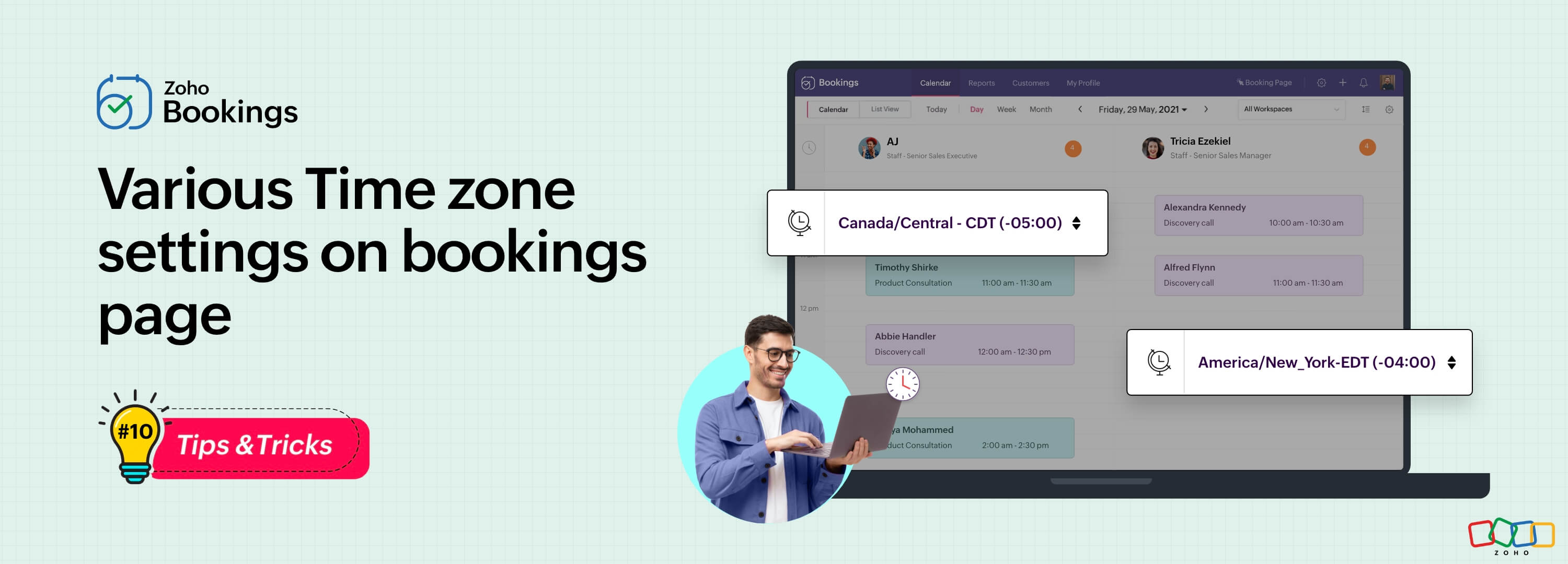
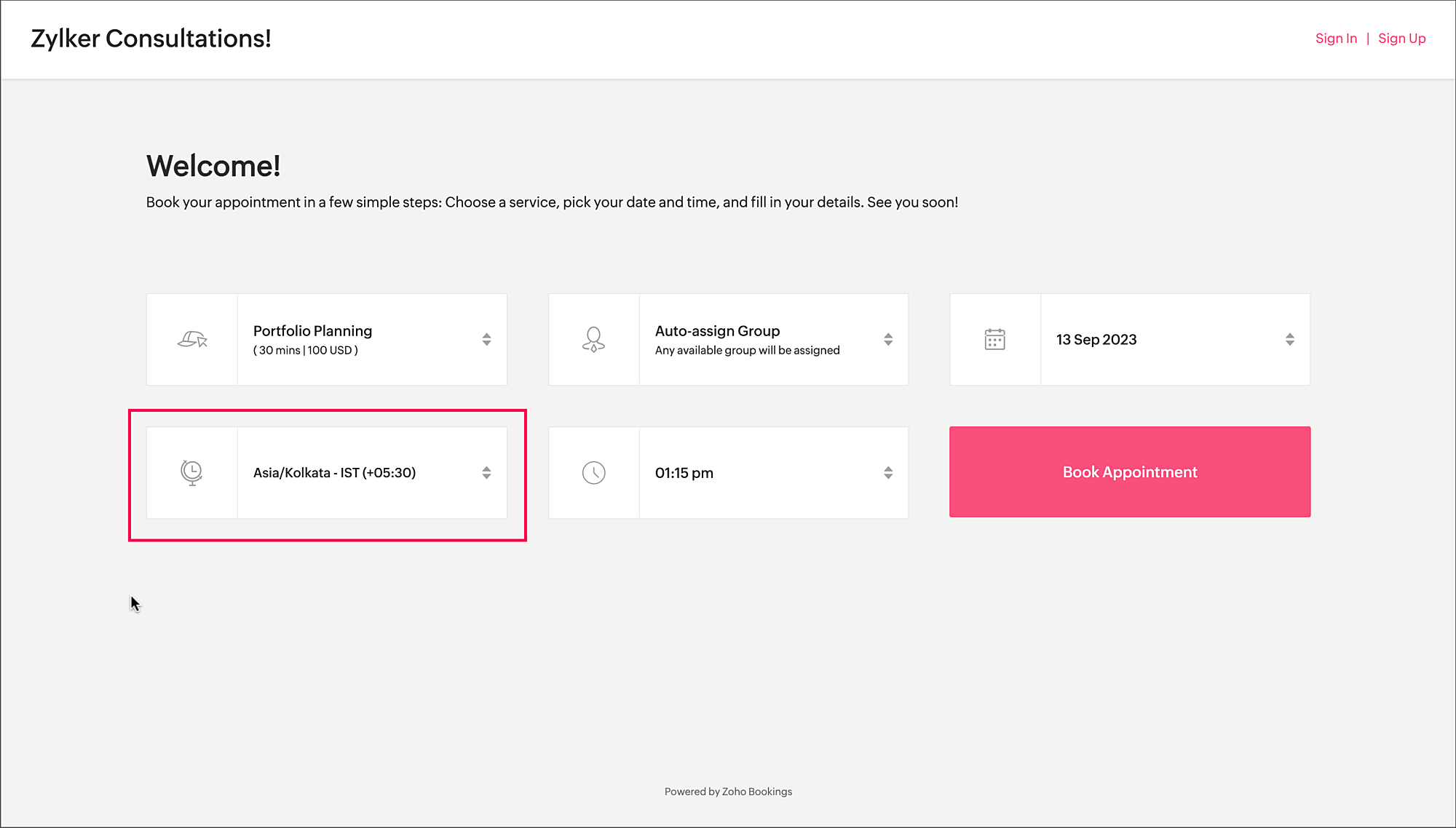
Let's assume you are an IT consultant who works with clients in multiple countries. To schedule appointments and avoid any time-zone related complications, your booking platform should provide automatic time zone conversion. Additionally, your clients should have the option to select their preferred time zones for appointments. This feature can greatly benefit consultants who frequently travel or meet clients and experience varying time zones on different days.
Likewise, a yoga studio can effortlessly arrange online sessions for its global clients, regardless of their time zones.
Zoho Bookings offers a range of time zone settings, simplifying the appointment scheduling process regardless of service provider and customer location.
Benefits
Minimized errors: Automatic time zone conversion reduces the risk of scheduling errors caused by manual time zone calculations.
Time zone selection control: Admins can determine whether the time zone option on the booking should be displayed, hidden, or made editable, offering greater flexibility that is tailored to specific needs.
Time zone-based notifications: Email notifications will be sent to both the staff and customers, according to their preferred time zones. For instance, if the staff works in an Australian time zone and the customer books in an American time zone, appointment emails will be sent to each party based on their selected time zones.
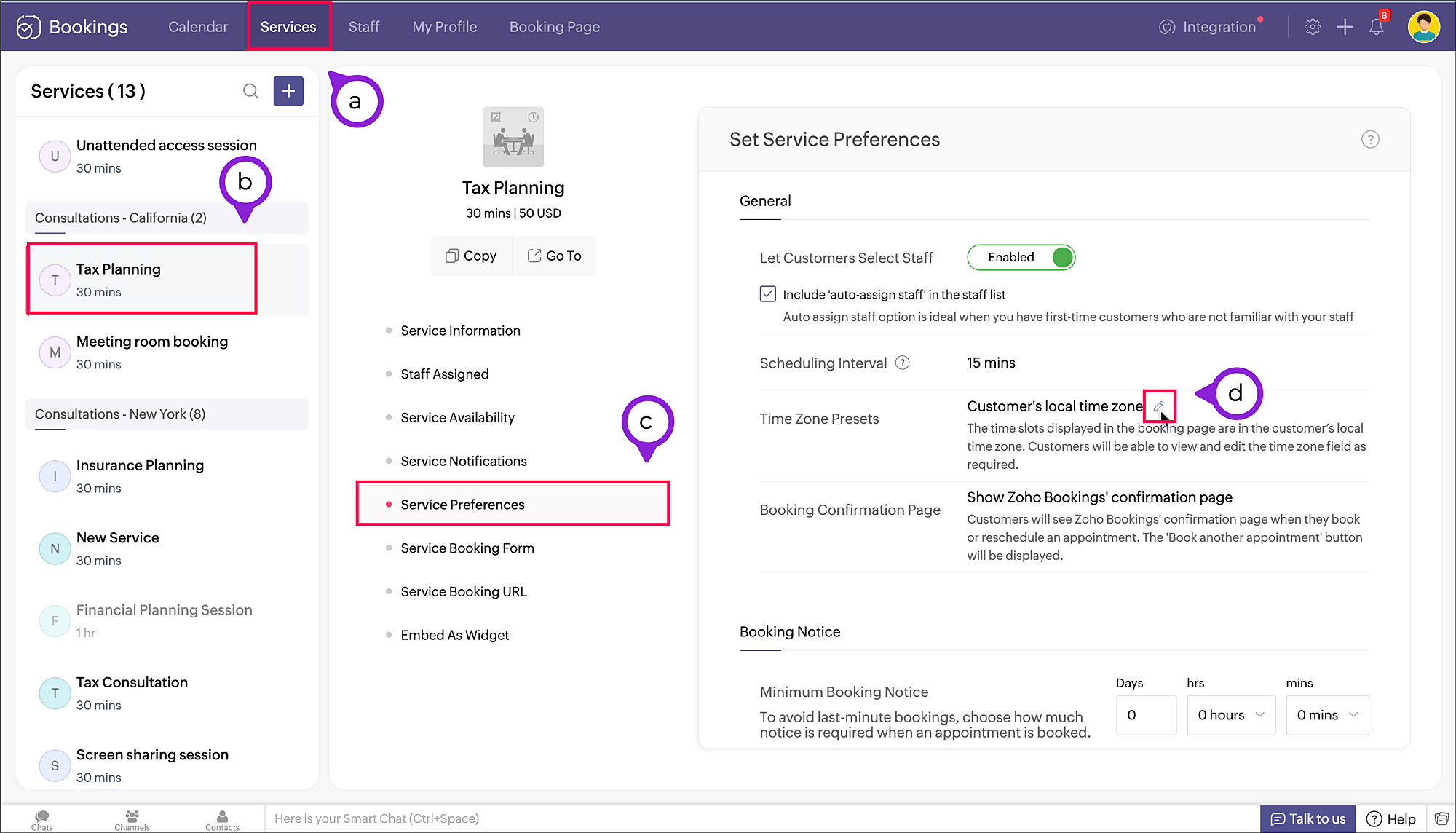
To access the time zone settings
- Navigate to Services > Select the required service > Service Preferences.
Note: For group and resource booking, the time zone settings can to be configured under Workspaces > Policies and Preferences. - Under General section, click the edit icon against Time Zone Presets.
- A pop-up appears where you can configure the time zone settings.
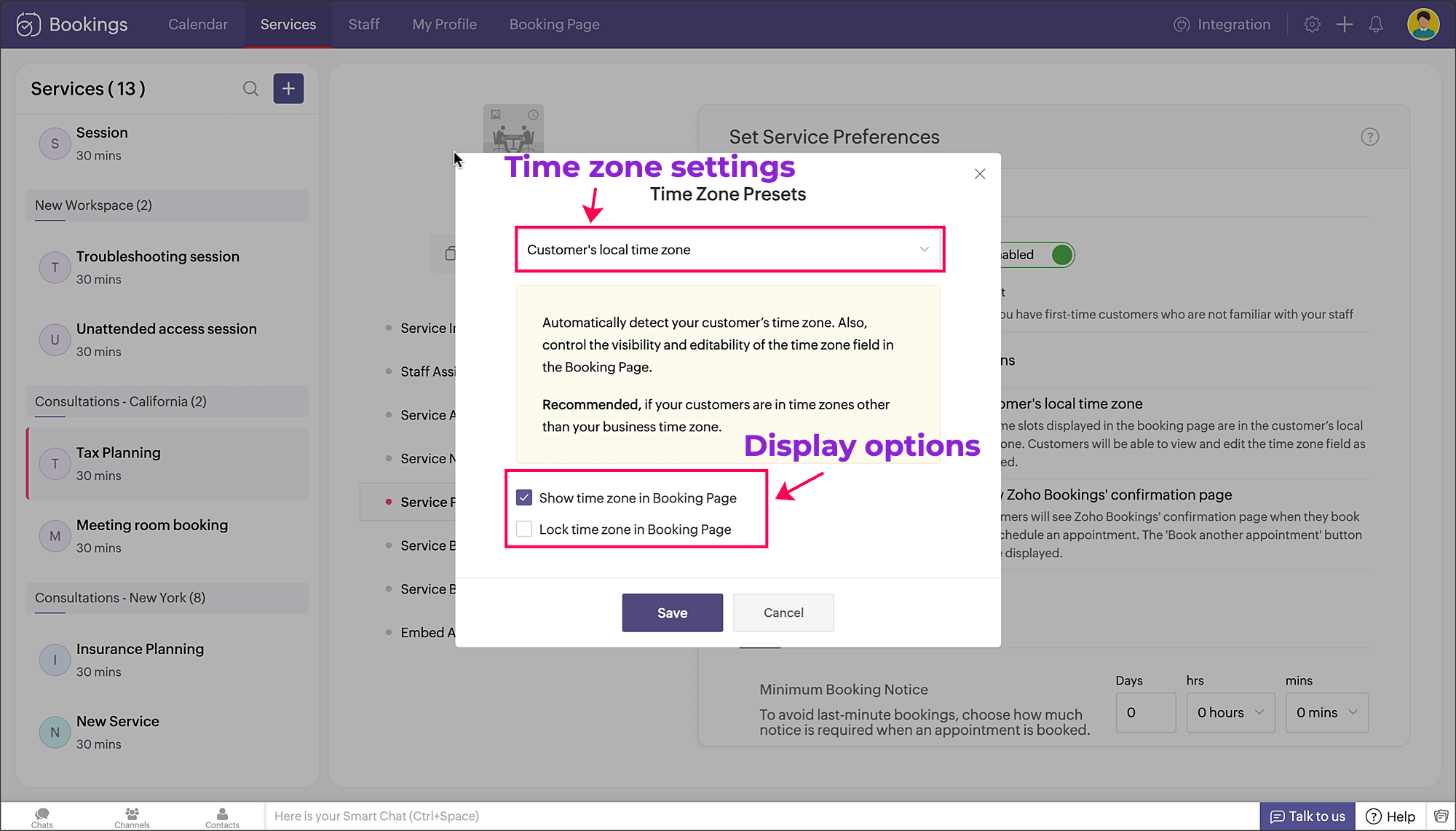
a. Time zone settings: The first dropdown is for choosing the time zone on the booking page. You have three options to choose from.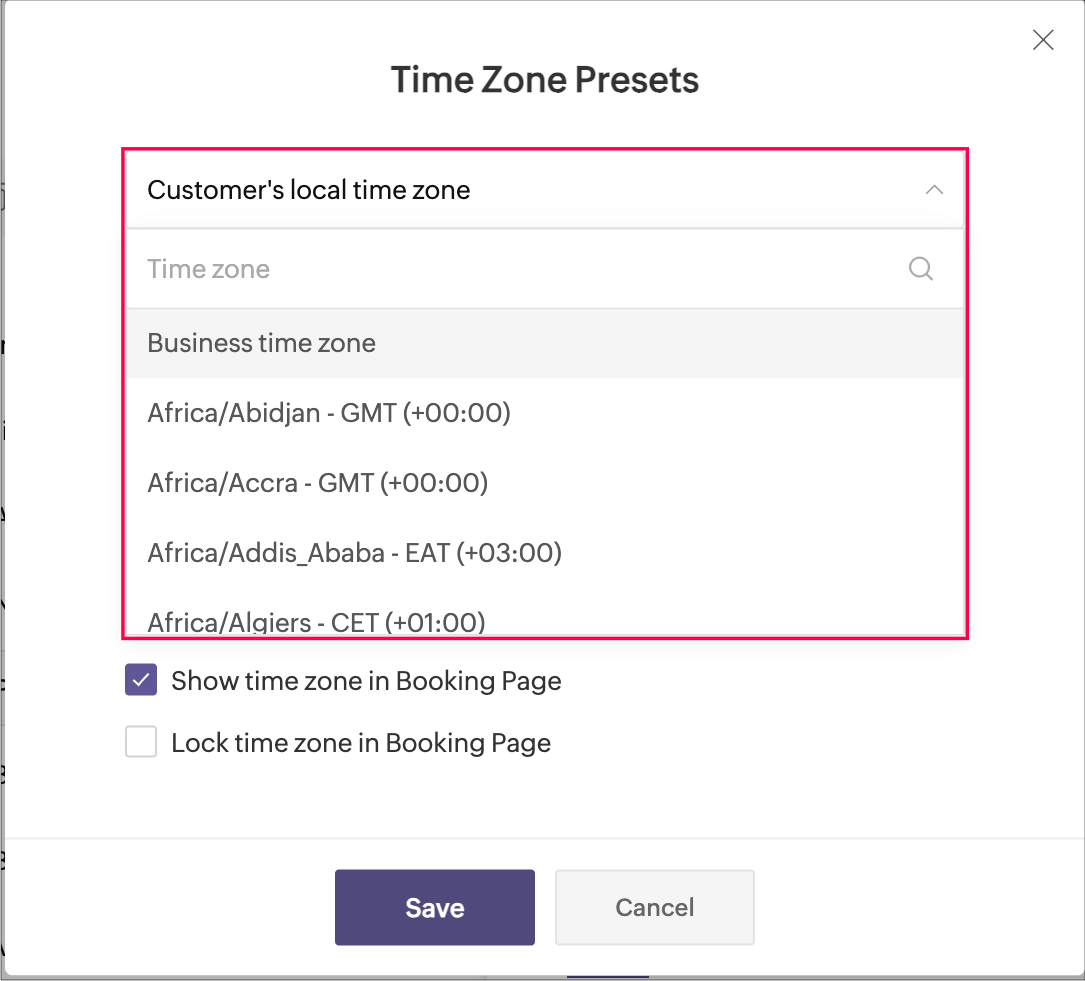
- Customer's local time zone: By choosing this, the customer's location will be detected and the corresponding time zone will be shown on the booking page.
- Business time zone: By choosing this, the default time zone of the business will be shown. This can be accessed under Settings > General > Basic Information > Time Zone.
- Any other time zone: You can choose any other time zone from the list of all time zones.

Visibility options:
- Show time zone: To show the time zone option on the booking page, select the checkbox next to Show time zone in Booking Page. This displays the time zone which is selected in the above pop-up.
- Hide time zone: To hide the time zone dropdown option on the booking page, deselect the checkbox next to Show time zone in Booking Page.
This means that the time zone selected on the above pop-up is suitable for the appointment. However, it's essential to ensure that all parties involved are on the same page regarding the appointment's timing, which might require additional communication or clarification.
Locking options:
- Lock time zone: To prevent the customer from changing the time zone, you can select the checkbox next to Lock time zone in Booking Page.
Here, the booking system displays the specified time zone without the option for customers to modify it. This can be beneficial when strict scheduling adherence is crucial, ensuring that all appointments are synchronized according to a predetermined time zone. - Unlock time zone: To allow the customer to edit/change the time zone, you can deselect the checkbox next to Lock time zone in Booking Page.
This option provides flexibility, allowing customers to select their preferred time zones, which can be particularly useful for businesses with a global customer base. It empowers customers to book appointments that align with their local time, reducing confusion and scheduling errors.
Combining the visibility and locking options, there are three display options as shown below.
Show | Lock | Result |
✓ | ✗ | Shows the time zone and allows customer to modify the time zone on the booking page |
✓ | ✓ | Shows the time zone but restricts the customer from modifying the time zone on the booking page |
✗ | N/A | Hides the time zone |
To conclude, implementing time zone settings and providing visibility or locking options on the booking page can greatly enhance user convenience, minimize scheduling errors, and ensure a smoother experience for both customers and service providers.
Hope this tip is useful, let us know your thoughts in the comments section.
Happy scheduling!
Topic Participants
Praveena Chandran
Michael Tarver
Akshara Amarnath
Sticky Posts
Tip #13: Identify where your bookings come from with Source Tracking
Source tracking is the practice of identifying where your bookings originated. This is important, because online bookings come from a wide variety of sources like social media platforms, your website, email and ad campaigns, partner websites, organicTip #17: How to mandate partial payment for your appointments
When you require partial payments during the booking process, customers can only schedule with you after paying a certain amount in advance. This deposit acts as a commitment between both parties. Apart from that, it has many more advantages. BenefitsTip #18: Organize a group workshop in a few steps
It's the season for workshops—they're everywhere, catering to diverse interests and needs. Whether for more professional goals like leadership development or creative endeavors like painting, there's an abundance of workshops offered every day. A schedulerTip #16: Custom labels for staff, service, and resources
Every industry uses its own jargon. Take healthcare, for example; when you visit a doctor, it's not just an appointment, it's a consultation. The people who provide consultations are the providers. Similarly, in the tranquil world of a spa, a massageTip #15: Customize service prices for each staff member
It's common practice for a service to be priced differently based on the staff member providing it. For example, an experienced hair stylist may charge more for a haircut compared to the other stylists. This pricing strategy allows businesses to charge
Recent Topics
My followed tickets extension is not working under the All departments view
Hi. I've installed the My followed tickets extension. However, when I try to open the extension under the all departments view, I get the following message: 'Sorry, this extension is not supported in the All Departments view.' How can I solve this pTicket Time Entry to Timesheet
The title just about sums it up. I have searched here and not found anything relevant, but If I overlooked, then please set me straight. We have staff that do nothing but close tickets in desk all day long. These tickets represent their timesheet. Is there a way to have this information sync or for a tech to go into their timesheet themselves and sync it with their tickets of the same timeframe?? We waste a ton of time doing timesheets and the old "Clock in/Clock out" isnt detailed enough for us!!Calls undetected.
The call is not showing on the call log.Calls undetected
Zoho is not reading calls made.Multi-currency and Products
One of the main reasons I have gone down the Zoho route is because I need multi-currency support. However, I find that products can only be priced in the home currency, We sell to the US and UK. However, we maintain different price lists for each.Missing information data Zoho inventory
there some missing data in Zoho inventory connection. pick list stock counts bin location we have requested it via mail and the support team doesn’t gove feedback. has anyone achieve to get these info or to ask other ya lesCalendar Events Issues
Not able to view scheduled events on my calendarExtensions 101 webinar series: Build, integrate, and monetize with extensions
Attention developers! Are you ready to take your extension development skills to the next level? We're excited to bring back the Extensions 101 webinar series with an expanded lineup of Zoho products and an introduction to more platform features. LastCustom Related List Inside Zoho Books
Hello, We can create the Related list inside the zoho books by the deluge code, I am sharing the reference code Please have a look may be it will help you. //..........Get Org Details organizationID = organization.get("organization_id"); Recordid = cm_g_a_data.get("module_record_id");Where are recordings stored?
I have hosted a couple of test meeting, used the "record" button to start and stop the recording but I am unable to find where are those recordings saved? Can anybody help? ThanksZoho Desk's integration with Microsoft PowerBI delivers advanced analytics insights
Hello everyone, Gaining advanced insights through reports and dashboards is one of the critical requirements of every business. In addition to key metrics tracked in Zoho Desk, such as agent performance, SLA adherence, and ticket lifecycle, businessesCreate static subforms in Zoho CRM: streamline data entry with pre-defined values
Last modified on (9 July, 2025): This feature was available in early access and is currently being rolled out to customers in phases. Currently available for users in the the AU, CA, and SA DCs. It will be enabled for the remaining DCs in the next coupleIMAP error message in Zoho mail
I cannot send emails today. Everything fine for years until today. Get a message: "You are yet to enable IMAP for your account. Please contact your administrator". Does anyone know how to correct this?IMAP stopped working today
Hello! I've been a paid customer for more than 10 years, IMAP was always working fine. But today this is the error I've got on my iPhone: I've tried toggling the IMAP for my account (Mail -> Settings -> Mail accounts) off and on again, but that did notAre custom portals accessible on the Zoho learn smartphone app?
In other words, can users external to my organisation, once signed up, use the app in the same way as internal users? ThanksZoho Books/Inventory - Update Marketplace Sales Order via API
Hi everyone, Does anyone know if there is a way to update Sales Orders created from a marketplace intigration (Shopify in this case) via API? I'm trying to cover a scenario where an order is changed on the Shopify end and the changes must be reflectedConditional Layouts On Multi Select Field
How we can use Conditional Layouts On Multi Select Field field? Please help.Multiple columns in a form
I am evaluating Zoho Creator. However, I am seeing almost no layout control on a form. Just a basic 1 or 2 column format that is then imposed on the entire form. That's not going to work for many, many real world cases. We need multiple columns per line, and we need each line/section to occupy a single column or be able to span the columns. Someone please tell me that I'm missing something and the capability is actually there.Global search
Hi! I think it would be great to have a global search that would give you results from all records of a database, no only for a single field of a single form as we have now. Thanks!Any insights about API/v2? Having problem for a while.
I don't know why it is throwing a 404 error, my report name is correct. Has someone had this issue and how you fix it?Edit QR code with redirect to form
Guten morgen, wir haben ein Formular Reklamation_erstellen. Dort soll ein QR Code erstellt werden, der im Lieferschein angezeigt wird. Beim Scannen auf dem soll das jeweilige Formular zum BEARBEITEN geöffnet werden. Leider bekomme ich es nur so hin, dassGetting all the ingredients together for baking an app
Good day everyone. After reading a lot of the help docs and watching videos, I now started on my app. To prevent hours and hours wasted on going down the wrong track, I would like some clarification on the following. But first some background: I haveHelp Needed with Configuring ZC Microservice
I'm attempting to create a simple microservice, but am running into problems with scope and auth. Using Custom API Builder, here's my setup: 1. Method: GET 2. Auth: OAuth2 3. User Scope: All users 4. Response: Standard 5. Function: A function that returnsCreator Simplified #10: Predefine Form Field Values and Make Them Read-Only for Users
Hey Creators, Ready for this week's tip in the Creator Simplified series? Today, we will explore how to have read only fields in a form. Use Case: Assume a scenario where the default value for a Department field needs to be English Literature, but youZoho Mail : Email Outgoing Blocked
I suddenly received the following message yesterday. I cannot send any mail. Please resolve as soon as possible, I cannot work without sending email. Dear User, We regret to inform you that your email outgoing has been blocked and you will not be ableCreator and Tables
Good day. I am trying to create my first application. I have imported my data into Tables and am creating my app in Creator. I do not see my tables and cannot see how to write forms data to a table. Even the Workflow just uses the form. In one of thecustomer Name and address details
i created one application there is no customer details in that . how to add customer details andRecalculate every row in the subform
Hello, Can anyone help me with a script, please? I have an issue. Sometimes it happens, that in a multi row subform one of the rows show an incorrect row total value. Not really understand how it can happen, if I have a 20 row subform, 19 rows show correctCreating Repeat Forms that remove redundancies
I wanted to understand if you can make multi-layer forms that reduce the need for users to input information in again and again. We want a form that our suppliers fill out per ingredient they sell, and the end result should have the Ingredient (SectionWhat is the difference between the free plan and the mail lite plan?
What is the difference between the free plan and the mail lite plan? How many emails can I send per day?Unblock email
Hi The outgoing mail from a client of me is blocked. I already made tickets and tickets are send to the EU desk but nobody is responding. The problem is already 4 days! There is absolutely no help from the support. I am really not satisfied at all! CanDomain verification failure
Hello Zoho Support, I purchased my domain directly through Zoho Mail, but the domain verification keeps failing with the message “TXT verification failed.” I’ve already waited and retried several times, but it still won’t verify. Could you please manuallyUnable to send message;Reason:554 5.1.8 Email Outgoing Blocked.
My email account is unable to send emails, and I urgently need to use it. How can I resolve this?If there is anything we have done wrong, please let us know in advance so we can actively cooperate to improve. User ID: 850482493URGENT: Email stopped workin - can't access admin panel
For some reason email sending stopped working. When I try to send an email it fails with "Unable to send message;Reason:451 4.7.1 Temporary system error" I can receive email just fine I see in my notifications some errors about the MX records, howeverCan I associate an invoice to a Project after the fact?
We have generated an invoice but would like to assoicate it to a Zoho Project after the fact. Is there any way to accomplish that? Thanks, ScottEmails I send as a cc or bcc NEVER GO THROUGH TO THA RECEIVER !!
every time i send a cc or bcc copy of an email to anyone when I’m using my zohomail.com email - no one ever gets the cc of bcc copy if the email: why???? And i triple check that the email addresses are correct; then i get back an email message (EVERYTIME)Cannot see correct DNS config for mail after moving domain to another provider
I have moved my domain from one provider to another and after that zoho mail stopped working (expected). Problem is, zoho mail admin panel still shows (10 hours after move) that all records are correct while I haven't changed anything in my domain DNSAdd Support for Authenticator App MFA in Zoho Desk Help Center
Hello Zoho Desk Team, We hope you are doing well. We would like to request an enhancement related to security for the Zoho Desk Help Center (customer portal). Currently, the Help Center supports MFA for portal users via SAML, JWT, SMS authentication,Auto-fill Contacts in Zoho Mail not working for me
We just switched to Zoho Mail for our company, and I am noticing that the "auto fill" feature when composing an email -- where the "to" field is autofilled (like in the attachment) from Contatcts works for everyone except me. Any way I might have madeHow to unlink a SAML user from the existing Zoho Desk user (domain change case)
Hi everyone, I’m trying to understand how to handle a situation where a customer changes their company domain. In our setup, users authenticate via SAML, so when the domain changes, the SAML system treats them as a new user. However, in Zoho Desk, I’dNext Page