Tip #4 - Avoid no-shows by setting reminders
Do your customers book appointments with you but don't show up? This is a common problem that businesses face, as it can be difficult to predict customer behavior. There is a possibility that they don't remember booking with you. One way to combat this issue is by setting reminders. Zoho Bookings gives you the flexibility to send reminders of your choice before the appointment.
You can send email and/or SMS reminders to customers before specific days, hours, and minutes of an appointment.
To set reminders:
Navigate to Services > Select a required service > Service Notifications.
Select the For Customers tab.
Under the Remind Upcoming Appointments section:
Use the dropdown to choose between days, hours, and minutes.
Enter how many hours, minutes, or days before the appointment to send a reminder.
Select the checkbox to send the reminder. The first checkbox would send an email reminder, and the second checkbox would send a text reminder (to send a text alert, SMS integration has to be enabled under the Integration section).
Changes are auto-saved.
The below image shows that an email reminder will be sent to the customer 30 minutes before an appointment.
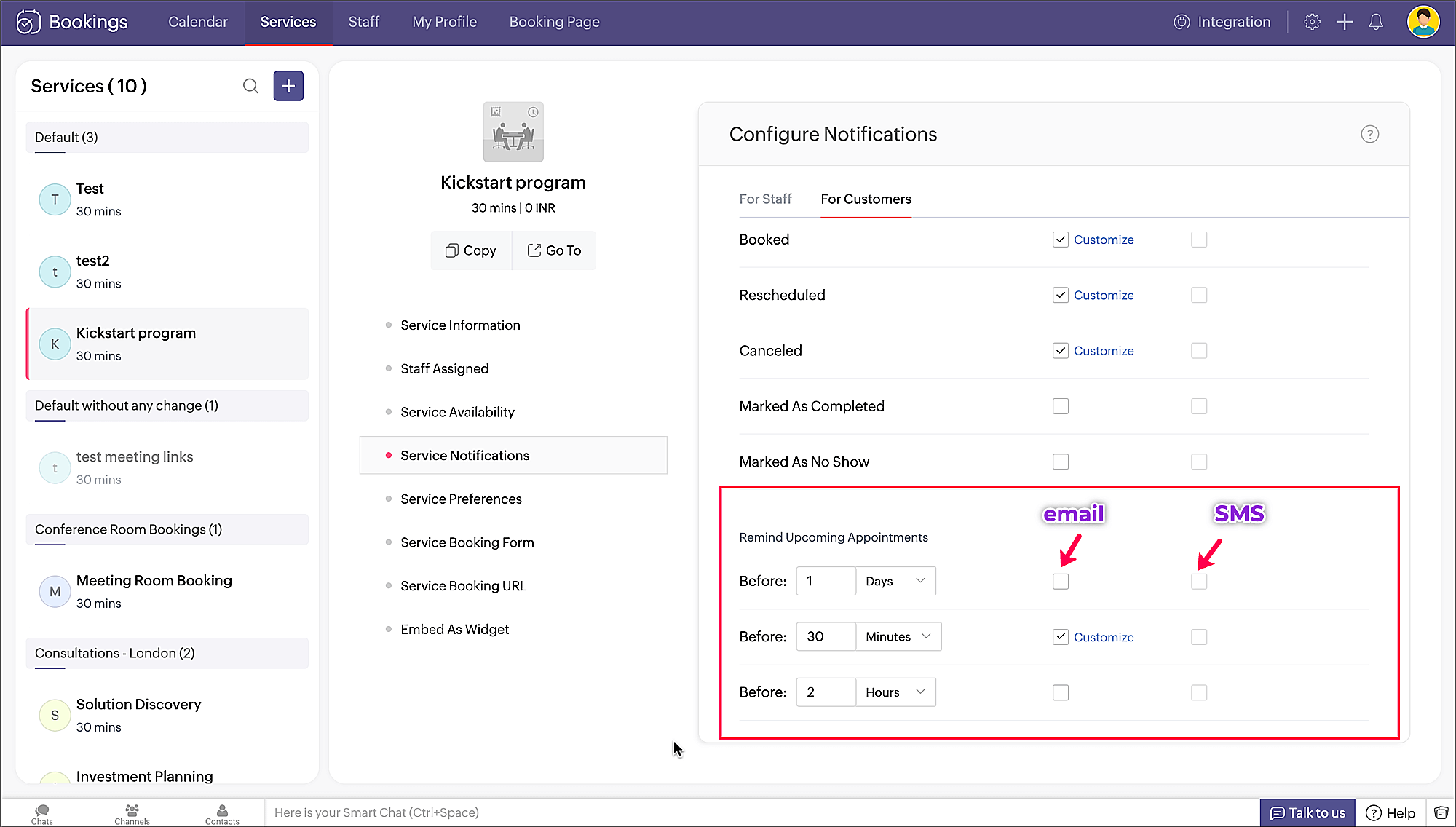
Please note that you can set up to three reminders of your choice.
Setting reminders ensures that customers are aware of their upcoming appointments and reduces the risk of them forgetting to attend or canceling.
We'll have more tips soon. Until then, happy scheduling!