In Zoho Analytics, small tweaks can lead to big insights. One such feature is Conditional formatting based on other columns, your key to instantly spotting where sales success is overshadowed by product returns.
Our tip this week shows you how to apply conditional formatting across columns to uncover products and categories that look like top performers in sales but reveal a different story once returns are factored in.
The Big Picture
High sales don’t always mean healthy business. A category may dominate revenue, but if product return rates are unusually high, your profits and customer trust take a hit. Looking only at sales hides this risk.
Conditional formatting based on return rates bridges that gap. It helps you go beyond surface numbers and focus on product quality and customer experience.
In this demo, we’ll start with a pivot table arranged as follows:
Columns: Month
Rows: Product Category
Data: Sales (USD), Return Rate (%)
Get ready to see how sales dominance changes month to month and how return rates reveal a deeper layer of truth.
We’ll highlight three eye-catching zones using conditional formatting:
- Healthy Zone - Low returns
- Warning Zone - Rising returns
- Critical Risk - Unacceptable return rates
By the end of this demo, sales won’t just be tall bars on your pivot; they’ll instantly tell you which categories are fueling sustainable growth, and which ones are silently eroding your margins.
Check out the video here:
Steps to Apply
- Open your Pivot Table.
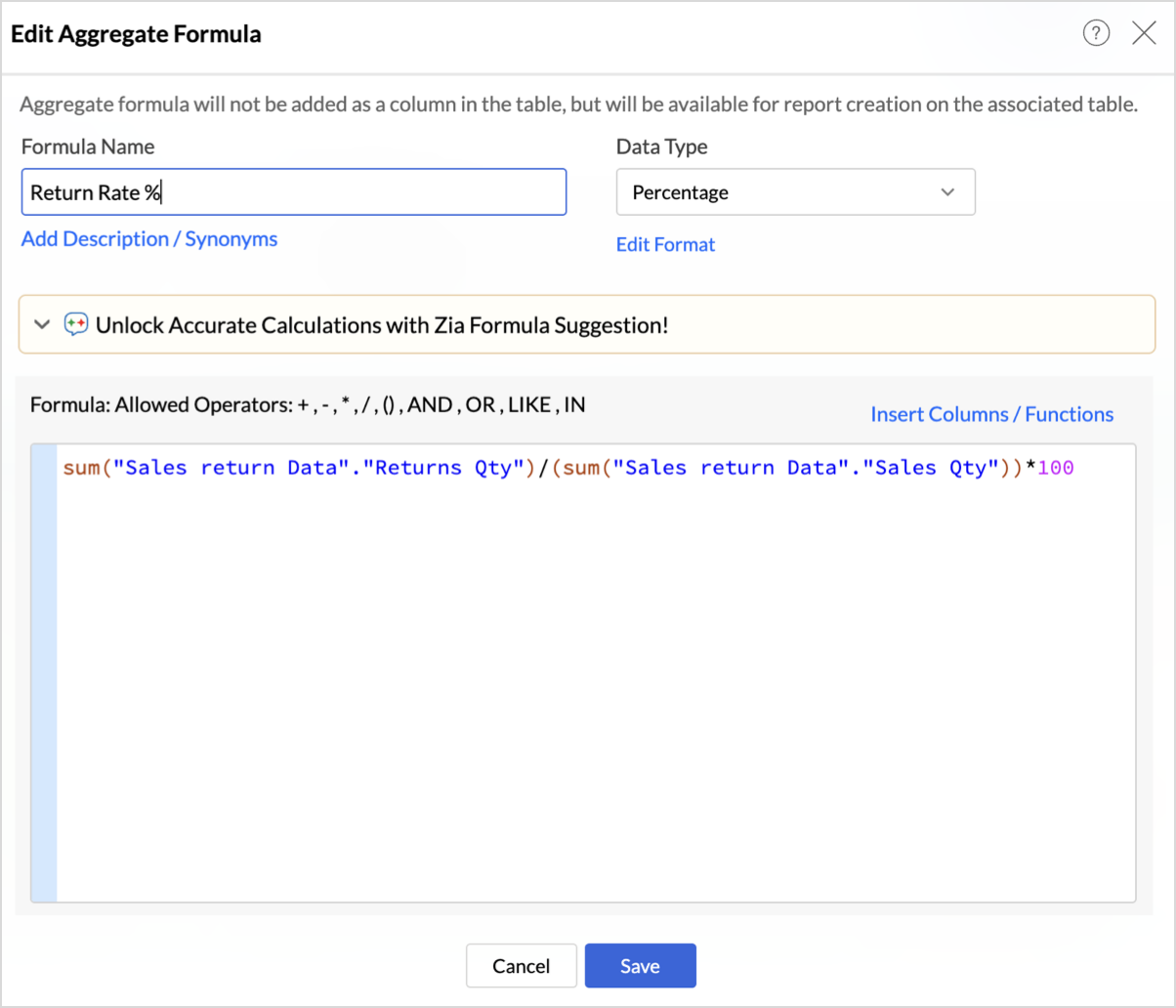
- Creating Return Rate Formula:
- Click Add Aggregate Formula.
- Enter Formula name as Return Rate.
- Define the metric as below:
sum("Sales return Data"."Returns Qty")/(sum("Sales return Data"."Sales Qty"))*100
This formula calculates the percentage of sold items that were returned, giving you the Return Rate % for each product category and month in your pivot.
- Click Save.

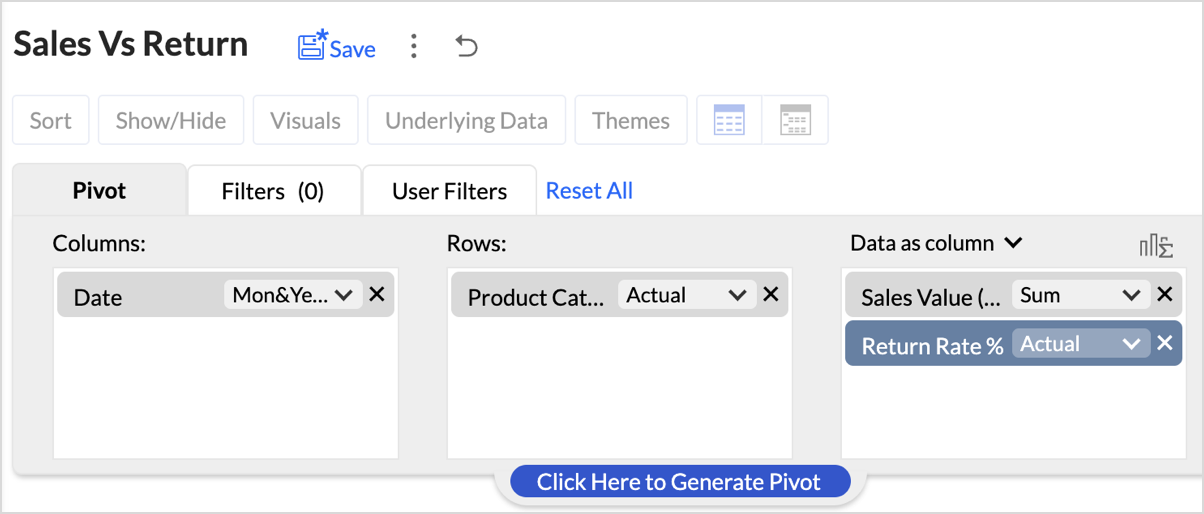
- Set up your pivot table as shown below.
- Columns: Month
- Rows: Product Category
- Data: Sales (USD), Return Rate (%)
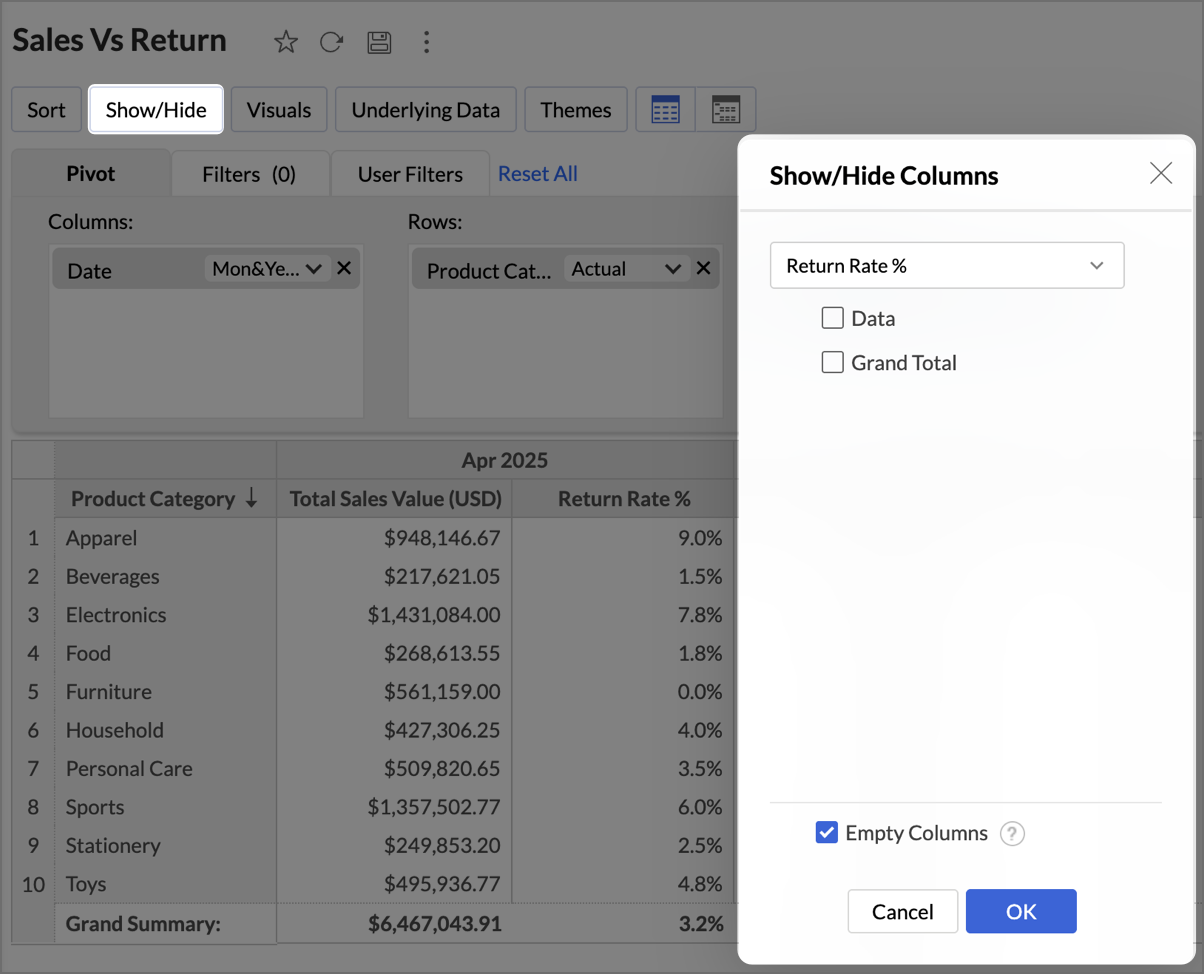
- Hide the Return Rate % column from the pivot as shown below.
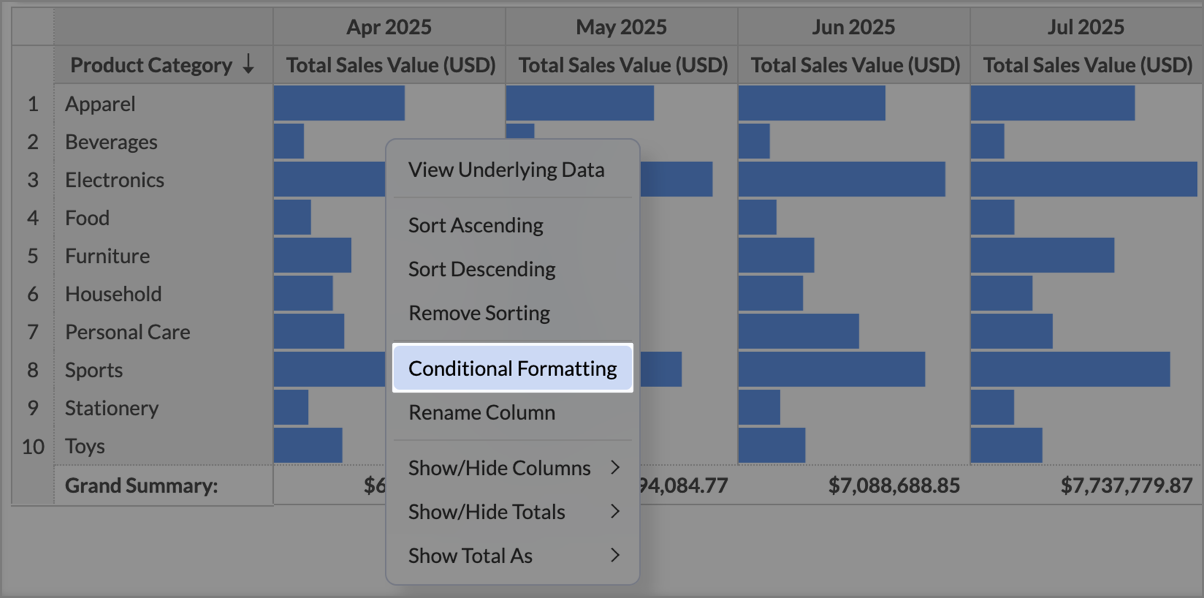
- Click Visuals and select Only Data Bars.
- Right-click on any Sales cell and select Conditional Formatting.
- In the Conditional Formatting dialog, under Based On, choose Return Rate (%).
- Define three conditions based on the following zones:
- Critical Risk - Set the condition as Greater than or Equal to 10 and choose Red fill in Additional Formatting options.
- Warning Zone - Set the condition as Between 5 to 10 and choose Amber fill.
- Healthy Zone - Set the condition as Less Than or Equal To 5 to 10 and choose Amber fill.
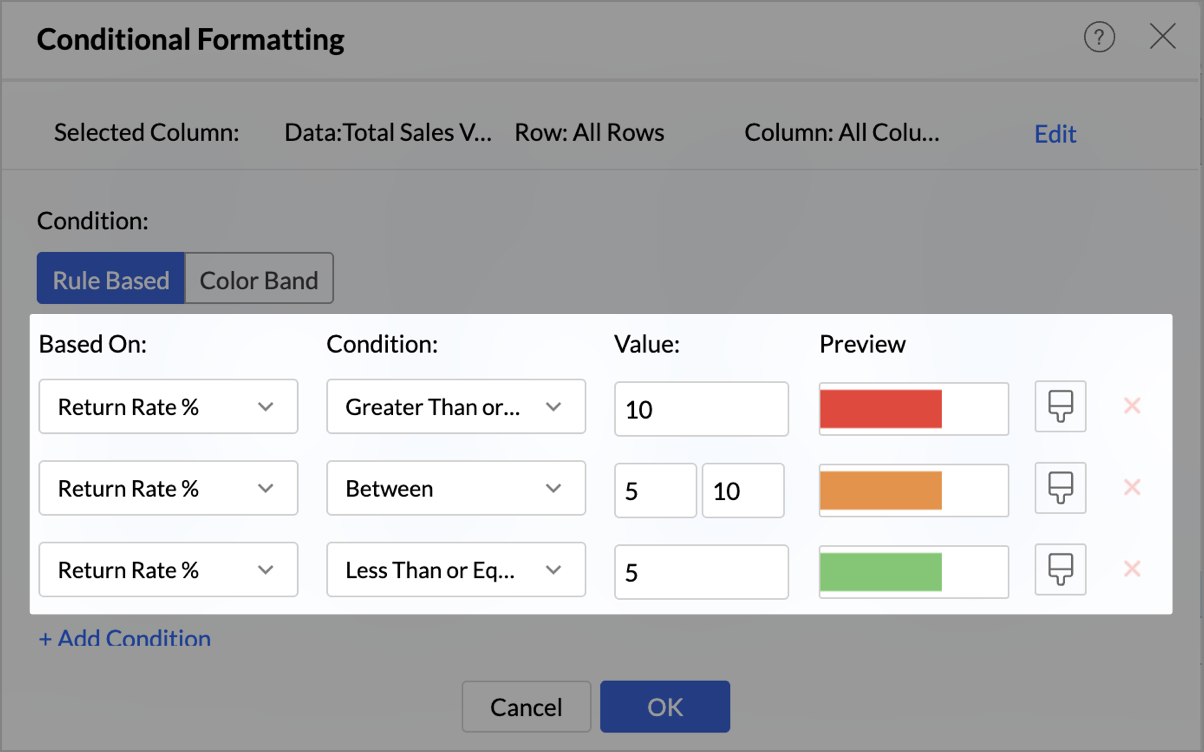
- Click OK to save the conditions.
What you should see
- Green Sales Bars where return rates are low → sustainable business.
- Amber Bars where returns are rising → early warning.
- Red Bars where sales are hit by high returns → high-priority fix.
With one glance, your pivot now tells a double story: who’s leading in sales and who’s at risk due to high returns.
Best Practices
- Highlight what matters most: Focus on key risk signals like high return rates or unexpected spikes. This keeps the pivot sharp and attention where it belongs.
- Use KPI-driven thresholds: Base your rules on meaningful KPIs (like Profit Margin % or Return Rate %), not arbitrary numbers. This ensures the colors always map to business impact.
- Keep colors intuitive: Stick to natural associations: Green = Healthy, Red = Risk, Orange = Caution. This makes insights instantly recognizable for everyone.
- Pair visuals for impact: Don’t stop at colors. Combine conditional formatting with Data Bars to highlight magnitude, or Sparklines to reveal trends over time. Layering visuals makes patterns clearer without adding extra clutter.
- Test across different data ranges: For broader cues, try Color Bands to show intensity (like a heatmap of return rates) or Icon Bands to flag quick signals
- Avoid overlapping rules: Overlaps can confuse users. Keep each condition distinct to avoid conflicting colors on the same cell.
- Explore Color Bands and Icon Bands: If you want a broader visual cue beyond rule-based formatting, try Color Band (gradient shades that show intensity, like heatmaps) or Icon Band (symbols that signal performance trends). These are especially effective where quick scanning matters more than raw numbers.
- Think ahead for storytelling: Design your formatting with the end reader in mind. The goal isn’t to decorate numbers; it’s to tell a story at first glance.
When done right, conditional formatting turns pivots into a decision board. Your wins glow green, your risks flash red, and your opportunities pop out without a single extra click.
Keep Exploring
- Help Documentation
- Pivot Tables in Zoho Analytics
- Conditional Formatting in Pivot
- Visuals in Pivot
- Help Videos
- Creating Pivot tables
- Adding Visuals in Pivot table
Recent Topics
What's New in Zoho POS - April 2026
Hello everyone, Welcome to Zoho POS’s monthly update, where we share our latest feature updates, enhancements, events, and more. Let’s take a look at how April went. Access and manage other web applications in Zoho POS with Web Tabs You can now access
Plug Sample #9 - Get Notified on Cliq When Your Premium Customers Interact with SalesIQ's Zobot
Hi everyone! We're here with another simple yet effective plug for your chatbot to integrate with Zoho Cliq to make your job easier. Just imagine whenever a potential lead or your premium customers are on your website, and they engage with your chatbot,
Zoho IP address blocked by Microsoft
Today I tried to send emails to Outlook email addresses and all of them failed. The log displays like this: Reporting-MTA: dns; mx.zohomail.jp Arrival-Date: Fri, 27 Jun 2025 12:52:30 +0800 Original-Recipient: rfc822; ######@outlook.com Final-Recipient:
Remove "Subject" as a required field on Quotes
Currently, when you create a quote in CRM, the field "Subject" is mandatory. The properties of a system defined field cannot be edited which means we cannot de-select the mandatory requirement. A 'subject' on a quote is a little vague and not something
Integrate QuickBooks with Bigin and streamline your sales and accounting!
If your business relies on Bigin for customer management and QuickBooks for accounting and invoicing, this new integration is here to make your operations more efficient. By connecting these two platforms, you can now manage your CRM and financial processes
Upgraded sentiment analysis model for more accurate detection
Hello everyone! Sentiment Analysis in Zia is being upgraded to a newer model to improve how customer sentiment is detected and interpreted. This transition is aimed at getting better contextual understanding across all supported channels. As part of this
Adding contact to account automatically in helpdesk?
Hello, We're using Zoho desk to managed our helpdesk tickets. Is there a way to add contacts (email senders) automatically to an account based on their emails domain name? For example: when UserA@companyx.com send an email to our support mailbox, a trigger or a workflow would automatically add the userA to Companyx account if it does exists Please advise Thank you
Automated entries past the current month in a calendar report
Hi all, I have an automation problem. I have a form which on successfull entry adds either 5 or 10 more of these entries with a slight change so our customers can see it throug a calendar report on the webiste. The entry put in manually shows up perfectly
DYK 4 - Reactions
Did You Know that you can react to comments in Zoho Projects? In a collaborative workspace, comments come in throughout the day. Some need a detailed reply, others just need to be acknowledged, and the more the replies, the harder it is to follow the
Atlassian Jira integration live in Zoho Apptics
Tracking crashes and fixing them often happen with different tools. You might use Zoho Apptics to track crashes and understand what went wrong and Jira to resolve those issues. If you use both, you're probably familiar with the manual effort involved
GLM 5 not available
Hello, I am trying to setup a Zia Agent using agents.zoho.com. The settings says that GLM5 is among the list of free zoho hosted models available. However, when I try to setup an agent and pick a model from the list only GLM 4.7 Flash is available. How
Native QuickBooks integration for Zoho CRM: Connecting sales and finance
Greetings, I hope all of you are doing well. We're excited to announce Zoho CRM's integration with QuickBooks Web, which is designed to synchronize your CRM data with your QuickBooks accounting records and bridge the gap between sales and finance. This
Knowledge base articles is now available in the Zoho Desk mobile app!
Hello all, As a customer service agent, every day you might have to deal with many questions and issues reported by the users. With Knowledge Base, you can reduce the issue resolution life cycle for your organization. We are delighted to announce that we have brought in support for 'Knowledge Base articles' in the Zoho Desk iOS mobile app. This feature is already available for Android users. KB articles are available to iOS users in the latest version of the app (v2.4.9). You can update the
Urgent Issue – Draft Reply Fails to Save When Message Contains Code Snippets
Hello Zoho Desk Support Team, We are experiencing a critical issue in the ticket reply editor that is directly impacting our support operation. Whenever we write a reply containing code snippets, URLs, or technical content (for example, terms like “curl
Introducing parent-child ticketing in Zoho Desk [Early access]
Hello Zoho Desk users! We have introduced the parent-child ticketing system to help customer service teams ensure efficient resolution of issues involving multiple, related tickets. You can now combine repetitive and interconnected tickets into parent-child
Zoho CRM Meetings Module Issues
We have a use-case that is very common in today's world, but won't work in Zoho CRM. We have an SDR (Sales Development Rep) who makes many calls per day to Leads and Contacts, and schedules meetings for our primary Sales Reps. He does this by logging
Huge confusion in zoho crm and zoho analytics
Context => We have reporting based hierarchy in zoho crm and basically there will be one sales head and couple sales managers and 10 pre sales excutives divided between 2 sales managers we have maintained that in zoho crm and there is complex reporting
information on a suggestion how to treat old records in the - pipeline deals, notes, activities (tasks- events-calls) and emails etc.
Hi, I would like information or a suggestion on how to treat old records in the - pipeline deals, notes, activities (tasks- events-calls) and emails etc. ? As each option (pipeline deal, notes, activities, emails etc.) counts as a record and as we advance
Inventory batch details
Hi there, I'm trying to get the batch details of an item, here's what I've done so far. I've sent cUrl request to the below endpoint and I get a successful response. Within in the response I find the "warehouses" property which correctly lists all the
Zoho Trident Windows - Streams Not Visible
Namaste We’re having an issue with Streams not being visible in Trident (Windows), which is important for us as we share many emails internally. It appears that the feature to show Streams above the Inbox folder, as seen in the default mailbox view, is
Search through email contents
Is there a way to search through the email history of a lead? Meaning if among the 50 emails to a lead about different topics I want to find all the ones with the word "pizza" in the body of the email, is that possible? Thanks for your help, Hanan
Adding Multiple Products (Package) to a Quote
I've searched the forums and found several people asking this question, but never found an answer. Is ti possible to add multiple products to a quote at once, like a package deal? This seems like a very basic function of a CRM that does quotes but I can't
Early Access: Check Printing in Zoho Books
Hello Everyone, Are you constantly writing checks to pay your vendors? We've got a great news to share with you! You can now pay your vendors by writing and printing a check directly from Zoho Books. The feature is ready and we'll be rolling it out to our customers in phases. It is available in the US Edition of Zoho Books and also in the Global edition, where the country is selected as USA and the currency is USD. Here’s a summary of what’s possible: 1. Write and print a check. 2. Make
Trash - Delete All
We use 6 inbox shared (via IMAP). The Trash bin contains a lot of messages. Is it possible to delete them all permanently? Is there a rule to empty trash bin after xx days? Deleted permanently message in TeamInBox are deleted permanently in the related
Internal mails on our company domain (managed by Zoho) do not get delivered
Hi last week Thursday and Friday a colleague had sent me two emails which did not show up at all in my inbox, spam or anywhere else. What this a problem with Zoho mail in general or did this affect just us? From the forum is reads like many problems had
Paste Options don't work
I've always wondered about this, as I've experienced this issue for quite some time now. Why don't the right-click Paste options work properly in Zoho Writer? I can use Ctrl + V without any issue, but if I right-click and use one of the Paste menu options,
What's New - April 2026 | Zoho Backstage
Hello everyone, April has been focused on improving speed, reliability, and overall platform performance. Here are a few updates from this month. Safaricom M-PESA for event payments in Kenya Organizers hosting events in Kenya can accept payments through
Enrich your contact and company details automatically using the Data Enrichment topping
Greetings, I hope you're all doing well. We're happy to announce the latest topping we've added to Bigin: The Data Enrichment topping, powered by WebAmigo. This topping helps you automatically enhance your contact and company records in Bigin. By leveraging
Consolidate your workflows and be more productive - Introducing Multiple Conditions in Workflow Rules
Workflow rules in Zoho CRM helps you automate your routine tasks and save time. Usually, while creating a workflow rule, you'd provide the basic details of the rule, specify when the rule should be triggered and associate set of actions to be executed whenever the rule criteria is met. And you’d create a new workflow rule for every new automation that you required. Not anymore! You can now combine multiple conditions and the corresponding actions to follow in a single workflow rule. Let’s look at
How has Zoho still not resolved Daylight Savings Time?
According to these forums Zoho has been working on DST for 12 years. Totally unacceptable. Am I missing something? Why are other customers who observe DST not screaming for this to be fixed? Are there reasonable workarounds? This is a must-have for
Overview on users IMAP settings
We have about 30 users who all have the channels/email/email configuration/IMAP integration/O365 enabled and emails are synchronized. Here my problem: Passwords for the email accounts are expiring on individual bases and most of the users forget to update
Digest Avril - Un résumé de ce qui s'est passé le mois dernier sur Community
Chers utilisateurs, Un nouveau mois riche en nouveautés vient de filer à toute vitesse chez Zoho Community France ! Jetons un œil à ce qu’il s’est passé. Des webinaires à votre image avec Zoho Webinar Vos pages d’inscription sont souvent le premier point
Introducing SlyteUI : From Idea to a Working Interface in Minutes
SlyteUI is now live across all DCs as of 4th May 2026! Hello everyone! Are you spending hours building basic UIs? Does even the smallest customization feel like a major task? CRM customization should feel intuitive and straightforward, not time consuming
Updates to native forms in Zoho LandingPage
Hello all, We have a couple of updates to native forms in Zoho LandingPage that we think you will find useful. Country code on phone number fields You can now enable a country code dropdown on the phone number field. Visitors select their country code
Import KB template OR Export template for zoho desk?
Greetings. Can you tell me if there is a way to get an EXPORT of my KB articles? OR is there a template you supply for importing KB articles into my zoho desk? I am looking for a method of understanding what fields can be imported, and what their possible
Set Custom Icon for Custom Modules in new Zoho CRM UI
[Bug] WebAuthn passkey registration blocked on rpIds with TLDs longer than 6 characters (.accountant, .technology, etc.) — isValidDomain regex too strict
Hi, Filing on behalf of an enterprise customer where Zoho Vault is deployed across the company. The Chrome extension blocks WebAuthn passkey registration on legitimate sites whose Relying Party ID (rpId) has a TLD longer than 6 letters. This affects every
Customer Support Portal
Hi, As I am dealing with and waiting for help with a serious Zoho Mail issue, I tried to submit requests and manage my requests by logging into the Customer Support Portal, but it keeps saying that I do not have a valid email address and cannot login.
Rich Text Type Format for Notes Field
Has it been discussed or is there a way to insert a table in the notes field? We sometimes receive information in a table format, and it would be beneficial to have it in the same format as a note on a record.
Can not send or reply to mails
Hello, I can not send mails or reply. If I try to send a mail i get "Unable to send message;Reason:553 Replaying disallowed. Invalid Domain - invata-programare.ro" Can you help me, please? Thank you!
Next Page