Tips & Tricks #10 Automatiseren met Zoho Desk Deel 2

Tips & Tricks #10 Automatiseren met Zoho Desk Deel 2


In deel 1 van het automatiseren met Zoho Desk las je een use case over een probleem in een appartementencomplex en hoe dit door gebruik te maken van Zoho Forms en Zoho Desk kan worden opgelost. In deel 2 lees je meer over het integreren van Zoho Forms met Zoho Desk.

Zoho Forms integreren met Zoho Desk

Wanneer je meerdere klantvragen en support verzoeken van huurders ontvangt, kan het handmatig aanmaken van support tickets in de helpdesk vervelend worden en veel tijd kosten, die anders gebruikt kan worden om je huurders te helpen. Als Zoho Desk wordt gebruikt om support tickets te beheren, kun je de Zoho Forms - Zoho Desk integratie gebruiken om de ingevoerde formulieren automatisch als support tickets naar je Desk portal te pushen. Je kunt een beschrijving toevoegen en door de huurders geüploade bestanden en afbeeldingen toevoegen aan de tickets die via deze integratie zijn aangemaakt.
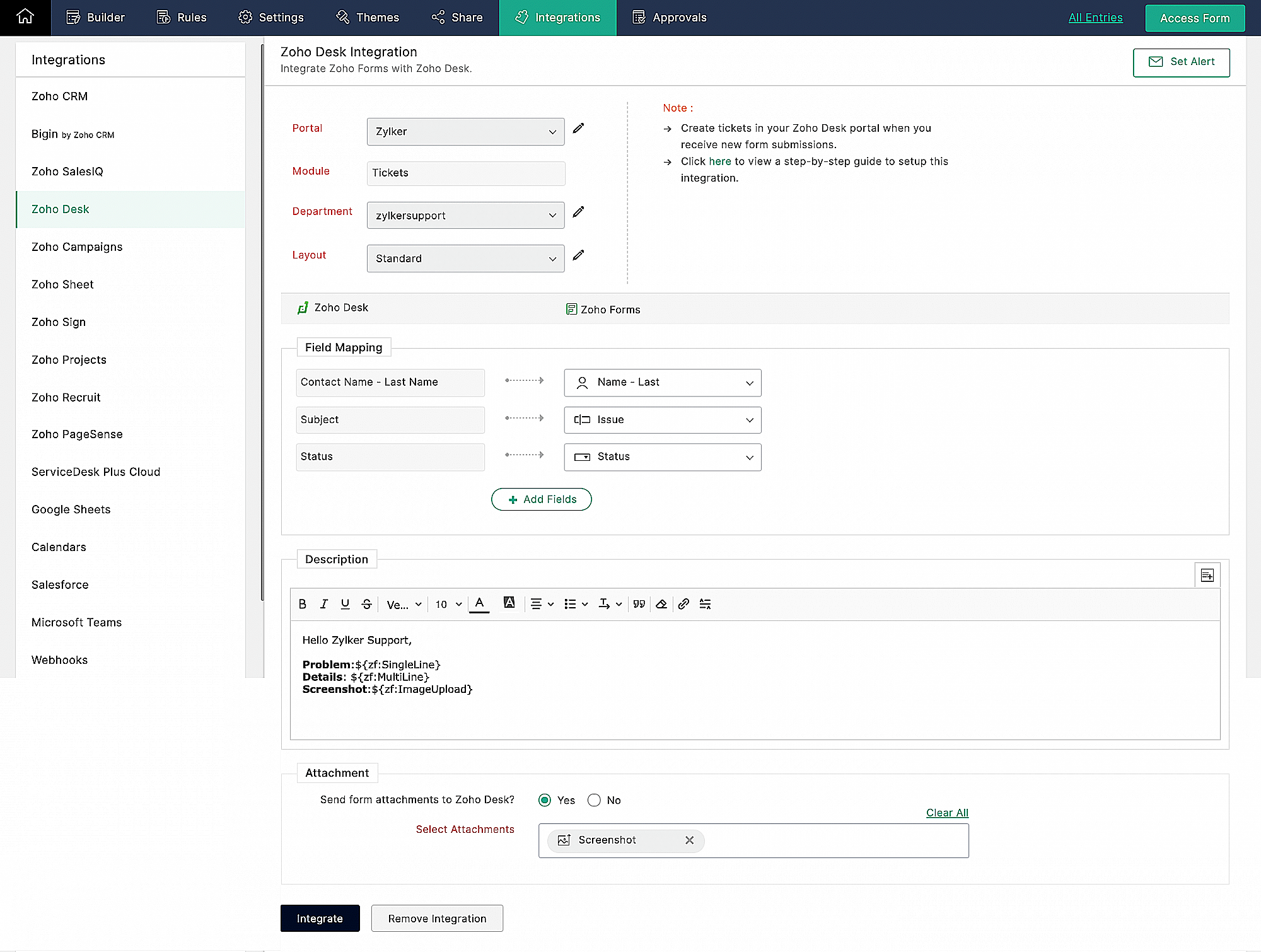


Klachtenmanagement

Zoho Desk, een Omnichannel Customer Service Software, is de eerste contextbewuste helpdesk software die bedrijven helpt zich te focussen op de klant. Met Zoho Desk kun je eenvoudig helpdesk tickets toewijzen, volgen en meldingen instellen. Je kunt Zoho Desk aanpassen aan je behoeften en zorgen voor tevredenheid bij de support van je huurders.
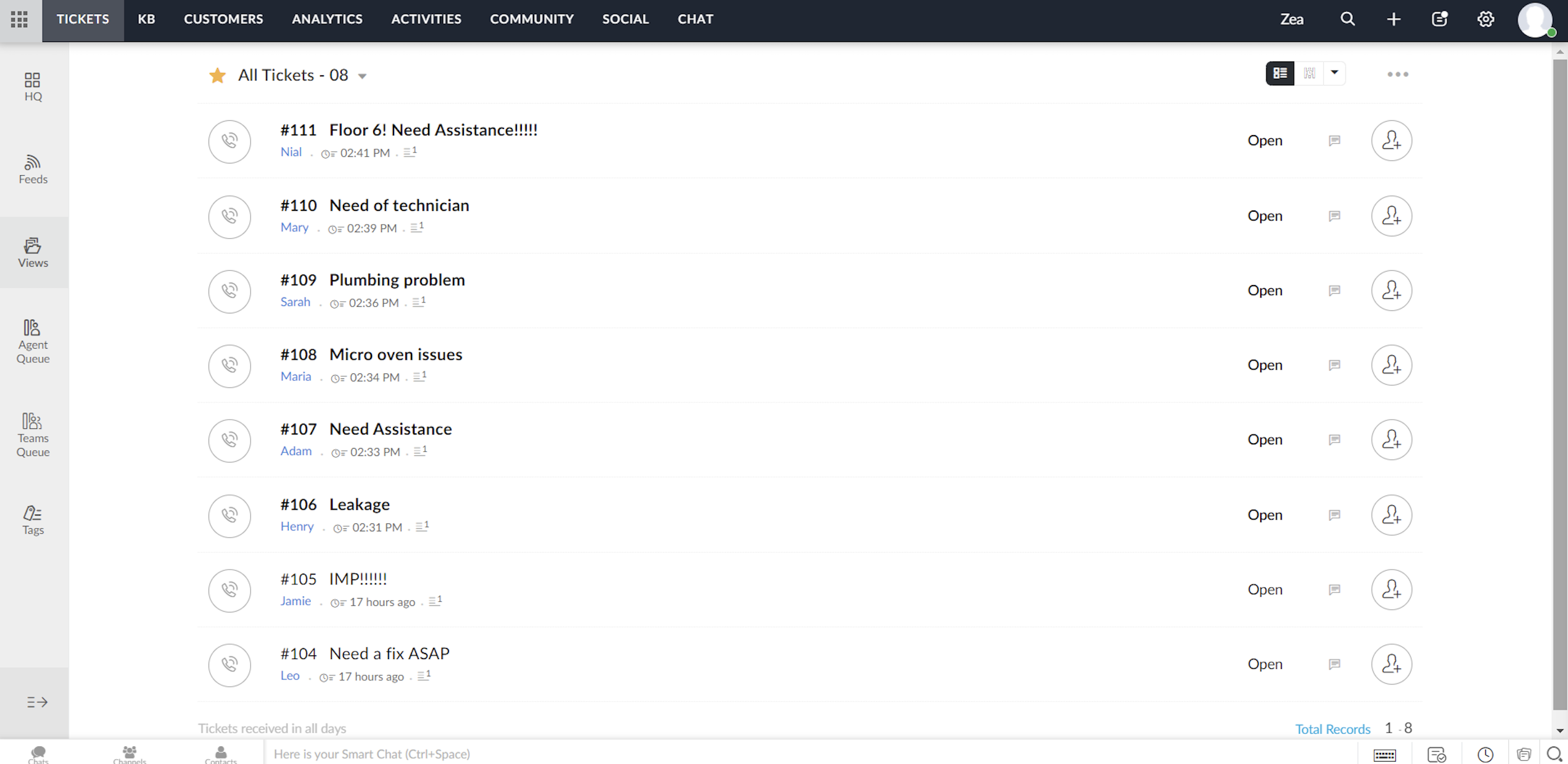


Elk ticket dat wordt ingediend door huurders die het klachtenformulier invullen, wordt toegewezen aan één van de agenten in Zoho Desk, waar het probleem wordt aangepakt en de nodige acties voor het probleem worden ondernomen.


Toewijzingsregel

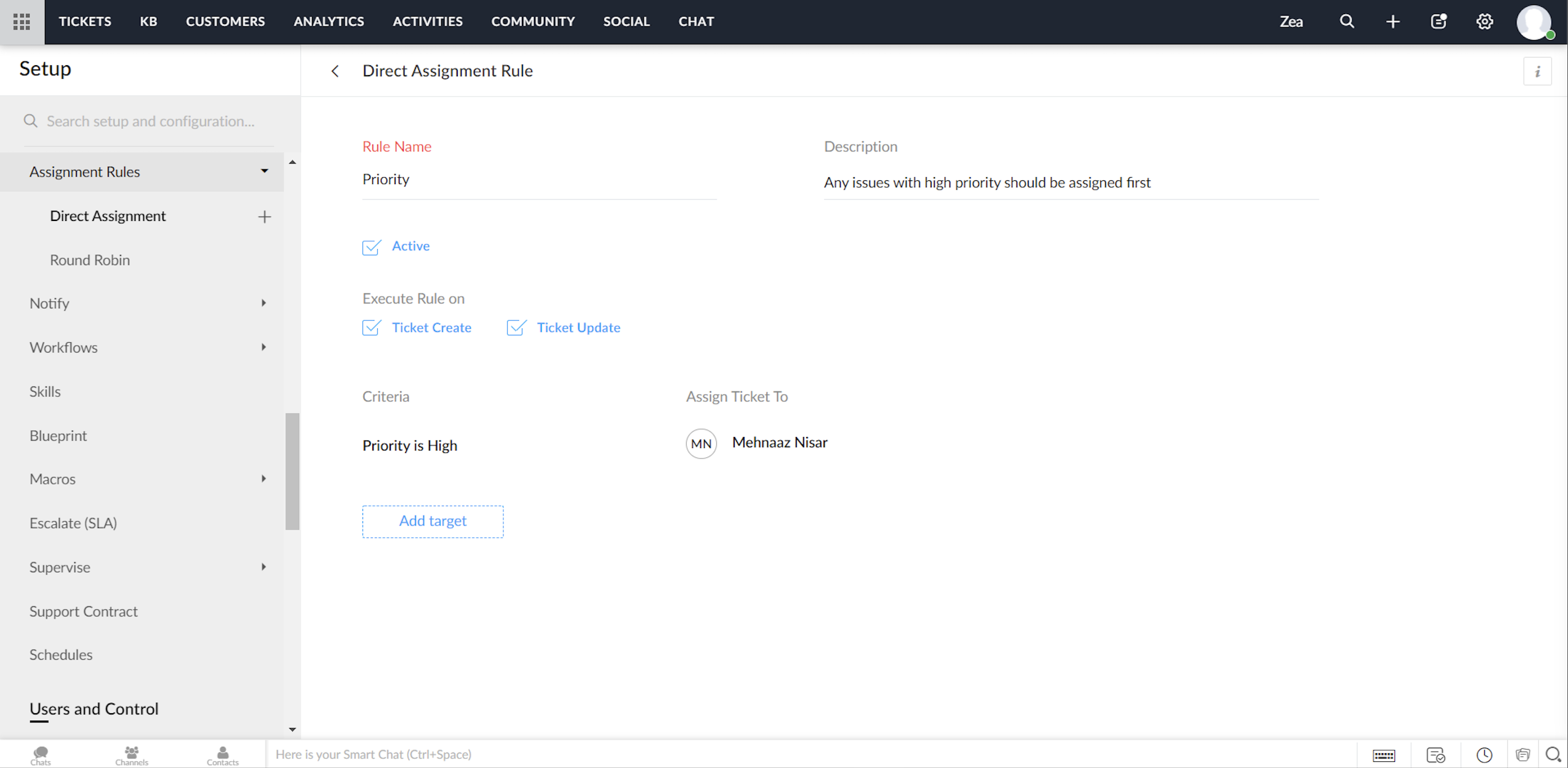
Ga tot in de fijnste details van ticketbeheer door, via het instellen van toewijzingsregels. Op deze manier hoef je niet elke keer dat er tickets binnenkomen handmatig tickets/klachten toe te wijzen aan agents. Het geeft je meer controle, en je team meer autonomie. Met behulp van toewijzingsregels wijs je automatisch de Tickets/Klachten toe die via Zoho Desk binnenkomen.


Directe toewijzing

De regel op basis van bepaalde gespecificeerde voorwaarden kan Tickets / Klachten naar de juiste afdeling leiden en er verder eigendomsrechten aan toekennen. Hoewel dit zinvol is voor nieuwe Tickets / Klachten, kun je ook een toewijzingsregel activeren wanneer Tickets / Klachten worden bijgewerkt in je helpdesk.


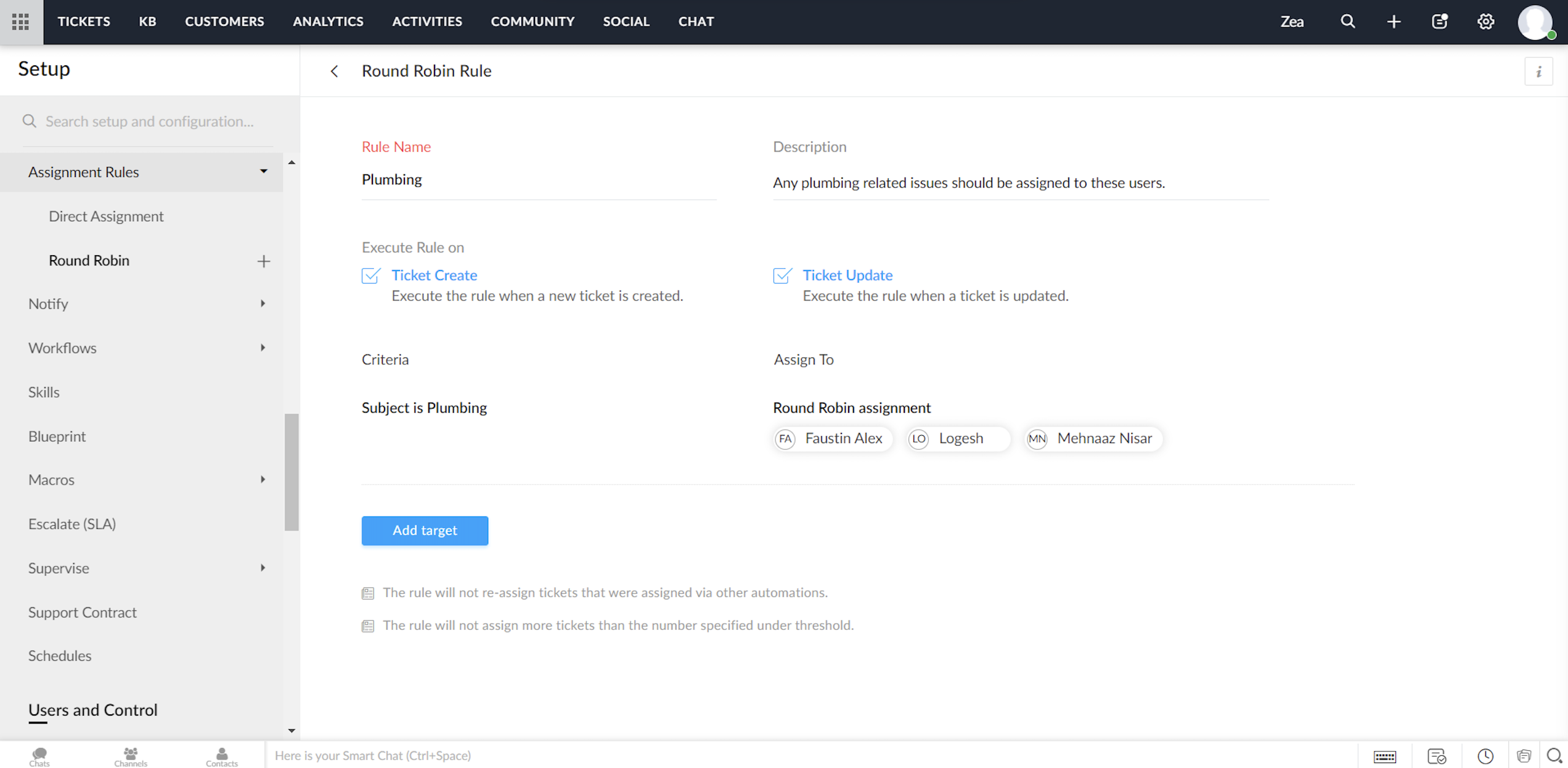
Round Robin

Round Robin is de eenvoudigste vorm van het automatisch toewijzen van tickets. Het verdeelt tickets/klachten gelijkmatig over al je agents op basis van het limiet dat je instelt. Met een minimale tussenkomst zorgt Round Robin ervoor dat geen enkel ticket niet wordt toegewezen. Ook zorgt de Round Robin regel ervoor dat de werkdruk van je agents in Zoho Desk in balans is. Dat wil zeggen, dat Tickets / Klachten eerst worden toegewezen aan de minst belaste agent.


Service Level Agreement (SLA)

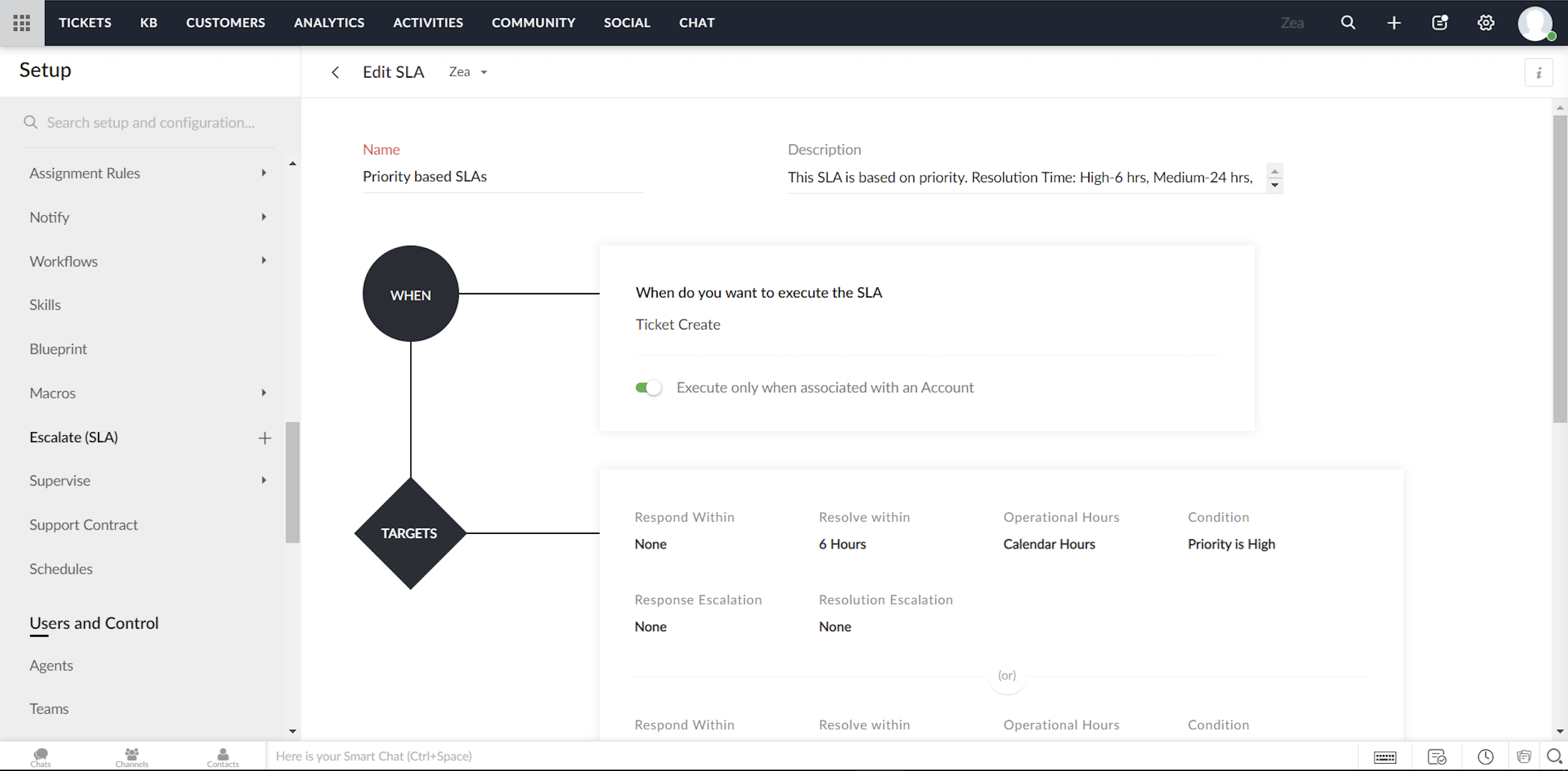
Een Service Level Agreement, of SLA, is de servicestandaard die je hebt afgesproken om aan je klanten te leveren. De serviceovereenkomst geeft de responstijden en de oplostijden weer die door je medewerkers worden aangeboden. Meestal bevat een SLA de uitvoeringscriteria en een reeks vooraf bepaalde voorwaarden of doelstellingen. Terwijl de uitvoeringscriteria bepalen wanneer een SLA moet worden geactiveerd, bevat het doel de acties die zullen worden uitgevoerd op de trigger. Je kunt acties configureren zoals reactietijd, oplostijd, het sturen van escalaties, het opnieuw toewijzen van Tickets/Klachten en het bijwerken van de prioriteit.                                                                                                   


Om te beginnen kunt je met Zoho Desk twee modellen van service level agreements volgen:

  • Je kunt SLA's maken voor individuele accounts in Zoho Desk

  • Je kunt een aantal SLA's maken (zoals Standard Support en Priority Support etc.) en deze delen over meerdere accounts.


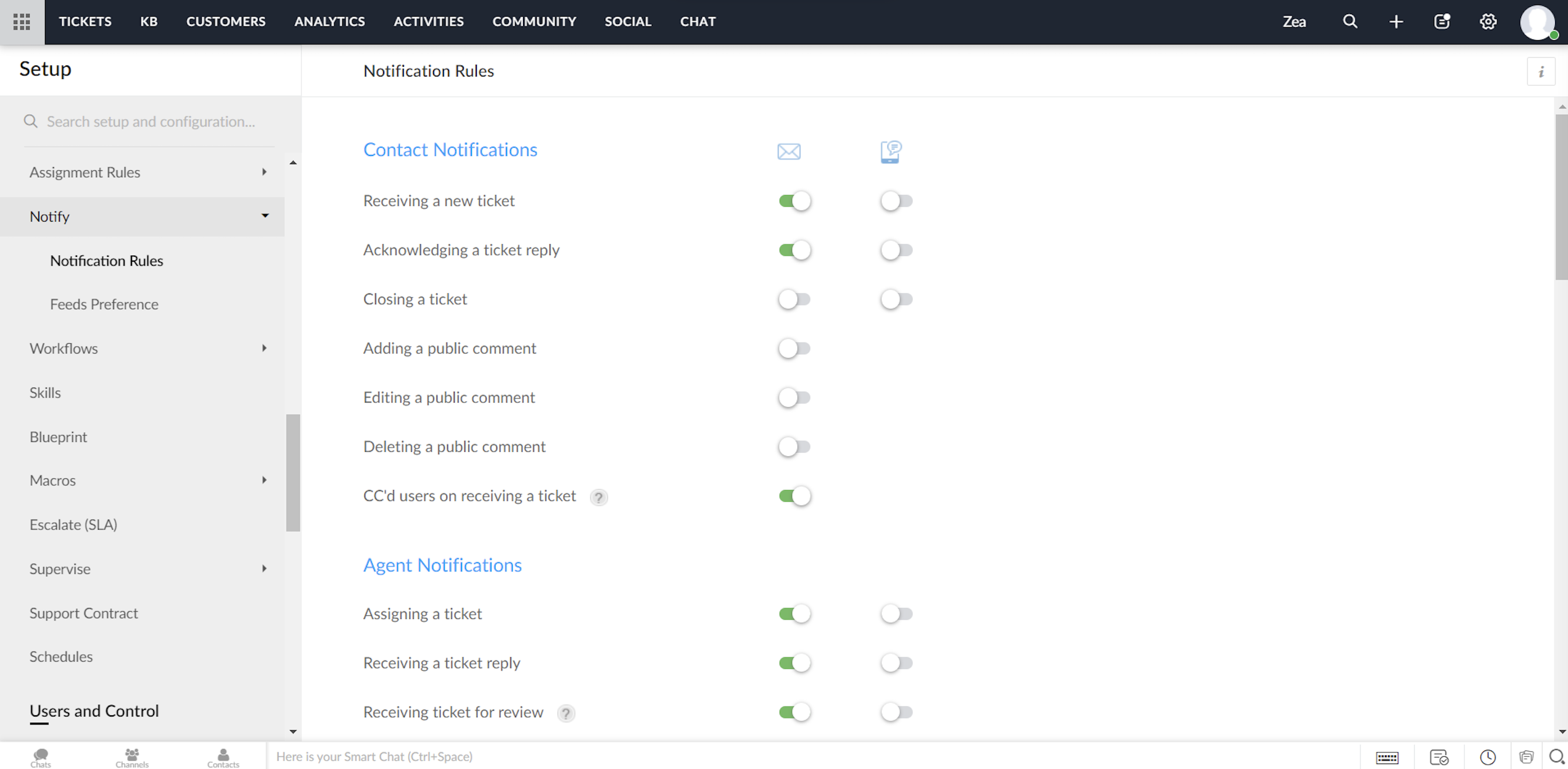
Notificatie regels/Triggers beheren in Zoho Desk

Zoho Desk biedt een standaardset meldingsregels die kunnen worden gebruikt om je klanten en agents te notificeren. Je kunt deze regels indien nodig activeren of deactiveren. Ook kunnen meldingen via e-mail of SMS worden verzonden.


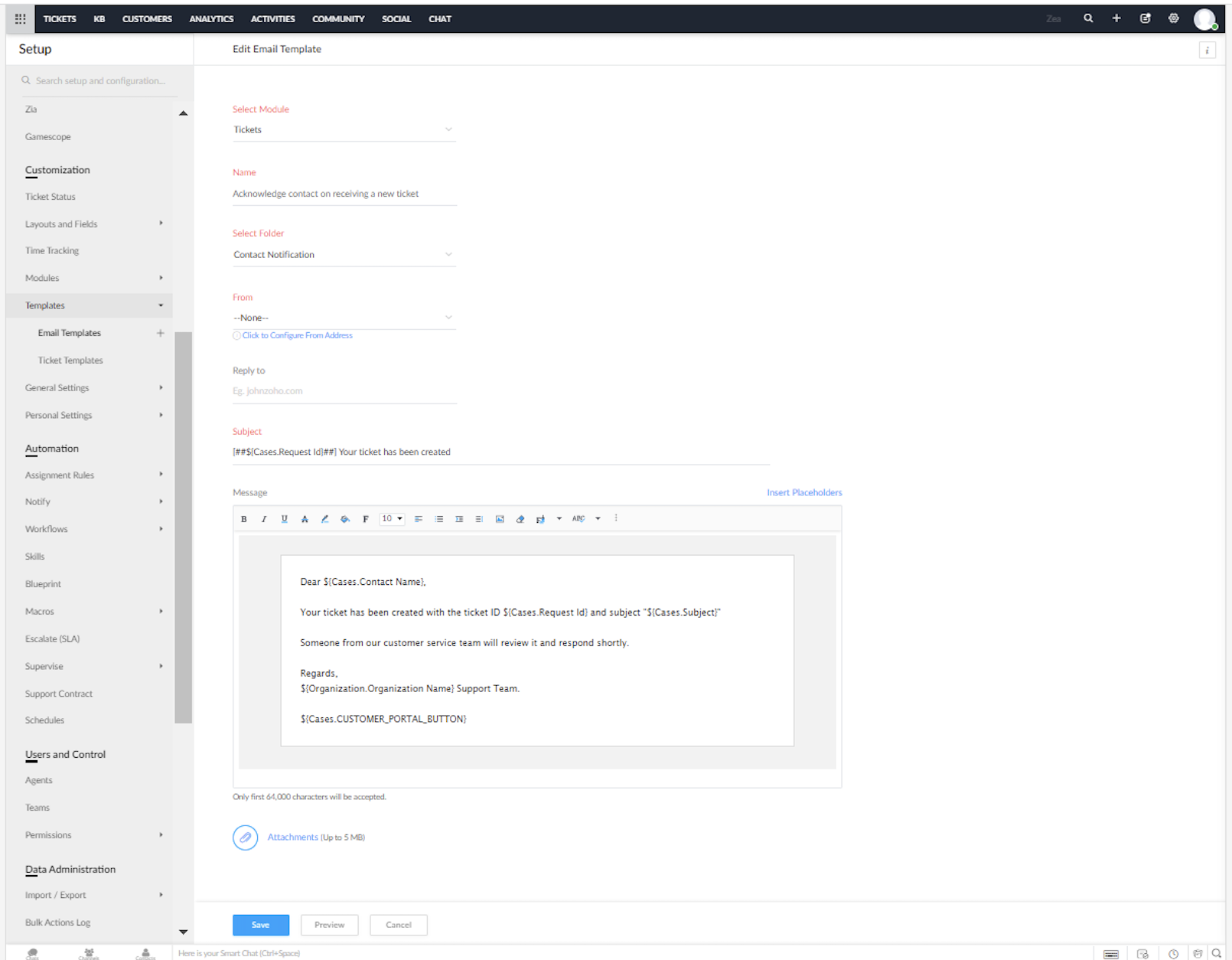
Je kunt de vooraf opgestelde e-mail en SMS sjablonen voor de meldingen in Zoho Desk aanpassen.


Heeft dit jou ook een beter beeld gegeven van het inzetten van Zoho Desk in combinatie met Zoho Forms? We lezen het graag in de opmerkingen hieronder.


Met vriendelijke groet,


    • Sticky Posts

    • Doe mee aan de Zoho Desk Meetup op 7 maart in Antwerpen

      Beste Community leden, Wij nodigen jullie graag uit voor de Community Meetup van Zoho Desk! Op 7 maart komen we bij elkaar in Antwerpen, samen met een klant en de Zoho Experts van Brainsolutions. Onze experts zullen een live demo presenteren en jouw vragen
    • Doe mee aan de Zoho Desk Meetup op 16 Februari in Utrecht

      Beste Community leden, Wij nodigen jullie graag uit voor de Community Meetup voor Zoho Desk! Op 16 februari komen we bij elkaar in Utrecht, samen met Fleetkennis en de Zoho Expert van Mobile XL. Onze experts zullen een live demo presenteren en jouw vragen
    • Wat is er nieuw in Zoho Desk 2023

      Beste Community leden, Hoeveel je ook van je klanten en je werk houdt, als klantenservice medewerker zul je zeker een aantal zware dagen tegenkomen. We hebben het dan over de dagen dat je een paar keer op de snooze-knop drukt, koffie morst op je favoriete
    • Tips & Tricks #10 Automatiseren met Zoho Desk Deel 2

      In deel 1 van het automatiseren met Zoho Desk las je een use case over een probleem in een appartementencomplex en hoe dit door gebruik te maken van Zoho Forms en Zoho Desk kan worden opgelost. In deel 2 lees je meer over het integreren van Zoho Forms
    • Tips & Tricks #09 Automatiseren met Zoho Desk Deel 1

      Beste Community leden, Zoals jullie weten hebben we in Nederland een woningtekort. Een oplossing hiervoor is de hoogbouw. Echter, om de de hoogte in te gaan moet er ook voor de juiste faciliteiten in flats worden gezorgd. Problemen kunnen we allemaal
    • Recent Topics

    • Pasting Images in Zoho Desk ignores cursor location

      My team has reported an issue which started recently where when we paste an image into a new or existing reply or comment, the pasted image seems to ignore the current cursor location instead paste itself at the last character present in the reply/comment,
    • No Ability to Rename Record Template PDFs in SendMail Task

      As highlighted previously in this post, we still have to deal with the limitation of not being able to rename a record template when sent as a PDF using the SendMail Task. This creates unnecessary complexity for what should be a simple operation, and
    • Automated entries past the current month in a calendar report

      Hi all, I have an automation problem. I have a form which on successfull entry adds either 5 or 10 more of these entries with a slight change so our customers can see it throug a calendar report on the webiste. The entry put in manually shows up perfectly
    • [Bug] WebAuthn passkey registration blocked on rpIds with TLDs longer than 6 characters (.accountant, .technology, etc.) — isValidDomain regex too strict

      Hi, Filing on behalf of an enterprise customer where Zoho Vault is deployed across the company. The Chrome extension blocks WebAuthn passkey registration on legitimate sites whose Relying Party ID (rpId) has a TLD longer than 6 letters. This affects every
    • Get Files Associated to Data Template via API

      I have a data template with multiple files associated to it, and trying to write a Deluge script that will fetch files associated with this data template. I created the script below based on the WorkDrive API documentation, one request uses the data templates
    • ZOHO CRM User management or role

      I need guidance regarding Zoho CRM licensing and user management. I want to purchase one Zoho CRM license and create multiple team users under the same account with the following hierarchy: Super Admin User Manager User Executive Users (with limited access)
    • Tip #72 - Exploring Technician Console: Setup Unattended Access - 'Insider Insights'

      Hello Zoho Assist Community! You joined a live session, diagnosed the issue, and got the user back on track. Fix delivered, user happy, session closed. But you know this machine. It needs a follow-up. A cleanup, a patch, maybe a deeper maintenance run.
    • #1 New to Zoho Invoice? Do this First!

      "Zoho Invoice has made our company's tax invoices look more elegant and professional. It is effortless to raise an invoice and track payments with it", says Arunkumar Balakrishnan, Director GA Technologies. Generating professional invoices usually begins
    • Mastering Zia Match Scores | Let's Talk Recruit

      Feeling overwhelmed by hundreds of resumes for every job? You’re not alone! Welcome back to Let’s Talk Recruit, where we break down Zoho Recruit’s features and hiring best practices into simple, actionable insights for recruiters. Imagine having an assistant
    • Automation Series #5: Supervisor Rule vs Schedule in Zoho Desk

      Supervisor Rules vs Schedules: Choosing the right time-based automation This post is part of the "Desk Automation Series," Chapter 1. Through this series, we will help you choose the right automation type in Zoho Desk by comparing commonly confused automations
    • Error when changing user permission from read only to user.

      Hi there, Ive tried to change one of my users to be able to edit, however i kept getting the error user license exceed.
    • Add Zia matching jobs on the main screen of candidates module

      It will be good if it is added in the main screen as a column so that we can quickly hover over and see if they match for any job openings. That will save from two additional clicks
    • How do I change the Subject header when I reply please, it contains Re which I want to remove.

      Hi Zohodesk, When a customer logs a call we have amended the Acknowledge on new Ticket template so the subject header has "Ticket Id" at the start of it.  When we reply the customer gets Re: and then the Id and I can't see a template for this? Can you
    • Insert Template not inserting

      I have been using the "Insert Template" feature for years and I use it every single working day. Yesterday it was working fine. Today, on two different browsers (Chrome and Edge), I can select "Insert Template", select the template I want to insert, but
    • Need Help Preventing Overselling in Zoho Inventory

      Hi fellow Zoho Inventory users, I'm reaching out for advice on managing inventory control in our growing business. We've recently encountered situations where sales orders get confirmed despite insufficient stock, creating operational challenges. Our
    • Conditional Layouts On Multi Select Field

      How we can use Conditional Layouts On Multi Select Field field? Please help.
    • Smart Feature Compatibility Indicators for CRM Field

      Zoho CRM offers a wide range of field types and advanced customization options. However, several field types have feature-specific limitations that are currently documented only in help articles. For example, while configuring a Rich Text field, admins
    • Deactivate Zoho CRM for everyone

      We would like to deactivate Zoho CRM for everyone. How can we do that?
    • Best sales insights for target accounts?

      Question for all the sales power-users out there: I would like to gain insights from Zoho CRM for a rotating list of target accounts. Each Outside Salesperson has 5 target accounts, and they can change these targets quarterly with management approval.
    • Building extensions #2: Publishing and sharing Zoho Sprints extensions using Sigma Cloud Editor

      Welcome to a new post on Zoho Sprints extension development! In our last post, we explored how to create, test, and edit an extension for Zoho Sprints. In this post, we'll take a look at how to publish and share an extension. Publishing and sharing extensions
    • Set Custom Icon for Custom Modules in new Zoho CRM UI

    • Custom return paths

      How do I delete a custom return path subdomain created in error?
    • How do you paginate in schedule function

      How does someone paginate in schedule function in deluge is there an ideal way to do this apart from hardcoding max pages
    • Mail bounces due to bad reputation

      Good evening. I'm seeing these errors from both hotmail/outlook and yahoo, as well as hard bounce from Virgin Media and talktalk for some time now. Bounce category: Connection issues Reason: uncategorized-bounce Message: 4.7.650 The mail server [136.143.188.237]
    • What is a realistic turnaround time for account review for ZeptoMail?

      On signing up it said 2-3 business days. I am on business-day 6 and have had zero contact of any kind. No follow-up questions, no approval or decline. Attempts to "leave a message" or use the "Contact Us" form have just vanished without a trace. It still
    • Calendar in Global View

      When you are working with multiple projects, staying on track with all project activities requires a centralized view of all your project activities. Especially in a work environment, users tend to miss out on their day-to-day activities when it doesn't
    • My email sending has beed blocked due to high bounce rate. NEED HELP

      User ID: 886739811 Dear Zoho Team, I hope this message finds you well. My account (User ID: 886739811) was blocked from sending emails last week due to an unusually high bounce rate. This spike was caused by a bot attack on our platform, which led to
    • Cliq iOS can't see shared screen

      Hello, I had this morning a video call with a colleague. She is using Cliq Desktop MacOS and wanted to share her screen with me. I'm on iPad. I noticed, while she shared her screen, I could only see her video, but not the shared screen... Does Cliq iOS is able to display shared screen, or is it somewhere else to be found ? Regards
    • What is the difference between workflows, journeys, and blueprints?

      I semi-understand what they are individually but they all say they can be used to automate processes in your CRM. What makes these three different? What are the benefits and cons of using each?
    • How to Migrate from MDaemon to Zoho Mail Account?

      Hi there, Zoho Mail is one of the most popular as well as leading competitor for several cloud email service providers. It is It provide cloud email service as well as desktop based email client. In recent years people are migrating from third party cloud servers to Zoho Mail. The reasons are plenty, i.e. the user interface, security, high performance and many countless amazing features. On the other hand MDaemon Mail (aka WorldClient) is also popular among cloud email servers. But there are some
    • Ask the Experts: A Live Q&A Session

      We’re back with another exciting edition of the Ask the Experts series, this time exclusively for our Zoho Recruit users from the USA & Canada regions! Whether you're trying to configure your account better, have questions about customization, or want
    • Tip #7: Customize the appointment confirmation page

      A confirmation page plays a crucial role in creating the first impression, as that's where customers land when booking with you. It shows your brand identity, engages your audience, and drives more conversions. Yet, this section is often overlooked when
    • Add Image Upload Field to Zoho Bookings Registration Form

      Hi, We would like to request the addition of an image upload field to the Zoho Bookings registration form. Currently, Zoho Bookings only supports text-based fields (e.g., Single Line, Multi-Line, Email, Checkbox, Dropdown, Radio Button, and Date), but
    • Meeting integration with Otter.ai

      Would love for an integration with an AI transcription service like Otter.ai to be integrated with Zoho Meeting. Thanks
    • [Free webinar] AI agents in Zoho Creator - Creator Tech Connect

      Hello everyone, We’re excited to invite you to another edition of the Creator Tech Connect webinar. About Creator Tech Connect The Creator Tech Connect series is a free monthly webinar featuring in-depth technical sessions designed for developers, administrators,
    • プロフェッショナルプランで、見積作成時に原価と利益率を確認する代替案について

      現在、Zoho CRMのプロフェッショナルプランを利用しています。 海外から輸入した商品を販売しており、商品ごとに原価が異なるため、見積書を作成する際(または保存直後)に、その見積の原価合計と利益率を確認したいと考えています。 しかし、現在のプランではDeluge(関数)が使えず、見積書の「商品詳細」の項目をカスタマイズすることもできません。 1,見積作成画面で商品の原価を参照できるような、標準機能での工夫はありますか? 2,レポート機能を使って、見積単位での原価・利益を算出する方法はありますか?
    • Announcing Zoho Sheet desktop app for macOS and Windows (Beta)

      Hello Sheet users, We know you’ve been waiting for this one. It has always been the top priority on our roadmap to provide a single native desktop app for macOS and Windows that works both online and offline. Today, we are excited to announce that the
    • How to create a directory report from one-to-many relationship

      Hi all, Newbie here. I'm converting an Access DB to Creator. I've learned Forms are tables and Reports are used to edit table rows, not Forms. I've got the data loaded and can maintain it with the Reports already done. I've done filtering and sorting,
    • SalesIQ Email Delivery Issues to Microsoft

      Is anyone else having delivery issues to Hotmail, Outlook, and Live inboxes when sending transcripts and replies via email from SalesIQ? We’ve detected that emails sent from SalesIQ to these accounts aren't arriving—they don’t even bounce back; they simply
    • Moving Project Task to other parent not possible

      We are trying to move an existing Zoho Projects task to a different parent task via API. Example: Task ID: 289214000001385113 Current parent: 289214000001281044 New parent: 289214000001281045 We tested updating the task with: taskParam.put("parent_task_id",
    • Next Page