Hello Users!
We're back with another round of updates for Zoho Analytics. This month's release focuses on giving you greater flexibility in how you visualize, manage, and act on your data - with new features like custom visualizations, remote MCP server, geo maps and dashboard enhancements, code governance, and more. Here's what is new.

Custom Visualizations
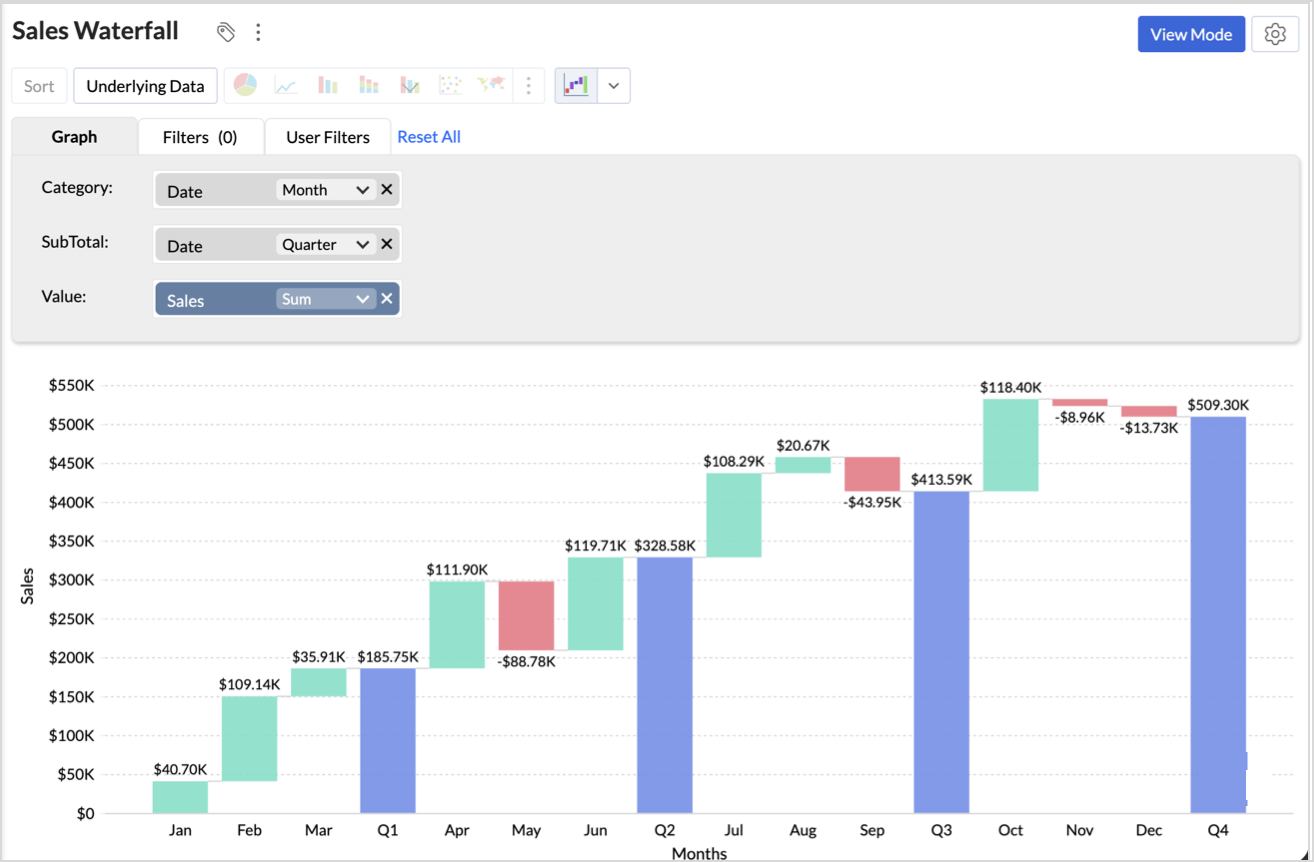
One of your most anticipated features is finally here! Custom Visualizations lets you go beyond the built-in chart library and bring your own visual elements to life using third-party JavaScript libraries or custom scripts. Design industry-specific diagrams, specialized plots, or any unique visual format your reporting demands - then configure user-defined settings and manage them all. If you've ever felt limited by standard chart types, this one's for you. Try it out and see what's possible.
Click here to learn more.
Databridge Sharing
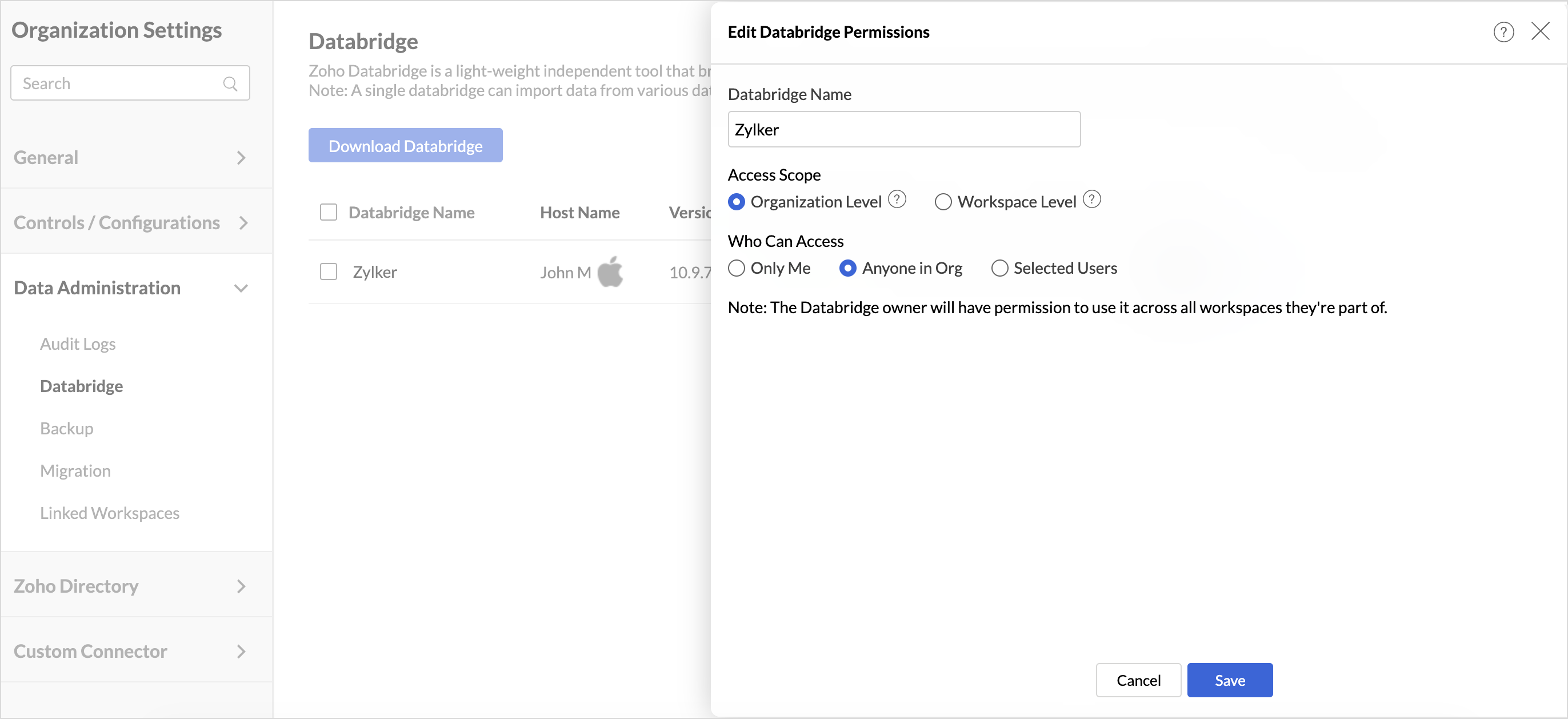
Collaboration just got easier with Databridge Sharing. Multiple users can now monitor, manage, and maintain DataBridge setups without depending on a single owner. This eliminates bottlenecks, ensures continuity, and gives teams the flexibility to manage data pipelines together - keeping your data flowing without interruption.
Click here to learn more.
Multiple Schedules for Tables
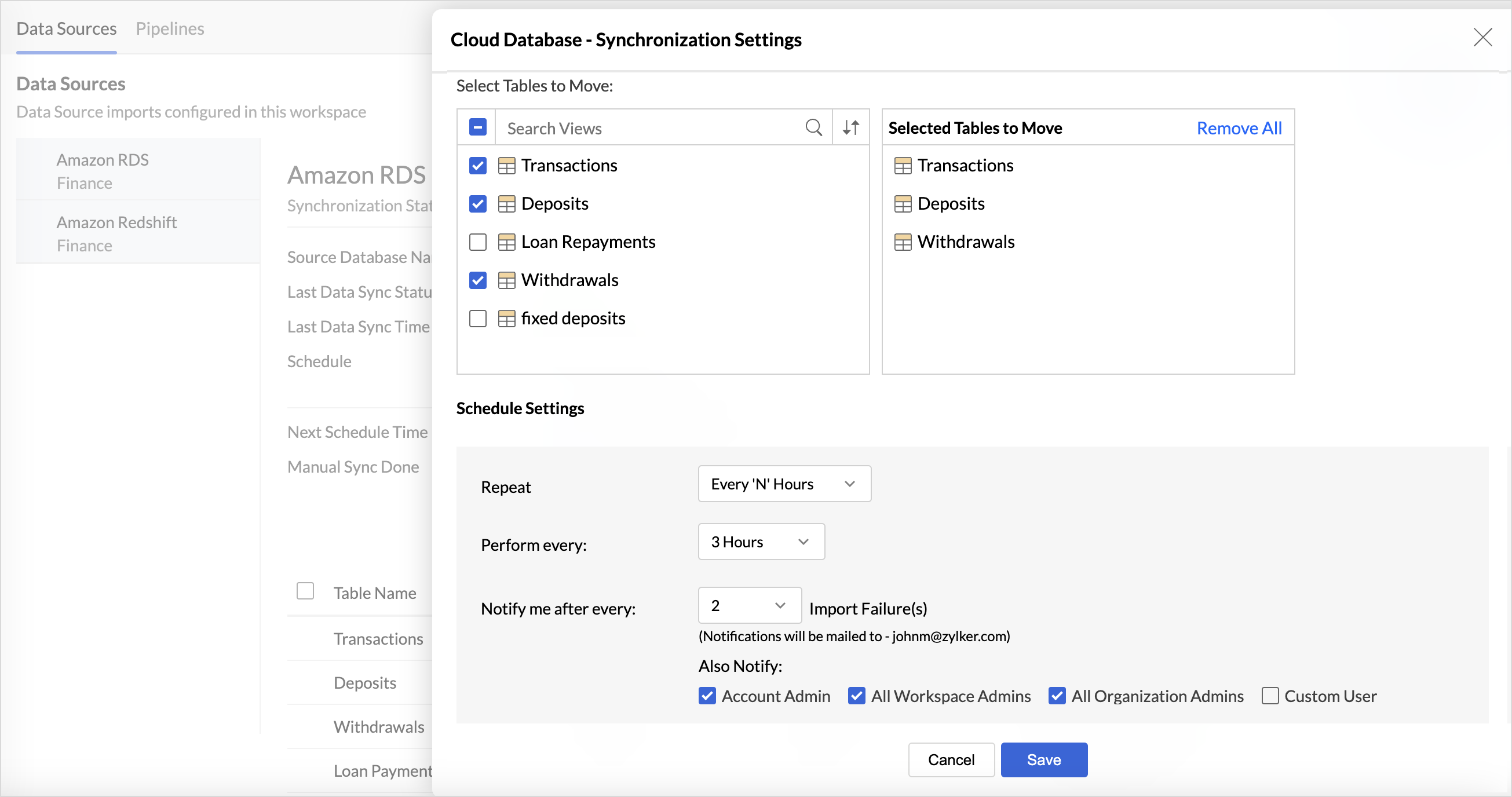
Multiple import schedules were previously supported only for databases. We've now extended this capability to more data sources like Elasticsearch, Local Files via Databridge, Data Lakes, and OData. This gives you greater flexibility to control refresh frequency across different data sources, ensuring your reports are always working with the most relevant data.
Click here to learn more.
Drill Actions
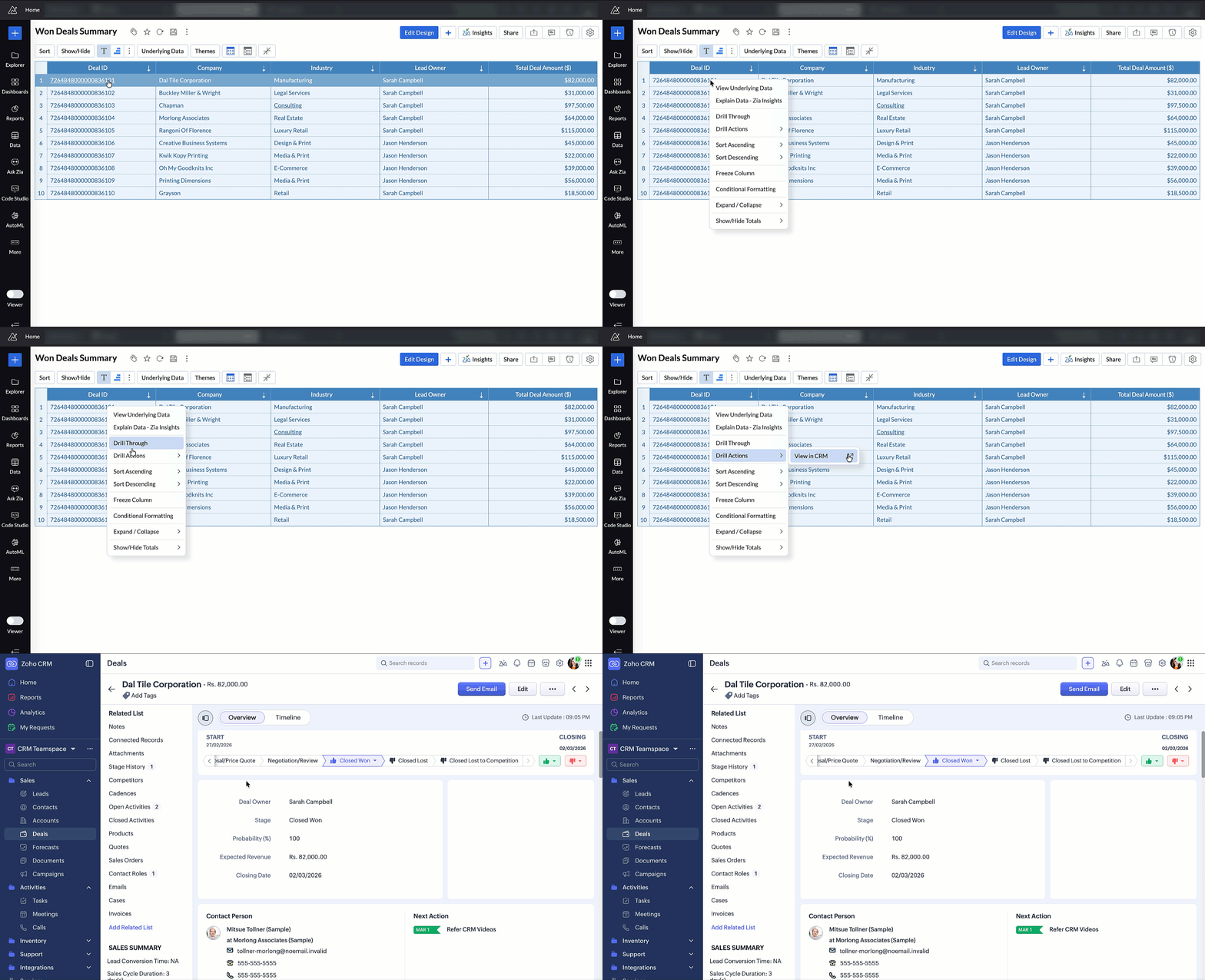
Drill Actions empower users to go beyond analysis and take operational action directly from their reports. Open records, create new entries, update information, or trigger workflows - all without leaving your analytics environment. This bridges the gap between insight and action, making your data truly actionable.
Click here to learn more.
Remote MCP Server for Zoho Analytics
We've enhanced our MCP Server support with a new Remote MCP Server setup for Zoho Analytics. Your organization can now host a single, centrally managed MCP Server instance and share it with all users over HTTPS - eliminating the need for per-user Docker installs, local credential management, or manual update cycles. One setup, managed centrally, available to everyone.
Click here to learn more.
Code Studio – Domain Allowed List
Security and governance in Code Studio just got stronger. You can now define a Domain Allowed List for your Python scripts - specifying which external APIs and web services are permitted to be accessed. This prevents unauthorized data transfer and gives your organization precise control over external connectivity in code-driven workflows.
Click here to learn more.
Drill Through in Widgets
Drill Through is now available in dashboard widgets. Click on a data point in any widget to navigate to a detailed underlying report, enabling faster root-cause analysis and deeper exploration from your dashboard.
Click here to learn more.
Map Zoom Sync in Dashboards
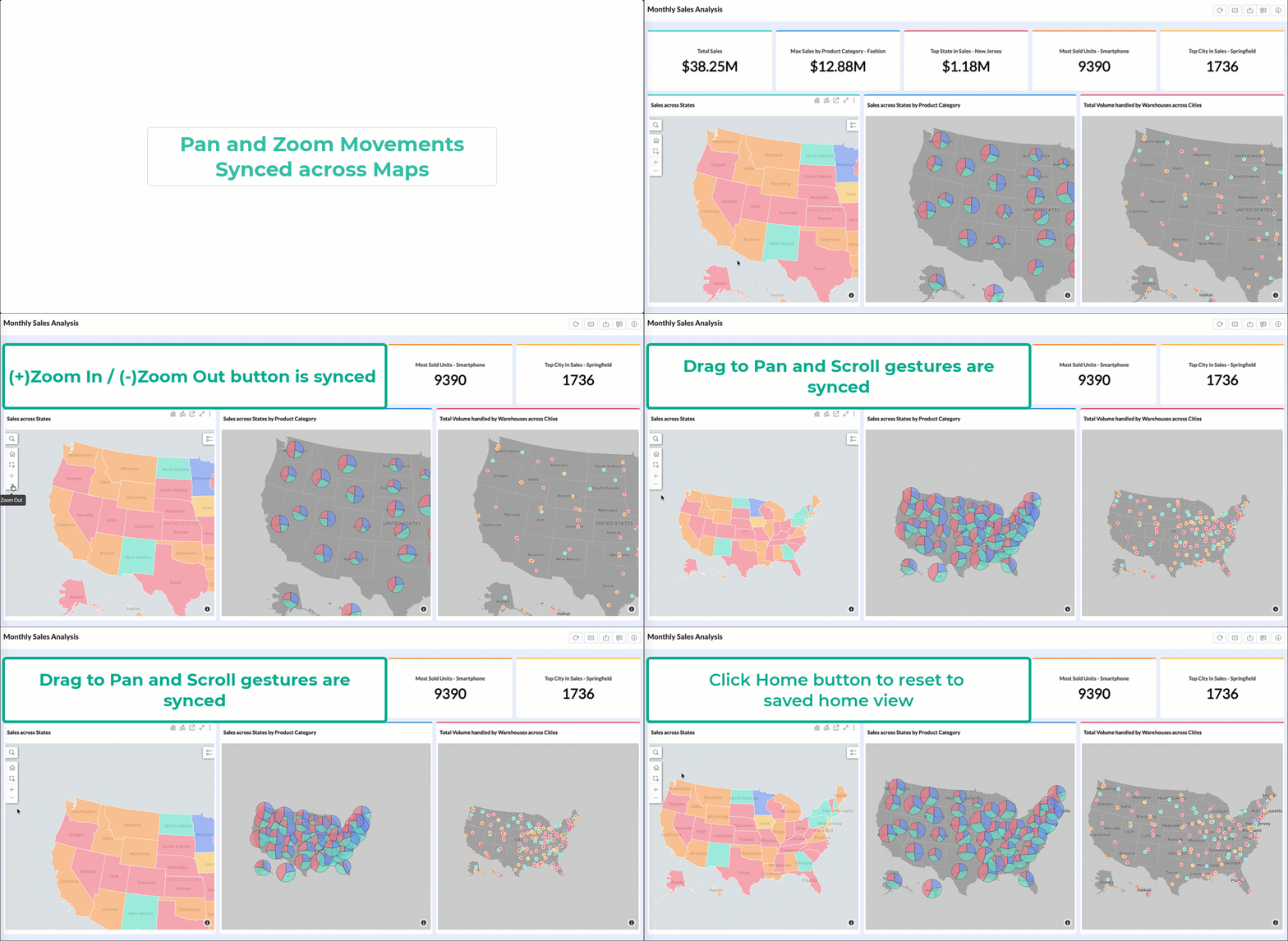
When your dashboard contains multiple maps, keeping them in sync is now effortless. Map Zoom Sync lets you synchronize pan and zoom movements across all maps in a dashboard simultaneously. Navigate one map, and all others follow - making geographic comparisons and multi-region analyses far more intuitive.
Click here to learn more.
US Hex Bin Projection for Geo Maps
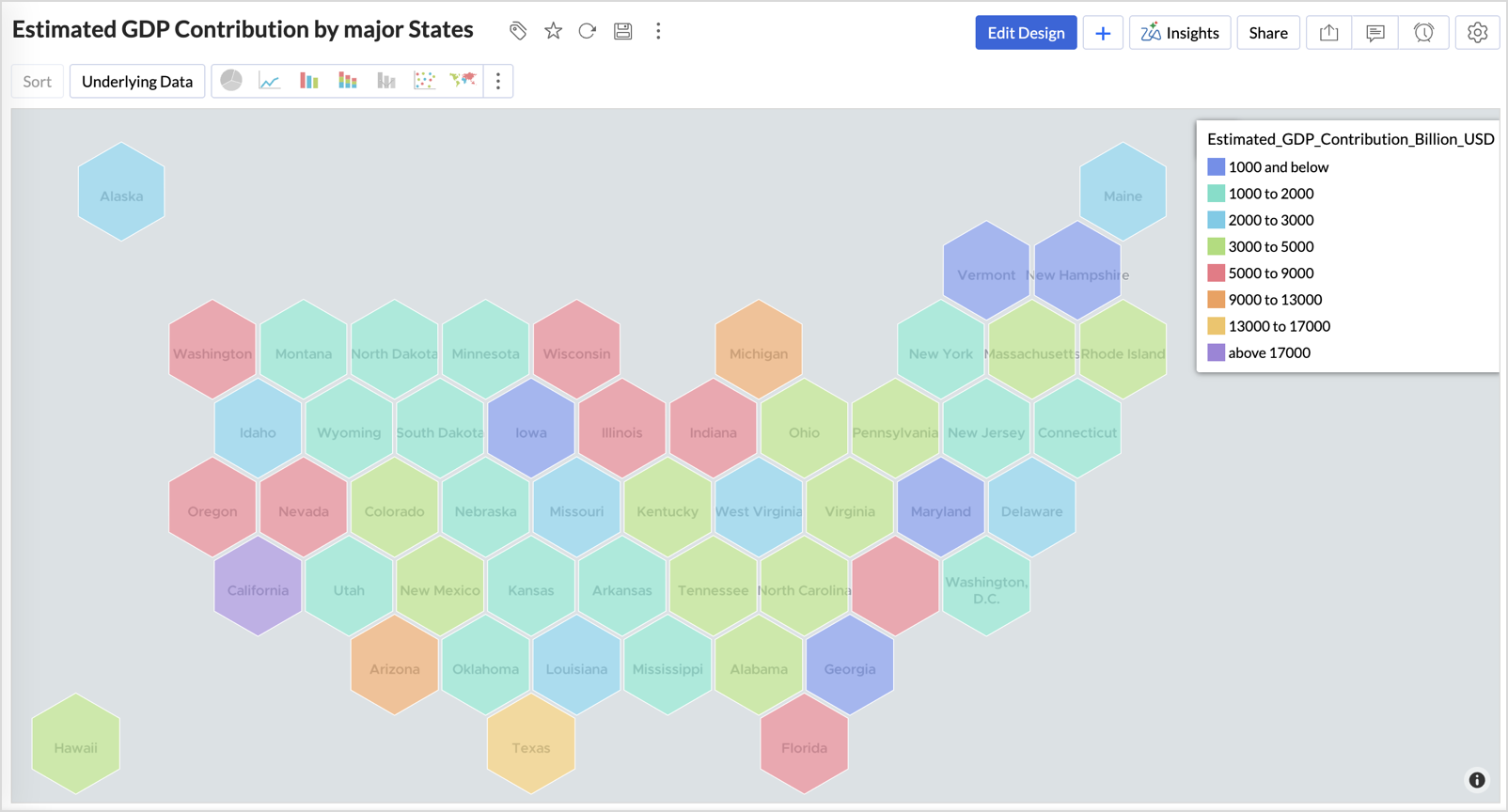
Geo map visualizations now support US Hex Bin projection - a clean, equal-area representation of US state-level data that eliminates the visual bias of traditional geographic maps. Each state is represented as a uniform hexagon, making it easier to compare data across states regardless of their physical size.
Click here to learn more.
Data Bars with Sparkline in Pivot Tables
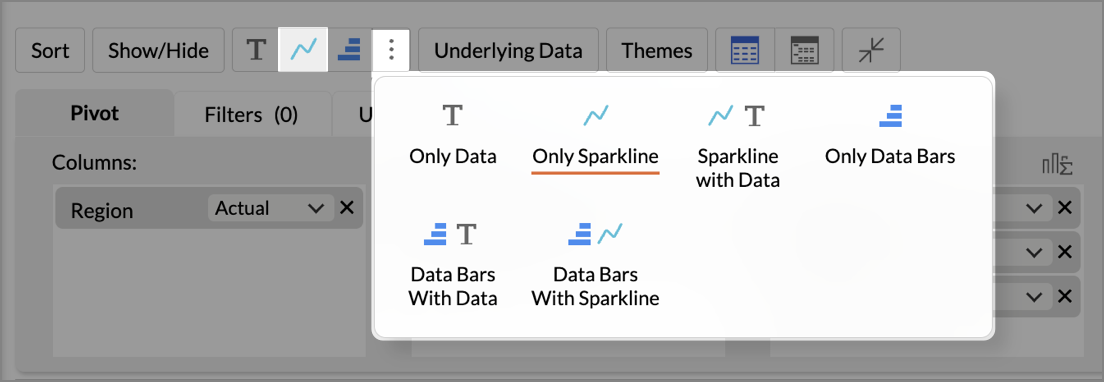
You can now display Data Bars and Sparklines together in pivot tables for richer cell-level insights. This helps you compare values and view trends in a single view, making pivot analysis faster and more intuitive - no need to toggle between separate charts and tables.
Click here to learn more.
New Business App Connectors
We've expanded our integration ecosystem with four powerful new connectors:
Zoho ERP
Connect Zoho ERP with Zoho Analytics to analyze your core business processes end-to-end. From procurement and production to finance and distribution, build comprehensive dashboards that give your leadership team a real-time pulse on operational performance.
Click here to learn more.
PayPal
Bring your PayPal transaction data into Zoho Analytics to analyze payment trends, revenue streams, refund patterns, and customer purchase behavior. Track key financial metrics and gain deeper visibility into your payment operations.
Click here to learn more.
Zoho Spend
Integrate Zoho Spend with Zoho Analytics to gain complete visibility into your organizational spending. Analyze expense trends, policy compliance, vendor patterns, and budget utilization — all in one place - to optimize spend management and reduce costs.
Click here to learn more.
Odoo Online
Connect your Odoo Online data with Zoho Analytics to gain a unified view of your business operations. Analyze sales, inventory, finance, and HR data with ready-made reports and dashboards to make faster, data-driven decisions across your entire organization.
Click here to learn more.
These updates bring enhanced functionality, deeper analytical capabilities, and improved workflows to your Zoho Analytics experience. Head to your workspace today and start exploring!
Recent Topics
Does Zoho has chatroom/chatbot url feature?
Hi Zoho community! I’m looking for a quick "Yes/No" answer for my dev team regarding Zoho’s capabilities. We currently use Zoho Desk for our Service Team and Zoho CRM for our Marketing Team to bring both functions under one platform. Our question: Does
One Support Email Managed By Multiple Departments
Hello, We use one support email (support@company.com). Incoming emails come to the "Support Department" and based on what the customer is asking, we route that ticket to different departments (billing, technical support, etc.). When users in these different
What's New in Zoho Analytics - February 2026
Hello Users! We're back with another round of updates for Zoho Analytics. This month's release focuses on giving you greater flexibility in how you visualize, manage, and act on your data - with new features like custom visualizations, remote MCP server,
Is it Possible to Modify Standard Report Urls
Is there a way to permanently modify standard report Urls? Use case: Suppose I have a Products report. Showing list as timeline, calendar, or kanban doesn't make sense. Want to hide that from users by adding #Report:Products?zc_ShowAs=false&zc_Print=false
Updated font library: New font styles and custom font options in Zoho Sheet
Zoho Sheet's font library now supports 500+ font styles in 60+ languages! The updated font library is stacked with new font styles, and some of the previously available font styles have been replaced with equivalent options. There are two ways you can
scope for phonebridge in CRM and phonebridge API documentation
Hi I cannot find the scope to be used for phonebridge in CRM API V2 calls. I am getting OAUTH_SCOPE_MISMATCH for scope group ZohoCRM.modules.ALL,ZohoCRM.setttings.ALL Also I am not able to locate the documentation for the same, All I have is phonebridge
Create custom rollup summary fields in Zoho CRM
Hello everyone, In Zoho CRM, rollup summary fields have been essential tools for summarizing data across related records and enabling users to gain quick insights without having to jump across modules. Previously, only predefined summary functions were
Job Alerts for Candidates
hi All, I have 2 questions relating to sharing job details with candidates. 1. is there a way to notify candidates that meet certain criteria of current jobs available? eg. I run a candidate search, and identify 50 candidates that might be suitable. Can
Zoho Wiki or new Zoho Learn
We are currently evaluating if we should move off confluence. At present in Confluence we have multiple levels within our documentation but with learn it looks like you can only have Space - Manual - Chapter Is it possible to have levels below Chapter? Also the same question for the existing wiki, can I have more sub-levels?
Fix image at bottom of a page fot automatic proposal creation
I'm working on a proposal document to automate our proposal creation process. So far it works fine, but I experience some problems with an image I want to have fixed at the bottom of the page AND above the footer. This section of the document consists
Can't scroll the page down unless I refresh the page
Hello, This issue has been going on with me and a lot of other users in my organization, we can't scroll down! the scrolling side bar doesn't appear and scrolling down through mouse or keyboard keys doesn't work, it seems that the page just ends in the
Price List
II want to restrict the items to display in sales, quote, etc for which custom rates are added in price list. How I can do the same in Zoho books
Let’s Talk Recruit: Still switching tabs to source?
Welcome back to the Let’s Talk Recruit series. Let’s talk about how you actually source talent. Do you open multiple job boards every single time a role opens? Run the same keyword searches you ran yesterday? Download, upload, rename, and then do it again
Kaizen #231 - Embedding Zoho Desk Tickets in Zoho CRM
Hello, CRM Wizards! This week, let us enhance cross-team visibility between Zoho CRM and Zoho Desk. We will use the Zoho Request Client inside a Related List widget to display open Zoho Desk tickets directly within the Contact record in Zoho CRM. This
EU Problem
Hi all, we've been facing issues with the Europe data center for two days. It's starting to disrupt our daily workflow. Any word on when this will be resolved?
Introducing a smarter, faster, and more flexible charting experience
Hello Zoho Sheet users, We're delighted to share the latest news about a major update to charts in Zoho Sheet! The new version supports dynamic data ranges, granular styling options, faster loading, and other interesting enhancements that allow you to
Introducing Job Alerts
Keeping candidates engaged beyond their first application is one of the most consistent hiring challenges. Many interested candidates simply do not revisit career sites regularly, which can result in missed opportunities and reduced re-applications. To
Where is the settings option in zoho writer?
hi, my zoho writer on windows has menu fonts too large. where do i find the settings to change this option? my screen resolution is correct and other apps/softwares in windows have no issues. regards
Client Script | Update - Client Script Support For Custom Buttons
Hello everyone! We are excited to announce one of the most requested features - Client Script support for Custom Buttons. This enhancement lets you run custom logic on button actions, giving you greater flexibility and control over your user interactions.
Enhance Sign CRM integration
Hello all, I'm working on a custom Deluge script to enhance the integration between Zoho CRM and Sign by using a writer merge template for additional flexibility. I want to replicate the post-sign document integration that exists between CRM and Sign
Task status - completed - other options
I have a dumb question I know i can make custom statuses for the tasks - but is there anyway to make additional "completed" statuses like for instance if i have a task "call back customer" and i leave a vm for them to call back marking it "completed -
Bank feed integration First Abu Dhabi Bank (FAB) to Zoho? (UAE)
Hello everyone, Is First Abu Dhabi Bank in the list of banks available for bank feed integration with Zoho Books? Thank you.
How to Export Filtered List of Contacts?
This seems like it should be simple, but I'm stymied. I'm trying to export a filtered list of my Contacts for analysis in a spreadsheet. The use case is that I'm an ecom business based in the US. The bulk of our customers are individuals stored as Contacts.
Possible to Turn Off Automatic Notifications for Approvals?
Hello, This is another question regarding the approval process. First a bit of background: Each of our accounts is assigned a rank based on potential sales. In Zoho, the account rank field is a drop-down with the 5 rank levels and is located on the account
Quick Create needs Client Script support
As per the title. We need client scripts to apply at a Quick Create level. We enforce logic on the form to ensure data quality, automate field values, etc. However, all this is lost when a user attempts a "Quick Create". It is disappointing because, from
can we add product images in Zoho CRM Quote PDF template?
I want to create a quotation format in Zoho CRM similar to the attached PDF, where each product is displayed in a table with rpoduct image I need the product image to appear inside the line items section of the quote. However, while checking the Quote
Does Zoho Writer have Dropdowns
I want to add a drop down field in Zoho writer. Is this possible?
system not picking my default custom service report template
Can you tell me why when we create a service report always pick the (standard old) template? Even when I have a custom service report selected as Default.
Facturation électronique 2026 - obligation dès le 1er septembre 2026
Bonjour, Je me permets de réagir à divers posts publiés ici et là concernant le projet de E-Invoicing, dans le cadre de la facturation électronique prévue très prochainement. Dans le cadre du passage à la facturation électronique pour les entreprises,
Connecting Multiple WooCommerce Stores to a Single Zoho Marketing Automation Account
Is it possible to connect multiple WooCommerce stores to a single Zoho Marketing Automation account?
Service Title in Service Report Template Builder
I am currently working on the Service Report Template Builder in Zoho FSM. I have created three separate service report templates for different workflows: Preventive Maintenance Report Requested Service Report Installation Report My issue is that I cannot
Update: New Security Admin Role
Hello Zoho Directory Admins! This post is to highlight the recent role and permission changes introduced as part of the security enhancements. Previously, Helpdesk Admins had the security permissions and were responsible for managing the security configurations
Client Script | Update #14 - Client Script Support for Quick Create
Hello Everyone! We are back with another exciting and highly awaited update in Client Script! Over the past months, many of you shared your insights and requests, asking for the power to extend Client Script functionality to Quick Create forms. This capability
Empty folders are now appearing in the sidebar...
...and the folder list is now auto-collapsed by default with no way to change. Neither of these recent updates are useful or user-friendly. ==================== Powered by Haiku https://www.haiku.co.uk ====================
Upload from Zoho Creator File Upload field to OpenAI Vector Store
I’ve struggled for quite a while to get this working properly. For a long time we relied on Azure Functions as a workaround to handle file transfers between Zoho Creator and OpenAI Vector Stores. It worked, but added unnecessary infrastructure and complexity.
Career site URL - Suggestion to modify URL of non-english job posting
Hi, I would like to suggest making a few modification to career sites that are not in english. Currently, the URL are a mix of different languages and are very long. It makes for very unprofessional looking URLs... Here is an example of one of our URL
I'd like to suggest a feature enhancement for SalesIQ that would greatly improve the user experience across different channels.
Hello Zoho Team, Current Limitation: When I enable the pre-chat form under Brands > Flow Controls to collect the visitor’s name and email, it gets applied globally across all channels, including WhatsApp, Messenger, and Instagram. This doesn't quite align
The Social Playbook - February edition: Why moment marketing works (and how brands use it)
Imagine the final season of your favorite series is about to drop. Your entire feed is talking about it. Trailers everywhere. Fan theories. Hype at 100%. Now your go-to burger place launches a limited-edition meal box themed around that series—custom
PDF Attachment Option for Service Reports
Hello Team, I would like to check with you all if there is an option to attach PDF documents to the service reports. When I try to attach a file, the system only allows the following formats: JPEG, JPG, and PNG. Could you please confirm whether PDF attachments
Manage Every Customer Conversation from Every Channel inside Zoho SalesIQ
Your customers message you from everywhere. But are you really able to track, manage, and follow through on every conversation, without missing anything? With interactions coming in from websites, mobile apps, and messaging platforms like WhatsApp and
Next Page