What's New in Zoho Inventory | January - March 2025
Hello users,
We are back with exciting new enhancements in Zoho Inventory to make managing your inventory smoother than ever! Check out the latest features for the first quarter of 2025. Watch out for this space for even more updates.
Email Insights for Sales Orders
We have introduced the Email Insights feature for Sales Orders in Zoho Inventory. With this feature, you can track emails sent for Sales Orders and view when the email was opened. The 'Client Viewed' filter allows you to find Sales Orders that have been viewed via email by the recipient.

Stock Availability Filter in Stock Counts
We have added a Stock Availability Filter to Stock Counts. This filter allows you to filter and add items to a stock count based on their stock availability, making the counting process more efficient.
View and Customize Stock Status in Transactions
When creating a transaction, you can now see both the Stock on Hand and the Available for Sale quantity for each item. The displayed quantity will depend on the selected View option.

Export Bin Locations Report
You can now export the Bin Locations Details Report and Bin Location Transaction Summary Report in your preferred format such as PDF, XLS, or XLSX. This enhancement makes it easier to analyze your bin-level inventory data.
To export a bin locations report, go to Reports > Bin Locations Details Report under Inventory
Add Dropshipping Address in Sales Orders
You can now add a dropship address in your Sales Orders. This address is used exclusively for the specific transaction and will not be saved to the customer's additional address list. You can also view and copy addresses from existing customers when setting the dropship address.
To add a dropshipping address, go to Sales > Sales Orders, edit/create a sales order, and click + Dropshipping Address.

New & Improved Zoho Inventory Reports
Introducing enhancements to Inventory reports for better control and visibility. The Stock Summary Report now supports custom reports, amount columns, and a stock tracking mode filter. Bulk export is available for up to 500,000 records (based on your plan) for key reports like Inventory Summary and FIFO Cost Lot Tracking. Purchase Order Reports now offer detailed columns such as Quantity Ordered, Received, In Transit, and Late By Date. Custom reports, Show/Hide Columns, and advanced filters are now supported across various reports including Inventory Aging, ABC Classification, Committed Stock, Product Sales, Valuation, Landed Cost, and Active Purchase Orders. The Sales by Item Report adds a Report Basis filter, while the Sales Return History Report gets a complete revamp with status tracking, return reasons, grouping, customizations, and scheduled exports. The Inventory Valuation Summary includes a new Stock Account column with filters, and you can now exclude transfer orders in Inventory and Stock Summary reports. These changes will provide a more flexible and insightful reporting experience.
Display Type for Lookup Custom Fields
We now support different display types for lookup custom fields. You can choose between a List view and a Dropdown view. This feature is currently available for specific lookup modules, like items, vendors, purchase orders, and customers.
Generate Serial Numbers in Inward Transactions
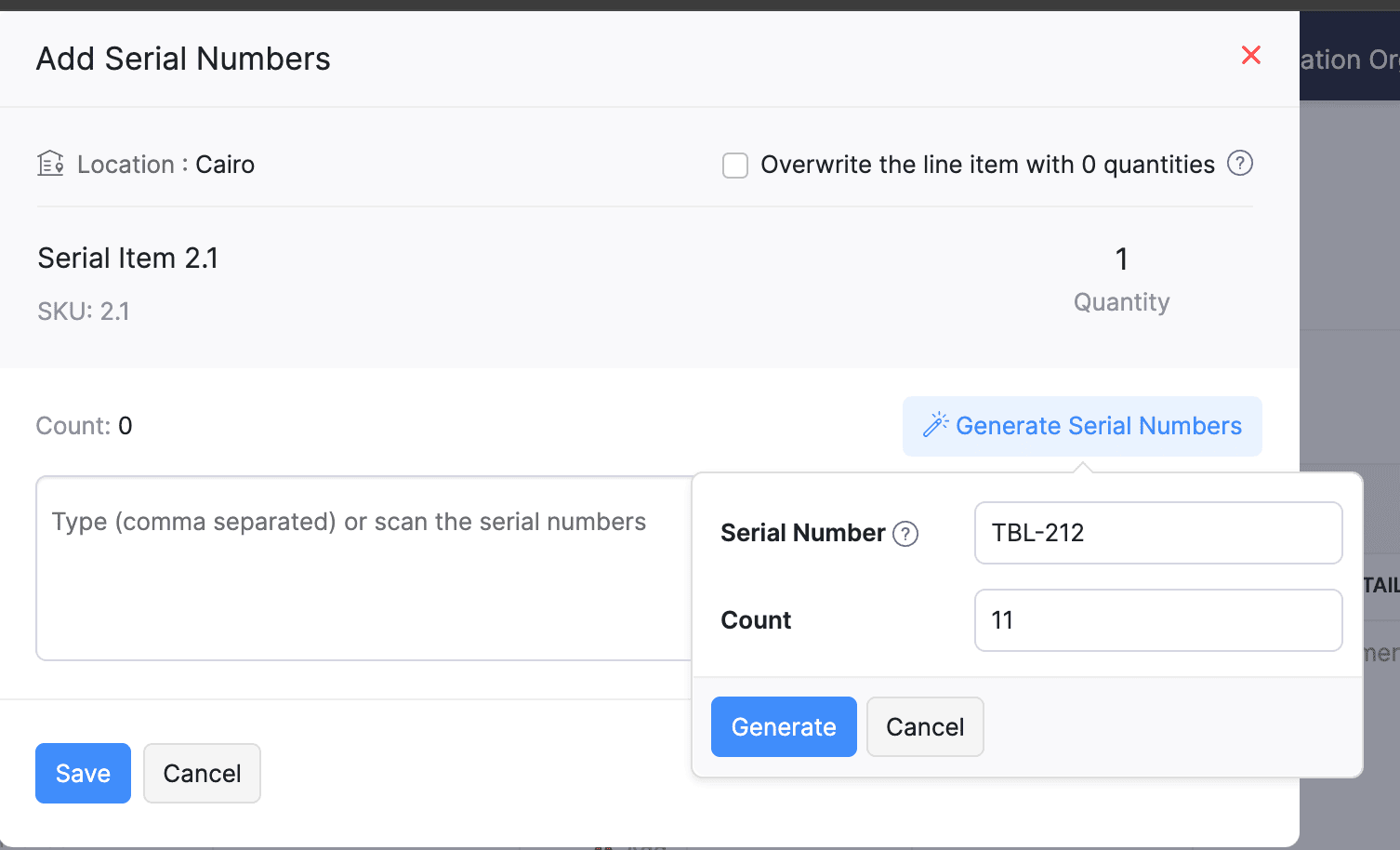
Introducing support serial number generation for inward transactions. You can set a starting serial number and specify the required count to ensure precise inventory tracking and save time.
Note: The starting serial number must always end with a numeric value.
To generate serial numbers, select an item from the item table, click Add Serial Numbers, then select Generate Serial Numbers. Enter the starting value and count, then click Generate.
Note: The starting serial number must always end with a numeric value.
To generate serial numbers, select an item from the item table, click Add Serial Numbers, then select Generate Serial Numbers. Enter the starting value and count, then click Generate.
Batch Tracking Enhancements
Batch Tracking just got more powerful and flexible with some major enhancements. You can now create and edit batches directly from the item details page, making management easier. A new return option allows items to be returned to the same sold batch, improving stock accuracy. You can also use the same batch across multiple line items in purchase transactions. Batch status control lets you mark batches as Inactive, keeping them out of transactions while retaining them for reports. Plus, all batch activity including creation, edits, restocks, and transfers is now visible in the Audit Trail report.
Item Description for UPS Line Items
We have improved the UPS Paperless Invoice feature by introducing the ability to add and edit item descriptions and unit prices individually for each line item within a package. Previously, a single description was applied to all items in a package, limiting the level of detail you could provide. With this update, you now have more control and flexibility.

Enhanced Shopify Integration
We have improved the shopify integration. You can now set sync frequency and mapping options for each store separately. Item sync runs every 24 hours by default, but you can also set it up manually if needed. Non-taxable items are now created with the correct tax exemption. When setting up Sales Order sync, you’ll pick a start date and can set how often it runs. Each store can now sync independently. You can also decide if sales orders should be fetched to Zoho Inventory under a single customer or create new customers using fields like email or name. Now, sync history includes filters for sync type and status, making it easier to show both successful and failed sync.
To integrate Shopify with Zoho Inventory, go to Settings > Integrations & Marketplaces > Shopify
Pin Columns in Transaction List Page
You can now pin up to two columns in the transaction list page in both default and custom views to keep key information visible while scrolling. This feature is available when a view contains more than eight columns.
To pin columns, go to any module, click the Customize Columns icon, hover over the fields, click the Pin icon, and then click Save.

Edit Etsy Orders
You can now edit orders fetched from Etsy with ease. Previously, Etsy orders were imported with non-editable details and tax. Now, you can edit these orders and override the tax applied based on the tax rate configured at your organization level.
To integrate Etsy, go to Settings > Integrations & Marketplaces > Etsy
Clone Delivery Challans
You can now duplicate delivery challans by cloning the existing ones, thereby saving time.
To clone a delivery challan, go to Delivery Challans, select a challan, click the More icon, and select Clone from the dropdown.

Enhanced Export and Print Preferences for Reports
We have added new customization options for report exports and print preferences. You can now set custom file names for exported reports, display column headers on each PDF page, and organize report data into separate pages based on the group by field.
Multi-Factor Authentication (MFA) for Portals
We are improving security by adding Multi-Factor Authentication (MFA) to both Customer and Vendor Portals. This extra security step requires users to enter a Time-Based One-Time Password (TOTP) along with their login credentials.
Admins can turn on MFA in the Customer Portal settings, making it mandatory for customers and vendors to set it up using an authenticator app. Once enabled, users will need to enter a TOTP code each time they log in. If needed, admins can reset MFA for users.
Note that even if MFA is disabled later, users that have already set it up will still need to enter the TOTP code. If they lose access to their authenticator app, they should contact an admin for a reset.
To enable multi-factor authentication for your customers and vendors, go to Settings > Preferences > Customer Portal. Check the Enable multi-factor authentication (MFA) option.

Import Move Orders and Putaways
We have introduced import option for the Move Orders and PutAway modules. You can now seamlessly import data for these, making bulk updates and record creation faster and more efficient.
To import move orders and putaways, go to Transfer Orders/Putaways under Inventory > Click More in the top right corner > Import Transfer Orders/Putaways.
Attach Documents in Purchase Receives
You can now upload, attach, and manage documents directly from the Purchase Receive creation and edit page.
To attach a document in purchase receive, go to Purchases > Purchase Receives > + New > Upload File.

Print & PDF Support for Purchase Receives
You can now generate and print or download your purchase receives. We have also supported a standard template with which you can view the PDF of your purchase receives to simplify record-keeping.
To print or download a purchase receive, go to Purchases > Purchase Receives. Select the purchase receive and click PDF/Print.
To view the PDF of a purchase receive, go to Purchases > Purchase Receives. Select the purchase receive and enable the Show PDF View option on its details page.

Filter Lookup Custom Fields
You can now filter your lookup custom fields by using custom views and setting criteria. The records will be shown based on the chosen custom view and the rules set by you, making sure all the conditions are met.

Leave Organization Option
We have introduced the option to leave an organization from the Manage Organizations page. However, if you are the admin who created the organization or the only admin, you will need to delete the organization instead. Additionally, before you leave, ensure the integrations are disabled, if any.

That's all for now, folks! Try these new features and share your feedback. If you need assistance, reach out to us at support@zohoinventory.com.
Best Regards,
The Zoho Inventory Team
Topic Participants
Akshin Eniyavel S
Jahmonesalmon
Roshin Uchakavil
Marie Sharps Canada
Tocayah
Recent Topics
GA4 data
Hi, I have data being pulled from GA4 into numerous tables. There are a few major errors in the source data. Eg for a period of time GA4 reported ecommerce sales that were $98 as $9,800 and $42 as $4,200. It's not happening now but my historical dataLost Search Box with new UI Design
I would like to suggest bringing back the Search Box in the new Zoho Project UI. I use the search feature a lot and having to click the magnifying glass to type for a search is one extra click that we did not have with the old UI.Adaptación de zoho books a la nueva regulación de facturación electrónica
La facturación electrónica será obligatoria para todas las empresa en España en 2025, en Francia probablemente también e imagino pronto en todos los países europeos. Ya en 2024 todas las empresa grandes tienen que utilizar el sistema de facturación electrónica.ZOHOBOOK Sales_QUOTE: To Add Discount At Each Line Item Table
Hi, Our quote need to display with discount at each line item level as well. Try to edit template, >CUSTOMISE>EDIT TEMPLATE> Table, I can see template view with discount column, but when hit SAVE the template, view in PDF the discount column not shown.How to account for vat with postponed VAT accounting
Hi everyone, looking for some help with postponed VAT accounting, I use DHL express for my imports and they used to pay the VAT for me and then invoice me. I could then log this as a bill and the VAT element from import was recorded as input VAT, allWeekly Automation Trigger for Equipment Calibration Reminder
Dear Team, I’m currently working on an automation in the Equipment module. The goal is to track calibration schedules for tools — all of which require regular calibration. I’ve created an automation that sends email reminders for tools that are due forADDDATE formula using 2 calculations
Hello, I want to create an ADDDATE formula using 2 calculations, add 1 month and deduct 1 day. the formula that I need should look like this: ADDDATE(due_date, 1, "Months")+ ADDDATE(due_date, -1, "Days") Each row itself works fine, but when I'm tryingUpgrading from Zoho Invoice to Books was a major downgrade in functionality for me
I have been a user for many years of a free plan on Zoho Invoice for my personal consulting business. I recent upgraded my organization to Books since some of the additional functionality looked useful to me, and played around with the free trial for🎉 Dynamic Org Chart for Zoho CRM Extension Published [2025]
Hey Zoho CRM Community! We're thrilled to unveil our latest Zoho extension:🥁 Dynamic Org Chart for Zoho CRM 🎊 This extension is now available to transform the way your teams visualize, manage, and interact with org chart directly inside any Zoho CRM'sDetailed General Ledger has problem of exporting out to excel and missing ledger details for some accounts
I have been encountering some problems generating Detailed General Ledger report with Zoho books. Firstly, I cannot export out the report of Detailed General Ledger to Excel. It will show this error message "invalid value passed for sort column", andUpload a file to a File Upload Field through API
Hello, Is there any way to upload a file to a custom file upload field in a module when doing an Update using the Record API? I've found and I am able to upload files to attachments but I don't know how to upload them to a field. I've checked the documentation at https://www.zoho.com/crm/help/api/v2/#update-specify-records but the File Upload field type does not appear in the examples. ThanksKaizen #131 - Bulk Write for parent-child records using Scala SDK
Hello and welcome back to this week's Kaizen! Last week, we discussed how to configure and initialize the Zoho CRM Scala SDK. This week, we will be exploring the Bulk Write API and its capabilities. Specifically, we will focus on executing bulk writeAutomatic pricing feature for sales orders
I am currently setting up my Zoho Inventory system and would like to implement an automatic pricing feature for sales orders. We have created a custom field called "brandline" for our items. All products with the same brandline value should have the sameAbility to access VAT returns and submit them has disappeared.
I have been using Zoho books successfully to submit quarterly VAT returns. Without reason I have lost that facility. I have followed all available instructions eg going into settings, taxes, VAT etc. without success. My registration number is there andHow to automatically schedule a meeting After Blueprint Transition
As part of our sales process, we require a technician to go to the customer's site and perform an installation prior to advancing to the next stage of the blueprint. So this will require (a) scheduling a meeting for the technician to visit the customer's site and (b) a reminder phone call the day before the scheduled meeting. As I'm designing the Deal Blueprint, I see that I can automatically add a Task to the deal, but I can't add a Meeting or a Call. What am I missing? There seem to be 3 typesZoho Recruit > Workflow
I have created a workflow for my application module Whenever a record is created The condition , application status is 1st call invitation I have set this OI do not receive the email that was suppose to be send outMultiple locations but one parent company
I am trying to configure my accounts that have multiple locations under one parent company to show separate locations in the portal.Stock Count History in Product Details – Zoho Inventory
Hello Zoho Team, When I perform a Stock Count for a product in Zoho Inventory, I would like to view the history of those stock counts later — especially from the product details page. Currently, I can perform the count and update the quantity, but I’mCreate Project while winning potentials - Projects v3 api updated code
Hi all, I've been using the built in function to create a project while a deal is closed won and noticed it had some missing fields when trying to reference the zoho projects v3 api documentation. Specifically the project group had some issues when addingMerge feature parity with writer
Hello Zoho team, I have run into a workflow limitation with Zoho Contracts and the lack of merge feature parity with what Writer can do. We have created a fairly complex merge process to create a statement of work based on several fields in our CRM whichExport option in Contacts is missing
Hello - I've been clicking around Zoho all morning trying to find the export option. It formerly was in the right hand corner, above the search box, but now I don't see it. I've looked everywhere - Am I missing it somehow? I've attached a screenshot.Formatting of cells changing by itself and formulas not always calculating automatically
I'm new to Sheets and have been setting up a budgeting template that has many linked tabs. It's going fairly well except certain quirky things have been happening from time to time. 1- sometimes when I scroll up or down I lose formatting from a randomUnable to open iOS Zoho CRM app
i am unable to open Zoho CRM iOS App in iPhone 14 Pro Max v18.5 and it is crashing immediately after i click to openWhatsapp BOT with CRM
Hello, how do you use Whatsapp integrations in zoho CRM?sync two zoho crm
Hello everyone. Is it possible to sync 2 zoho crm? what would be the easiest way? I am thinking of Flow. I have a Custom Module that I would like to share with my client. We both use zoho crm. Regards.Side-by-Side view on Windows 11
Is there a way to open two notes in a side-by-side view? I'm running Notebook on a Desktop running Windows 11. If this feature doesn't exist, do you have plans for it?Value shows in balance sheet for Goods in Transit
We have transferred goods from one warehouse to another warehouse and accepted the same at another warehouse. Although my balance sheet shows X amount as goods in transit value. I don't understand, how to clear that Can anyone guide us please?Ask for a quote to multple vendors
We are able to send a Purchase order, but How can we Send a quote request to our vendor, once the value changes every time? I didn't see any feature like this in Zoho Books/ Inventory. Send this request with the Items that we want to know the cost, toBigin merge field in email template for subject line to match lead name
Hello We Are using email in to automatically create leads in our pipelines. When we want to reply from conversations, and apply an email template, it’s not matching the original subject line. It should be lead name to match. But it’s not working. EvenHow to create auto-link between Invoice and Quote in CRM
It's strange that when you 'convert' a quote into an invoice, it doesn't auto-link the two. How can we develop an auto sync so we don't need to manually link each invoice to their respective quote?Why Are Columns Reset When Deleting Entry
Hello, this is quite annoying. We use forms as a questionnaire for candidates, we filter entries by removing columns, when we delete an entry the columns reset. Every "delete" the columns reset, why!? Thank youPi or Pie? A slice of infinity in customer service
Hey everyone! While Pi Day is on March 14 (3.14), July 22 marks another special occasion: Pi Approximation Day! On this day, we recognize the mathematical constant π (pi ≈ 22/7); a number that's infinite, irrational, and never-ending. Pi is essentialConfiguración
Hola acabo de instalar Zoho CRM y quiero configurarlo correctamente. Al respecto me surgen algunas dudas tales como la diferencia entre: Cuentas, posibles Clientes y Contactos. ¿Conceptualmente que son cada uno? ¿Como se se relacionan entre ellos? SiGL account associated to each supplier for new bill
Hello I'm facing problem for all items of my bills that are not inventoried. The need is each time I enter new bill and after I select supplier the GL account section is autopopulated with default GL account (that I would like to add in supplier settings)LinkedIn verification link and otp not receiving
For the last 2 to 3 weeks I'm trying to verify my LinkedIn account to access my company's LinkedIn page, Linkedin is sending verification links and codes to this email address but I have not received any codes or links. Please help me here. Looking forwardMail Merge Stuck in Queue
I am trying to send Mail Merge's and it never sends out to the full list. It always hits a portion and the rest remain in the "Queue" - the emails I am sending are time sensitive, so I need this to be resolved or have a way to push the emails throughSMTP Email Sending Not Working for My Domains and Apps
Hello Zoho Support Team, I am experiencing a critical issue with sending emails via Zoho SMTP for my domain humanhup.com. Both of my applications, HumanHup and CheapUI, are unable to send emails using Zoho SMTP, even though the same setup was workingWhy is Zoho supporting the Proud Boys?
Hello. This is the only way I can find to contact your company. There is someone in Maine posing as a law enforcement officer, attempting to kidnap immigrants. They are also recruiting for a known hate group. They have an email address hosted by Zoho.com.Composite Item - Associated/Component Items
I am trying to find the Associated Item/Component Item field in the Composite Item Table in Analytics. Has anyone been able to find and utilize this field in Analytics?Use openUrl() to edit a specific record
I am working on a queue app for my organization. I have a master queue that is a report of meetings with workflow buttons to manipulate the records. One of these buttons I would like to open the record and edit for the purpose of changing the queue lookupNext Page